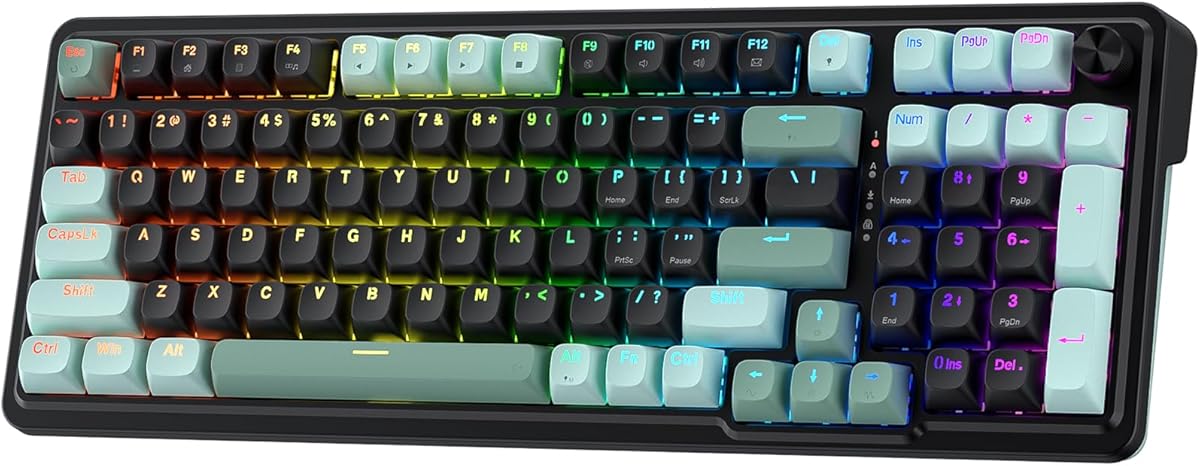
Redragon K686 HE
4.4Editor score
8000Hz Hyper-Polling
One-Knob Control
Rapid Trigger & PRCS
This guide compares the top magnetic switch keyboards for rapid trigger technology, evaluating polling rates, actuation precision, and build quality to help
Magnetic switch keyboards have revolutionized competitive gaming by offering rapid trigger capabilities that eliminate physical contact delays. These keyboards use Hall Effect sensors to detect keypresses with extreme precision, allowing for instant actuation and release. Gamers seeking a competitive edge in fast-paced titles like Valorant or CS2 often prioritize these features for their ability to enhance movement and firing speed.
To compile this comprehensive list, we analyzed ten top-rated models based on their polling rates, actuation adjustability, and overall build quality. We examined user feedback, technical specifications, and real-world performance data to ensure each recommendation meets the high standards expected by serious players. Our goal is to provide clear insights into how each keyboard performs under pressure.
Each pick in this guide highlights specific strengths such as customizable actuation points, wireless connectivity options, or compact layouts designed for maximum desk space. While prices and availability fluctuate over time, the core performance metrics remain consistent indicators of value. Readers should review the detailed comparisons to find the model that aligns best with their unique gaming setup and preferences.
4.4Editor score

4.7Editor score

4.5Editor score
The following table provides a side-by-side comparison of all ten magnetic switch keyboards reviewed in this guide. It highlights key specifications such as polling rates, switch types, and layout sizes to help you quickly identify the model that best fits your needs.


The EPOMAKER G84 HE stands out as a top-tier option for gamers who demand precision and flexibility. With a high rating of 4.7 stars, it delivers exceptional performance through its 8K polling rate and adjustable actuation points down to 0.01mm. This level of control allows players to fine-tune their keystrokes for optimal speed and accuracy in competitive matches.
We may earn a commission when you buy through this link, at no additional cost to you.
Its tri-mode wireless connectivity ensures stable connections across multiple devices, making it suitable for both gaming and productivity tasks. The gasket-mount design provides a creamy typing experience that reduces noise and enhances comfort during long sessions. Additionally, the large battery capacity supports extended use without frequent recharging, adding to its convenience.
While the price is higher than many budget alternatives, the build quality and feature set justify the investment for serious enthusiasts. The software offers extensive customization options, though new users might need time to explore all settings. Overall, it balances performance and usability better than most competitors in this category.
We recommend this keyboard for players who value wireless freedom and precise actuation control. It is ideal for those seeking a premium experience without compromising on rapid trigger capabilities. For anyone building a high-end setup, the G84 HE offers a compelling blend of speed and reliability.
The keyboard supports actuation adjustments from 0.1mm to 3.3mm with zero dead zone, enabling instant directional changes and accurate firing in games.
With support for 2.4GHz, Bluetooth 5.2, and wired modes, users can switch seamlessly between devices while maintaining stable input for gaming or work.
We may earn a commission when you buy through this link, at no additional cost to you.
The Redragon K686 HE offers an accessible entry point into the world of rapid trigger keyboards without sacrificing core performance. Rated at 4.4 stars, it features a robust 8000Hz polling rate that ensures inputs are transmitted up to eight times faster than standard keyboards. This makes it highly responsive for fast-paced gaming scenarios where timing is critical.
We may earn a commission when you buy through this link, at no additional cost to you.
Its one-knob simplicity allows users to adjust backlight brightness and media playback easily, reducing the need for complex key combinations. The dual-module floating structure paired with noise dampening layers provides a soft, quiet typing experience that minimizes distractions. Software-powered precision tuning lets players save multiple actuation profiles for different games or tasks.
While it lacks wireless capabilities, the wired connection ensures zero latency and consistent performance during intense sessions. The build materials are functional but not as premium as higher-end models, which is expected at this price point. Overall, it delivers excellent value for gamers focused on performance over aesthetic features.
This keyboard is ideal for budget-conscious players who still want competitive advantages like rapid trigger and high polling rates. It works well for titles like Valorant or CS2 where precise stopping and firing matter. For those seeking a cost-effective solution, the K686 HE is a strong contender.
UltraMag POM magnetic switches sense keypresses without physical contact, enabling precise peek-and-fire timing in competitive shooters.
A single control knob simplifies media and lighting adjustments, allowing quick access without memorizing extra key combinations during gameplay.
We may earn a commission when you buy through this link, at no additional cost to you.
The Keychron K2 HE represents a premium choice for users who want a refined blend of customization and performance. With a 4.5-star rating, it features hot-swappable Gateron magnetic switches that ensure stable and responsive typing. The 75% layout retains essential keys while saving space, making it suitable for both gaming and productivity workflows.
We may earn a commission when you buy through this link, at no additional cost to you.
Its three connectivity options include 2.4GHz wireless, Bluetooth 5.2, and wired Type-C modes, offering seamless switching between devices. The web-based Launcher allows for easy customization of actuation points and macros without bulky software downloads. Adjustable actuation points from 0.2 to 3.8 mm provide precise control for varied use cases.
While the price reflects its premium positioning, the build quality and compatibility with macOS and Windows justify the investment. The limitation to specific switch types might restrict some modders, but the included switches are high quality. Overall, it excels as a versatile tool for professionals and gamers alike.
We recommend this keyboard for users seeking a reliable wireless option with robust customization features. It is perfect for those who value layout efficiency and cross-platform support. For anyone prioritizing build quality and flexibility, the K2 HE delivers a premium experience.
Adjust each key with precision from 0.2 to 3.8 mm sensitivity, enabling shallow press for instant actions and deeper ones for deliberate engagement.
Switch between computers, phones, and tablets using wireless modes while maintaining up to 1000 Hz polling rate for competitive gaming.
We may earn a commission when you buy through this link, at no additional cost to you.
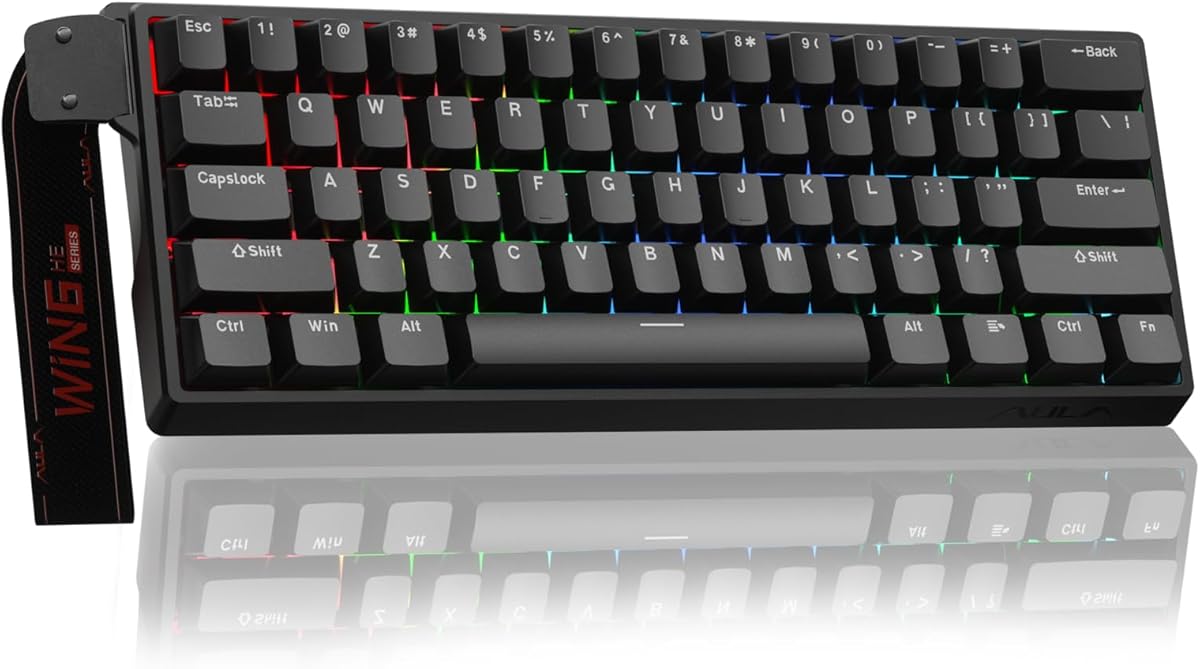
The Aula WIN60 HE is designed for gamers who prioritize desk space and fast response times. It features a 60% compact layout that frees up room for wider mouse movements, which is crucial for low-sensitivity shooters. With an ultra-low RT step distance of just 0.02mm, it ensures lightning-fast response times for rapid shooting and complex combos.
We may earn a commission when you buy through this link, at no additional cost to you.
Its web-based driver makes customization effortless without requiring software downloads, allowing key remapping and macro creation from any device. The dynamic RGB lighting adds aesthetic flair with 16.8 million customizable colors. Optimized for FPS games, the magnetic switches enable faster peeking and quick-stop shooting for better positioning.
While the compact layout removes dedicated arrow and function keys, it is ideal for portable setups or minimalist desks. The lack of wireless connectivity limits its use in certain environments but ensures stable performance. Overall, it balances size and speed effectively for competitive players.
This keyboard is suitable for travelers and gamers who need maximum desk space for mouse movement. It works exceptionally well in tight setups where every inch matters. For those seeking a compact rapid trigger solution, the WIN60 HE is a reliable choice.
Designed specifically for titles like Valorant and CS2, offering faster peeking and quick-stop shooting to enhance accuracy and positioning.
Access powerful web-based driver from any internet-connected device to remap keys and create macros without worrying about system compatibility.
We may earn a commission when you buy through this link, at no additional cost to you.
The MONSGEEK FUN60 Pro delivers high precision at a competitive price point. With an ultra-accurate rapid trigger of up to 0.005mm, it allows fine-tuning for optimal response times. The 16k scan rate ensures near-zero latency control, keeping players one step ahead during intense matches. It supports DKS, Toggle Key, and Mod-Tap functions for advanced control.
We may earn a commission when you buy through this link, at no additional cost to you.
Its compatibility with five third-party magnetic switches offers flexibility for users who want to mix and match key inputs. The ARGB lighting features smooth flicker-free effects with a 500Hz refresh rate to reduce visual fatigue. The web-based driver simplifies the setup process for various configurations.
While the software interface is functional, it lacks some advanced customization features found in premium models. The layout is limited to 60%, which may not suit everyone. However, the performance and switch compatibility make it a strong value proposition for gamers.
This keyboard is recommended for players seeking high precision without a high price tag. It suits those who enjoy customizing switch setups across different keys. For budget-conscious gamers, the FUN60 Pro offers impressive technical specifications.
Offers compatibility with five third-party magnetic switches, allowing users to select and calibrate different types for varied tactile experiences.
Individually controlled LEDs with Alpha channel integration reduce visual fatigue during long gaming sessions with rich dynamic lighting effects.
We may earn a commission when you buy through this link, at no additional cost to you.
The ATTACK SHARK X68 HE focuses on speed and precision with an ultra-low latency of just 0.125ms and 0.01mm RT accuracy. It uses Hall Effect triggering technology to achieve ultimate speed and precision with an 8000Hz polling rate. This makes it perfectly suited for typists and gamers needing enhanced efficiency and performance.
We may earn a commission when you buy through this link, at no additional cost to you.
Its exclusive self-designed magnetic switches support various N-pole down switches for unparalleled versatility. Users can mix and match switches for a fully personalized tactile feel. The web driver software allows quick customization of DKS, macros, and RGB lighting on Windows and Mac systems. Durable two-color injection molded PBT keycaps ensure a smooth feel.
While the software is functional, it may require occasional updates for peak performance. The compact 60% layout sacrifices navigation keys for desk space, which may not suit all users. Overall, it delivers exceptional accuracy and durability for competitive environments.
This keyboard is ideal for players who need precise control and high-speed input. It works well for competitive gaming and rapid typing tasks. For those prioritizing accuracy and durability, the X68 HE is a solid option.
Paired with a coiled cable, the keyboard offers faster transmission speeds and near-zero latency for consistent performance during intense gaming.
Equipped with 0.01mm accuracy and customizable trigger points ranging from 0.1mm to 3.4mm for perfect tactile feedback.
We may earn a commission when you buy through this link, at no additional cost to you.
The MONSGEEK M1 V5 TMR stands out with its elegant aluminum gradient design and premium build quality. It achieves an ultra-accurate 0.01mm rapid trigger with 32k scan rate detecting internal key changes instantly. The quick release aluminum case allows tool-free assembly for effortless customization and portability. Cross-compatible with magnetic and mechanical switches, it offers versatility.
We may earn a commission when you buy through this link, at no additional cost to you.
Its DKS, Toggle Key, and Mod-Tap functions pack a punch for advanced control. The ARGB lighting features individually controlled LEDs for smooth flicker-free lighting with Alpha channel integration. The high-precision TMR sensor supports a customizable range from 0.1mm to 3.3mm in precise steps.
While the aluminum body adds weight, it contributes to durability and a solid feel. The price is higher than standard plastic keyboards, reflecting the premium materials. For users valuing build quality and precision, it is a strong candidate.
This keyboard is recommended for enthusiasts who appreciate premium construction and customization. It suits gamers seeking robust switches and unique aesthetics. For those prioritizing durability, the M1 V5 TMR delivers.
32k Scan Rate detects internal key changes instantly, enhancing responsiveness and operational data sent to computers by eight times.
Cross-compatible with five third-party magnetic and mechanical switches, allowing unique mixes like magnetic WASD and mechanical rest.
We may earn a commission when you buy through this link, at no additional cost to you.
The Redragon K673 HE delivers stable performance with a dual-module floating structure and noise dampening layers. It features a soft, silky bounce instead of a harsh rigid clack. With 8000Hz hyper-polling, it transmits inputs up to eight times faster than standard keyboards. Software-powered precision tuning saves multiple actuation profiles between 0.1mm and 3.4mm.
We may earn a commission when you buy through this link, at no additional cost to you.
Its one-knob simplicity manages backlight and media playback without memorizing key combos. The UltraMag POM magnetic switches sense keypresses without physical contact, ensuring precise timing in games like Valorant or Apex. The design focuses on consistent input detection during quick direction changes.
While the design is basic, it prioritizes functionality and stability. The lack of wireless limits flexibility but ensures reliability. Overall, it is a solid choice for those who value steady performance.
This keyboard is suitable for gamers needing reliable inputs and minimal distractions. It works well for titles requiring precise stopping. For stability-focused users, the K673 HE is a dependable option.
Dual-Module Floating Structure with independent switch-plate design paired with dampening layers gives a soft bounce instead of harsh clack.
Dynamic key activation cuts redundant keystrokes during quick direction changes, maintaining consistent timing across different games.
We may earn a commission when you buy through this link, at no additional cost to you.
The Redragon K745 HE focuses on comfort with its 5-layer noise dampening and anti-wobble switch-plate design. It delivers a soft, silky Hi-Fi bounce instead of a harsh rigid clack. Vibrant RGB lighting with adjustable brightness modes brings the desk to life day or night. Software-powered precision tuning ensures consistent calibration across games.
We may earn a commission when you buy through this link, at no additional cost to you.
Its dynamic key activation cuts redundant keystrokes during quick direction changes. The wired connection transmits inputs up to 8x faster than standard keyboards. While the rating is lower, it still provides essential rapid trigger features for those needing a reliable setup without high costs.
While the build is functional, it may not match the durability of more expensive models. The lack of wireless connectivity is a limitation for some users. However, the comfort features make it a strong contender for long sessions.
This keyboard is suitable for typists and gamers seeking noise reduction. It works well for setups needing comfortable keystrokes. For those prioritizing noise dampening, the K745 HE offers good value.
Anti-wobble independent switch-plate design paired with multiple dampening layers gives a soft, silent typing experience.
Save multiple actuation profiles and calibrate switches through the driver so setup stays consistent across different games.
We may earn a commission when you buy through this link, at no additional cost to you.
The Redragon K617 HE offers an entry-level option with a compact 60% design that frees up desk space for mouse swipes. It features up to 10x faster response and 2x longer switch lifespan compared to traditional mechanicals. Software-adjustable actuation allows fine-tuning for hair-trigger sensitivity or heavier feel. The 8000Hz hyper-polling ensures rapid transmission of inputs.
We may earn a commission when you buy through this link, at no additional cost to you.
Dynamic key activation cuts redundant keystrokes during quick direction changes. Software-powered precision tuning saves multiple actuation profiles between 0.1mm and 3.4mm. The vibrant adjustable RGB lighting matches any setup. While basic, it delivers essential rapid trigger features for budget-conscious users.
The compact layout may limit usability for those needing dedicated navigation keys. Build quality is functional but basic. However, it offers a strong starting point for exploring magnetic switch technology.
This keyboard is ideal for beginners seeking rapid trigger tech without high costs. It works well for compact setups needing room for mouse movement. For those seeking affordable entry into rapid trigger, the K617 HE is a good start.
Ditching the numpad and nav cluster frees up desk space for wide mouse swipes, ideal for low-sensitivity gaming setups.
Switches sense keypresses without physical contact to provide up to 10x faster response and longer lifespan than traditional options.
We may earn a commission when you buy through this link, at no additional cost to you.
Selecting the right magnetic switch keyboard requires understanding key features that impact performance and usability. This section outlines the factors you should consider to ensure you choose a model that meets your specific gaming or productivity needs.
Polling rate determines how often the keyboard sends data to your computer. Higher rates like 8000Hz reduce latency to near-zero levels which is crucial for competitive gaming. Low latency ensures that every input is registered instantly without noticeable delay. Look for models with high polling rates if speed is your priority.
Prioritize keyboards with polling rates of at least 8000Hz for optimal performance in fast-paced games.
Adjustable actuation points allow you to customize how deeply a key must be pressed to trigger. This feature is vital for rapid trigger technology enabling instant stop-and-shoot mechanics. Fine-tuned actuation can improve accuracy and reduce accidental inputs during complex movements. Ensure the keyboard allows adjustments in small increments like 0.01mm for precision.
Select models that offer wide adjustability ranging from 0.1mm to 3.4mm to match different playstyles.
The layout determines which keys are included and how much space the keyboard occupies. Compact layouts like 60% save desk space but remove function and navigation keys. Full-size layouts offer more keys but take up more room. Choose based on your need for mouse movement space versus accessibility to specific keys.
Balance desk space needs with functionality when choosing between compact and full-size layouts.
Wired keyboards offer consistent zero-latency performance but limit mobility. Wireless options provide flexibility but may introduce latency depending on the connection type. Look for tri-mode options that support Bluetooth 2.4GHz and wired connections for versatility. Stable wireless is key if you prefer a cable-free setup.
Consider tri-mode connectivity if you need seamless switching between devices while maintaining performance.
Software allows you to remap keys create macros and adjust lighting settings. Web-based drivers simplify customization by avoiding bulky downloads. Ensure the software is user-friendly and supports your operating system. Advanced features like DKS and mod-tap should be easily accessible in the configuration tool.
Check for intuitive software interfaces that offer deep customization for keys and lighting.
Some keyboards allow you to swap switches while others come with fixed ones. Hot-swappable boards provide flexibility for future upgrades or repairs. Durability is also key as magnetic switches often claim longer lifespans than mechanical ones. Review the switch lifespan rating and support for third-party replacements.
Opt for hot-swappable designs if you want long-term flexibility in switch customization.
Build materials affect durability and typing feel. Aluminum cases offer premium solidity while plastic may be lighter. Noise dampening layers reduce the sound of keystrokes which is important in shared environments. Look for features like gasket mounts or silicone padding for a quieter experience.
Choose keyboards with noise dampening features if you plan to type or game for long hours.
RGB lighting can enhance the visual appeal of your setup. Addressable RGB allows individual key customization while standard RGB offers preset modes. Ensure the brightness is adjustable and the effects are smooth without flickering. Aesthetics are personal but functional lighting aids visibility in low-light conditions.
Prioritize adjustable and smooth RGB effects to match your setup's style and visibility needs.
To get the most out of your magnetic switch keyboard start by installing the official driver software. This allows you to configure actuation points and key mapping. Adjust the rapid trigger settings based on your gameplay style for better control. Regularly update the software to ensure compatibility with new games.
Clean the keyboard regularly to maintain performance. Use a soft brush or compressed air to remove dust from keycaps and sensors. Avoid using liquids directly on the board as moisture can damage the internal components. Wipe the surface with a microfiber cloth to remove oils and dirt.
Store the keyboard in a dry place when not in use to protect it from humidity. If you have a detachable cable disconnect it to prevent port damage. For wireless models keep the battery charged to avoid unexpected shutdowns. Proper care extends the lifespan and maintains consistent performance over time.
Rapid trigger technology uses magnetic sensors to detect keypresses without physical contact allowing instant actuation and release. This eliminates the need to fully release a key before re-triggering which enhances speed in games. It provides a competitive edge by enabling faster directional changes and stop-and-shoot movements.
Magnetic keyboards offer faster response times and adjustable actuation points which mechanical switches cannot match. They are ideal for competitive gaming where speed and precision matter most. However mechanical switches may provide more tactile feedback for typists who prefer physical bumps.
Most magnetic keyboards work with any game supporting standard keyboard input. Features like rapid trigger may have varying effectiveness depending on the game engine. Titles like Valorant CS2 and Apex Legends benefit significantly from these advanced input methods.
Magnetic switches typically last longer than mechanical ones since there is no physical contact to cause wear. Many models claim a lifespan of up to 100 million keystrokes. This makes them a durable choice for heavy daily use over many years.
Several models like Keychron support macOS alongside Windows. Always check product specifications for OS compatibility before purchasing. Some drivers may have limited features on Mac but basic functionality should work across platforms.
High-quality wireless models with 2.4GHz connections have minimal latency suitable for gaming. Bluetooth modes may introduce slight delays but are acceptable for casual use. Wired connections remain the safest option for zero-latency competitive play.
Basic typing works without software but advanced features like rapid trigger require a driver. Most brands offer web-based configurators that simplify setup without downloads. Always install the recommended software to unlock full performance capabilities.
Gaming players often prefer shallow actuation points around 0.1mm to 0.3mm for faster input. Typists may prefer deeper points like 2mm for better control. Experiment with settings to find a balance that matches your comfort and speed needs.
This guide explored ten top magnetic switch keyboards that deliver rapid trigger performance for serious gamers. The EPOMAKER G84 HE stands out for its precision and wireless versatility. The Redragon K686 HE offers exceptional budget-friendly performance for competitive play. Each model provides unique benefits depending on your layout and budget preferences.
When selecting a keyboard prioritize polling rate and actuation adjustability to match your gaming needs. Ensure the layout suits your desk space and that the software supports your operating system. Investing in a quality magnetic keyboard can significantly enhance your gaming experience and productivity.
Prices and availability can change so always verify current listings before buying. Check for warranty details and return policies to ensure peace of mind. By choosing the right model you will enjoy faster response times and a more comfortable typing experience.