
Ocean C 64GB+4GB 7” Color eBook Reader
4.5Editor score
Fast page turns
Long battery life
Supports handwriting
Color E Ink Tablets offer a unique blend of digital convenience and paper-like comfort for readers and note takers alike. These devices reduce eye strain while supporting vibrant visuals for comics and documents. Choosing the right model depends on your specific needs for size, features, and budget constraints today.
We evaluated ten leading Color E Ink Tablet options based on display technology, writing responsiveness, and overall user experience. Our comparison considers screen clarity, software flexibility, and portability to help you find the perfect fit. Each device was analyzed for its ability to handle diverse content types effectively.
Every pick includes detailed specs, pros, and cons to guide your decision-making process with confidence. You will see how each model performs in real-world scenarios like reading or note taking. Prices and availability change frequently, so verify current details before purchasing your new device.
4.5Editor score

4.3Editor score

4.2Editor score
As an Amazon Associate we earn from qualifying purchases.
This side-by-side comparison highlights the key differences between the top Color E Ink Tablet models available this year. We examine screen size, storage capacity, and unique features to help you narrow down your choices efficiently.


The Amazon Kindle Scribe Colorsoft 64GB stands out as the top choice for Color E Ink Tablet users seeking advanced features. With a 4.3 rating, it offers a stunning 11 inch display designed specifically for writing and reading in color. Its paper-like feel ensures comfort during long sessions without eye strain.
We may earn a commission when you buy through this link, at no additional cost to you.
This device excels with AI tools that can summarize notes and convert handwriting to typed text efficiently. The custom built Colorsoft display delivers high contrast and vibrant color that remains easy on the eyes. You can import documents from cloud services and mark them up directly on the screen with the included pen.
While it offers exceptional performance, the ecosystem is optimized for reading and writing rather than general tablet apps. Some users might find the lack of third party app flexibility limiting compared to Android devices. However, this focus ensures distraction-free productivity and maximum battery efficiency for dedicated users.
For writers, students, and professionals who value organization and clarity, this model is the ideal investment. The included pen requires no charging and features a built-in eraser for seamless editing. We recommend this device for anyone prioritizing a premium paper-like experience in a large format tablet.
Use AI to search your notes, ask questions about what you wrote, and generate summaries automatically for better retention.
The glare-free display keeps you focused on content without the pull of notifications or social media apps found on other tablets.
We may earn a commission when you buy through this link, at no additional cost to you.
The Ocean C 64GB+4GB 7” Color eBook Reader delivers impressive value for those seeking a compact Color E Ink Tablet without breaking the bank. Boasting a 4.5 rating, it combines a vibrant display with strong performance for reading and writing tasks. Its fast page turns and adjustable brightness make it versatile for any lighting condition.
We may earn a commission when you buy through this link, at no additional cost to you.
This device supports handwriting with optional Musnap stylus compatibility, offering precision for note takers and sketchers alike. The octa-core processor ensures smooth multitasking for reading comics or managing documents efficiently. Storage capacity allows you to keep thousands of books and files accessible on the go.
Keep in mind that the stylus pen is not included in the box, so factor that into your budget planning. The screen quality is high but may appear darker than standard LCDs due to e-ink technology. However, this trade-off provides superior eye comfort and longer battery life than most alternatives.
Ideal for casual readers and students, this model balances cost and functionality exceptionally well. It supports a wide range of file formats and third party apps for added flexibility. Choose this if you want a lightweight, affordable entry into color e-ink reading and writing.
Read various formats including PDF, EPUB, and Office documents, making it a practical tool for both work and leisure reading.
The flexible screen mimics paper texture for natural control, reducing fatigue during long note-taking sessions.
We may earn a commission when you buy through this link, at no additional cost to you.
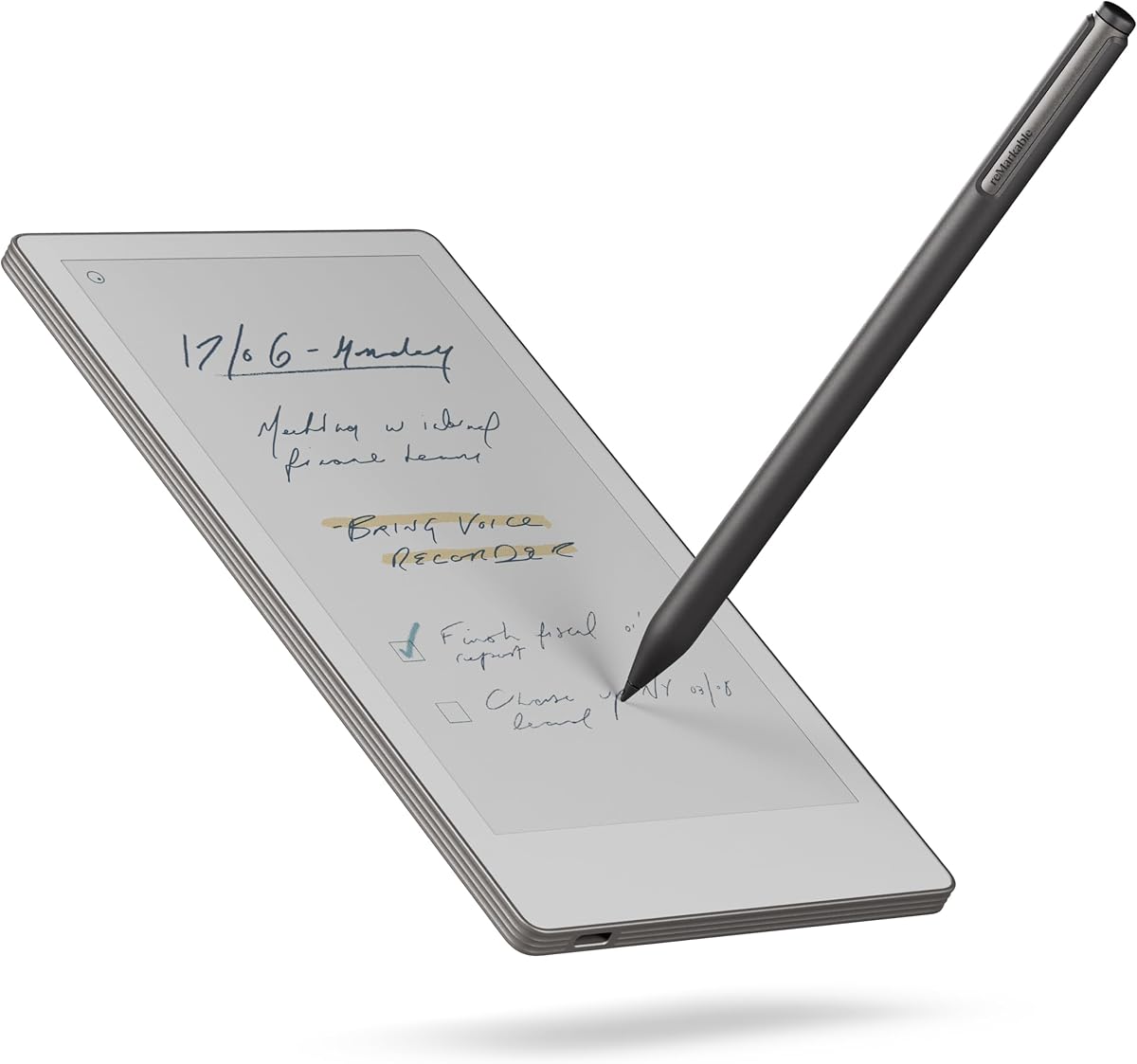
The reMarkable Paper Pro with Marker Plus represents the pinnacle of premium digital writing tools with its expansive 11.8 inch Canvas Color display. Rated 4.2, this device focuses on delivering a realistic paper-like writing experience that rivals physical notebooks. Its ultra-slim profile and portable design make it perfect for professionals on the move.
We may earn a commission when you buy through this link, at no additional cost to you.
Writing on this device feels authentic due to the Marker Plus pen which offers precise control and all-day comfort. You can sketch, write, and read in color, organizing work into folders and tags effortlessly. The included eraser and built-in conversion tools streamline your workflow from handwriting to typed text.
While the price is higher than many competitors, the unmatched writing feel justifies the investment for serious note takers. The closed ecosystem limits app flexibility but ensures a distraction-free environment focused solely on productivity. Battery life and display quality are optimized for long reading and writing sessions outdoors.
Recommend this for creatives and executives who prioritize a premium writing experience over app versatility. The adjustable reading light allows you to work day or night without eye strain. This is the top choice for those seeking the most natural digital paper interaction available today.
Engineered to deliver realistic friction and natural writing feel that mimics real paper for ultimate comfort and precision.
Sort notes with folders and tags, and instantly convert handwriting to text to keep your work accessible and organized.
We may earn a commission when you buy through this link, at no additional cost to you.
The BOOX Tablet Go Color 7 Gen II offers a compact solution for Color E Ink Tablet users who value portability and software freedom. With a 4.0 rating, it features a 7 inch Kaleido 3 screen and Android 13 for broad app compatibility. Its small size makes it easy to carry in a pocket or bag for daily commuting.
We may earn a commission when you buy through this link, at no additional cost to you.
This tablet supports third party apps natively, allowing you to use reading and note-taking tools you already know. The front light with warm and cold options ensures comfortable reading in any environment. Refresh modes help reduce ghosting for a smoother experience when browsing static content.
Note that the active stylus is not included in the box, so you will need to purchase it separately. The color screen shares inherent limitations common to e-ink, appearing darker than LCDs but offering better eye comfort. This is acceptable given the battery efficiency and reduced glare benefits provided.
Perfect for tech-savvy users who want Android freedom in a small package, this device is a strong contender. It handles documents and ebooks well with page turn buttons for physical navigation. Select this if you need a lightweight device that supports versatile software without sacrificing reading comfort.
Run third party apps directly on Android 13, giving you access to a wide ecosystem of reading and productivity tools.
Use warm and cold light modes to adapt to your surroundings and reduce eye strain during night reading sessions.
We may earn a commission when you buy through this link, at no additional cost to you.
The reMarkable Paper Pro with Marker Plus and Basalt Book Folio bundle provides a premium package for those seeking the best paper-like experience. Rated 4.2, it includes the 11.8 inch color display tablet along with a high-quality protective cover and pen. This complete set ensures everything you need to start writing right out of the box.
We may earn a commission when you buy through this link, at no additional cost to you.
The Basalt Book Folio adds style and protection with its Mosaic weave design, keeping your device safe while looking professional. Writing capabilities remain top-tier with the Marker Plus pen offering precise control and an eraser. The system organizes your work efficiently, converting handwriting to text for easy sharing.
While the cost is high, the added value of the cover and pen simplifies your purchase decision significantly. The focus remains on productivity and distraction-free work rather than app variety. This trade-off is ideal for users who want a dedicated device for deep work without digital interruptions.
Choose this bundle if you want a polished, ready-to-use solution for professional note-taking. The large display supports reading and sketching in color effectively. It is an excellent choice for anyone invested in the reMarkable ecosystem who values aesthetics and functionality.
The Mosaic weave Book Folio offers stylish protection for your tablet, making it durable and portable for daily use.
With pen and cover included, you get a fully equipped notebook experience that helps you stay organized from day one.
We may earn a commission when you buy through this link, at no additional cost to you.
The BOOX Tablet 10.3 Note Air 5 C offers a spacious 10.3 inch screen for those needing more room to write and read. Rated 3.8, it comes with 6GB RAM and 64GB storage for smooth performance across apps. The front light with warm and cold settings ensures comfortable viewing in any lighting condition.
We may earn a commission when you buy through this link, at no additional cost to you.
Running Android 15, this device supports a wide range of third party apps for enhanced productivity. Fingerprint recognition adds security while dual speakers and a microphone enable multimedia functions. The larger canvas is ideal for reviewing documents or splitting screens between note-taking and reading.
Be aware that color resolution on e-ink screens is lower than black and white, which is normal for this technology. The device is heavier than smaller tablets, so consider your portability needs before purchasing. Despite this, the performance and screen real estate make it a powerful tool for professionals.
Recommend this for business users who need ample space for detailed work and file management. It handles PDFs and complex documents with ease thanks to the large display. Select this if you prioritize screen size and RAM over ultra-portability in a color e-ink device.
With 6GB RAM, multitasking between apps and documents runs smoothly, reducing lag during daily workflows.
The warm and cold front light allows you to adjust the screen tone to match your environment and reduce strain.
We may earn a commission when you buy through this link, at no additional cost to you.
The Penstar eNote Pro C E-Ink Digital Notebook stands out with its powerful AI features designed to boost productivity for writers and students. Rated 4.0, it features a 10.3 inch screen and includes a high-precision pen with 8192 pressure levels for natural writing. The bundle covers all basics, including a folio and extra nibs.
We may earn a commission when you buy through this link, at no additional cost to you.
AI tools enable real-time voice-to-text and handwriting recognition, making organizing and searching notes faster. The 128GB storage offers ample space for documents and books without needing external memory. Split-screen multitasking lets you read and write simultaneously for efficient research sessions.
While the hardware is robust, battery life may vary depending on app usage and brightness settings. The focus on AI and organization makes it distinct from standard e-readers. Users who value automation and smart features will find this device particularly useful for academic or work tasks.
Choose this for an advanced digital notebook experience that integrates intelligent tools seamlessly. The included pen and accessories save you from extra purchases. It is best suited for power users who need smart features alongside a paper-like display.
Record audio notes and convert them to text instantly using built-in voice recognition capabilities for faster documentation.
View a document on one side and take notes on the other for seamless study and review sessions.
We may earn a commission when you buy through this link, at no additional cost to you.
The BOOX Tablet Go Color 7 Gen II provides a compact option for users who prefer active stylus support on a small Color E Ink Tablet. With a 3.7 rating, it supports Android 13 and includes page turn buttons for easy navigation. The device is lightweight and fits easily into bags for travel.
We may earn a commission when you buy through this link, at no additional cost to you.
Active stylus technology allows for precise input when paired with the InkSense pen, though it must be bought separately. This device handles many document formats and supports third party apps for broader utility. The screen refresh modes help manage ghosting for better readability.
Be aware that E-ink technology refreshes slower than LCD, so dynamic content may lag slightly. This is standard for the category but can affect browsing speed. However, for reading and static writing tasks, the performance is adequate and comfortable for the eyes.
Select this if you need a portable device that supports advanced stylus features and Android apps. It is a practical choice for students who value lightweight design over high performance. Ensure you budget for the separate stylus purchase before buying.
Use the compatible InkSense pen for high-quality input that mimics real pen strokes on paper.
Physical buttons let you flip pages quickly without touching the screen, ideal for quick reading.
We may earn a commission when you buy through this link, at no additional cost to you.
The reMarkable Paper Pro Move with Marker Plus is designed for travelers who need a digital notebook smaller than a paperback. Rated 3.9, it fits easily in a jacket pocket while offering the same paper-like feel as the larger Pro model. The 7.3 inch canvas display balances size and readability for on-the-go work.
We may earn a commission when you buy through this link, at no additional cost to you.
Distraction-free design ensures you stay focused on writing without notifications interrupting your flow. Search functionality lets you find specific notes quickly, and cloud sync keeps your work accessible across devices. The included Marker Plus pen provides precise control and natural writing feedback.
While smaller than other options, this model is ideal for sketching and quick notes during travel. Color capabilities are present but optimized for a compact form factor. Users who value portability above all else will find this device perfectly suited for their needs.
Choose this if you need a lightweight companion for capturing ideas anytime. The cloud integration ensures your work is safe and searchable. It is the best choice for mobile professionals who prioritize convenience and focus.
Slips into any pocket or small bag, making it the most portable option for daily carry and travel.
Locate handwritten notes by searching text, tags, or folders to keep your workflow organized effortlessly.
We may earn a commission when you buy through this link, at no additional cost to you.
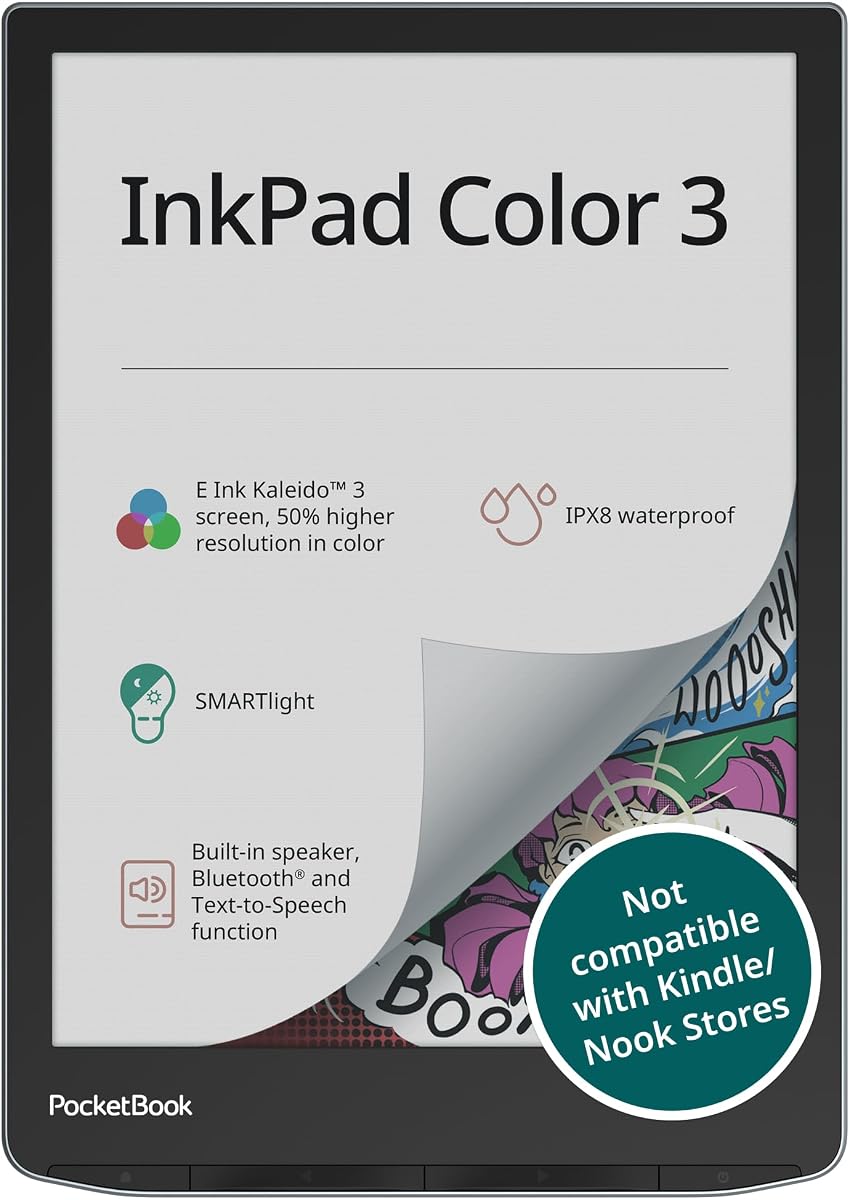
The PocketBook InkPad Color 3 offers unique durability with its waterproof design, perfect for reading by the pool or in the bath. Rated 4.0, it features a 7.8 inch color display that supports both ebooks and audiobooks seamlessly. Text-to-speech and a built-in speaker make it versatile for auditory learners.
We may earn a commission when you buy through this link, at no additional cost to you.
With 32GB of internal storage and Bluetooth support, you can download vast libraries and listen wirelessly. The SMARTlight adjusts for comfortable reading day or night. This model focuses on reading and audio rather than note-taking or handwriting features.
Keep in mind this device does not support stylus input, limiting it to reading and media consumption. The weight is slightly higher than paper tablets, but the durability makes up for it. It is an excellent choice for readers who need a rugged, all-purpose e-reader.
Select this if waterproof reading and audio features are your top priorities. The large storage ensures you have access to endless content. It is ideal for travelers who want a device that can handle various environments.
IPX8 protection lets you read in the rain or bathtub without worrying about water damage to your device.
Listen to audiobooks or use text-to-speech to have texts read aloud for hands-free consumption.
We may earn a commission when you buy through this link, at no additional cost to you.
Selecting the right Color E Ink Tablet involves balancing display quality, writing feel, and software features to suit your needs.
Display size affects portability and readability. Larger screens like 10 inch or 11 inch are better for documents and art, while 7 inch models are more pocketable. Resolution for color is lower than black and white due to technology limitations, but high contrast models perform well.
Look for at least 7 inches for comfort and ensure the resolution meets your reading needs. Consider larger options for professional work and smaller for travel.
A good tablet should mimic paper friction and weight. Check if the stylus is included or sold separately. Models with pressure sensitivity offer better control for drawing or handwriting. Some use electromagnetic resonance while others use active capacitive pens.
Prioritize devices with included pens or known compatible stylus options. Test the texture if possible to ensure long session comfort.
Android systems offer broad app support for reading and productivity, while closed systems focus on simplicity. Consider if you need third party apps or prefer a distraction-free environment. App optimization for E-ink can vary significantly.
Choose Android for flexibility and closed systems for focus. Verify app compatibility before purchasing to avoid workflow issues.
E-ink devices typically last weeks on a single charge due to low power consumption. Look for larger battery capacities for long trips. Fast charging features can reduce downtime when power is available.
Aim for models rated for several weeks of use. Larger batteries are preferable for frequent travelers.
Ensure the device supports your preferred formats like PDF, EPUB, and image files. Some models allow direct editing on documents while others are read-only. Compatibility reduces the need for file conversion software.
Check the list of supported formats in the specs. Universal support adds versatility for diverse content.
Materials and build affect longevity. Some models include waterproofing for safety in various environments. Covers and folios can protect the screen during travel.
Select a build that matches your usage style. Waterproof options are ideal for outdoor or bathroom reading.
Cloud syncing ensures your notes and books are backed up and accessible across devices. Look for integration with services like Google Drive or Dropbox. This helps in workflow continuity between tablet and computer.
Choose devices with seamless sync options to avoid data loss and enable cross-device access.
Prices vary widely from budget to premium tiers. Consider what features matter most to you such as screen size or included accessories. Balance cost with long-term usability to ensure value.
Determine your budget and compare features. Invest in models that offer the necessary tools for your primary use case.
Start by charging your device fully before first use to maximize battery health. Install essential apps or connect to your preferred cloud services for syncing. Review the settings to adjust lighting and refresh modes according to your comfort.
Use the stylus gently on the screen to avoid scratches, especially if it is not coated. Clean the screen with a soft, dry cloth regularly to remove dust and fingerprints. Keep the device in a protective case when not in use to prevent physical damage.
Update software periodically to ensure security and performance improvements. For best battery life, avoid leaving the device on screensavers or heavy apps for extended periods. Charge using the original cable to maintain battery efficiency over time.
Yes, Color E Ink Tablets are better for reading as they reflect light like paper, reducing eye strain. They consume less power and offer a distraction-free environment. LCD screens are brighter but cause more fatigue during long sessions.
Most modern Color E Ink Tablets support color images, though with lower resolution than black and white text. They are well suited for comics, magazines, and charts where vibrant visuals enhance the experience without the glare of LCD.
Absolutely, most models support handwriting with stylus pens designed for e-ink screens. They offer paper-like feel and allow saving notes as PDFs or text files for easy sharing and organization.
Battery life typically ranges from weeks to months depending on usage frequency and brightness settings. Frequent writing and screen refreshes drain power faster, but standard reading usage often yields over two weeks on a single charge.
It varies by model. Some bundles include the stylus and accessories, while others require separate purchase. Always check the product details to confirm if the pen is included or sold separately before buying.
Android-based models allow installing most apps via the Play Store, but performance may vary. E-ink optimized apps work best. Closed systems like reMarkable restrict apps to maintain focus and battery efficiency.
Choosing the right Color E Ink Tablet depends on your specific needs for writing, reading, and portability. Our top picks highlight the best options for value, productivity, and premium experiences in the current market.
Prioritize display size and writing feel to ensure the device complements your workflow. Consider whether you need app flexibility or a focused environment to guide your final decision effectively.
Always verify current prices and availability before purchasing as these details can change rapidly. We hope this guide helps you find a device that enhances your digital paper experience.