
OMTech K40+ 45W Desktop CO2 Laser Engraver & Cutter
4.4Editor score
45W upgraded laser performance
12×8 inch compact workspace
Compatible with LightBurn software
This comprehensive guide compares the top CO2 laser cutters for 2026, evaluating power, speed, safety features, and software compatibility to help you choose
Choosing the right CO2 laser cutter can transform your creative projects into professional products. These machines offer precision cutting and engraving capabilities that are essential for makers, small businesses, and hobbyists looking to elevate their work quality.
We compared leading models based on laser power, work area size, safety features, and software compatibility. Our analysis focuses on real-world performance metrics to ensure you find a machine that meets your specific production needs without compromising on quality.
Each pick below highlights unique strengths and potential trade-offs to help you make an informed decision. Please note that pricing and availability can fluctuate, so we recommend checking current listings before making your final purchase for your workspace.
4.4Editor score

4.5Editor score

5.0Editor score
The following comparison table outlines the key specifications for each of the top ten CO2 laser cutters available this year, allowing you to quickly identify the model that aligns with your project requirements.


The xTool P3 represents the pinnacle of desktop laser technology with its intelligent automation systems. Its 80W power and expansive workspace make it ideal for serious production environments.
We may earn a commission when you buy through this link, at no additional cost to you.
The ACS system integrates LiDAR for perfect autofocus, while dual cameras ensure precise alignment. Smart Nesting reduces material waste significantly, boosting efficiency for commercial projects.
While the initial cost is higher, the speed and reliability justify the investment. Some users may find the machine requires significant floor space in smaller workshops.
This cutter is perfect for professionals needing speed and precision. The advanced safety features provide peace of mind during long runs.
The ACS system simplifies setup and operation significantly for users of all skill levels.
Cut through acrylic and wood with cleaner edges and faster speeds than lower power models.
We may earn a commission when you buy through this link, at no additional cost to you.
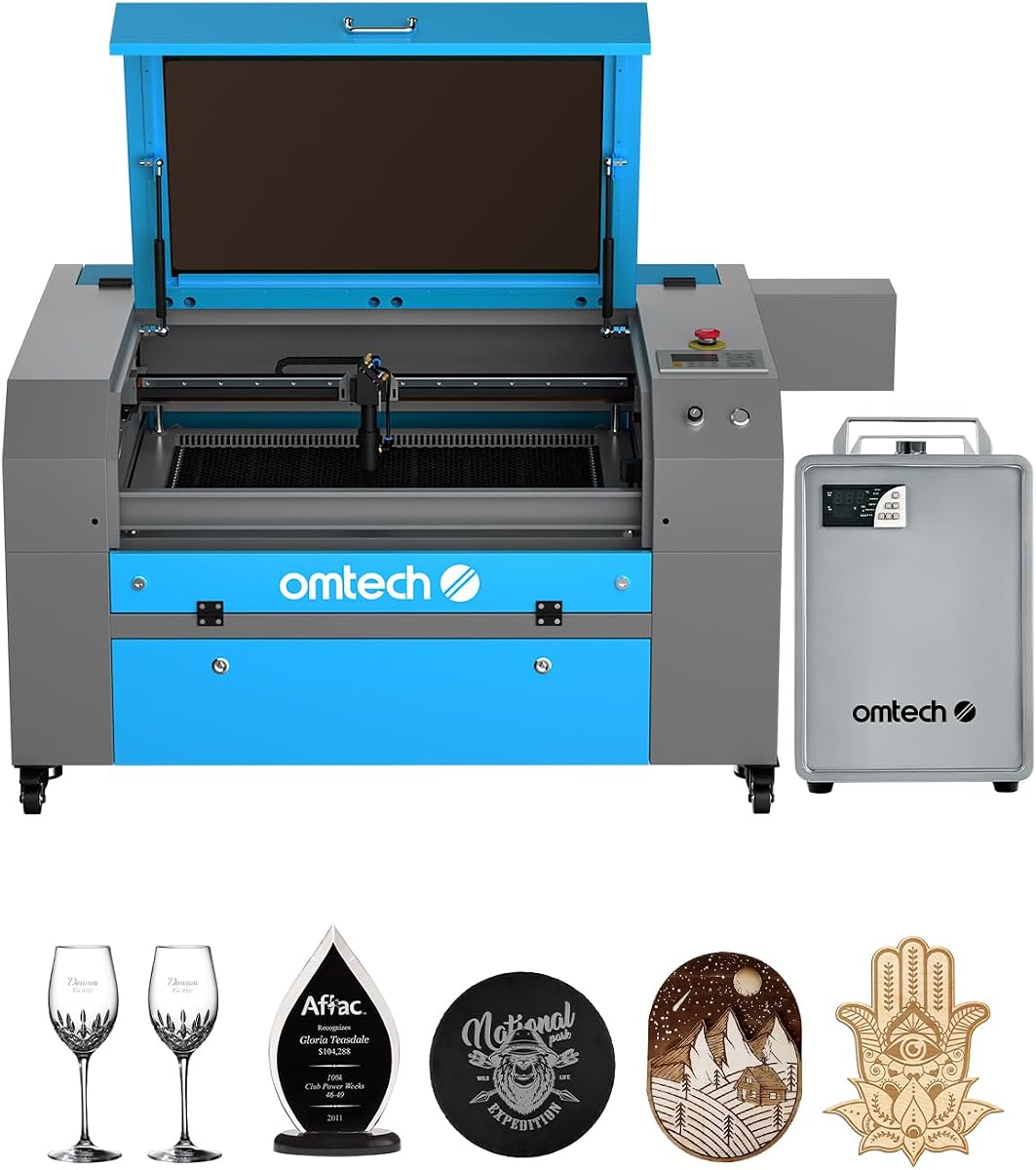
The OMTech K40+ provides an affordable entry point into CO2 laser cutting for hobbyists and small businesses. Its compact size fits easily on standard desks or tables.
We may earn a commission when you buy through this link, at no additional cost to you.
Powered by a 45W tube, it handles thin materials like wood and acrylic efficiently. The included software compatibility ensures you can start creating quickly.
The smaller workspace limits large sheet processing, and power may struggle with thick materials. These trade-offs are acceptable for the low price point.
Ideal for beginners or those with limited space. The robust support network ensures help is available when needed.
User-friendly setup and software compatibility make this a top choice for first-time users.
Global 24/7 support provides technical guidance and local demos by appointment.
We may earn a commission when you buy through this link, at no additional cost to you.
The VEVOR 100W offers professional-grade power and a spacious workspace for large projects. Its Class 1 safety rating ensures secure operation during intense production cycles.
We may earn a commission when you buy through this link, at no additional cost to you.
With 19.7 IPS speed and pass-through doors, it handles large materials with ease. The digital control panel simplifies navigation through complex designs quickly.
The weight and voltage requirements may limit placement options. However, the performance gains for industrial applications are substantial.
Best suited for workshops needing high capacity and safety. The reliable performance supports consistent commercial output.
100W power cuts materials up to 0.59 inches thick in one pass efficiently.
Class 1 rating with automatic power cutoff ensures operator safety during use.
We may earn a commission when you buy through this link, at no additional cost to you.
The OMTech Maker 90W combines power with a bundled water chiller for long sessions. It is designed for commercial use where extended runtime is crucial.
We may earn a commission when you buy through this link, at no additional cost to you.
The Yongli H2 tube ensures up to 8000 hours of usage. Four-way pass-through doors accommodate larger items effortlessly during production.
Some users note limited software info in documentation. The price point is mid-range compared to entry-level models.
Perfect for commercial users needing reliability. The cooling system ensures the machine stays operational during heavy use.
The bundled water chiller provides effective cooling for longer engraving sessions.
Four-way pass-through doors make it easy to fit larger projects.
We may earn a commission when you buy through this link, at no additional cost to you.
The OMTech Maker 60W simplifies the workflow with autofocus and LightBurn software. It is a solid choice for those prioritizing ease of use.
We may earn a commission when you buy through this link, at no additional cost to you.
Autofocus automatically finds the right focal distance, removing manual guesswork. The 20×28 workspace balances size and desk space well.
Power is lower than the 90W model, affecting thickness capacity. This is acceptable for standard hobby and small business needs.
Ideal for makers who want plug-and-play functionality. The included software ensures a smooth start to projects.
Autofocus adjusts the workbeds at the touch of a button.
20×28 inch area fits most projects without excessive footprint.
We may earn a commission when you buy through this link, at no additional cost to you.
The OMTech K40+ offers high-speed engraving at an affordable price. It is well-suited for bulk orders where time is of the essence.
We may earn a commission when you buy through this link, at no additional cost to you.
Engraving speeds up to 300 mm/s ensure quick project completion. The integrated air assist clears smoke and protects the lens effectively.
The small workspace restricts larger items. Users must plan materials carefully to maximize utility.
Best for desktop use and small items. The safety features like emergency stop provide peace of mind.
Up to 300 mm/s speed is ideal for complex designs and bulk orders.
Emergency stop and flame-retardant panel ensure user safety.
We may earn a commission when you buy through this link, at no additional cost to you.
The OMTech Pronto 100W delivers revolutionary engraving speeds up to 39.4 inches per second. It is designed for competitive edge and high throughput.
We may earn a commission when you buy through this link, at no additional cost to you.
Advanced autofocus ensures precision without guesswork. The large work area handles most large projects with ease.
Noise levels can be high during operation. Air pump power is strong but may require maintenance over time.
Ideal for makers prioritizing production speed. The safety features ensure secure operation.
1000 mm/s speed transforms visions into reality in record time.
Autofocus technology provides consistent high-quality results.
We may earn a commission when you buy through this link, at no additional cost to you.
The OMTech Pronto 130W offers massive power and a huge workspace for professional use. It handles thick materials with ease and speed.
We may earn a commission when you buy through this link, at no additional cost to you.
With 130W power, it engraves as deep as 0.4 inches on nonmetallics. The autofocus and large work area streamline production.
The high cost and large footprint are significant considerations. However, performance justifies the investment for serious users.
Best for professionals needing top-tier performance. The robust design ensures long-term reliability.
130W laser tube delivers 12000 hours of usage.
51×35 inch area accommodates large projects effortlessly.
We may earn a commission when you buy through this link, at no additional cost to you.
The OMTech K40+ remains a top choice for compact desktop setups. It balances performance with a tiny footprint for home offices.
We may earn a commission when you buy through this link, at no additional cost to you.
The 45W power handles standard engraving tasks well. Safety features ensure secure operation in shared spaces.
Large projects are not feasible on this unit. Power limits are typical for this class.
Ideal for home offices and hobbyists. It provides a reliable entry into laser engraving.
12×8 inch workspace fits small spaces perfectly.
Class 2 safety ensures safe usage.
We may earn a commission when you buy through this link, at no additional cost to you.
The OMTech Pro 130W is built for industrial environments. Its massive workspace and advanced features set it apart for heavy production.
We may earn a commission when you buy through this link, at no additional cost to you.
Servo motors achieve speeds up to 1200 mm/s. WiFi connectivity and touchscreen control streamline operations efficiently.
The price point is high and the machine is heavy. These are acceptable for serious industrial applications.
Best for factories needing top-tier performance. The robust design ensures long-term reliability.
Servo motors and ball-bearing rails ensure precise rapid engraving.
WiFi control allows effortless machine management.
We may earn a commission when you buy through this link, at no additional cost to you.
Selecting the right CO2 laser cutter depends on several critical factors including power, workspace, and safety.
Laser power determines cutting speed and material thickness capacity. Higher wattage like 100W allows cutting through thicker acrylic and wood easily.
Choose power based on your typical material thickness requirements.
Workspace dimensions affect the maximum sheet size you can process. Larger workspaces accommodate bigger projects but require more floor space.
Balance workspace size with your available room dimensions.
Class 1 safety ratings are crucial for professional environments as they prevent accidental exposure. Ensure the machine has interlocks and air assist.
Always prioritize safety features over price when possible.
Compatible software like LightBurn enhances workflow and design flexibility. Ensure the machine supports industry-standard software for easier use.
Check compatibility before purchasing to avoid integration issues.
Autofocus and LiDAR systems reduce setup time and improve accuracy. Automation is valuable for high-volume production environments.
Consider automation for professional efficiency needs.
Built-in chillers ensure consistent cooling and tube longevity. External chillers may be cheaper but require extra setup and space.
Internal chillers add convenience and reliability.
Budgets vary widely from entry-level to industrial models. Consider long-term value and maintenance costs alongside initial purchase price.
Invest in the best you can afford for long-term satisfaction.
Reliable manufacturer support and warranty coverage are vital for troubleshooting. Ensure local service is available for your region.
Strong support ensures smoother operation over time.
Always wear appropriate eye protection and ensure the workspace is well-ventilated during operation. Check the lens for dust and clean it regularly.
Use software to calibrate settings for different materials before starting projects. Monitor initial test runs to adjust speed and power accordingly.
Perform routine maintenance such as checking air assist and cooling systems monthly. Store the machine in a dry environment to prevent rust and damage.
CO2 laser cutters can process wood, acrylic, leather, cardboard, and various non-metallics. They struggle with metals unless marked with a special spray.
Yes, with proper safety features and ventilation. Always follow manufacturer guidelines and use enclosed units with safety interlocks.
Inspect the lens before every major project. Clean it weekly with isopropyl alcohol to maintain cutting quality and speed.
For high-power models, a chiller is essential to prevent tube overheating. Built-in chillers simplify the setup significantly.
Most support LightBurn and LaserGRBL. Always verify compatibility before purchase to ensure smooth design workflows.
Quality tubes last 12,000 to 25,000 hours depending on usage. Proper cooling and maintenance extend this lifespan.
Use the autofocus feature if available or measure manually with a gauge. Proper focus ensures clean cuts and maximum power.
Not all models include WiFi. Pro models often feature it for remote monitoring. Check specs carefully.
The top picks offer a range of options from budget-friendly to industrial-grade power. The OMTech K40+ is great for beginners while the xTool P3 excels for professionals.
Prioritize safety and software compatibility when making your final choice. Automation features can significantly reduce workflow friction.
Prices and availability change frequently so always verify listings before buying. Invest in the machine that best fits your long-term needs.