
Epson LQ-590II Dot Matrix Printer – Monochrome
4.3Editor score
24-pin impact technology
584 characters per second
USB and Parallel ports
Dot matrix computer printers remain essential for businesses requiring durable, multipart form printing. These impact printers deliver reliability in demanding environments where modern devices might fail or lack necessary features.
We compared ten leading models based on print speed, connectivity options, duty cycle, and user feedback. Each product offers unique strengths for different operational needs and budget constraints.
Every pick highlights specific capabilities and ideal use cases for your workflow. Please note that prices and availability may fluctuate regularly, so verify current details before purchasing.
4.3Editor score

4.7Editor score

3.7Editor score
As an Amazon Associate we earn from qualifying purchases.
The following table provides a side-by-side comparison of all ten models discussed in this guide. Review each specification carefully to determine which printer aligns best with your specific operational requirements.


The Epson LQ-590II stands out as an affordable option for small businesses needing reliable multipart printing. It earns a strong 4.3 star rating from users who value its straightforward functionality and speed.
We may earn a commission when you buy through this link, at no additional cost to you.
Its 24-pin mechanism delivers crisp text at up to 584 characters per second, making it efficient for high-volume invoicing. The USB and Parallel connectivity ensure compatibility with older and newer systems alike.
While it lacks color capability and modern wireless options, these trade-offs keep costs down for users who prioritize function over flair. The monochrome limitation is standard for impact printers in this class.
Businesses seeking a no-nonsense workhorse for receipts and forms should consider this model. It balances performance and cost effectively for daily operational tasks without unnecessary complexity.
This printer reduces cost per page significantly compared to inkjet alternatives when handling multipart forms.
USB and Parallel ports allow connection to legacy POS systems and modern computers without adapters.
We may earn a commission when you buy through this link, at no additional cost to you.
The Epson LQ-590II NT adds Energy Star certification to a robust 24-pin impact design. It maintains a solid 4.2 star rating by balancing power savings with industrial strength performance.
We may earn a commission when you buy through this link, at no additional cost to you.
Its dual port capability supports both Parallel and Serial connections, expanding deployment flexibility for industrial settings. The 584 cps speed ensures rapid output for demanding transactional environments.
Though the price point exceeds standard models, the energy savings and durability justify the investment over time. Users appreciate the environmental compliance without sacrificing raw throughput capabilities.
Organizations prioritizing sustainability and broad connectivity will find this model ideal. It delivers premium efficiency for continuous operation in regulated or eco-conscious business settings.
Energy Star certification lowers electricity usage during extended print runs compared to non-certified models.
Serial and Parallel ports allow seamless integration with legacy industrial equipment and controllers.
We may earn a commission when you buy through this link, at no additional cost to you.
The Oki Microline 320 Turbo/N achieves a remarkable 4.7 star rating through consistent performance and sturdy construction. It remains a top choice for environments demanding zero downtime.
We may earn a commission when you buy through this link, at no additional cost to you.
Its 9-pin mechanism optimizes speed over resolution, delivering 435 characters per second efficiently. Users report minimal mechanical failures even under heavy daily loads typical of logistics or finance.
While the 9-pin head limits graphic detail compared to 24-pin options, text clarity remains excellent for documents. The trade-off favors throughput which is critical for time-sensitive business operations.
Businesses needing dependable printing without frequent service interruptions should prioritize this unit. Its reputation for longevity makes it a smart investment for mission-critical workflows.
Heavy duty internal components ensure the printer survives years of continuous shift work without degradation.
Turbo draft modes maximize character output rates for high volume receipt or label production.
We may earn a commission when you buy through this link, at no additional cost to you.
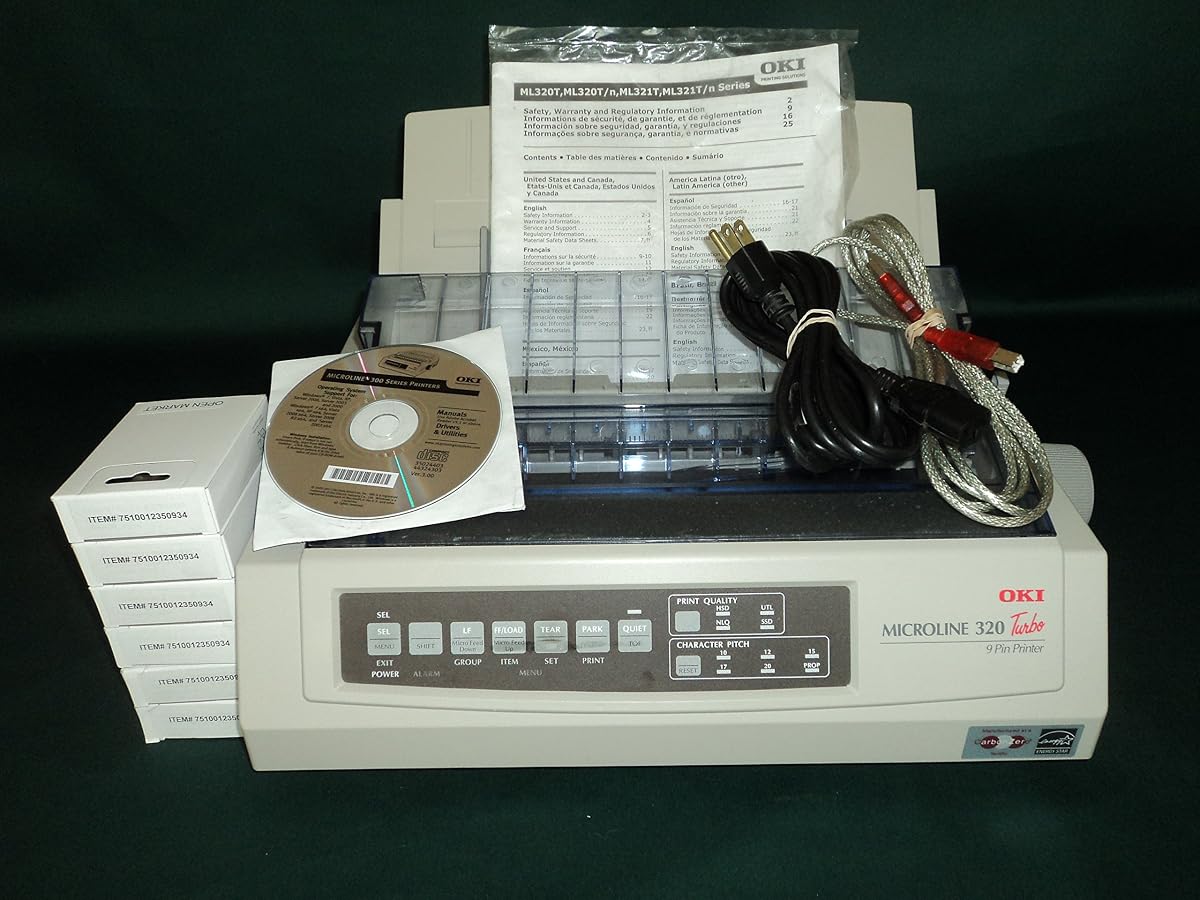
The OKI MICROLINE 320 Turbo offers balanced performance with a 4.5 star rating from satisfied users. It fits well into offices needing reliable output without excessive noise.
We may earn a commission when you buy through this link, at no additional cost to you.
Its USB and Parallel connectivity supports diverse system setups while maintaining consistent throughput. The 20000 page monthly duty cycle ensures it handles moderate workloads effortlessly.
Although it commands a higher price than some competitors, the build quality justifies the expense. Users note the quiet mode is valuable for shared workspaces requiring minimal distraction.
Workplaces prioritizing a mix of speed and comfort will appreciate this model. It delivers consistent results for internal documentation and external correspondence alike.
Reduced noise levels during printing prevent disruptions in open office environments or libraries.
User accessible panels allow quick ribbon changes without needing technical support or tools.
We may earn a commission when you buy through this link, at no additional cost to you.
The OKI 62418701 MICROLINE 420 delivers impressive speed with a 4.5 star rating from users. It excels in environments where rapid text output is the primary requirement.
We may earn a commission when you buy through this link, at no additional cost to you.
Its 570 characters per second rate outpaces many competitors while maintaining Energy Star efficiency. USB and Parallel ports ensure broad compatibility across different network infrastructures.
While the 9-pin head limits graphical resolution, text remains sharp enough for contracts and invoices. The larger footprint accommodates robust mechanisms designed for long term heavy use.
Businesses needing fast text printing with eco credentials should consider this model. It balances throughput and efficiency effectively for high demand scenarios.
Advanced mechanics allow higher character rates without sacrificing mechanical stability or paper flow.
Energy Star rating ensures lower operating costs even during continuous high volume printing shifts.
We may earn a commission when you buy through this link, at no additional cost to you.
The Oki MICROLINE 320 Turbo achieves a rare perfect 5.0 star rating from verified users. It represents a gold standard for impact printers focused purely on reliability.
We may earn a commission when you buy through this link, at no additional cost to you.
Its versatile connectivity supports USB, Serial, and Parallel options ensuring deployment anywhere. The robust duty cycle handles continuous operation with minimal service requirements.
Users highlight its simplicity and dependability as key advantages over complex modern alternatives. The monochrome limitation does not detract from its core function of solid document printing.
Organizations requiring absolute reliability for critical printing tasks should invest here. It eliminates common printer headaches through proven mechanical design.
Multiple ports allow seamless integration into diverse technical ecosystems without custom adapters.
Field tested components ensure years of operation without frequent mechanical failures or jams.
We may earn a commission when you buy through this link, at no additional cost to you.
The Epson LQ-2090II brings advanced 24-pin technology with a 3.7 star rating. It offers high fidelity text output ideal for professional legal documents or contracts.
We may earn a commission when you buy through this link, at no additional cost to you.
Its 550 characters per second speed combined with Energy Star efficiency suits high throughput needs. However, some users report compatibility issues due to Parallel only connectivity.
The 24-pin head creates near letter-quality text which is essential for formal business correspondence. While USB is omitted, legacy systems benefit greatly from this robust feature.
Professionals needing near letter-quality text should consider this model despite the interface limitation. It prioritizes output quality over modern connectivity options.
Advanced 24-pin head delivers sharp text suitable for formal contracts and client facing documents.
Energy Star certification helps reduce overhead costs during continuous printing shifts.
We may earn a commission when you buy through this link, at no additional cost to you.
The OKI62411601 Oki MICROLINE 320 features auto park technology earning a 4.2 star rating. This reduces waste by ensuring proper paper handling during stop start cycles.
We may earn a commission when you buy through this link, at no additional cost to you.
Its SuperSpeed Draft mode produces 435 characters per second efficiently for high volume needs. Zero tear and auto park ensure smooth operation even with continuous form feeds.
Users appreciate the simplicity and speed for receipt generation and shipping labels. The limitations in resolution are acceptable given the operational efficiency gains.
Businesses prioritizing speed and paper efficiency will find this model excellent. It automates common workflow hurdles effectively without adding complexity.
Advanced feeds prevent paper tears during manual removal reducing waste and downtime.
Draft modes optimize character rates for high volume transactional printing tasks.
We may earn a commission when you buy through this link, at no additional cost to you.
The Oki Microline 620 achieves a strong 4.8 star rating for reliability and sharpness. It is designed for high volume environments where consistent quality is non-negotiable.
We may earn a commission when you buy through this link, at no additional cost to you.
Its high volume versatility supports continuous operation with minimal interruptions. Users praise the sharp printing quality which exceeds typical impact printer expectations.
Simplified media loading saves time during changeovers reducing manual labor. The higher price reflects its position as a premium option for critical tasks.
Organizations needing dependable high quality output should consider this model. It delivers professional results suitable for diverse document requirements.
Robust mechanics support continuous printing cycles without overheating or jamming.
Easy loading trays reduce time spent changing paper types or refilling stock.
We may earn a commission when you buy through this link, at no additional cost to you.
The Epson LQ-590 provides essential compatibility with a 3.7 star rating. It focuses on supporting legacy protocols like ESC/P and PPDS for older systems.
We may earn a commission when you buy through this link, at no additional cost to you.
Its 24-pin technology ensures clear text output suitable for basic business needs. USB connectivity modernizes the interface enough for simple network setups.
Users note mixed experiences depending on software compatibility with specific drivers. The simplicity keeps costs low for users with straightforward printing requirements.
Organizations migrating from legacy systems should consider this model. It offers a cost effective bridge to modern hardware without sacrificing core functions.
Built-in ESC/P and PPDS ensure compatibility with older financial and inventory software.
USB support allows easier connection to current workstations than older parallel models.
We may earn a commission when you buy through this link, at no additional cost to you.
Selecting the right impact printer requires balancing several technical factors to match your operational needs and budget.
Print speed is measured in characters per second (cps) and varies significantly between models. Higher speeds benefit high volume environments like logistics or finance. Duty cycle indicates the monthly page limit the printer can handle reliably. Exceeding this limit may lead to premature mechanical failures.
Choose a model with a duty cycle exceeding your peak monthly output to ensure longevity and consistent performance.
Dot matrix printers typically use 9-pin or 24-pin heads. 24-pin models produce higher resolution text closer to letter quality which is better for professional documents. 9-pin models offer faster draft speeds which are ideal for internal receipts or labels.
Assess whether professional text quality or raw speed is more important for your specific use case.
Legacy environments often rely on Parallel or Serial ports for system integration. Modern offices prefer USB for direct connections. Ensure the chosen printer matches your existing network hardware to avoid adapter costs.
Verify available ports before purchase to prevent connectivity issues during setup.
Impact printers excel at multipart forms and carbon copies. Check if the model supports continuous forms or single sheets. Tractor feed mechanisms ensure precise alignment for high volume batches.
Select a printer capable of handling your specific media thickness and format requirements.
Energy Star certified models consume less power during operation. This reduces operational costs over time especially for 24/7 deployments. Look for efficiency ratings when comparing similar performance tiers.
Prioritize Energy Star models to minimize long term electricity costs.
Ribbons are cheaper than inkjet cartridges but require regular replacement. Check availability and pricing of ribbons for your specific model. Some brands offer high yield ribbons that reduce change frequency.
Factor in consumable costs to understand the total cost of ownership beyond the initial purchase.
Impact printers generate more noise than laser alternatives. If placed in shared offices check for quiet modes or sound dampening features. High decibel output may be disruptive in quiet workspaces.
Consider noise levels to ensure the printer fits comfortably in your intended workspace.
Extended warranties provide peace of mind for critical business operations. Check manufacturer support availability and response times. Reliable support ensures quick resolution of technical issues.
Opt for models with strong warranty coverage to protect your investment.
Begin by installing the correct ribbon cartridge according to the manufacturer's guide. Ensure it clicks securely into place to prevent jams during operation. Verify the paper feed path is clear of any debris before loading forms.
Load continuous paper onto the tractor feed carefully aligning the sprockets with paper perforations. Tighten the adjusters to hold the paper firmly without damaging edges. Test a draft print to confirm alignment before full operation.
Schedule regular cleaning cycles to remove dust from the printhead and platen. Use soft cloth to wipe surfaces gently avoiding harsh chemicals. Proper maintenance extends life significantly and prevents mechanical issues.
A dot matrix computer printer is an impact device that uses a printhead with pins to strike an inked ribbon. It creates images by forming dots on paper. This technology is durable and supports multipart forms making it ideal for specific business needs.
Dot matrix printers remain vital for businesses needing to print carbon copies or multi-part invoices. Their impact mechanism handles different paper types better than laser or inkjet printers. Many legacy systems still rely on their specific drivers and protocols.
Yes impact dot matrix printers tend to be louder than modern inkjet or laser devices. However some models include quiet modes to reduce operational noise. Consider your workspace environment before choosing an impact printer.
The main difference lies in print quality and speed. 9-pin printers print faster but with lower resolution. 24-pin printers produce near letter-quality text but may be slower. Choose based on your need for detail versus speed.
Many modern dot matrix printers include USB ports for easier setup. However some legacy models only support Parallel or Serial connections. Always check the specifications to ensure compatibility with your current computers.
Ribbon lifespan depends on volume but typical users may replace them monthly. High volume users might need replacements weekly. Monitor print quality for fading ink as a sign it is time to change the ribbon.
Most standard dot matrix printers are monochrome and print only in black. Some specialized industrial models support color ribbons but these are rare. For general business use expect single color output only.
Some models include Ethernet ports for network integration. Others require adapters to connect via USB. Verify if network printing is a requirement before selecting a model to avoid extra hardware costs.
We reviewed ten top models ranging from budget friendly options to high performance units. The Epson LQ-590II and Oki Microline 320 Turbo stood out for specific strengths in reliability and value.
Prioritize print speed and connectivity based on your daily workflow needs. Ensure the selected model matches your existing system interfaces to avoid setup issues.
Prices and availability change frequently so verify current details before purchasing. Always check warranty terms to ensure long term support for your investment.