10 Best Cable Management for Gaming PC (November 2026) Expert Guide
Written by Alex · Updated November 2026
A clean gaming setup starts with proper cable management. Without it, your desk becomes a tangled mess that looks unprofessional and can even pose safety risks. Choosing the right organizers keeps your space neat and protects your gear from accidental damage or overheating.
We evaluated ten top-rated products to find the best solutions for every type of setup. From sleeving kits to under desk trays, our list covers various methods to hide and route wires. Each pick was chosen for its durability ease of installation and overall effectiveness in real world use.
Every product in this list offers unique benefits to suit different needs and budgets. Whether you need simple ties or a full concealment system, you will find a match here. Prices and availability change frequently so check current listings before making your final purchase decision.
Top 3 Picks for Best Cable Management for Gaming PC
Best Budget
Alex Tech 10ft – 1/2 inch Cord Protector Wire Loom Tubing Cable Sleeve Split Sleeving For USB Cable Power Cord Audio Video Cable – Protect Cat From Chewing – Black
48" Gaming Under Desk Cable Management Tray, Black No Drill Cord Organizer for PC Setup, Large Anti-Sag Wire Hider, Stealth Cable Management Net for Battlestation (Black, 47.8")
As an Amazon Associate we earn from qualifying purchases.
Top 10 Best Cable Management for Gaming PC in 2026 Compared
The following table provides a side by side look at all ten products reviewed in this guide. It highlights key specifications and features to help you quickly compare options and find the perfect fit for your gaming PC setup.
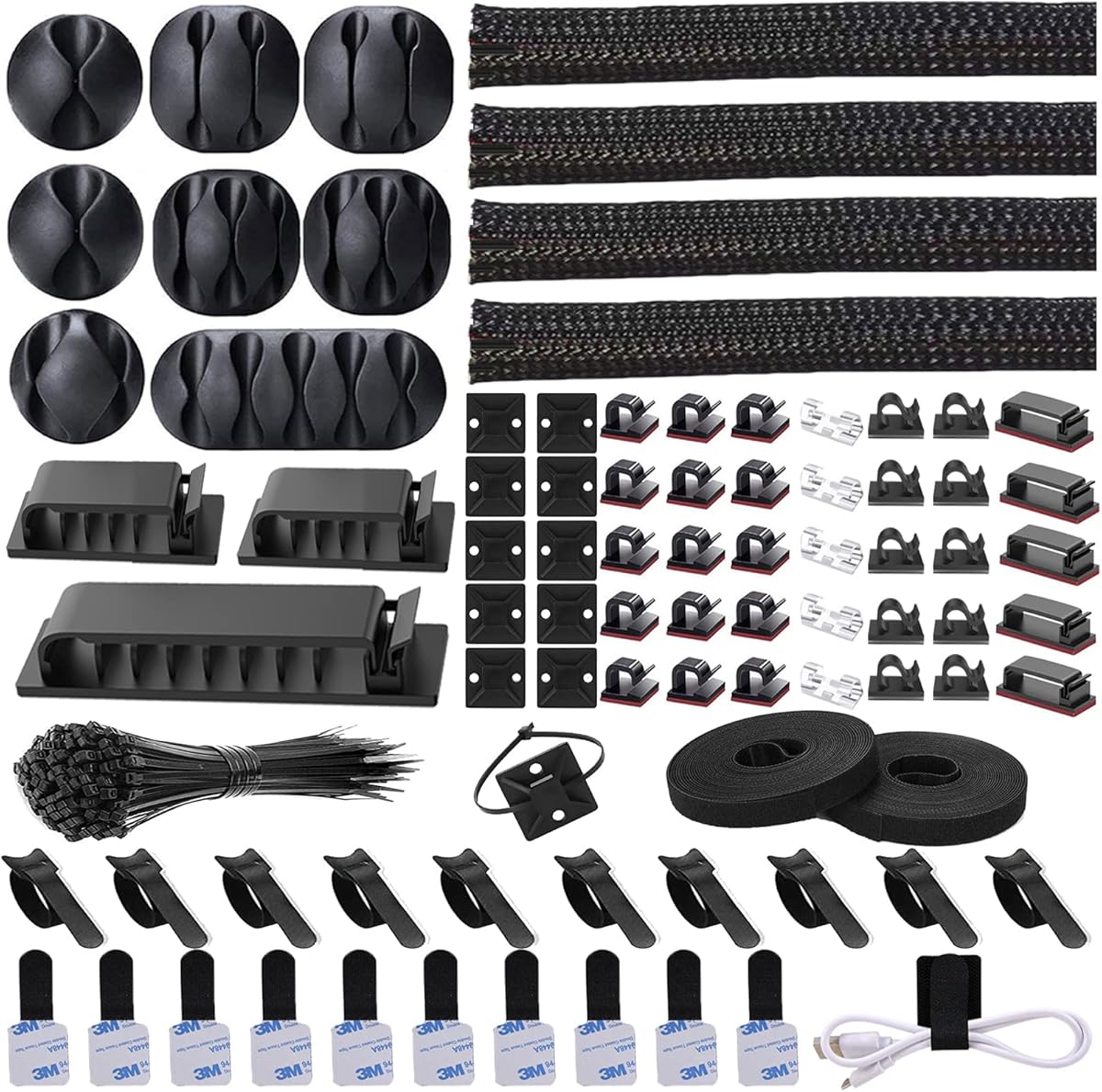
This NOROCME kit stands out as the top pick due to its sheer volume and versatility. With 192 pieces you get everything from sleeves to clips and ties in one box. It earns a strong rating from users who appreciate having multiple solutions for different cable types.
Pros
Comprehensive kit for all needs
Split sleeves for easy install
Durable polyamide material
Strong adhesive pads included
Includes multiple clip styles
Cons
May have excess ties
Requires surface prep for adhesive
We may earn a commission when you buy through this link, at no additional cost to you.
The split cable sleeves make it incredibly easy to route wires without disconnecting them. You simply open the sleeve slide the cables in and let it close on its own. The included adhesive pads are robust ensuring that clips stay put on desks and walls without falling off over time.
While the kit is extensive some users might find they have more ties than needed for a single setup. Additionally the adhesive pads work best on smooth clean surfaces so textured walls might require extra care or alternative mounting methods.
Ideal for anyone building a new gaming station or overhauling an old one this kit provides the best overall value. It simplifies the organization process by offering all the tools you need in one purchase making it a smart choice for most gamers.
Complete Solution for Every Corner
Having everything in one box saves time and ensures consistency across your setup.
Split Sleeves Simplify Installation
The split design means you do not need to disconnect cables to organize them effectively.
This Cord Management Organizer Kit offers similar benefits to the top pick at a competitive price point. It includes 192 pieces covering a wide range of organization needs. The rating reflects its reliability for keeping cords organized and accessible.
Pros
Matches first kit features
Cost effective solution
Strong adhesive pads
Reusable ties provided
Durable construction
Cons
Adhesive may leave residue on some surfaces
Sleeves may be too short for some runs
We may earn a commission when you buy through this link, at no additional cost to you.
The split sleeves allow for quick routing of power and signal cables without hassle. The included wire ties are reusable which helps in making adjustments as your setup evolves. Adhesive pads ensure clips stay secure on most standard surfaces like wood and ceramic.
Some users note that adhesive residue can occur if removal is attempted without heat. Additionally the sleeves have fixed lengths so longer cable runs might require connecting multiple sleeves which can be slightly tedious.
This kit is a great alternative if you want comprehensive organization without spending extra. It works well for standard desktop setups where moderate cable lengths are common and budget is a consideration.
Versatile Kit for Various Needs
Includes a mix of clips and ties to handle different cable thicknesses and routes.
Durable Material for Longevity
Polyamide components resist wear and tear ensuring long term usability.
Alex Tech 10ft – 1/2 inch Cord Protector Wire Loom Tubing Cable Sleeve Split Sleeving For USB Cable Power Cord Audio Video Cable – Protect Cat From Chewing – Black
10 foot length
Half inch diameter
Split design
UL recognized
For those needing a simple protective solution the Alex Tech Cord Protector delivers high value. It offers ten feet of split tubing perfect for bundling cables together. The high rating comes from its effectiveness in protecting wires from pets and physical damage.
Pros
Very affordable price
Split tube design
Protects from pets
UL recognized safety
Easy to load wires
Cons
Only one piece type
No adhesive clips included
We may earn a commission when you buy through this link, at no additional cost to you.
The split loom design allows you to thread cables in without unplugging them. It fits standard USB and power cords snugly keeping them together and reducing clutter. The material is durable and can withstand typical household temperature ranges safely.
The main trade off is that it does not come with clips or ties so you may need to buy those separately. Also it only covers one type of management so it might need to be combined with other items for full desk organization.
This is the ideal budget pick for specific cable runs like from PC to monitor. It provides essential protection and organization at a low cost making it a smart addition to any budget friendly setup.
Affordable Protection for Cables
Provides reliable shielding for cords at a fraction of the cost of full kits.
Pet Safe Design
The tubing helps prevent pets from chewing on exposed wires reducing hazards.
The YECAYE set provides a more permanent looking solution with its J channel design. Each of the six pieces is made from flame retardant PVC which adds a layer of safety. Users value the spacious interior that holds multiple cables securely.
Pros
Sturdy PVC construction
Outward facing opening
Flame retardant safe
Easy installation
Hides wires under desk
Cons
Adhesive removal needs heat
Fixed length per piece
We may earn a commission when you buy through this link, at no additional cost to you.
The outward facing opening makes adding or removing cables very simple. You can adjust layouts as needed without removing the entire channel. Adhesive tape allows for tool free installation on smooth surfaces like desks and walls.
Removal requires heat to soften the adhesive which can be a minor inconvenience if you plan to move often. Also the fixed length of each piece might not fit every desk width perfectly requiring some planning.
This option is best for those who want a clean look without open mesh trays. It keeps wires hidden in a structured way and is suitable for home offices and gaming setups alike.
Structured Wire Concealment
Channels provide a rigid structure that keeps cables neat and out of sight.
Safety and Durability
Flame retardant PVC ensures safety in case of electrical issues near the desk.
Nettbe offers a pack of sixty reusable ties which are perfect for bundling loose cables. The high rating reflects their durability and ease of use. They are simple to apply and remove making them ideal for frequent changes.
Pros
Highly reusable
Simple hook and loop
Large quantity included
Adjustable for thickness
Eco friendly option
Cons
Not for heavy loads
Can fray over time
We may earn a commission when you buy through this link, at no additional cost to you.
These straps use a hook and loop mechanism that allows for quick adjustments. You can wrap them around bundles of varying sizes without cutting or wasting material. They work well for organizing power strips and short cable runs.
While versatile they may not hold up well for very heavy loads over long periods. The fabric can fray if pulled too hard or exposed to extreme wear so they are best for light to medium duty tasks.
Buy these if you want to reduce plastic waste and need flexible ties. They are great for maintaining your setup without buying new disposable ties every time you swap components.
Eco Friendly and Practical
Reusable ties reduce plastic waste while keeping your cables organized effectively.
Flexible and Adjustable
The hook and loop design lets you customize the tightness for any bundle.
Scanfield Under Desk Cable Management Tray, No-Screw, 17-Inch, 2-Pack Black
17 inch size
No screw install
Adhesive backing
2 pack included
The Scanfield tray is a straightforward solution for hiding cables under a desk. The two pack allows you to organize both front and back runs. Users report a noticeable improvement in aesthetics once the trays are installed.
Pros
Tool free installation
Sturdy construction
Spacious for power strips
Improves desk aesthetics
Durable adhesive
Cons
May not fit all desk thicknesses
Adhesive may fail on textured surfaces
We may earn a commission when you buy through this link, at no additional cost to you.
Installation is easy with strong adhesive backing that holds without screws. The trays are spacious enough to hold power strips and multiple cables. They provide a sturdy platform that keeps items from sliding off or sagging.
Adhesive strength varies with surface texture and cleanliness. Textured surfaces might reduce hold quality so smooth wood or metal works best. Also the 17 inch size might be too short for larger desks requiring multiple trays.
This tray is a good choice for quick upgrades without drilling holes. It keeps equipment out of sight and protects cables from being kicked or tripped over under your desk.
Simplified Tool Free Setup
Strong adhesive backing makes installation simple without needing any tools.
Spacious Design
The tray dimensions accommodate standard power strips and multiple cables easily.
Univivi No Drill Under Desk Cable Management Tray, 36 inch Cable Management
36 inch length
Clamp and screw
Oxford fabric
Heavy duty clamp
Univivi offers a large tray that works well for extensive setups. The thirty six inch length covers most standard desks comfortably. It supports both clamp and screw mounting giving you flexibility depending on your desk material.
Pros
Flexible installation options
Large capacity
Durable fabric material
Anti sag support
Easy access design
Cons
Requires table space for clamp
Clamp may mark soft wood
We may earn a commission when you buy through this link, at no additional cost to you.
The oxford fabric is durable and flame retardant which adds safety. The tray unfolds to allow easy access for adding or removing items. Built in ties help secure wires inside the tray so they do not shift around.
You must ensure there is space on the table edges for the clamp mechanism. This might not work on desks with drawers or built-in hardware that blocks the edge. Also clamp pressure might leave marks on very soft wood over time.
This tray is excellent for those who need a large hidden storage solution. It keeps everything neat and safe while providing easy access when you need to adjust connections.
Versatile Mounting Options
Choose between clamp or screw installation to match your desk structure.
High Capacity Storage
The wide tray holds many cables and adapters without crowding the space.
Cable Management, 25'' Cable Management Under Desk, Cable Tray
25 inch size
Metal mesh
No drill clamp
Open design
This tray features a metal mesh design that promotes airflow around power supplies. It is made of sturdy metal that resists bending under load. The high rating reflects its robust build and functional design.
Pros
Metal mesh ventilation
Adjustable clamp
Dust reduction
Open side access
Sturdy structure
Cons
Assembly required
Clamp needs solid edge
We may earn a commission when you buy through this link, at no additional cost to you.
The open side design allows you to slide cables in easily. Rubber pads on the clamps protect your desk surface from scratches. It supports a good weight capacity which makes it suitable for heavy power bricks.
Assembly is required which might take a few minutes to connect the two halves. Also the clamp needs a solid edge to grip properly so it might not work on all desk types.
Ideal for gamers who need to keep power supplies cool this tray combines utility with strength. It is a reliable choice for maintaining a clean under desk area without sacrificing ventilation.
Efficient Ventilation
The metal mesh allows air to flow through keeping electronics cooler.
Protective Clamps
Non slip pads prevent scratches and ensure the tray stays stable.
[Made in the UK] 10-Pack Adjustable Elastic Adhesive Cable Clips, Wire Management Holder, Cord Organizer for Home Office, Under Desk, Behind TV, Phone Charger, Laptop, PC, HDMI, USB (Black)
10 pack clips
Elastic loop
Screw and adhesive
Made in UK
CableGenie clips offer a unique elastic design that adjusts to different cable sizes. The 10 pack is useful for organizing multiple points around your desk. Users like the one handed operation for quick cable management.
Pros
Adjustable elastic loop
One handed operation
Screw options included
Reusable clips
Durable silicone
Cons
Not ideal for thick cables
Screw holes needed for max hold
We may earn a commission when you buy through this link, at no additional cost to you.
The silicone loop is tough and resistant to wear over time. You can mount them using adhesive pads or screws depending on your surface. This flexibility makes them suitable for temporary or permanent setups.
Thick cables might exceed the loop capacity making them less effective for heavy bundles. Also achieving the strongest hold often requires drilling which may not appeal to everyone.
Use these clips for managing individual cables like HDMI or USB. They provide a sleek look and keep cords accessible while maintaining a tidy appearance.
Quick One Handed Access
The clip design lets you insert and remove cables with just one hand.
Durable Silicone Loop
High quality silicone ensures long lasting elasticity without snapping.
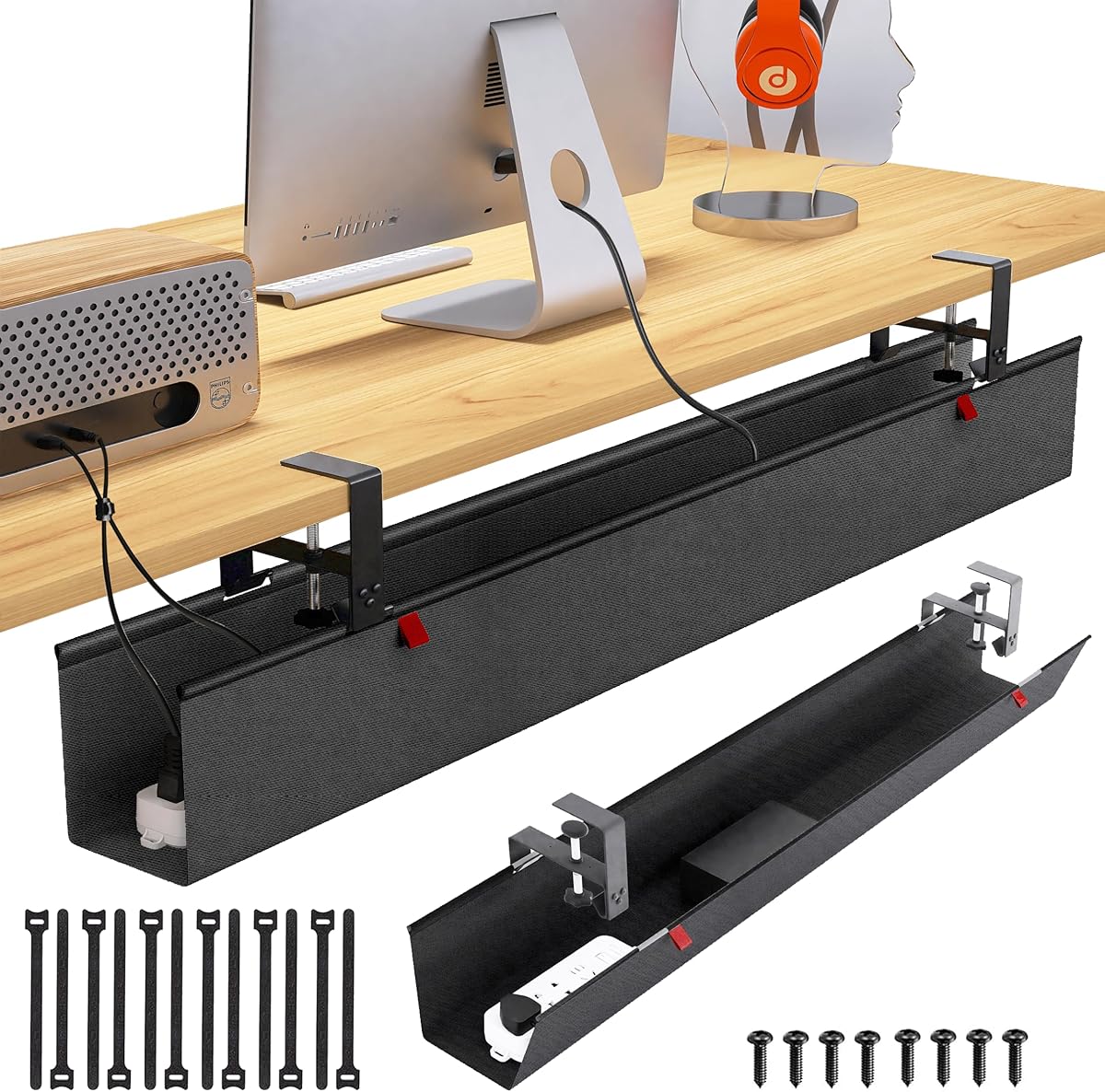
48" Gaming Under Desk Cable Management Tray, Black No Drill Cord Organizer for PC Setup, Large Anti-Sag Wire Hider, Stealth Cable Management Net for Battlestation (Black, 47.8")
47.8 inch length
Stealth black fabric
Anti sag base
Side opening
This premium tray offers a stealthy look that blends into gaming setups. Its large size ensures all cables and adapters fit neatly underneath. The blackout fabric hides the wires completely for a clean aesthetic.
Pros
Large blackout design
Heavy duty support
Side opening access
Anti sag construction
Dust protection
Cons
Highest price point
May require precise measurements
We may earn a commission when you buy through this link, at no additional cost to you.
The anti-sag base is robust and can handle heavy equipment without bowing. Side openings make it easy to route thick cables without struggling. Dust protection helps keep your gear clean while allowing airflow.
The price is higher than basic options and precise measurement is needed for fit. If your desk has built-in drawers you may need to check clearance before purchasing to avoid issues.
Choose this tray if you want a high-end look and top-tier durability. It is perfect for serious gamers who value a polished appearance and reliable performance.
Stealth Aesthetic
Blackout fabric keeps the under desk area looking dark and professional.
Heavy Duty Support
Reinforced base handles high weight loads without losing shape.
We may earn a commission when you buy through this link, at no additional cost to you.
Buying Guide – How to Choose the Best Cable Management for Gaming PC
Selecting the right cable management solution involves considering your desk setup and budget. This guide breaks down key factors to help you make an informed decision.
Type of Organization
Decide between sleeves ties or trays based on your needs. Sleeves bundle cables together while trays hide them completely under a desk.
Choose a system that fits your available space and aesthetic goals.
Installation Method
Some products require drilling while others use adhesive or clamps. Ensure the method matches your furniture material and permission to alter surfaces.
Adhesive options are best for temporary setups and clamps for solid desks.
Material Durability
Look for high quality materials like nylon or reinforced plastic. Durability ensures the solution lasts long without fraying or breaking under tension.
Durable materials protect your cables and maintain their shape over time.
Capacity and Size
Check the dimensions of trays and sleeves to ensure they fit your cables. Large setups need spacious trays to avoid overcrowding and poor airflow.
Measure your desk before purchasing to ensure a perfect fit.
Safety Features
Flame retardant materials add a layer of safety for your setup. Ensure any clips or holders are non toxic and free from sharp edges.
Safety features protect both your equipment and your home environment.
Reusability and Flexibility
Reusable ties and adjustable clips let you change your setup easily. Avoid permanent solutions if you plan to upgrade or move components often.
Flexible systems adapt to your evolving needs without extra costs.
Ease of Access
Ensure cables can be easily added or removed without taking apart the system. Side opening trays and split sleeves are ideal for quick adjustments.
Easy access saves time and frustration when connecting new devices.
Aesthetic Integration
Pick colors and designs that match your gaming PC theme. Black solutions often blend best with standard setups to avoid visual distraction.
A matching look enhances the overall presentation of your battlestation.
How to Use and Care for Your Cable Management for Gaming PC
Start by planning your cable routes before attaching any organizers. Group cables by function such as power and video to keep the layout logical.
Clean the surface thoroughly before applying adhesive clips to ensure they stick properly. Dust and oil can weaken the bond and cause clips to fall off over time.
Check your organizers periodically for signs of wear or looseness. Tighten any clamps and replace worn ties to maintain a safe and tidy environment.
Frequently Asked Questions
What is the best way to hide cables under a gaming desk?
Using an under desk tray is the most effective way to hide cables. It keeps power strips and wires out of sight and off the floor. You can combine this with sleeves to bundle the wires entering the tray.
Can I use cable ties permanently on my gaming PC?
Permanent zip ties can work but reusable ties are better for long term setups. Reusable options allow you to adjust cables when you add new devices. They also prevent accidental damage from cutting the tie.
Do cable management solutions affect airflow?
Proper management improves airflow by keeping cables organized. Avoid stuffing cables into tight spaces where they block fans. Mesh trays allow air to flow while still hiding wires from view.
How do I prevent adhesive clips from falling off?
Clean the surface with alcohol before applying adhesive clips. Ensure the surface is dry and smooth for the best bond. Press firmly for a few seconds to activate the adhesive pad.
Are cable sleeves safe for long term use?
Yes high quality sleeves are safe for long term use. Look for UL recognized materials that resist heat and wear. Avoid cheap plastics that might melt or degrade over time.
What size cable organizer should I buy for a gaming PC?
Choose a size that fits your desk width and cable volume. For standard desks a 17 inch to 25 inch tray works well. Larger setups might benefit from a 36 inch or 48 inch tray.
Can cable organizers protect my PC from dust?
Yes many trays and sleeves help reduce dust accumulation. They shield cables from open air and make cleaning easier. Look for dust proof designs if you have pets or high traffic areas.
How do I install an under desk tray without drilling?
Use clamps or adhesive backing to mount trays without drilling. Clamps grip the edge of your desk securely. Adhesive mounts work on smooth surfaces and leave no marks when removed carefully.
Final Thoughts on Choosing the Best Cable Management for Gaming PC
We have reviewed ten top options to help you find the perfect cable management for gaming PC. From the comprehensive NOROCME kit to the premium stealth tray each pick serves different needs.
Prioritize what matters most to you such as ease of use or aesthetic stealth. Consider your desk type and how often you update your setup.
Remember that prices and availability can change so verify details on Amazon before buying. A clean setup enhances your gaming experience and protects your valuable equipment.