
MAIWO 4 Bay Hard Drive Enclosure
3.5Editor score
Temperature controlled fan activation
Daisy chain expansion capability
HD-TV port for video output
Finding the right storage solution is crucial for modern computing tasks. A 4 Bay Hard Drive Enclosure with Cooling Fans offers expandable space while keeping drives cool.
We evaluated ten top models based on speed, build quality, cooling efficiency, and compatibility. Each product was assessed for real world reliability and performance metrics.
Each pick highlights key strengths and weaknesses to help you choose wisely. Prices and availability change often so verify details before purchasing your ideal enclosure.
3.5Editor score

4.3Editor score
4.1Editor score
As an Amazon Associate we earn from qualifying purchases.
This comparison table provides a quick overview of all ten featured products highlighting their core specifications and unique selling points.


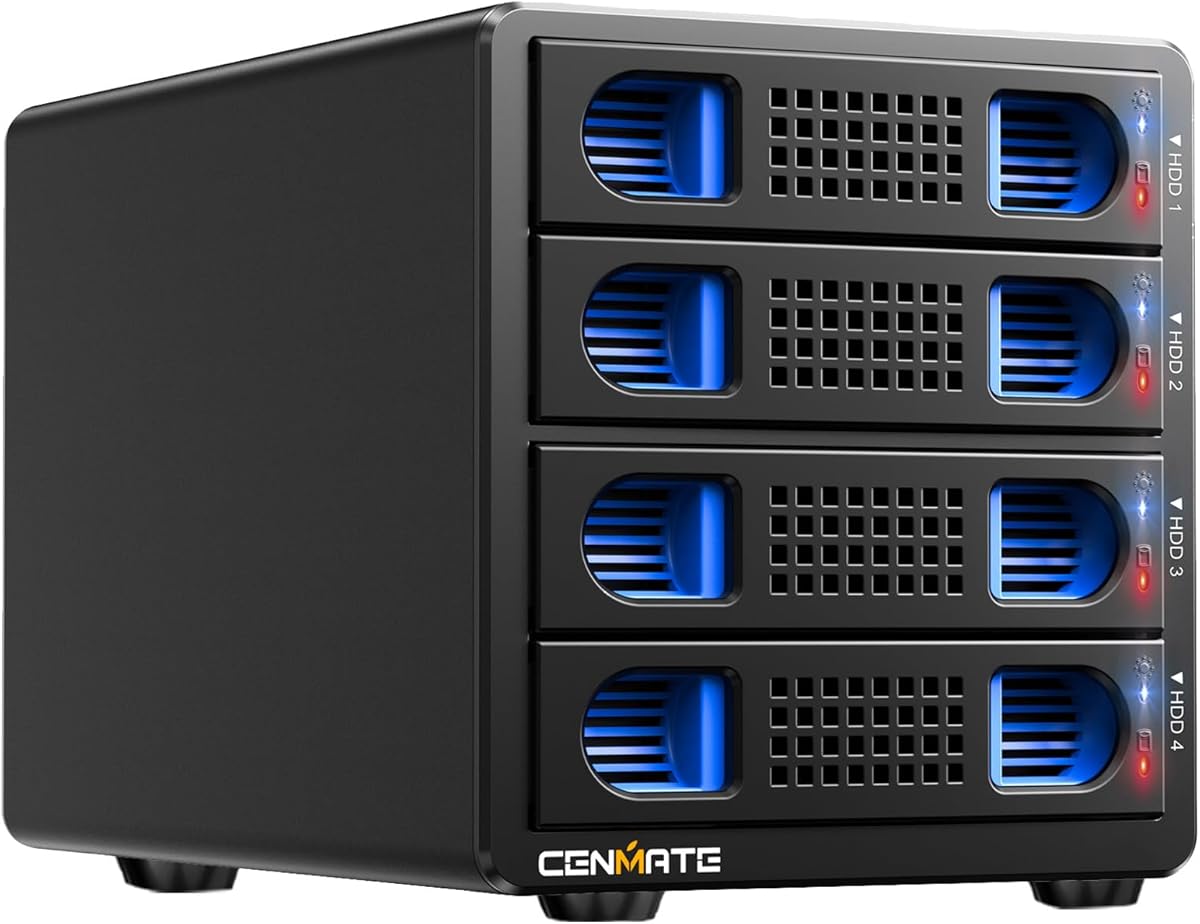
The CENMATE Aluminum 4 Bay Hard Drive Enclosure stands out as a top choice for users needing reliable external storage. With a rating of 4.3 stars it delivers consistent performance for both personal and business use cases effectively.
We may earn a commission when you buy through this link, at no additional cost to you.
Its aluminum alloy construction ensures durability while the built in cooling fan prevents overheating during heavy loads. The USB 3.0 interface supports fast transfers making it ideal for large file movements without latency issues.
While the fan noise is around 40 to 50 decibels it remains acceptable for most environments. The lack of RAID features limits redundancy options but simplifies setup for those needing straightforward DAS storage solutions.
This enclosure is perfect for professionals who value speed and stability over complex configurations. Its plug and play compatibility and robust design make it a recommended pick for expanding desktop storage efficiently.
The aluminum chassis paired with an active fan keeps drives cool during continuous operation ensuring longevity and stable performance under load.
Tool free trays allow you to swap drives quickly without powering down which enhances workflow efficiency during data migration tasks.
We may earn a commission when you buy through this link, at no additional cost to you.
The CENMATE 10Gbps variant offers a significant speed boost over standard USB 3.0 models making it ideal for professionals handling massive datasets. It maintains the same solid build quality while doubling the theoretical bandwidth for faster file transfers.
We may earn a commission when you buy through this link, at no additional cost to you.
Read and write speeds can reach impressive levels when paired with compatible drives. The hot swappable design allows you to replace drives on the fly which is crucial for servers or workstations that cannot afford downtime during maintenance.
As with other models in this line the fan noise might be noticeable in quiet rooms. However the cooling efficiency is excellent ensuring that high speed transfers do not cause thermal throttling during intensive operations.
Buyers seeking maximum throughput without RAID complexity will find this enclosure compelling. It bridges the gap between consumer and prosumer storage needs with a reliable design and robust connectivity options.
USB 3.2 Gen 2 support enables up to 10Gbps transfers significantly reducing wait times for large video or backup files.
The USB Type-C port supports Thunderbolt 3 and 4 connections ensuring future proof compatibility with modern laptops and desktops.
We may earn a commission when you buy through this link, at no additional cost to you.
The MAIWO 4 Bay enclosure delivers solid features at a competitive price point making it attractive for budget conscious users. Its intelligent cooling system activates only when needed which helps save energy while protecting drive health effectively.
We may earn a commission when you buy through this link, at no additional cost to you.
Daisy chaining allows you to connect multiple enclosures for extensive storage expansion without needing extra ports. The HD-TV port adds a unique twist enabling direct video output for multimedia presentations or entertainment setups at home.
While the overall rating is lower due to mixed user experiences the specifications are robust. The fan noise can be intrusive in quiet spaces which might deter users seeking silent operation for home office environments specifically.
If cost is a primary concern this unit offers excellent value with high capacity support and modern connectivity. It is best suited for users who need expandable storage without breaking the bank.
Fans activate automatically at 48 degrees Celsius ensuring drives stay cool only when necessary for better energy efficiency and less noise.
The HD-TV port supports 4K output allowing direct connection to displays for seamless video playback without needing a separate computer.
We may earn a commission when you buy through this link, at no additional cost to you.
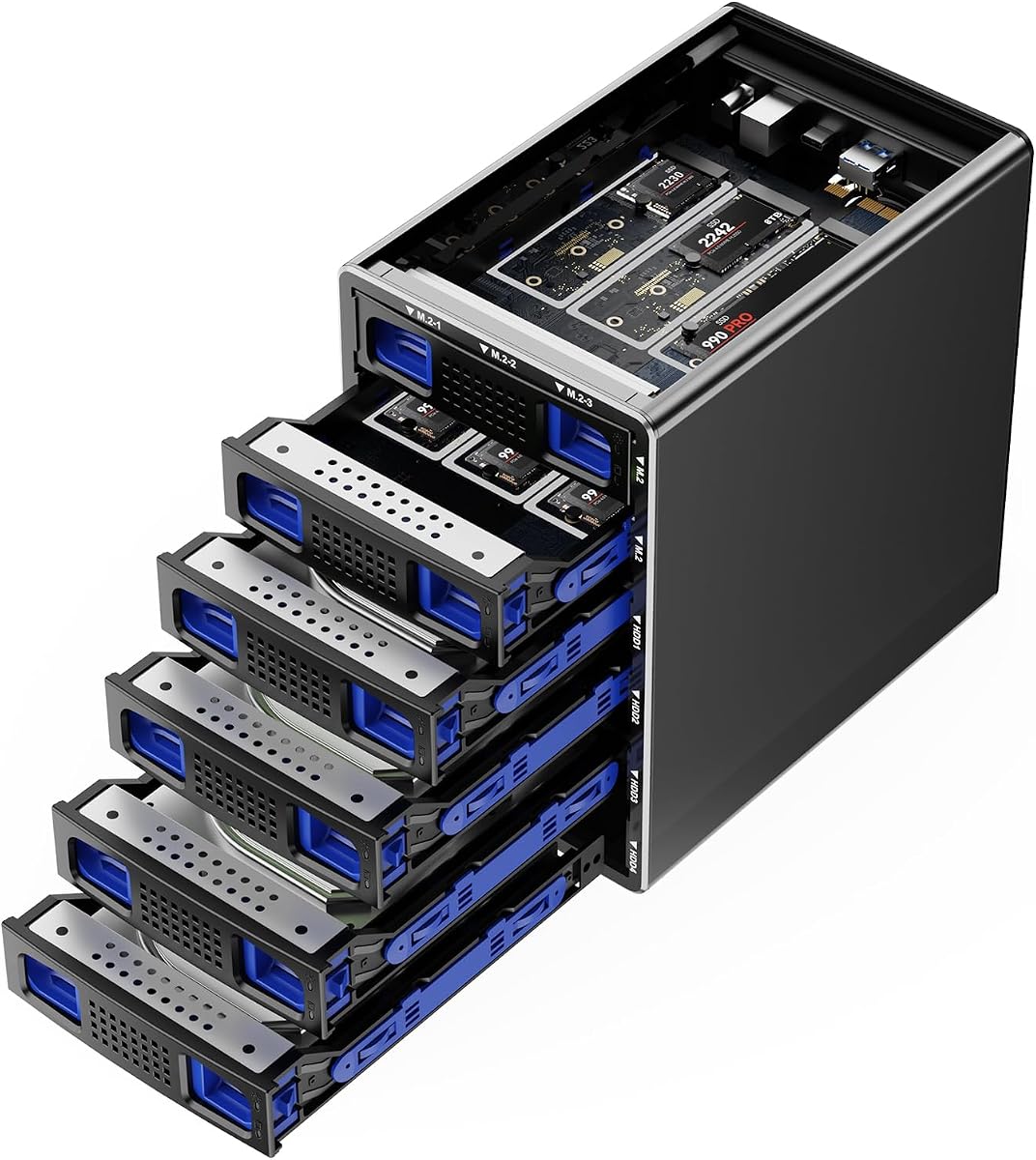
The CENMATE Hybrid enclosure is a powerhouse designed for users who need both high capacity HDD storage and fast NVMe SSD performance. It uniquely combines four SATA bays with six M.2 slots allowing flexible data management strategies.
We may earn a commission when you buy through this link, at no additional cost to you.
With support for up to 136TB total capacity it is ideal for content creators and professionals managing extensive media libraries. The USB 3.2 Gen 2 interface ensures that even when running multiple drives the speed remains consistent and reliable.
While the cost is higher than standard enclosures the added versatility justifies the investment for advanced users. Silent fans provide necessary cooling without adding noise which is beneficial for quiet studios or offices where sound matters.
This unit is recommended for power users requiring maximum flexibility and capacity. If you need a single device to handle both archival storage and active project files this hybrid solution offers unmatched convenience.
By supporting both SATA HDDs and NVMe SSDs you can optimize storage for both capacity and speed within one unified enclosure.
Accommodating up to 22TB per SATA drive and 8TB per M.2 SSD allows for extensive data retention without needing multiple enclosures.
We may earn a commission when you buy through this link, at no additional cost to you.
The WAVLINK 4-Bay enclosure distinguishes itself with a dedicated HDMI port enabling direct connection to displays for 4K video playback. This feature transforms the unit into a mini media server capable of streaming content directly to a TV or monitor.
We may earn a commission when you buy through this link, at no additional cost to you.
It supports up to 88TB capacity using high capacity drives and includes dual fans that activate at 48 degrees to maintain optimal operating temperatures. The independent power switches per bay allow precise control over each drive independently.
Users should ensure their host USB-C port supports video output to utilize the HDMI feature effectively. While the fan noise is present it serves a critical role in preventing overheating during continuous media streaming sessions.
This model is perfect for home theater enthusiasts or video editors who need quick access to large media files. The combination of storage and display output makes it a versatile addition to any entertainment or creative workspace setup.
The HDMI interface supports 4K resolution allowing you to play videos directly from the drives without routing through a computer.
Independent switches for each bay mean you can power down specific drives when not in use saving energy and reducing wear.
We may earn a commission when you buy through this link, at no additional cost to you.
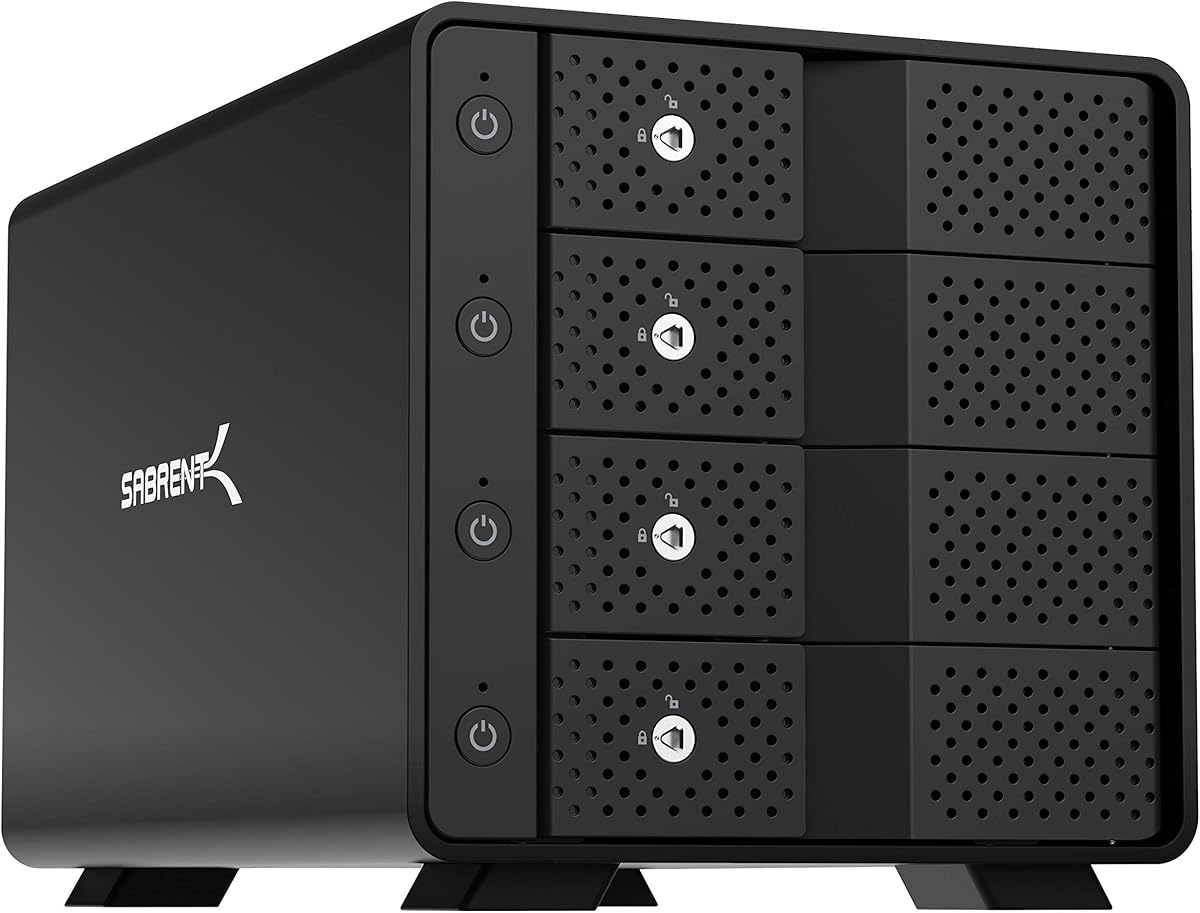
The SABRENT USB 3.0 4-Bay docking station is designed specifically for 2.5 inch drives making it compact and space efficient. It offers a straightforward solution for users who primarily use laptops drives or smaller SSDs for portable storage needs.
We may earn a commission when you buy through this link, at no additional cost to you.
Its whisper quiet fan is a standout feature ensuring minimal disruption during operation which is ideal for shared workspaces or home offices. The magnetic cover allows quick access to drives without tools simplifying daily swapping routines effectively.
While it lacks USB-C support the USB 3.0 speed is sufficient for most general tasks. The limitation to 2.5 inch drives means it is not suitable for standard desktop 3.5 inch HDDs but perfect for laptop storage backups.
For those prioritizing quiet operation and compact size this dock is an excellent choice. Its strong rating reflects reliability and ease of use making it a trusted option for personal and professional backup workflows.
Designed for 2.5 inch drives the unit saves valuable desk space while offering robust cooling for smaller form factor storage.
The whisper quiet fan ensures that noise levels remain low even during continuous operation which is ideal for quiet environments.
We may earn a commission when you buy through this link, at no additional cost to you.
The CENMATE eSATA enclosure provides flexibility by supporting both USB and eSATA connections which is useful for older systems. This dual interface capability allows users to integrate the unit into various setups depending on available ports on their computer.
We may earn a commission when you buy through this link, at no additional cost to you.
It supports up to 80TB capacity ensuring ample space for extensive archives. The aluminum chassis works with the fan to keep drives cool during heavy file transfers maintaining consistent performance over long periods of use.
Users should note that hot swapping is not supported on this model requiring a shutdown before drive changes. Additionally the eSATA port functionality depends on the host system supporting RAID which may limit its usability for some users.
This unit is a strong contender for those who need connectivity versatility without compromising on storage space. Its robust build and cooling system make it a reliable choice for long term data management solutions.
Having both USB and eSATA options ensures compatibility with a wider range of computers and peripherals for flexible setups.
Supporting up to 80TB across four bays makes this enclosure ideal for long term storage of large media and project files.
We may earn a commission when you buy through this link, at no additional cost to you.
The WAVLINK 128TB enclosure pushes the boundaries of external storage capacity allowing up to 32TB drives per bay for a total of 128TB. This makes it an ideal solution for businesses and creatives managing petabytes of data over time.
We may earn a commission when you buy through this link, at no additional cost to you.
It features 10Gbps USB 3.2 connectivity ensuring that large datasets can be moved quickly. The inclusion of an HDMI port adds versatility for direct video playback which is useful for reviewing footage without needing a PC.
While the upfront investment is significant the capacity per dollar is competitive when using high capacity drives. The independent switches for each bay allow you to manage power consumption efficiently by powering down unused drives when idle.
For users requiring vast storage in a single unit this model offers unmatched scalability. Its robust build and cooling features ensure that the drives operate safely even under continuous workloads typical of professional environments.
With support for up to 32TB per drive this enclosure provides a scalable path to massive storage without complex RAID setups.
Independent power switches per bay allow you to minimize energy usage by powering down drives that are not currently needed.
We may earn a commission when you buy through this link, at no additional cost to you.
The CENMATE RAID enclosure introduces hardware RAID modes allowing users to prioritize speed or redundancy based on their needs. This adds a layer of data safety that standard DAS enclosures lack making it suitable for business environments where data loss is risky.
We may earn a commission when you buy through this link, at no additional cost to you.
It supports up to 80TB capacity and features eight RAID configurations including RAID 0 1 3 5 and 10. The aluminum chassis and active fan ensure that drives remain cool during intense calculations which is common with RAID rebuilding or syncing.
Configuring RAID requires careful setup and switching modes may involve a reset process which could be daunting for less technical users. Additionally the lack of hot swap support means you must power down to change drives which is a slight inconvenience.
For those needing basic data redundancy without investing in a full NAS system this unit offers a cost effective middle ground. It delivers essential protection and storage in a single package for small teams or power users.
Hardware RAID support allows users to choose between speed mirroring or parity protection to suit specific data safety needs.
The aluminum chassis paired with an active fan maintains safe operating temperatures even during complex RAID calculations.
We may earn a commission when you buy through this link, at no additional cost to you.
The SABRENT USB-C enclosure uses independent controllers for each bay ensuring that every drive has its own stable connection. This reduces bottlenecks and improves reliability making it ideal for critical data environments where consistent performance is expected.
We may earn a commission when you buy through this link, at no additional cost to you.
Its aluminum and metal housing is designed for durability while the active fan ensures safe operation during long hours of use. The Kensington lock slot adds a layer of physical security which is valuable for office or shared workspace environments.
While the price is higher than many competitors the build quality and controller design justify the cost for professional users. It supports up to 80TB capacity and offers a robust solution for storing large datasets reliably.
This model is best suited for professionals who prioritize stability and build over simple plug and play setups. If you need a durable high performance dock that can withstand daily heavy use this enclosure delivers excellent results.
Each bay has its own controller ensuring that one drive issue does not affect others while providing stable reliable connections.
The included Kensington lock slot allows you to physically secure the unit to a desk preventing theft in shared environments.
We may earn a commission when you buy through this link, at no additional cost to you.
Selecting the right enclosure involves evaluating several critical factors to ensure performance and reliability meet your specific needs.
The interface type determines how fast you can transfer data to your computer. USB 3.0 offers 5Gbps while USB 3.2 Gen 2 provides up to 10Gbps. For large video files or frequent backups a faster interface significantly reduces wait times and improves workflow efficiency. Ensure your computer has compatible ports to utilize the full speed potential.
Look for USB-C or eSATA options if you need future proof connectivity or backward compatibility with older systems.
Check the maximum supported capacity per drive and total enclosure capacity. Most 4 bay units support drives up to 20TB or 32TB each allowing for terabytes of total storage. Confirm compatibility with both 2.5 and 3.5 inch drives to ensure your existing hardware fits without needing extra adapters.
Higher capacity support ensures you can scale your storage needs over time without replacing the enclosure frequently.
Active cooling fans are essential for 4 bay enclosures to prevent overheating during extended use. Look for units with temperature controlled fans that activate only when necessary to balance noise and cooling. Aluminum chassis materials also aid in passive heat dissipation keeping internal temperatures stable.
Effective cooling prolongs drive life and prevents data loss due to thermal throttling during heavy loads.
Hot swapping allows you to replace drives without powering down the enclosure which is crucial for servers or workstations that require uptime. Not all enclosures support this feature so check the product specifications carefully. This functionality enhances workflow efficiency during maintenance or data migration tasks.
Ensure the enclosure supports hot swapping if you need to change drives frequently while the system remains active.
An aluminum or metal chassis provides better protection against physical damage and helps dissipate heat more effectively than plastic. Sturdy construction ensures the enclosure can withstand daily handling and potential impacts. Look for tool free designs that simplify installation and maintenance without risking damage to components.
Durable materials reduce wear and tear over time ensuring a longer lifespan for your investment.
Some enclosures offer hardware RAID modes providing data redundancy or speed improvements. If data safety is a priority consider a model with RAID 1 or 5 support. However standard DAS units are simpler and avoid the complexity of RAID configurations for most users.
Choose RAID support only if you need built-in redundancy without a full NAS system.
A dedicated power adapter ensures stable power delivery to all drives preventing corruption during surges. External adapters rated for high capacity drives help maintain performance and protect hardware. Internal power sharing units may struggle with multiple large drives so verify wattage requirements.
Reliable power management prevents unexpected shutdowns and ensures consistent drive performance.
Features like HDMI ports allow direct video output making the enclosure a mini media server. USB hubs or daisy chain support increase versatility by allowing more peripherals. Consider what extra connectivity options fit your specific workspace or entertainment setup needs.
Extra features can transform a simple storage unit into a more functional workstation component.
Begin by installing your hard drives into the bays using the tool free trays if available. Ensure each drive is securely seated to avoid connection errors during operation. Connect the power adapter first followed by the USB or eSATA cable to your computer for proper initialization.
After connecting verify that the operating system recognizes all drives through the file manager or disk utility. Configure any desired drive settings or RAID modes according to your needs ensuring all data is backed up before changing configurations. Allow the cooling fan to run freely to maintain optimal temperature levels.
Regularly dust the vents to prevent airflow blockage and ensure the fans function efficiently. If the unit is not in use for extended periods power it down properly to save energy and reduce wear. Periodic checks on drive health can prevent unexpected failures and extend the lifespan of your setup.
Most modern enclosures are plug and play and do not require special drivers. They work out of the box with Windows macOS and Linux for basic file storage. However some RAID or advanced features might need specific software tools provided by the manufacturer for full configuration.
Yes most 4 bay enclosures support both 3.5 and 2.5 inch SATA drives simultaneously. You may need mounting brackets for 2.5 inch drives to fit them securely in the bays. Always check the product specifications for specific compatibility notes before purchasing.
Overheating usually results from blocked vents or a failing fan. Ensure the enclosure sits in a well ventilated area away from walls or other devices. Clean dust from the fans regularly and consider adding an external fan if the built-in system struggles under heavy load.
Many models are designed for 24/7 use but it depends on the cooling and build quality. Look for units explicitly rated for continuous operation with reliable power supplies. Ensure the fan is functioning properly to prevent heat buildup during long periods of activity.
Hot swapping can affect data integrity if drives are removed improperly during active transfers. Always use the safe eject function in your operating system before removing a drive to ensure data is fully written. Follow manufacturer guidelines to avoid corruption or hardware damage during swaps.
Yes most enclosures are compatible with Macs using USB or USB-C connections. However Macs may require reformatting drives to APFS or ExFAT for native support. Check the product details for macOS compatibility to ensure seamless integration with your system.
We have reviewed ten top models offering a range of features from high speed USB-C to RAID support. Each enclosure provides unique benefits tailored to different storage needs and budgets ensuring there is a solution for everyone.
Prioritize connection speed cooling efficiency and build quality when making your decision to ensure long term reliability. Consider how much capacity you need now and in the future to avoid needing frequent upgrades.
Remember that prices and availability change frequently so check current deals before purchasing. Investing in a quality enclosure protects your valuable data and enhances your overall computing experience significantly.