
TP-Link 1 to 2
4.6Editor score
Compact aluminum housing
Two active ports
Includes power cable
This guide compares the top ten internet splitter models for reliable multi-device connectivity and fast network expansion across home and office environments.
Finding the right internet splitter is essential for expanding your network without running new cables. A quality device ensures stable connections for multiple gadgets while maintaining high-speed data transfer rates.
We evaluated ten leading models based on port count, build quality, and compatibility with modern ethernet standards. Our analysis focuses on devices that deliver reliable performance without complex setup requirements.
Each pick highlights specific strengths like port density or power efficiency. Note that pricing fluctuates frequently so always check current listings before making a purchase decision for your setup.
4.6Editor score

4.7Editor score

4.4Editor score
The following table offers a side-by-side view of the ten selected models. Each entry includes key specifications to help you compare port counts, transmission speeds, and physical designs quickly.

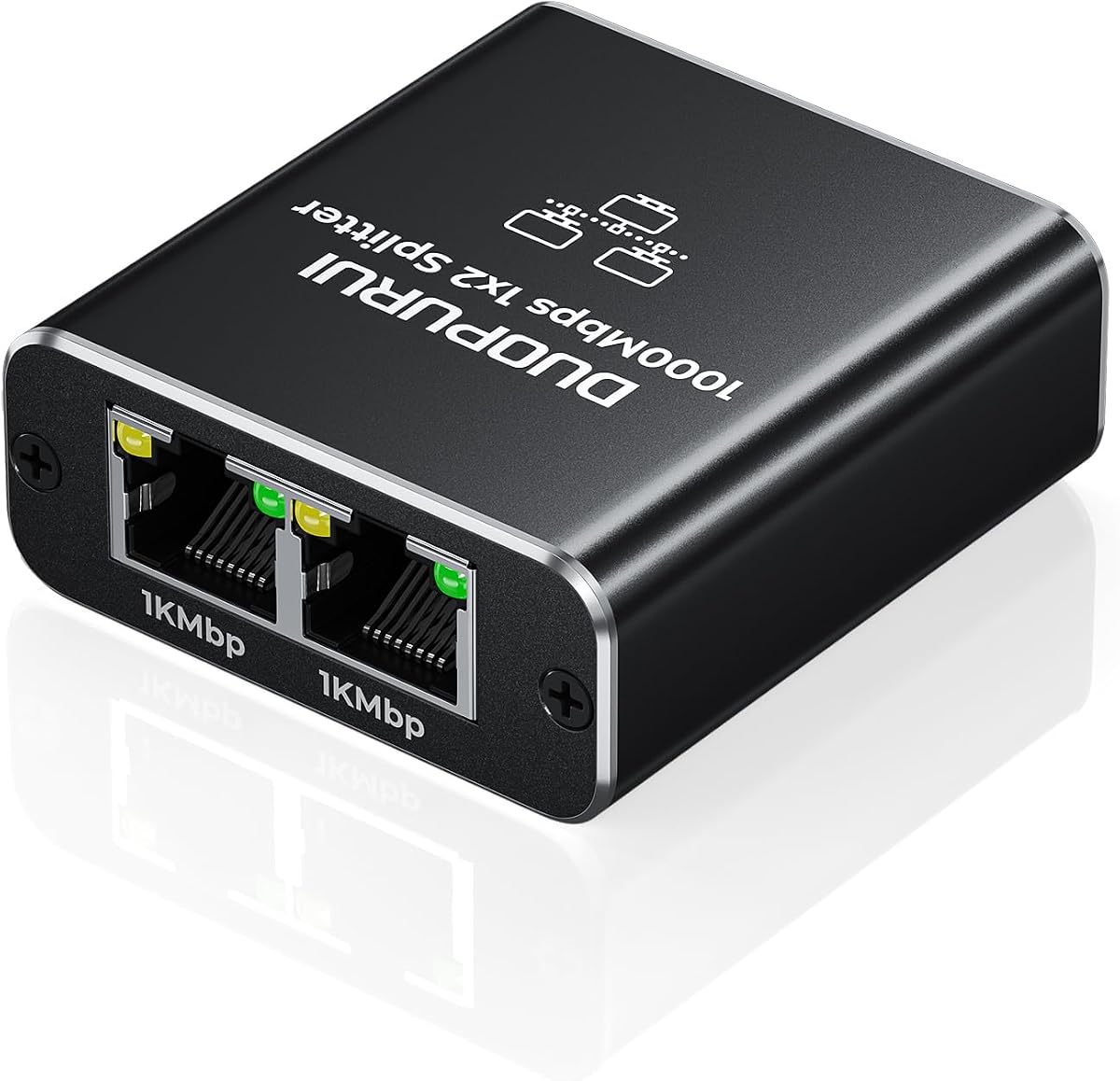


This gigabit ethernet splitter offers a straightforward way to expand one network port into two. With a rating of 4.3 stars it stands out for its ability to handle high-speed data transfer up to 1000 Mbps.
We may earn a commission when you buy through this link, at no additional cost to you.
The device features an aluminium alloy casing that protects internal components while aiding heat dissipation. Six LED indicators provide clear visibility on which connected devices are actively running which simplifies troubleshooting.
You must connect a USB power source for it to work which adds a minor setup step. However the stable transmission and simultaneous dual-device support make the requirement worthwhile for consistent performance.
Ideal for home offices needing extra ports without switches it fits well with Cat 5 through Cat 8 cables. This model delivers reliable connectivity for streaming and general browsing tasks.
Both output ports work at once allowing two devices to connect without switching cables or losing signal.
The metal housing and gold-plated pins ensure long-lasting durability and consistent signal quality over time.
We may earn a commission when you buy through this link, at no additional cost to you.
Ranked second with a 4.7 rating this TP-Link switch acts as a robust internet splitter solution for expanding five connections from one source. It is highly rated for reliability and energy efficiency.
We may earn a commission when you buy through this link, at no additional cost to you.
The fanless metal design ensures silent operation while protecting against physical damage. Advanced traffic optimization features allow prioritizing video or voice data to maintain smooth performance during heavy usage.
It requires no software configuration and supports auto negotiation for easy device detection. The 3-year warranty adds significant value and peace of mind for long-term network infrastructure planning.
Best for users needing multiple wired connections this model handles gaming and streaming loads well. Its sturdy build and energy efficiency make it a top choice for offices and homes.
Innovative power management reduces consumption based on link status and cable length to save money.
Shielded ports protect against interference ensuring stable data transfer even in crowded electronic environments.
We may earn a commission when you buy through this link, at no additional cost to you.
This model secures the third spot with a 4.6 rating offering a budget-friendly way to split one ethernet port into two active connections. It supports up to 1000 Mbps total bandwidth effectively.
We may earn a commission when you buy through this link, at no additional cost to you.
TP-Link adheres to a cybersecurity pledge ensuring security is built into the design. The compact aluminum housing makes it easy to place behind TVs or carry in laptop bags for travel.
While bandwidth is shared between devices the stability remains high for most standard internet tasks. It comes with a USB power cable and ethernet cable so you can set it up immediately.
Best for travelers or small offices needing quick port expansion without buying a full switch. The price point and security features make it a strong contender for cost-conscious buyers.
The device is built with security as a core requirement aligning with industry standards for safer networking.
Lightweight and small enough to fit in travel bags making it ideal for temporary network setups.
We may earn a commission when you buy through this link, at no additional cost to you.
This splitter supports up to 1000 Mbps transmission rates for both connected devices simultaneously. It is designed to solve port shortages efficiently with an alloy shell that ensures durable long-term use.
We may earn a commission when you buy through this link, at no additional cost to you.
The internal circuit board focuses on stable signal transmission even in complex network scenarios. You get a 3.3FT USB power cable included but using a dedicated adapter is recommended for stability.
Installation is straightforward with no drivers needed to get started. It works with all common cable types from Cat 5 to Cat 8 making it highly versatile for different setups.
Ideal for users needing a simple plug-and-play solution for two devices. The anti-jamming capabilities and durable build provide peace of mind for consistent daily connectivity.
Supports 1000Mbps rates for smooth handling of 4K video and large file transfers without lag.
No software installation required allowing you to connect and start using the network instantly.
We may earn a commission when you buy through this link, at no additional cost to you.
This premium option connects one port to four devices offering maximum expansion in a compact unit. With a 4.4 rating it is valued for its ability to handle fast data transfers for gaming and streaming.
We may earn a commission when you buy through this link, at no additional cost to you.
It includes a Cat 6 LAN cable which simplifies the setup process significantly. The lightweight design allows for easy portability making it perfect for travel or rotating office needs.
While bandwidth is shared across four devices the high-speed capacity ensures adequate performance for standard tasks. The USB power requirement is manageable given the convenience of four connections.
Best for offices needing to connect multiple wired devices from a single source. The included cable and premium build quality justify the higher price point for many users.
Four ports allow simultaneous connections for multiple computers or consoles without needing a full switch.
Comes with a Cat 6 LAN cable so you can start using it right out of the box.
We may earn a commission when you buy through this link, at no additional cost to you.
This splitter features four output ports to expand your wired network connections quickly. It supports data transfer speeds up to 1000Mbps ensuring reliable connectivity for multiple devices at once.
We may earn a commission when you buy through this link, at no additional cost to you.
The USB-C power cable included adds reliability to the operation without needing complex adapters. It fits all major cable types making it compatible with existing Cat 5 to Cat 8 setups.
No configuration is required as it is a plug-and-play device ready to use immediately. This simplicity makes it ideal for users who want to expand connections without technical hurdles.
Best for home offices needing multiple wired ports from a single wall outlet. The speed and port count offer a solid balance between utility and ease of use.
Four ports allow connecting more devices simultaneously reducing cable clutter and complexity.
Works with Cat 5 to Cat 8 cables ensuring it fits most modern and legacy network setups.
We may earn a commission when you buy through this link, at no additional cost to you.
This adapter lets you expand one port into two with speeds up to 1000Mbps. Rated 4.3 stars it includes a Cat 6 cable for immediate use and features LED indicators for port status.
We may earn a commission when you buy through this link, at no additional cost to you.
The upgraded transmission chip ensures stable connectivity without compromising on speed. Lightweight plastic housing helps with heat dissipation while keeping the device easy to handle and install.
It is designed to be plug and play requiring no complex configuration steps. The nickel-plated jacks contribute to stable signal transmission which is vital for uninterrupted access.
Best for those needing a simple and quick dual-port expansion. The included cable and clear status lights make it a convenient option for home networks.
Clear LEDs display the working status of each port to help troubleshoot connection issues easily.
Upgraded chips ensure high-speed connectivity even when multiple devices share the connection.
We may earn a commission when you buy through this link, at no additional cost to you.
This mini splitter supports three devices sharing a single line which is perfect for limited cable runs. It has a 4.5 rating and features an aluminum body that aids heat dissipation and durability.
We may earn a commission when you buy through this link, at no additional cost to you.
The compact size allows it to fit easily into laptop bags for travel. It supports high-speed transfer rates ensuring stable connections for devices like gaming consoles and smart TVs.
LEDs on the device help you identify which devices are active at any time. It requires a power source to work but the setup remains simple for most users.
Best for home and hotel use where you need to split a single connection into three. The metal build and portability make it a strong option for flexible networking.
Allows three devices to connect simultaneously so you can share a single line effectively.
Lightweight aluminum construction ensures durability while keeping the device small enough to carry.
We may earn a commission when you buy through this link, at no additional cost to you.
This splitter allows three devices to share a single line efficiently. With a 4.5 rating it offers stable data transfer rates up to 1000Mbps for reliable network performance across multiple users.
We may earn a commission when you buy through this link, at no additional cost to you.
The high-quality aluminum material provides durability and efficient heat dissipation. It works with most standard ethernet cables ensuring flexibility across different network environments.
While bandwidth is shared the setup is plug-and-play requiring no configuration. The compact design makes it convenient for home office or industrial use where extra ports are needed.
Best for users needing three connections from one source without buying a full switch. The speed and stability make it a practical solution for consistent connectivity.
Ensures reliable data transfer up to 1000Mbps for smooth performance across connected devices.
Lightweight and portable design allows for easy transport and flexible placement in any room.
We may earn a commission when you buy through this link, at no additional cost to you.
This splitter splits one gigabit network into two allowing both to reach 1000Mbps. Rated 4.5 stars it features a space grey design that fits well in modern setups without looking out of place.
We may earn a commission when you buy through this link, at no additional cost to you.
Built with aluminum alloy and gold-plated pins it ensures no signal crosstalk or interference. The eco-friendly PCB adds to its durability making it a reliable choice for data transfer.
It requires a 5V power connection which is standard for this type of device. The compact form factor makes it easy to carry in a laptop bag for business trips.
Best for users needing fast consistent transfer for two devices. The build quality and design make it a solid option for both home and business environments.
Aluminum alloy and gold-plated pins ensure fast and stable transmission speeds without signal loss.
Small and lightweight enough to be easily carried in a laptop bag for travel use.
We may earn a commission when you buy through this link, at no additional cost to you.
Selecting the right internet splitter requires understanding port needs, speed capabilities, and build quality. This guide outlines the key factors to help you choose a device that fits your specific network environment.
First determine how many devices you need to connect simultaneously. Models range from 1 to 2 up to 1 to 4 outputs. Choosing the correct count prevents overspending on unnecessary ports while ensuring all gadgets stay connected.
Focus on a model that matches your current device count plus a small buffer for future growth.
Look for gigabit ethernet support that handles speeds up to 1000 Mbps. High-speed transmission is vital for streaming and gaming. Ensure the device supports backward compatibility with older cables if needed.
Prioritize models explicitly stating 1000 Mbps support to avoid bandwidth bottlenecks.
Most splitters require external power via USB to function. Check if the package includes the cable and verify the voltage requirements. Some may need a dedicated adapter instead of a laptop port.
Choose a splitter that matches your available power sources for uninterrupted operation.
Aluminium alloy housings offer better heat dissipation and durability than plastic. Metal designs protect the internal PCB and ensure stable performance over time. This is crucial for devices used daily.
Opt for metal or high-quality plastic shells to ensure long-term reliability.
Ensure the splitter works with your existing cable types like Cat 5e or Cat 8. Universal compatibility prevents issues when you already have specific cables installed. Check for support across standard RJ45 connections.
Verify it supports your cable category to guarantee stable and fast connections.
Look for plug-and-play devices that do not require software drivers. Simple setup reduces frustration and saves time. Devices with LED indicators help troubleshoot connection status quickly without complex tools.
Pick a model that requires no configuration to get started immediately.
Understand that bandwidth is often shared among connected devices. If you have multiple heavy users, consider a switch instead. However for general browsing a splitter works well for sharing a single line.
Review if the device shares total bandwidth so you manage expectations correctly.
If you need to move the splitter, check its size and weight. Compact designs fit in laptop bags for hotel or office use. Lightweight devices are easier to manage when switching locations frequently.
Select a portable unit if you travel often for work or remote setups.
Begin by connecting one end of an ethernet cable to your router or wall port. Plug the other end into the input port on the splitter. Ensure the connection is snug to avoid loose signal issues.
Connect a second ethernet cable from an output port to your device like a PC or console. Verify that the device shows a connected network status. Repeat for additional ports if available.
For power, plug the included USB cable into the splitter and a power source. If the device has lights, confirm they are on to show it is active. Keep the device in a well-ventilated spot.
A splitter reduces multiple ports to fewer inputs and requires power to duplicate the signal. A switch adds more ports and manages data traffic independently without needing external power. Both expand connectivity but switches offer better traffic management.
High-quality splitters maintain up to 1000 Mbps speeds if supported by the input source. Bandwidth is shared across connected devices so multiple users might see slightly reduced rates. Choose a gigabit model to minimize impact.
Most splitters are designed for router connections rather than direct modem use. Connecting to a modem can sometimes cause configuration issues depending on your ISP. It is safer to plug the splitter into a router.
Yes active splitters require a USB power source to duplicate the signal properly. Without power the signal will not reach all output ports effectively. Always check the voltage requirements before buying.
Use ethernet cables like Cat 5e or Cat 6 that match your internet speed. These cables support high-speed transfers and fit standard RJ45 ports. Older cables may limit performance to lower rates.
Yes but ensure the device supports gigabit speeds for low latency. Gaming requires consistent bandwidth so a stable splitter helps avoid lag. Connect your console directly to an output port for best results.
You generally should not cascade splitters as it degrades signal quality. For many ports use a switch instead which handles multiple connections better. Cascading increases complexity and lowers stability.
Most durable splitters last several years if kept in a cool dry place. Metal housings protect against wear and tear better than plastic. Proper ventilation extends the lifespan of the internal circuitry.
We have reviewed ten top models offering port counts from two to four with varying build qualities. Whether you need a basic dual-port option or a premium four-port expansion there is a fit for every setup.
Prioritize gigabit speeds and aluminum build materials to ensure stable and long-lasting performance. Check power requirements to confirm your setup can support the device without extra adapters.
Prices and availability change frequently so check the provided links for the latest listings. Select the model that matches your specific port needs and budget for optimal network expansion.