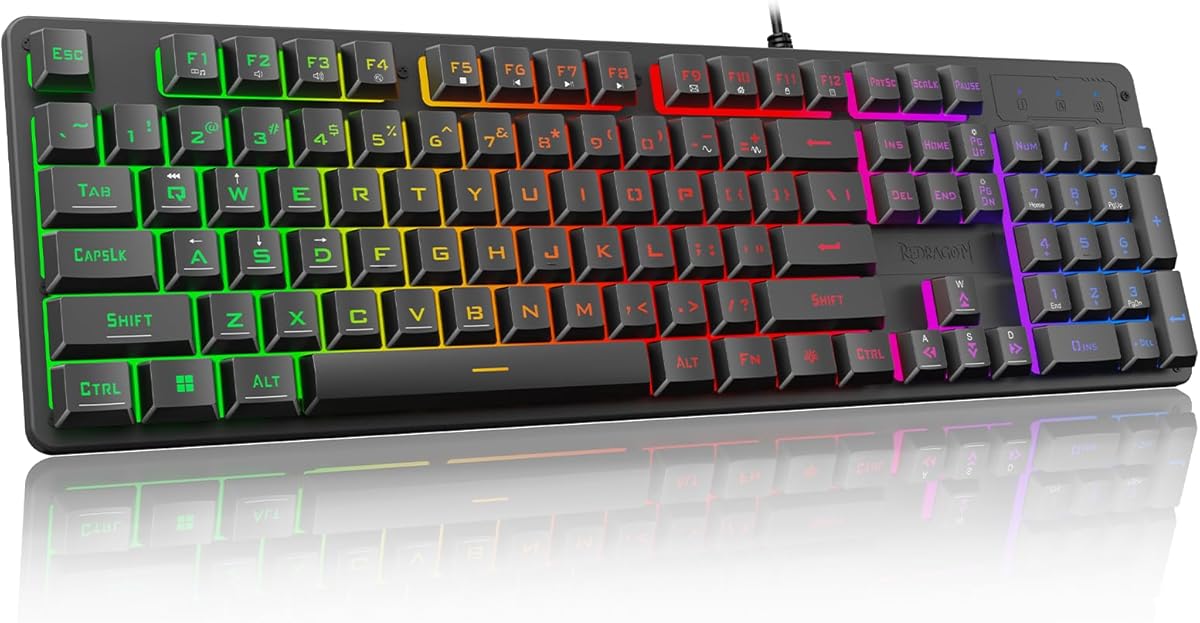
Redragon K521 Upgrade Rainbow LED Gaming Keyboard
4.4Editor score
Mechanical feeling keys
19 key anti-ghosting
Rainbow LED backlight
This guide compares the best keyboard for Rainbow Six Siege to help players find the right speed and comfort for tactical shooting games.
Finding the right keyboard for Rainbow Six Siege is essential for tactical precision and rapid response during intense multiplayer matches. Players need reliable input devices that support quick key presses and macro programming for operator abilities and utility deployment.
We evaluated ten top gaming keyboards based on switch type, response time, build quality, and compatibility with competitive gaming setups. Our analysis focuses on models that offer low latency, durable switches, and features that enhance performance in fast-paced FPS environments.
Each selection highlights specific strengths such as budget value, premium build, or specialized features like rapid trigger and magnetic switches. Prices and availability may change so check current listings before purchasing to ensure you get the best deal available today.
4.4Editor score

4.6Editor score

4.6Editor score
Compare these ten keyboards side by side to find the right balance of speed, durability, and features for Rainbow Six Siege gameplay.



The AULA F75 Pro stands out as a top choice for players seeking a high-quality mechanical keyboard with versatile connectivity. With a 4.6 rating, it offers a compact 75% layout that saves desk space while maintaining essential keys for competitive play.
We may earn a commission when you buy through this link, at no additional cost to you.
Its tri-mode connection supports Bluetooth 5.0, 2.4GHz wireless, and USB wired options allowing seamless switching between devices. The hot-swappable design lets users replace switches without soldering making it easy to tailor the keyboard to personal preferences.
While the price is higher than budget options, the premium features justify the cost for serious gamers. The side-engraved PBT keycaps and multi-function knob add both durability and intuitive control over media and lighting settings.
This keyboard is ideal for players who value customization and performance. It delivers reliable input and a tactile experience that enhances gameplay in Rainbow Six Siege and other tactical shooters.
Hot-swap support and tri-mode connection allow flexible use across devices and switch preferences.
Side-engraved PBT keycaps and robust construction ensure long-term reliability and stylish appearance.
We may earn a commission when you buy through this link, at no additional cost to you.
The Redragon K521 offers excellent value for budget-conscious gamers seeking a keyboard with mechanical feel. With a 4.4 rating it provides fast key response and anti-ghosting to ensure accurate inputs during intense gaming sessions.
We may earn a commission when you buy through this link, at no additional cost to you.
Its rainbow LED lighting enhances visual appeal while the one-touch brightness control simplifies customization. The 19-key anti-ghosting feature prevents missed keypresses and the 12 multimedia keys add convenience for media control.
Though it lacks true mechanical switches the keyboard still delivers satisfying feedback for competitive play. The plug-and-play design ensures easy setup without drivers making it accessible for all users.
This model is perfect for beginners or those on a tight budget who want reliable performance. It balances cost and functionality well making it a solid choice for Rainbow Six Siege players.
Mechanical feel and anti-ghosting provide responsive gameplay at an affordable price point.
Multimedia keys and customizable lighting enhance user experience without complex setup.
We may earn a commission when you buy through this link, at no additional cost to you.
The ASUS ROG Strix Scope II 96 Wireless delivers top-tier performance for players seeking a premium mechanical keyboard. Its 4.6 rating reflects exceptional build quality, versatile connectivity, and customizable features that enhance competitive gaming.
We may earn a commission when you buy through this link, at no additional cost to you.
The 96% layout provides full-size functionality in a compact form saving desk space while retaining the number pad. Tri-mode connectivity and hot-swappable switches allow flexibility for device switching and switch customization.
Sound-dampening foam and pre-lubed switches improve acoustics making typing and gaming quieter. The ergonomic design includes tilt adjustments and a detachable wrist rest for comfort during extended sessions.
This keyboard is ideal for enthusiasts willing to invest in quality and performance. It combines premium features with reliable input to support precise gameplay in Rainbow Six Siege.
The 96% layout balances space efficiency with full functionality for versatile use.
Hot-swappable switches and tri-mode connectivity offer extensive flexibility for setup and use.
We may earn a commission when you buy through this link, at no additional cost to you.
The ASUS ROG Strix Scope II X is a full-size mechanical keyboard designed for durability and customization. With a 4.5 rating it offers hot-swappable switches and premium PBT keycaps for a reliable typing and gaming experience.
We may earn a commission when you buy through this link, at no additional cost to you.
Its wired USB-C connection ensures stable low-latency input ideal for competitive gameplay. The sound-dampening foam and V2 switches improve acoustics reducing unwanted noise during intense sessions.
The ergonomic design with tilt adjustments and wrist rest supports comfort during long gaming marathons. Full-size layout includes a number pad for productivity and gaming flexibility.
This keyboard is suited for players who prioritize build quality and input reliability. Its premium features make it a strong choice for those investing in a high-end setup.
PBT keycaps and V2 switches provide long-lasting performance with consistent tactile feedback.
Adjustable tilt and wrist rest enhance comfort for extended gaming sessions.
We may earn a commission when you buy through this link, at no additional cost to you.
The Razer BlackWidow V4 X delivers rapid input performance with yellow linear switches optimized for speed. A 4.5 rating highlights its responsive design and Chroma RGB customization for immersive gameplay.
We may earn a commission when you buy through this link, at no additional cost to you.
Six dedicated macro keys allow easy access to complex commands and shortcuts. The multi-function roller and secondary media keys provide intuitive control over volume and lighting settings.
Doubleshot ABS keycaps ensure legends remain clear despite extensive use. Improved acoustics reduce noise while maintaining satisfying feedback for competitive play.
This keyboard suits players seeking fast response and extensive customization. Its features support precise inputs and personalization for enhanced performance in tactical shooters.
Linear switches offer instant actuation for quick inputs in fast-paced gaming.
Macro keys and media roller enhance convenience and flexibility for various tasks.
We may earn a commission when you buy through this link, at no additional cost to you.
The Aula WIN60 HE features advanced Hall effect magnetic switches delivering ultra-fast response times. A 4.5 rating reflects its competitive edge with 8000Hz polling and rapid trigger mode for precise gameplay.
We may earn a commission when you buy through this link, at no additional cost to you.
Adjustable actuation and rapid trigger enable quicker peeking and shooting actions. The 60% layout saves desk space and the web-based driver simplifies customization without bulky software.
RGB lighting and compact design enhance portability and aesthetics. The magnetic switches eliminate wear and tear for consistent performance over time.
This keyboard is perfect for competitive players seeking minimal latency. Its specialized features support high-speed inputs and precision in tactical shooters like Rainbow Six Siege.
Hall effect switches and rapid trigger ensure lightning-fast response for competitive advantage.
The 60% layout maximizes desk space while retaining essential gaming functionality.
We may earn a commission when you buy through this link, at no additional cost to you.
The Corsair K55 RGB PRO provides reliable performance with six dedicated macro keys and dynamic RGB lighting. A 4.4 rating highlights its balance of features and affordability for gaming setups.
We may earn a commission when you buy through this link, at no additional cost to you.
iCUE software enables customization of lighting effects and macro programming. The IP42 spill-resistant design protects against accidental damage ensuring durability during intense sessions.
Detachable palm rest and media keys add comfort and convenience. While not mechanical the membrane switches offer consistent input for casual and competitive play.
This keyboard is ideal for players wanting macros and RGB without high cost. It supports essential gaming features and reliable input for tactical shooters.
Six macro keys and dynamic RGB lighting enhance customization and visual appeal.
IP42 rating and palm rest protect against spills and improve long-session comfort.
We may earn a commission when you buy through this link, at no additional cost to you.
The SteelSeries Apex 3 offers quiet operation with whisper quiet gaming switches ideal for shared spaces. A 4.6 rating reflects its reliable performance and RGB illumination for gaming aesthetics.
We may earn a commission when you buy through this link, at no additional cost to you.
10-zone RGB lighting allows color customization and the magnetic wrist rest provides palm support. Water resistance protects against spills and multimedia controls simplify media management.
Though it uses membrane switches the keyboard delivers consistent input and durability. It suits players valuing quiet operation and essential features.
This keyboard is great for gamers needing reliability and comfort. It balances performance and value well for casual and competitive setups.
Whisper quiet switches ensure silent operation without sacrificing input consistency.
Magnetic wrist rest and media controls enhance convenience and ergonomics.
We may earn a commission when you buy through this link, at no additional cost to you.
The Razer Ornata V3 features low-profile keys and mecha-membrane switches for comfortable long-term use. A 4.5 rating highlights its blend of mechanical feedback and ergonomic design.
We may earn a commission when you buy through this link, at no additional cost to you.
UV-coated keycaps resist wear and the magnetic wrist rest supports comfort. Dedicated media keys enhance convenience and the slim profile suits compact setups.
While lacking full mechanical switches the keyboard offers precise and satisfying input. It balances durability and comfort for extended gaming sessions.
This keyboard is ideal for players seeking ergonomic design and reliable performance. It delivers consistent input and features well suited for competitive play.
Low-profile keys and magnetic rest reduce strain during long gameplay sessions.
UV-coated keycaps ensure resistance to wear and tear over time.
We may earn a commission when you buy through this link, at no additional cost to you.
The Logitech G413 TKL SE offers tactile mechanical switches in a space-saving tenkeyless layout. A 4.6 rating reflects its durable PBT keycaps and premium aluminum top for reliable performance.
We may earn a commission when you buy through this link, at no additional cost to you.
Six-key rollover ensures accurate inputs during complex commands. Dedicated media keys provide quick access to volume and playback controls while the body design minimizes flex.
Though it lacks RGB customization the keyboard delivers consistent input and build quality. It suits players valuing simplicity and tactile feedback.
This keyboard is great for gamers seeking essential mechanical performance. It provides reliable and durable input for tactical shooters and general use.
PBT keycaps and tactile switches ensure long-lasting consistent feedback.
Tenkeyless design maximizes desk space without sacrificing essential gaming keys.
We may earn a commission when you buy through this link, at no additional cost to you.
Choosing the right keyboard involves considering switch type, response speed, and build quality to match your gameplay style.
Mechanical switches provide tactile feedback and durability ideal for competitive gaming. Linear switches offer smooth keystrokes while tactile switches give feedback for precise inputs.
Look for switches that suit your preference for sound and feel to minimize fatigue.
Low latency and high polling rates ensure quick key registration essential for fast-paced gameplay. Aim for keyboards with 1000Hz polling or higher to reduce input lag.
Higher polling rates can improve responsiveness in critical moments during matches.
TKL or 60% layouts save desk space while full-size options include a number pad for versatility. Choose a size that fits your workspace and gaming setup needs.
Compact layouts enhance mouse movement area which benefits aiming and positioning.
Materials like PBT keycaps and aluminum top plates improve longevity and resistance to wear. Sturdy construction ensures consistent performance over time.
Invest in keyboards with durable materials to avoid frequent replacements.
Programmable macro keys allow quick access to operator abilities and commands. Software support enables RGB customization and key remapping.
Select a keyboard that offers flexibility for personalizing your gaming workflow.
Wired connections offer stability and low latency while wireless provides flexibility. Some keyboards support multi-mode connectivity for device switching.
Ensure the connection type aligns with your setup to avoid interference.
Features like wrist rests and adjustable tilt reduce hand strain during long sessions. Comfortable design helps maintain focus and performance.
Prioritize keyboards that support healthy hand positioning.
Prices vary widely so determine your spending limit and prioritize essential features. Budget options offer basic performance while premium models add customization.
Balance cost with performance needs to find the best value.
Familiarize yourself with all keys and programmable features to maximize in-game efficiency. Practice key combinations regularly to build muscle memory for operator abilities.
Keep the keyboard clean by gently removing dust and debris with a soft brush or compressed air. Avoid spills and moisture to prevent internal damage.
Store the keyboard in a dry environment when not in use and inspect cables periodically for wear. Proper care extends the lifespan and maintains consistent performance.
Linear mechanical switches are often preferred for smooth keystrokes and rapid inputs. However, tactile switches can provide feedback for precise key activation. Choose based on personal comfort and speed needs.
Mechanical keyboards generally offer better durability and response times. While not mandatory, they provide consistent input that supports competitive play. High-quality membrane keyboards can also suffice for some players.
Macro keys enable quick execution of operator abilities or complex commands without multiple keystrokes. This streamlines gameplay and improves reaction times during critical moments.
Modern wireless keyboards with low-latency technology can perform comparably to wired models. Ensure the connection is stable and the battery is charged to avoid interruptions.
TKL or 60% layouts provide more mouse space and are popular among gamers. Full-size keyboards offer additional keys but may limit movement area.
Choose linear or silent switches and consider keyboards with built-in dampening. Using a wrist rest can also help minimize noise from excessive key movement.
RGB lights do not directly affect performance but help with key visibility and customization. They enhance setup aesthetics and personalization.
Clean your keyboard monthly to remove dust and debris that can affect key function. Regular maintenance ensures optimal performance and longevity.
The ten keyboards reviewed offer a range of options suited for different budgets and performance needs. Top picks like the AULA F75 Pro and ASUS ROG Strix Scope II 96 deliver premium features.
Prioritize switch type, layout, and build quality based on your play style and workspace. Reliable input and comfort are essential for competitive success.
Prices and availability change frequently so check current listings for the best deals. Select a keyboard that aligns with your goals and setup requirements.