
Thrustmaster T-Flight Hotas X
4.5Editor score
Ergonomic hand rest design
Detachable throttle for flexibility
High precision adjustable resistance
Discover the top Hotas or Joystick for Elite Dangerous controllers. This guide compares features, ergonomics, and controls to find the best flight simulation
Finding the right Hotas or Joystick for Elite Dangerous transforms your space combat experience. These controllers offer precise handling and immersive flight simulation dynamics. A good setup enhances your ability to maneuver ships and manage systems efficiently during intense battles.
We compared ten leading controllers based on build quality, programmable controls, and sensor accuracy. Our analysis covers options ranging from entry-level sticks to premium military-grade systems. Each product was evaluated for its compatibility with Elite Dangerous and overall flight simulation performance.
Each pick highlights key strengths and ideal user scenarios to help you decide. Note that availability and specifications may vary over time as manufacturers update their product lines. Check current listings for the most up-to-date details before making your final purchase decision today.
4.5Editor score

4.0Editor score
4.6Editor score
This comparison table lists all ten selected controllers side by side. It highlights essential specifications like axes count, button programmability, and compatibility features to help you quickly identify which model fits your specific flight simulation needs and desk space constraints effectively.



The Logitech G X56 H.O.T.A.S stands out as a top tier controller for space flight sims. With 189 programmable controls, it offers extensive customization for Elite Dangerous. Its 16-bit sensors ensure smooth input handling during complex maneuvers.
We may earn a commission when you buy through this link, at no additional cost to you.
This controller features twin throttles with adjustable friction, allowing fine control over thrust. The mini analog stick control surfaces enable separate management of gimballed weapons. RGB backlighting helps identify buttons quickly in dark cockpit setups.
While the build quality is high, the reliance on software can be a slight inconvenience initially. The cable length is standard at two meters which may limit positioning for some users. However these trade-offs are acceptable given the performance.
Pilots seeking deep control over ship systems will find this HOTAS ideal. It bridges the gap between consumer joysticks and professional simulation gear effectively. We recommend it for serious Elite Dangerous enthusiasts wanting maximum input flexibility.
The 16-bit aileron and elevator axes with hall-effect sensors provide consistent accurate input without wear over time.
Mini analog sticks on the throttle allow independent control of pitch roll and yaw alongside weapon systems.
We may earn a commission when you buy through this link, at no additional cost to you.
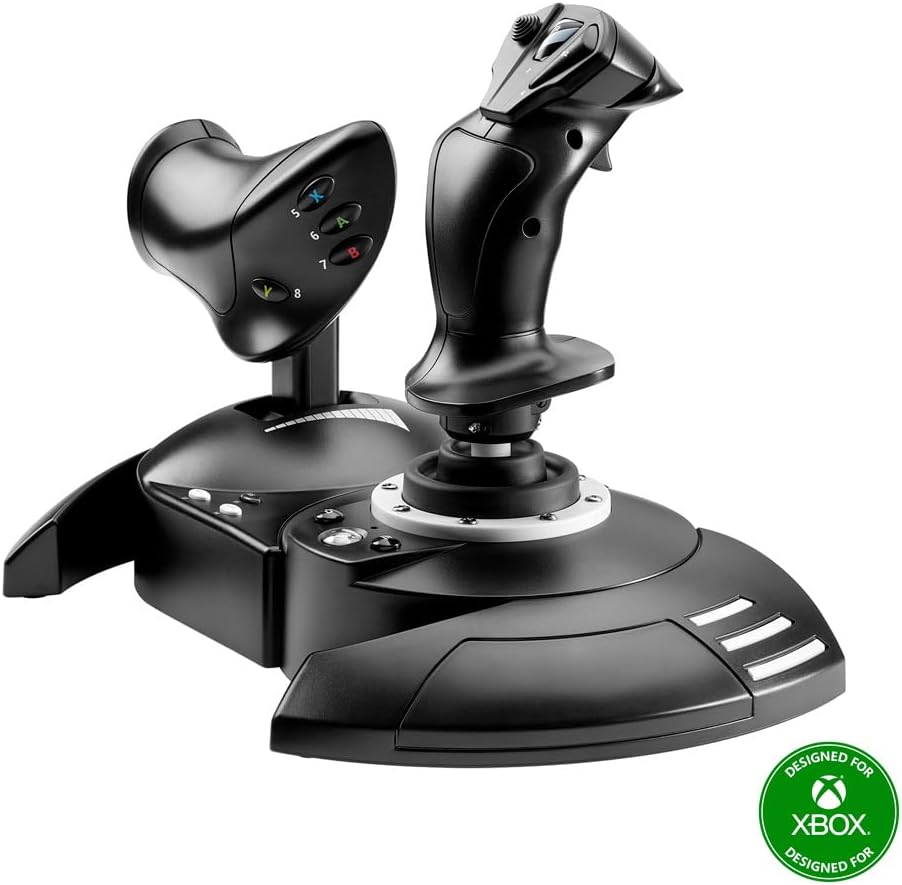
The Thrustmaster T-Flight Hotas X offers an accessible entry point into flight simulation. It features a comfortable hand rest and real-size throttle for natural hand positioning. Preconfigured controls mean you can start flying immediately without complex setup.
We may earn a commission when you buy through this link, at no additional cost to you.
Its detachable throttle allows flexible desktop or lap mounting. The adjustable resistance dial lets you tune stick tension to your preference. A weighted base ensures stability during intense dogfighting sessions in Elite Dangerous.
While it lacks the button count of premium models, it covers essential functions well. The plastic construction is durable but feels lighter than metal alternatives. This is acceptable for the price point and target audience.
Beginners or casual pilots will appreciate the ease of use and comfort. It provides a solid foundation for learning flight mechanics without overwhelming complexity. We recommend it for those prioritizing ergonomics and simplicity over extreme customization.
Separate the throttle to create your ideal cockpit mount or keep them connected for compact desktop use.
Plug and play design saves custom programming in built-in memory even when disconnected for your next mission.
We may earn a commission when you buy through this link, at no additional cost to you.
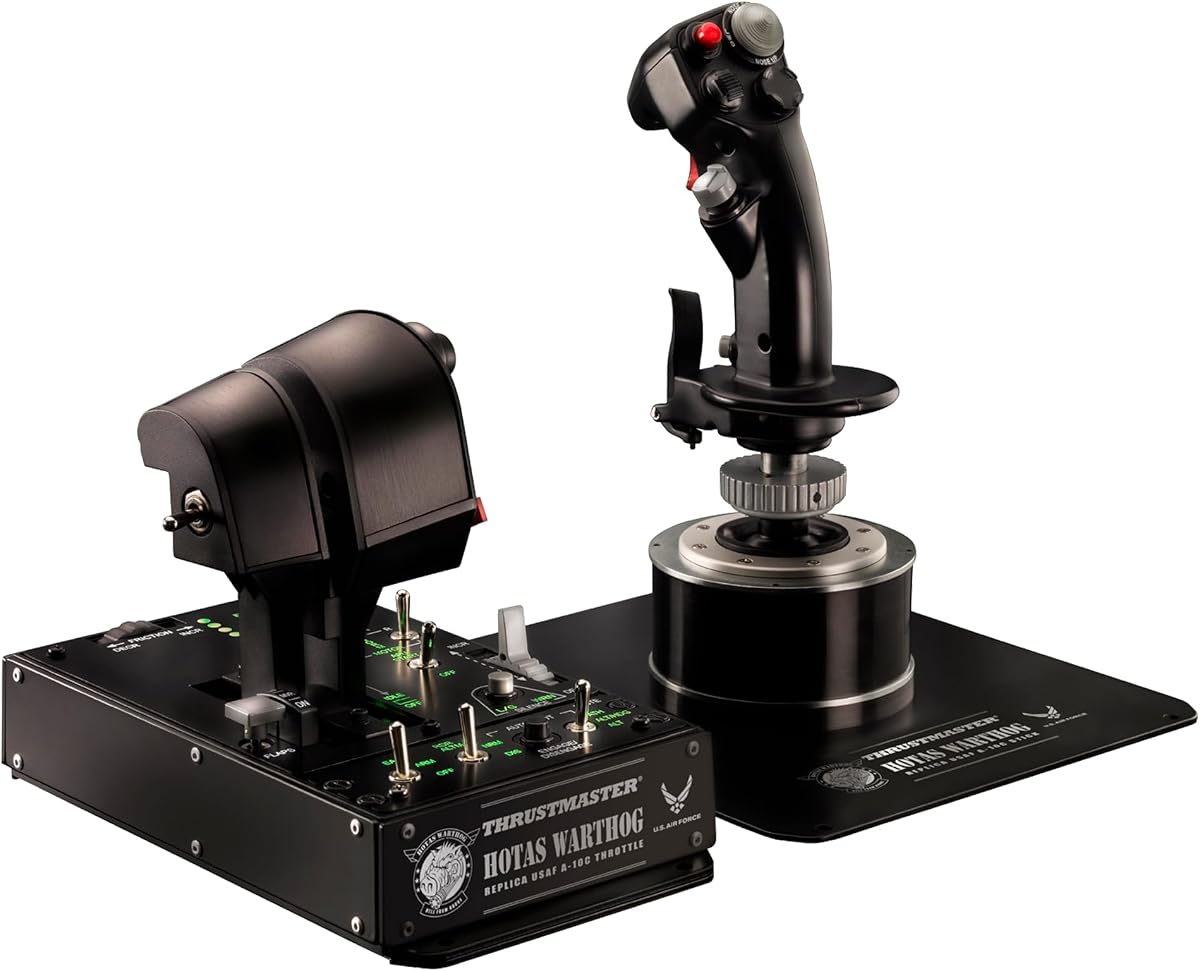
The Thrustmaster HOTAS Warthog is a benchmark for realism in flight simulation. As a 1:1 replica of the U.S. Air Force A-10C controls, it delivers authentic military-grade precision. The all-metal construction ensures exceptional durability and a premium weighted feel.
We may earn a commission when you buy through this link, at no additional cost to you.
Its dual throttle system allows independent control of each engine, vital for advanced flight sims. H.E.A.R.T. sensors provide 16-bit resolution per axis ensuring zero drift over time. The 55 fully programmable buttons offer deep customization for complex missions.
The sheer weight and size of this controller might limit desk space suitability. The price reflects its professional build but may be steep for casual users. However serious pilots will find the investment worthwhile for the realism.
This HOTAS transforms your desk into an immersive cockpit environment. It is ideal for users who value tactile feedback and military-style control layouts. We recommend it for advanced sim pilots seeking unmatched control and reliability.
Built almost entirely from metal, the Warthog withstands intense use while maintaining precise sensor performance over years.
Dual throttle levers allow you to manage each engine separately for realistic aircraft behavior and damage simulation.
We may earn a commission when you buy through this link, at no additional cost to you.
This bundle combines the Logitech G X56 HOTAS with Pro Flight Rudder Pedals for a complete simulation experience. It adds critical yaw control essential for realistic aircraft and ship handling. The pedals feature smooth self-centering and adjustable tension.
We may earn a commission when you buy through this link, at no additional cost to you.
The X56 base offers 189 programmable controls and twin throttles. Adding the rudder completes your control suite allowing full movement manipulation without keyboard reliance. The toe brakes deliver full control for runway stand and tight maneuvers.
Managing the extra hardware and cables can complicate setup in smaller rooms. The combined cost is higher than buying individual components. But for serious simmers, having a coordinated system is a major advantage.
Pilots wanting a full cockpit feel will appreciate this comprehensive package. It ensures all parts work seamlessly together out of the box. We recommend it for those ready to invest in a total flight simulation solution.
Adding rudder pedals gives you precise yaw input essential for landing and complex atmospheric flight maneuvers.
Differential toe brakes allow independent control of each wheel for realistic taxiing and runway positioning.
We may earn a commission when you buy through this link, at no additional cost to you.
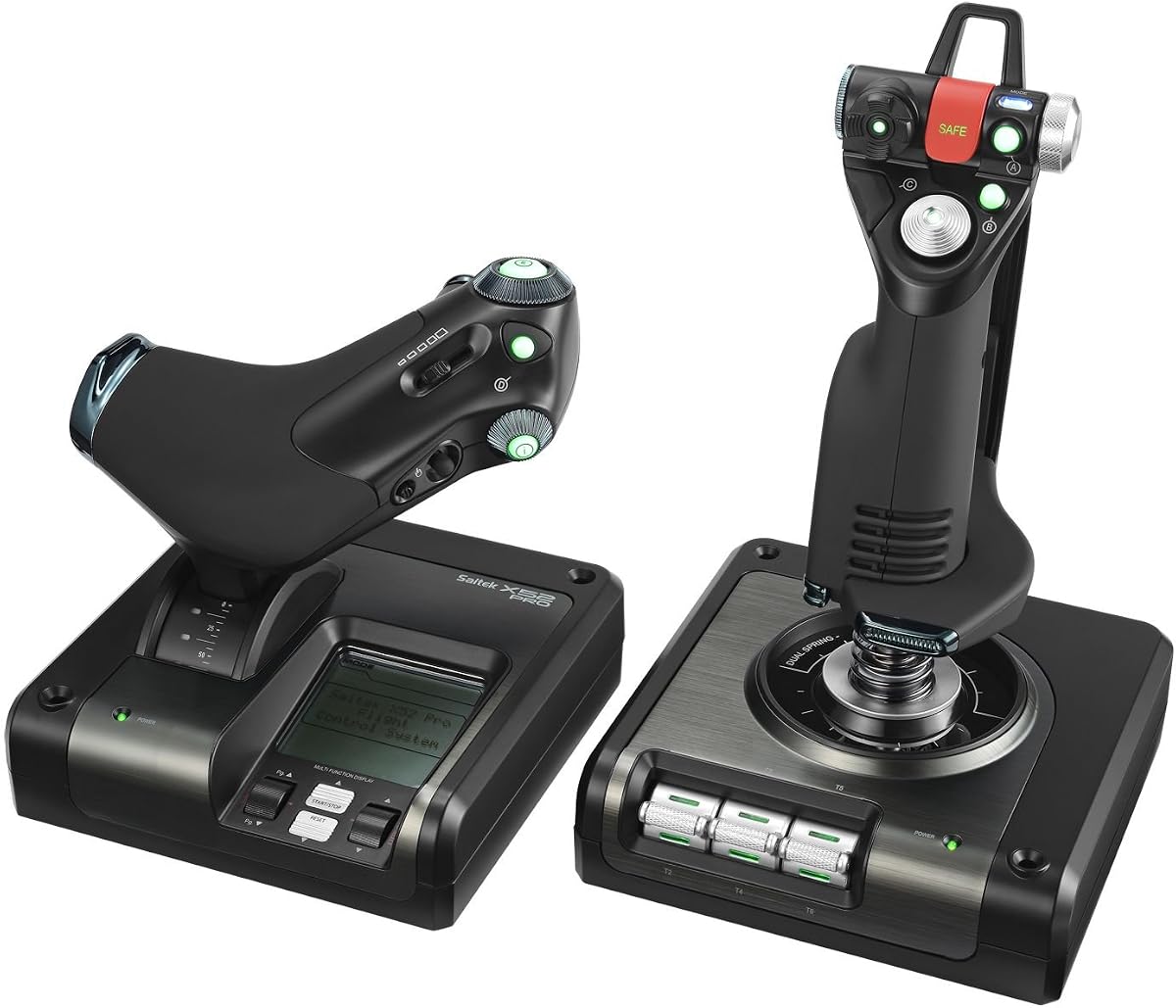
The Logitech G X52 offers a compact integrated design with a standout LCD display. This screen lets you check programmed commands before activating them. It also includes a built-in clock for timing flight plans. The magnetic non-contact axes enhance longevity.
We may earn a commission when you buy through this link, at no additional cost to you.
With 282 programmable commands over three modes, you can map complex Elite Dangerous controls. The 5-position grip system maintains ergonomic comfort without stretching to reach buttons. 3D twist with rudder lock prevents accidental activation if you have pedals.
The integrated throttle lacks some flexibility of detachable units. It is an older design which may lack newer RGB features. Still the LCD feedback and sensor quality remain top-notch for precise control.
Pilots who value immediate visual feedback will find this system practical. It balances functionality and comfort effectively for daily flight sessions. We recommend it for users wanting a reliable all-in-one solution without complex setup.
The multifunction LCD displays all programmed commands on your HOTAS so you know exactly what each button does.
Magnetic non-contact X and Y axis sensors eliminate mechanical wear for enhanced lifespan and consistent accuracy.
We may earn a commission when you buy through this link, at no additional cost to you.
The Thrustmaster T-Flight Hotas One is designed for versatility across platforms. It connects via USB for instant compatibility with Windows PC and Xbox. The modular design allows the stick and throttle to be used together or separately.
We may earn a commission when you buy through this link, at no additional cost to you.
Its ergonomic flight stick features adjustable resistance and responsive triggers for smooth control. The detachable throttle supports both desk and lap setups. Compatible with TFRP rudder pedals via the S.M.A.R.T. system for expansion.
As an entry-level option, it lacks advanced features like hall effect sensors. The plastic feel is lighter than premium alternatives. However its simplicity and platform support are strong points for multi-device users.
Gamers playing on both console and PC will appreciate the single controller utility. It provides a balanced start for flight simulation enthusiasts. We recommend it for casual pilots seeking easy setup and cross-platform consistency.
Designed for Xbox Series X and S, it offers instant takeoff ready controls without complex configuration steps.
Compatible with Thrustmaster rudder pedals using the S.M.A.R.T. sliding rail for smooth precise steering upgrades.
We may earn a commission when you buy through this link, at no additional cost to you.
This version of the Thrustmaster Warthog includes only the flight stick and throttle base for separate control. It retains the authentic A-10C replica design with metal construction. The H.E.A.R.T. sensors ensure surgical accuracy and zero drift over time.
We may earn a commission when you buy through this link, at no additional cost to you.
With 19 action buttons and multiple hats, it covers essential combat functions. You can customize every axis using free T.A.R.G.E.T. software. The handle weighs over 6 lbs keeping the joystick stable during intense sessions.
Lacking the full throttle unit means you must manage engine inputs elsewhere. The metal build is premium but adds bulk to your setup. However pilots who already have a throttle can save money with this option.
It is ideal for users building a custom cockpit piecemeal. The precision and stability make it a strong centerpiece for advanced setups. We recommend it for pilots seeking high-fidelity stick performance without a full bundle.
The detachable handle crafted entirely from metal delivers a premium weighted feel keeping the joystick rock stable.
19 action buttons three 8-way hats and a metal dual trigger let you map critical functions at your fingertips.
We may earn a commission when you buy through this link, at no additional cost to you.
The Logitech G Saitek X52 Pro builds on the original X52 with enhanced features. It offers illuminated buttons and an LCD display for intuitive control. The progressive throttle includes detents for Afterburner and Idle settings for realistic engine management.
We may earn a commission when you buy through this link, at no additional cost to you.
No-contact technology on x and Y axes ensures constant spring force and precision. The 5-position handle adjustment suits all hand sizes with a soft-touch contoured grip. You can program the controller for each game using powerful smart technology software.
It may lack the modern connectivity of newer units. The reliance on older software drivers can be a hurdle for some. Still its mechanical design and detent features remain highly functional for flight simulation.
Pilots valuing tactile feedback and programmable detents will find it useful. It offers a balanced mix of precision and ergonomics. We recommend it for users who prefer physical feedback over software-heavy configurations.
Progressive throttle with resistance adjustment and detents allows precise control over engine thrust settings like Afterburner.
The 5-position handle adjustment system ensures excellent ergonomic comfort with no need to stretch to reach buttons.
We may earn a commission when you buy through this link, at no additional cost to you.
The Thrustmaster HOTAS Cougar is designed to work seamlessly with existing bases like the Warthog. It shares similar metal durability and Hall Effect sensor precision for consistent accuracy. The dual throttle setup allows independent control of each engine.
We may earn a commission when you buy through this link, at no additional cost to you.
With multiple switches and hats, you can map complex functions easily. Its design aligns with Thrustmaster's ecosystem allowing easy expansion. The metal build ensures it handles intense combat without mechanical wear.
Requires a separate base unit to function which adds to total cost. It is less effective as a standalone solution for new users. However for existing owners it offers a solid upgrade path.
This model is best for those expanding a cockpit incrementally. It ensures compatibility and precision across different control pieces. We recommend it for users already invested in the Thrustmaster platform.
Designed to be fully compatible with HOTAS Cougar bases allowing users to upgrade their setup incrementally over time.
Dual throttle system provides hands-on control over each engine separately ideal for combat aircraft and advanced simulators.
We may earn a commission when you buy through this link, at no additional cost to you.
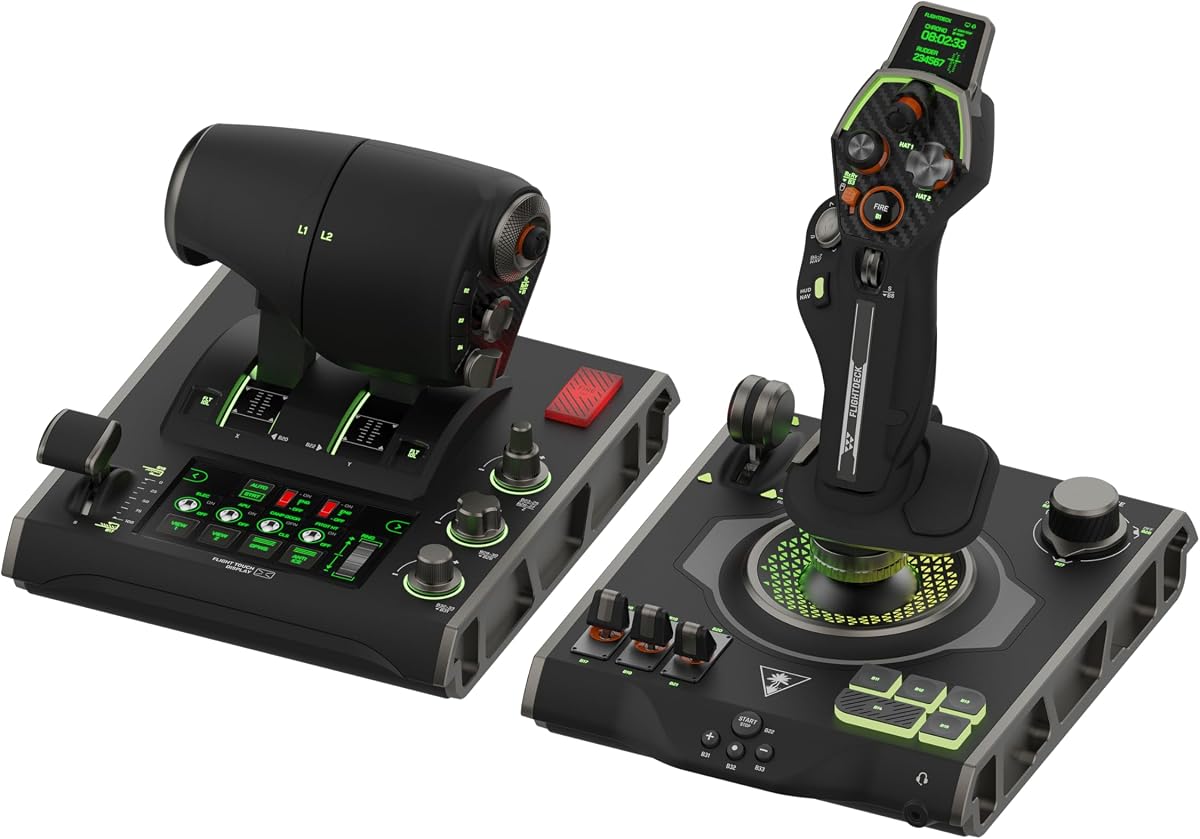
The Turtle Beach VelocityOne Flightdeck introduces an innovative Flight Touch Display for visual feedback. It features contactless Hall-Effect controls for precision and durability. The customizable OLED Head Up Display brings modern tech to flight simulation.
We may earn a commission when you buy through this link, at no additional cost to you.
With 139 programmable buttons, it allows deep system mapping. Adjustable stick height and haptic throttle detents accommodate all hand sizes. Multi-zone RGB lighting and audio enhancements for headsets add immersion.
Being a newer product, software stability may need refinement. The complexity of features can be overwhelming initially. However the display technology sets a new standard for visual integration in controls.
Early adopters who want a unique interface will find this exciting. It aims to reduce keyboard reliance by showing critical info on-screen. We recommend it for users seeking a modern high-tech flight control experience.
The customizable OLED Head Up Display projects critical flight information directly into your line of sight for faster reactions.
139 programmable buttons across the stick and throttle modules allow deep customization for complex mission scenarios.
We may earn a commission when you buy through this link, at no additional cost to you.
Selecting the right controller requires understanding your specific needs and budget. This guide breaks down the key factors to consider when choosing a Hotas or Joystick for Elite Dangerous to ensure a seamless and immersive flight simulation experience.
Hall Effect sensors use magnetic fields to measure position which eliminates physical contact and wear. This technology ensures that your controller maintains precision over years of heavy use. When shopping, look for specifications that mention Hall Effect or non-contact sensors to guarantee long-term accuracy.
Prioritize controllers with Hall Effect or non-contact sensors to prevent drift and ensure consistent performance during long simulation sessions.
Elite Dangerous requires extensive mapping for weapons, engines, and systems. A controller with over 50 programmable buttons gives you flexibility to keep hands on the stick. Check how many axes and buttons the device supports to match your ship configuration.
Choose a controller with at least 50 programmable buttons to accommodate complex ship systems without needing keyboard backups.
You may fly for hours, so comfort is critical. Look for designs with adjustable grips, hand rests, and appropriate weight. The controller should fit your hand size naturally to prevent fatigue. Test the stick tension to ensure it matches your fighting style.
Ensure the controller has an adjustable grip or hand rest to maintain comfort during extended flight sessions.
Some pilots prefer twin throttles for engine control, while others like a single unit. Detachable throttles offer flexible setups for different desk layouts. Verify if the throttle matches your preferred control scheme before purchasing.
Consider whether you need a detachable throttle for flexible desk setups or a fixed unit for simplicity.
Metal builds offer durability and a premium feel but add weight. Plastic is lighter and more affordable. For long-term reliability, check user reviews regarding button durability and structural integrity over time.
Opt for metal construction if durability is a priority, or lighter plastic if portability is more important.
Most controllers require software for customization. Ensure the brand offers reliable tools for mapping buttons. Look for features like profile switching or cloud backups to save your settings easily between sessions.
Verify that the controller software supports profile switching to save and restore your settings easily.
Ensure the controller connects via USB 2.0 or higher for stable data transfer. Some setups require two USB ports for separate stick and throttle units. Check cable length to ensure it reaches your PC comfortably.
Confirm the USB connection type and cable length match your desk setup to avoid extension cord needs.
If you play atmospheric flights, rudder control is essential. Some controllers include built-in twist rudders, while others require separate pedals. Decide if you need integrated rudder or plan to buy pedals later.
Choose a controller with twist rudder or plan to buy rudder pedals for atmospheric flight support.
Start by installing the manufacturer software to calibrate your device. Map your most critical functions like thrust, brakes, and targeting to the stick. Adjust tension dials to match your preference and avoid fatigue during flights.
Regularly clean the joystick and buttons with a dry cloth to remove dust. Store the controller in a dry place to prevent moisture damage. If the unit has cables, check for fraying and replace them if necessary to ensure safety.
Update the device firmware whenever available to improve compatibility. Use the software to save multiple profiles for different ships or roles. Periodically recalibrate axes to ensure accuracy remains consistent over time.
Elite Dangerous works well with most standard joysticks and Hotas systems. The game supports Xinput and DirectInput natively allowing many models to work out of the box. Controllers with many buttons like the X56 or Warthog offer the most control for ship management.
Yes a joystick is sufficient for most gameplay including exploration and combat. It provides precise movement control for pitch and roll. However a Hotas system adds throttle management which is useful for speed control and fuel management.
Only specific models like the Thrustmaster T-Flight Hotas One support Xbox. Most high-end controllers like the Warthog or X56 are PC only. Check the product description to confirm console compatibility before purchasing.
Basic functions work via plug and play but full mapping requires software. This allows you to assign custom commands to buttons. Ensure you download the latest version of the driver from the manufacturer.
Hall Effect sensors use magnetic fields to detect position while optical sensors use light beams. Both are non-contact and durable but Hall Effect is more common in flight sims. Either technology prevents mechanical wear over time.
Use the Windows Game Controllers settings or the manufacturer software to calibrate. Ensure the axes are centered correctly and buttons register when pressed. Recalibrate if you notice drift or unresponsive inputs during flight.
Pedals are optional but help with yaw control in atmospheric flights. Many players use stick twist for rudder. They are useful for realism but not necessary for space flight.
Yes you can connect multiple USB devices as long as your PC has enough ports. Use USB hubs if needed. Ensure each controller has its own unique mapping to avoid conflicts.
We highlighted top picks like the X56 for extensive buttons and the Warthog for durability. Budget options like the T-Flight Hotas X provide solid performance without breaking the bank. Each model offers unique advantages depending on your specific simulation needs.
Prioritize sensor quality and button count for the best flight experience. Ensure the build quality matches your usage frequency and budget. Consider ergonomics carefully to maintain comfort during long mission sessions.
Prices and availability change frequently so verify current listings before buying. Check for warranty terms to ensure long-term support. Choose the controller that aligns best with your personal flight style and setup constraints.