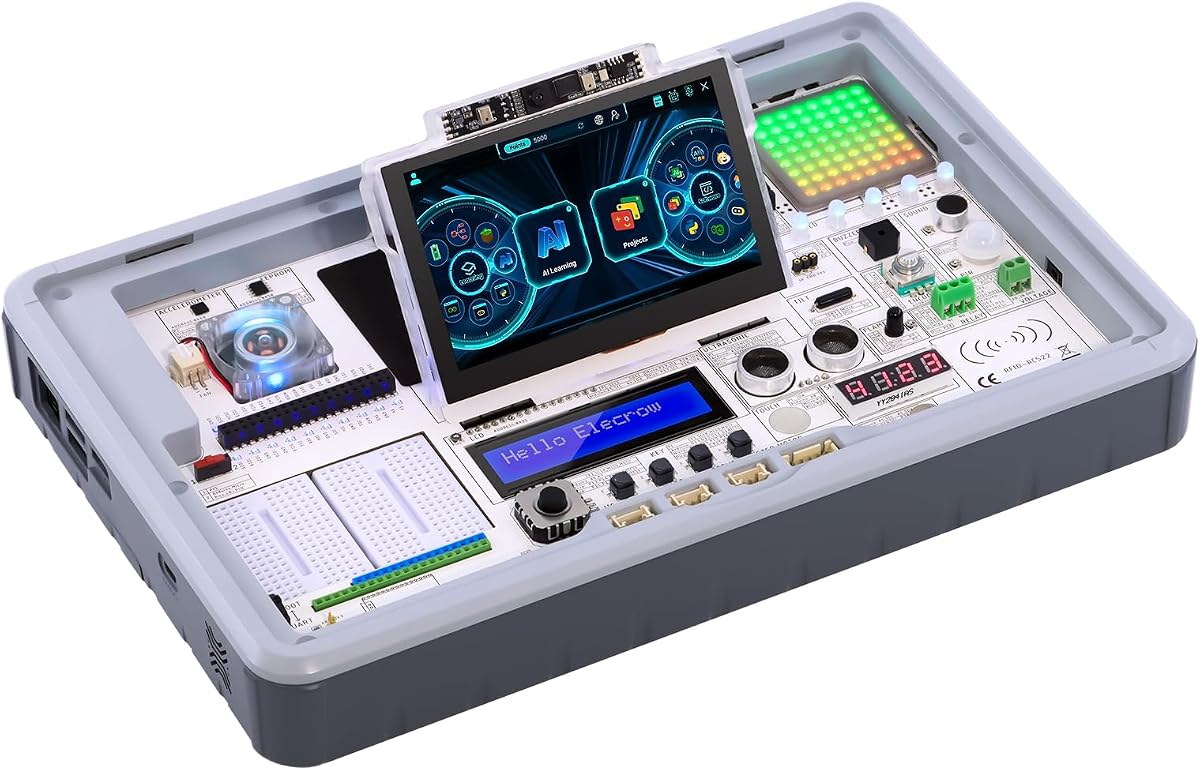
ELECROW CrowPi3 AI Learning Kit for Raspberry Pi 5
4.3Editor score
Built-in Touch Display
200 Learning Lessons
Includes Essential Sensors
This guide compares the top AI Raspberry Pi Kits for 2026, evaluating hardware, sensors, AI capabilities, and learning resources to help you choose the best
AI Raspberry Pi Kits offer a unique gateway into the world of artificial intelligence, combining affordable hardware with powerful software tools. These kits allow enthusiasts to build projects that see, hear, and interact with the world around them. Whether you are a student or a professional developer, these platforms provide the necessary components to explore machine learning and computer vision hands-on.
To compile this list, we analyzed real-world performance, included components, and educational value across multiple vendors. We looked at sensor variety, AI accelerator support, and the quality of accompanying tutorials to ensure each pick delivers genuine learning opportunities. Our goal is to help you find a kit that matches your technical skill level and project ambitions without overspending on unnecessary features.
Each selection in this guide highlights specific strengths, from budget-friendly options to high-performance workstation setups. You will find detailed breakdowns of what comes in the box and how each kit supports AI development tasks. Please note that prices and availability can change frequently, so verify current details on the product pages before making your final purchase decision.
4.3Editor score

4.6Editor score

5.0Editor score
The following table provides a side-by-side comparison of all ten kits reviewed in this guide. It outlines key specifications and features to help you quickly identify which product aligns with your specific requirements for AI development and learning.
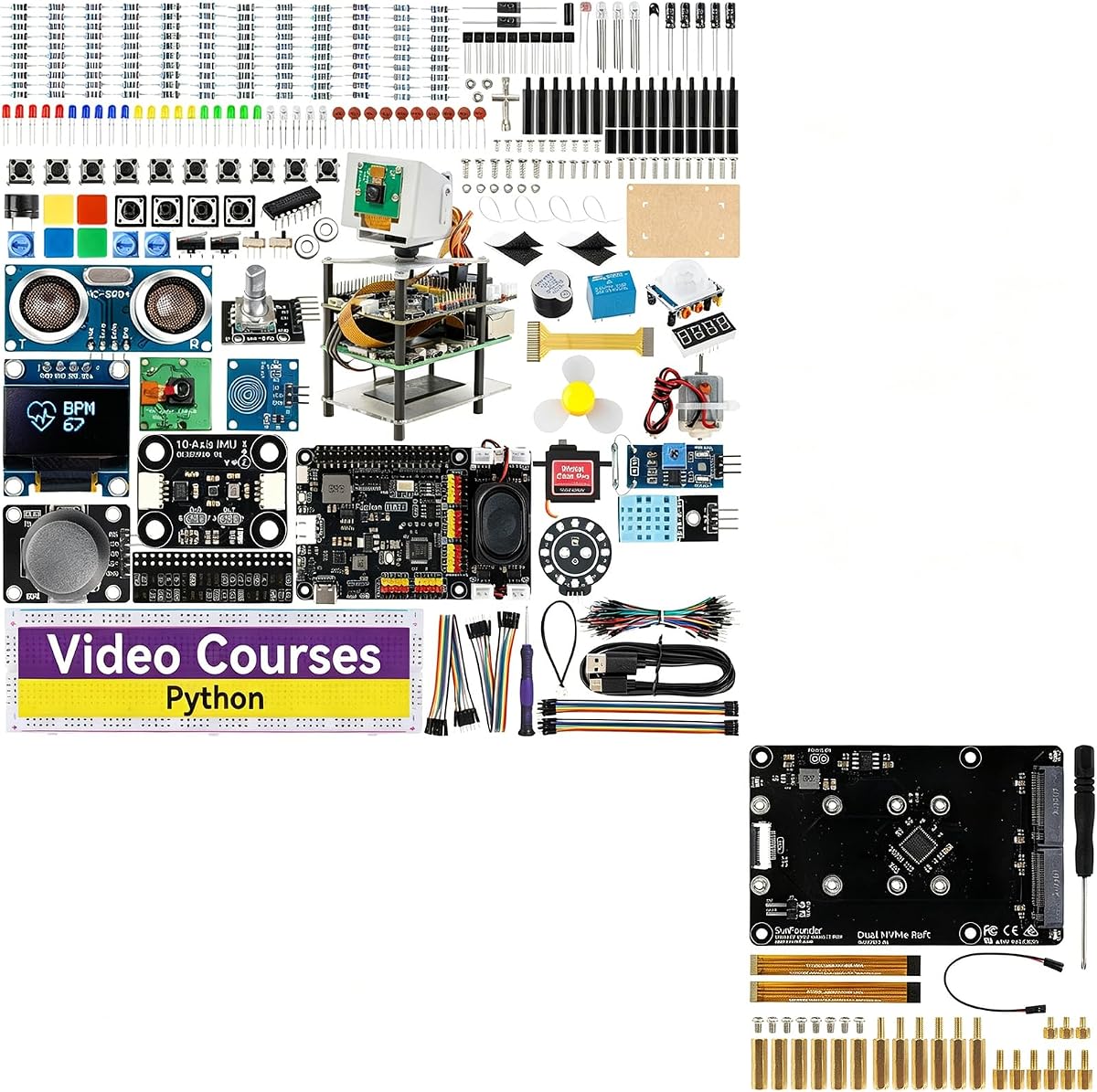


The SunFounder AI Fusion Lab Kit stands out as a top choice for learners entering the field of AI with Raspberry Pi. It combines essential hardware like a camera and sensors with extensive software support for large language models and computer vision tasks. With a strong rating from users, this kit is praised for its structured curriculum that guides you from basics to advanced projects.
We may earn a commission when you buy through this link, at no additional cost to you.
What makes this kit truly valuable is its support for multiple LLMs including ChatGPT and Gemini. You can integrate voice recognition and visual tracking into projects seamlessly. The included Pan-Tilt HAT allows for dynamic interaction, making your AI applications feel responsive and alive. The step-by-step videos by Paul McWhorter ensure you understand every component and concept.
One trade-off to consider is that the Raspberry Pi board itself is not included in the package. You will need to purchase a compatible board separately, which adds to the initial cost. However, this flexibility allows you to choose the exact specification you need. The kit focuses on providing all the peripherals and software to maximize your Pi capabilities.
If you are looking for a complete learning path that bridges the gap between hardware and AI software, this kit is highly recommended. It is perfect for hobbyists who want to build interactive projects without getting bogged down in complex wiring. The community support and documentation make it easy to troubleshoot issues as you progress.
The kit supports STT and TTS for natural voice interactions combined with OpenCV for visual tracking.
Connect to various AI models like Qwen and Ollama to explore different AI capabilities.
We may earn a commission when you buy through this link, at no additional cost to you.
The Vilros Raspberry Pi 5 AI Kit is designed for users who need raw performance for complex AI tasks. It includes the Raspberry Pi 5 board itself along with a powerful AI HAT+ accelerator. This setup is ideal for running neural networks efficiently without needing to assemble components separately. The perfect rating suggests users find it reliable and effective.
We may earn a commission when you buy through this link, at no additional cost to you.
Performance is the key strength here with the Hailo-8 accelerator delivering up to 26 TOPS of processing power. This enables faster inference for object detection and image segmentation compared to standard CPU processing. The active cooling system ensures the board stays at optimal temperatures during heavy loads. Everything comes preloaded with a 128GB SD card so you can start immediately.
A significant downside is the cost compared to kits that do not include the main board. You are paying for a premium experience with all major components accounted for. Additionally the specific HAT+ is required to get the advertised performance which might limit flexibility. But for those focused on speed and efficiency this is a strong choice.
Choose this kit if you need a robust workstation for development or production AI applications. It saves time on setup and provides the horsepower needed for demanding workloads. Whether you are building a smart camera or a complex automation system this kit delivers consistent results.
Active cooling keeps the Pi 5 running cool during intense AI processing tasks.
Preloaded OS and accessories mean less setup time for immediate project starts.
We may earn a commission when you buy through this link, at no additional cost to you.
The ELECROW CrowPi3 Basic Kit is an excellent entry point for those on a budget who want a structured learning experience. It features a built-in touch display and a large array of sensors so you can focus on coding without soldering. While it does not include the Pi board the value offered through lessons and hardware is compelling for students.
We may earn a commission when you buy through this link, at no additional cost to you.
This kit shines in its educational content with over 200 lessons covering various programming tasks. The 41 sensors are neatly arranged making it easy to experiment with different inputs like light and motion. You can run facial recognition and OpenCV projects directly through the intuitive interface. The display makes it a self-contained unit once you add the Pi.
One limitation is that it is the basic version which means some advanced features might be missing compared to the full set. Also you must buy the Raspberry Pi 5 separately which is an extra cost. However for many users the included components are enough to start learning AI concepts effectively without overspending.
Ideal for schools or beginners who want a clear path to learning AI programming. The layout prevents frustration from wiring errors and lets you concentrate on logic and algorithms. If you need a simple and affordable way to introduce AI to a classroom this kit is a top contender.
The 4.3-inch screen allows direct interaction without external monitors.
Step-by-step instructions help you master Python and AI basics quickly.
We may earn a commission when you buy through this link, at no additional cost to you.
This SunFounder kit extends the Fusion Lab with a Dual NVMe Raft making it perfect for users needing significant storage or server capabilities. It supports PCIe Gen 2.0 allowing for fast data access which is crucial for large AI datasets. The Fusion HAT+ remains included ensuring you still have access to voice and vision tools.
We may earn a commission when you buy through this link, at no additional cost to you.
The dual M.2 slots allow you to install two SSDs for RAID 0 or 1 configurations providing redundancy or speed. This turns your Pi into a robust home assistant or NAS server. The integration with OpenMediaVault makes managing this storage straightforward. You can also pair the SSDs with an AI accelerator for real-time processing.
While powerful this kit adds complexity and cost to your setup. It is designed for those who already have a Pi 5 or plan to use one. The focus shifts from simple learning to robust application hosting. If you need a central hub for smart home data this is a strong option.
Consider this if you plan to build a smart home server that also runs AI tasks. The storage options are superior to standard kits and the flexibility is unmatched. It bridges the gap between a hobbyist project and a reliable home service platform.
Build a reliable storage array with RAID 0 for speed or RAID 1 for safety.
Supports Hailo-8L to boost performance while using NVMe storage.
We may earn a commission when you buy through this link, at no additional cost to you.
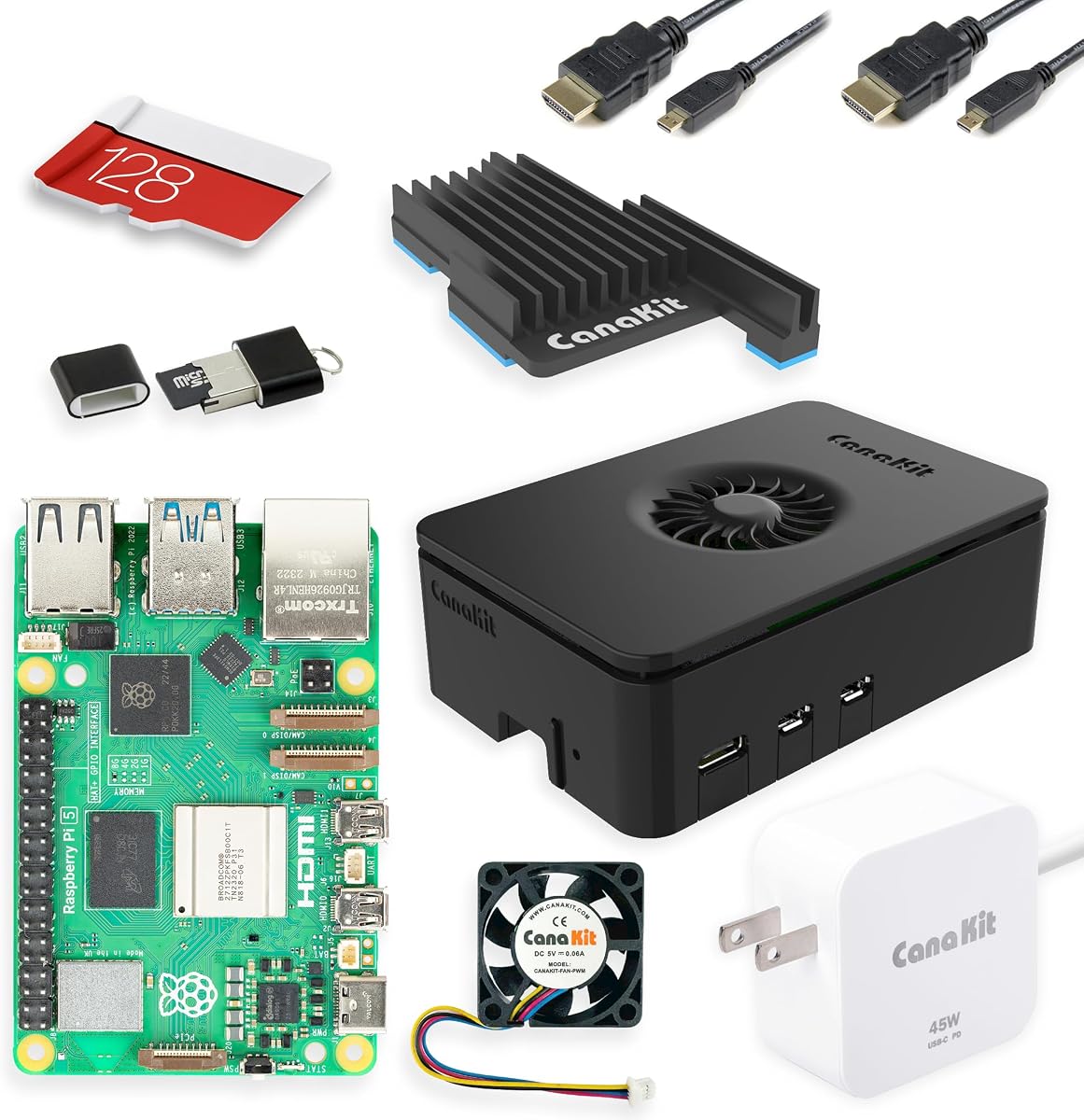
The CanaKit Raspberry Pi 5 Starter Kit PRO is a solid foundation for any Raspberry Pi project. It includes the Pi 5 board with 8GB RAM ensuring you have enough power for multitasking. The Turbine case and low noise fan provide efficient cooling keeping the system stable during long runs. It is a classic reliable choice for general use.
We may earn a commission when you buy through this link, at no additional cost to you.
One notable feature is the 45W power supply which exceeds the standard requirements allowing for more USB devices without power issues. The 128GB SD card is preloaded with the OS making it ready to use instantly. This kit focuses on stability and quality components rather than specific AI add-ons which makes it versatile for any hobbyist.
The trade-off is that it does not include specialized AI hardware like HATs or cameras specifically for AI. You would need to add those separately if you want advanced vision or voice features. However for general computing and basic AI projects this kit offers excellent value and dependability.
Choose this if you want a trustworthy setup for your Pi without worrying about power or heat. It is perfect for beginners who want a premium build quality. You can expand it later with AI kits once you are comfortable with the basics of running the Pi.
The 45W supply ensures stable power even with high-draw peripherals attached.
Low noise fan keeps your workspace quiet while maintaining optimal temperatures.
We may earn a commission when you buy through this link, at no additional cost to you.
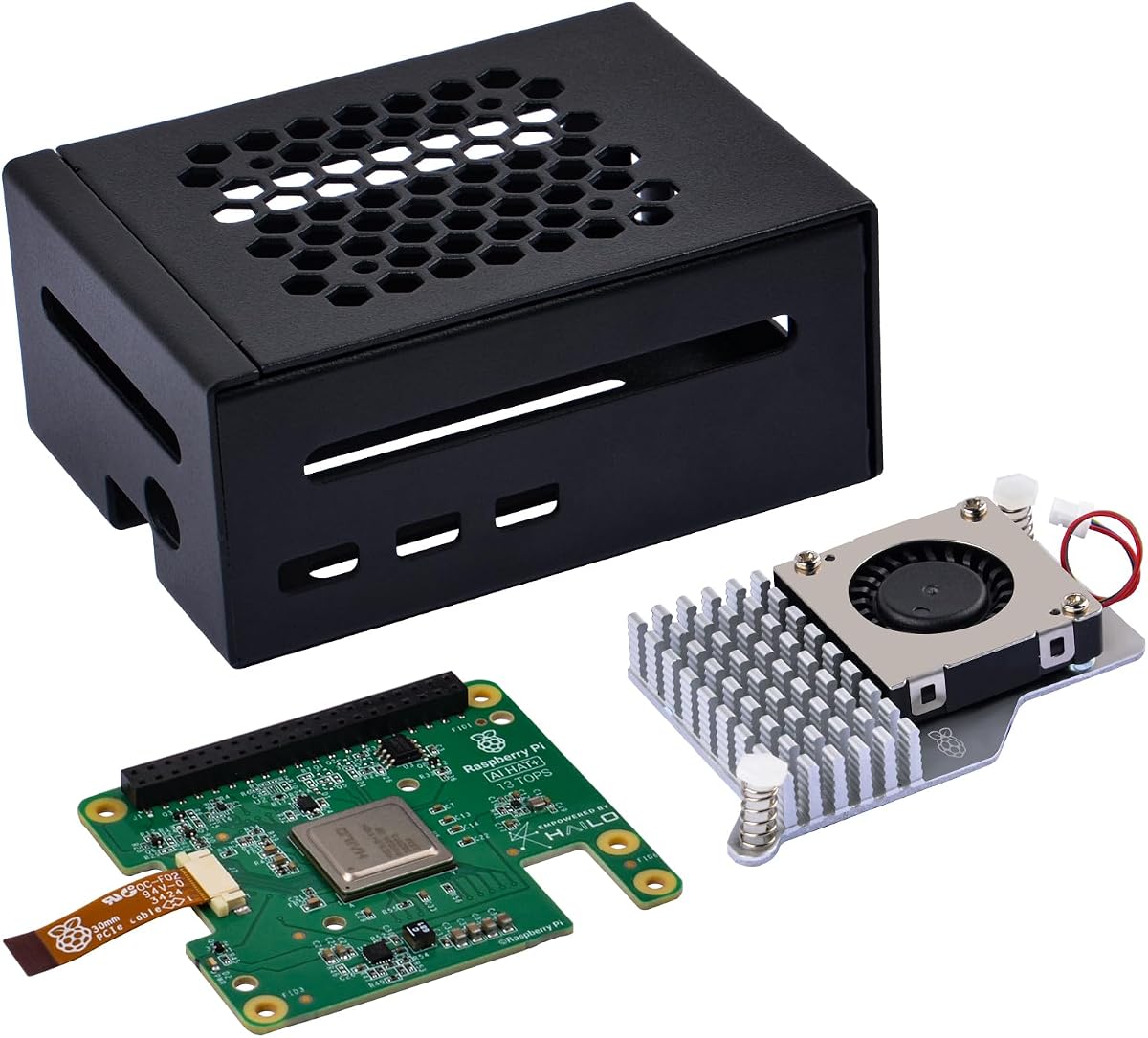
The GeeekPi AI HAT+ Build-in kit focuses on providing the crucial piece of hardware needed for efficient AI processing. It includes the Hailo AI accelerator which handles neural network tasks with high efficiency. Combined with a metal case and active cooler it protects your Pi while ensuring the processor stays cool under load.
We may earn a commission when you buy through this link, at no additional cost to you.
This kit is particularly strong for projects requiring object detection or segmentation. The NPU is supported natively by the Pi OS which simplifies setup significantly. The metal case offers better durability than plastic options and the active cooler maintains performance during intense tasks. It is designed to work seamlessly with the Pi 5 architecture.
A limitation is that this is an accessory kit rather than a complete package including the Pi board. You will need to have your own Pi 5 to use it. However for those who already have a board this is the best way to unlock AI potential without building custom hardware.
Select this if you need to upgrade an existing Pi 5 setup for AI tasks. The accelerator makes a significant difference in speed and power efficiency compared to CPU-only solutions. It is a practical add-on for developers looking to deploy more serious AI applications.
Automatically detected by Raspberry Pi OS for easy integration.
Metal case protects from dust and physical damage while allowing port access.
We may earn a commission when you buy through this link, at no additional cost to you.
This kit offers an official set of components ensuring compatibility and reliability for your Raspberry Pi 5 setup. It includes the board an official case with active cooling and a power supply specifically designed for the Pi 5. Everything is preloaded to get you started quickly. It is backed by Seeed Studio warranty support.
We may earn a commission when you buy through this link, at no additional cost to you.
The main benefit is the use of official hardware which minimizes compatibility issues. The active cooling case ensures the system stays stable for long hours of AI processing. It is a great base for developers who need a stable platform before adding third-party AI accessories. The build quality is consistent with official specifications.
On the downside it functions as a standard starter kit without specific AI sensors included. You may need to purchase cameras or sensors separately to build AI applications. For general computing and development however it provides a solid trustworthy environment. The 128GB SD card is ready for your projects immediately.
Choose this kit if you prioritize official support and guaranteed compatibility. It is a reliable starting point for professional workstations or advanced home labs. Once you have this base you can add specialized AI modules to expand your capabilities.
Designed specifically for Pi 5 to ensure best performance and support.
Backed by Seeed Studio warranty and technical support for peace of mind.
We may earn a commission when you buy through this link, at no additional cost to you.
The SunFounder AI Robot Kit brings AI to life with a physical robot that can move and interact. Powered by the Raspberry Pi Zero 2 W it includes 12 servos for realistic movements like walking and sitting. It integrates with ChatGPT-4o allowing for voice commands and visual recognition. This kit is highly engaging for robotics enthusiasts.
We may earn a commission when you buy through this link, at no additional cost to you.
The FPV feature lets you see the robot's view in real-time which enhances control and interaction. You can program it to respond to complex queries and gestures making it feel intelligent. The app control is intuitive and the assembly process is documented to help beginners. It is a fun way to learn about AI in a tangible context.
The Zero 2W processor is less powerful than the Pi 5 so complex AI tasks might require cloud support. It is optimized for the specific robot functions rather than general computing. However for a robot kit it offers impressive capabilities and interaction. The included card means you can start coding right away.
Ideal for those who want a fun project combining mechanics and AI. It is great for learning control systems and natural language processing. If you enjoy building gadgets that can talk and move this kit provides an exciting platform to explore.
ChatGPT-4o integration enables natural conversations and problem solving via camera.
32 different actions allow for expressive physical interactions and tricks.
We may earn a commission when you buy through this link, at no additional cost to you.
The ELECROW CrowPi 3 Station is a comprehensive development platform designed to streamline the AI learning process. It features a capacitive touch display and high-sensitivity microphone for intuitive interactions. With 41 integrated sensors you can test various projects without dealing with breadboards. It supports multiple development boards offering flexibility.
We may earn a commission when you buy through this link, at no additional cost to you.
The focus on an interactive experience makes it easy to visualize data and control projects. You can run facial recognition and object detection directly on the device. The included courses cover AI and Node-RED IoT projects providing a broad educational scope. It is built for educators and serious learners.
One consideration is that the Raspberry Pi board is not included which adds to the total investment. Also the price point is higher than basic kits due to the integrated screen and sensor array. But for a ready-to-use station the convenience and features justify the cost for many users.
Choose this if you need a dedicated workstation for education or prototyping. It reduces setup time and allows you to focus on coding and logic. It is an excellent tool for teaching AI concepts in a structured and hands-on manner.
Compatible with Arduino Nano and Pico for versatile cross-platform learning.
Node-RED projects included to connect AI with smart home automation.
We may earn a commission when you buy through this link, at no additional cost to you.
The CrowPi 3 AI Learning Station with Raspberry Pi 5 16GB Board offers a premium all-in-one experience. It includes the highest specification Pi board available providing ample RAM for complex models. Along with the full suite of sensors and a touchscreen it is ready for advanced prototyping right out of the box.
We may earn a commission when you buy through this link, at no additional cost to you.
This kit is ideal for developers who need significant memory for large language models. The included guided courses cover everything from fundamentals to advanced applications. The layout of sensors allows for rapid prototyping without complex wiring. It is designed to support heavy workloads and professional development.
The main drawback is the price which is significantly higher than basic kits. For simple AI tasks the 16GB RAM might be more than you need. However for a top-tier setup it offers unmatched power and convenience. You avoid the hassle of sourcing and matching individual components.
Select this if you need the best possible hardware for intensive AI development. It provides a robust foundation for building and testing sophisticated applications. It is a powerful tool for those who want to push the limits of what a Raspberry Pi can do.
16GB RAM supports large models and multitasking efficiently.
Pre-integrated modules speed up development and testing cycles.
We may earn a commission when you buy through this link, at no additional cost to you.
Choosing the right AI Raspberry Pi Kit depends on your technical goals, budget, and the complexity of projects you want to build.
Most AI kits support the Raspberry Pi 5 due to its improved performance and PCIe interface. Some kits work with older models like the Pi 4 or Zero 2 W which are suitable for simpler tasks. Always check if the kit includes the board or if you need to buy it separately to avoid unexpected costs.
Ensure the kit matches your current hardware or plan for the board purchase in your budget.
For heavy AI tasks like object detection, kits with dedicated accelerators like the Hailo-8 or Hailo-8L offer much better performance. These chips handle neural network inference efficiently without overloading the CPU. If your projects require real-time processing, prioritize kits with these accelerators included.
A dedicated AI accelerator significantly improves speed and efficiency for complex models.
A good kit should include a range of sensors such as cameras, microphones, and motion detectors. Look for kits that simplify wiring, like those with integrated touch displays or pre-wired sensor boards. This reduces setup time and allows you to focus on coding rather than hardware configuration.
Look for kits with diverse sensors that eliminate complex wiring for quick setup.
High-quality kits come with structured lessons, video tutorials, or sample code. Resources from educators like Paul McWhorter can guide you from basics to advanced concepts. Check if the kit offers support for multiple AI models to ensure you can learn versatile skills.
Structured lessons and clear documentation are essential for effective self-guided learning.
AI projects can generate significant heat, so kits with active cooling cases or fans are important for stability. Ensure the power supply is sufficient to run the Pi and any added HATs or SSDs. Kits with high-wattage power supplies prevent unexpected shutdowns during heavy use.
Proper cooling and adequate power supply are critical for system stability.
For advanced users, kits that support NVMe SSDs provide fast storage for large datasets. This is beneficial if you plan to build a NAS or run large AI models. Check if the kit supports RAID configurations if you need redundancy or speed.
Fast storage options like NVMe are vital for handling large datasets effectively.
A strong community or responsive technical support can save time when troubleshooting issues. Look for kits with active forums or official documentation that helps you resolve problems quickly. This support is especially valuable for beginners new to AI development.
Active support communities ensure you can resolve issues quickly and keep building.
Start by setting up your Raspberry Pi with the official OS image on a fast SD card or NVMe drive. Connect all sensors and HATs securely, ensuring they are aligned with the GPIO pins. Follow the included tutorials to verify that each component is detected and functioning correctly before running complex AI models.
When running AI tasks, monitor the system temperature to avoid overheating. If your kit has a cooling fan, ensure it is unobstructed and working properly. For long-term projects, consider placing your Pi in a well-ventilated area to maintain optimal performance and extend the lifespan of your components.
Regularly update your software packages to take advantage of the latest AI libraries and security patches. Back up your SD card or NVMe drive periodically to prevent data loss. This routine maintenance ensures your kit remains reliable for your ongoing projects and learning journey.
The SunFounder AI Fusion Lab Kit is highly recommended for beginners due to its structured video lessons and easy hardware integration. It covers a wide range of AI concepts without requiring advanced wiring skills. This kit helps you build confidence and projects step-by-step with clear guidance.
It depends on the kit. Some like the Vilros or CrowPi 3 Station with 16GB include the board while others like the basic CrowPi3 or Fusion Lab do not. Always check the product description to confirm if the board is included in the package you are considering.
An AI HAT+ typically includes a dedicated neural network accelerator like the Hailo chip which speeds up AI tasks. Standard HATs may just extend GPIO or camera capabilities. If you need real-time object detection or heavy processing, an AI HAT+ is more powerful.
Yes, kits with sufficient RAM like 8GB or 16GB can run smaller local LLMs effectively. Some kits support cloud-based models via API which allows you to use ChatGPT or Gemini without heavy local processing. Always check the RAM capacity to ensure it meets your needs for LLM tasks.
Look for kits that include an active cooling fan or a metal case with heatsinks. The Pi 5 generates significant heat during AI workloads so passive cooling alone might not be enough. Active cooling ensures stable performance and protects your board from overheating during long sessions.
Yes, kits with high-performance boards and accelerators like the Vilros Pi 5 or CrowPi 3 Premium are suitable for professional work. They offer the power and stability needed for production tasks. However for very heavy workloads you might need to scale up to a server-grade setup.
Most kits support Python as the primary language for AI development due to its rich library support. Some also offer resources for Node-RED for IoT projects. Python is the standard for AI, making these kits versatile for learning and building various types of applications.
The SunFounder AI Fusion Lab Kit stands out as the top overall choice for its balanced features and educational value. The Vilros Pi 5 Kit offers high performance for those who need speed, while the CrowPi3 Basic provides an excellent budget-friendly option for learning.
When making your decision, prioritize the components that match your project needs such as AI accelerators or storage capacity. Consider whether you want a ready-to-go solution or a flexible platform you can expand later. Balancing these factors will help you select a kit that fits your specific goals.
Remember to verify current prices and availability on the product pages before you buy. Prices can fluctuate and kits may change in stock or content. This guide aims to give you a clear overview to make an informed choice based on the latest information.