
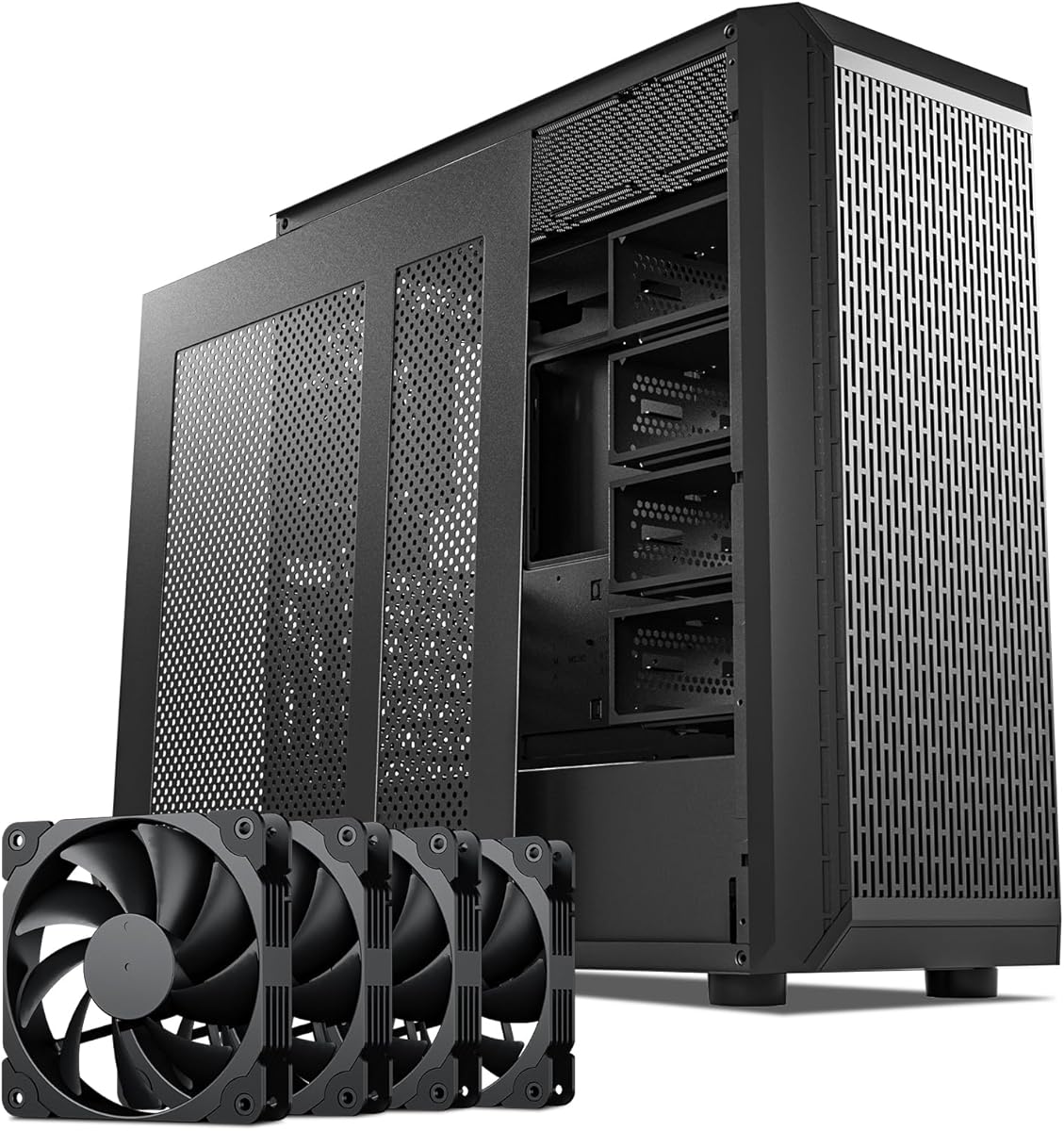
Rosewill Helium NAS Duo
2.6Editor score
Supports up to 8 HDD drives
Includes 4 PWM cooling fans
Features USB 3.2 Type-C port
Building a reliable network attached storage system requires the right foundation. An ATX NAS computer case provides the necessary space for multiple drives and components while ensuring proper airflow for long-term stability and performance.
We evaluated ten leading cases based on drive bays, motherboard support, cooling options, and build quality. Our analysis covers everything from budget-friendly mid towers to premium workstation chassis designed for heavy-duty server environments.
Each selection highlights specific strengths and ideal use cases for different users. Prices and availability change frequently, so verify current listings before purchasing to ensure you get the best value for your specific storage build requirements.
2.6Editor score

4.7Editor score

4.6Editor score
As an Amazon Associate we earn from qualifying purchases.
This side-by-side comparison highlights key specifications across all ten models to help you quickly identify the chassis that best fits your storage capacity, cooling, and compatibility requirements.

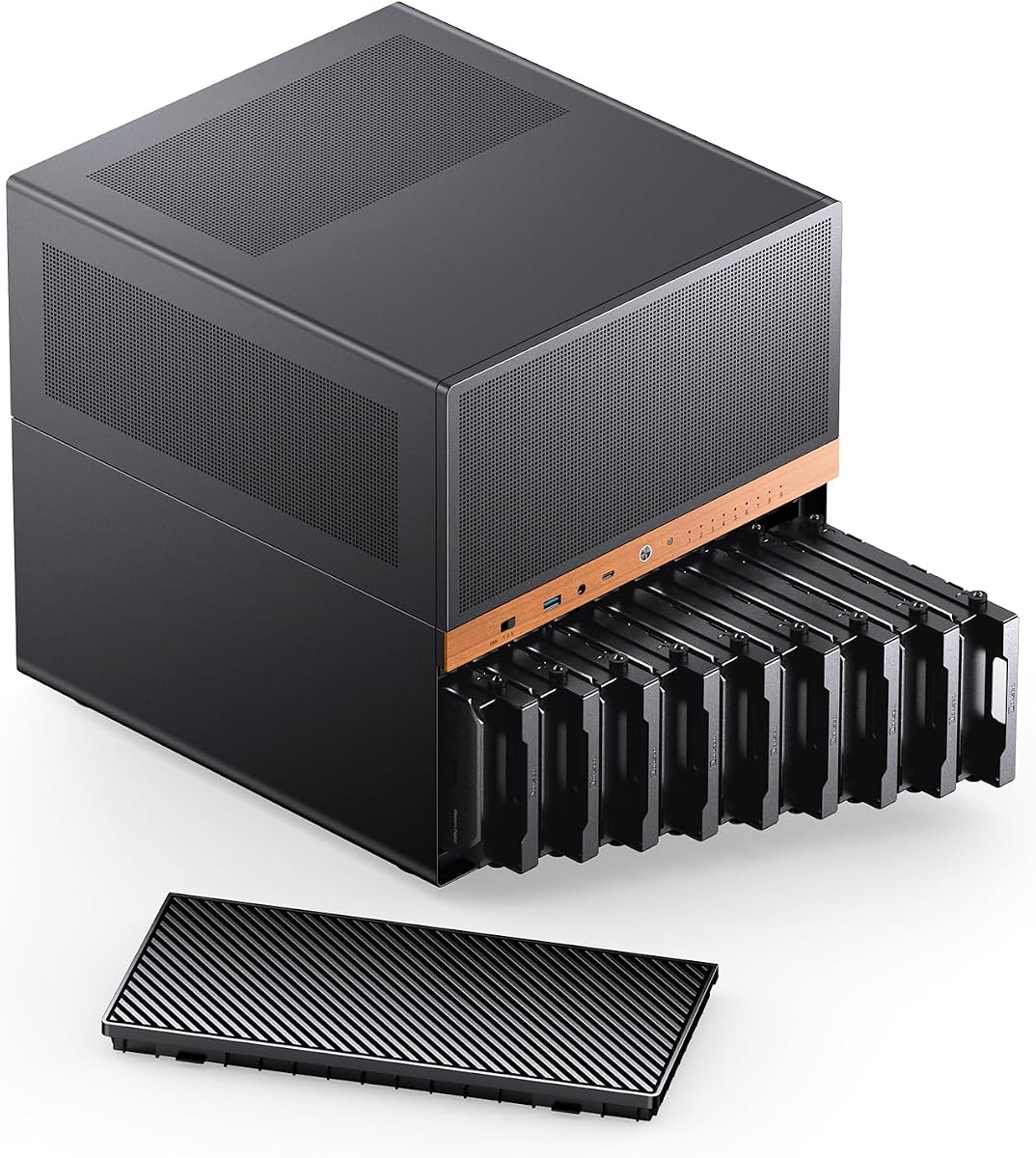


The JONSBO N5 stands out as a top choice for users needing extensive storage in a professional chassis. With a 4.7 rating, it balances high capacity and aesthetic appeal through its wood veneer design.
We may earn a commission when you buy through this link, at no additional cost to you.
Its ability to support twelve 3.5-inch drives plus four 2.5-inch SSDs makes it ideal for enterprise or high-end home labs. The E-ATX compatibility ensures you can run powerful hardware without space constraints.
While the build is robust, the sheer size and weight make it less portable. Users should ensure their desk or rack can support the load before installation. The premium features justify the cost for serious builders.
For those building a high-performance network server or workstation, this case offers the versatility and capacity needed to scale up. It remains a top recommendation for advanced users seeking both looks and power.
The flexible drive configuration allows users to mix and match HDDs and SSDs for optimized performance and bulk storage.
The North American black walnut veneer gives the case a unique look that blends well with office and home environments.
We may earn a commission when you buy through this link, at no additional cost to you.
The Rosewill Helium NAS Duo offers an entry point into ATX NAS builds at an accessible price. While ratings vary, the inclusion of four 140mm PWM fans helps keep temperatures manageable.
We may earn a commission when you buy through this link, at no additional cost to you.
It supports up to eight 3.5-inch drives, which is sufficient for many home users. The mesh panels and USB-C port add modern touches that enhance usability and data transfer speeds.
However, reviews suggest mixed experiences with build quality. Users may need to reinforce panels or check stability upon arrival. It is best suited for those on a strict budget willing to tinker.
For straightforward media server setups where cost is the primary driver, this case provides the necessary storage and airflow. Just be prepared to verify hardware stability during initial setup.
The four pre-installed PWM fans reduce the need for additional purchases and ensure consistent airflow across drive bays.
USB 3.2 Type-C support allows for fast external data transfer and compatibility with newer peripheral devices.
We may earn a commission when you buy through this link, at no additional cost to you.
This full tower is designed for serious enterprise users or advanced hobbyists needing maximum storage density. With fifteen hot-swappable bays and redundant power support, it matches rack-mounted server capabilities.
We may earn a commission when you buy through this link, at no additional cost to you.
The case supports large motherboards and multiple expansion cards, making it ideal for GPU workloads or heavy networking. Build quality is robust to handle the weight of fully populated drive bays.
The main drawback is the long shipping cycle noted in the product description. Buyers need to plan ahead. Also, the physical size requires significant desk or rack space.
If you need a home server that rivals professional gear, this case offers the capacity and reliability to handle demanding workloads. It is a powerful tool for high-stakes storage environments.
Hot-swappable drive trays allow for easy maintenance and scaling without powering down the entire system.
Support for 1+1 redundant power supplies ensures continuous operation even if one unit fails during critical tasks.
We may earn a commission when you buy through this link, at no additional cost to you.
The DARKROCK Classico Storage Master excels in thermal management with its mesh front and side panels. It supports thirteen hard drives and allows for 360mm radiators, keeping high-density systems cool.
We may earn a commission when you buy through this link, at no additional cost to you.
Vertical GPU mounting is a standout feature that prevents sagging and improves cooling. This is beneficial for users who rely on GPUs for transcoding or compute tasks within their NAS.
The trade-off involves the weight and bulk of the unit. You may need a reinforced surface to handle the load. The cooling benefits are worth it for systems under heavy continuous load.
For builders prioritizing thermal efficiency alongside high storage density, this case offers a balanced solution. It is a strong contender for those worried about overheating in multi-drive setups.
The mesh panels create open pathways for air to move freely around hot components and drive bays.
Mounting your graphics card vertically frees up space and ensures better cooling around the GPU area.
We may earn a commission when you buy through this link, at no additional cost to you.
This 8-bay unit is a standout compact NAS solution with a perfect rating from users. It features hot-swap trays and supports a mix of HDDs and SSDs for versatile storage setups.
We may earn a commission when you buy through this link, at no additional cost to you.
The dual-chamber design helps separate heat-generating components from storage drives. It fits well on a desk due to its small dimensions, making it great for personal or office use.
The main limitation is the support for smaller motherboards and short GPUs. You cannot use high-end graphics cards here. This is fine for basic NAS tasks or lightweight transcoding.
If you need a tidy, space-saving solution that offers hot-swap flexibility, this case is a top pick. Its high rating suggests reliability and ease of use for home server projects.
The mini tower design fits comfortably on a desk without taking up excessive floor or surface space.
Drive trays allow you to swap hard drives without opening the case or shutting down the server.
We may earn a commission when you buy through this link, at no additional cost to you.
The N6 offers impressive flexibility with three power supply installation positions. This helps optimize airflow and space usage. It supports nine drives and features the signature wood veneer aesthetic of the brand.
We may earn a commission when you buy through this link, at no additional cost to you.
Built-in fans and multiple mounting points allow custom cooling configurations. It is designed for users who want to balance aesthetics with practical thermal performance. The Micro ATX form factor keeps the size manageable.
The GPU length is limited to roughly 305mm, which restricts high-end options. This is acceptable for storage-focused builds. The price is higher than generic options but matches the premium finish.
For those wanting a stylish yet functional NAS case with PSU flexibility, the N6 delivers. It suits home offices where appearance matters as much as raw storage capability.
Multiple installation positions allow you to optimize PSU choice and cable routing for better thermal management.
North American black walnut veneer adds a premium look to a standard metal chassis without compromising structural integrity.
We may earn a commission when you buy through this link, at no additional cost to you.
The KM7B is a full tower designed for maximum storage and expandability. With support for thirteen HDDs and E-ATX motherboards, it suits large home servers or small enterprise setups.
We may earn a commission when you buy through this link, at no additional cost to you.
The magnetic front panel makes accessing drives and cables easy without tools. This simplifies maintenance. Liquid cooling support up to 360mm helps manage heat in high-density configurations.
It lacks user ratings, making it a riskier choice. The size is significant, requiring substantial floor space. It is best for users comfortable building without extensive community feedback.
If you need a spacious chassis for heavy expansion and large components, this tower provides the room. It is a solid candidate for advanced builds where capacity is the priority.
Support for E-ATX motherboards and large liquid coolers means you are not limited by chassis constraints.
The magnetic front panel allows for easy and quick removal for cable management or drive access.
We may earn a commission when you buy through this link, at no additional cost to you.
The Silverstone Temjin is a legendary chassis known for its aluminum construction and build quality. It supports SSI-CEB boards and features a positive pressure design to reduce dust intake.
We may earn a commission when you buy through this link, at no additional cost to you.
The built-in hard drive cooler is a unique feature that helps maintain optimal drive temperatures. This extends hardware lifespan. The front panel is 7mm thick aluminum, giving it a solid and premium feel.
It is more expensive than modern alternatives and lacks some current connectivity options. This is fine for users valuing durability and style. It is a long-term investment for quality.
For those seeking a durable, classic case that stands the test of time, the Temjin is ideal. It appeals to enthusiasts who appreciate traditional build quality and design heritage.
Positive pressure design ensures filtered air flows out through vents, keeping dust away from internal components.
The dedicated cooling system keeps hard drives at safer temperatures during high usage periods.
We may earn a commission when you buy through this link, at no additional cost to you.
The JONSBO N4 is a mini NAS case designed for desktop use with a walnut wood panel. It supports eight drives and features a compact design that fits easily on a shelf or desk.
We may earn a commission when you buy through this link, at no additional cost to you.
The front panel includes USB 3.2 Gen 2 Type-C for fast connectivity. The design emphasizes noise reduction and aesthetics, making it a great fit for home offices or living rooms.
While it lacks built-in fans, airflow is managed through specific venting. You may need to add fans if you run high-power hardware. The GPU support is limited to short cards.
For users wanting a quiet and stylish NAS for the living room, the N4 is an excellent pick. It combines practicality with a unique wood finish that blends into home decor.
The compact dimensions make it easy to place on a desk without dominating the workspace.
USB 3.2 Gen 2 Type-C support ensures quick data transfers and compatibility with modern drives.
We may earn a commission when you buy through this link, at no additional cost to you.
The CS382 is built for enterprise-level performance with support for both SAS and SATA drives. It offers hot-swappable trays that make maintenance easy without downtime. LED indicators show drive status clearly.
We may earn a commission when you buy through this link, at no additional cost to you.
With support for 11 total drives, it balances capacity with a compact Micro-ATX form factor. This allows for integration into smaller spaces while maintaining high throughput. The build quality is robust and reliable.
The main downside is the price. It is more expensive than consumer options. This is justified if you require SAS performance. You should consider whether you need enterprise-grade speeds.
For businesses or professionals needing reliable storage with hot-swap capabilities, the CS382 is a top choice. It is a high-performance chassis that ensures data integrity and uptime.
Support for SAS-12G drives allows for higher data transfer speeds and better reliability in heavy loads.
LED indicators on each tray provide instant visual feedback on drive activity and health status.
We may earn a commission when you buy through this link, at no additional cost to you.
Choosing the right case depends on storage needs, motherboard size, and cooling requirements. Consider these key factors to ensure compatibility and long-term stability.
Determine how many 3.5-inch drives you need now and in the future. Some cases support up to fifteen drives while others are limited to eight. Ensure enough space for expansion without replacing the case later.
Match the bay count to your storage goals to avoid frequent hardware upgrades.
Check if the case supports ATX, Micro ATX, or E-ATX boards. Larger motherboards need more space for mounting points and airflow. This also affects GPU and PSU placement inside the chassis.
Ensure the motherboard size matches the case specs for proper fit.
Look for mesh panels or pre-installed fans that support high airflow. Heat from multiple drives can accumulate without proper ventilation. Consider liquid cooling support if you run high-performance components.
Good airflow prevents thermal throttling and extends component life.
Verify if the case supports ATX or SFX power supplies. Some designs allow redundant PSU installation for better uptime. Ensure the PSU length fits to avoid blocking drive bays.
Flexible PSU support helps manage heat and cable routing.
Steel, aluminum, or wood veneer options affect aesthetics and durability. Metal provides strength while wood adds a premium look. Magnetic or tool-free panels simplify maintenance and drive swaps.
Choose materials that suit your environment and maintenance preferences.
Hot-swap drive trays let you change drives without shutting down. This is vital for servers that need continuous uptime. Check if the backplane supports the needed SATA or SAS connections.
Hot-swap features improve accessibility and reduce downtime.
Count the available PCIe slots for network cards or GPUs. Some cases offer 8 slots while others have 4. If you plan to use multiple GPUs or 10GbE cards, ensure there is enough space.
Extra slots allow for future network or compute upgrades.
Measure your desk or rack space before buying. Full towers can be heavy and large while mini towers save space. Ensure the weight can be supported by your intended surface safely.
Correct dimensions ensure the case fits your physical workspace.
Install your motherboard and power supply first to establish a stable base. Secure all mounting screws and ensure cables are routed away from drive bays to maximize airflow and reduce clutter.
Use the provided drive handles or screws to install your hard drives carefully. Verify that each drive is securely seated in its tray before powering on. Use labels to identify drives if you use multiple units.
Regularly clean dust from intake fans and vents using compressed air. This maintains cooling efficiency and prevents overheating. Keep the area around the case clean to avoid debris clogging the filters.
The Rosewill Helium NAS Duo offers a budget-friendly entry with eight drive bays and included fans. It is compatible with multiple motherboard types and features USB-C for modern connectivity. This makes it ideal for those starting a home server without breaking the bank.
Yes, several cases like the JONSBO N5 and KM7B support E-ATX motherboards. Always check the case specifications to ensure clearance for large boards and proper mounting hole alignment. This allows for powerful hardware setups inside your NAS.
Some cases like the Rosewill Helium include multiple PWM fans out of the box. Others may require you to buy fans separately. Check the product details to see if cooling is included or if you need to budget for additional components.
Hot-swap trays are convenient for maintenance and swapping drives without downtime. They are especially useful for users who need continuous uptime or frequent data changes. For basic home use, fixed trays may suffice if you do not need instant access.
Full tower cases designed for fifteen drives can hold over twenty kilograms when fully loaded. Ensure your desk or rack is sturdy enough to support this weight. Smaller cases hold less but still require stable placement to avoid tipping.
SAS drives offer higher performance and reliability compared to standard SATA drives. Cases like the Silverstone CS382 support both types but often cost more. Choose SAS if you need enterprise-grade speeds; SATA is fine for general storage.
Our top picks cover a wide range of needs from budget-friendly to enterprise-grade. The JONSBO N5 leads for capacity and looks while the Rosewill Helium serves as a great starting point for small builds.
Prioritize drive bay count and cooling to avoid overheating in high-density setups. Ensure the case matches your motherboard size and PSU needs for a smooth installation process. Consider future expansion to avoid buying another case soon.
Prices and availability fluctuate frequently so check current listings before ordering. Use the detailed comparison to find the right balance of features and cost. Your ideal case is ready to support your data storage goals.