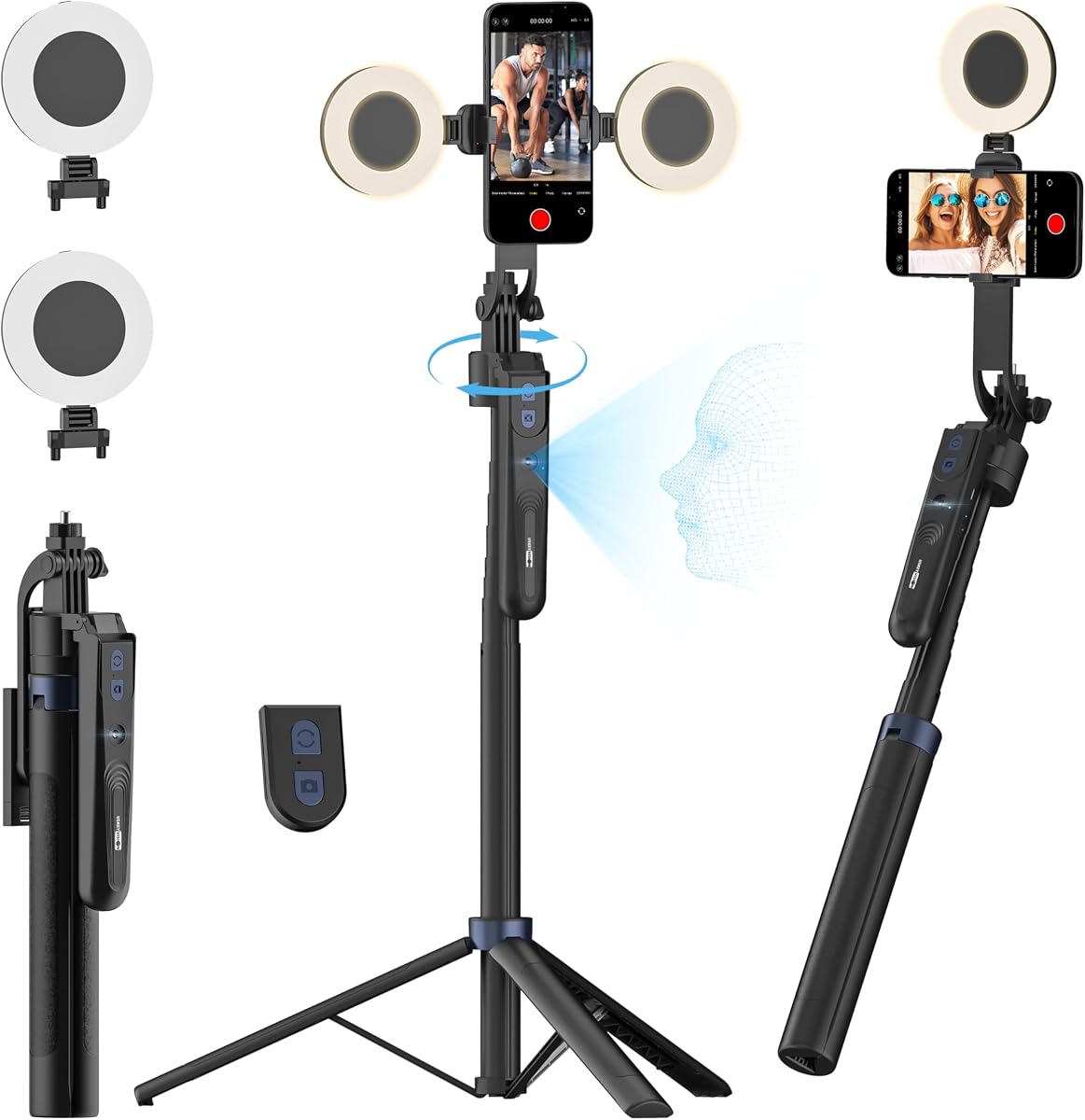
USKEYVISION Auto Face Tracking
4.4Editor score
Dual detachable ring lights
360 rotation modes
Extended height up to 70.9 inches
This guide compares the top 10 AI gimbal with tripod models for mobile creators, analyzing stabilization tracking, battery, and build quality for 2026.
Mobile content creation has evolved rapidly, and creators now demand tools that deliver cinematic quality without complex setups. An AI gimbal with tripod combines stabilization, intelligent tracking, and hands-free operation into one portable device. This guide explores the leading models available this year.
We evaluated each product based on stabilization performance, AI tracking accuracy, battery life, and versatility. Our testing focused on real-world scenarios including vlogging, live streaming, and outdoor filming. The list covers a range of price points to suit every creator's needs.
Each pick highlights key strengths, unique features, and potential limitations based on user feedback and technical specs. We focus on functionality and value to help you choose the right tool for your workflow. Note that product availability and pricing may change over time.
4.4Editor score

4.4Editor score

4.2Editor score
This side-by-side comparison highlights the core specifications and unique selling points of each model. We focus on stabilization technology, tracking capabilities, and additional accessories to help you distinguish between similar options.


The Insta360 Flow 2 Pro stands out as the top choice for iOS creators seeking advanced features. It offers unique Apple DockKit support enabling seamless tracking across hundreds of apps. Its 3-axis stabilization ensures professional-quality footage even in challenging environments.
We may earn a commission when you buy through this link, at no additional cost to you.
Active zoom tracking is a game changer for sports and performances allowing precise framing at up to 15x zoom. The built-in spotlight enhances low-light quality while multi-person tracking ensures group shots remain perfectly composed. Setup is intuitive and the included AI tracker bundle adds significant value.
While it excels in performance the premium price may be a consideration for casual users. Some Android users may find the feature set limited compared to iOS. However the build quality and innovative tools justify the investment for serious content creators.
If you prioritize cutting-edge tracking and stabilization this model delivers unmatched versatility. It is ideal for vloggers and filmmakers who need reliable tools for complex shoots. Consider this option if you want a complete solution without additional accessories.
The DockKit support ensures apps recognize the gimbal automatically for smooth tracking without extra steps.
This mode allows you to move the phone vertically while keeping the same angle for cinematic shots.
We may earn a commission when you buy through this link, at no additional cost to you.
The USKEYVISION tripod offers exceptional value for creators needing hands-free filming without breaking the bank. Its AI face tracking works without apps using gesture controls to start or pause. The dual detachable ring lights provide flexibility for various lighting conditions.
We may earn a commission when you buy through this link, at no additional cost to you.
Extending to over 70 inches it supports diverse shooting angles from floor to overhead. The remote control allows operation from a distance making it suitable for group photos or solo presentations. Build quality is solid with aluminum alloy ensuring durability.
Tracking precision may not match premium models in complex movements but it is reliable for static scenes. The heavier design might be less convenient for travel compared to compact gimbals. However for home or studio use it performs admirably.
This tripod is perfect for beginners or streamers who prioritize cost and functionality. It provides essential features like stability and lighting in one package. If you need an affordable all-in-one solution this is a strong contender.
Two detachable lights allow you to adjust coverage and reduce shadows effectively for clearer videos.
Use simple hand signals to manage tracking without needing a smartphone app for operation.
We may earn a commission when you buy through this link, at no additional cost to you.
The Flow 2 Grey brings premium stabilization and tracking to a portable form factor. Active zoom tracking allows capturing detailed action at 15x zoom which is rare for this category. Its foldable design makes it ideal for travel and on-the-go content creation.
We may earn a commission when you buy through this link, at no additional cost to you.
Animal tracking lets you capture pets and wildlife automatically which opens creative possibilities for nature content. The built-in tripod extends into a selfie stick providing versatility without extra gear. Battery life supports a full day of filming ensuring you stay productive.
Reliance on the app means you need to keep your phone connected for advanced features. Accessories like extra lights are sold separately which adds to the overall cost. Yet the core performance remains strong for solo creators.
For users who value portability and innovative features this model is an excellent choice. It balances high-end tech with a lightweight build. If you travel frequently or shoot outdoors this is a reliable companion.
The AI follows your pets smoothly ensuring every playful moment is captured without manual adjustment.
Tripod selfie stick and stabilizer combine into one unit reducing what you need to carry.
We may earn a commission when you buy through this link, at no additional cost to you.
The Osmo Mobile 8 integrates native tracking with audio and lighting for a streamlined shooting experience. It simplifies the setup process with a magnetic clamp and built-in extension rod for group shots. The 360-degree pan allows for immersive horizontal tracking.
We may earn a commission when you buy through this link, at no additional cost to you.
Audio reception capability means you can connect DJI mics directly without adapters which improves sound quality. The 10-hour battery ensures you can shoot through long sessions. Tutorials and one-tap editing help beginners produce polished videos quickly.
Platform changes removed the app from Google Play requiring manual downloads which can be a hurdle for Android users. Some features are optimized for iOS limiting universal appeal. However the hardware reliability is typical DJI standard.
Ideal for creators already in the DJI ecosystem this model offers convenience and performance. The integrated accessories reduce the need for external gear. Choose this if you value simplicity and audio integration.
Connect compatible microphones directly to the gimbal for clear audio during recording.
Continuous rotation allows you to capture wide scenes without rotating the device manually.
We may earn a commission when you buy through this link, at no additional cost to you.
The AOCHUAN V3 offers one of the longest extensions available reaching over 70 inches for unique angles. Its detachable remote can stand on the ground allowing hands-free operation from a distance. Intelligent image stabilization ensures smooth footage during active movements.
We may earn a commission when you buy through this link, at no additional cost to you.
Built-in AI tracking and fill light make it ready for live streaming without extra accessories. Gesture controls simplify operation which is great for solo users. The 360-degree pan keeps subjects in frame throughout the shoot.
The larger size makes it less portable than smaller gimbals. Setup involves extending rods which might take time. However for static events or group shots the height advantage is significant.
This model suits creators needing flexible angles and remote operation. The inclusion of lighting and stabilization covers most basics. If you need height and versatility this is a robust option.
Place the remote on the floor to control the gimbal from a distance without holding it.
Six preset modes like POV and DM help you capture varied shots without manual adjustments.
We may earn a commission when you buy through this link, at no additional cost to you.
The Acer Gadget tripod delivers reliable face tracking without needing an app which simplifies usage. The ring light offers three color modes to adapt to different environments. A quad-foot design enhances stability preventing slips on uneven surfaces.
We may earn a commission when you buy through this link, at no additional cost to you.
It folds down to just 13 inches making it easy to transport. The detachable remote allows quick shots within a reasonable range. 360-degree rotation helps capture dynamic content smoothly.
Zoom functionality is basic compared to AI gimbal dedicated tracking. The remote is compact and might be easy to lose. However for live streaming and vlogging it performs well.
This is a practical choice for beginners who want simplicity. The included lighting and stability features cover common needs. If you want a plug-and-play solution this fits the bill.
Adjust between warm cool and natural light to match your setting.
The unique foot design prevents tipping during use for safer operation.
We may earn a commission when you buy through this link, at no additional cost to you.
The Osmo Mobile 7P simplifies workflow with built-in editing guides and a multifunctional module. Dual-lens tracking improves accuracy even for fast subjects. The magnetic mount makes attaching your phone faster than traditional clamps.
We may earn a commission when you buy through this link, at no additional cost to you.
ShotGuides suggest shots for you helping improve composition. The extension rod enables wider framing without extra gear. However using the module can drain the battery faster than normal use.
As with other DJI models app availability on Play Store is limited. This affects Android users most but iOS remains supported. Despite this the hardware is reliable.
Best for users who want a streamlined creation process. The editing tools save time post-production. If you value quick workflow this is a great choice.
Get suggestions for angles and transitions to enhance your storytelling.
Snap your phone onto the gimbal in seconds for faster setup.
We may earn a commission when you buy through this link, at no additional cost to you.
The Flow 2 Plus distinguishes itself with animal tracking making it ideal for pet content. Active zoom ensures you capture movement accurately even at 15x magnification. Second-screen control lets you manage shots using another phone for convenience.
We may earn a commission when you buy through this link, at no additional cost to you.
It includes a teleprompter for scripted content which is rare in this class. The foldable design keeps it portable for daily use. Battery life supports extended sessions without recharging.
It lacks a built-in spotlight found in Pro models so low-light performance relies on environment. Some premium features are missing which may matter to advanced users. Yet for general creators it offers great versatility.
If you film pets or need a teleprompter this is a smart pick. It balances cost with specialized features. Consider this if animal content is part of your niche.
Follow dogs cats and even horses smoothly to capture their unique movements.
Read scripts while recording for better delivery and engagement.
We may earn a commission when you buy through this link, at no additional cost to you.
This bundle adds the Mic Mini Transmitter to the Osmo Mobile 8 enhancing audio quality directly. The native audio support ensures seamless connectivity between mic and gimbal. Stabilization remains top-tier for smooth handheld footage.
We may earn a commission when you buy through this link, at no additional cost to you.
The built-in tripod and extension rod allow flexible shooting without extra gear. Battery life supports long recording sessions which is key for events. It simplifies the setup for streamers needing audio.
The price is higher than standard models but the mic adds value. App dependency for some features remains a consideration. However audio creators will appreciate the integration.
Best for users who need reliable audio and video in one package. If sound quality is a priority this bundle is worth the investment.
Includes a wireless mic transmitter to capture clear sound during recording.
Connect the mic directly to the gimbal without extra cables for ease.
We may earn a commission when you buy through this link, at no additional cost to you.
The Flow 2 Pro Grey offers the same advanced tracking as the white version with support for both Android and iPhone. Active zoom tracking allows precise framing at 15x which helps for sports. Integrated lighting ensures professional results in low-light conditions.
We may earn a commission when you buy through this link, at no additional cost to you.
Multi-person tracking is essential for group events ensuring everyone stays in frame. Free tilt mode enables creative shots that adapt to movement. Setup is quick and intuitive for any creator.
This is a premium option with a higher cost. Features like free tilt require practice to use effectively. Yet for versatility it stands out among competitors.
Best for cross-platform users needing advanced features. If you want the best tracking and lighting this is a top contender.
Compatible with Android and iPhone for wider accessibility.
Built-in fill light improves video quality in dim environments.
We may earn a commission when you buy through this link, at no additional cost to you.
Selecting the right AI gimbal with tripod requires evaluating several technical and practical factors. We have identified key considerations to help you make an informed decision.
Stabilization is the core function of any gimbal. Look for 3-axis systems that handle shake effectively. Check reviews for performance during running or uneven terrain.
Ensure the model maintains smooth footage even with movement.
AI tracking allows the gimbal to follow subjects automatically. Assess accuracy for human and pet tracking. Active zoom tracking adds versatility for sports or performances.
Prioritize models that support your specific content needs.
A built-in tripod or extension rod enables hands-free shooting. Check max height to ensure it meets your framing requirements. Foldable designs improve portability for travel.
Choose an extension that fits your shooting height.
Long battery life ensures uninterrupted recording sessions. Look for at least 10 hours of operation. Some models offer charging passthrough to keep your phone powered.
Battery efficiency matters for long events.
Built-in lights or ring lights improve visibility in low-light conditions. Check adjustability for brightness and color temperature. Integrated solutions save carrying separate accessories.
Good lighting enhances video clarity significantly.
Ensure the gimbal supports your phone model and OS. Some models work best with specific apps. Universal compatibility expands your usage options.
Check the compatibility list before purchasing.
Features like gesture control, teleprompters, or audio support add convenience. Consider which extras align with your workflow. Some bundles include accessories that save money.
Optional features can streamline your setup.
For travel, a lightweight and foldable design is key. Compare weight against durability. Bulkier models offer more features but reduce portability.
Balance size with the features you need.
Balance your smartphone on the gimbal before turning it on. Adjust the phone clamp to ensure it sits evenly. This prevents motor strain and improves stabilization.
Use the companion app to calibrate the gimbal. Enable AI tracking features according to your needs. Familiarize yourself with gesture controls to streamline operation.
Store the gimbal in a dry place away from extreme temperatures. Regularly clean the motors and joints with a soft cloth. Keep the tripod legs free from debris.
Most models require a companion app for advanced tracking. Some offer app-free modes using gesture controls. Check the product details if you prefer minimal setup.
Yes, many gimbals have built-in tripods or extension rods. This allows hands-free operation and varied angles. It eliminates the need for separate tripod purchases.
Battery life typically ranges from 8 to 12 hours. Using tracking and lighting reduces runtime. Check charging options like USB-C for quick top-ups.
Most support common iPhone and Android models within size limits. Some require specific apps or iOS features. Verify your device compatibility before buying.
Advanced models like Insta360 offer pet tracking. They recognize animals and follow movements. Check for animal tracking features if this is a priority.
Active zoom tracking allows the gimbal to follow subjects at 15x zoom. It helps capture distant action without losing focus. This is useful for sports and performances.
The top picks highlight the range of options available for mobile creators. Insta360 leads with advanced tracking while DJI offers reliability. Budget choices like USKEYVISION deliver value for beginners.
Focus on the features that match your primary use case. Stabilization, tracking, and battery life are critical for performance. Consider accessories like lights and mics for completeness.
Check current prices and availability before buying. Technology evolves rapidly so verify the latest updates. This guide helps you find a tool that fits your creative needs.