
ASUS Z170 PRO Gaming
4.1Editor score
LGA1151 socket support
SupremeFX audio technology
USB 3.1 Type C
Discover the top 1151 Z170 Skylake gaming motherboards compared for performance features and value to help you choose the ideal motherboard for your build.
Selecting the right motherboard is crucial for any gaming PC build. The 1151 Z170 Skylake chipset offers robust features including DDR4 support and high-speed connectivity essential for modern gaming experiences today.
We have carefully evaluated ten leading options based on their specifications reliability and user feedback. This comprehensive guide highlights the strengths and weaknesses of each board to help you make an informed decision for your setup.
Each pick showcases unique capabilities tailored to different budgets and performance needs. Please note that prices and availability can fluctuate frequently so check current listings before making your final purchase decision today.
4.1Editor score

4.2Editor score

4.2Editor score
This side by side comparison outlines the key specifications and features of each motherboard to help you visualize differences in connectivity expansion and overall build quality at a glance.


The Asus ROG Maximus VIII Hero stands out as a top-tier choice for gamers seeking high performance and reliability. With a rating of 4.2 stars it delivers exceptional power management and audio features that enhance the gaming experience significantly.
We may earn a commission when you buy through this link, at no additional cost to you.
Its Extreme Engine DIGI+ technology ensures stable power delivery to the CPU which is crucial for overclocking and sustained gaming sessions. The SupremeFX 2015 audio system provides immersive sound quality that rivals dedicated sound cards for competitive gaming.
While the price is higher than budget options the features justify the investment for serious enthusiasts. The dual USB 3.1 ports offer fast data transfer speeds and the M.2 support ensures rapid storage access for modern applications.
This board is ideal for builders who prioritize quality and advanced features. It remains a strong recommendation for anyone looking to maximize the potential of their Skylake processor in a high-end gaming rig.
The Extreme Engine DIGI+ system regulates voltage precisely for stable performance under heavy loads.
SupremeFX 2015 audio delivers crystal clear sound with minimal noise interference for competitive play.
We may earn a commission when you buy through this link, at no additional cost to you.
This Gigabyte motherboard offers an incredible value proposition with a perfect 5.0 rating. Despite industrial packaging it is genuine and provides extensive support for modern Intel processors and memory configurations.
We may earn a commission when you buy through this link, at no additional cost to you.
The board supports up to 64GB of DDR4 memory and includes versatile M.2 slots for fast storage. It also accommodates 7th generation processors with a BIOS update making it a future-proof choice for budget builders.
The lack of original packaging does not affect performance but may require careful handling during installation. It is recommended to have technical knowledge or a professional install this product to ensure proper setup.
For those seeking maximum features at a lower cost this board is an excellent choice. It delivers robust connectivity and memory support that competes with more expensive options in the market today.
Support for ECC and XMP memory allows for versatile configurations depending on user needs.
Multiple M.2 and SATA ports enable diverse storage setups for speed and capacity.
We may earn a commission when you buy through this link, at no additional cost to you.
The ASUS Z170 PRO Gaming is a reliable option for builders seeking balanced performance and durability. With a 4.1 rating it offers essential gaming features like SupremeFX audio and protected networking at a competitive price.
We may earn a commission when you buy through this link, at no additional cost to you.
Its LANGuard technology ensures robust network protection which is vital for online gaming stability. The inclusion of USB 3.1 Type A and C ports provides versatile connectivity for modern peripherals and storage devices.
While it lacks some premium aesthetics like extensive RGB lighting it focuses on functional durability. Gamer's Guardian components ensure the board withstands long-term use without compromising performance or reliability.
This motherboard is perfect for gamers who prioritize core functionality over flashy features. It provides a solid foundation for a gaming build without unnecessary costs or complex configurations.
LANGuard offers top-speed protected networking to reduce lag and disconnections during play.
SupremeFX audio delivers flawlessly clear sound that enhances game immersion significantly.
We may earn a commission when you buy through this link, at no additional cost to you.
This ASUS compatible motherboard emphasizes durability and performance for serious gaming scenarios. Its upgraded power design and high-grade storage standards ensure reliability during intensive usage cycles and heavy workloads.
We may earn a commission when you buy through this link, at no additional cost to you.
The board features advanced cooling to maximize the potential of recent Intel processors. A rugged battle-tested design allows it to withstand marathon gaming sessions without overheating or throttling performance.
Although specific ratings are not available the descriptions highlight strong durability and connectivity. This makes it a viable choice for users prioritizing hardware longevity over cosmetic aesthetics or premium branding.
Consider this option if you need a robust foundation for a workstation or gaming rig. It delivers steady performance and seamless connectivity suitable for demanding computing environments and daily use.
Advanced cooling features prevent thermal throttling during extended gaming or rendering tasks.
Upgraded power design ensures consistent voltage delivery to critical components.
We may earn a commission when you buy through this link, at no additional cost to you.
The Gigabyte GA-Z170X-Gaming 7 is designed for enthusiasts who want multi-GPU capabilities. With a 4.2 rating it supports both NVIDIA SLI and AMD Crossfire configurations for enhanced graphical performance in demanding games.
We may earn a commission when you buy through this link, at no additional cost to you.
Its ample USB ports including one 3.1 port offer excellent connectivity for peripherals. The ATX form factor provides enough space for large cooling solutions and additional expansion cards without crowding the case.
While multi-GPU setups require significant power and cooling the board manages these loads efficiently. It is a solid platform for users building a high-end rig focused on maximum frame rates.
This motherboard is ideal for advanced gamers planning to use multiple graphics cards. It delivers the bandwidth and connectivity needed to unlock the full potential of dual or triple GPU setups.
Support for both SLI and Crossfire allows flexible graphics configurations for maximum performance.
Multiple USB 3.0 ports ensure plenty of connections for controllers and peripherals.
We may earn a commission when you buy through this link, at no additional cost to you.
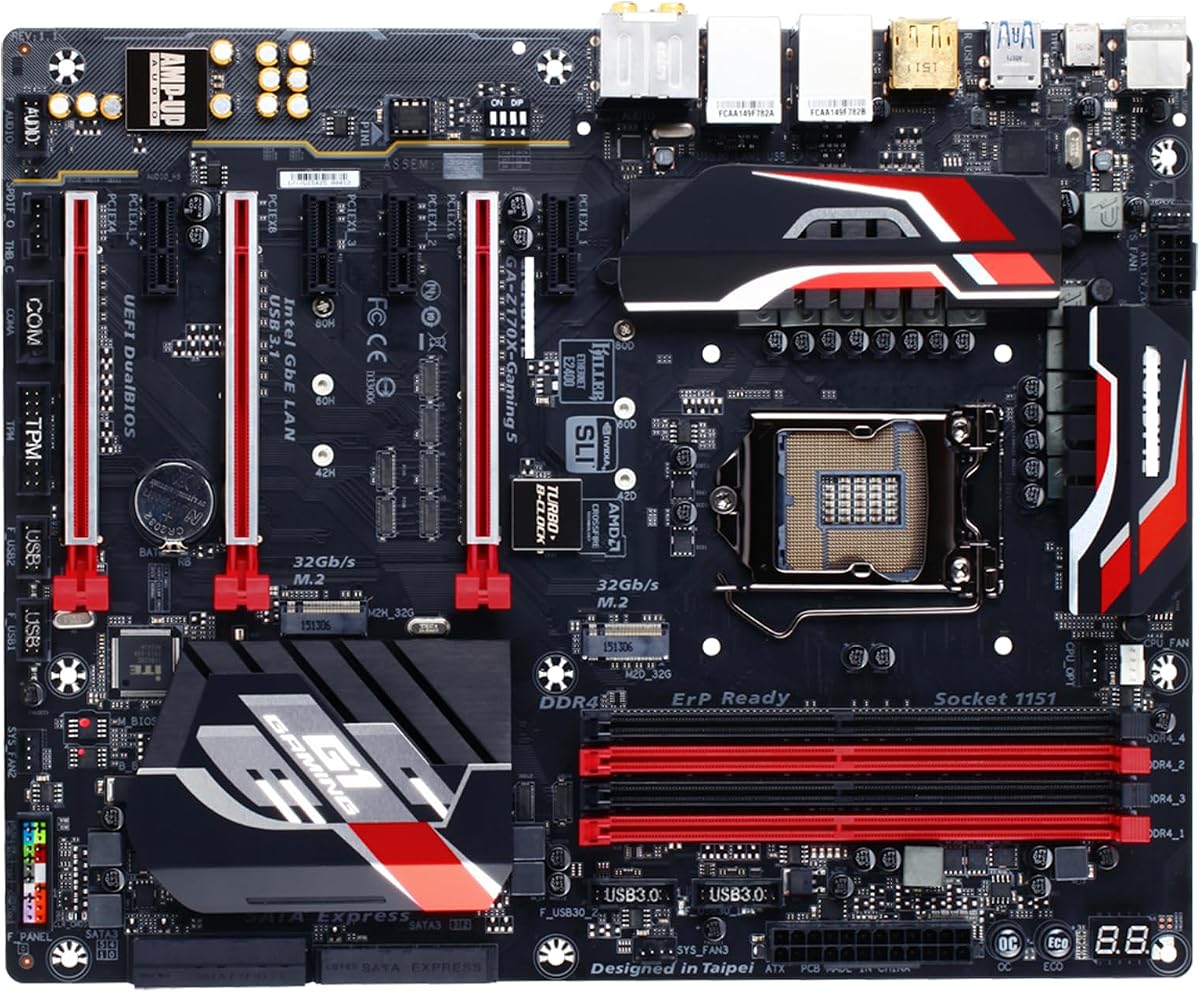
This Gigabyte board provides a solid foundation for 6th gen Intel systems with reliable performance. While its rating is 3.7 it offers essential features like multiple PCIe slots and ample SATA connectivity for diverse storage needs.
We may earn a commission when you buy through this link, at no additional cost to you.
The inclusion of 4 DDR4 DIMM sockets allows for high memory capacity which is beneficial for multitasking and content creation. The board supports multi-GPU setups which adds value for graphical performance upgrades.
Some users have reported BIOS related challenges but these can often be resolved with updates. The robust build quality ensures stability during regular gaming sessions and daily computing tasks without frequent crashes.
For builders needing specific connectivity options this board remains a viable contender. It provides a balanced mix of expansion and storage that suits mid-range gaming systems effectively.
Six SATA 6Gb/s connectors provide plenty of options for adding hard drives and SSDs.
Multiple PCIe slots allow for expansion cards like sound cards or additional GPUs.
We may earn a commission when you buy through this link, at no additional cost to you.
The ASRock Z170 EXTREME4 offers a wealth of features for power users and enthusiasts. With a 4.2 rating it stands out for its triple PCIe x16 slots and comprehensive storage support including multiple SATA Express ports.
We may earn a commission when you buy through this link, at no additional cost to you.
Its Realtek ALC1150 audio codec delivers high definition sound suitable for gaming and media consumption. The board supports various RAID configurations which allows for optimized storage performance or redundancy based on user preference.
Managing three PCIe x16 slots requires a large case and a powerful PSU but the flexibility is unmatched. This makes it ideal for users who want extensive expansion possibilities beyond standard gaming needs.
Consider this board if you need maximum connectivity and expansion slots. It provides the necessary hardware flexibility for complex builds that demand robust data handling and multi-device support.
Triple PCIe x16 slots enable versatile configurations for multiple GPUs or high bandwidth cards.
Support for multiple RAID configurations offers flexibility for performance or data protection.
We may earn a commission when you buy through this link, at no additional cost to you.
MSI designed this motherboard specifically for gaming with features like Steel Armor and Audio Boost 3. With a rating of 3.9 it emphasizes durability and audio quality to enhance the overall gaming experience significantly.
We may earn a commission when you buy through this link, at no additional cost to you.
The eight USB 3.0 ports provide ample connectivity for peripherals without needing hubs. DDR4 Boost technology ensures stable high-speed memory performance which is crucial for modern games that rely on fast data access.
While some users find the BIOS complex the hardware is robust for gaming workloads. The Steel Armor reinforces the PCIe slots to protect heavy graphics cards from physical damage over time.
This board is a good choice for gamers who value connectivity and audio quality. It delivers a solid performance foundation without excessive price points for mid-range gaming systems.
Steel Armor protects PCIe slots from damage ensuring longevity for heavy graphics cards.
Audio Boost 3 provides clearer sound output for immersive gaming sessions.
We may earn a commission when you buy through this link, at no additional cost to you.
The Asus Z170-A boasts the highest rating of 4.3 among the reviewed options. It focuses on user-friendliness with 5-Way Optimization that automatically tunes your system for optimal performance without manual intervention.
We may earn a commission when you buy through this link, at no additional cost to you.
USB 3.1 Boost ensures faster data transfer for connected devices which helps with loading times. DTS Studio Sound delivers an immersive audio experience that rivals more specialized hardware for gaming needs.
While M.2 support is limited to SATA standards it still provides fast storage access for many users. The 5X Protection II adds reliability which is important for long-term system stability in daily use.
This board is ideal for those who want a hassle-free experience with strong performance. It balances features and ease of use effectively for most home gaming builds.
5-Way Optimization automatically adjusts settings for the best performance based on your hardware.
5X Protection II safeguards components against power surges and other common issues.
We may earn a commission when you buy through this link, at no additional cost to you.
This ASUS ROG model brings premium features into a compact mATX form factor ideal for small cases. As a Certified Refurbished product it comes tested and cleaned with a warranty providing peace of mind for buyers.
We may earn a commission when you buy through this link, at no additional cost to you.
The Extreme Engine DIGI+ technology ensures stable power delivery which is vital for high-performance components in a small space. SupremeFX 2015 audio delivers immersive sound despite the reduced physical size of the board.
While it is refurbished the quality control ensures it functions like new. The lighting control allows for customization which enhances the visual appeal of a small build without sacrificing aesthetics.
Consider this board if you need a high-end solution for a compact gaming PC. It offers premium performance and features that are rare in smaller form factors available today.
mATX design packs high-end features into a smaller footprint without compromising performance.
Certified Refurbished status includes testing and cleaning to ensure quality standards.
We may earn a commission when you buy through this link, at no additional cost to you.
Choosing the right motherboard requires understanding key factors that impact performance reliability and future upgrades.
Ensure the motherboard supports the LGA1151 socket which is required for 6th and 7th Gen Intel Core processors. Always check if a BIOS update is needed for newer CPUs.
Verify CPU socket compatibility before purchasing to avoid fitting issues with your processor choice.
Look for boards that support DDR4 memory as this offers higher speeds and better bandwidth for gaming tasks. Check the maximum capacity supported to ensure it meets your multitasking needs.
Confirm DDR4 memory support and capacity limits for smooth multitasking and game performance.
If you plan to use multiple graphics cards verify the PCIe slot configuration supports SLI or Crossfire. Single GPU users can save money with boards having fewer slots.
Check PCIe slot counts and speeds to ensure compatibility with your graphics card and expansion plans.
Modern gaming builds benefit from M.2 slots for fast storage access. Look for boards with SATA Express or multiple SATA ports if you have many drives.
Prioritize M.2 connectivity and enough SATA ports for your storage and speed requirements.
High quality audio codecs and Ethernet ports reduce latency and improve sound immersion during play. Look for technologies like SupremeFX or Realtek ALC series audio.
Evaluate audio and networking specs for reduced latency and immersive sound during games.
USB 3.1 Type A and C ports provide faster data transfer and compatibility with modern devices. Count total ports to ensure you have enough for peripherals.
Ensure enough USB 3.1 ports for your peripherals and future device additions.
Motherboards with robust VRM cooling and durable capacitors ensure stability during overclocking or long sessions. Look for brands known for consistent quality and support.
Select boards with solid build quality and reliable VRM cooling for long term stability.
ATX boards offer more slots and features while mATX are ideal for compact builds. Ensure the case you choose supports the specific size of the motherboard.
Match the motherboard size to your PC case to ensure proper fit and installation.
Install the motherboard on the case standoffs to prevent short circuits and ensure secure fitting. Align all connectors carefully to avoid physical damage during assembly or maintenance.
Apply a BIOS update upon first boot to ensure support for newer CPU models. This step is critical for system stability and optimal performance with 7th Gen processors.
Regularly clean dust from heatsinks and fans using compressed air to maintain cooling efficiency. Monitor temperatures during gaming to ensure the system remains within safe operating limits.
Yes you can use 7th Gen Intel Core processors on Z170 boards provided you update the BIOS to the latest version. Most manufacturers released updates to ensure compatibility and stability for these newer CPUs.
The Z170 chipset supports CPU overclocking and offers more PCIe lanes compared to H170 which locks CPU multiplier. Z170 is ideal for gamers wanting performance tuning while H170 serves basic needs.
Yes updating the BIOS is required to recognize 7th Gen Intel CPUs on Z170 boards. Check the manufacturer website for the latest BIOS file and instructions before installation.
No LGA1151 boards require DDR4 memory as they are designed for the newer memory standard. Attempting to install DDR3 will not work physically or electronically with these boards.
Many of these boards support multi-GPU setups like SLI or Crossfire but check specific PCIe slot configurations. Ensure your power supply can handle the additional GPU load.
Most boards support NVMe via M.2 slots that use PCIe lanes. Check the manual to ensure your M.2 SSD is compatible with the slot type and speed.
Yes for budget builds or upgrades to 6th 7th Gen systems these boards offer great value. They are not suitable for newest CPUs but remain reliable for specific use cases.
Check the motherboard form factor such as ATX or mATX and compare it with your case specifications. Ensure the mounting holes align and the I/O shield fits the rear panel.
We have highlighted the top ten options for 1151 Z170 Skylake motherboards to help you find the perfect match for your build. Each board offers unique strengths that cater to different budgets and performance requirements.
Prioritize features like memory capacity and connectivity that align with your gaming and work needs. The right board ensures stability and longevity for your investment over the coming years.
Always verify current availability and prices before purchasing as these may change. Select the option that offers the best value and features for your specific setup.