
Guermok Video Capture Card
4.4Editor score
Affordable price point
USB3.0 high speed transfer
Plug and play setup
HDMI recorders are essential tools for capturing high-quality video from various sources without needing a computer. They allow users to record gameplay, live events, and analog conversions easily.
We evaluated ten leading models based on video quality, ease of use, and compatibility with different devices. Each product offers unique features tailored to specific recording scenarios and user preferences.
Each pick highlights key strengths and ideal use cases for different buyers. Please note that product availability and pricing may change over time so check current listings before purchasing.
4.4Editor score
4.0Editor score

4.1Editor score
As an Amazon Associate we earn from qualifying purchases.
The following table provides a side-by-side comparison of all ten HDMI recorders evaluated in this guide to help you quickly identify the best fit.





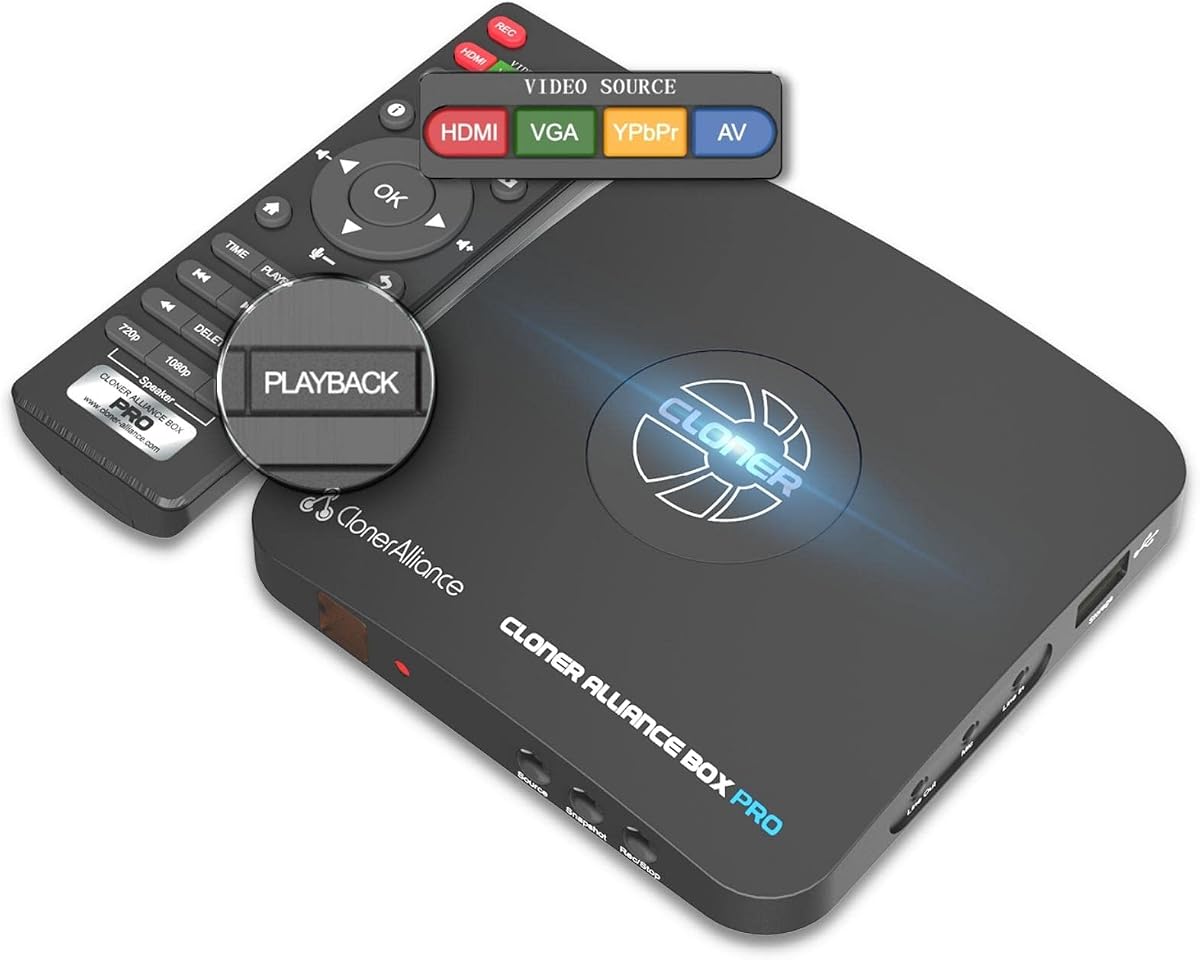
The ClonerAlliance Box Pro is a powerful standalone device designed for users who need to record video without connecting a computer. It captures high-definition content from various sources and saves it directly to USB storage.
We may earn a commission when you buy through this link, at no additional cost to you.
This recorder supports multiple input types including HDMI RCA and VGA making it versatile for older devices like VCRs and camcorders. The ability to schedule recordings means you can automate capturing content at specific times easily.
While it offers excellent versatility for analog conversions the device does not support HDCP protected content which limits streaming playback. The latency is low ensuring a smooth viewing experience during capture sessions.
This device is ideal for archivists and gamers who want a simple plug-and-play solution. If you need reliable standalone recording with broad compatibility this model is a strong choice.
The wide range of supported inputs allows users to capture from almost any video source including legacy analog devices.
Operating without a PC makes this recorder perfect for quick setups in living rooms or studio environments.
We may earn a commission when you buy through this link, at no additional cost to you.
The Guermok Video Capture Card offers an entry point into video capture for those on a tight budget. It delivers solid performance for streaming and recording while maintaining a very accessible price point.
We may earn a commission when you buy through this link, at no additional cost to you.
Using USB3.0 technology it ensures fast data transfer which is crucial for high frame rate content. The card works with major operating systems and popular streaming software like OBS making it easy to integrate.
One limitation is the lack of HDMI loop-out which means you cannot see the video on another monitor while streaming. Also it requires software to function so it is not standalone for TV use.
If you need a portable and cheap solution for streaming or recording to a computer this card is highly recommended. It balances cost and performance effectively for most casual users.
Its small size makes it easy to carry in a laptop bag for travel or events.
Compatibility with tools like OBS and VLC ensures flexibility for different workflow needs.
We may earn a commission when you buy through this link, at no additional cost to you.
The ClonerAlliance UHD Pro stands out as a premium choice for users needing high-resolution recording capabilities. It supports capturing video in 4K resolution which is essential for modern gaming and professional video content.
We may earn a commission when you buy through this link, at no additional cost to you.
Advanced codec support like H.265 ensures that files are compressed efficiently without losing quality. The ability to pause and resume recording provides flexibility during long sessions allowing you to manage storage space better.
While it offers impressive specs it still lacks support for protected content so streaming services cannot be recorded. The requirement for specific file systems might require some initial setup for storage drives.
This recorder is perfect for content creators who need high-quality footage without a PC setup. The premium features justify the price for those requiring reliable standalone 4K performance.
H.265 codec support reduces file sizes significantly while maintaining high visual fidelity.
Capture 4K video directly to USB storage without needing a powerful computer attached.
We may earn a commission when you buy through this link, at no additional cost to you.
This capture card is designed specifically for streamers who need to share gameplay or camera feeds. It provides a reliable connection for transmitting video to a computer with high speed USB 3.0.
We may earn a commission when you buy through this link, at no additional cost to you.
The HDMI loop-out feature ensures that you can play games on a monitor while simultaneously sending the feed to your PC. The microphone input allows you to add commentary directly into the capture stream.
While it offers great utility for streaming it is limited to 1080p output resolution which might not satisfy 4K capture needs. The lack of external power means it relies solely on USB power which can be limiting.
If you are focused on streaming from consoles this card provides all the necessary tools at a reasonable cost. It simplifies the setup for beginners looking to start broadcasting content.
Optimized for platforms like Twitch and YouTube to help creators broadcast high quality video.
Built-in mic jack lets you add live voice commentary without extra hardware.
We may earn a commission when you buy through this link, at no additional cost to you.
The Audio Express AXHDCAP is a compact solution for users looking for basic capture capabilities without spending much. It allows for 4K input but limits output to 1080p for wider compatibility.
We may earn a commission when you buy through this link, at no additional cost to you.
Its low latency design ensures that what you see is what you get during live sessions. The small form factor makes it easy to integrate into various setups including travel streaming kits.
A major constraint is the USB 2.0 interface which limits the speed and maximum frame rate compared to newer cards. This might cause bottlenecks if you try to run high performance software.
For simple tasks like video conferencing or basic recording this card serves its purpose well. It is best suited for those who prioritize portability and cost over high frame rates.
Provides essential capture features at a very low price point for budget conscious users.
Its small size allows it to fit easily into a pocket or small laptop bag.
We may earn a commission when you buy through this link, at no additional cost to you.
This card is engineered for gamers who want to capture smooth footage from modern consoles like PS5 or Xbox. The USB 3.0 connection ensures that data transfer is fast enough for 60fps video.
We may earn a commission when you buy through this link, at no additional cost to you.
Its low latency performance is crucial for live streaming where timing matters. The device is universally compatible with most operating systems and streaming software making it easy to set up.
Since it relies on a PC for processing and storage you cannot use it as a standalone recorder. However for desktop setups it offers a robust and reliable capture solution.
If you are building a streaming setup for console games this device provides the necessary bandwidth and speed. It balances portability with performance effectively for most streamers.
Works seamlessly with PlayStation and Xbox consoles to capture gameplay smoothly.
High bandwidth connection ensures data transfer is fast enough for 1080p60fps capture.
We may earn a commission when you buy through this link, at no additional cost to you.
This capture box stands out by offering dual HDMI inputs which is rare for standalone devices. It allows you to switch between two sources easily without needing a separate switch.
We may earn a commission when you buy through this link, at no additional cost to you.
The built-in 7-inch screen lets you monitor and review content without connecting to an external TV. This feature is particularly useful for on-the-go recording where portability is key.
While it offers advanced features like battery power and picture-in-picture the higher price might not be justified for casual users. It is a specialized tool for specific professional use cases.
If you need to manage multiple video sources independently this box provides the necessary tools. It is ideal for production teams or educators who need flexible switching capabilities.
Connect two HDMI sources simultaneously and switch between them for seamless broadcasting.
The included screen lets you verify video feeds instantly without external monitors.
We may earn a commission when you buy through this link, at no additional cost to you.
The ZowieREC 4K HDMI offers a premium design with an aluminum casing that looks and feels professional. It provides standalone recording capabilities so you do not need a computer to capture footage.
We may earn a commission when you buy through this link, at no additional cost to you.
Features like pause and resume give you control over your recording sessions allowing for more precise edits later. The scheduling function lets you automate recordings for regular events or live streams.
While the design is sleek it only records up to 30fps which might be lower than competitive models. The lack of HDCP support remains a common limitation across most standalone devices.
This recorder is a great choice for those who value build quality and standalone convenience. It is suitable for users who need high-quality recording without the hassle of a PC setup.
The aluminum casing ensures durability and a professional aesthetic for any desk.
Set recording times in advance so you never miss important events or sessions.
We may earn a commission when you buy through this link, at no additional cost to you.
The ClonerAlliance ViewPro is a portable standalone unit that includes a large screen for immediate playback. This makes it easy to verify recordings on the spot without needing another monitor.
We may earn a commission when you buy through this link, at no additional cost to you.
Its support for analog inputs allows you to digitize older content like VHS tapes or old camcorder footage. The built-in speaker adds convenience for listening to audio directly from the device.
While it is more versatile than USB cards it is heavier and less portable due to the screen. It is best suited for scenarios where you need both capture and playback in one device.
This unit is perfect for archivists or educators who need to digitize and play back media easily. It offers a unique combination of portability and standalone functionality.
The built-in LCD lets you view and play back footage instantly without extra gear.
Supports old video formats to help you preserve and digitize legacy media collections.
We may earn a commission when you buy through this link, at no additional cost to you.
This recorder is built for professional workflows that rely on SDI video inputs rather than standard HDMI. It offers high-speed data transfer that ensures no loss of quality during capture.
We may earn a commission when you buy through this link, at no additional cost to you.
The loop output feature allows you to connect other equipment in the chain without interrupting the main feed. This makes it ideal for complex broadcast setups or live production environments.
It requires dedicated SDI equipment which adds to the cost and complexity compared to consumer options. This tool is designed for users with professional hardware rather than casual home users.
If you are working in broadcast or professional video production this device provides industry standard quality. It is a robust tool for those who need reliable performance with SDI interfaces.
Designed for broadcast environments that require robust SDI video connections.
Loop-through output allows easy integration with other production equipment.
We may earn a commission when you buy through this link, at no additional cost to you.
Selecting the right HDMI recorder requires understanding your specific needs and the technical limitations of the devices you plan to use.
The resolution and frame rate determine how smooth and detailed your recordings will be. Look for models that support at least 1080p at 60fps if you plan to record fast-moving content like gaming.
Ensure the device matches the output capabilities of your source device to avoid bottlenecks or quality loss.
Decide whether you need a device that works without a computer. Standalone units allow you to record directly to USB drives which is convenient for living room setups.
PC-based capture cards offer more flexibility but require your computer to be on and running software during capture sessions.
Check the available ports to ensure they match your existing hardware. Some recorders include analog inputs like RCA or VGA which are useful for legacy devices.
Verify the presence of HDMI loop-out if you need to monitor the video feed while streaming or recording.
Understanding the supported codecs helps you manage file sizes and compatibility. Modern devices should support H.264 and ideally H.265 for efficient compression.
Check which file systems are supported so your USB drive is recognized correctly by the recorder.
Most consumer recorders do not support HDCP protected content which means streaming services cannot be recorded directly. Be aware of this limitation before purchasing for personal viewing.
If you need to record protected content you will need a model that specifically bypasses this protection or is designed for that purpose.
If you plan to travel with your recorder consider the physical size and weight. Portable units with built-in screens add convenience but may be bulkier than simple capture cards.
Look for rugged designs with good heat dissipation if you plan to use the device for long periods.
Ensure the device works with the software you intend to use for recording and streaming. Most modern cards support OBS and VLC but some may have proprietary software.
Check for updates and driver support to ensure long-term compatibility with operating system changes.
Balance the features against the price to determine the best value for your needs. Entry-level cards offer good performance for casual use while higher-end models provide more flexibility.
Consider warranty and customer support options when making your final decision to ensure peace of mind.
Connect your video source to the recorder using a high-quality HDMI cable. Ensure the connection is secure to prevent signal drops during recording sessions.
Set up your storage device by formatting it to the supported file system like FAT32 or NTFS. Insert the drive into the recorder and verify it is recognized before starting.
Regularly check for firmware updates to maintain optimal performance. Keep the device in a well-ventilated area to prevent overheating during long capture sessions.
Most standard HDMI recorders do not support HDCP protected content which is used by streaming services. This means you will likely see a black screen when trying to record such content. You need specific models designed to bypass this protection if that is a requirement.
Most recorders support FAT32 and NTFS which are widely compatible. FAT32 has a file size limit of 4GB which might affect long recordings. NTFS allows larger files but check your device documentation for specific compatibility details.
Standalone recorders are designed to work without a computer. You can connect your source directly to the device and save files to a USB drive. A PC is only needed if you want to edit the footage or transfer files later.
Latency can occur due to the encoding process or connection quality. Using USB 3.0 instead of 2.0 can reduce delay significantly. Check that your cables are high quality and your software is configured for low latency.
Yes if the recorder supports analog inputs like RCA or Composite. You will need a converter if your recorder only accepts HDMI. Many dedicated capture devices include these inputs specifically for legacy video digitization.
Most devices will stop recording immediately if power is cut. Some standalone models have battery options to prevent this. It is always good to save your files frequently or use a backup power source for long sessions.
Most modern consoles like PS5 and Xbox work well with capture cards as long as they have an HDMI output. Check if the device supports HDCP or requires specific settings changes. Most manufacturers list compatibility on their product pages.
Yes capture cards can be used to route video from cameras to conferencing software. This allows you to use higher quality external cameras instead of built-in webcams. Ensure your software recognizes the device as a video source.
The right recorder depends on whether you need a standalone unit or a PC-based solution. Top picks like the ClonerAlliance Box Pro and Guermok Video Capture Card offer excellent value for different user needs.
Prioritize resolution and input types that match your existing hardware to ensure smooth operation. Consider features like scheduling and loop-out if you require advanced capabilities for streaming.
Always verify current listings for availability and compatibility before purchasing. Technology evolves quickly so checking the latest specifications ensures you get the best performance for your investment.