
Fender Quantum HD 2
MAX-HD mic preamps
Front instrument inputs
Fender Studio app pack
This guide compares the top external sound cards for guitar, evaluating audio quality, connectivity, software, and value for musicians and producers.
Finding the right external sound card for guitar is crucial for musicians who demand pristine audio capture and low latency monitoring. These devices transform your computer into a professional recording studio, ensuring every nuance of your performance is preserved without unwanted noise or distortion.
We evaluated ten leading audio interfaces based on input versatility, conversion quality, driver stability, and included software ecosystems. Our analysis prioritizes units that offer dedicated instrument inputs, high-resolution recording capabilities, and seamless compatibility with modern digital audio workstations.
Each selection highlights distinct strengths ranging from budget-friendly options to premium studio solutions. While prices fluctuate due to market conditions, the core features described remain consistent. Check current listings for the most up-to-date offers before making your final purchase decision.
4.6Editor score

4.4Editor score
The following table provides a side-by-side comparison of all ten selected audio interfaces. We highlight key specifications such as input types, sample rates, and unique features to help you identify the unit that best fits your recording needs.


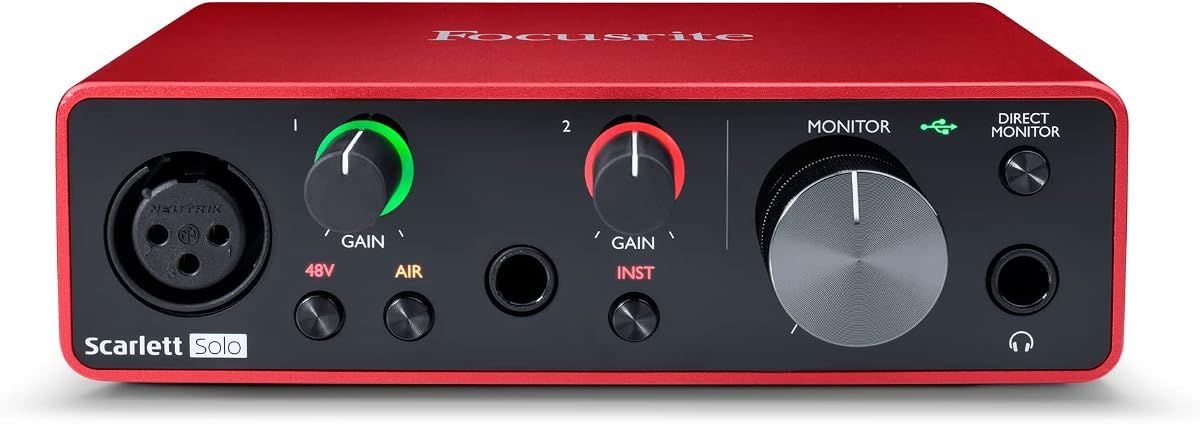
The Focusrite Scarlett Solo 3rd Gen stands out as a reliable external sound card for guitar, earning a 4.6 rating from users. It delivers pro performance with high-headroom instrument inputs and a switchable Air mode that adds clarity to acoustic tones.
We may earn a commission when you buy through this link, at no additional cost to you.
Its standout features include Gain Halos that prevent unwanted clipping during loud passages. The unit includes high-performance converters allowing recording at up to 24-bit/192kHz ensuring sonic qualities are retained. You also receive Pro Tools Intro plus Ableton Live Lite in the box.
While it lacks direct ADAT expansion compared to larger interfaces, its simplicity is often a benefit. The three-year warranty provides peace of mind against manufacturing faults. This device is ideal for home recordists seeking professional quality without complex routing.
We recommend this for guitarists and vocalists who need a compact solution with studio-quality converters. It is particularly valuable for those starting out who want industry-standard software included. Check current listings for pricing before purchasing.
The visual Gain Halos help you set input levels correctly to avoid distortion without needing a meter.
Air mode engages an EQ curve that enhances high frequencies making acoustic guitars sound brighter.
We may earn a commission when you buy through this link, at no additional cost to you.
The Fender Quantum HD 2 is a robust external sound card designed for musicians who want the best audio fidelity. It offers a 20×24 USB-C interface with MAX-HD mic preamps and a full Fender amp model pack via the Studio app.
We may earn a commission when you buy through this link, at no additional cost to you.
Front-facing instrument inputs are optimized for transparent guitar recording. The unit supports ADAT expansion allowing hybrid studio growth and includes a DSP monitor mixer for latency-free monitoring. Auto Gain instantly sets perfect recording levels for fast sessions.
The main trade-off is the price, which reflects its premium build and features. The complexity of routing may require some setup time compared to simpler interfaces. However, the included perpetual license for Fender Studio Pro adds significant value for producers.
This interface suits advanced creators needing expandability and authentic amp tones. It is perfect for those who own Fender gear and want seamless integration. We suggest registering early to claim the software pack.
The Fender Studio app provides a full collection of authentic models and effects for crafting inspiring tones.
One-touch Auto Gain eliminates guesswork ensuring fast and frustration-free recording sessions.
We may earn a commission when you buy through this link, at no additional cost to you.
The Synido A10 offers exceptional value as an external sound card for guitar and DJ recording. It delivers pristine 24-bit/48kHz resolution and features a wireless backing track system for practice sessions without cables.
We may earn a commission when you buy through this link, at no additional cost to you.
Its portable design includes a sturdy aluminum alloy body and a secure buckle-design USB-C connector. Independent volume buttons allow precise monitoring of input and headphone levels. This makes it ideal for beginners needing mobility.
While it does not match the sample rates of higher-end units, 48kHz remains industry standard for streaming. The lack of advanced mixing features limits professional use. But for hobbyists, the wireless feature is a standout.
We recommend this for musicians on a tight budget who value portability. It works well with mobile devices and PCs. Always check the warranty details before purchase.
Stream backing tracks directly from one phone to the recording phone without cables.
The aluminum alloy body ensures durability while keeping the unit compact and lightweight.
We may earn a commission when you buy through this link, at no additional cost to you.
The M-AUDIO M-Track Duo is a versatile interface that covers podcasting recording and live streaming. It features two combo XLR line and instrument inputs with phantom power for various microphone types.
We may earn a commission when you buy through this link, at no additional cost to you.
Crystal Preamps ensure optimal sound from microphones. A USB/Direct switch allows for zero latency monitoring. The unit also includes MPC Beats software complete with essential production tools from Akai Professional.
The main drawback is the absence of a USB-C connection which may limit modern laptop compatibility. However, the flexibility of inputs makes it suitable for multi-source recording. It is a solid choice for podcasters.
Buy this if you need a compact interface that handles multiple inputs without breaking the bank. It is also great for those who want to explore drum production with MPC Beats. Verify cable type before ordering.
Get started with production immediately thanks to the included MPC Beats software.
Direct monitoring allows real-time listening without delay while recording.
We may earn a commission when you buy through this link, at no additional cost to you.
The Fender AudioBox GO is an ultra-compact 2×2 USB-C audio interface designed for mobile recording. It features pristine 24-bit/96kHz converters and a dedicated TS instrument input optimized for guitar and bass.
We may earn a commission when you buy through this link, at no additional cost to you.
Access to the Fender Studio app unlocks a complete collection of authentic amp models. The unit is bus-powered for plug-and-play simplicity. A 6-month trial of Fender Studio Pro is included to help you start recording.
The trial period means you may need to upgrade for full DAW features eventually. The I/O is minimal which limits complex setups. But for guitarists needing a simple reliable interface this is perfect.
We suggest this for solo performers who record on the go. It is also suitable for podcasters needing a clean mic input. Check the trial terms carefully before committing.
Unlock the Complete Fender Amp & FX Pack to craft inspiring guitar tones.
Bus-powered design ensures effortless portability without external power needs.
We may earn a commission when you buy through this link, at no additional cost to you.
The MAONO PS22 Lite is designed for content creators and streamers needing high-resolution recording. It captures every detail with 24-bit/192kHz resolution and a dynamic range of 106dB. The ProStudio Routing Software adds flexibility for live streams.
We may earn a commission when you buy through this link, at no additional cost to you.
A dynamic light ring indicates sound input status which helps beginners monitor levels visually. The ergonomic feel reduces cable clutter. It is compatible with popular DAWs like Avid Pro Tools and Ableton Live.
The software setup may require some configuration to get drivers right. However, the intuitive modes for recording and broadcast make it easy to use. This is a strong choice for podcasters.
We recommend this for social media influencers needing a professional setup without high costs. It handles both condenser and dynamic microphones well. Ensure you select the correct driver in settings.
The dynamic light ring indicates sound input status so you know when recording.
ProStudio Routing Software opens up virtual channels and loopbacks for streams.
We may earn a commission when you buy through this link, at no additional cost to you.
The Sound Blaster Play! 3 is a simple USB audio adapter offering 24-bit 96kHz resolution. It works straight out of the box without requiring drivers. Downloadable software provides audio enhancements and optimized profiles for earphones.
We may earn a commission when you buy through this link, at no additional cost to you.
This is an excellent option for listeners needing a headphone jack but not a dedicated instrument input. The power source is corded electric ensuring stable performance. The easy headphone connectivity allows split or single stereo connections.
While it lacks instrument inputs for direct guitar recording, it is useful for playback and monitoring. The price is very competitive compared to full interfaces. It is best suited for casual listening.
We suggest this for users with computers lacking audio outputs. It is also good for gaming headsets. Check compatibility with your headset type before buying.
Control panel software gives powerful Audio Enhancements for better sound.
Works straight out of the box without needing installation.
We may earn a commission when you buy through this link, at no additional cost to you.
The StarTech 7.1 USB Audio Adapter adds up to 7.1 channels of audio to your computer via USB. It supports 7.1, 5.1 and 2 channel output using 3.5mm jacks and a microphone input.
We may earn a commission when you buy through this link, at no additional cost to you.
With support for analog and digital audio output, it upgrades existing integrated audio on desktop or laptop computers. The digital audio adapter is easy to install with plug and play support in Windows systems.
While the 48KHz max rate is adequate for most uses, high-res music may not benefit fully. However, the volume controls and mute buttons offer convenience. It is perfect for gamers needing surround sound.
We recommend this for home theater PC setups. It provides a simple solution for surround audio without internal cards. Verify Windows version compatibility.
This sound card supports 7.1, 5.1 and 2 channel output.
SPDIF Digital output supports 48KHz audio playback.
We may earn a commission when you buy through this link, at no additional cost to you.
The Cubilux CB5 USB Audio Interface converts your USB port into multiple jacks for microphones and instruments. It enables multi-track recording by assigning independent device names to each interface. The built-in advanced chip ensures crisp sound.
We may earn a commission when you buy through this link, at no additional cost to you.
With decent clarity up to 96 KHz/24-bit, it provides professional audio content for performances. It is also integrated with a powerful Hi-Res DAC to drive studio monitors up to 250 Ohm. No external power source is required.
The limitation is that line-out and audio output jacks cannot be used simultaneously. However, the portability allows recording wherever inspiration strikes. This is a strong contender for streaming.
We suggest this for streamers needing multiple inputs without a heavy setup. It is affordable and easy to connect. Always test the output jacks before a session.
Assign independent device names to each interface for multi-track recording.
The built-in advanced chip enables crisp and precise sound.
We may earn a commission when you buy through this link, at no additional cost to you.
The Cubilux 7.1 USB Surround Sound Card supports sample rates up to 384KHz for headphones. The 7.1 surround audio supports sampling rates up to 48KHz. It features a full aluminum alloy housing to isolate interference.
We may earn a commission when you buy through this link, at no additional cost to you.
Enjoy endless Hi-Res music on platforms like Spotify and Apple Music. The durable case ensures no-loss transmission of audio without static. It works seamlessly with PCs and MacBooks lacking built-in sound cards.
The product does not support older Windows systems which limits legacy users. The inputs include line-in and mic inputs. It is suitable for those prioritizing audio fidelity.
We recommend this for users seeking high-resolution playback and surround sound. Always check your Windows version before ordering. It is ideal for music listening.
The headphones output supports sampling rates and resolution from 44.1Khz to 384Khz.
Full Aluminum alloy housing enables full isolation of electronic interference.
We may earn a commission when you buy through this link, at no additional cost to you.
Selecting the right interface requires understanding key features like inputs, sampling rates, and software. This guide helps you navigate these factors to find a device that fits your recording style and budget.
Ensure the interface has a dedicated instrument input for high impedance guitars. Look for combo XLR/Line inputs if you plan to use microphones or external effects pedals. More inputs offer flexibility for multi-track sessions.
Always verify the input type matches your gear to prevent signal loss or noise.
Higher bit depth like 24-bit provides more dynamic range for recording. A sampling rate of 48kHz is standard but 96kHz or 192kHz offers higher resolution. This affects file size and CPU load.
For most home studios, 24-bit/48kHz or 24-bit/96kHz is the ideal balance of quality and performance.
Look for zero-latency monitoring which allows you to hear your instrument in real time without delay. Some interfaces offer direct monitoring via hardware switches. This is critical for live tracking without lag.
Check the driver support as ASIO drivers ensure low latency on Windows systems.
Many interfaces include DAWs and amp modeling plugins that add value. Ensure the included software is compatible with your operating system. Full perpetual licenses are better than limited trials.
Consider if you need additional plugins or if the included ones are enough to start producing.
USB-C is preferred for modern laptops as it supports data and power. Bus-powered units reduce cable clutter. If you travel, a compact design is essential for fitting in bags.
Verify the connection type matches your computer to avoid needing adapters.
Metal casings like aluminum alloy reduce interference and increase durability. Plastic cases are common in budget models but may feel less sturdy. Ensure knobs and jacks are robust for daily use.
A durable build ensures the unit withstands transport and frequent connections.
Compare the features against the cost to ensure you are paying for what you need. Higher price often means more inputs or better converters but does not guarantee better sound. Look for bundles including cables.
Set a budget based on your specific needs to avoid overspending on unnecessary features.
Some units support ADAT or digital expansion for future growth. This allows you to add more inputs via optical ports. If you plan to scale up your studio, this feature is vital.
Check the maximum inputs supported before expanding your studio setup.
Always connect your guitar to the instrument input specifically labeled for high impedance. Avoid using line inputs for guitars as this may result in weak signals. Set the gain knob so the meter stays in the green or yellow zone.
Install the latest drivers from the manufacturer's website to ensure stability. If you experience audio dropouts, try using a direct USB port rather than a hub. Restart your DAW after changing sample rates.
Store the unit in a dry place away from heat to prolong the life of the electronics. Regularly check connections for dust or debris. If the unit overheats, ensure the vents are not blocked.
While you can use a laptop's internal audio jack, an external sound card provides high impedance inputs. This ensures your guitar signal is clean and distortion free. Internal jacks are optimized for microphones not instruments.
USB-C offers faster data transfer and can charge your device simultaneously. Older USB-A interfaces are still reliable but less convenient for modern laptops. Most new interfaces now use USB-C for better compatibility.
Some units are plug-and-play but installing specific drivers like ASIO ensures low latency. Check the manufacturer's site for the latest versions. This can prevent audio glitches during recording sessions.
Yes, many interfaces support XLR inputs for microphones making them suitable for podcasts. Look for units with multiple inputs to connect both a mic and instrument. This allows dual recording for interviews with music.
Adjust the gain knob until the meter stays below zero dB. Avoid turning the gain up too high as it causes digital distortion. Use the provided software to monitor levels accurately.
Higher rates capture more detail but use more CPU resources. For general production 48kHz is sufficient. Only aim for 96kHz if you need high resolution for mastering or archival.
Most modern bus-powered interfaces draw power from your USB port. Check the product details to confirm this. If a unit requires external power it will need an AC adapter.
Many interfaces work immediately on Macs via Core Audio drivers. However installing the manufacturer's control panel ensures full feature access. Check compatibility lists before buying.
The Focusrite Scarlett Solo 3rd Gen offers the best balance of quality and simplicity. The Fender Quantum HD 2 provides premium features for advanced users seeking authentic tones. For budget seekers the Synido A10 delivers great value.
Prioritize inputs and latency over sample rates for practical recording needs. Ensure the software bundle fits your workflow to save money later. Always check compatibility with your DAW before finalizing your choice.
Prices fluctuate due to sales and market demand. Check current listings to find the best deal for your selected model. Your ideal interface depends on balancing these factors with your specific goals.