
Lexar ES3 1TB Portable SSD Silver
4.4Editor score
High-speed Data Transfer
Wide Compatibility
On The Go Design
This guide compares the best external SSD for Mac Mini M4 users, evaluating speed, durability, compatibility, and storage capacity to help you expand your
Finding the right external SSD for Mac Mini M4 is crucial for maximizing your workstation's potential. Whether you edit 4K video or manage large codebases, you need reliable, fast storage that integrates seamlessly with macOS and Apple silicon chips.
We compared ten top-rated portable and desktop external drives based on transfer speeds, durability, build quality, and ecosystem compatibility. Our analysis focuses on real-world performance for creative pros, developers, and power users needing expanded storage today.
Each pick highlights key strengths and trade-offs to help you choose the ideal drive for your workflow. Prices fluctuate frequently, so verify current deals before purchasing to ensure you get the best value for your specific storage needs.
4.4Editor score

3.9Editor score
The following table provides a side-by-side comparison of all ten drives reviewed in this guide. Evaluate key specifications like transfer speeds, storage capacity, interface types, and durability ratings to find the perfect match for your Mac Mini M4 setup.






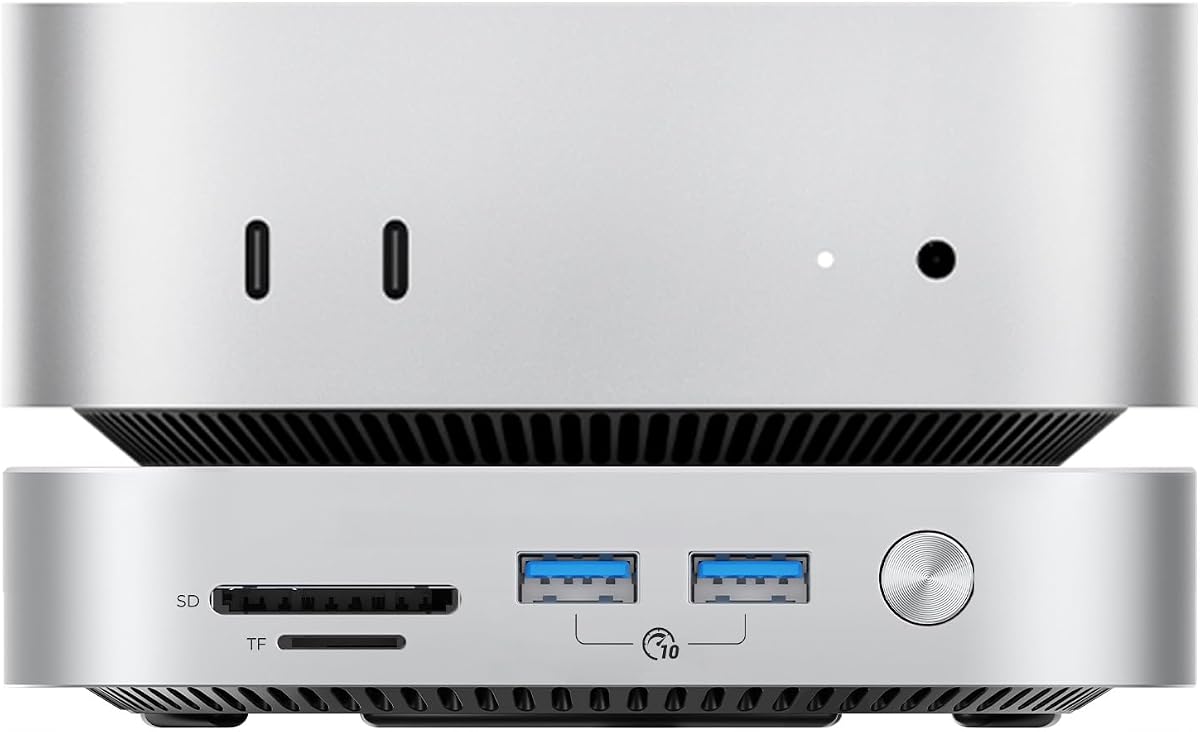
The ORICO 2TB External SSD offers seamless expansion for Mac Mini M6 and M4 series users. With speeds up to 3200MB/s, it doubles storage capacity while maintaining desktop elegance and Apple ecosystem optimization.
We may earn a commission when you buy through this link, at no additional cost to you.
This bundle includes dual-SSD connectivity to enhance workflows for 4K and 8K content creation. The aluminum body sustains peak speeds through thermal channels, and smart sleep mode reduces idle power consumption significantly.
While designed for Mac Mini users, the USB 3.0 ports add versatility for connecting peripherals or card readers. Some users may find the footprint larger than portable drives, but this suits desktop setups.
Ideal for professionals needing reliable, high-speed storage expansion for their Mac Mini. It integrates perfectly with macOS Time Machine and offers a complete solution out of the box with included accessories.
Optimized for macOS Sonoma and M-series chips, this drive supports plug-and-play setup with Time Machine compatibility, ensuring effortless backup and storage expansion without complex configuration.
The aerospace-grade aluminum body features thermal channels that maintain peak performance during extended workloads, while smart power management extends longevity for 24/7 operation.
We may earn a commission when you buy through this link, at no additional cost to you.
The Samsung T7 delivers fast speeds and durable features for video editing, photo storage, and file backups. Its embedded PCIe NVMe technology offers read/write speeds up to 1050MB/s, nearly twice as fast as previous models.
We may earn a commission when you buy through this link, at no additional cost to you.
Built for makers who need reliable storage on the go, the T7 features shock resistance and fall protection up to 6 feet. Its compact design saves space while supporting high-resolution video recording directly onto the drive.
Although not Mac Mini-specific, the T7 works with Mac systems via USB-C or USB-A cables. Samsung produces all components in-house, ensuring quality control and trusted performance across various heavy-duty applications.
Perfect for users prioritizing portability and reliability for creative work. Its versatility across PC and mobile devices makes it a true team player for diverse storage needs without sacrificing performance.
Embedded PCIe NVMe technology enables sustained read/write speeds up to 1050MB/s, making file transfers nearly twice as fast as older models while maintaining shock-resistant durability.
Samsung's world-leading expertise since 2003 ensures all firmware and components are produced in-house, including DRAM and NAND for consistent quality and long-term reliability across devices.
We may earn a commission when you buy through this link, at no additional cost to you.
The Lexar 2TB ES3 offers fast storage expansion with speeds up to 1050MB/s read and 1000MB/s write. It provides instant backups and transfers, making it 9.5x faster than traditional hard disk drives for efficient workflows.
We may earn a commission when you buy through this link, at no additional cost to you.
Built-in double layer graphite sheets conduct heat efficiently, keeping the drive cool during blazing fast transfers. The drive is drop-resistant up to 2 meters, ensuring durability for office and everyday use.
Although not designed specifically for Mac Mini, it works with Mac systems via plug-and-play USB-C/USB-A cable support. Some users might prefer Mac-specific bundles for easier integration or additional ports.
Ideal for users needing a portable, fast, and durable drive for general storage tasks. Its compact design and reliable performance make it a practical choice for expanding capacity across multiple devices.
Double layer graphite sheets conduct heat away from the drive quickly, ensuring cool operation during high-speed transfers to maintain consistent performance over time.
With drop resistance up to 2 meters, this drive withstands daily handling and travel, offering peace of mind for users moving between office and remote work locations.
We may earn a commission when you buy through this link, at no additional cost to you.
The SanDisk Extreme Portable SSD delivers transfer speeds up to 2000MB/s, nearly twice as fast as the previous generation. This allows users to move thousands of high-res photos in under a minute for efficient workflows.
We may earn a commission when you buy through this link, at no additional cost to you.
Its IP65 rating provides protection against spills and drops up to 3 meters, making it ideal for travel and outdoor use. A pocket-sized design ensures it fits easily in bags for portable access.
Built-in 256-bit AES encryption with password protection helps keep private files secure from unauthorized access. While not Mac Mini-specific, it works with Mac systems and supports high-resolution content storage.
Perfect for users needing fast, rugged, and secure portable storage. Its combination of speed, durability, and encryption makes it a versatile choice for creators who prioritize reliability and data protection.
With up to 2000MB/s transfer speeds, this drive moves large high-res photo and video files significantly faster than previous models, reducing wait times during workflow processes.
IP65 water and dust resistance plus 3m drop protection ensure durability, while 256-bit AES encryption keeps sensitive files secure with password protection capabilities.
We may earn a commission when you buy through this link, at no additional cost to you.
The Lexar ES3 1TB Portable SSD offers affordable high-speed storage with read speeds up to 1050MB/s and write speeds up to 1000MB/s. It provides efficient data transfer for various workloads and device compatibility.
We may earn a commission when you buy through this link, at no additional cost to you.
Weighing just 42g and measuring 10.5mm thick, this drive is smaller than a card and fits easily in pockets. Its stylish design includes Type-C cable support for plug-and-play convenience across multiple platforms.
Lexar DataShield software provides 256-bit AES encryption to protect sensitive files, making it suitable for users prioritizing data security. However, it lacks MagSafe compatibility and Mac Mini-specific enhancements.
Ideal for budget-conscious users needing reliable portable storage. Its combination of speed, lightweight design, and encryption features makes it a practical choice for everyday storage and backup tasks.
Weighing just 42g with a slim profile, this drive is designed for easy portability, fitting comfortably in pockets or small bags for on-the-go access.
Included Lexar DataShield software offers 256-bit AES encryption to protect sensitive files from unauthorized access, ensuring data privacy during transfers.
We may earn a commission when you buy through this link, at no additional cost to you.
The SSK Portable SSD 1TB offers reliable fast transfers with speeds up to 1050MB/s read and 1000MB/s write. It includes SLC caching to maintain consistent performance during large file transfers without slowdowns.
We may earn a commission when you buy through this link, at no additional cost to you.
Built with a 2mm thick aluminum alloy case, this drive provides superior heat dissipation and a premium touch. At just 36.6g, it is remarkably lightweight and highly portable for daily use.
LED indicators show activity status, while included USB-C and USB-A cables ensure broad compatibility. Some users may prefer drives with Mac-specific bundles, but this offers solid value for general storage.
Great for users needing steady performance and portability at an affordable price. Its lightweight design, heat management, and included accessories make it a convenient choice for expanding storage.
25% of available capacity is allocated as high-speed SLC cache, ensuring steady 10Gbps transfer rates within cache limits to avoid performance degradation.
The 2mm thick aluminum alloy case ensures superior heat dissipation, keeping temperatures low during sustained transfers for reliable performance.
We may earn a commission when you buy through this link, at no additional cost to you.
The Crucial X10 2TB Portable SSD delivers ultra-fast speeds up to 2100MB/s, designed for creators, students, and gamers. Its durable design includes IP65 dust and water resistance plus 3-meter drop protection.
We may earn a commission when you buy through this link, at no additional cost to you.
Broad compatibility ensures seamless connectivity across Mac, Windows, iPad Pro, Android, Linux, and gaming consoles. Included software bonuses add value for photo management and backup with three months of Mylio and Acronis.
While not Mac Mini-specific, this drive offers excellent general-purpose storage for demanding workflows. Some users may find the price higher, but the speed and durability justify the investment for heavy users.
Perfect for users needing fast, rugged storage for diverse applications. Its combination of performance, compatibility, and included software makes it a compelling choice for expanding storage on multiple devices.
Up to 2100MB/s read speeds provide significantly faster data access compared to hard drives, ideal for creators and gamers needing quick file transfers.
IP65 dust and water resistance combined with 3-meter drop protection ensures the drive withstands travel and varying weather conditions for reliable performance.
We may earn a commission when you buy through this link, at no additional cost to you.
The Samsung T9 delivers sustained read/write speeds up to 2000MB/s, making it the fastest SSD in Samsung's lineup for creators. Its advanced thermal guard ensures ideal temperatures even during heavy use or long processes.
We may earn a commission when you buy through this link, at no additional cost to you.
Magician Software keeps the drive updated with firmware, encryption options, and health monitoring. Broad compatibility across desktop, camera, and gaming devices ensures flexibility, while all components are produced in-house.
Although not optimized for Mac Mini, this drive works well with Mac systems. Some users may need USB 3.2 Gen 2×2 ports to achieve maximum speeds, so compatibility should be checked.
Ideal for users needing top-tier speed and thermal management for creative work. Its combination of performance, reliability, and software support makes it a premium portable storage option.
Up to 2000MB/s sustained read/write speeds enable fast loading, editing, and transferring even during longer processes for creator productivity.
Advanced thermal solution controls heat to keep the SSD at ideal temperatures during heavy use, ensuring consistent performance without throttling.
We may earn a commission when you buy through this link, at no additional cost to you.
The SABRENT Rocket Nano XTRM delivers up to 2700MB/s over Thunderbolt 3, ideal for uninterrupted 4K and 6K video editing. Its compact 2TB NVMe storage fits in a shirt pocket and is bus-powered.
We may earn a commission when you buy through this link, at no additional cost to you.
Solid aluminum body improves heat dissipation and durability, while the included silicone sleeve offers additional protection during travel. Both Thunderbolt and USB cables are included for maximum flexibility.
Designed for professionals needing high-speed storage without waiting on transfers. While pricier, the performance and compact design justify the investment for demanding workflows and frequent location changes.
Perfect for professionals prioritizing top speeds and portability. Its combination of Thunderbolt performance, included cables, and rugged design makes it a standout choice for on-the-go storage needs.
Thunderbolt 3 enables speeds up to 2700MB/s, perfect for 4K/6K editing, RAW backups, and fast project transfers without waiting.
Solid aluminum body improves heat dissipation while the included silicone sleeve protects against drops and scratches for demanding environments.
We may earn a commission when you buy through this link, at no additional cost to you.
The SanDisk Professional PRO-G40 SSD delivers up to 3000MB/s read speeds via Thunderbolt 3, moving 50GB in under a minute. Its ultra-rugged design includes IP68 water and dust resistance plus 3-meter drop protection.
We may earn a commission when you buy through this link, at no additional cost to you.
Dual-mode compatibility supports Thunderbolt 3 and USB-C connections for versatile use across devices. The aluminum core pulls heat away to maintain peak transfer speeds during intensive tasks.
Though expensive and heavy, this drive is ideal for professionals handling massive datasets needing top durability and capacity. Users must prioritize speed and ruggedness over portability or budget considerations.
Best for professionals requiring maximum storage, speed, and durability. Its combination of Thunderbolt performance, extreme ruggedness, and 4TB capacity makes it a premium solution for demanding workflows.
Up to 3000MB/s read speeds via Thunderbolt 3 move massive files like 50GB in under a minute, ideal for high-volume workflows.
IP68 dust and water resistance plus 3-meter drop protection and 4000lb crush resistance ensure the drive withstands the toughest conditions.
We may earn a commission when you buy through this link, at no additional cost to you.
Selecting the right external SSD for Mac Mini M4 involves evaluating several critical factors beyond capacity. This guide outlines key considerations to ensure optimal performance, compatibility, and value for your specific workflow.
Choose capacity based on your typical file sizes and long-term needs. Professionals editing 4K video or managing large datasets will benefit from 2TB or 4TB options, while casual users may find 1TB sufficient.
Assess your current storage usage patterns and anticipate growth to avoid frequent upgrades. Investing in higher capacity now can save money and hassle in the future.
Transfer speeds determine how quickly files move between your Mac Mini M4 and the SSD. Look for drives supporting USB 3.2 Gen 2, Thunderbolt 3, or higher standards to ensure smooth performance during editing and backups.
Higher speeds reduce waiting times for large file transfers, making workflows more efficient. Ensure your Mac Mini M4 has compatible ports to achieve advertised transfer rates.
Check the connection interface of your external SSD matches your Mac Mini M4 ports. USB-C is standard on Mac Mini M4, but Thunderbolt 3 offers faster speeds for intensive workloads if supported.
Ensure included cables are compatible or budget for additional adapters. Seamless connectivity prevents bottlenecks and ensures the drive works out of the box.
External drives often face physical stress during transport. Look for aluminum bodies, shock resistance ratings, and IP ratings for dust and water protection to ensure longevity.
Rugged builds protect data integrity during travel or accidental drops. Prioritize durability if your workflow involves moving between locations frequently.
Bus-powered SSDs draw energy from the connected device, eliminating the need for separate power adapters. This enhances portability and simplifies setup on desktop setups.
Some high-capacity or Thunderbolt drives may require external power. Consider this factor if you plan to minimize cables and maximize convenience on your desk.
If handling sensitive data, look for drives with hardware or software encryption options. AES encryption helps protect files from unauthorized access, ensuring privacy and compliance.
Check whether encryption requires third-party software or comes built-in. Easy-to-use encryption ensures security without complicating daily tasks.
Confirm the SSD is compatible with macOS and supports Time Machine backups. Some drives are pre-formatted or optimized for Apple systems to avoid reformatting hassles.
Cross-platform compatibility ensures flexibility if you switch devices or share files. Verify compatibility before purchase to ensure seamless integration.
A longer warranty period reflects manufacturer confidence in product durability. Look for at least 3 years of coverage to safeguard against defects or failures.
Reliable customer support helps resolve issues quickly. Research brand reputation for service responsiveness when selecting your external SSD.
Connect your external SSD directly to a USB-C or Thunderbolt port on your Mac Mini M4 to ensure maximum transfer speeds. Avoid using hubs or extension cables unless necessary, as they may reduce performance or power stability.
Properly eject the drive from macOS before unplugging it to prevent data corruption. Use Finder to drag the drive icon to the Trash or right-click and select eject to ensure all files are safely written.
Keep the drive in a cool, dry environment when not in use. Excessive heat or moisture can degrade performance over time, so avoid direct sunlight or humid locations for long-term storage.
Yes, most external SSDs work seamlessly with macOS Time Machine after formatting to APFS or Mac OS Extended. Ensure the drive has enough capacity and supports USB-C or Thunderbolt connectivity for optimal performance.
Thunderbolt 3 provides the fastest speeds for large file transfers, but USB-C 3.2 Gen 2 offers great performance for general use. Choose based on your speed requirements and available ports on your Mac Mini M4.
Most portable external SSDs are bus-powered and draw power directly from the Mac Mini M4 ports. High-capacity or Thunderbolt models may require external power adapters for sustained performance.
External SSDs typically last several years with regular use, depending on write cycles and usage patterns. Proper handling and avoiding extreme temperatures help extend their lifespan and data integrity.
Yes, high-speed external SSDs support direct editing of 4K video on Mac Mini M4. Ensure the drive has sufficient read/write speeds and is connected via USB-C or Thunderbolt for smooth playback.
Most modern external SSDs are compatible with macOS Sonoma and later versions. Verify product specifications for macOS certification to ensure plug-and-play functionality without requiring additional drivers.
This guide highlights ten top external SSDs tailored for Mac Mini M4 users, balancing speed, capacity, durability, and price. The ORICO 2TB and SanDisk PRO-G40 excel in specialized performance and ruggedness respectively.
Prioritize transfer speeds and interface compatibility if you work with large files or multiple devices. Budget-conscious users may prefer the Lexar ES3 1TB for reliable everyday storage without premium costs.
Prices and availability change frequently, so verify current offers before purchasing to ensure the best value. Always match the drive's specifications to your specific workflow needs for optimal productivity.