
ASUS ROG Tessen Mobile Gaming Controller
4.1Editor score
Ultra-Portable Foldable Design
Console-Grade Control Comfort
Zero-Latency Wired Performance
This guide compares the top ASUS ROG Ally Controller options for PC and Xbox gaming, evaluating features like connectivity, joystick tech, and customization to
Finding the right controller for your handheld gaming setup is crucial for immersive play. Whether you prefer PC or Xbox ecosystems, the ASUS ROG Ally Controller series offers versatile options designed to enhance your experience with responsive inputs and durable construction.
We analyzed ten distinct models focusing on connectivity, build quality, and unique features like OLED displays or TMR joysticks. Each product was evaluated based on its ability to provide low latency, comfort during long sessions, and compatibility with various gaming platforms.
Every pick highlights specific strengths and trade-offs to match your gaming style. Prices and availability fluctuate frequently, so verify current details before purchasing to ensure you get the best value for your specific needs.
4.1Editor score

3.9Editor score

4.0Editor score
This comparison table outlines the key specifications and features of the top ten controllers available for ASUS ROG Ally and related gaming setups.


The ASUS ROG Raikiri II Xbox stands out as a versatile gaming controller designed for both PC and Xbox platforms. It features a rating reflecting strong user satisfaction and delivers standout qualities like ultra-low latency and flexible connectivity modes.
We may earn a commission when you buy through this link, at no additional cost to you.
Its Tri-Mode Connectivity allows players to switch between 2.4GHz RF, Bluetooth, or wired USB-C easily. The 1000Hz polling rate ensures responsive controls, while the Anti-Drift TMR Joysticks offer accuracy and power efficiency compared to traditional Hall Effect models.
While it offers impressive battery life of at least 30 hours, some users may find the setup process requires navigating Armoury Crate software for full customization. These trade-offs are acceptable given the controller's performance benefits and included premium accessories like a protective case.
Gamers seeking a controller that bridges PC and Xbox ecosystems should consider this model. It is an excellent choice for those prioritizing responsiveness and long-term durability in their gaming setup.
The ability to switch between wireless and wired modes ensures compatibility with various devices without compromise.
TMR Joysticks reduce wear and tear, providing consistent performance over extended gaming sessions.
We may earn a commission when you buy through this link, at no additional cost to you.
This Pro variant targets competitive players with an 8K sampling rate for maximum responsiveness. It includes unique features like a full color display for profile customization and hot-swappable joystick modules.
We may earn a commission when you buy through this link, at no additional cost to you.
The controller offers 79 hours of battery life, making it ideal for long trips or tournaments without frequent charging. Additional customizable buttons on the back and front allow for faster in-game commands.
The high price and advanced features might be overwhelming for casual users. However, these trade-offs justify the cost for those needing top-tier performance and detailed control over their gaming setup.
Professional gamers or enthusiasts who demand precise inputs and customization will find this controller invaluable. It represents the pinnacle of ASUS gaming controller engineering.
Ultra-fast sampling reduces input lag, crucial for competitive gaming environments.
Hot-swappable parts allow quick adjustments to suit different play styles.
We may earn a commission when you buy through this link, at no additional cost to you.
This model introduces a built-in OLED display allowing users to create unique looks and switch profiles on the fly. It supports tri-mode connectivity and includes premium sound via an ESS DAC.
We may earn a commission when you buy through this link, at no additional cost to you.
The controller offers intuitive rear controls for commands or sensitivity shifts. Customization is extensive through Armoury Crate, enabling precise adjustments to triggers and joysticks.
Battery life might be impacted by OLED usage, but the visual benefits often outweigh this minor drawback. Users should be prepared to install software for full feature access.
Players who enjoy personalizing their gear will appreciate the OLED functionality. It brings a console-like customization experience to PC gaming.
Animations and status indicators on the OLED screen enhance the user interface.
The built-in DAC ensures immersive audio without needing external headphones.
We may earn a commission when you buy through this link, at no additional cost to you.
The Tessen is designed specifically for Android phones, offering a foldable, compact design that fits easily in pockets. It ensures secure phone holding with rubber support pads.
We may earn a commission when you buy through this link, at no additional cost to you.
It features console-grade sticks with a 22 degree range of movement for accuracy. The 500Hz polling rate via wired USB-C provides zero-latency gaming.
While it is limited to Android and requires a cable, the pass-through charging feature eliminates battery anxiety during play. This makes it an ideal budget option for mobile shooters.
Mobile gamers looking for a physical controller experience without breaking the bank should consider this. It transforms smartphone gaming into a more console-like experience.
The foldable design makes it easy to carry in a pocket or bag.
Pass-through charging keeps the phone powered during extended gaming sessions.
We may earn a commission when you buy through this link, at no additional cost to you.
This version of the Pro controller supports both PC and Xbox via USB-C certification. It includes the signature OLED display and tri-mode connectivity options.
We may earn a commission when you buy through this link, at no additional cost to you.
With up to 48 hours of battery life, it allows for nonstop gaming sessions. The ESS DAC and 3.5mm jack provide premium sound experiences.
Some users report a lower overall satisfaction compared to newer models. However, its robust feature set still offers significant value for dedicated gamers.
If you own an Xbox Series X or S alongside a PC, this controller provides seamless switching between platforms with consistent performance.
Extended battery life ensures uninterrupted play without frequent recharges.
Xbox certification ensures native support on console devices.
We may earn a commission when you buy through this link, at no additional cost to you.
This renewed product is certified to work like new with limited signs of wear. It includes the full feature set of the standard model at a lower cost.
We may earn a commission when you buy through this link, at no additional cost to you.
It offers up to 48 hours of battery life and the OLED display. The refurbishing process includes testing and inspection to ensure functionality.
Buyers should be aware that cosmetic imperfections might exist. However, the 90-day warranty provides peace of mind regarding performance.
For those seeking the premium features of the Raikiri Pro without the full retail price, this refurbished unit is a smart choice.
Certified refurbishing guarantees the device works reliably.
Significant savings compared to brand new units.
We may earn a commission when you buy through this link, at no additional cost to you.
While not a controller itself, the ROG Xbox Ally is a full handheld companion designed for seamless Xbox integration. It offers a 7-inch 120Hz touchscreen and Windows 11 performance.
We may earn a commission when you buy through this link, at no additional cost to you.
It provides access to a full library of PC games with Xbox Play Anywhere. The device includes three months of Game Pass Premium for immediate gaming.
It is expensive compared to standard controllers but represents a complete portable PC solution. The build quality prioritizes all-day comfort.
This is an ideal gift for gamers wanting a dedicated handheld experience without the complexity of building a full PC.
Ryzen Z2 A processor ensures smooth gameplay for demanding titles.
120Hz refresh rate with FreeSync Premium eliminates screen tearing.
We may earn a commission when you buy through this link, at no additional cost to you.
This renewed version of the Raikiri II offers the same core features as the new model. It includes TMR joysticks and a travel case for added value.
We may earn a commission when you buy through this link, at no additional cost to you.
Users benefit from web-based configuration options and anti-slip grip design. The 50-hour battery life ensures extended play.
It may have minor cosmetic wear but is certified to work like new. This makes it a safer option for budget-conscious buyers.
Perfect for travelers who want a reliable wireless controller without the premium price tag.
The included travel case protects the controller during transit.
Extended playtime reduces the need for frequent recharging.
We may earn a commission when you buy through this link, at no additional cost to you.
The NEO S is a versatile wireless controller supporting multiple platforms including Steam Deck and ROG Ally. It uses Hall Effect thumbsticks to prevent stick drift.
We may earn a commission when you buy through this link, at no additional cost to you.
It allows for re-mappable back buttons and adjustable trigger sensitivity. Users can reveal unique product numbers via a companion app.
While it lacks ASUS-specific features, its reliability and design make it a strong alternative for cross-platform users.
Gamers who need a single controller for Switch, PC, and mobile will find this highly practical.
Seamlessly switches between Nintendo, PC, and mobile devices.
Hall Effect sensors ensure long-term accuracy and responsiveness.
We may earn a commission when you buy through this link, at no additional cost to you.
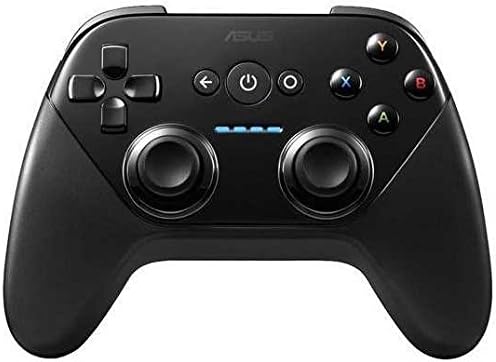
This gamepad is designed for Android TV and older operating systems. It supports Google Play Games and basic 3D visuals for HDTV gaming.
We may earn a commission when you buy through this link, at no additional cost to you.
It connects wirelessly for comfortable play on the couch. The controller helps track progress and achievements across devices.
While it lacks modern features like Hall Effect joysticks, it serves as a functional option for legacy systems.
Ideal for users with older Android TVs looking for basic controller support without complex setup.
Wireless connectivity allows for comfortable play away from the TV.
Compatible with older operating systems still in use today.
We may earn a commission when you buy through this link, at no additional cost to you.
Choosing the right controller depends on your primary gaming platform and specific needs. This guide breaks down key factors to help you decide.
Consider whether you need wired or wireless connections. The best controllers offer tri-mode connectivity for flexibility across PC and Xbox.
Prioritize low-latency options if you play competitive shooters.
TMR and Hall Effect joysticks reduce stick drift and improve accuracy. These features are critical for long-term reliability.
Look for hot-swappable modules if you want to maintain your controller over time.
Remappable rear buttons and trigger settings enhance gameplay. Controllers with OLED displays allow visual profile changes.
Ensure the controller supports your preferred software like Armoury Crate.
Long battery life is essential for extended gaming sessions. Models offering over 40 hours minimize interruptions.
Check if pass-through charging is available for uninterrupted play.
Verify that the controller works with your specific devices. Some options are limited to Android or PC only.
Xbox certification ensures native support on console platforms.
Prices vary from under $100 to premium models over $300. Determine which features justify the cost for your use case.
Renewed options can offer high value for budget-conscious buyers.
Connect the controller using the preferred mode via USB-C, Bluetooth, or 2.4GHz RF. Follow the on-screen pairing instructions for your device.
Use Armoury Crate software to customize button mappings and trigger settings. This step ensures the controller matches your play style.
Keep the joysticks clean and store the controller in its provided case when not in use. Avoid exposing it to extreme temperatures or moisture.
Yes, models like the Raikiri II and Pro are certified for Xbox. They connect via USB-C or 2.4GHz RF for native support on Xbox consoles.
TMR joysticks provide anti-drift performance and higher accuracy compared to traditional potentiometers. They also consume less power, improving battery life.
Some models like the Tessen are designed exclusively for Android phones. However, standard wireless models often support Bluetooth for mobile gaming.
Most models support wired USB-C charging. Some even offer pass-through charging, allowing you to game while the device is plugged in.
Renewed products typically come with a 90-day warranty. This covers functionality and ensures the device meets performance standards.
Use the Armoury Crate app to adjust trigger zones. You can switch between step and linear modes to suit your preference.
The ASUS ROG Raikiri II and Tessen stand out for their balance of features and performance. Both offer unique strengths depending on whether you prioritize versatility or portability.
Focus on connectivity and joystick durability when making your final decision. These elements have the biggest impact on long-term user satisfaction.
Always check current prices and availability as they fluctuate frequently. This ensures you get the best deal for your specific requirements.