
Microsoft Surface Dock
4.5Editor score
Magnetic Surface Connect cable
Multiple USB 3.0 ports
Wide Surface compatibility
This guide compares the top ten docking stations for Surface Pro devices to help you find the perfect connectivity solution for your specific workflow and
Choosing the right docking station for your Surface Pro is essential for maximizing productivity and creating a seamless desktop experience. A good dock expands your limited ports, supports multiple monitors, and ensures reliable connectivity for all your essential peripherals and accessories.
We have carefully evaluated ten top-rated docking stations based on compatibility, port selection, charging power, and build quality. This list includes official Microsoft accessories and third-party alternatives designed to work flawlessly with your Surface devices.
Each pick highlights key features, performance strengths, and ideal use cases to help you make an informed decision. Please note that availability and pricing may change over time, so verify current details before purchasing your next docking solution.
4.5Editor score

4.4Editor score

4.8Editor score
This side-by-side comparison highlights the key specifications and capabilities of the top ten docking stations available for Surface Pro users.



The Microsoft Surface Thunderbolt 4 Docking Station stands out as a top choice for users needing high-speed connectivity. With a solid rating and robust features, it offers a seamless experience for professionals.
We may earn a commission when you buy through this link, at no additional cost to you.
Its Thunderbolt 4 ports provide exceptional speeds for data transfer and media streaming. The dock supports up to two 4K monitors and includes multiple USB-C and USB-A ports for versatile peripheral connections.
While it is priced higher than some alternatives, the performance and build quality justify the investment. The eco-friendly design using recycled ocean-bound plastic adds an extra layer of value for environmentally conscious users.
This dock is ideal for professionals who demand reliability and speed. It transforms your Surface Pro into a powerful workstation with easy port identification and quick charging capabilities.
Experience lightning-fast connectivity that lets you transfer large files and stream high-quality media without delays.
Made with recycled materials, this dock demonstrates a commitment to environmental responsibility without compromising on performance.
We may earn a commission when you buy through this link, at no additional cost to you.
The Microsoft Surface Dock offers an affordable way to expand your Surface Pro's capabilities. With a high rating and essential ports, it is a practical choice for everyday users.
We may earn a commission when you buy through this link, at no additional cost to you.
It features multiple USB 3.0 ports for peripherals and Mini DisplayPort outputs for external monitors. The magnetic Surface Connect cable ensures a secure and easy connection to your device.
Although it lacks some newer features, it remains reliable for basic connectivity needs. The wide compatibility across Surface devices makes it a versatile option for many households.
This dock is perfect for those seeking a budget-friendly solution. It transforms your Surface into a desktop setup with minimal hassle and maximum convenience.
The magnetic Surface Connect cable simplifies the setup process, allowing you to quickly connect and disconnect your device.
Works seamlessly with a wide range of Surface devices, ensuring you get the most out of your existing hardware.
We may earn a commission when you buy through this link, at no additional cost to you.
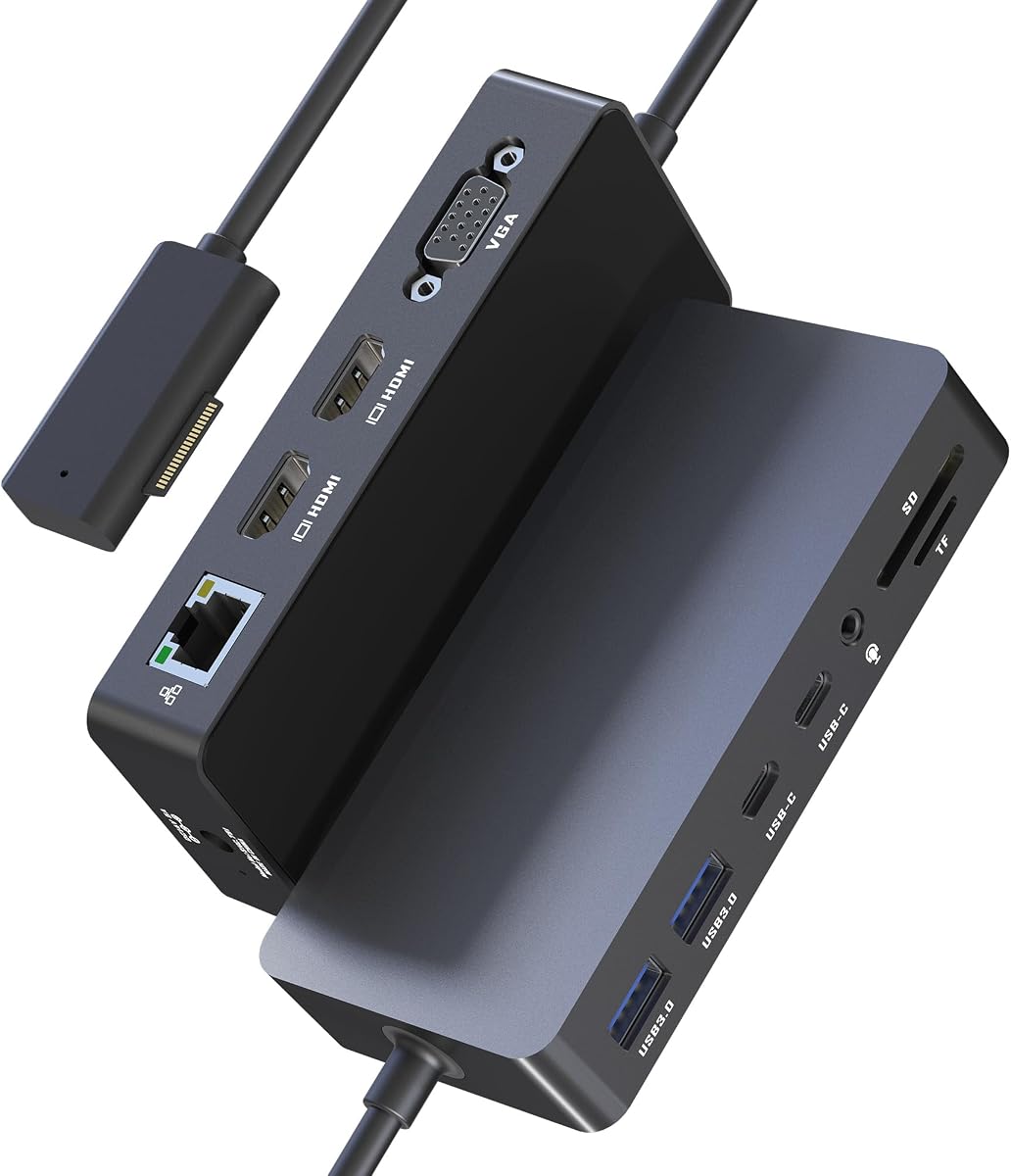
The Surface Docking Station Triple Displays offers extensive connectivity with a 12-in-1 design. It supports triple displays and includes various ports for all your peripherals.
We may earn a commission when you buy through this link, at no additional cost to you.
With dual HDMI and VGA outputs, you can extend your workspace across multiple screens. The 72W power adapter ensures your device stays charged while running demanding applications.
While it requires external power and can be complex to set up, the versatility is unmatched. It is ideal for users needing maximum screen real estate and connection options.
This dock is best for power users who need extensive connectivity. It provides the tools to create a robust workstation environment with ease and flexibility.
Boost your productivity by connecting up to three external monitors for an expanded workspace and enhanced multitasking.
With a wide array of ports, this dock supports all your essential peripherals without needing additional adapters.
We may earn a commission when you buy through this link, at no additional cost to you.
This Surface Docking Station Triple Displays model is highly rated by users for its performance and reliability. It features triple display support and a wide range of ports for versatility.
We may earn a commission when you buy through this link, at no additional cost to you.
The 72W power supply ensures your device is charged while connected. It supports USB 3.0 and USB-C ports for fast data transfer, making it ideal for creative professionals.
Some users note it requires an external power adapter and can be bulky on the desk. However, the functionality and build quality make it a strong contender for demanding work environments.
This dock is perfect for users prioritizing performance and feedback. It offers the connectivity and power needed to handle complex workflows efficiently.
With a high rating, this dock has proven its reliability and performance in real-world professional settings.
Transfer large files quickly with USB 3.0 and USB-C ports that support high-speed data rates.
We may earn a commission when you buy through this link, at no additional cost to you.
The Surface Docking Station 12-in-1 provides clear video output and extensive connectivity. It supports dual 4K HDMI and a VGA port for flexible display configurations.
We may earn a commission when you buy through this link, at no additional cost to you.
With a 72W charging capability, your Surface stays powered during heavy use. The Ethernet port ensures stable internet connectivity, perfect for video conferences and large transfers.
While the 4K output is limited to 30Hz, it is sufficient for most productivity tasks. The setup is straightforward and compatible with a wide range of Surface devices.
This dock is suitable for general productivity and educational use. It offers a balanced feature set that meets the needs of most users without unnecessary complexity.
Choose between HDMI and VGA connections to adapt to different monitor setups and resolutions.
The Ethernet port provides a stable connection for uninterrupted work and online meetings.
We may earn a commission when you buy through this link, at no additional cost to you.
The Microsoft Surface Dock 2 is an official accessory designed for seamless integration with Surface devices. It supports dual 4K at 60Hz and offers a robust range of ports.
We may earn a commission when you buy through this link, at no additional cost to you.
With USB-C gen 2 and a powerful 199W supply, it handles demanding workloads. The gigabit Ethernet and security lock slot ensure stable network and physical security.
The higher price point and short cable may be drawbacks for some users. However, the performance and official support make it a reliable choice for critical workstations.
This dock is ideal for professionals needing top-tier performance. It delivers a premium experience with extensive connectivity and trusted Microsoft quality.
Official Microsoft engineering ensures seamless compatibility and reliable operation with your Surface devices.
USB-C gen 2 ports provide fast data transfer for external drives and high-resolution peripherals.
We may earn a commission when you buy through this link, at no additional cost to you.
The Surface Dock 2 USB-C variant is praised for its high performance and reliability. It supports dual 4K and offers a wide range of ports for connectivity.
We may earn a commission when you buy through this link, at no additional cost to you.
With USB-C front and rear connections, it provides flexibility for device placement. The 199W power supply ensures your device remains charged during intensive tasks.
While the price is high and the dock is heavy, these are acceptable trade-offs for the performance. It is a solid choice for users prioritizing speed and quality.
This dock is best for professionals needing reliable performance. It provides the power and connectivity needed for demanding professional workflows.
Rated highly by users, this dock delivers consistent performance and reliable connectivity for various use cases.
Front and rear USB-C ports allow for flexible cable management and easier access to connections.
We may earn a commission when you buy through this link, at no additional cost to you.
This Surface Thunderbolt 4 Docking Station delivers fast HDMI output and robust charging power. It supports triple displays and provides a wide range of connectivity options.
We may earn a commission when you buy through this link, at no additional cost to you.
The gigabit Ethernet ensures stable internet connections for smooth video conferencing. SD/TF card readers and USB 3.0 ports enable rapid data transfers for media files.
While it may be complex for beginners and limited in compatibility, it is a powerful tool for professionals. It handles high-speed data needs with ease.
This dock is suitable for tech-savvy users needing speed. It offers the performance and connectivity required for efficient work and content creation.
Dual 4K@60Hz HDMI outputs provide smooth, high-resolution visuals for presentations and media consumption.
With 100W DC charging, your Surface remains fully powered even when running multiple high-demand applications.
We may earn a commission when you buy through this link, at no additional cost to you.
The Microsoft Surface Dock 2 Renewed offers the features of the original at a more accessible price. It supports dual 4K and provides robust connectivity for your peripherals.
We may earn a commission when you buy through this link, at no additional cost to you.
With USB-C and USB-A ports, it supports various devices. The gigabit Ethernet ensures stable connections for video calls and large file transfers.
While the warranty and condition may vary for renewed items, the cost savings are significant. It is a good choice for budget-conscious users needing quality performance.
This dock is best for those seeking value. It delivers official Microsoft quality at a lower cost while maintaining essential features.
Get the performance of a premium dock at a reduced price point without sacrificing essential connectivity features.
Renewed units undergo testing to ensure they meet performance standards and work reliably for daily tasks.
We may earn a commission when you buy through this link, at no additional cost to you.
The Surface Dock 90W Power Supply is a versatile option with wide compatibility. It features multiple USB 3.0 ports and mini DP outputs for external monitors.
We may earn a commission when you buy through this link, at no additional cost to you.
With gigabit Ethernet support, it ensures stable network connections. The 90W power output is sufficient for most Surface models, keeping them charged during use.
While it uses older DisplayPort technology, it remains a practical solution for basic needs. It is easy to set up and works with a broad range of devices.
This dock is suitable for users with simpler requirements. It provides essential connectivity and reliable charging at a budget-friendly price point.
Get essential docking features at an affordable price without compromising on core connectivity needs.
Compatible with a broad range of Surface devices, ensuring usability across your existing hardware ecosystem.
We may earn a commission when you buy through this link, at no additional cost to you.
Selecting the right docking station depends on your specific needs for display, ports, and performance. Here are key factors to consider before making a purchase.
Consider the number and type of ports you need. Look for USB-C, USB-A, HDMI, and Ethernet ports to connect all your peripherals.
Ensure the dock has enough ports to avoid the need for additional adapters.
Check how many external monitors the dock supports and at what resolution. Some docks support dual 4K displays while others support triple setups.
Choose a dock that matches your workspace and visual requirements.
Verify the power output of the dock to ensure it can charge your Surface Pro while in use. Higher wattage is better for performance-intensive tasks.
Look for docks with adequate power supplies to avoid battery drain.
Ensure the dock is compatible with your specific Surface model and generation. Some docks work best with newer Thunderbolt-enabled devices.
Read compatibility details carefully to avoid connection issues.
A dock with a gigabit Ethernet port ensures stable internet for video calls and large transfers. This is crucial for remote work environments.
Prioritize Ethernet over Wi-Fi if reliability is a priority for you.
Opt for docks with durable construction to withstand daily use. Metal bodies and robust connectors often indicate better longevity.
Consider the brand reputation and warranty terms for peace of mind.
Look for plug-and-play docks that require no additional software installation. Simplified setups reduce downtime and technical headaches.
Check if additional drivers are needed for your operating system.
Determine how much you are willing to spend based on your needs. High-end docks offer premium features but may be overkill for basic use.
Balance cost with performance to find the best value.
Connect your Surface to the dock using the provided cable, ensuring a firm connection. Plug in all necessary peripherals to the appropriate ports for instant access.
Keep the dock in a well-ventilated area to prevent overheating during extended use. Avoid placing heavy objects on top of the dock that might block vents.
Periodically check for firmware updates for your dock to ensure optimal performance. Clean dust from ports using a soft brush or compressed air to maintain connectivity.
Yes, many third-party docking stations are compatible with Surface Pro devices. Ensure they support the correct connector type and offer sufficient power and display capabilities for your model.
Most modern Surface docks support two external monitors at high resolutions. Some advanced models support three displays, but you may need to turn off the Surface screen for the third.
Most docks are plug-and-play and do not require additional drivers. However, checking for firmware updates or specific software can enhance functionality and stability.
A power output of 65W or higher is generally recommended to charge your device while in use. Higher wattage is necessary for intensive tasks like video editing or gaming.
An Ethernet port is valuable for stable internet connections during video calls or large file transfers. It is not strictly necessary but enhances reliability over Wi-Fi.
Yes, if the dock has sufficient power delivery to handle both charging and peripheral power. Check the wattage to ensure your device does not run out of battery.
Most Surface docks are optimized for Surface devices. While some may work with other USB-C laptops, full functionality is not guaranteed outside the Surface ecosystem.
Use a soft, dry cloth to wipe the exterior and compressed air to clear dust from ports. Avoid liquids or harsh chemicals that could damage the connectors or casing.
Choosing the right docking station depends on your specific needs for ports, displays, and performance. The options highlighted offer a range of solutions for both basic and professional workflows.
Prioritize compatibility, power output, and port selection to ensure the dock meets your daily demands. Consider your budget and future needs when making your decision.
Remember to verify current availability and details before purchasing. A good dock can significantly enhance your productivity and desktop experience.