
QNAP TL-D1600S
4.5Editor score
High performance SATA 6Gbps
PCIe SATA card included
12 plus 4 drive bays
Compatible with Windows and Linux
Finding the right storage solution is critical for modern data needs. A robust 16 Bay NAS Enclosure offers massive capacity and flexibility. This guide explores the leading options to help you secure your valuable information efficiently.
We evaluated ten top models based on performance, expandability, and build quality. Our analysis covers diverse needs from home labs to enterprise racks. Each product was scrutinized to ensure it meets high standards for reliability and speed.
Each pick highlights unique strengths and potential trade-offs for your setup. We detail specifications and real-world application scenarios for every unit. Please note that availability and pricing may fluctuate over time.
4.5Editor score
4.5Editor score

4.5Editor score
As an Amazon Associate we earn from qualifying purchases.
This side by side comparison highlights key specifications and capabilities across the top ten models. We analyze processors, network interfaces, and drive compatibility to help you decide which unit fits your infrastructure best.


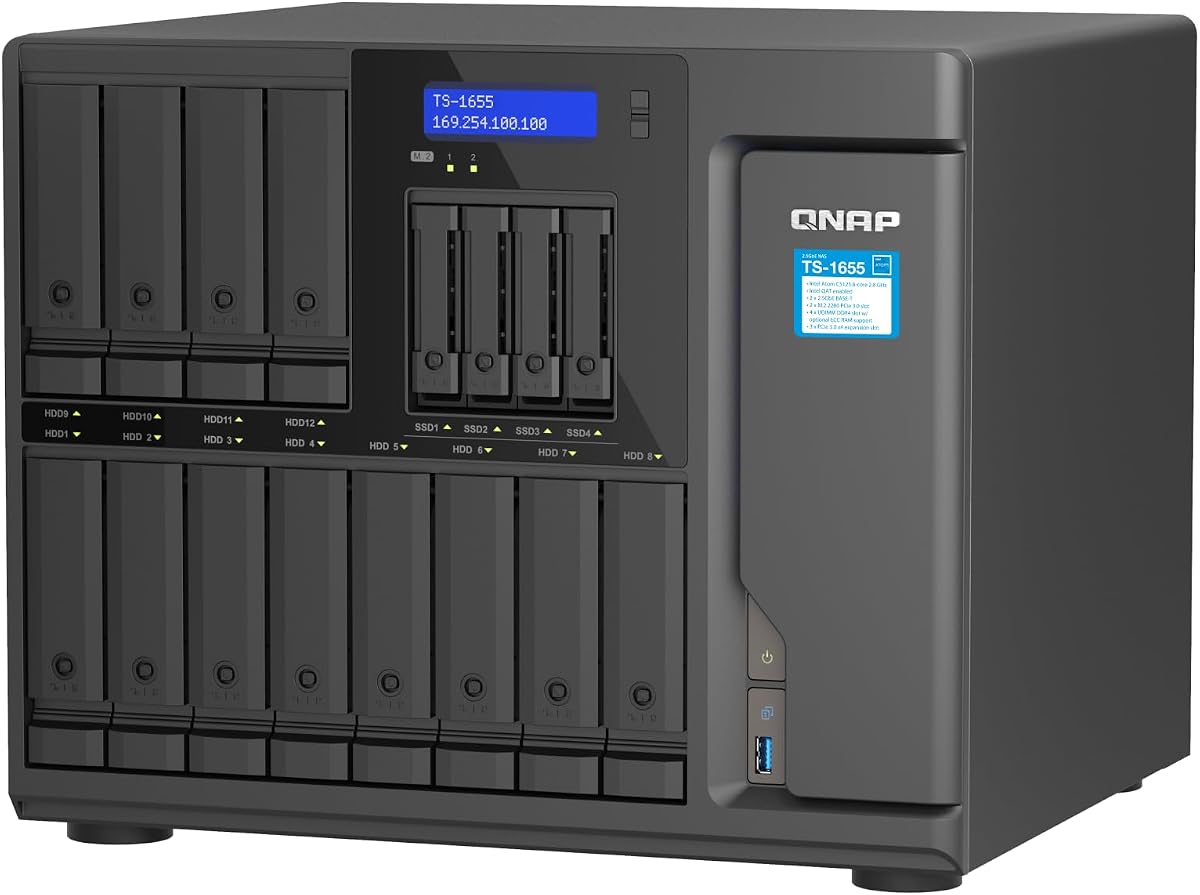
The QNAP TS-1655-8G-US stands out as a top contender in the 16 Bay NAS enclosure market. It combines powerful hardware with flexible software options. Its robust design caters to users needing significant storage capacity and speed.
We may earn a commission when you buy through this link, at no additional cost to you.
Its Intel Atom C-5125 processor provides ample power for various tasks. The dual 2.5GbE ports ensure fast data transfer rates. Users can upgrade memory up to 128GB with ECC support. This makes it ideal for demanding virtualization and database applications.
While highly capable, the system requires careful planning during setup. Configuring the dual network ports and M.2 slots can be technical. The price reflects its high-end features and build quality. These trade-offs are acceptable for professional environments.
This unit is best for IT professionals and power users. It offers room to grow without replacing hardware soon. The long-term availability ensures stability for business operations. It is a strong investment for scalable storage.
The system supports both SATA and NVMe drives for optimized performance. This allows caching on fast drives while storing bulk data on capacity drives.
Dual 2.5GbE ports provide faster throughput than standard Gigabit Ethernet. This significantly reduces bottlenecks during large file transfers or backups.
We may earn a commission when you buy through this link, at no additional cost to you.
This rackmount JBOD is designed for professionals needing secure expansion. It fits easily into smaller server cabinets due to its short depth. The redundant power supplies ensure continuous operation during power events. It is a reliable choice for business continuity.
We may earn a commission when you buy through this link, at no additional cost to you.
The Mini-SAS HD interface offers fast and stable data paths. This unit supports up to 16 drives in a 3U form factor. It integrates seamlessly with QNAP NAS systems for easy management. The build quality supports long-term enterprise use.
You must already own a compatible QNAP NAS to use this. The rail kit is sold separately which adds to the cost. These factors limit it to specific users. However, the benefits outweigh these minor inconveniences for data centers.
Ideal for offices needing quick storage growth. It maintains stability without adding complex computing resources. The design prioritizes physical security and power reliability. It is a solid choice for expanding existing setups.
The short depth allows installation in tight spaces like media cabinets. This makes it perfect for locations where rack depth is limited.
Two power supplies ensure the unit stays on if one fails. This feature is critical for maintaining access to stored data.
We may earn a commission when you buy through this link, at no additional cost to you.
This enclosure is a great way to add storage to any computer. It includes the necessary card to connect via PCIe. Users can install up to sixteen SATA drives easily. It is a cost effective solution for growing storage needs.
We may earn a commission when you buy through this link, at no additional cost to you.
The SATA 6Gbps interface ensures fast read and write speeds. It supports both Windows and Linux operating systems well. The setup process is straightforward without requiring complex drivers. This simplicity makes it accessible for many users.
It does not offer RAID features like some higher end units. You must manage data redundancy via software. The cooling is basic so noise might vary slightly. These limitations are reasonable given the price point.
Perfect for home labs or small office archives. It provides a straightforward path to high capacity storage. The included card saves extra purchase costs. It is a practical choice for budget conscious buyers.
This unit works with various operating systems. It is not limited to proprietary NAS software or hardware.
The PCIe card is included in the box. This saves money compared to buying the card separately.
We may earn a commission when you buy through this link, at no additional cost to you.
This rackstation delivers massive performance for business environments. It comes with a powerful 8-core Intel processor. The two PCIe slots allow for network or cache upgrades. It is built for heavy compute-intensive services.
We may earn a commission when you buy through this link, at no additional cost to you.
The system supports up to 40 drive bays with expansion. This offers huge scalability for growing data needs. Redundant power supplies ensure it stays online during failures. The 5-year warranty adds significant peace of mind.
It is quite expensive and requires disks to function. The initial investment is high compared to standalone units. These costs are offset by reliability and speed. It is not for casual home users generally.
Best for enterprise networks needing robust storage. It handles virtualization and backups with ease. The warranty and build quality justify the price. It is a top choice for mission-critical data.
Expansion units allow growing the system significantly. You can start small and add bays as needed.
The 8-core CPU supports multiple complex tasks. This enables smooth operation of virtual machines and apps.
We may earn a commission when you buy through this link, at no additional cost to you.
This case is perfect for building a custom NAS from scratch. It supports up to 15 hot swap drives easily. The E-ATX support allows for large enterprise motherboards. It is highly flexible for hardware enthusiasts.
We may earn a commission when you buy through this link, at no additional cost to you.
There are many slots for adding expansion cards like GPU. The redundant power support ensures stability in high loads. It is a solid frame for a powerful workstation. Users have full control over the software inside.
Shipping times can be long due to sea transport. The build quality depends on the specific batch received. These issues require patience from the buyer. Still, the features offered are rare at this price.
Recommended for DIY builders needing maximum flexibility. It offers a strong foundation for complex storage projects. The cooling and structure support heavy workloads. It is a great start for custom hardware.
You choose all internal components for the build. This allows perfect optimization for your specific needs.
Eight PCI slots let you add many network cards. This is ideal for specialized networking or GPU tasks.
We may earn a commission when you buy through this link, at no additional cost to you.
This NAS brings enterprise features to high-end users. It features dual 10GbE ports for rapid data movement. The 40Gbps USB4 port is great for external storage. It supports heavy virtualization and AI workloads.
We may earn a commission when you buy through this link, at no additional cost to you.
It uses AMD Ryzen embedded processors for consistent performance. The ECC DDR5 RAM ensures data integrity. This unit is built for continuous 24/7 operation. It handles 4K and 8K media workflows well.
It has fewer bays than the main 16 bay focus. The price reflects its premium networking capabilities. It may not fit tight budget constraints easily. These limits are small given the speed benefits.
Perfect for media editors needing fast network access. It connects seamlessly to high-speed storage networks. The memory and CPU support complex tasks. It is a strong choice for enthusiasts.
USB4 allows ultra-fast data transfer. This is great for external drive setups.
Optimized for high resolution video tasks. It handles 4K and 8K smoothly.
We may earn a commission when you buy through this link, at no additional cost to you.
This unit excels at database and video management tasks. The Xeon processor handles virtual machines efficiently. Users can scale up to 48GB of memory. It offers strong sequential read and write speeds.
We may earn a commission when you buy through this link, at no additional cost to you.
Networking is flexible with support for 10GbE or 25GbE. NVMe SSD caching boosts speeds significantly. It scales up to 36 bays with expansion units. This makes it a long term solution.
It costs more than many competitors. The 12 bay limit might be low for some. These trade-offs are balanced by performance. It is a great fit for business data.
Ideal for hosting backups or virtual machines. It provides reliable performance for critical systems. The warranty and support add value. It is a strong choice for small businesses.
It delivers over 260,000 random read IOPS. This is excellent for random access workloads.
Up to 48GB of memory is supported. This helps run multiple applications simultaneously.
We may earn a commission when you buy through this link, at no additional cost to you.
This expansion unit adds drives to specific Synology models. It uses Synology DSM tools for unified management. The 5-year warranty ensures long-term support. It is easy to configure in minutes.
We may earn a commission when you buy through this link, at no additional cost to you.
It supports only selected Synology units. This limits its use to that ecosystem. The diskless design requires separate drive purchases. These restrictions are clear for buyers.
It is a simple way to grow Synology storage. The reliability matches the main units well. It offers a stable path for more capacity. It fits specific user needs perfectly.
Best for Synology owners needing more bays. It keeps management simple and effective. The warranty adds confidence to the buy. It is a great add-on for existing setups.
Configuration tools work directly in DSM. This makes adding storage simple and quick.
Matches the warranty and quality of main units. It ensures consistent performance across the system.
We may earn a commission when you buy through this link, at no additional cost to you.
This enclosure connects via USB 3.0 for easy access. It uses an aluminum chassis with cooling fans. You can install drives without tools. It works well for personal or enterprise use.
We may earn a commission when you buy through this link, at no additional cost to you.
It supports up to 240TB total capacity. Daisy chaining allows up to three devices. The power adapter ensures stable transmission. It is faster than older USB standards.
The fans produce around 40-50 decibels of noise. Users should check drives individually before loading. This helps avoid drive detection issues. These steps ensure smooth operation.
Ideal for users needing quick external storage access. It offers high capacity without a complex setup. The daisy chain adds scalability. It is a good choice for simple needs.
You can connect up to three units together. This expands your storage significantly.
Works with Windows Mac and Linux. It needs no drivers to function.
We may earn a commission when you buy through this link, at no additional cost to you.
This model ensures long-term availability for your system. It features an 8-core processor for speed. The network ports are fast with 2.5GbE. It supports massive memory upgrades for growth.
We may earn a commission when you buy through this link, at no additional cost to you.
The system handles virtualization and backups well. It is built to support various storage pools. The design prioritizes reliability and capacity. It is a solid investment for the future.
The software may need time to learn. The cost is higher than entry-level units. These trade-offs are acceptable for stability. The long-term promise adds value.
Best for users planning for years ahead. It offers a consistent platform for data. The performance meets professional standards. It is a strong choice for growth.
Long-term availability ensures support for years. This makes future planning easier for businesses.
It supports large memory and drive counts. This provides room for massive data storage.
We may earn a commission when you buy through this link, at no additional cost to you.
Selecting the right enclosure requires understanding your storage needs. We break down key factors to help you make an informed decision.
The CPU determines how fast the system runs tasks. Look for multi-core processors like Atom or Xeon for heavy workloads.
Higher performance CPUs handle virtualization and database apps better.
Fast networking is crucial for data transfer. Standard Gigabit Ethernet might bottleneck large files.
Choose models with 2.5GbE or 10GbE ports for speed.
Check which drive sizes the unit accepts. Most support both 2.5 and 3.5-inch SATA drives.
Verify hot-swap capabilities for easier maintenance.
Future growth is essential for long-term planning. Ensure the unit supports expansion or daisy chaining.
Look for extra slots for network or cache cards.
Physical size matters for placement. Rackmount units save space in server cabinets.
Desktop units fit under desks or shelves better.
Reliable power keeps your data safe. Redundant power supplies prevent outages during failures.
High wattage supports more drives and components.
Some units run proprietary software while others are generic. Ensure it fits your existing OS like Windows or Linux.
Consider compatibility with your current workflows.
Costs vary based on features and build quality. Balance your needs with what you can afford.
Longer warranties indicate better manufacturer confidence.
Place the unit in a well-ventilated area to prevent overheating. Ensure there is enough space around fans for airflow.
Insert drives carefully following manufacturer guidelines. For hot-swap units, you can replace drives without shutting down the system.
Update firmware regularly for security and stability. Monitor drive health via the software dashboard to catch issues early.
A JBOD enclosure allows drives to act as individual volumes. It does not combine them into a single array automatically. This gives you more control over data management.
Some require proprietary software while others work as plug-and-play devices. Check the product details to see what is needed for your OS. Linux and Windows usually work well.
Yes, most support both SATA SSDs and traditional hard drives. SSDs improve speed significantly. Check speed limits for the interface used.
Daisy chaining connects multiple enclosures together. This lets you expand total capacity without new cables. It is useful for growing storage needs.
RAM varies by model. Some support up to 128GB while others have less. More RAM helps run virtual machines and complex apps better.
Noise levels vary. Units with fans might be loud in quiet rooms. Rackmount units can be noisy in small spaces. Check decibel ratings before buying.
Our top picks include the QNAP TS-1655-8G-US for performance and the TL-D1600S for budget. Both offer solid features for different needs. The Synology RackStation suits enterprise users well.
Prioritize network speed and processor power for best results. Expansion options help you plan for the future. Ensure power stability is in place for safety.
Remember that prices and models may change. Check current availability before you buy. This guide helps you start your search with confidence.