
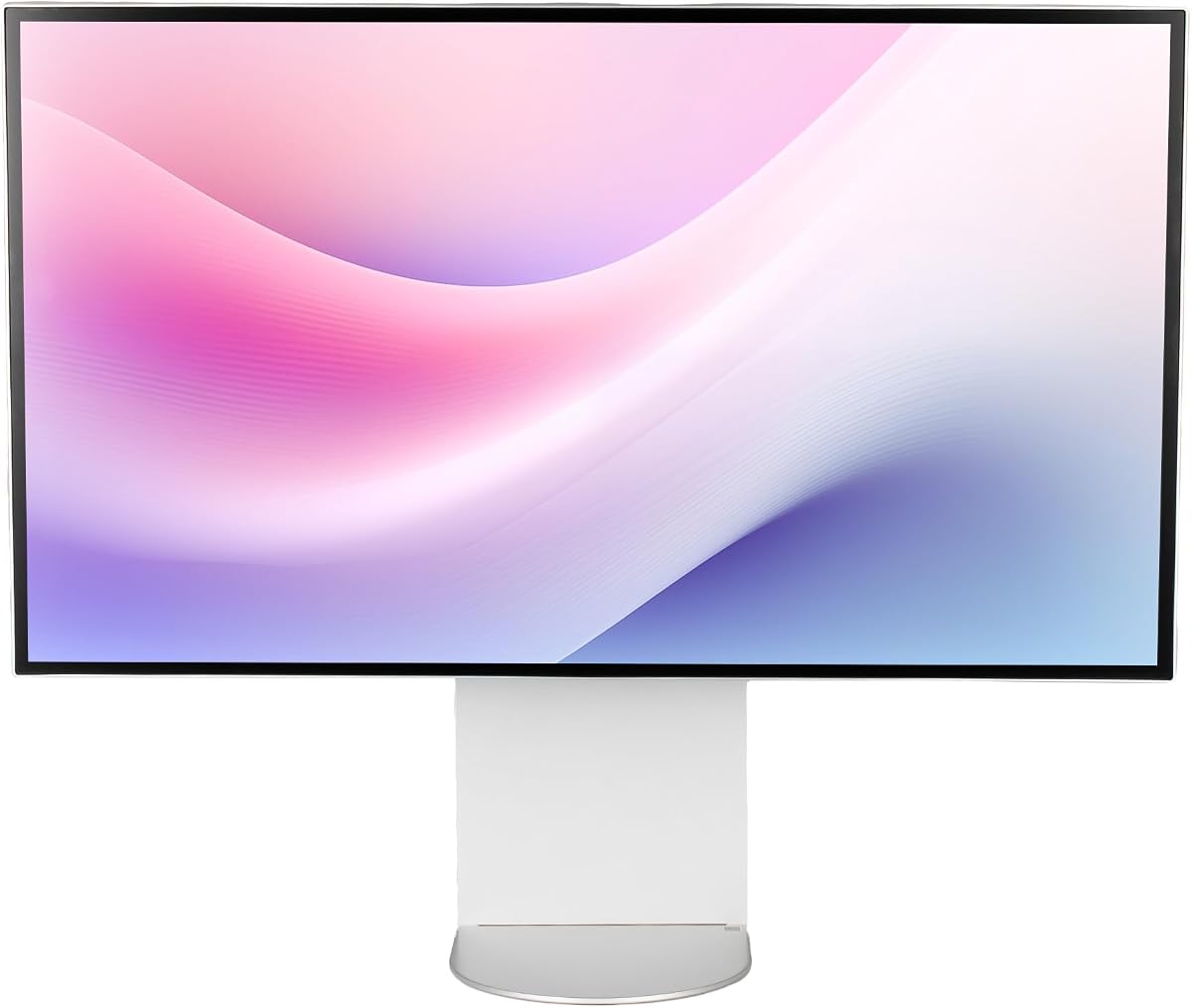
ALOGIC Clarity Touch
5.0Editor score
World first 6K touch
Active stylus support
High fidelity visuals
Finding the right display for professional work or high-end gaming requires careful consideration of resolution and color fidelity. The 32 Inch 6K Monitors offer incredible pixel density that sharpens text and images beyond standard 4K options for creators who demand precision.
We evaluated ten leading models based on panel technology, connectivity options like Thunderbolt, and color gamut coverage. Our analysis focuses on real-world performance for video editing, design, and immersive gaming experiences across different operating systems.
Each selection highlights unique strengths such as touch functionality, HDR performance, or specific workflow integrations. Prices and availability fluctuate frequently, so verify current details before purchasing to ensure you get the best value for your specific needs.
5.0Editor score

3.8Editor score

3.9Editor score
As an Amazon Associate we earn from qualifying purchases.
This side-by-side comparison outlines the core specifications and unique selling points of each selected monitor to help you decide which model fits your workspace requirements best.


The LG UltraFine evo stands out as a pioneering display with Thunderbolt 5 connectivity. It delivers exceptional clarity with 6K resolution and Nano IPS Black technology for improved contrast. This model is ideal for professionals who need fast data transfer and high fidelity visuals.
We may earn a commission when you buy through this link, at no additional cost to you.
Its 224 PPI density ensures text and images appear razor-sharp without scaling issues. The color accuracy supports up to 99.5% Adobe RGB making it suitable for print and digital work. Thunderbolt 5 allows daisy chaining and rapid file transfers essential for heavy media workflows.
While the price is high it justifies the investment for serious creators needing the latest standards. The 60Hz refresh rate is not for gaming but perfect for steady professional tasks. Eye comfort features reduce strain during long editing sessions effectively.
If you need a workspace that grows with your needs this monitor delivers. It balances visual fidelity with modern connectivity better than most competitors. Choose this for a setup that prioritizes precision and efficiency above all else.
Thunderbolt 5 provides speeds up to 80 Gbps enabling rapid large file transfers without bottlenecks in creative workflows.
This panel type offers a 2000:1 contrast ratio producing deeper blacks and richer shadows than standard IPS displays.
We may earn a commission when you buy through this link, at no additional cost to you.
This monitor redefines interaction by combining 6K resolution with precise touch controls. It functions as a large digital canvas for artists and architects requiring detailed input. The included stylus supports over 4000 pressure levels for natural drawing experiences.
We may earn a commission when you buy through this link, at no additional cost to you.
Color fidelity is exceptional with factory calibration ensuring ΔE values remain minimal for accurate work. The stand allows the screen to tilt flat for drafting or upright for viewing. USB-C connectivity supports charging and data simultaneously reducing cable clutter on desks.
It is a premium tool designed for specific creative needs rather than general use. The touch interface is intuitive on Mac and Windows systems allowing seamless navigation. While expensive it offers capabilities no other monitor in this list provides.
Artists seeking a large surface for sketches and digital painting will find this unmatched. It bridges the gap between traditional drawing and digital precision efficiently. Select this if touch input and resolution are non-negotiable for your profession.
The Active Stylus offers 4096 levels of pressure sensitivity enabling nuanced strokes and shading for detailed artwork creation.
The Fold Stand supports 360 rotation allowing the monitor to be used flat as a tablet or upright as a standard display.
We may earn a commission when you buy through this link, at no additional cost to you.
Designed with Apple workflows in mind this monitor features a specific preset matching MacBook color output. It ensures seamless color consistency when moving between portable and desktop screens. Thunderbolt 4 ports allow daisy chaining and sufficient power for most laptops.
We may earn a commission when you buy through this link, at no additional cost to you.
The ProArt series is known for reliability and color accuracy suitable for design tasks. It includes a KVM switch to manage multiple computers with one set of peripherals. The included Adobe Creative Cloud trial adds immediate value for new purchasers.
While not the brightest panel it provides accurate color reproduction necessary for editing work. The ergonomic stand supports tilt and pivot adjustments for varied viewing angles. This model offers strong value for creative professionals on a tighter budget.
If you work heavily with Mac devices this monitor simplifies your color workflow significantly. It balances cost with professional-grade features better than many alternatives. Choose this for a reliable workstation hub that respects color integrity.
The M Model-P3 Color Preset Mode matches the color performance of MacBook displays ensuring seamless workflow transitions.
The built-in Auto KVM Switch allows effortless switching between two connected laptops using a single keyboard and mouse.
We may earn a commission when you buy through this link, at no additional cost to you.
This is the industry’s first 6K gaming monitor offering a unique dual mode experience. It provides 165Hz at 6K for visuals or 330Hz at 3K for competitive action. The Fast IPS panel ensures quick response times and minimal ghosting during play.
We may earn a commission when you buy through this link, at no additional cost to you.
Support for G-Sync and FreeSync Premium ensures smooth frame delivery without tearing. HDR10+ optimizes brightness and depth for immersive content. While it has 6K resolution the gaming modes often utilize lower resolutions to maintain high refresh rates effectively.
It is an excellent choice for users who prioritize high refresh rates alongside high resolution. The ergonomic stand supports height and pivot adjustments for comfort. This monitor bridges the gap between productivity and high performance gaming well.
Gamers needing a high resolution screen will find this model unique in its class. It offers flexibility to switch between work and play without compromising quality. Consider this if performance fluidity is a key requirement for your setup.
Dual Mode allows users to select 6K at 165Hz or 3K at 330Hz depending on whether visuals or speed are prioritized.
Fast IPS panel technology reduces motion blur and ghosting ensuring crisp action sequences during high-speed gameplay.
We may earn a commission when you buy through this link, at no additional cost to you.
The Dell UltraSharp offers a bright clear display suitable for text heavy office work. Its 6K resolution allows multiple windows to be open without crowding the screen. USB-C simplifies connections enabling data transmission through a single cable effectively.
We may earn a commission when you buy through this link, at no additional cost to you.
At 450 nits the screen remains visible even in well lit environments without glare. The response time is sufficient for standard use but not for rapid gaming tasks. Dell provides robust dependability ensuring this unit performs consistently over years.
This monitor is a practical choice for professionals focused on efficiency and text readability. It supports standard office tasks with clarity and precision. The design fits well in corporate environments requiring reliable and functional displays.
For those needing a reliable screen for daily administrative work this is a strong candidate. It balances resolution with brightness to handle demanding document layouts. Choose this for a stable and bright workspace display.
With 450 Nit brightness the monitor ensures content remains visible in well lit areas without causing eye strain.
USB Type-C allows quick transmission of data at a higher rate for your convenience during daily tasks.
We may earn a commission when you buy through this link, at no additional cost to you.
This bundle provides the LG UltraFine evo with essential extras like cable management tools. It is designed to streamline setup for professionals needing a ready to use station. The monitor supports Thunderbolt 5 for fast data and charging combined.
We may earn a commission when you buy through this link, at no additional cost to you.
Color accuracy is supported by HDR 600 and wide gamut coverage ensuring vivid results. Built-in KVM functionality helps manage two computers easily without extra peripherals. VESA mounting support allows flexible placement on walls or arms for ergonomics.
The inclusion of cleaning kits and ties shows attention to user convenience from the start. It reduces the need to buy extra accessories separately for full integration. This makes it a valuable option for immediate workspace deployment.
Buyers seeking a hassle-free experience with high-end specs should consider this kit. It ensures you have all necessary components for a clean organized setup. Select this if you want a fully equipped monitor station.
Bundle items include cable ties and a screen cleaning kit to keep your workspace neat and maintain display quality.
Built-in KVM functionality lets you control two connected computers using a single keyboard and mouse efficiently.
We may earn a commission when you buy through this link, at no additional cost to you.
This monitor emphasizes a minimalist design with powerful charging capabilities in a compact frame. It features a high-speed port capable of 100W output for laptops and devices. The anti-glare coating helps maintain visibility in varied lighting conditions effectively.
We may earn a commission when you buy through this link, at no additional cost to you.
With 218 PPI the screen delivers sharp images suitable for productivity. It supports universal mounting allowing integration with various arm systems. The build quality uses aluminum ensuring durability and a premium look.
It is a strong candidate for those who prioritize style and connectivity over advanced HDR features. The eye care features help reduce fatigue during long sessions. This model offers a balanced mix of aesthetics and function for modern desks.
Choose this if you prefer a sleek display that supports high-power charging well. It fits well in home offices requiring a tidy professional appearance. Select it for a reliable and stylish 6K solution.
100W high-speed port allows you to charge laptops and phones while streaming video through a single connection.
Includes 100x100mm universal mount compatibility supporting third-party arms for flexible setup options.
We may earn a commission when you buy through this link, at no additional cost to you.
This model stands out with a unique honeycomb cooling design and glossy finish. It offers high color accuracy with 99% DCI-P3 coverage for precise work. The aluminum body ensures premium durability while keeping the chassis sleek and lightweight.
We may earn a commission when you buy through this link, at no additional cost to you.
Because it is sold without a stand it allows users to install a preferred arm. This increases flexibility for those with custom desk setups. The glossy screen enhances vibrancy but may reflect light in bright rooms.
It is ideal for users who want to build a custom monitor arm setup. The cooling design helps maintain performance during long usage periods. This option appeals to those who value both form and function highly.
Choose this if you have your own stand and need high fidelity colors. It serves well for creative tasks requiring accurate color representation. Select it for a premium chassis that supports efficient thermal management.
The honeycomb cooling design ensures premium durability and helps manage heat during extended usage periods.
The advanced IPS panel maintains 99% sRGB and DCI-P3 color accuracy ensuring lifelike details.
We may earn a commission when you buy through this link, at no additional cost to you.
This bundle pairs the Dell UltraSharp with a two-year premium extended service protection plan. It includes essential cables like Thunderbolt and Mini DisplayPort to start immediately. The screen delivers 450 nit brightness for clear visibility in offices.
We may earn a commission when you buy through this link, at no additional cost to you.
The focus is on dependability and support which is valuable for business environments. Having a protection plan reduces long-term maintenance costs. The display supports standard 6K resolution which is suitable for document and web browsing.
It is a practical choice for offices that prioritize risk management and uptime. The included accessories reduce the need for immediate extra purchases. This package ensures you have a protected display ready for daily tasks.
Select this if you need a monitor with added security for your investment. It suits businesses looking for reliable hardware with warranty support. Choose it for peace of mind during extended work periods.
The 2 Year Premium Extended Service Protection Plan provides added dependability for your investment over time.
In the box includes Thunderbolt 4 cables Mini DisplayPort cables USB cables ready for immediate connection.
We may earn a commission when you buy through this link, at no additional cost to you.
This model offers a standard 6K experience with focus on ergonomic adjustability. It features a height adjustable stand and pivot support for varied viewing angles. Three USB-C ports provide flexibility for connecting multiple peripherals easily.
We may earn a commission when you buy through this link, at no additional cost to you.
The anti-glare finish helps reduce reflections during work. While brightness is moderate it supports HDR 600 for decent dynamic range. The design aligns with VESA standards allowing for custom mounting solutions if desired.
It is a functional choice for those needing basic 6K clarity without extra frills. The stand design ensures comfortable viewing over long sessions. This model serves well for general creative or business tasks.
Choose this if you need adjustable ergonomics with a standard 6K display. It fits well in setups prioritizing comfort and basic connectivity. Select it for a reliable and adjustable workspace monitor.
Tilt, height adjustable, and pivot design help create a comfortable optimized workspace for long hours of professional production.
Multiple USB-C ports allow flexible connection of storage drives and peripherals without excessive cables.
We may earn a commission when you buy through this link, at no additional cost to you.
Choosing a 32 Inch 6K Monitor requires balancing resolution needs with connectivity and budget. Consider these factors to ensure the display meets your professional or personal goals.
6K resolution (typically 6144×3456 or 6016×3384) offers immense detail suitable for photo and video editing. On a 32-inch panel, this creates a pixel density over 200 PPI, making text sharp and reducing eye strain during long sessions. Ensure your system can drive this resolution smoothly.
Look for pixel density above 200 PPI to maximize screen real estate without scaling.
Nano IPS or Fast IPS panels deliver wide viewing angles and vibrant colors. Some models use Nano IPS Black for improved contrast, which is vital for dark scene accuracy. For gaming, prioritize Fast IPS to minimize motion blur and ghosting effects.
Select IPS technology for color accuracy and contrast performance in creative work.
Thunderbolt 4 or 5 ports allow single-cable data and power transfer. Distinguish between HDMI 2.1 and DisplayPort 2.1 based on your graphics card capabilities. USB hubs built into the monitor simplify access to peripherals without extra dongles.
Verify Thunderbolt or USB-C ports match your laptop’s power and video output needs.
Professional monitors should cover 98% DCI-P3 or 99% Adobe RGB for precise color reproduction. Factory calibration is a strong indicator of ready-to-use accuracy without manual adjustments. Delta E values under 2 are generally acceptable for professional tasks.
Prioritize factory calibrated monitors with high DCI-P3 coverage for color critical work.
Height, tilt, pivot, and swivel adjustments ensure comfortable viewing. A VESA mount allows flexibility if you want to use a third-party arm. Consider models with eye comfort certifications to reduce fatigue during extended use.
Choose stands that support height and pivot adjustments for long-term comfort.
Standard professional displays run at 60Hz, which is sufficient for editing. Gaming monitors may offer 165Hz or higher, especially at lower resolutions like 3K. Consider your workload mix when selecting refresh rate specs.
Higher refresh rates are essential for gaming but 60Hz suffices for static work.
VESA DisplayHDR 600 provides better contrast and brightness for HDR content. This is crucial for video editors and content consumers who need accurate brightness representation. Check brightness nits and contrast ratios for realistic image performance.
Select HDR600 certified displays for better dynamic range in video work.
Manufacturers like Dell and ASUS often offer extended warranty options. Some bundles include protection plans that cover accidental damage or defects. Consider the total cost of ownership including potential service costs over time.
Look for models with strong warranty coverage and easy support channels.
Proper setup begins with calibration software to match color profiles to your environment. Use USB-C or Thunderbolt cables to ensure full bandwidth and power delivery are maintained.
Keep the screen clean using a microfiber cloth and LCD cleaner to prevent scratches. Avoid harsh chemicals that can damage anti-glare coatings on the panel surface.
Ensure ventilation is not blocked by walls or furniture to prevent overheating. Use built-in sleep modes or timers to reduce wear and extend the lifespan of the display.
6K provides sharper text and more workspace than 4K, making it ideal for editing high resolution media. It reduces zooming and allows multiple applications side by side. However, it requires powerful graphics hardware to run smoothly.
For productivity and design, a 60Hz refresh rate is usually sufficient and cost effective. Higher refresh rates like 120Hz or 165Hz are beneficial if you game on the same screen. They also reduce motion blur during quick scrolling.
Yes, driving 6K resolution requires a robust GPU such as recent NVIDIA RTX or AMD Radeon cards. Ensure the card supports DisplayPort 2.1 or Thunderbolt 5 for full performance. Older cards may struggle with scaling at native resolution.
Most monitors support macOS via USB-C or Thunderbolt. Look for models with native macOS color presets for seamless integration. macOS settings may require adjustment to optimize resolution scaling.
Touch monitors are valuable for digital artists needing a drawing surface. However, they are expensive and less durable than non-touch screens. Consider this only if touch input is a specific requirement for your workflow.
Adjust brightness to match room lighting and enable blue light filters. Use anti-glare coatings and take regular breaks to maintain eye health. Proper ergonomics and monitor height also help reduce physical fatigue.
This guide highlights top performers ranging from the LG UltraFine evo to the ALOGIC Clarity Touch. Each model offers unique strengths whether for creativity, gaming, or office productivity. Select the one that best fits your primary workflow requirements.
Prioritize connectivity and color accuracy if you are a professional content creator. For gamers, look for high refresh rates and adaptive sync support to maintain smooth visuals. Balance budget with long-term needs for the best return on investment.
Prices and availability can change frequently so verify the current details before making a purchase. Check for active promotions or bundles that may enhance the value. Ensuring compatibility with your current hardware is essential for a smooth upgrade.