
Koolertron 40% Gaming
4.1Editor score
Full macro programming
RGB backlighting
Compact 42 key
Mouse control buttons
Discover the top 40 percent keyboard models for productivity and gaming. This guide compares compact layouts, ergonomics, and programmability to find your
The 40 percent keyboard represents a bold shift in how we interact with computers daily. By stripping away non-essential keys, these boards offer unparalleled desk space and ergonomic potential. Finding the right one requires balancing compactness with functionality and build quality for your specific needs.
We evaluated ten leading models based on layout efficiency, switch quality, and customization options. Our analysis covers wired and wireless variants, ortholinear designs, and mainstream compact boards. Each product was assessed for typing comfort, programmability, and overall value for enthusiasts and professionals alike.
Every pick includes detailed specifications and real-world usage insights to help you decide. Note that availability and pricing fluctuate frequently in the tech market. We recommend checking current stock before purchasing to ensure you get the best deal for your preferred configuration today.
4.1Editor score

4.5Editor score

4.5Editor score
This side-by-side comparison highlights the unique strengths of each model. From wireless convenience to split ergonomics, find which features align with your workflow and desk setup preferences.




The EPOMAKER Luma40 stands out as the top choice for users seeking a premium 40 percent keyboard. With its robust CNC aluminum construction and low-profile switches, it delivers a refined typing experience. This model excels in balancing compactness with full functionality through powerful firmware support.
We may earn a commission when you buy through this link, at no additional cost to you.
Its ortholinear layout minimizes finger strain, making it ideal for long typing sessions. The hot-swappable design allows easy switch experimentation, while QMK and VIA support enable deep customization. Wireless connectivity ensures seamless switching between up to five devices effortlessly.
While the layout requires adjustment, the ergonomic benefits are substantial. The frosted keycaps and RGB lighting add visual appeal without distracting. The sound profile is dampened for satisfying feedback, suitable for both office and home environments.
For professionals who value ergonomics and build quality, this keyboard is a strong investment. It suits programmers and writers looking to optimize their workflow. The combination of wireless reliability and wired precision makes it a versatile tool for any desk setup.
The aligned grid reduces diagonal finger movement and strain over time.
Switch between devices quickly with stable Bluetooth and 2.4GHz modes.
We may earn a commission when you buy through this link, at no additional cost to you.
The Koolertron 40% Gaming keyboard offers an accessible entry point into compact layouts. Designed for gamers and programmers, it features 16 macro keys that can store complex command sequences. This functionality replaces mouse movements and streamlines repetitive tasks effectively.
We may earn a commission when you buy through this link, at no additional cost to you.
RGB backlighting provides 8 dynamic effects with adjustable brightness and speed. The keyboard supports four layers of configuration stored locally for quick access. Its plug-and-play nature ensures easy setup without driver installation hassles on most systems.
Build quality is functional rather than premium, with a plastic frame that is durable enough for daily use. The keycaps are standard PBT for longevity. However, the layout differs from traditional keyboards and may require adaptation time for new users.
Budget-conscious buyers will appreciate the value provided by this model. It works well for short work or gaming sessions. For those needing basic macros and RGB without spending much, this is a solid starting option.
Store up to 349 key commands with delays for complex automation tasks.
Choose from multiple colors and dynamic effects to match your setup.
We may earn a commission when you buy through this link, at no additional cost to you.
The YIVU Corne LP is a dedicated ergonomic tool for users prioritizing wrist health. Its split ortholinear layout allows independent adjustment of halves to match shoulder width. This design significantly reduces strain during extended typing sessions by promoting neutral hand positions.
We may earn a commission when you buy through this link, at no additional cost to you.
Low-profile switches minimize actuation force and finger travel, enhancing speed and reducing fatigue. Vial software provides intuitive real-time key mapping without needing a browser. The keyboard includes a pre-lubed switch set for smooth, consistent keystrokes out of the box.
RGB lighting supports 16.8 million colors with preset modes to suit any environment. The wired connection ensures zero latency for critical tasks. While the split design demands more desk space, the ergonomic gains are substantial for chronic pain sufferers.
Ideal for developers and writers with ergonomic needs, this keyboard is a premium choice. It balances customizability with ease of use. If wrist comfort is a priority, the investment is justified by improved long-term health outcomes.
Modify spacing and tilt to align perfectly with your natural hand position.
Remap keys instantly with a user-friendly interface for custom layers.
We may earn a commission when you buy through this link, at no additional cost to you.
The VORTEXKEYBOARD Core V2 balances wireless convenience with ergonomic design. Its 50-key layout includes essential keys while maintaining a compact footprint. The low-profile switches offer a comfortable typing angle that reduces wrist stress significantly during daily work.
We may earn a commission when you buy through this link, at no additional cost to you.
Wireless connectivity supports up to three devices via Bluetooth and one via dongle. Switching between devices is seamless, enhancing productivity across multiple platforms. The keyboard also allows macro creation and key remapping via VIA firmware for personalized workflows.
RGB backlighting is available only in wired mode, which is a limitation for mobile users. The retro grey design offers a timeless look suitable for professional settings. Build quality is solid, ensuring durability for regular typing demands.
This keyboard is best for users needing a reliable wireless option with ergonomic benefits. It suits office environments and portable workstations. For those valuing multi-device switching and comfort, it stands out as a versatile compact choice.
Connect up to four devices and switch easily for versatile workflows.
Enjoy smooth keystrokes with long-life switches designed for comfort.
We may earn a commission when you buy through this link, at no additional cost to you.
The Keychron Q9 is an enthusiast-grade wired keyboard built for precision. Its CNC-machined aluminum body provides exceptional rigidity and a premium feel. The 52-key layout includes essential keys for productivity while maintaining a compact form factor.
We may earn a commission when you buy through this link, at no additional cost to you.
QMK and Launcher support offer deep customization layers and key remapping options. The keyboard comes with hot-swappable Gateron G Pro Brown switches for tactile feedback. South-facing RGB LEDs ensure bright lighting without obstruction from thick keycaps.
While lacking wireless options, the detachable Type-C cable ensures reliable connectivity. PBT keycaps resist shine and wear over time. The dual profiles for Mac and Windows enhance compatibility across different operating systems effectively.
Enthusiasts and professionals will appreciate the build quality and customization depth. It suits static desk setups where wired connections are preferred. If you prioritize durability and layout flexibility, this model delivers consistent performance.
Enjoy a rigid and premium chassis that reduces flex during typing.
Switch seamlessly between Mac and Windows systems with dedicated profiles.
We may earn a commission when you buy through this link, at no additional cost to you.
The YIVU Unibody Split targets DIY enthusiasts seeking a compact ergonomic solution. With 36 keys and an ortholinear matrix, it minimizes finger travel and strain. The unibody construction ensures stability, reducing unwanted movement during intense use sessions.
We may earn a commission when you buy through this link, at no additional cost to you.
QMK and VIA support enable deep customization, letting users create complex macros and shortcuts. Hot-swappable sockets allow easy switch changes without soldering. This flexibility is perfect for coders and gamers who want to fine-tune their input feel.
Build quality focuses on minimalism and function, with a sleek low-profile design. The keyboard supports Mac, Windows, and Linux, ensuring broad compatibility. However, users may need to adapt to the steep learning curve of custom layouts.
For those who enjoy tinkering with layouts, this keyboard offers excellent potential. It fits well in minimalist setups where space is critical. If you value customization and ergonomic alignment over out-of-box simplicity, this is a strong contender.
Keys align vertically to match finger columns and reduce wrist twisting.
A solid one-piece frame ensures maximum stability on any surface.
We may earn a commission when you buy through this link, at no additional cost to you.
This Koolertron model serves as an affordable entry point into compact layouts. It features 42 keys with advanced macro functionality to automate tasks. The RGB backlight allows visual customization to match personal style or room lighting.
We may earn a commission when you buy through this link, at no additional cost to you.
Mouse control buttons enable cursor movement and clicks directly from the keypad. This feature saves time when working with design software or gaming. The keyboard supports multi-device connections without interference for flexible workflow management.
Build quality is basic, with a standard plastic frame suitable for light to moderate use. The layout is fixed but practical for short sessions. Users should expect a learning curve to adapt to the reduced key density.
Ideal for students or casual users needing a backup keyboard, this model offers value. It fits easily in backpacks and small desks. If you need basic macros and RGB without high costs, it is a practical choice.
Navigate screens without moving hands from the keyboard during work.
Create complex sequences with delay commands for precise automation.
We may earn a commission when you buy through this link, at no additional cost to you.
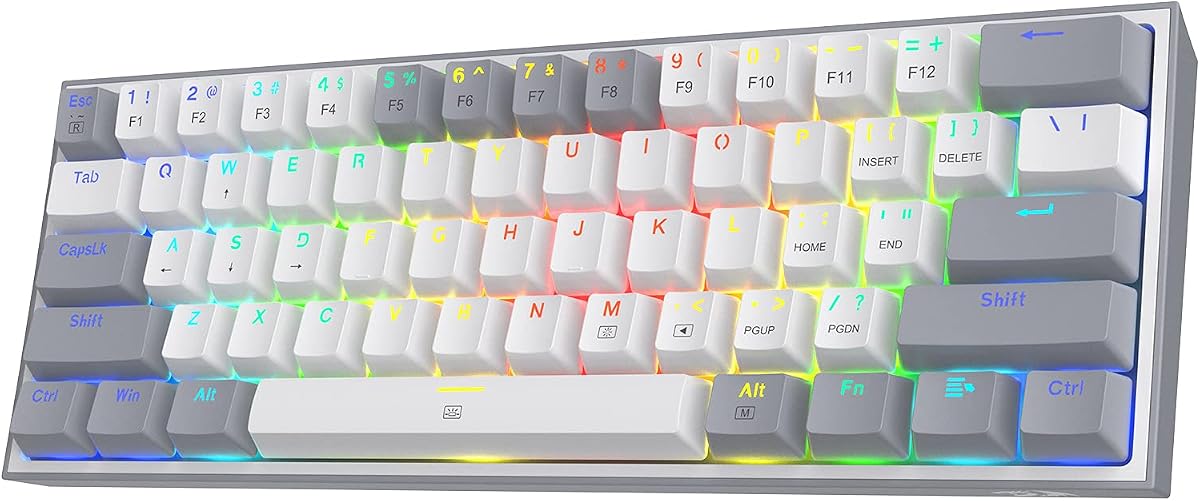
The Redragon K617 is a compact 60% board offering solid value for gamers. While not strictly 40%, it removes the numpad to maximize mouse space. The hot-swap design allows easy switch replacement without soldering for customization.
We may earn a commission when you buy through this link, at no additional cost to you.
RGB lighting features up to 20 preset modes with adjustable brightness. Switches are rated for 50 million keystrokes, ensuring longevity. The software supports advanced macros and lighting customization for tailored setups.
Build quality is functional, with a clean white and grey aesthetic. The board is wired, ensuring reliable zero-latency performance. It suits gamers needing space efficiency without the steep learning curve of 40% layouts.
Ideal for gamers transitioning to compact boards, this model balances cost and function. It fits well in crowded desks. If you value space and durability, it is a practical alternative to more extreme layouts.
Swap switches easily to change typing feel without permanent modification.
Maximize mouse movement area while keeping essential keys accessible.
We may earn a commission when you buy through this link, at no additional cost to you.
The YIVU 40% Corne Wireless bridges ergonomics with wireless freedom. Unlike Bluetooth splits, it uses a 2.4GHz dongle for low latency. This ensures instant remapping and macro creation without lag during critical work tasks.
We may earn a commission when you buy through this link, at no additional cost to you.
The columnar-staggered layout aligns keys with finger lengths to reduce strain. Premium Graywood V4 switches deliver a smooth, thocky sound profile. PBT keycaps offer a textured, durable surface that resists shine over time.
Wireless connectivity allows portability while maintaining stability. The compact layout removes unnecessary keys, bringing functions within reach of the home row. This design supports seamless workflows across multiple devices efficiently.
Ideal for professionals seeking a wireless ergonomic split, this model is a top choice. It suits developers and writers valuing health and efficiency. If you need reliable wireless and ergonomic design, it is a standout option.
Enjoy responsive typing without pairing delays common in Bluetooth connections.
Key columns match natural finger alignment for reduced wrist strain.
We may earn a commission when you buy through this link, at no additional cost to you.
The Keychron Q9 adds unique knob functionality to its robust chassis. This extra control element simplifies volume and scroll tasks efficiently. The 52-key layout retains essential keys while maintaining a compact footprint for productivity.
We may earn a commission when you buy through this link, at no additional cost to you.
QMK Launcher support allows layer customization and macro shortcuts via web app. Hot-swappable Gateron G Pro Brown switches provide tactile feedback without excessive noise. The aluminum body ensures durability and premium aesthetics on any desk.
Dual system profiles streamline workflow between Mac and Windows systems. PBT keycaps resist wear and oil buildup over time. While wired, the detachable cable ensures secure connections without clutter or tension.
Ideal for power users needing knob controls and customization, this model delivers. It fits static setups where wired reliability is key. If you prioritize features and build quality, it offers excellent utility.
Control volume and scroll smoothly with a dedicated rotary knob.
Configure layers and shortcuts easily through a browser-based interface.
We may earn a commission when you buy through this link, at no additional cost to you.
Selecting the right compact keyboard depends on your workflow needs and ergonomic preferences. Use these factors to narrow down your options effectively.
A 40 percent keyboard typically features between 40 and 55 keys, focusing on essentials like letters, numbers, and navigation. This extreme compression removes function rows and navigation clusters, relying on layers to access secondary commands. Users must decide if this trade-off suits their daily tasks. Consider which layers will be most accessed frequently.
Prioritize boards that offer intuitive layer transitions and clear indicators to reduce cognitive load during typing.
Ergonomic layouts like ortholinear or split designs reduce finger travel and wrist strain. Ortholinear grids align keys in straight columns, while splits allow natural arm positioning. These features are critical for long work sessions to prevent repetitive strain injuries. Evaluate your comfort level with these shapes before committing.
Choose split boards if you experience wrist pain or have wide shoulder setups to maintain healthy posture.
Switches determine the tactile feel and sound of each keystroke. Linear switches offer smooth travel, tactile provide a bump, and clicky ones produce an audible click. Low-profile switches reduce actuation force, ideal for extended typing. Match the switch to your preference for feedback and noise levels.
Select low-profile switches for comfort or tactile variants for better feedback and typing accuracy.
Wired boards provide zero latency and consistent power, while wireless offers flexibility. Bluetooth supports multiple device pairing, but 2.4GHz dongles offer lower latency. Consider your need for portability versus stability when choosing connectivity options.
Go wireless for multi-device switching or wired for gaming and precision tasks needing instant response.
Programmability allows users to remap keys, create macros, and design custom layers. Firmware support like QMK or VIA enables deep changes without soldering. This is vital for users who rely on shortcuts and automation for productivity.
Ensure the board supports your preferred firmware and allows layer saving for seamless workflow adaptation.
Materials like CNC aluminum, ABS plastic, and PBT keycaps affect durability and feel. Solid cases reduce unwanted flex and improve acoustics. High-quality materials ensure longevity and a consistent typing experience across the lifespan.
Invest in aluminum cases for stability and PBT keycaps for long-lasting legends and texture.
Prices vary from budget-friendly models under $70 to premium boards exceeding $100. Higher costs often bring better materials, wireless options, and ergonomic features. Balance your financial constraints with essential features to avoid overspending.
Set a clear spending range to narrow choices and ensure you get value without unnecessary costs.
Start by mapping your most used shortcuts to the accessible keys. Use QMK or VIA software to create layers that fit your workflow. Consistent layer practice will make navigation intuitive over time.
Clean the keyboard regularly using compressed air to remove dust. Remove keycaps periodically to wipe the switch area. This prevents debris buildup and maintains smooth key action.
Store the keyboard in a protective case when transporting. Use the included USB-C cable to secure it properly. Proper storage prevents scratches and maintains the board condition.
Yes, a 40 percent keyboard is highly suitable for office work due to its space-saving design. By using layers to access essential keys, you gain extra mouse space. This reduces repetitive movements and can improve productivity in desk environments.
Learning typically takes one to two weeks of consistent daily use. Muscle memory builds as you memorize common shortcuts and layer transitions. Practice sessions focusing on frequent tasks will speed up the adaptation process significantly.
Most modern 40 percent keyboards support Mac systems natively. They include OS-specific keycaps and firmware toggle switches. Ensure the model you select offers Mac layouts for seamless integration with Apple devices.
Many gamers find them ideal as they maximize mouse movement space. The compact layout eliminates clutter, allowing precise aim and faster movements. However, gaming performance depends on low latency and responsive switches for competitive play.
Yes, several models offer Bluetooth and 2.4GHz wireless options. These modes provide flexibility for multi-device setups without cables. Check for low latency wireless if you prioritize performance over pure portability.
Ortholinear layouts align keys in straight columns, while staggered layouts mimic typewriters. Ortholinear reduces finger travel and wrist strain. Choose ortholinear for ergonomics or staggered if you prefer traditional key positions.
The EPOMAKER Luma40, Koolertron 40% Gaming, and YIVU Corne LP lead the market for their balance of ergonomics and value. Each offers distinct features for different user needs. Evaluate your priorities to find the best fit.
Focus on layout efficiency, switch comfort, and connectivity to ensure long-term satisfaction. Ergonomics should not be compromised for space savings if health is a concern. Prioritize models that support your preferred software and customization needs.
Prices and availability fluctuate often, so verify current details before buying. Check official product pages for the latest configurations. This ensures you receive the best quality and support for your setup today.