
Samsung 49" Odyssey OLED G9 (G91SD)
4.3Editor score
QD-OLED panel
0.03ms response time
144Hz refresh rate
Infinite contrast ratio
Finding the right display can transform your racing simulator into a realistic cockpit experience. A wide screen fills your peripheral vision and helps you judge corners better than standard monitors.
We compared ten leading models based on resolution, refresh rate, panel type, and curvature. Each entry offers detailed insights into how it performs for racing titles and daily use.
Every pick highlights key strengths and trade-offs so you can choose the best fit for your setup. Prices and availability change often so check current listings before buying.
4.3Editor score

4.6Editor score
4.1Editor score
As an Amazon Associate we earn from qualifying purchases.
This side-by-side table helps you compare core specs across all ten models. Look closely at panel type, refresh rate, and connectivity to find the best match for your hardware.





This monitor brings wide immersive visuals to racing sims without a steep price tag. It holds a strong 4.6 rating from users who praise its balance of detail and motion clarity.
We may earn a commission when you buy through this link, at no additional cost to you.
The 165Hz refresh rate and 1ms response time help keep fast tracks smooth. The 1500R curve wraps around your field of view to make cornering feel more natural.
VA panel contrast is deep enough for night racing but may show some motion blur at extreme speeds. The HDR400 support improves shadow detail but is not as bright as premium models.
Anyone seeking a cost-effective 49 inch display for iRacing or Assetto Corsa will find this a strong fit. It replaces two monitors cleanly and keeps budget friendly.
The 32:9 aspect ratio and 1500R curve fill peripheral vision so you spot braking points earlier.
HDMI 2.0 and DisplayPort 1.4 let you link PCs and consoles while PIP modes help monitor telemetry streams.
We may earn a commission when you buy through this link, at no additional cost to you.
This OLED model delivers unmatched contrast and speed for sim racers who demand the best visuals. A 4.3 user rating reflects its premium build while noting care tips for longevity.
We may earn a commission when you buy through this link, at no additional cost to you.
Near instant 0.03ms response times eliminate ghosting so tire marks and track debris appear sharp. The QD-OLED panel offers deep blacks that make night sessions look realistic.
Static UI elements like telemetry bars need attention to avoid burn-in over long periods. The cost is higher but many find the visual payoff worth it for serious training.
Racers building a high-end cockpit should consider this for its clarity and speed. Pair it with anti burn-in features to keep the screen clean over years of use.
The OLED panel reacts faster than LCD so motion trails vanish and steering input feels precise.
Built in algorithms adjust brightness to reduce heat and help the panel stay stable during long races.
We may earn a commission when you buy through this link, at no additional cost to you.
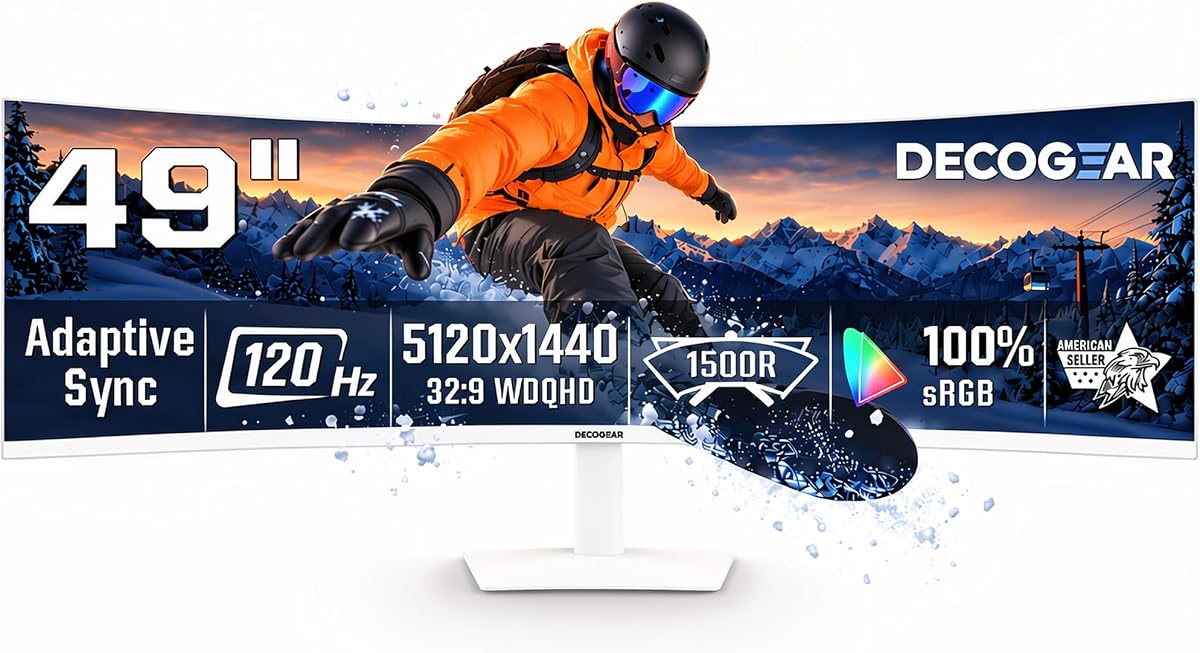
This affordable unit delivers wide screen real estate and solid detail for sim racers on a tight budget. User feedback shows a 4.1 rating with praise for value and ease of setup.
We may earn a commission when you buy through this link, at no additional cost to you.
The 120Hz refresh rate is enough for most titles though top tier titles may push higher. USB-C power helps connect laptops or mini PCs without extra chargers at the desk.
Motion clarity and HDR performance lag behind costlier models but it is a strong starting point. The built-in speakers can help with telemetry or music while racing.
Entry level sim racers or those upgrading from smaller screens will appreciate the wide view. Keep expectations realistic on HDR but you get impressive size for the cost.
USB-C with power delivery lets you plug in a laptop and start racing without docking stations or adapters.
PIP and PBP modes help you run telemetry tools on one side while the race plays on the other.
We may earn a commission when you buy through this link, at no additional cost to you.
This model blends productivity features with gaming specs so it fits work and play at the desk. A 4.2 rating points to dependable performance and good connectivity for laptops.
We may earn a commission when you buy through this link, at no additional cost to you.
The 99 percent sRGB coverage ensures colors stay accurate for both racing and content creation. A height adjustable stand helps you set a comfortable eye level for long sessions.
Refresh rates cap at 120Hz which is fine for most sims but may limit competitive edge in high frame titles. The USB-C port simplifies cables for mobile setups.
Users wanting one display for work and sim use will value the flexible ports and ergonomics. Set up your telemetry apps on the side while you focus on the main view.
Strong sRGB coverage helps you see track textures and car liveries more clearly during race prep.
Adjust height and tilt to avoid neck strain when leaning into corners for long races.
We may earn a commission when you buy through this link, at no additional cost to you.
This model pushes speed with a 240Hz refresh rate that keeps motion fluid on powerful GPUs. Users rate it 4.1 and note the intense immersion from its tight curve and high brightness.
We may earn a commission when you buy through this link, at no additional cost to you.
The 1000R curve wraps deeply around you so steering feels closer to a real cockpit. HDR1000 support makes reflections and track lighting pop during daytime sessions.
Some users find the tight curve hard to adapt to if sitting farther back. It also demands a strong GPU to reach peak frame rates in demanding sims.
Competitive racers who run high fps titles will appreciate the motion clarity and speed. Place it close to your eyes to get the most out of the wrap around design.
The 240Hz rate helps reduce blur so track details stay sharp when speeding through chicane sections.
High peak brightness helps show off sun glare and shadows for a more realistic daytime feel.
We may earn a commission when you buy through this link, at no additional cost to you.
A balanced pick for racers who want strong performance without the top tier cost. A 4.4 rating highlights its smooth motion and vivid HDR scenes in daily testing.
We may earn a commission when you buy through this link, at no additional cost to you.
The 144Hz refresh rate works well with most GPUs and keeps motion fluid. HDR600 delivers brighter highlights and deeper blacks than entry level monitors.
The 1000R curve is immersive but may feel too tight for some desk setups. Auto connect helps switch between PC and console inputs without manual selection.
People who want a refined experience with good brightness will find this a strong match. Use the stand adjustments to set a comfortable height for long runs.
Brighter HDR helps you see shadows and glare clearly so you can react to changing track conditions.
When you power on your console or PC the monitor switches inputs instantly to save time.
We may earn a commission when you buy through this link, at no additional cost to you.
This value model offers solid refresh rates and a wide view at a friendly price. Users rate it 4.4 and praise its motion smoothness and vibrant colors.
We may earn a commission when you buy through this link, at no additional cost to you.
The 165Hz rate keeps gameplay fluid and AMD FreeSync helps prevent tearing on compatible GPUs. Its wide color coverage improves track texture and car paint details.
Lacking height adjustment can make ergonomics harder on taller desks. HDR is basic but useful for dark scenes without much fanfare.
Anyone needing a simple affordable 49 inch monitor for sims will like this pick. Pair it with a good arm if you need more position flexibility.
165Hz keeps corner transitions clear and reduces blur for better visual focus.
Strong color coverage helps distinguish between track surfaces and barriers easily.
We may earn a commission when you buy through this link, at no additional cost to you.
A reliable option from a known brand that offers good ergonomics and gaming tools. The 4.4 rating reflects steady performance and thoughtful eye care features.
We may earn a commission when you buy through this link, at no additional cost to you.
The 144Hz refresh rate keeps motion smooth and FreeSync 2 HDR helps reduce screen tearing. ASUS Eye Care reduces flicker to help comfort during long sessions.
Resolution is lower than newer models so track details may look softer. It works best for casual racing or where cost matters more than maximum sharpness.
Users who value build quality and eye comfort will find this a solid choice. Pair it with upscaling tools if you want sharper text and HUD elements.
Flicker free and low blue light features help reduce fatigue during endurance race sessions.
GamePlus overlays add timers and crosshairs that can help track progress in training modes.
We may earn a commission when you buy through this link, at no additional cost to you.
This model pairs a high refresh rate with strong resolution and color accuracy. A 4.5 rating points to good motion performance and clear image detail in tests.
We may earn a commission when you buy through this link, at no additional cost to you.
The 240Hz rate helps keep motion crisp while 5K2K resolution shows fine track details. Strong color accuracy helps distinguish between track surfaces and barriers clearly.
Less known brand may mean fewer resources for driver support or tuning. The setup can be a bit complex with multiple inputs and settings.
Tech savvy users who want high refresh and high resolution on a budget will value this. Run calibration tools to match your color profile for best results.
240Hz keeps motion fluid so you can react to sudden track changes more quickly.
Accurate colors help you identify tire wear and track grip more reliably.
We may earn a commission when you buy through this link, at no additional cost to you.
An OLED option that combines deep contrast with high refresh rates for a premium feel. The 4.1 rating reflects strong visual quality and motion clarity in racing apps.
We may earn a commission when you buy through this link, at no additional cost to you.
The 240Hz refresh rate keeps motion fluid while OLED delivers instant response. True Black 400 makes night racing look more vivid with deep shadows.
As with any OLED care is needed to avoid burn-in on static HUD elements. The price remains high compared to LCD alternatives.
Serious sim racers who want OLED visuals at high refresh will find this a great fit. Enable screen saver features to keep static elements safe during breaks.
Deep blacks help you see track edges and barriers clearly during night sessions.
240Hz ensures smooth motion even when racing at high speeds on complex tracks.
We may earn a commission when you buy through this link, at no additional cost to you.
Picking the right monitor depends on how you balance motion clarity, resolution, and budget. Use these factors to narrow down the best fit for your cockpit setup.
VA panels offer strong contrast and deep blacks which helps during night sessions. OLED panels provide perfect blacks and instant pixel response but cost more and need care to avoid burn-in.
Choose VA for value and contrast or OLED for the ultimate in motion clarity and color depth.
Higher refresh rates like 144Hz 165Hz or 240Hz reduce motion blur so track details stay sharp. Faster response times around 1ms keep steering input feeling precise during quick transitions.
Aim for at least 144Hz and fast response if you race on powerful PCs for best results.
Curved screens like 1000R 1500R or 1800R wrap around your eyes to improve immersion. Tighter curves feel more realistic but may cause neck strain if you sit far back.
Pick a curve that matches your desk depth and preferred viewing distance for comfort.
DQHD 5120×1440 gives crisp text and track textures without overloading GPUs. Lower resolutions save cost but can look soft when zoomed in on dashboards or signs.
Use DQHD or higher to keep HUD elements and track details clear during long races.
HDR support improves shadow detail and highlights which helps in changing light conditions. Higher peak brightness ensures track reflections and sun glare look realistic without washing out.
Look for HDR400 minimum but HDR600 or HDR1000 offers better realism for outdoor tracks.
Multiple HDMI and DisplayPort inputs help you switch between PC and console easily. USB-C with power delivery can simplify laptop setups by carrying video and power together.
Ensure the monitor has the ports your devices need to avoid extra dongles or hubs.
Adjustable stands let you set the right height and tilt to reduce neck strain. VESA mounts give flexibility to use arms for better positioning in tight cockpits.
Choose a model with good adjustability or plan for a VESA compatible arm setup.
Lower cost models offer wide views but may trade off motion performance and HDR brightness. Premium models deliver better contrast and speed but require stronger hardware and care.
Match your spend to how often you race and how much visual quality you need.
Place the monitor close enough to fill your peripheral view without causing neck strain. Use the stand or an arm to set eye level near the middle of the screen.
Set the refresh rate and resolution in your graphics settings to match the monitor. Use FreeSync or G Sync features in your GPU panel to prevent screen tearing.
Keep the screen clean with a soft cloth and avoid harsh cleaners. For OLED screens use built-in burn-in prevention settings to preserve panel life.
Yes a 49 inch ultrawide monitor fills your peripheral view and makes judging braking points easier. The wide aspect ratio helps you see more of the track than standard screens.
Higher refresh rates and resolutions require strong GPUs to maintain high frame rates. If you target 144Hz or higher choose a graphics card that can handle the workload smoothly.
A 1000R curve feels most immersive for cockpit setups but can strain some users. 1500R offers a good balance of wrap and comfort for most desk sizes.
Yes these monitors support multitasking with PIP and PBP modes. They work well for spreadsheets while running telemetry tools on the side.
Use built-in screen saver and logo detection features to dim static elements. Take breaks and enable auto dim to protect the panel over long sessions.
Use DisplayPort 1.4 for high refresh rates and resolutions. HDMI 2.1 is also effective if your GPU and monitor support it.
The Raywego 49 Inch model leads as a balanced choice for most sim racers. Samsung OLED G9 sets a premium standard while Deco Gear offers value for entry level builds.
Prioritize refresh rate and contrast if motion clarity and night sessions matter most. Choose curvature and ergonomics that fit your desk and viewing habits.
Prices and stock change so check current listings before making your decision. Use this guide to match the right features to your racing style and budget.