
M-AUDIO Keystation 49 MK3
4.5Editor score
Plug and play USB connection
Velocity sensitive full size keys
Includes MPC Beats and Ableton
This guide compares the top 49 key MIDI keyboards for producers, highlighting features like keybeds, DAW integration, and software bundles to help you choose
Finding the right keyboard for music production requires balancing playability with control. A 49 key MIDI keyboard offers a sweet spot between portability and range. It provides enough keys for chords and melodies without taking up excessive desk space in your studio setup.
We evaluated ten top models based on key feel, software integration, and included tools. Our analysis covers budget options to premium controllers designed for serious production work. Each product was assessed for its ability to streamline your workflow across different digital audio workstations.
Each pick details specific strengths and weaknesses to guide your decision. You will see how each controller handles velocity sensitivity and MIDI mapping. Please note that pricing and stock levels change frequently so verify current details before purchasing.
4.5Editor score

4.7Editor score

4.5Editor score
This table provides a side-by-side view of the ten top ranked controllers to help you quickly compare core specifications and features before making a final decision for your studio.




The Novation Launchkey 49 MK4 stands out as a top contender for producers seeking deep integration with their digital audio workstation. Its 4.7 star rating reflects high user satisfaction with its responsive controls and versatile feature set. The controller shines when paired with major DAWs allowing for seamless workflow without manual mapping.
We may earn a commission when you buy through this link, at no additional cost to you.
Its FSR drum pads offer polyphonic aftertouch which is rare at this price point and enable dynamic performance techniques. The Scale and Chord modes allow users to trigger complex harmonies with a single finger making music composition more accessible. Additionally the included software bundle covers essential production needs from Ableton Live Lite to Melodics lessons.
While the build quality is robust the cost might be a consideration for absolute beginners compared to simpler alternatives. Some users note that the touch sensitivity requires adjustment to match their playing style initially. These are minor trade-offs given the extensive capabilities provided for creative control.
This controller is ideal for intermediate producers ready to upgrade their setup with professional grade features. If you prioritize tight DAW integration and expressive performance tools this model delivers exceptional value. It remains a strong choice for anyone serious about advancing their music production capabilities.
Custom scripts ensure every knob and fader maps instantly to your software parameters saving time during mixing.
Polyphonic aftertouch allows individual note modulation for richer sound design without needing complex routing.
We may earn a commission when you buy through this link, at no additional cost to you.
The M-AUDIO Keystation 49 MK3 is a highly rated option for those seeking an affordable entry into MIDI production. With a 4.5 star rating it is praised for its reliable performance and user friendly setup. The focus here is on core essentials that work seamlessly with your computer without requiring drivers.
We may earn a commission when you buy through this link, at no additional cost to you.
Its velocity sensitive keys provide a natural playing feel which is crucial for expressive performances. The included software package featuring MPC Beats and Ableton Live Lite adds significant value making it a complete package out of the box. Simple transport controls and octave buttons ensure you can manage your tracks efficiently during sessions.
However the lack of drum pads means you might need an additional controller for beat making specifically. Also the fewer assignable knobs limit direct control over software parameters compared to higher end models. These limitations make it best suited for keyboard focused composition rather than broad production control.
This controller is perfect for beginners or students needing a solid keyboard without breaking the bank. If you plan to use external pad controllers or prefer simplicity this model offers a clean reliable solution. It provides the fundamental tools needed to start creating music immediately.
USB bus power means you can plug directly into your laptop and start playing without needing an outlet.
The bundle includes multiple instruments and DAWs giving you a full production suite without extra costs.
We may earn a commission when you buy through this link, at no additional cost to you.
The Arturia KeyLab Essential mk3 brings premium features to the mid range market with its robust software integration and tactile controls. Rated 4.5 stars it is known for its high quality keybed and exceptional software bundle that rivals standalone synthesizers. The inclusion of Analog Lab V offers immediate access to thousands of sounds.
We may earn a commission when you buy through this link, at no additional cost to you.
Its RGB backlit pads are pressure sensitive adding a layer of expression for drumming and sample triggering. The LCD screen provides real time feedback on parameter changes ensuring you never lose track of your settings during performance. Custom integration scripts allow deep control over DAWs like Logic Pro X and Ableton Live.
The main drawback is the price which places it out of reach for those on a strict budget. Additionally the software ecosystem requires activation and updates which can be a hurdle for offline users. These factors are acceptable for users prioritizing sound quality and integration depth.
This controller is best for producers who value sound design and detailed software interaction. If you want a comprehensive production tool that grows with your skills this model offers excellent long term value. It bridges the gap between hobbyist gear and professional studio standards effectively.
Access over 2000 presets spanning orchestral to modern synth sounds instantly without needing extra plugins.
The bright screen displays active settings clearly helping you adjust parameters on the fly during sessions.
We may earn a commission when you buy through this link, at no additional cost to you.
The M-AUDIO Oxygen 49 MKV is designed for versatile production with a strong focus on beat making and sample control. Its 4.6 star rating highlights its reliability and the value of its Native Instruments NKS integration. This feature allows seamless browsing and control of preset libraries directly from the keyboard.
We may earn a commission when you buy through this link, at no additional cost to you.
The 16 backlit drum pads support Note Repeat for fast pattern creation and clip launching. Along with 8 assignable knobs and 9 faders it offers tactile control over virtual synth parameters and DAW settings. This makes it highly effective for mixing and sound tweaking without reaching for a mouse.
While the pads are responsive they lack pressure sensitivity which limits dynamic control for certain playing styles. Users must also select specific software bundles which might limit immediate access if not chosen carefully. These are minor inconveniences for the broad compatibility and control features offered.
Ideal for beat makers and synthesizer users the Oxygen 49 MKV delivers professional tools at a competitive price. If you work heavily with Native Instruments software this model provides unmatched integration and workflow efficiency. It is a strong recommendation for versatile producers.
Browse and control Native Instruments presets instantly using the knob encoders without needing manual mapping.
The combination of knobs faders and pads ensures you have a physical control for every aspect of your track.
We may earn a commission when you buy through this link, at no additional cost to you.
The Nektar SE49 is a straightforward option for those needing a basic yet reliable MIDI controller for home studios. It holds a 4.5 star rating due to its simplicity and compatibility with various digital audio workstations. The integration scripts cover most popular software making it functional out of the box.
We may earn a commission when you buy through this link, at no additional cost to you.
It features basic MIDI functionality that is compatible with all standard music software applications. The inclusion of Bigwig Studio and sound content provides a starting point for recording and arrangement tasks. Compatibility with iOS devices extends its usability for mobile producers using iPads or iPhones.
The feature set is limited compared to higher end models with fewer controls for automation and mixing. Users seeking extensive customization might find it restrictive for complex production workflows. However for basic recording needs it offers significant value for the price.
This model is recommended for beginners or mobile users needing a compact controller without unnecessary complexity. If your workflow focuses on simple composition and recording this controller handles the essentials effectively. It remains a budget friendly choice for reliable performance.
Works seamlessly with iOS devices via camera adapter enabling mobile music creation on the go.
Preconfigured scripts allow immediate control over transport and volume without manual setup or complex coding.
We may earn a commission when you buy through this link, at no additional cost to you.
This generic 49-key MIDI keyboard serves as a basic tool for practice and quick composition without advanced features. It is recognized for its compact footprint and lightweight design making it suitable for limited desk spaces. While ratings are less consistent it offers functional MIDI input for essential tasks.
We may earn a commission when you buy through this link, at no additional cost to you.
Constructed from ABS material it is durable enough for regular handling and storage. The simple design focuses on core functionality without extra controls which reduces complexity for new users. It is suitable for melody practice and preparation before recording in a full studio setup.
Build quality and feature support can vary significantly compared to branded controllers. Software integration is minimal requiring manual setup for many production features. Users should expect a basic experience with fewer automation capabilities.
Ideal for students or hobbyists needing a budget solution for learning and practice this keyboard fulfills basic requirements. If you need a secondary controller for simple tasks it is a cost effective option. It provides a starting point for those testing the waters in music production.
Its small size allows it to fit in crowded workspaces without obstructing other equipment or monitors.
Designed for basic practice and melody work it helps users learn keyboard skills without investing in complex gear.
We may earn a commission when you buy through this link, at no additional cost to you.
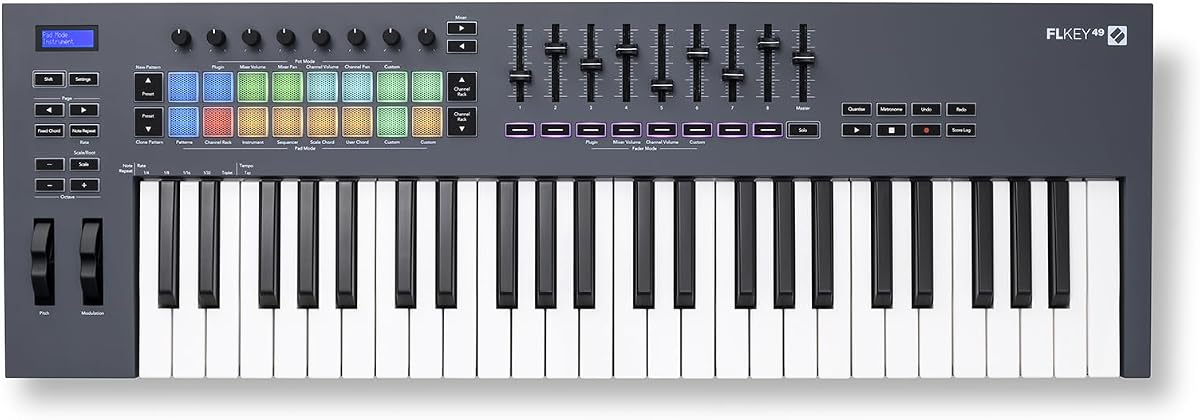
The Novation FLkey 49 is a specialized controller designed specifically to enhance the FL Studio experience for beat makers. Rated 4.6 stars it offers seamless integration where controls map instantly to FL Studio features. This reduces the need for mouse use and speeds up the production process significantly.
We may earn a commission when you buy through this link, at no additional cost to you.
Its eight pots and nine faders mirror FL Studio's mixer and channel rack allowing precise control over volumes and pans. The step sequencer mapping on the pads enables quick pattern creation without needing a mouse. Additionally the scale modes help keep melodies harmonically correct for better creative flow.
While excellent for FL Studio users its integration with other DAWs is not as deep which limits flexibility for cross-platform users. The specific design makes it less versatile if you switch software frequently. For dedicated FL users this is a minor concern compared to the workflow benefits.
This controller is the top choice for producers committed to using FL Studio as their primary software. If you want hardware that feels like a natural extension of the software this is the ideal option. It transforms the computer production experience into a more tactile and enjoyable process.
Every knob and fader is mapped to critical FL Studio functions ensuring zero setup time for production.
Scale and chord modes allow intuitive composition by preventing wrong notes and simplifying harmony creation.
We may earn a commission when you buy through this link, at no additional cost to you.
The M-AUDIO Oxygen Pro 49 delivers professional features designed for serious production environments needing robust control. With a 4.5 star rating it is praised for its semi weighted keybed with aftertouch and versatile connectivity. The inclusion of a screen adds visual feedback for managing complex sound setups easily.
We may earn a commission when you buy through this link, at no additional cost to you.
Its 16 RGB backlit pads and extensive assignable controls allow for deep customization of virtual instruments and effects. The dedicated 5-pin MIDI output ensures reliable connection to hardware synthesizers without relying solely on USB. Split zones support enables splitting the keyboard into different instrument zones for richer performances.
The higher price and larger footprint may be prohibitive for smaller home studios. Users needing basic features might find it more advanced than required for simple tasks. However for professional needs these features are essential for efficient workflows.
This model is best for professionals needing extensive connectivity and control over complex setups. If you require aftertouch and dedicated MIDI output for hardware integration it is a powerful choice. It bridges the gap between studio controllers and performance instruments effectively.
5-pin MIDI output ensures stable connection to hardware gear without latency or driver issues.
Aftertouch and split zones offer expressive control and versatility for professional live and studio performances.
We may earn a commission when you buy through this link, at no additional cost to you.
The midiplus AK490 is a straightforward controller offering essential MIDI input and output capabilities for basic setups. It holds a 4.3 star rating for reliability and functionality for users needing a direct connection. Its simple design focuses on delivering key input without unnecessary complex features.
We may earn a commission when you buy through this link, at no additional cost to you.
It includes a sustain pedal input and octave buttons which are crucial for playing music with dynamics. The MIDI out Din Jack allows connection to hardware synthesizers directly which is rare at this price. USB cable and manual are included to facilitate immediate setup.
The lack of software bundles means you must provide your own instruments and DAWs. The key feel is basic and may not satisfy players seeking expressive control. These limitations keep the price low but limit creative potential.
This controller is recommended for users needing a simple interface for hardware or software without cost. If you prioritize budget and MIDI out connectivity it is a practical choice for technical needs. It serves well as a secondary input device in a multi-device studio.
The MIDI DIN output allows direct control of external synths without needing USB bridging or drivers.
Essential buttons and sustain inputs cover fundamental performance needs for straightforward music creation tasks.
We may earn a commission when you buy through this link, at no additional cost to you.
The Arturia KeyLab mk3 in White offers a premium aesthetic combined with advanced performance features for modern producers. With a 4.4 star rating it is valued for its robust build quality and stylish appearance. The white finish provides a distinctive look that stands out in any studio environment.
We may earn a commission when you buy through this link, at no additional cost to you.
It features aftertouch supported keys and USB-C power which ensures modern connectivity and expressive play. The 9 encoders allow for precise parameter adjustments essential for sound design. While it shares software with other models the design focus appeals to those prioritizing visual integration.
The price reflects its premium build and design making it less accessible for budget conscious buyers. Additionally it requires a separate software suite which may increase total costs if not already owned. These factors are acceptable for those valuing aesthetics and quality materials.
This model is best for users who want a stylish controller without compromising on essential features. If you care about how your gear looks and uses modern standards this is a strong choice. It combines style with functional performance for dedicated production setups.
USB-C power input ensures compatibility with modern laptops and reduces cable clutter in the workspace.
Robust encoders and materials ensure the controller remains reliable over years of daily professional use.
We may earn a commission when you buy through this link, at no additional cost to you.
Selecting the right keyboard involves evaluating several technical and practical factors to ensure it fits your workflow.
The quality of the keybed determines how the keyboard feels to play. Look for velocity sensitivity to capture dynamic performance nuances and consider whether you prefer semi-weighted or unweighted keys. Aftertouch is another feature to check if you want expressive control over parameters like vibrato or volume.
Prioritize a keybed that feels responsive to your playing style for the best experience.
Integration with your Digital Audio Workstation (DAW) is crucial for an efficient workflow. Check if the controller offers specific scripts for software like Ableton Live Logic or FL Studio. Seamless integration saves time by mapping controls automatically instead of manual configuration.
Choose a keyboard that supports your primary DAW to maximize productivity during sessions.
Many controllers come bundled with DAWs and virtual instruments which can add significant value to the purchase. Look for packages that include Ableton Live Lite MPC Beats or high-quality synthesizers. This reduces initial costs by providing the necessary tools to start producing immediately.
Verify the software included meets your production needs before making a decision.
Connectivity options determine how you connect the keyboard to your system. USB is standard but MIDI DIN ports allow connection to external hardware synths. USB-C support is becoming common for modern laptops and ensures reliable power and data transfer.
Ensure the controller has the specific ports required for your current studio setup.
Control surface features like pads knobs and faders help manage your project without using a mouse. Drum pads are essential for beat making while knobs and faders are useful for mixing. The number and quality of these controls vary significantly between models.
Select a layout that matches how you typically interact with your digital audio workstation.
Build quality affects durability and portability especially if you plan to travel with the controller. Look for sturdy materials and a compact design if desk space is limited. The aesthetic design also matters if you want the gear to fit your studio style.
Assess the physical construction to ensure it can withstand regular professional use.
Compatibility with different devices like Mac PC and iOS ensures flexibility in your workflow. Some controllers require specific adapters for iOS devices so check if these are included or sold separately. Broad compatibility allows you to use the keyboard across different systems effortlessly.
Verify system requirements match your current computer and mobile devices.
Budget considerations should align with the value provided by the features. Higher priced models offer better keybeds and more controls while budget options cover essentials. Determine what features are non-negotiable versus what you can compromise on to find the best balance.
Compare the total package including software to find the best value for your budget.
Connect the keyboard to your computer via USB and ensure the drivers or class compliance settings are active. Most modern keyboards are plug and play but you may need to select the MIDI input in your DAW settings. This setup allows your software to receive note data and control messages correctly.
Adjust velocity and pressure settings if available to match your playing style for a natural feel. Regularly update the firmware through the manufacturer's website to ensure optimal performance and bug fixes. Keeping the software current guarantees compatibility with newer DAW versions.
Clean the keys with a soft dry cloth to remove dust and oils after every few uses. Avoid exposing the controller to extreme temperatures or moisture to prolong its lifespan. Proper maintenance ensures the keys remain responsive and the controls function smoothly over time.
Velocity measures how hard a key is struck to control volume or brightness. Aftertouch measures pressure applied after the key is pressed to control effects like vibrato or filter cutoff. Both features add expression to your performances.
Most 49 key keyboards support iOS devices with a USB camera adapter. You will need to ensure your DAW app supports MIDI input properly. Some controllers include specific integration for iOS apps like GarageBand.
MIDI keyboards connect to computers and software allowing you to access infinite sounds and recording tools. Regular pianos do not output data to software which limits sound variety and editing capabilities. MIDI controllers also typically take up less physical space in a studio.
Yes 49 key keyboards are widely used in professional studios for their versatility and compact design. They provide enough range for most musical compositions and chord progressions. Many producers pair them with additional pads or hardware for expanded control.
Most keyboards include DAWs like Ableton Live Lite and virtual instruments such as MPC Beats or Analog Lab. The exact bundle varies by model and manufacturer. Always check the product page for the latest software inclusions before buying.
Yes most MIDI keyboards work with both Mac and PC systems via USB. Windows may require basic driver installation while Mac typically uses class compliance. Ensure your DAW software supports the specific controller for full functionality.
The Novation Launchkey 49 MK4 leads our selection with its deep DAW integration and expressive pads. The M-AUDIO Keystation 49 MK3 offers the best value for budget conscious beginners. The Arturia KeyLab Essential mk3 provides the best premium features for producers needing advanced sound tools.
Prioritize DAW integration and keybed quality when making your final decision. A keyboard that aligns with your workflow will improve your creative process significantly. Do not overlook the software bundles as they often add substantial value to the hardware purchase.
Always check current prices and availability before purchasing as models and bundles change frequently. Verify that the latest firmware matches your operating system for smooth operation. With the right choice you can elevate your music production capabilities with confidence.