
Newmen GM326 Mechanical Keyboard
4.4Editor score
Rainbow LED backlighting
Hot swappable switches
Compact 75 percent layout
Discover the top 75 percent percent mechanical keyboard options for 2026. This guide compares features, sound, and build quality to help you choose.
Finding the right 75 percent percent mechanical keyboard can transform your workspace. These compact boards balance space savings with essential keys. Look for gasket mounts and hot-swap capabilities for best performance.
We compared ten top models based on build quality, connectivity, and typing experience. Our analysis covers wired and wireless options across various price points. Each pick offers unique strengths for different user needs.
Every selection highlights key specs and real-world performance details. Prices and availability change frequently so check current listings. We aim to help you find the perfect match for your setup.
4.4Editor score

4.6Editor score

4.7Editor score
This side-by-side comparison highlights key specifications across all ten selected models. We focus on layout, connectivity, switch types, and special features to help you decide quickly.



The AULA F75 Pro stands out as a top contender in the 75 percent percent mechanical keyboard market. With a solid 4.6 rating, it delivers a premium experience without the premium price tag. Its tri-mode connectivity and robust battery life make it ideal for multi-device workflows.
We may earn a commission when you buy through this link, at no additional cost to you.
Key strengths include the pre-lubed Reaper switches which offer a smooth and creamy typing feel immediately. The five-layer filling system effectively dampens noise, providing a thocky sound profile preferred by enthusiasts. The multi-function knob adds practical control over volume and media without software intervention.
Trade-offs exist mainly in software usability. The driver provides deep customization but may require a learning curve for new users. Additionally, the battery while large adds slight weight. These are minor compromises given the performance and build quality on offer.
This keyboard suits users seeking wireless freedom with premium features. Gamers, writers, and professionals will appreciate the balance of portability and functionality. If you need a reliable daily driver with strong customization, the F75 Pro is a highly recommended choice.
The 4000mAh battery ensures weeks of use on a single charge. Tri-mode switching lets you jump between devices seamlessly.
Hot-swappable sockets allow switch changes without soldering. The pre-lubed stabilizers reduce wobble for a cleaner keystroke.
We may earn a commission when you buy through this link, at no additional cost to you.
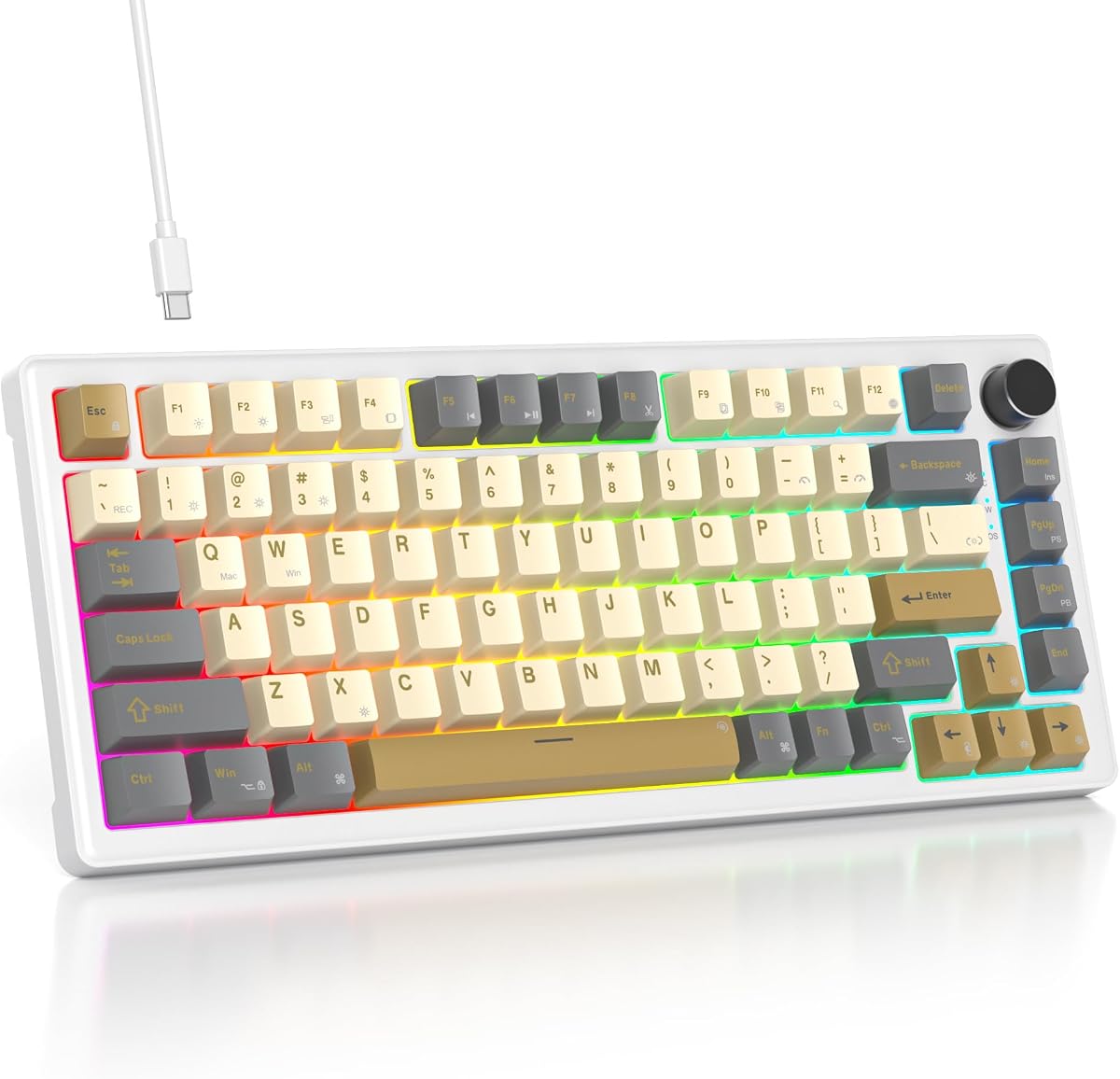
The Newmen GM326 offers an excellent entry point for those exploring 75 percent percent mechanical keyboards. Rated 4.4 stars, it balances cost and features effectively. The hot-swap capability allows users to experiment with switches without replacing the entire board.
We may earn a commission when you buy through this link, at no additional cost to you.
It features rainbow LED backlighting with multiple modes to personalize your setup. The multi-function knob provides easy volume control which is rare at this price point. Ergonomic design elements like stepped keycaps help reduce fatigue during long sessions.
While it lacks wireless connectivity, the wired design ensures zero latency. The software support is minimal compared to higher-end models. These trade-offs are acceptable for budget-conscious buyers prioritizing core functionality over advanced features.
Ideal for students or first-time mechanical keyboard users. It provides a solid foundation for understanding switch types and layout benefits. If you want an affordable customizable option, the GM326 is a smart starting point.
Hot-swap sockets let you try different switches easily. The included knob adds practical utility without extra cost.
The 75 percent layout keeps arrow keys while freeing desk space. Perfect for smaller desks or mobile setups.
We may earn a commission when you buy through this link, at no additional cost to you.
The Womier SK80 defines premium features with its color multimedia display. Rated 4.7 stars, it appeals to users wanting visual customization. The gasket mount design ensures a soft and responsive typing feel distinct from rigid boards.
We may earn a commission when you buy through this link, at no additional cost to you.
Its software allows deep customization including GIFs on the screen and music syncing RGB modes. Pre-lubed linear switches deliver a clean out-of-the-box sound. The build quality supports a high-end experience suitable for dedicated enthusiasts.
The price is higher but justified by unique features. The display screen requires software to function fully which may not suit all users. These factors are minor given the overall quality and innovation provided.
Best for users seeking a showpiece keyboard with functional utility. The visual elements add flair to any setup. If you value aesthetics alongside performance, the SK80 delivers a standout experience.
The color screen displays GIFs system system status. This adds a unique layer of personalization not found elsewhere.
EVA positioning plates and bottom filling create a soft bounce. This enhances comfort during extended typing sessions.
We may earn a commission when you buy through this link, at no additional cost to you.
The RK ROYAL KLUDGE R75 Wireless offers reliable triple-mode connection. Rated 4.4 stars, it provides consistent performance for daily tasks. The CNC metal volume knob adds a premium touch and precise control.
We may earn a commission when you buy through this link, at no additional cost to you.
Pre-lubed cream switches deliver smooth and quiet operation. The gasket mount reduces vibration enhancing comfort during typing. PBT keycaps resist wear ensuring longevity and a clean look over time.
Battery life is solid but depends on RGB usage. The software is functional but basic compared to competitors. These minor issues do not detract from the overall value proposition.
Ideal for users who prefer wireless freedom with physical controls. The build quality and switch feel are well-suited for typing and light gaming. If you want a dependable wireless board the R75 is a strong candidate.
The CNC metal knob feels solid and precise. It allows quick volume adjustments without navigating menus.
PBT material resists shine and oil better than ABS. This keeps the keyboard looking new for longer.
We may earn a commission when you buy through this link, at no additional cost to you.
The RK ROYAL KLUDGE R75 Wired focuses on tactile performance. Rated 4.6 stars, it offers satisfying feedback for typists. The pre-lubed brown switches provide a smooth tactile bump without excessive noise.
We may earn a commission when you buy through this link, at no additional cost to you.
Gasket mounting ensures a comfortable typing experience reducing fatigue. The volume knob and RGB backlighting add functional and aesthetic value. The detachable cable aids portability and easy replacement.
Being wired limits placement flexibility but ensures zero latency. The software is functional yet lacks advanced features. These trade-offs are acceptable for users prioritizing feel and reliability.
Best suited for office environments or users who prefer tactile feedback. The build quality supports long-term daily use. If you want a solid wired board with good switches this model fits well.
Brown switches offer a clear bump without loud clicks. Ideal for shared spaces needing quiet typing.
A dedicated volume knob saves time adjusting audio. The knob adds utility beyond basic keyboard functions.
We may earn a commission when you buy through this link, at no additional cost to you.
The EPOMAKER x Aula F75 emphasizes acoustic mastery. Rated 4.6 stars, it delivers a tranquil typing environment. Five-layer padding effectively reduces noise and resonance for a focused experience.
We may earn a commission when you buy through this link, at no additional cost to you.
Factory-lubricated switches ensure smooth and consistent keystrokes. Cherry profile PBT keycaps provide durability and a refined feel. The gasket structure maintains a flexible yet firm typing experience.
The keycaps come in fixed gradient black which may limit customization. The higher price reflects the build quality and materials used. These are minor points compared to the overall performance and sound quality.
Perfect for users who value quiet and tactile typing. The low-latency wireless ensures responsiveness for gaming too. If you need a refined daily driver with excellent acoustics this is a great choice.
Multiple layers reduce cavity noise effectively. This creates a more solid and premium feel.
Ultra-low latency ensures keystrokes are registered instantly. Suitable for both work and gaming needs.
We may earn a commission when you buy through this link, at no additional cost to you.
The DIERYA DK81E stands out with browser-based key control. Rated 4.5 stars, it simplifies customization without desktop software. This approach works across Windows macOS and Linux seamlessly.
We may earn a commission when you buy through this link, at no additional cost to you.
Factory-lubed switches deliver a creamy typing sound. The gasket structure and sound-dampening layers enhance comfort. The clean white design fits well with minimal setups.
Browser-based tools rely on an internet connection which may be limiting offline. Wired connectivity restricts placement options compared to wireless boards. These factors are acceptable for users prioritizing ease of use.
Ideal for professionals who value simplicity and clean aesthetics. The lack of complex software makes setup quick and easy. If you want a hassle-free experience with solid build quality consider this model.
Remap keys and record macros via browser. This avoids installing extra programs on your system.
The white chassis suits modern and clean desks. It keeps the focus on functionality without distraction.
We may earn a commission when you buy through this link, at no additional cost to you.
The MageGee 75% Mechanical Gaming focuses on simplicity. Rated 4.1 stars, it offers basic functionality without software. This is perfect for users who want a ready-to-use keyboard.
We may earn a commission when you buy through this link, at no additional cost to you.
Red switches provide smooth linear action ideal for rapid tapping. The blue backlighting adds a classic gaming touch. Metal panel construction ensures durability for daily tasks.
It lacks customization options like hot-swap or software remapping. Lighting effects are limited to preset modes. These limitations are expected at this price point and user profile.
Best for casual gamers or home users needing a budget option. The layout keeps arrow keys essential for many tasks. If you want reliability without complexity the MageGee is a solid choice.
The keyboard works instantly after plugging in. No drivers or configuration files are needed.
Metal panel adds weight and durability. The board stays stable during intense typing sessions.
We may earn a commission when you buy through this link, at no additional cost to you.
The 75% Retro Mechanical Keyboard offers unique visual flair. Rated 4.6 stars, it combines gasket comfort with budget pricing. The shimmer white switches catch light for a striking look.
We may earn a commission when you buy through this link, at no additional cost to you.
Five-layer padding ensures a smooth quiet typing experience. Full-key macro programmability allows efficient workflows. The compact layout saves desk space without sacrificing key functionality.
Driver software is functional but not polished. Availability may fluctuate due to stock levels. These minor issues do not hinder the core value of the board.
Perfect for those seeking a unique design on a budget. The build quality exceeds expectations for the price. If you want a stylish yet functional board this model is worth considering.
Shimmer switches and retro design stand out. This keyboard adds personality to any desk.
Full-key macro support aids productivity tasks. You can automate complex sequences easily.
We may earn a commission when you buy through this link, at no additional cost to you.
The 75 Percent Keyboard Gasket-Mounted offers solid value. Rated 4.6 stars, it combines PBT durability with gasket comfort. The hot-swap socket allows easy switch customization.
We may earn a commission when you buy through this link, at no additional cost to you.
RGB lighting is vibrant and supports customization via software. Full key anti-ghosting ensures accurate input during gaming. The gasket structure reduces noise and enhances typing feel.
Software is basic compared to higher-end models. Wired connectivity is a limitation for wireless users. These trade-offs are acceptable for the build quality and features offered.
Ideal for users wanting a reliable daily driver with essential features. The PBT keycaps ensure longevity and a premium feel. If you need a versatile board this model is a strong contender.
PBT material resists wear and shine. This keeps legends clear and keys smooth over time.
Gasket structure absorbs shock and vibration. This creates a softer typing experience for long sessions.
We may earn a commission when you buy through this link, at no additional cost to you.
Choosing the right keyboard involves balancing layout, connectivity, and features. This guide outlines key factors to consider for your specific needs.
The 75 percent layout keeps arrow keys and function rows while saving desk space. It suits users needing compactness without losing functionality.
Ensure the model retains essential keys for your workflow before buying.
Wired models offer zero latency while wireless provides freedom. Look for Bluetooth 5.0 or 2.4GHz wireless for stable connections.
Consider how many devices you need to connect simultaneously.
Linear switches are smooth while tactile ones provide feedback. Pre-lubed options deliver a better out-of-box experience.
Test or research switch feel to match your typing style.
Gasket mounts reduce vibration and improve comfort. PBT keycaps resist wear better than ABS over time.
Check for sound-dampening layers for a quieter experience.
Hot-swap PCBs allow switch changes without soldering. RGB lighting and macros add personalization options.
Verify driver support matches your operating system needs.
Look for large capacities like 4000mAh for extended use. RGB effects can drain battery faster so adjust settings.
Check for quick charge features if you need fast top-ups.
A dedicated knob allows quick adjustments without software. Mute buttons enhance convenience for daily workflows.
Ensure the knob is programmable if you want extra utility.
Models range from affordable to premium. Identify which features matter most for your use case.
Balance price against build quality and long-term reliability.
To begin, connect via USB-C or pair via Bluetooth. Install any required software to enable macros and RGB settings. Adjust knob functions to match your workflow needs.
Keep the keyboard clean by using compressed air to remove dust. Wipe keycaps with a dry cloth regularly to prevent grime buildup. Avoid spilling liquids near the device to protect electronics.
Update firmware periodically for stability and new features. If hot-swap, replace switches gently without bending pins. Store in a dry environment when not in use to preserve materials.
It retains essential arrow and function keys while saving significant desk space. This layout supports multitasking without the bulk of full-sized boards.
Most models listed support both macOS and Windows with a physical toggle switch. Check specific product details for key mapping nuances.
Basic functions work plug-and-play but advanced features need software. Look for browser-based drivers for easier setup if possible.
They allow you to remove and replace switches without soldering. This enables customization without permanent hardware modifications.
Pre-lubed linear or tactile switches are ideal. They provide smooth strokes with minimal noise for shared spaces.
Yes, most support N-key rollover for accurate inputs. Look for low latency for wireless options for the best performance.
The AULA F75 Pro leads with wireless versatility and robust battery life. It balances performance and value better than most competitors.
For budget buyers the Newmen GM326 offers hot-swap capability at a low cost. Those seeking premium features should consider the Womier SK80.
Prices fluctuate often so verify current listings before purchasing. Choose the model that aligns with your specific connectivity and aesthetic needs.