
chenyang SATA Male to SATA Female
4.4Editor score
Affordable price point
Supports 6Gbps data transfer
Compatible with HDD and SSD
Finding the right connection solution for your storage drives can be challenging when space is tight inside your computer case. A 90 degree SATA adapter provides a practical way to reorient your data cables and power connectors to fit snugly into confined areas without forcing connections.
We have carefully analyzed ten highly rated options available on the market to identify which ones offer the best reliability and ease of use. Our evaluation focuses on build quality, compatibility with modern storage standards, and the ability to maintain stable data transfer speeds under various conditions.
Each product selection highlights specific strengths such as cable management improvements or specific orientation needs for different motherboard layouts. Please note that availability and pricing can fluctuate over time so always verify current details before making your final purchase decision for your system.
4.4Editor score

4.6Editor score

5.0Editor score
As an Amazon Associate we earn from qualifying purchases.
This side-by-side comparison table allows you to quickly review the key specifications and features of each adapter to decide which one fits your specific build requirements best.


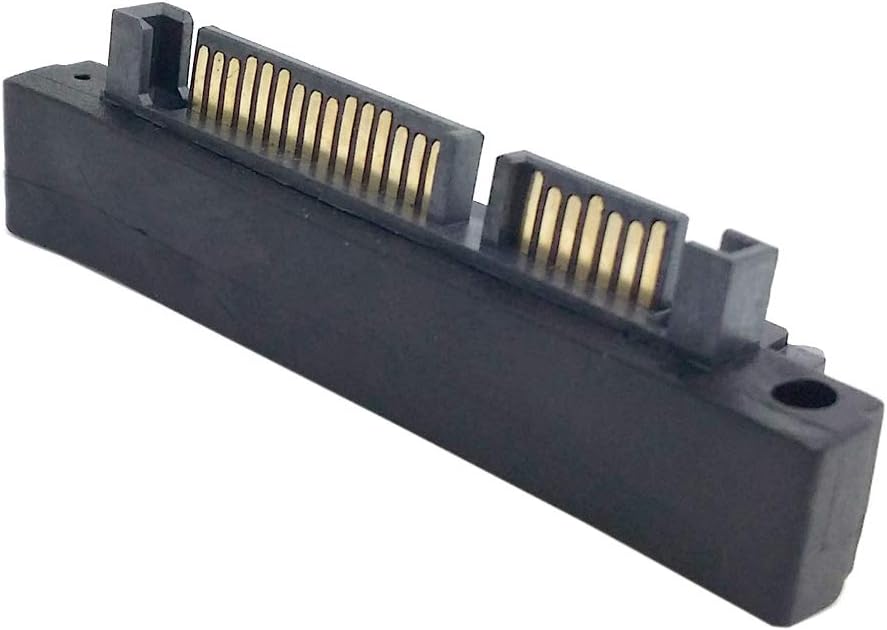


This adapter is designed to solve common installation issues where standard cables cannot fit due to chassis constraints. It holds a solid rating from users who appreciate its reliability and straightforward functionality in desktop environments.
We may earn a commission when you buy through this link, at no additional cost to you.
The up angle design specifically targets scenarios where the vertical SATA interface faces inward. This allows the cable to route horizontally away from the drive which improves airflow and reduces strain on the motherboard port.
While it works perfectly for data transfer it does not provide power to the drive. Users must ensure their power supply has a separate connector available for the storage device to operate correctly.
Ideal for builders who need to redirect cables without forcing them into tight spaces this adapter provides a practical solution for modern PC builds using SSDs and HDDs.
The angle change allows for cleaner wire paths inside the case which helps with airflow and overall aesthetics.
Meeting SATA III specifications ensures you get the full speed potential of your modern solid state drives.
We may earn a commission when you buy through this link, at no additional cost to you.
This option stands out for its dual female port design which can be useful in specific low profile scenarios. It is rated highly for helping users resolve space constraints without compromising on data speeds.
We may earn a commission when you buy through this link, at no additional cost to you.
The dual female configuration allows for specific routing setups where splitting or redirecting the connection is needed. This makes it a versatile tool for custom builds where standard ports are obstructed by other components.
Users should verify their case layout to ensure the angle matches their needs since it is designed for a specific direction. Ensuring compatibility with your motherboard and drive setup prevents installation issues.
Buyers looking for a budget friendly way to handle multiple drive connections will find this adapter a solid choice for maintaining speed and organization.
Having two female ports allows for unique routing strategies in complex drive setups.
The right angle design is specifically intended to solve tight space problems in computer cases.
We may earn a commission when you buy through this link, at no additional cost to you.
This adapter is one of the most affordable ways to change the connection direction of your hard drive. It supports both power and data transfer which simplifies the setup process significantly.
We may earn a commission when you buy through this link, at no additional cost to you.
The ability to transfer 5V and 12V power means you do not need an additional power splitter in some cases. This feature makes it convenient for users who want a cleaner look with fewer cables.
While the build quality is standard for the price range it performs reliably for normal desktop use. Just ensure you handle the plastic carefully to avoid stress on the connector during installation.
For those on a tight budget who still need a functional solution for limited space ports this is a practical and effective choice.
Combining power and data in one adapter reduces cable clutter and simplifies drive connections.
The low price point makes it an easy purchase for anyone needing a quick fix for cable routing.
We may earn a commission when you buy through this link, at no additional cost to you.
This adapter offers a down angled orientation which is useful when ports are located lower on the motherboard or drive. It supports the full 22 pin standard for data and power transfer.
We may earn a commission when you buy through this link, at no additional cost to you.
The down angle design specifically helps in cases where vertical clearance is limited above the drive. By pointing the cable downward it avoids interference with other components like graphics cards or large coolers.
Performance remains consistent with SATA standards ensuring that your drive runs at the expected speed. The connector is robust enough to handle daily use without signal loss.
Users with specific chassis layouts that require downward routing will find this adapter a necessary and reliable tool for their build.
The downward orientation helps avoid obstruction in cases with tight vertical clearance above the drive.
Using the standard 22 pin layout ensures compatibility with most modern SATA drives and power cables.
We may earn a commission when you buy through this link, at no additional cost to you.
This adapter provides a straightforward right angle connection solution for SATA drives. It is designed to extend the interface cleanly without adding unnecessary bulk or complexity to the setup.
We may earn a commission when you buy through this link, at no additional cost to you.
The black color finish helps it blend in with modern PC components making it less visible in custom builds. This attention to detail is appreciated by users who care about aesthetics.
Since it follows the standard 22 pin layout compatibility is ensured with most drives and power cables. It acts as a reliable bridge between the port and the device.
Buyers looking for a no fuss extension that maintains signal integrity without extra costs will find this adapter a suitable choice.
The black color helps the adapter blend seamlessly with other internal components for a cleaner look.
Extending the connection allows for better drive placement without compromising on data or power stability.
We may earn a commission when you buy through this link, at no additional cost to you.
This pack includes two adapters one up and one down which provides flexibility for different build scenarios. It is designed to help with limited height chassis where standard cables might not fit.
We may earn a commission when you buy through this link, at no additional cost to you.
Having both angles allows you to test which orientation works best for your specific motherboard and case layout. This flexibility reduces the need for multiple purchases or returns.
The adapters function as expected for changing the direction of the 7pin cable. They ensure a secure connection while maintaining standard data transmission speeds.
Users who want options without spending extra on separate units will appreciate the convenience of having both angles available in one package.
Having both up and down angles gives you the choice to route cables in either direction easily.
Specifically designed to solve limited height chassis problems by rerouting the cable connection efficiently.
We may earn a commission when you buy through this link, at no additional cost to you.
This adapter offers a down angled connection to simplify drive installation in tight cases. It handles both power and data transfer ensuring a clean and functional setup for storage devices.
We may earn a commission when you buy through this link, at no additional cost to you.
The angled connector allows you to plug into a port even when space around it is limited. This prevents cables from being forced into sharp bends that could cause damage over time.
It works with both 2.5 and 3.5 drives providing versatility for various storage needs. The build is consistent with other affordable options on the market.
For users seeking a straightforward way to manage cables in cramped spaces this adapter provides a reliable and affordable solution.
The downward direction helps clear space above the drive for better airflow and component clearance.
Transferring both power and data in one adapter simplifies wiring and reduces cable clutter.
We may earn a commission when you buy through this link, at no additional cost to you.
This adapter stands out for its high quality build including gold plated contacts that ensure reliable signal transmission. It maintains a perfect rating from users who prioritize durability.
We may earn a commission when you buy through this link, at no additional cost to you.
The support for 6Gb/s data transfer ensures that you get the full speed potential of your drives without bottlenecks. This is especially important for modern SSDs that rely on fast data access.
Materials are RoHS compliant which means they meet safety standards for environmental impact. The construction is robust enough to withstand regular handling and insertion.
Buyers who want a premium adapter that guarantees longevity and performance will find this option worth the extra cost.
Gold plating on contacts prevents corrosion and ensures stable signal transmission over long periods.
Supporting 6Gb/s ensures that your storage drives run at their maximum speed potential without delays.
We may earn a commission when you buy through this link, at no additional cost to you.
This set includes four adapters with two up and two down options making it ideal for complex builds. It provides a convenient bulk solution for users with multiple drive requirements.
We may earn a commission when you buy through this link, at no additional cost to you.
The compact design is perfect for tight spaces where standard cables would not fit. It supports both 3Gbps and 6Gbps speeds ensuring compatibility with various drive types.
Having multiple units allows you to replace any faulty ones quickly without needing to buy a new set. It is a practical choice for systems with several storage devices.
Users looking for a comprehensive kit to handle multiple connection angles will find this set a cost effective and versatile choice.
Getting four adapters at once saves money and ensures you have spares for future upgrades.
Supporting both 3Gbps and 6Gbps ensures compatibility with older and newer SATA drives.
We may earn a commission when you buy through this link, at no additional cost to you.
This adapter set includes two down angled units specifically designed for limited height chassis. It helps reroute the data cable horizontally to avoid obstruction within the case.
We may earn a commission when you buy through this link, at no additional cost to you.
The adapters function as reliable extensions for the motherboard port ensuring a secure connection. They are compatible with desktop SSDs and HDDs providing a practical solution for tight installs.
Users with vertical space constraints will appreciate the ability to orient the connector downward away from obstacles. It maintains standard data speeds for consistent performance.
Buyers needing a specific angle solution for a constrained case will find this set a convenient and affordable option.
The down angle specifically addresses tight vertical clearance by routing cables horizontally away from obstacles.
Extending the 7pin connection ensures you can reach ports that are otherwise hard to access in a build.
We may earn a commission when you buy through this link, at no additional cost to you.
Choosing the right adapter requires considering your case layout drive requirements and connection needs to ensure a stable and efficient setup.
The most critical factor is whether you need the cable to angle up or down. This depends on the location of your motherboard ports and available clearance around your drive. Measuring the space inside your case before buying prevents fit issues.
Always check the product image to confirm the angle direction matches your specific requirement.
Some adapters transfer data only while others include power pins. Knowing your drive's power source helps you decide which type you need. If your power supply has limited connectors a combined option might help reduce clutter.
Verify the product specs to ensure it supports both data and power if your system requires it.
Ensure the adapter supports SATA III speeds up to 6Gbps for modern drives. Older adapters might limit performance even if the drive is capable of faster speeds. Most products listed support this but checking is safer.
Select an adapter that explicitly states SATA III compliance for best performance.
Most adapters use a 22 pin standard which covers both data and power. Confirm that the pin layout matches your motherboard and drive connectors to avoid connection failures. Compatibility is usually standard but visual checks help.
Look for 22 pin or 7+15 pin configurations to match standard SATA devices.
The materials used in the adapter affect its durability and signal stability. Gold plated contacts are preferred for long term reliability. Plastic parts should be rigid enough to avoid breaking during insertion.
Prioritize models with gold plated contacts and robust construction.
Buying in packs can offer better value and spare units for future use. Some sets include both up and down angles which increases flexibility. Consider how many drives you need to connect before choosing.
Check if the package includes multiple units or both angles for versatility.
Not all adapters fit every case type especially low profile models. Ensure the connector will not interfere with other components like graphics cards. Measuring your internal space is essential for a proper fit.
Verify the adapter dimensions against your case specifications before purchasing.
Basic adapters are affordable but premium models offer better durability. Balance your budget with the need for long term reliability. Often a small investment in quality pays off in system stability.
Choose a model that offers the best balance of features and cost.
First ensure your computer is powered off and unplugged before starting. This prevents any electrical shorts or damage to components while you are working inside the case.
Next align the adapter with the motherboard port and the drive connector carefully. Apply gentle pressure until it clicks or sits snugly without forcing it to avoid bending pins.
After installation check that the adapter does not block other components or airflow. Secure cables to prevent strain on the connection and turn the system back on to test functionality.
Most modern adapters support SATA III speeds so you will not see a reduction. Only cheap non compliant models might limit performance. Look for products that explicitly state 6Gbps support to ensure full speed.
Most adapters work with standard SATA power cables but some are data only. Check if the adapter includes power pins if you plan to use a SATA power cable. If not use a separate power connector for the drive.
The difference is the direction the cable points from the connector. Up angled adapters point toward the top of the case and down angled point toward the bottom. Choose based on your available space and component layout.
No special screw is needed as the adapter connects to the motherboard port directly. It sits between the port and the drive cable without needing additional mounting hardware. Just ensure it is fully inserted for a secure connection.
Measure the space around your port and check how far the cable needs to bend. If the port is low a down angled adapter might work better. Visualizing the cable path helps you decide before purchasing.
No these adapters are for standard SATA drives only. M.2 NVMe drives use a different interface slot and do not require SATA cables. You would need specific M.2 brackets instead for those drives.
Yes you can use it with a SATA to USB adapter for external drives. It helps route the cable neatly inside the enclosure. Just ensure the connection points are accessible and aligned correctly.
Forcing cables too much can damage the insulation or internal wires. Using a 90 degree adapter reduces this risk by allowing a natural bend. Avoid sharp angles that stress the cable over time.
We reviewed ten top options offering various angles and features for different build needs. The CERRXIAN options stand out for their balance of quality and value for most users.
Prioritize adapters that match your case layout and support the correct speed for your drives. Building a stable connection ensures long term reliability for your storage setup.
Always check current availability and details before buying since product stock changes frequently. The right adapter will solve your space issues efficiently and keep your system running smoothly.