
PROZOR 192KHz DAC
4.4Editor score
Optical to RCA and 3.5mm output
Supports up to 192kHz 24bit
Aluminum alloy housing for shielding
No drivers needed for plug and play
This guide compares the top audio converters for Mac including DACs USB capture cards and adapters for hi-res playback analog capture and digital output.
Audio converters for Mac help you connect modern digital devices to analog speakers or capture legacy media like tapes and vinyl into crisp digital files for your library.
We compared ten real products based on build quality audio fidelity Mac compatibility and features like USB optical coaxial and XLR inputs for diverse audio workflows.
Each pick shows key specs pros and cons so you can choose the right converter for your setup while noting that prices change and models update over time.
4.4Editor score

4.6Editor score

4.5Editor score
The table below offers a side by side view of all ten products including their image links key features and direct purchase URLs to help you decide quickly.
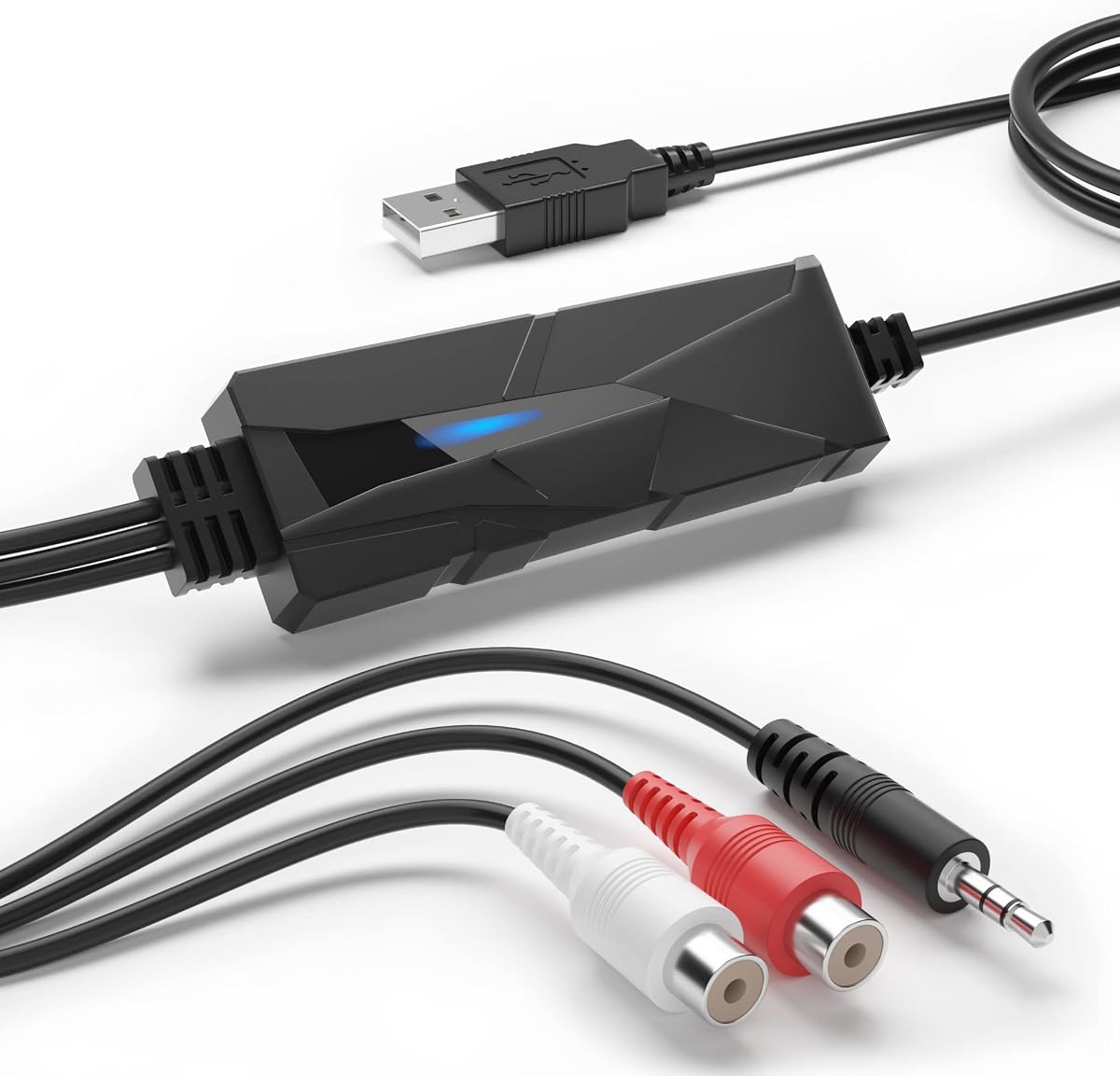


The DriverGenius AudioXfer is a specialized audio capture card that turns analog sources into digital files. It has a 4.2 rating and shines when you need to digitize old tapes or vinyl records.
We may earn a commission when you buy through this link, at no additional cost to you.
Its key strength is the dual 3.5mm and R L inputs that connect easily to boomboxes or stereo systems. The included Audacity software lets you record and edit your music immediately without extra apps.
The trade-off is that Mac users must ensure they run Audacity 2.3.1 or later and update the 64-bit Lame codec manually. This adds a small setup step but is manageable for most users.
Buy this if you want to save physical media forever. It is a reliable tool for collectors and families who want to share old songs digitally on modern Mac devices.
Convert cassette tapes LPs and FM radio into MP3 or WAV formats for cloud storage or mobile playback.
The LED light shows when recording is active so you never miss a moment during the transfer process.
We may earn a commission when you buy through this link, at no additional cost to you.
The Fosi Audio K5 Pro builds on the popular Q4 model by adding a microphone interface. It rates 4.3 and serves as an external sound card for Mac users who game or stream.
We may earn a commission when you buy through this link, at no additional cost to you.
Its standout features include the NE5532 op amp chip for clean audio and multiple inputs like USB Type C optical and coaxial. The volume and power button are combined for a sleek design.
A minor issue is that the power button requires a long press to switch on which might be slightly slower than a simple click. Also the mic input may need adjustment for clear calls.
Choose this if you want a versatile DAC that handles games and music well. It offers rich audio details and flexible connectivity for a Mac desktop setup.
Immerse yourself in games with low distortion and dynamic range that outperforms built-in Mac audio.
Connect phones or Mac via USB Type C and output to powered speakers using RCA or 3.5mm AUX.
We may earn a commission when you buy through this link, at no additional cost to you.
The PROZOR 192KHz DAC is a budget-friendly choice that delivers high-resolution audio up to 192kHz and 24bit. It earns a 4.4 rating and works well with Apple TV or Mac setups.
We may earn a commission when you buy through this link, at no additional cost to you.
Its key strengths include dual optical and coaxial inputs plus RCA and 3.5mm outputs. The aluminum housing provides better shielding and heat dissipation than standard plastic DACs.
Users must remember to set their TV or Mac to PCM output and use a specific 5V 1A adapter. This ensures clean signal and avoids electrical noise that could degrade sound quality.
Buy this if you need a simple DAC to connect your Mac to stereo receivers. It offers reliable performance and durable build quality at an affordable price point.
Enjoy lossless PCM and LPCM audio from your Mac or Apple TV with minimal distortion and clear clarity.
Plug the optical cable directly into your Apple TV and connect to your receiver or speakers instantly.
We may earn a commission when you buy through this link, at no additional cost to you.
The Douk Audio U2PRO is a USB to optical adapter that turns your Mac or PC into a clean digital signal source. It has a 4.1 rating and is built for audiophiles who need jitter-free audio.
We may earn a commission when you buy through this link, at no additional cost to you.
Its standout features include the XMOS XU316 chip that handles PCM up to 768kHz and DSD512. The UAC mode switch allows you to switch between plug and play and high-resolution audio.
One trade-off is that you need classic DACs or receivers without USB inputs to benefit from its optical outputs. Without these devices you cannot fully use its potential for signal routing.
Choose this if you have an external DAC that lacks USB input. It provides a stable lossless digital link from your Mac to high-end audio gear for critical listening.
The reclocker design reduces jitter and ensures your DAC receives a stable clock for clearer sound.
Expand the design with crystal oscillators to reduce jitter further and boost system synergy.
We may earn a commission when you buy through this link, at no additional cost to you.
The SMSL SU-1 is a specialized decoder that unlocks MQA and MQA CD playback. It has a 4.2 rating and appeals to fans of Tidal or MQA CD who want studio-quality restoration.
We may earn a commission when you buy through this link, at no additional cost to you.
Its key strength is the AK4493S DAC chip that delivers distortion lower than 0.00013%. This ensures you hear every nuance of the authenticated high-resolution signal from your Mac.
The trade-off is that Windows users must install drivers while Mac users enjoy native support. If you only use standard PCM files you may not need the advanced MQA capabilities.
Buy this if you want to preserve high-resolution audio from MQA sources. It is a powerful tool for critical listeners who demand accurate sound reproduction.
Restore the original studio signal from your CD player using the authentication signature of MQA decoder.
Works with macOS 10.6+ Linux and Android so you can use it across multiple device ecosystems.
We may earn a commission when you buy through this link, at no additional cost to you.
The SMSL PO100 PRO is a tiny USB interface that supports high-resolution audio up to 32bit and 768kHz. It rates 4.6 and is ideal for Mac users who travel or need a compact DAC.
We may earn a commission when you buy through this link, at no additional cost to you.
Its standout features include DOP64 support for PS5 and MQA decoding without extra software. The UAC and I2S mode switches give you flexibility to connect to various digital audio gear.
You should note that for optimal MQA playback the Mac volume must be set to maximum. This ensures the best audio output without clipping or signal loss during playback.
Choose this if you want a portable solution for your Mac and gaming console. It delivers rich audio in a small package that fits in your backpack easily.
Connect your PS5 via optical and enjoy DOP64 playback with a DAC that supports DOP64 standards.
Play MQA tracks directly from your Mac without needing additional ASIO or WASAPI setup steps.
We may earn a commission when you buy through this link, at no additional cost to you.
The Sound Blaster Play! 3 is a compact USB adapter that works right out of the box. It has a 4.5 rating and is perfect for Mac users who need a reliable headphone jack.
We may earn a commission when you buy through this link, at no additional cost to you.
Its key strengths include support for split stereo mic connectors and optimized profiles for many earphone brands. The downloadable software lets you tweak audio enhancements if you want more control.
A trade-off is that it relies on downloadable software for advanced settings. If you prefer pure plug and play you might find the extra step unnecessary for daily use.
Buy this if you need a simple solution for headphones and mics. It offers good sound quality and broad compatibility with many headset types on Mac.
Connect headsets with separate mic and audio jacks without needing a Y-splitter cable.
Download control panel software to apply optimized audio profiles for specific earphone brands.
We may earn a commission when you buy through this link, at no additional cost to you.
The iFi Audio Go Link Max is a USB-C dongle that delivers high-resolution audio with balanced output. It has a 4.5 rating and is great for Mac users who want powerful sound in a small device.
We may earn a commission when you buy through this link, at no additional cost to you.
Its key features include dual ESS Sabre DAC chips and support for 384kHz and DSD256. The gold-plated USB-C connector and headphone sockets ensure stable connections over time.
A minor issue is that the flexible cable can stress USB sockets if not handled carefully. Also gold plating might show wear if you carry it in a rough bag.
Choose this if you want premium sound for your Mac on the go. It offers dynamic range enhancement and balanced outputs for critical listening anywhere.
Get up to 241mW power with balanced output for driving sensitive high-impedance headphones easily.
Silver-plated copper conductors reduce interference and keep your music clear and pure.
We may earn a commission when you buy through this link, at no additional cost to you.
The Fosi Audio Q6 is a compact desktop DAC that supports high-resolution audio up to 32bit and 768kHz. It has a 4.6 rating and is perfect for connecting your Mac to home stereo amplifiers.
We may earn a commission when you buy through this link, at no additional cost to you.
Its key strengths include the AKM AK4493S DAC and OPA1612 op-amp for low noise sound. The aluminum build ensures durability and it handles digital inputs and outputs well.
You should know it cannot drive headphones or passive speakers directly. This means you need an external amplifier to use it effectively with your home stereo system.
Buy this if you want clean signal conversion for your Mac. It offers high fidelity sound and seamless connectivity to receivers and powered speakers in any room.
Enjoy crystal-clear audio with maximum sampling rates of PCM 32bit and DSD512.
Connect Optical Coaxial and USB-C to your Mac or TV and output to RCA or Sub Out.
We may earn a commission when you buy through this link, at no additional cost to you.
The Shure MVX2U Gen 2 is a professional audio interface that converts XLR microphones to USB-C. It has a 4.5 rating and is ideal for Mac users who want to podcast or stream.
We may earn a commission when you buy through this link, at no additional cost to you.
Its key strengths include onboard DSP that adds zero-latency effects like denoiser and auto level mode. This ensures your voice sounds consistent and clear during any recording session.
The trade-off is the higher price compared to standard DACs and it only works with XLR mics. If you only use USB or 3.5mm mics this interface may not suit your needs.
Choose this if you need professional audio quality on your Mac. It offers clean gain and app control so you can produce high-quality streams or podcasts easily.
Get real-time audio enhancements like denoiser and popper stopper without using CPU resources.
Use MOTIV Mix Audio and Video apps to manage settings and customize sound from your phone.
We may earn a commission when you buy through this link, at no additional cost to you.
Selecting the right audio converter depends on your input sources desired outputs and whether you need analog capture or digital playback on your Mac.
Check if the converter supports your source device like optical coaxial USB or XLR. Mac users often need USB-C or optical inputs since many devices lack analog jacks. Ensure the input matches your Mac or external gear.
Always verify input types match your setup to avoid extra adapters.
Decide if you need RCA 3.5mm 4.4mm or XLR outputs. For home stereo choose RCA outputs while for headphones prefer 3.5mm or balanced 4.4mm. Some DACs include sub outs for low frequency support.
Choose outputs that match your speakers or headphones to keep the signal path simple.
Higher sample rates like 384kHz or 768kHz and bit depths up to 32bit support hi-res audio. Look for models that support your streaming service like MQA or DSD512. Standard 16bit 44kHz is fine for most casual listening.
Prioritize high sample rates only if you own hi-res files or streaming subscriptions.
Mac users prefer plug and play devices that need no drivers. Some converters require specific drivers for Windows but work natively on macOS. Check product details to confirm macOS support before buying.
Select plug and play models to avoid installation issues and ensure smooth startup.
Aluminum alloy housings provide better shielding and heat dissipation than plastic. Look for gold-plated connectors to prevent corrosion. Solid build ensures longevity especially in setups with many devices.
Metal enclosures reduce noise and improve reliability for daily use.
Some interfaces include onboard DSP for effects and app control. Features like auto level or dynamic range enhance audio without extra software. These help podcasters and streamers get better results quickly.
Use DSP features to streamline your workflow if you record or stream often.
Ensure the converter has the right power needs. Some need external adapters while others are USB powered. Check if your Mac or hub supplies enough power to avoid signal loss or audio issues.
Verify power requirements to avoid signal instability or device failure during use.
Set a budget based on your needs. Budget DACs under fifty dollars work well for basic use while premium models offer advanced features like MQA decoding. Balance price with required specs to get value.
Choose a model that fits your budget without compromising essential features.
Connect your Mac to the converter using the right cable like USB-C or optical. Ensure both devices are powered and the converter indicator lights are on. Use the provided cable for best signal and avoid damaged wires.
Set your Mac audio output to the connected device in System Settings. For optical or USB audio select the output name listed in sound preferences. Check that sample rates match the converter capabilities for best quality.
Keep the converter in a clean dry place away from heat. Avoid bending cables tightly and use gold-plated connectors to prevent corrosion. Clean ports gently with a dry cloth to remove dust and ensure stable connection.
Most modern USB or optical converters are plug and play on macOS. Check product details to confirm macOS support. Some older or specialized devices may need drivers for full functionality on your Mac.
Yes you can use a USB-C to optical adapter to connect optical converters. This allows your Mac to output digital audio to DACs or receivers that need optical inputs.
MQA decoding restores high-resolution audio from streaming services or CDs. It matters if you want to hear the studio quality version of your tracks. DACs that support MQA can decode this for better sound.
Most USB powered DACs are safe. Ensure your Mac or USB hub can supply enough power. Using a powered hub or proper USB-C cable prevents signal issues and ensures stable audio.
Analog converters digitize old tapes or vinyl. Digital converters output high-quality audio from your Mac to speakers. Choose analog for archiving old media and digital for modern playback.
Some DACs need more power than USB ports supply for clean sound. External adapters reduce noise and ensure stable performance. Check specs to see if your converter needs one.
Some models like capture cards allow recording. For professional recording use an interface with XLR inputs. Many DACs are for playback only but check specs to confirm recording support.
Use high-quality cables and ensure your Mac is set to the right output format. Avoid mixing analog and digital inputs improperly. Try a different adapter or check power to reduce noise.
You can choose from capture cards DACs and interfaces depending on your needs. Top picks include the PROZOR 192KHz DAC for budget and the Fosi Audio Q6 for high-resolution playback.
Prioritize input output compatibility and sample rates for your use case. Plug and play support and build quality also matter for daily use. Match the device to your source and speakers for best results.
Prices change so verify current deals and model details before buying. Check if your Mac version matches driver or app requirements. A good converter makes your Mac audio system versatile and clear.