
Creality Ender 3 V3 SE
3.8Editor score
CR Touch auto leveling
Sprite direct extruder
Dual Z-axis lead
Quick 3-step assembly
This guide compares the top auto bed leveling 3D printers for beginners, evaluating speed, reliability, features, and ease of use to help you choose the right
Starting your 3D printing journey can be daunting, but the right machine makes all the difference. Auto bed leveling technology removes the guesswork from calibration, ensuring your first layer sticks perfectly every time. This feature is essential for newcomers who want reliable results without spending hours tuning manual screws.
We have carefully selected ten leading models that excel in automation and user friendliness. Our analysis focuses on build quality, printing speed, sensor accuracy, and overall value. Each printer on this list offers distinct advantages, from rapid CoreXY motion systems to robust metal frames designed for long-term stability.
Every pick below highlights specific strengths and potential trade-offs to guide your decision. We include detailed reviews, comparison tables, and expert advice on maintenance and filament choices. Remember that prices and availability fluctuate frequently, so always check the latest listings before making your final purchase.
3.8Editor score

4.3Editor score

4.3Editor score
This side-by-side comparison highlights key specifications across all ten models. You will see variations in print volume, speed capabilities, and build materials. Use this table to quickly identify which machine aligns best with your specific project needs and budget constraints.


The FLASHFORGE Adventurer 5M stands out as a top choice for beginners seeking speed and simplicity. With a rating of 4.3 stars, users appreciate its ability to produce high-quality prints right out of the box. The standout quality is its fully automatic one-click leveling system, which removes the biggest pain point for new users.
We may earn a commission when you buy through this link, at no additional cost to you.
This printer leverages a CoreXY motion system capable of reaching speeds up to 600mm/s. This acceleration ensures that prints are completed quickly without sacrificing detail. The direct extruder supports a wide range of filaments including PLA, PETG, and TPU. Vibration compensation technology further enhances surface quality by reducing ghosting artifacts.
While the open frame design allows for excellent ventilation, it may not be suitable for all materials like ABS without modification. Additionally, the high speed can generate noise during operation, though this is a minor trade-off for the efficiency gained. The lack of a heated chamber limits some engineering material options.
If you prioritize fast turnaround times and ease of setup, this model is highly recommended. It is perfect for hobbyists and small businesses needing reliable prototypes quickly. The robust design and intuitive interface make it a confident choice for anyone entering the world of 3D printing.
The combination of high speed and precise auto leveling ensures you spend less time waiting and more time creating.
Quick detachable components allow for easy nozzle swaps and filament changes without requiring tools or expertise.
We may earn a commission when you buy through this link, at no additional cost to you.
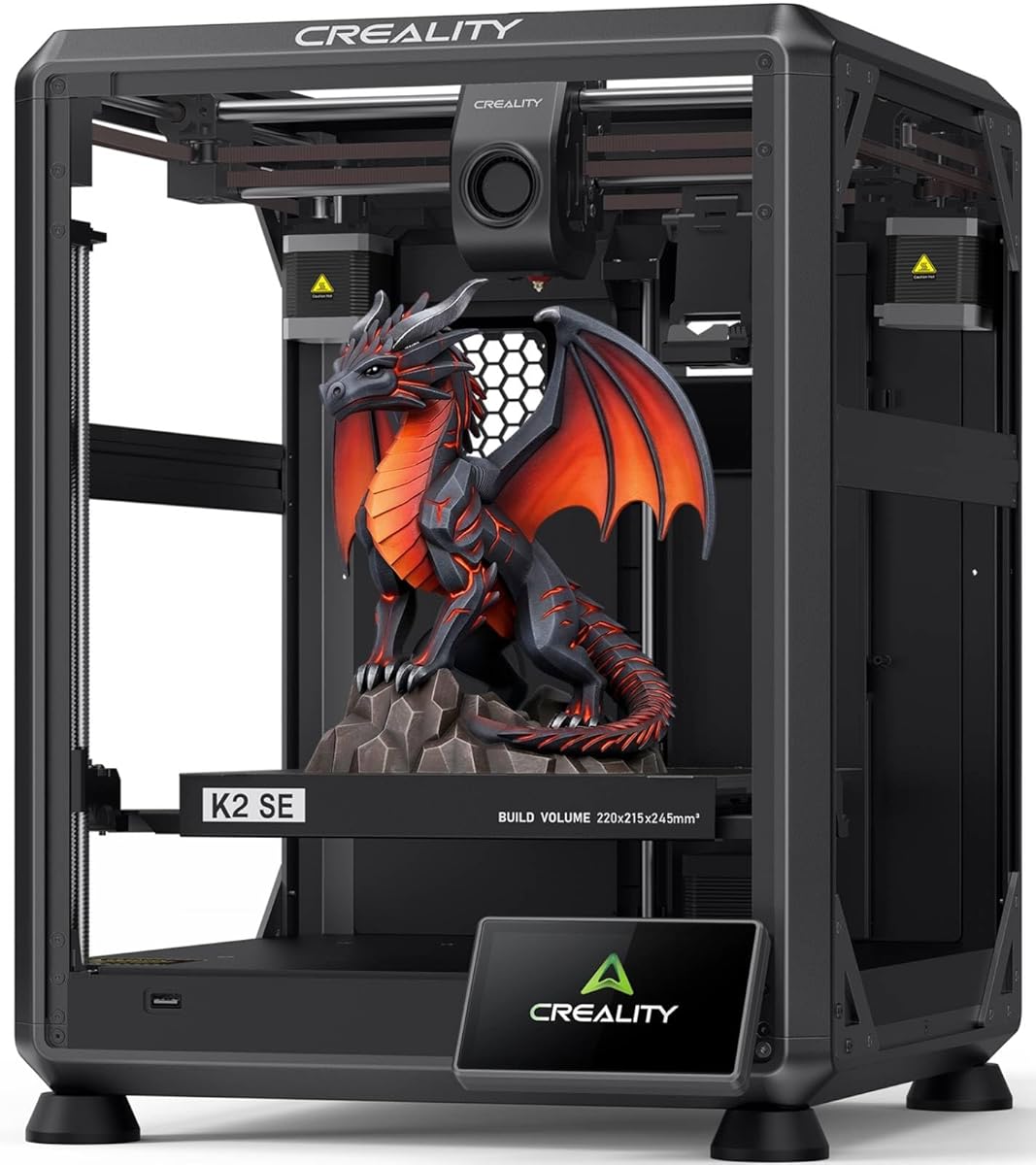
The Creality K2 SE offers a robust upgrade path for those looking beyond entry-level machines. Its solid metal build provides the rigidity needed for high-speed printing up to 500mm/s. Users report improved stability and dimensional accuracy compared to older belt-driven models.
We may earn a commission when you buy through this link, at no additional cost to you.
Key strengths include the direct drive extruder which handles flexible filaments well. The input shaping algorithm actively reduces ringing, resulting in sharper details. Future compatibility with the CFS multicolor system adds significant value for expanding your creative capabilities without buying a new printer.
However, the assembly process is more involved than plug-and-play options. Some users note initial software calibration issues that require patience to resolve. These hurdles are acceptable given the machine long-term potential and high-performance capabilities for detailed engineering projects.
This printer is ideal for users ready to tackle larger and more complex models. If you value build quality and plan to scale up later, the K2 SE is a strong investment. It balances performance and expandability effectively for intermediate users.
Compatibility with multicolor systems ensures your printer grows with your skills and project requirements over time.
The die-cast aluminum frame minimizes vibration, maintaining precision even at accelerated printing speeds.
We may earn a commission when you buy through this link, at no additional cost to you.
While not a printer itself, the E-Leveler 2 is a vital tool for beginners with manual leveling systems. Rated 4.3 stars, it simplifies the bed leveling process with clear LED indicators. This tool helps ensure perfect first layers on older printers that lack built-in automation.
We may earn a commission when you buy through this link, at no additional cost to you.
The design features visual feedback that guides users through nozzle-to-bed distance adjustments. It fits most manual printers and uses a battery-powered system for portability. This eliminates the need for paper methods, reducing human error significantly during setup.
The limitation is that it requires physical interaction and does not automate the process fully. However, for those on a budget or upgrading existing hardware, it is an excellent solution. It represents a cost-effective way to achieve professional results.
Recommend this tool for anyone using older 3D printers who wants improved consistency. It is easy to use and provides immediate feedback. Adding this to your workflow can significantly boost your success rate on every print.
Transform your current printer into a precision tool without buying a new machine with expensive sensors.
Clear LED lights make the technical process of leveling intuitive for those just starting out.
We may earn a commission when you buy through this link, at no additional cost to you.
The AD5M brings professional-grade features to the beginner market. Its fully automatic one-click leveling system is accurate and consistent. With a 4.3-star rating, it delivers reliable prints that meet high standards. The all-metal CoreXY structure ensures smooth movement and minimal vibration.
We may earn a commission when you buy through this link, at no additional cost to you.
One key feature is the quick-swap nozzle system allowing tool-free changes in seconds. This supports rapid transitions between different materials and nozzle sizes. The printer handles a wide variety of filaments from standard PLA to engineering-grade composites.
The main trade-off is a slightly steeper learning curve compared to ultra-basic models. Some users find the initial setup requires attention to detail. However, these investments pay off in long-term reliability and print quality.
For those wanting a balance of speed and precision, this is an excellent choice. It is well-suited for makers who need consistent results for functional parts. The build quality justifies the investment for serious hobbyists.
Tool-free nozzle swaps save time and reduce frustration when switching between different filament types.
All-metal components ensure the machine remains stable even during high-speed printing operations.
We may earn a commission when you buy through this link, at no additional cost to you.
The QIDI Q2 redefines what beginners can achieve with premium features. It includes a heated chamber reaching 65°C, ideal for materials like ABS. The nozzle can handle up to 370°C unlocking high-performance filaments. This model bridges the gap between hobby and industrial printing.
We may earn a commission when you buy through this link, at no additional cost to you.
Users appreciate the auto-leveling nozzle sensor that ensures perfect first layers every time. The triple filtration system improves air quality making indoor use safe. These features combined with robust reliability make it a top-tier choice for demanding users.
The price point is higher than standard models, and the enclosed chamber requires more space. These are acceptable trade-offs for the ability to print with high-performance plastics. The investment ensures you can tackle engineering-grade projects confidently.
Choose this printer if you need to print durable functional parts. It is perfect for prototyping engineers and advanced hobbyists. The combination of speed, heat, and safety features makes it a standout option in the market.
Access to high-temperature filaments opens new possibilities for strong and durable functional prints.
Advanced filtration reduces odors and particulates ensuring a healthier environment during printing.
We may earn a commission when you buy through this link, at no additional cost to you.
The 5M Pro focuses on user experience with quiet operation below 50dB. This makes it ideal for home offices or shared spaces. With full-auto calibration, setup is straightforward and error-free. It maintains the speed of the AD5M series with added noise reduction.
We may earn a commission when you buy through this link, at no additional cost to you.
The dual filtration system ensures clean air during printing which is a major plus for safety. Users can print TPU and ABS without worrying about fumes. The included nozzle bundle provides immediate versatility for different project requirements.
Chamber space is somewhat restricted compared to open-frame models. The cooling system adds complexity that might require periodic cleaning. However, these factors are balanced by the overall convenience and safety features provided.
This is the best choice for families or quiet environments. It combines high speed with a comfortable user experience. The reliable auto leveling ensures you can focus on creativity rather than technical fixes.
Low noise levels allow for printing at any time without disturbing household members or colleagues.
HEPA filtration filters particulates to maintain a healthy environment during printing sessions.
We may earn a commission when you buy through this link, at no additional cost to you.
The Ender 3 V3 SE offers exceptional value for beginners. Its CR Touch auto leveling system simplifies calibration significantly. Users rate it highly for ease of setup requiring only three steps. The Sprite direct extruder ensures smooth filament feeding for various materials.
We may earn a commission when you buy through this link, at no additional cost to you.
Speed is a moderate 250mm/s which is sufficient for most hobby projects. The dual Z-axis lead screws enhance stability during taller prints. This model retains the popularity of the Ender series while adding modern conveniences like auto-loading.
It lacks the high speed of premium models and the enclosure of others. For budget-conscious buyers, this is a reasonable trade-off. It delivers consistent results without breaking the bank making it accessible to everyone.
Recommend this printer for students or new makers on a tight budget. It provides all the essentials needed to start printing successfully. The robust community support ensures help is always available for any issues.
You get critical automation features like auto leveling at a price point that few competitors match.
The proven Sprite extruder and dual Z-axis offer a solid platform for learning and growing.
We may earn a commission when you buy through this link, at no additional cost to you.
For existing owners of compatible printers, this kit is an essential upgrade. Rated 4.4 stars, it adds auto leveling to older models efficiently. The multi-point detection builds a virtual plane for precise compensation across the bed.
We may earn a commission when you buy through this link, at no additional cost to you.
Installation requires firmware flashing which might be tricky for some users. However, once installed, it provides reliable and accurate leveling for all prints. This transforms a manual printer into a more automated and user-friendly machine.
The limitation is strict motherboard compatibility requiring verification before purchase. It does not work with non-Creality brands. Despite this, it remains the best value for upgrading existing hardware without replacing the whole printer.
This is perfect for users looking to modernize their current setup cheaply. It extends the life of older printers significantly. If you already own an Ender model, this is the best way to improve calibration.
Upgrade your existing hardware to modern standards without investing in a completely new machine.
Multi-point detection ensures the entire build plate is level not just the center point.
We may earn a commission when you buy through this link, at no additional cost to you.
The AD5X stands out for its ability to print in four colors simultaneously. This feature unlocks new creative possibilities for designers. Fully auto leveling ensures quality is maintained even with complex multi-material prints. Speed reaches 600mm/s matching other top models.
We may earn a commission when you buy through this link, at no additional cost to you.
The Intelligent Filament System automates refills reducing interruptions during long prints. This makes it highly efficient for users with multiple spools. The CoreXY structure ensures stability across the full build volume of 220x220x220mm.
Multicolor printing adds complexity to maintenance and filament loading. The initial setup requires careful calibration for optimal results. However, for creative users needing vibrancy, these efforts are well worth the investment.
Choose this if you want to add color to your prints effortlessly. It is great for artistic models and prototypes needing visual distinction. The combination of speed and automation makes it a powerful creative tool.
Multi-color capabilities allow you to create detailed models without post-print painting.
Automatic filament detection keeps your projects running smoothly without manual spool changes.
We may earn a commission when you buy through this link, at no additional cost to you.
This variant emphasizes beginner friendliness with a fast assembly process. Auto leveling simplifies the start-up experience significantly. Rated 4.1 stars, it provides a reliable platform for new users. The silent mainboard ensures comfortable operation in shared spaces.
We may earn a commission when you buy through this link, at no additional cost to you.
The flexible build plate makes removing prints easy without tools. Auto Z-offset calibration ensures the first layer sticks correctly. These small details add up to a smoother user experience for those new to the technology.
It may lack some advanced features found in high-end models but delivers solid value. Setup time is minimal making it perfect for those wanting immediate results. The quiet operation is a bonus for home environments.
Ideal for first-time buyers looking for simplicity and reliability. It removes the common pain points of calibration and noise. If you want to start printing today with minimal fuss, this is a great choice.
With minimal setup required you can be printing your first model within hours of unboxing.
Silent operation ensures the machine can run overnight without disturbing anyone.
We may earn a commission when you buy through this link, at no additional cost to you.
Selecting the right printer involves understanding key features that impact ease of use and print quality. This section breaks down the factors you should consider before buying.
Look for sensors like CR Touch or PINDA that measure bed height automatically. This ensures consistent first layers without manual adjustments.
Prioritize printers with proven auto leveling over manual tools to save time and reduce frustration.
Faster speeds allow for quicker project completion. Modern printers range from 200mm/s to 600mm/s depending on technology.
Choose a speed that balances quality with your workflow needs for efficient production.
Measure the size of your projects to ensure the printer can handle them. Standard sizes usually start at 220x220x220mm.
If you need larger parts, opt for a machine with expanded XYZ dimensions.
Open source firmware like Klipper offers advanced features. Proprietary software may be easier for beginners but limits customization.
Decide if you need advanced tuning or prefer plug-and-play simplicity.
Direct drive extruders handle flexible materials like TPU better. Bowden setups are lighter but may struggle with bends.
Direct drive is generally better for beginners wanting material versatility.
Check the maximum nozzle temperature to support various filaments. Standard printers handle PLA while advanced ones support PETG and ABS.
Ensure the machine supports the materials you plan to use.
A strong community and warranty offer peace of mind for repairs. Brands with large user bases provide more online resources.
Check manufacturer policies before buying to ensure help is available.
Silent mainboards make printing more pleasant in shared spaces. Noise levels can vary significantly between models.
Opt for quiet operation if you plan to print at night or work nearby.
Start by assembling the printer according to the manual. Ensure all screws are tight to prevent misalignment during operation.
Use the auto leveling function before every few prints to maintain accuracy. This prevents layer shifting and adhesion issues.
Regularly clean the build plate with isopropyl alcohol to remove oils. This ensures consistent adhesion for all filament types.
Most modern auto leveling systems handle the majority of the process automatically. However, you may need to set the initial Z-offset manually once. This step ensures the nozzle is at the perfect height for the first layer.
If the sensor fails, you can use a piece of paper to level the bed manually. Always check the sensor connection and replace it if needed. Most printers allow disabling auto leveling temporarily.
Yes, upgrade kits like the CR Touch can be added to many older printers. This requires installing the sensor and flashing new firmware. It is a cost-effective way to modernize existing hardware.
Auto leveling is compatible with standard filaments like PLA and PETG. Specialized filaments may require specific offset adjustments. The system measures the bed surface regardless of filament type.
It is recommended to run auto leveling after moving the printer or every few prints. Frequent use ensures accuracy since bed temperature changes over time. Consistent calibration prevents print failures.
Auto leveling maps the bed surface to adjust height during printing. Auto Z-offset sets the initial nozzle height relative to the bed. Both are essential for perfect first layers and reliable results.
We reviewed ten printers offering various speeds and automation levels for different needs. From the Flashforge 5M to the budget Ender 3, there is a fit for everyone.
Prioritize build quality and auto leveling accuracy to ensure long-term success. Your printer is an investment in creativity and precision projects.
Always verify current prices and availability on Amazon before purchasing. The market changes frequently so checking today's deals saves you money.