
TONGVEO 4K NDI PTZ Camera
4.6Editor score
Official NDI Integration
20X Optical Zoom
SDI and PoE Support
Discover the top 10 auto tracking conference cameras for 2026, comparing AI features, zoom, and audio for professional meetings and streaming.
Modern hybrid work demands seamless communication tools that keep every participant engaged. An auto tracking conference camera automatically follows speakers, ensuring remote attendees never miss a gesture or expression. This technology transforms static video calls into dynamic interactions, making meetings feel more natural and inclusive for teams spread across different locations globally.
We analyzed ten leading systems rated highly by professionals for reliability and performance. Each model was evaluated on AI tracking precision, video clarity, audio quality, and ease of setup. Our selection includes versatile options for small huddle rooms, large boardrooms, and religious services, ensuring you find a solution that fits your specific environment and budget needs effectively.
Every review highlights real-world performance, key features, and potential limitations to help you decide. We focus on what matters most for your meetings, from zoom capabilities to microphone range. Please note that availability and pricing fluctuate frequently, so checking current stock and offers directly on the retailer site ensures you get the best deal for your setup today.
4.6Editor score

4.8Editor score

4.1Editor score
This side by side comparison evaluates all ten selected cameras on critical specifications to help you choose the right tool for your meeting space and streaming needs.




This system stands out as the top choice for small to medium meeting rooms. It delivers professional 4K video clarity and reliable AI tracking to keep speakers centered automatically. The kit includes a separate wireless speakerphone, ensuring both video and audio are handled seamlessly without extra adapters or complex cabling.
We may earn a commission when you buy through this link, at no additional cost to you.
The 4K CMOS sensor captures sharp details even in lower light, while the 3x optical zoom brings distant subjects closer without quality loss. Its AI algorithm tracks both faces and body movements, preventing awkward framing shifts when participants stand up. The speakerphone picks up voices clearly up to 5 meters away.
While the camera needs a USB cable for control and video, the included HDMI port allows direct TV connection for uncompressed video. Setup is plug-and-play, but you should ensure your computer supports 4K input. The lack of a physical lens cover is a minor drawback for shared spaces.
Buy this if you need a complete, reliable solution for conferencing or streaming. It balances high-end features with ease of use, making it ideal for businesses, churches, or schools looking to upgrade their meeting experience significantly.
The manufacturer provides three years of support and lifetime technical help, which adds value to your investment. This combination of 4K quality and automated tracking ensures everyone stays focused on the meeting content rather than technical adjustments.
The 4K resolution ensures every gesture and document detail is visible to remote attendees.
The included speakerphone eliminates the need for a separate audio system setup.
We may earn a commission when you buy through this link, at no additional cost to you.
This webcam offers an accessible entry point into auto tracking technology for small offices. It is designed specifically for small conference rooms and features AI auto framing to keep all attendees in view. The included privacy cover provides security in shared environments, and the Zoom certification guarantees smooth performance on that platform.
We may earn a commission when you buy through this link, at no additional cost to you.
The 120 degree wide angle lens captures the entire table without needing a mount. Dual AI noise-canceling microphones reduce background noise, ensuring clear voices during calls. Setup requires no IT intervention, just a USB connection to start meetings instantly on Zoom, Teams, or Webex.
Tracking is functional but less granular than higher-end models, focusing on framing the group rather than individual movement. While it lacks optical zoom, the wide angle covers most needs for small groups. It is an excellent choice for budget-conscious teams needing reliable daily video calls.
Invest in this for small team huddles or home offices where cost efficiency matters. The privacy cover adds a layer of security often missing in budget webcams, making it practical for open-plan offices.
Physical privacy cover and USB setup simplify usage for non-tech staff.
120 degree view ensures everyone fits in the frame without adjustment.
We may earn a commission when you buy through this link, at no additional cost to you.
This system prioritizes smooth motion with 60fps full HD video, ideal for active presentations. The PTZ camera tracks speakers precisely, while the Bluetooth speakerphone offers flexible connectivity. It is suitable for small-to-medium rooms where fluid video quality matters more than raw resolution.
We may earn a commission when you buy through this link, at no additional cost to you.
The 60fps frame rate reduces blur during quick movements, ensuring clearer visuals. AI tracking locks onto faces and bodies with high precision. The speakerphone uses four microphones for clear audio up to 16.4 feet away. Setup is plug-and-play via USB, HDMI.
While 1080P is lower than 4K, the higher frame rate delivers a more natural viewing experience. The speakerphone relies on a battery that lasts 6-8 hours. This system is best for teams needing fluid visuals for training or interactive sessions.
60fps capture rate ensures smooth visuals for presentations and movement.
Bluetooth and USB options allow easy connection to various devices.
We may earn a commission when you buy through this link, at no additional cost to you.
This unique system adds gesture control, letting you start tracking with hand signals. It includes a remote for presets and supports 4K output. The kit combines camera and speakerphone, offering comprehensive video conferencing capabilities for interactive meetings.
We may earn a commission when you buy through this link, at no additional cost to you.
Six gesture controls allow you to toggle tracking and zoom without touching the device. The remote offers 10 preset positions for quick recalls. Full duplex audio ensures natural conversation flow. Setup is straightforward via USB.
While digital zoom lacks optical clarity, the gesture controls add a fun and useful layer for presentations. Ideal for educators or hosts who need hands-free control during busy sessions.
Gesture commands enable hands-free tracking and zoom adjustments.
Remote presets save time for recurring meeting layouts.
We may earn a commission when you buy through this link, at no additional cost to you.
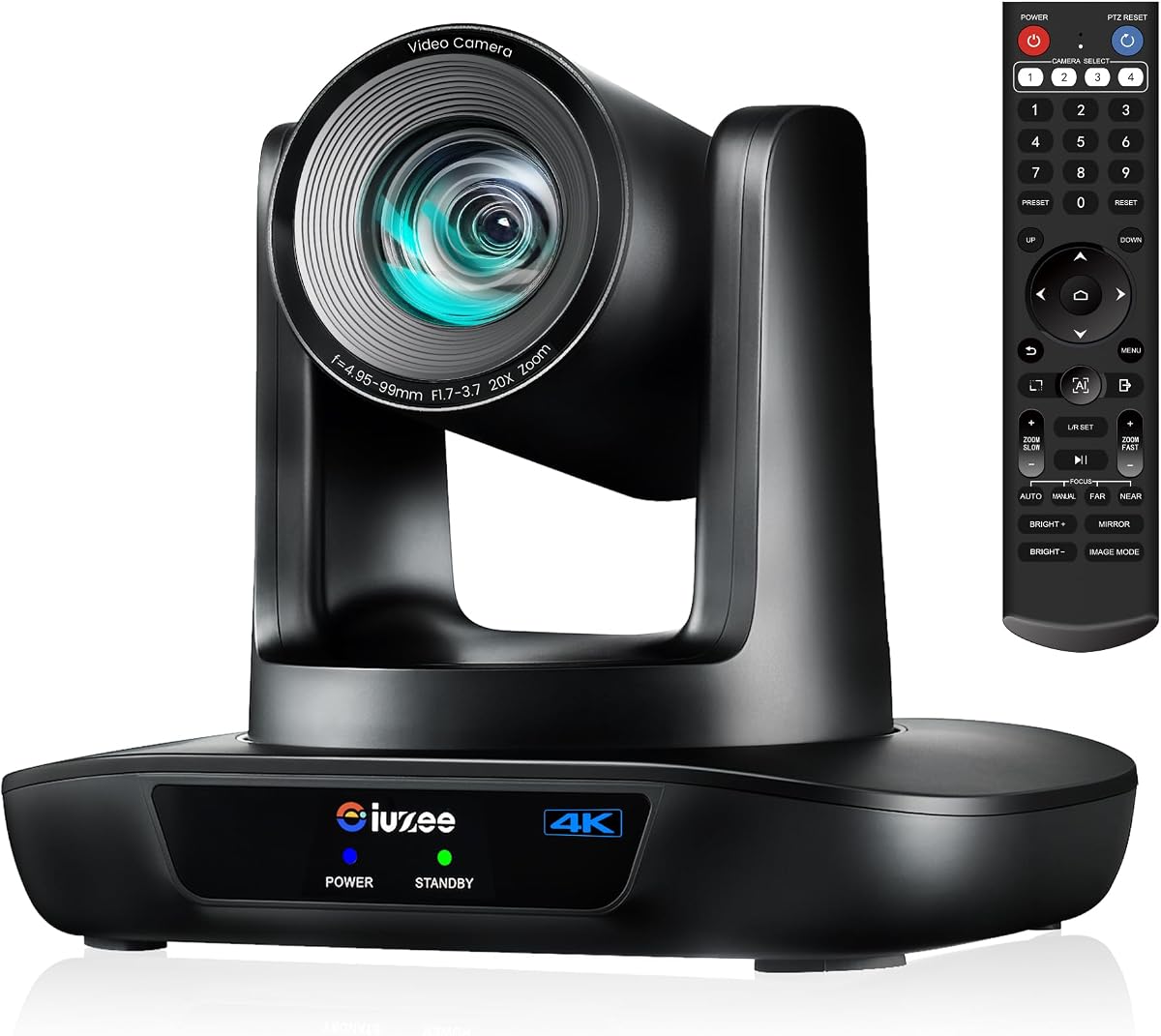
Designed for broadcast and streaming, this camera offers NDI and SDI outputs for professional workflows. It delivers true 4K via HDMI and 20x optical zoom. Ideal for churches or events needing long cable runs and multi-camera setups.
We may earn a commission when you buy through this link, at no additional cost to you.
NDI integration simplifies network streaming with high-quality signal transfer. SDI supports long-distance transmission without degradation. The 20x zoom captures distant subjects sharply. PoE reduces cabling complexity. Manual control via web browser or joystick is available.
The cost is higher, but the features justify it for high-end production. If you need broadcast quality and flexible connectivity, this is the top choice for serious streaming or large venues.
SDI and NDI outputs enable professional multi-camera setups and control.
20x optical zoom ensures clear views from distant positions.
We may earn a commission when you buy through this link, at no additional cost to you.
This camera focuses on large venues with 20x optical zoom and 4K clarity. It includes a speakerphone for full conferencing. Designed for churches and schools needing long-range capture and flexible power options.
We may earn a commission when you buy through this link, at no additional cost to you.
The 20x zoom allows clear shots of speakers from the back of a room. AI tracking keeps subjects centered automatically. PoE simplifies installation with single-cable power. The speakerphone handles audio up to 16.4 feet.
It is ideal for services or large meetings where zoom range matters. Ensure your network supports PoE to use the feature fully.
20x optical zoom maintains quality from distant seating.
PoE support reduces cabling for clean setups.
We may earn a commission when you buy through this link, at no additional cost to you.
Optimized for IP streaming, this camera supports RTMP and RTSP protocols. It offers 20x zoom and 4K output. Ideal for events where network transmission is preferred over direct USB.
We may earn a commission when you buy through this link, at no additional cost to you.
LAN output enables direct streaming to platforms. 20x optical zoom ensures detail at a distance. Setup via web browser provides presets and control. The camera lacks a mic, so audio must be handled separately.
Best for producers needing streaming flexibility. The 3-year warranty and lifetime support add reliability for institutional use.
Direct IP streaming supports YouTube and OBS workflows.
Web interface allows easy preset and setting management.
We may earn a commission when you buy through this link, at no additional cost to you.
This camera provides 20x optical zoom and auto tracking for various environments. It supports HDMI USB LAN and PoE. Suitable for churches and meetings needing a balance of performance and setup flexibility.
We may earn a commission when you buy through this link, at no additional cost to you.
The 20x zoom captures presenters clearly from afar. Auto tracking uses face recognition for smooth movement. Remote control aids quick adjustments. Setup via USB or network allows multiple integration methods.
Check default HDMI settings for resolution compatibility. Good for versatile deployment where zoom and tracking are priorities.
HDMI USB and network options fit diverse technical setups.
Auto tracking ensures continuous focus on active speakers.
We may earn a commission when you buy through this link, at no additional cost to you.
Built for medium to large rooms, this system auto-frames participants. It includes a mic array and speakers, reducing external hardware needs. Ideal for meeting spaces where simplicity and coverage are essential.
We may earn a commission when you buy through this link, at no additional cost to you.
AI auto framing keeps everyone centered. The 120 degree lens covers wide areas. 5x zoom offers detail options. Built-in speakers play audio directly from the camera. Setup is plug-and-play.
This is a complete solution for standard boardrooms. The integrated audio simplifies setup compared to separate systems.
AI auto framing ensures all attendees are visible.
Built-in mic and speaker reduce cable clutter.
We may earn a commission when you buy through this link, at no additional cost to you.
This compact webcam combines camera mics and speakers. It features adjustable FOV and digital zoom. Ideal for small teams or home offices needing a complete solution without extra hardware.
We may earn a commission when you buy through this link, at no additional cost to you.
Auto framing centers attendees. The remote allows quick adjustments to FOV and mute. Privacy cover enhances security. Setup requires only a USB connection.
Best for personal use or small desks where space is limited. While tracking is basic, it suffices for solo or small group calls.
All components in one device simplify desk setup.
Remote allows easy FOV and audio adjustments.
We may earn a commission when you buy through this link, at no additional cost to you.
Selecting the right camera depends on your room size, budget, and technical needs. This guide breaks down essential factors to simplify your decision.
Resolution defines how clear your video looks. 4K cameras provide superior detail, ideal for documents and presentations, while 1080p is sufficient for general meetings. Higher resolution requires better lighting and processing power to avoid lag during calls.
Choose 4K for professional settings and 1080p for standard business use.
Optical zoom uses lens mechanics to magnify without losing quality, while digital zoom crops the image and reduces clarity. For large rooms or distant subjects, optical zoom is essential. If you rarely need to zoom, digital may suffice.
Prioritize optical zoom for large venues and remote visibility.
Field of view determines how much of the room the camera captures. Wider angles like 120 degrees fit small teams, while narrower ones suit focused presentations. A wide lens ensures everyone is seen without manual panning.
Select a wide field of view for groups to include all participants.
Advanced AI tracks faces and body movements, keeping speakers centered. Look for models that handle multiple subjects or transitions smoothly. Basic framing works for static meetings, but dynamic rooms need robust tracking.
Opt for advanced AI tracking if participants move frequently.
USB is easiest for computers, but HDMI or LAN suits TVs or long cable runs. PoE supports networked setups for clean installations. Ensure your system matches your meeting room's hardware and infrastructure.
Match connectivity to your existing cables and network layout.
Some systems include speakerphones or microphones for all-in-one setups. Separate audio units offer better quality but add complexity. Evaluate if built-in audio meets your room size and noise levels.
Choose all-in-one kits for simplicity and separate audio for large rooms.
Mounting options include desk, wall, ceiling, or tripod. Some cameras come with brackets or screws. Consider your room layout and whether you need portable or fixed installation for long-term use.
Ensure mounting hardware fits your space and usage needs.
Compatibility with platforms like Zoom Teams or OBS is vital. Certified cameras ensure optimal performance on specific tools. Check if drivers are needed or if plug-and-play works for your OS.
Verify platform support before purchasing to avoid integration issues.
Install the camera at eye level above your monitor or TV for natural framing. Connect via USB HDMI or LAN, and plug in power. Most systems are plug-and-play; open your video app and select the camera device.
Calibrate settings via the remote or web browser to adjust tracking speed and presets. Test tracking with a few participants to ensure smooth movement. Use privacy covers when not in use to protect lenses.
Keep the lens clean with a microfiber cloth to avoid smudges affecting AI recognition. Regularly update firmware for improved tracking algorithms. Avoid direct sunlight on the sensor to prevent glare issues during sessions.
It automatically keeps speakers in frame, enhancing engagement and reducing the need for manual camera adjustments. This ensures remote attendees stay focused on the conversation rather than technical details.
Many systems include built-in microphones or speakerphones. Check product specs; all-in-one kits offer convenience, while separate audio may provide better quality for large rooms.
Yes, models with HDMI output can connect directly to TVs for presentations. However, AI features often require a PC connection for software control.
For group meetings, a wide angle like 120 degrees ensures everyone fits in the frame. Narrower views suit solo presentations but may require manual panning for groups.
Optical zoom uses lens elements to magnify without losing quality. Digital zoom crops the image, reducing resolution. Optical is preferred for large rooms.
Most support streaming platforms like OBS or YouTube via USB or IP. Check specific model specs for RTMP or NDI support for advanced streaming needs.
We reviewed ten top-rated systems balancing features, performance, and ease of use. The TONGVEO 4K NDI PTZ leads for professional streaming, while the 4K Room Camera System offers the best all-in-one value for standard meetings.
Focus on zoom, tracking accuracy, and connectivity to match your room size. For most businesses, a 4K model with AI tracking and a speakerphone provides the complete solution needed for hybrid collaboration.
Prices and availability change often, so check current offers before buying. Selecting the right camera now ensures your meetings remain productive and engaging for years.