
Geemarc Ampli550
4.1Editor score
55dB amplified sound output
Large backlit LCD display
Hearing aid compatible
This guide compares the top captioned telephones for hearing impaired users, featuring real-time captions, amplified sound, and easy-to-use designs for clear
Finding the right communication tool is essential for those with hearing loss. Captioned telephones offer real-time text on calls, ensuring no words are missed. These devices combine traditional phone features with advanced captioning technology to enhance clarity and confidence during conversations.
We evaluated ten leading models based on caption accuracy, sound amplification, ease of use, and reliability. Each product was reviewed for its ability to support daily communication needs across different environments. Our analysis highlights key features that matter most to users seeking independence and connection.
Every pick in this list includes detailed specifications and real-world performance notes. We focus on devices that deliver consistent results for seniors and adults with hearing challenges. Please note that product availability and pricing may change over time, so verify details before purchasing.
4.1Editor score

4.3Editor score

4.0Editor score
The following table provides a side-by-side overview of all ten models featured in this guide. Each entry highlights core specifications to help you compare capabilities at a glance.




The Hamilton CapTel 2400iSPNBT stands out as a top choice for hearing impaired users seeking reliable captioning. It features a large touchscreen that displays real-time captions alongside amplified audio. This dual approach ensures you never miss a word during important calls.
We may earn a commission when you buy through this link, at no additional cost to you.
Its captioning service operates 24/7 at no cost, which is a significant benefit for daily use. The device supports both auto and assisted captioning modes. Volume control reaches up to 40dB, making it suitable for moderate hearing loss. The built-in answering machine also shows voicemail captions on the screen.
While it requires a high-speed internet connection, this dependency ensures accurate captioning. The US-only service limit may restrict international use. These trade-offs are acceptable for most US-based users prioritizing clarity.
This phone is ideal for seniors who need clear communication without complex setup. It balances technology and ease of use effectively. For those seeking dependable captioning, it remains a leading option.
Read what you hear on the large display to confirm every word.
Access nationwide captioning without monthly fees or subscriptions.
We may earn a commission when you buy through this link, at no additional cost to you.
The Geemarc Ampli550 offers robust amplification for users who need louder calls without captioning. It provides up to 55dB of clear TrueSound and features a loud ringer. The large buttons and backlit display make dialing straightforward.
We may earn a commission when you buy through this link, at no additional cost to you.
Its hearing aid compatibility ensures seamless integration with assistive devices. The phone includes one-touch memory buttons for frequently called numbers. Three emergency keys add safety for urgent situations. The brand is recognized for notification products.
Unlike captioned phones, it does not display text. This may limit clarity for severe hearing loss. However, its volume and simplicity suit those needing straightforward amplification.
Ideal for users who struggle with soft sounds but do not require text. It is a practical budget-friendly choice for home use. This model supports independence through reliable audio.
Experience up to 55dB of amplification for clearer conversations.
Three dedicated emergency keys provide quick access to critical contacts.
We may earn a commission when you buy through this link, at no additional cost to you.
The Captel MDL 200 provides a straightforward approach to captioned telephony. It is a corded model designed for basic use. The device supports captioning to help users follow conversations more closely.
We may earn a commission when you buy through this link, at no additional cost to you.
Its interface avoids unnecessary complexity. Users can focus on clear communication without navigating menus. The phone connects to standard landline services easily. This simplicity is valuable for those overwhelmed by advanced features.
It lacks modern upgrades like touchscreens or high amplification. This makes it less versatile than newer models. However, its core function remains effective for essential calls.
This phone suits users who prioritize simplicity over advanced capabilities. It is a good fit for limited spaces or minimal needs. For basic captioning needs, it delivers consistent results.
Use the streamlined interface for hassle-free daily calls.
Connect via standard landline for steady performance.
We may earn a commission when you buy through this link, at no additional cost to you.
The Clarity AltoPlus is a premium choice for those needing significant amplification. It is TIA-4953 certified for mild to severe hearing loss. The phone offers up to 53dB of amplification and includes outgoing speech boost.
We may earn a commission when you buy through this link, at no additional cost to you.
Its ergonomic controls accommodate users with arthritis. A backlit screen with large font improves readability. Talking keypad and caller ID provide audio feedback. The design supports independence through accessible features.
Though expensive, its specialized features justify the cost for severe needs. The lack of captions may be a limitation for some. However, the audio quality is exceptional.
This model is best for users prioritizing high-fidelity sound. It suits those with moderate to severe hearing loss. For premium performance, it delivers outstanding clarity.
Meet TIA standards for reliable hearing loss support.
Amplify your own voice so callers hear you clearly.
We may earn a commission when you buy through this link, at no additional cost to you.
The Serene Innovations SI-CL-65 provides wireless convenience with HD audio. It includes a cordless handset for moving freely during calls. The talking caller ID announces who is calling audibly.
We may earn a commission when you buy through this link, at no additional cost to you.
Its HD audio reduces background noise interference. Memory buttons simplify dialing for regular contacts. The phone balances mobility with clear communication features. This suits users who move around the house often.
It requires charging for the cordless unit. The amplification levels are not explicitly detailed. These factors may limit users needing maximum volume.
This phone works well for active users preferring cordless use. It delivers good audio without complex setups. For mobility with clarity, it is a solid option.
Answer calls anywhere in your home with a cordless handset.
Experience clearer conversations with high-definition sound.
We may earn a commission when you buy through this link, at no additional cost to you.
The VTech SN5147 combines a corded base with a cordless handset. This hybrid design ensures calls work during power outages. It features up to 50dB audio assist and a loud ringer.
We may earn a commission when you buy through this link, at no additional cost to you.
Photo speed dial allows storing numbers with pictures. The answering machine includes slow playback for clarity. Visual indicators alert users to incoming calls. These features support seniors with varying needs.
The system expands to four handsets for larger homes. Setup requires some configuration. However, the flexibility is valuable for households with multiple users.
Ideal for seniors who want both stability and mobility. It offers practical tools for daily communication. For hybrid convenience, it provides good value.
Keep the corded base active when electricity is lost.
Store up to four contacts with personal photos for easy calling.
We may earn a commission when you buy through this link, at no additional cost to you.
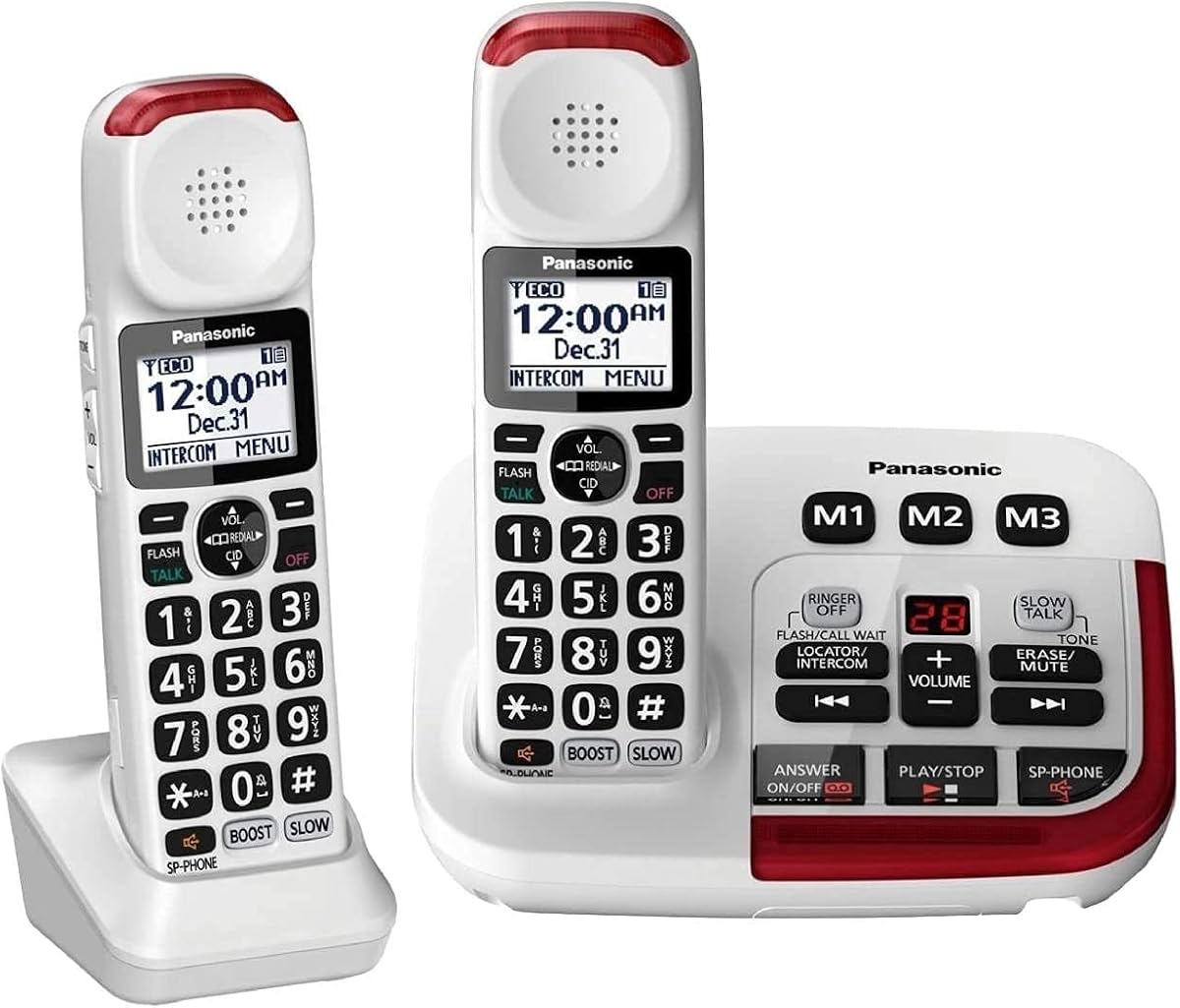
The Panasonic KX-TGM420W offers advanced controls for clearer calls. It includes a volume boost up to 40dB and noise reduction. The slow talk feature helps understand speech in real time.
We may earn a commission when you buy through this link, at no additional cost to you.
Visual ringers enhance alerts with flashing LEDs. The talking keypad confirms key presses audibly. The system expands to six handsets for flexibility. This makes it suitable for multi-room homes.
Charging handsets is necessary. The multiple settings may require adjustment. However, its tools significantly aid comprehension.
Best for users needing help with speech speed. It provides strong audio and smart features. For detailed control, it is highly effective.
Understand every word with real-time speech slowing.
Suppress background noise for focused conversations.
We may earn a commission when you buy through this link, at no additional cost to you.
The SWISSVOICE 3355 features large buttons with photo memory. It offers a loud ringer up to 90dB. The phone includes an SOS button for emergency contact.
We may earn a commission when you buy through this link, at no additional cost to you.
It comes with a cordless handset for convenience. The call block feature filters unwanted numbers. Hearing aid compatibility ensures smooth audio. These are practical tools for seniors.
User feedback suggests some setup complexity. Ratings are lower than competitors. However, its simplicity is a strength.
This phone works for those needing visual aids. It prioritizes big controls and loud alerts. For essential use, it serves well.
Use photos on buttons to recognize contacts easily.
Press one button to reach help immediately.
We may earn a commission when you buy through this link, at no additional cost to you.
This Panasonic model extends the KX-TGM420W features with two handsets. It maintains volume boost, noise reduction, and slow talk. The system supports up to six handsets total.
We may earn a commission when you buy through this link, at no additional cost to you.
Each handset supports visual ringers and talking keypad. The answering machine offers digital convenience. Having two units adds value for multi-room coverage. This reduces cost versus buying separately.
More handsets require more charging. Setup is straightforward but larger. The advanced features remain consistent.
Ideal for families or large homes needing multiple handsets. It provides flexibility with robust audio tools. For coverage and clarity, it delivers well.
Place handsets in several rooms with included units.
Expand to six handsets as household needs change.
We may earn a commission when you buy through this link, at no additional cost to you.
The Amplified 100dB Landline targets users needing high volume. It offers a 100dB ringer and 80dB receiver gain. The LED flash alert ensures no missed calls.
We may earn a commission when you buy through this link, at no additional cost to you.
Photo buttons store three speed dial numbers with images. It supports hearing aids for seamless audio. The design is straightforward for daily use. This suits those with mild to moderate loss.
It does not support profound loss needs. The corded setup limits movement. However, its alerts and volume are strong.
This phone fits users needing high alerts. It simplifies dialing with photos. For volume and reminders, it is effective.
LED flashes visibly to indicate incoming calls.
Receive calls with up to 80dB amplification.
We may earn a commission when you buy through this link, at no additional cost to you.
Choosing the right device requires understanding key features that support clear communication. This section outlines the most important factors to consider.
Captioned phones rely on services to convert speech to text. Look for models with high accuracy rates and 24/7 availability. Some require internet connections, so ensure your home has reliable Wi-Fi.
Verify that the service is available in your region. Accuracy ensures you understand every word during calls.
Hearing loss varies in severity. Choose a phone with amplification matching your needs. Many models offer 40dB to 55dB, suitable for moderate loss.
Check for volume controls that allow fine-tuning. Higher dB ratings help for more challenging environments.
Compatibility ensures seamless integration with your assistive devices. Look for TIA certification or specific labels indicating compatibility. This reduces feedback and distortion.
Test the phone with your hearing aids before finalizing. A compatible phone improves sound quality significantly.
Large displays with backlit screens improve readability. Touchscreens offer easy navigation, but physical buttons may be simpler. Consider font size options for captions or caller ID.
A clear interface reduces frustration. Prioritize models that match your dexterity and vision needs.
Extra loud ringers or visual alerts prevent missed calls. Some models include flashing strobes or vibration. Choose alerts that suit your environment and sensitivity.
A 90dB or higher ringer helps in noisy homes. Visual indicators work when hearing the ring is difficult.
Corded phones often work during power outages. Cordless handsets provide mobility around the house. Hybrid systems offer both stability and movement.
Consider your home layout. Cordless suits multi-room use, while corded ensures reliability.
Features like outgoing speech amplification or photo speed dial add convenience. Noise reduction and slow talk modes help with difficult conversations. Evaluate which tools matter most to you.
Extra functions can simplify daily calls. Focus on features that address your specific challenges.
Good customer support helps with setup and issues. Look for models with clear manuals and responsive teams. Warranties protect against defects.
A year of support ensures peace of mind. Verify warranty terms before purchasing.
Start by connecting the phone to power and internet if needed. Follow the setup guide to register services and configure preferences. Adjust volume and caption size to match comfort.
Test the phone with a few practice calls. Ensure captions appear correctly and audio is clear. Use memory buttons to store frequent contacts for easier access.
Clean the screen and buttons regularly with a soft cloth. Keep the device in a dry, dust-free area. Replace batteries promptly to maintain performance.
Most modern captioned phones need a high-speed internet connection to provide real-time captions. This ensures accurate text conversion during calls. Some models may offer offline features, but captions typically rely on online services.
Many models are explicitly designed to work with hearing aids. Look for TIA certification or compatibility labels. This reduces feedback and ensures smoother audio for users.
Many providers offer free captioning services for eligible users in the US. Registration may be required to activate the service. Check with the phone manufacturer for details on access.
Corded models generally work during outages if connected to a working line. Cordless phones require charged batteries. Hybrid systems with a corded base offer the most reliability in emergencies.
Amplification ranges from 40dB to over 100dB for ringers. Receiver gain for the handset often reaches 50dB to 80dB. Choose a model matching your hearing loss severity.
Most devices include memory buttons for speed dial. Some support photo speed dial to visualize contacts. This simplifies reaching family or emergency numbers quickly.
Accuracy depends on call clarity and service quality. Ensure proper internet connectivity and microphone placement. Contact the service provider for support if issues persist frequently.
Models are designed for senior-friendly setup with clear manuals. Some require registration for services. Customer support is usually available to guide users through initial configuration steps.
This guide highlights ten reliable options tailored to different needs. Whether you prefer captioning, amplification, or a hybrid approach, there is a fit for everyone. The top picks balance performance with user-friendly design.
Prioritize features that address your specific hearing challenges. Consider compatibility, alerts, and ease of use. A phone that simplifies communication improves daily life significantly.
Prices and availability may change over time. Verify current details on manufacturer websites or retailers before buying. Stay connected by choosing a device that meets your needs today.