
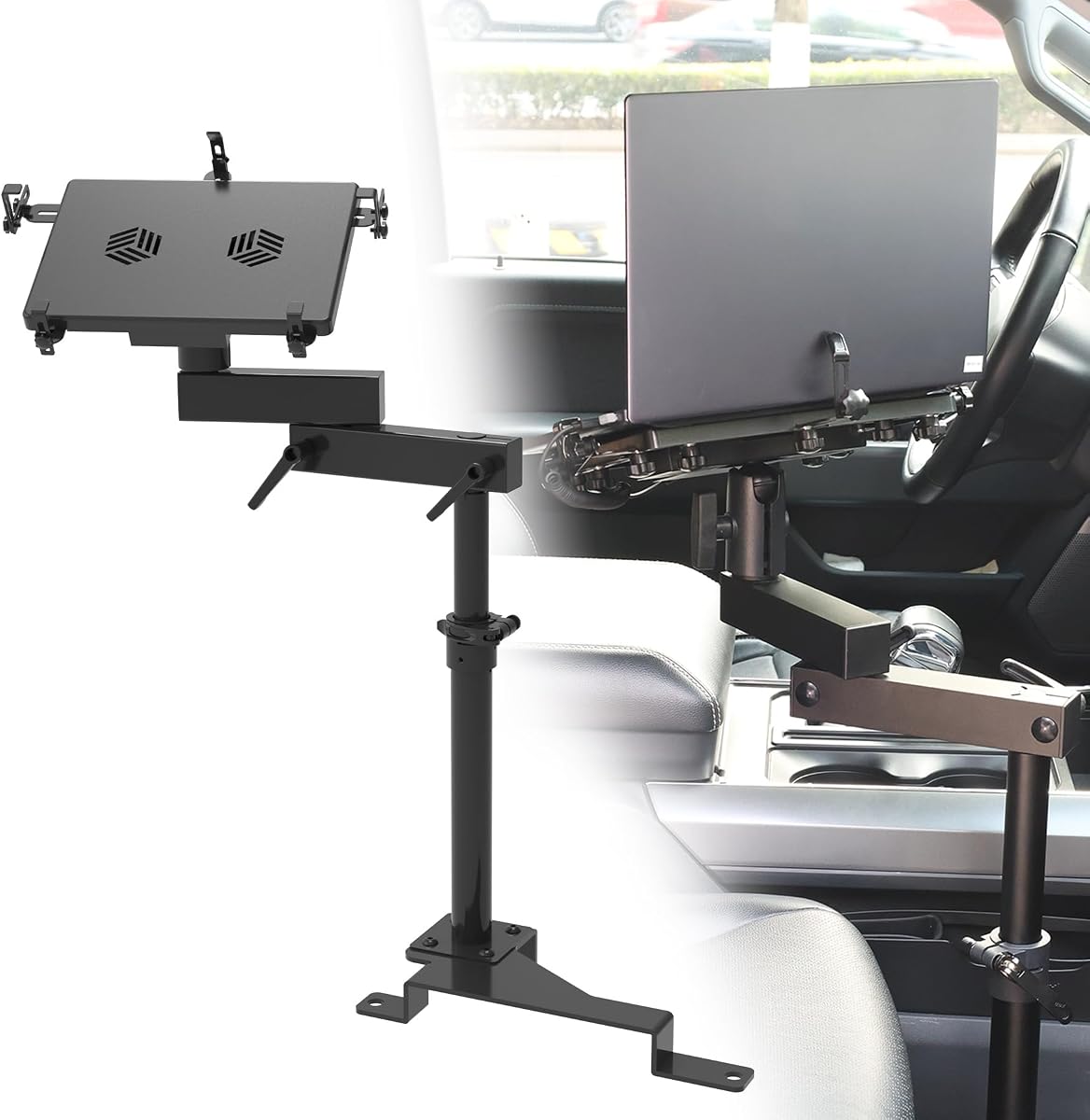
VIVO Black Adjustable Single Laptop Car Mount
3.9Editor score
Telescopic pole 18 inch5 inch
Ventilated tray surface
Quick disconnect mechanism
Working on the road requires reliable tools that keep your equipment secure and accessible. A good laptop mount transforms the passenger seat into a functional workspace without permanent modifications.
We evaluated these mounts based on stability, adjustability, cooling features, and ease of installation. Each product offers unique benefits for fleet operators, technicians, and mobile professionals.
Our detailed reviews highlight key features and trade-offs for every model. Keep in mind that availability and pricing may vary over time so check current listings before purchasing.
3.9Editor score

4.0Editor score

4.3Editor score
As an Amazon Associate we earn from qualifying purchases.
This table provides a side-by-side view of the top models available. Compare key specifications and mounting styles to find the perfect fit for your vehicle.




This No-Drill Car Laptop Mount offers a robust solution for mobile professionals needing a stable workspace. With a 4-star rating, it stands out for its secure base and versatile adjustability.
We may earn a commission when you buy through this link, at no additional cost to you.
The triangular 3-point base limits movement when parked, while 5 adjustable clamps and a 59-inch strap reduce device shifting. Dual USB cooling fans help prevent overheating during extended use.
Adjustment options include 11.9 to 20 inches height and 360-degree swivel. However, verify your vehicle seat bolt type using the guide to ensure compatibility before ordering.
Ideal for fleet operations and field service, this mount balances stability with convenience. It transforms your passenger seat into a reliable workstation without permanent vehicle modifications.
The 3-point base and clamp system ensure the laptop stays secure even on bumpy roads or uneven surfaces.
Built-in fans increase airflow under the laptop to maintain optimal operating temperatures during long parked sessions.
We may earn a commission when you buy through this link, at no additional cost to you.
The VIVO Black Adjustable Single Laptop Car Mount is a cost-effective choice for basic mobile work needs. It supports laptops up to 17 inches and 11 pounds with a ventilated tray.
We may earn a commission when you buy through this link, at no additional cost to you.
Its telescopic pole ranges from 18.5 to 26.3 inches, allowing flexible height positioning. The quick disconnect mechanism lets you remove the stand to return the seat to passenger use.
The ventilated surface increases airflow for cooling, though the overall build may feel less heavy-duty compared to premium options. It is best for occasional use or shared vehicles.
Choose this if you need an affordable solution for short-term projects. It provides essential adjustability and stability for a fraction of the cost of higher-end models.
The quick disconnect feature allows you to remove the workstation quickly, restoring the passenger seat for travel.
Adjustable tilt swivel and rotation help you find a comfortable viewing angle for different tasks.
We may earn a commission when you buy through this link, at no additional cost to you.
The MELIPRON No-Drill Truck Laptop Mount is a premium option built for rugged conditions and frequent use. Its 4.3 rating reflects strong performance on stability and durability.
We may earn a commission when you buy through this link, at no additional cost to you.
Constructed from heavy-duty aluminum and steel, it stays stable even on rough roads. Dual USB fans prevent overheating, and the quick-release pole maintains 80 percent of passenger space.
The patented ergonomic design adjusts height tilt and rotation to reduce strain. While pricier, the 2-year warranty and free replacement parts add long-term value for professionals.
This mount is perfect for fleet vehicles or personal work trucks that see daily use. It delivers reliability and comfort that justify the investment for serious mobile workers.
The heavy-duty materials and construction ensure the mount remains firm even during off-road or rough driving conditions.
The quick-release pole allows easy removal to preserve most of the passenger seating area when not in use.
We may earn a commission when you buy through this link, at no additional cost to you.
The 2026 Upgrade Truck Laptop Mount introduces a unique no-base structure that saves interior space. This design brings flexible installation spots and leaves more activity room for passengers.
We may earn a commission when you buy through this link, at no additional cost to you.
Its full motion adjustable design allows height adjustment, 360-degree rotation, and angle tilting for a comfortable in-vehicle office experience. Premium solid material builds a stable structure.
Flexible side clips hold laptops steadily without scratching the surface, while the hollow ventilation layout aids natural heat dissipation during long work sessions. This makes it great for vans.
Choose this if maximizing interior space is a priority. It offers a modern solution for mobile workers who need a lightweight but sturdy setup without permanent fixtures.
The absence of a traditional base frees up floor space and allows for more flexible placement within the vehicle.
The hollow ventilation layout works without fans to move heat away from the device during extended use.
We may earn a commission when you buy through this link, at no additional cost to you.
Mount-It! Car Laptop Mount offers a lifetime warranty and US-based support, which is rare in this category. It is sized for everyday laptops from 12 to 15.4 inches.
We may earn a commission when you buy through this link, at no additional cost to you.
The arm telescopes from 23 to 35 inches with full swivel and tilt. Velcro straps hold the laptop securely to reduce wobble and shifting during vehicle motion.
A vented tray manages heat by allowing airflow underneath the device. However, it is designed for smaller laptops up to 9 pounds, not oversized devices.
Buy this for long-term reliability and support. It is ideal for users with standard-sized laptops who want peace of mind from a strong warranty program.
The manufacturer provides a lifetime warranty and US-based support, which is unmatched in this category for reliability.
Integrated hook-and-loop straps hold your device within rated weight to prevent wobble during travel.
We may earn a commission when you buy through this link, at no additional cost to you.
This MELIPRON mount is optimized for Ford F-Series trucks from 2015 to 2026, ensuring precise fitment. It also works with select Dodge and Jeep vehicles.
We may earn a commission when you buy through this link, at no additional cost to you.
Dual swing arms offer extended reach for comfortable use, and integrated cooling fans prevent overheating in hot environments. The aluminum and steel build provides rock-solid stability.
A quick-release structure allows fast detachment while maintaining a stable base. The 2-year warranty and free replacement parts add value for truck owners.
Choose this if you drive a Ford truck and need guaranteed compatibility. It delivers specialized performance and stability tailored to popular work truck models.
Designed specifically for Ford F-Series bolt patterns, this mount offers a precise fit that reduces installation guesswork.
Dual swing arms provide an extended reach, allowing comfortable typing and viewing positions for larger truck cabins.
We may earn a commission when you buy through this link, at no additional cost to you.
The Mobotron MS-526 is a heavy-duty mount with a 30mm telescoping aluminum tube for maximum stability. It supports laptops from 10 to 17 inches easily.
We may earn a commission when you buy through this link, at no additional cost to you.
Quick lock-in and release levers allow fast installation and removal. The tray fully adjusts vertically and horizontally for ergonomic positioning.
Ensure the passenger seat rail is flat and bolts are visible before install. It is built for rugged environments where standard mounts might flex.
Choose this for heavy loads and rough conditions. It provides the rigidity needed for larger laptops in demanding work vehicles.
The 30mm aluminum tube ensures the mount remains rigid even with heavier laptops during travel.
Lock-in levers allow you to install or uninstall the mount in seconds for flexibility.
We may earn a commission when you buy through this link, at no additional cost to you.
This Mount-It! mount is rated for laptops and tablets up to 17 inches with a 6.6 lb capacity. It offers full motion swivel tilt and rotation.
We may earn a commission when you buy through this link, at no additional cost to you.
Active and passive cooling work together to move heat away. The arm folds toward the seat after work to restore passenger space.
Toothed locking segments hold positions exactly. Verify your seat bolt before buying as mounting options vary by vehicle.
Select this for larger devices and flexible storage. It combines stability with a clean interior when the workstation is not in use.
When the workday ends, the arm collapses toward the seat, keeping the interior clean and usable for passengers.
A ventilated tray and USB fan move heat away from the laptop to prevent overheating during heavy use.
We may earn a commission when you buy through this link, at no additional cost to you.
This Mount-It! model starts with a base plate that hooks onto the seat rail and bolts to the bracket for maximum stability. It fits laptops up to 17 inches.
We may earn a commission when you buy through this link, at no additional cost to you.
The leveling foot provides a third contact point for a stable base. The pole adjusts from 10.6 to 18.4 inches with tilt and swivel.
Multiple bracket styles (vertical horizontal, or 45-degree) adapt to different seat bolts. This base design reduces arm flex during typing.
Choose this if stability is your top priority. It transforms a parked vehicle into a stable workspace without permanent modifications.
The base plate hooks to the rail and bolts to the bracket, creating a secure foundation for the workstation.
The pole adjusts from 10.6 to 18.4 inches to help you find comfortable eye and typing levels.
We may earn a commission when you buy through this link, at no additional cost to you.
The Mobotron MS-526B comes with a complete accessory package including a support brace screen stabilizers and a USB cooling fan. It fits laptops from 6 to 17 inches.
We may earn a commission when you buy through this link, at no additional cost to you.
The universal mounting base offers a no-drill solution. Installation can take less than 10 minutes if seat bolts are accessible.
The accessories bundle saves money and ensures stability. It is a comprehensive kit for users who want all stability and cooling tools in one box.
Buy this for a turnkey solution. It provides all the necessary accessories to maximize performance without buying separate items.
This model includes a support brace, screen stabilizers, and a USB fan to ensure stability and cooling.
The universal mounting base and clear instructions allow installation in less than 10 minutes.
We may earn a commission when you buy through this link, at no additional cost to you.
Choosing the right mount involves considering your vehicle type laptop size and work habits. These factors will help you select a stable and ergonomic solution.
Ensure your vehicle has exposed floor seat bolts that are accessible. Some mounts require specific bolt angles or types so check the compatibility guide before purchasing.
Always verify seat rail flatness and bolt visibility to avoid installation issues after delivery.
Check the tray dimensions and weight limit of the mount. Larger laptops or heavy gaming devices may need a sturdy base to prevent wobbling.
Select a mount that supports your device weight comfortably without risking joint strain.
Look for adjustable height tilt and rotation to find a comfortable ergonomic position. A wider range helps adapt to different seating positions.
Prioritize models with smooth locking mechanisms to maintain your chosen angle.
Heavier bases and clamp systems reduce movement during travel. A stable mount protects your laptop and prevents strain.
Consider models with anti-scratch clips to protect your device surface.
Laptops can overheat when parked. Built-in fans or ventilated trays help maintain safe operating temperatures during extended work.
If you work in hot climates, active cooling features are highly recommended.
No-drill designs preserve your vehicle interior. Ensure you can install the mount with basic tools before starting.
Quick-release mechanisms allow you to remove the mount when the seat is needed for passengers.
Check for manufacturer warranty and US-based support. A longer warranty period indicates confidence in durability.
Good customer support can help resolve fitment questions quickly.
Balance your budget with the features you need. Premium mounts offer better stability and cooling but cost more.
Invest in a durable mount if you plan to use it daily for critical work.
Before installation, inspect your vehicle seat rails to ensure they are flat and free of debris. This step prevents wobbling and guarantees a secure connection for the mount.
Use basic hand tools to tighten bolts to the manufacturer's specified torque. Avoid over-tightening which can strip threads or damage seat rails over time.
Regularly clean the ventilation areas and check locking mechanisms for wear. Keeping the mount free of dust ensures smooth operation and longevity.
No, laptop mounts are designed for use while the vehicle is parked. Using a laptop while driving can distract the driver and is unsafe.
Most mounts attach to the passenger seat rail bolts. Ensure your seat has exposed bolts and the rail is flat for a proper fit.
Most models support laptops from 12 to 17 inches. Check specific weight limits to avoid overloading the mount joints.
No, these are no-drill mounts that attach to existing seat bolts. This preserves your vehicle interior and simplifies installation.
Use a mount with a ventilated tray or built-in cooling fans. Ensure airflow is not blocked during long work sessions.
Yes, many models have quick-release mechanisms that allow you to detach the workstation quickly when the seat is needed.
The top picks offer stability adjustability and cooling for various needs. The MELIPRON and No-Drill models stand out for durability and design.
Prioritize vehicle compatibility and weight capacity to ensure a secure setup. A good mount protects your device and improves work ergonomics.
Check current availability and pricing before buying. Prices may vary so compare deals to get the best value for your mobile workstation.