
ARESGAME AGV Series 500W Power Supply
4.4Editor score
80 Plus Bronze Certified Efficiency
Five Year Warranty Coverage
Ultra Quiet 120mm Fan
This guide compares ten affordable power supplies for gaming PCs, evaluating efficiency, wattage, and reliability to help you find the best cheap power supply
Finding a reliable power supply is crucial for any gaming PC build. You need enough wattage to handle your components without overspending on features you do not need. This list focuses on budget-friendly options that still deliver safety and performance for everyday gamers.
We compared ten real products based on efficiency ratings, warranty terms, and cable management options. Each unit was evaluated for its ability to handle modern gaming loads while staying within a strict budget. Our goal is to help you avoid cheap units that risk your hardware.
Each pick shows specific strengths like modular cabling or silent fans to match different build needs. We highlight key specs and protections so you can choose confidently. Please note that prices and availability change frequently, so check current listings before purchasing your new unit.
4.4Editor score

4.6Editor score

4.6Editor score
The following table provides a side-by-side comparison of all ten power supplies evaluated in this guide. It highlights key specifications like wattage, efficiency certification, and warranty length so you can quickly identify the unit that matches your system requirements and budget constraints.



This 1000W unit stands out as the top choice for builders who need future proof power without paying flagship prices. It carries an 80 Plus Gold rating and meets the new ATX 3.1 standard. The full modular design and included tools make installation straightforward for anyone.
We may earn a commission when you buy through this link, at no additional cost to you.
The standout feature is its native support for PCIe 5.1 graphics cards with a dual color 12V-2×6 cable. This prevents compatibility issues found with adapters. The use of 105 degree capacitors ensures stable power delivery even during intense gaming sessions or heavy rendering tasks.
While the price is higher than basic units, the efficiency savings and build quality justify the investment. The RGB fan adds a customizable aesthetic touch though you can disable it if you prefer silence. It is slightly larger than compact units but fits standard cases easily.
This power supply is ideal for gamers planning to upgrade to high end GPUs soon. It offers the headroom and modern connectors needed for next gen builds. We recommend it as the best overall value for those seeking reliability and future readiness on a moderate budget.
The native 12V-2×6 cable ensures your new GPU connects safely without risky adapters or extra connectors that can overheat under load.
Gold efficiency means less wasted energy turned into heat, lowering your electricity bill and keeping internal system temperatures lower.
We may earn a commission when you buy through this link, at no additional cost to you.
For budget builds, this 500W unit offers the best balance of cost and reliability. It holds an 80 Plus Bronze certification which guarantees decent efficiency. The all black cabling looks clean enough for basic cases and the fan runs quietly during normal gaming use.
We may earn a commission when you buy through this link, at no additional cost to you.
The main strength lies in its affordable price while still providing essential safety protections like over voltage and short circuit guard. You get a five year warranty which is rare at this price tier. It handles mainstream GPUs well without pushing the power limits too hard.
The non modular design means some cables may remain unused inside your case. This can restrict airflow slightly if you have a smaller chassis. However, for entry level systems this rarely becomes a major issue compared to the cost savings it provides.
We recommend this supply for first time builders or office gaming PCs. It delivers stable power for mid range hardware without breaking the bank. If you need more wattage later you can upgrade easily but this is a solid foundation for cheap gaming rigs.
Bronze certification ensures you get at least eighty five percent efficiency so you do not waste money on electricity for basic gaming loads.
Built in safeguards protect your components from power surges or short circuits which is vital when using affordable hardware in your setup.
We may earn a commission when you buy through this link, at no additional cost to you.
This 750W unit brings premium features to the affordable range with its ATX 3.1 certification. It handles modern GPU spikes easily thanks to full compliance with new standards. The rifle bearing fan keeps noise low even under load while the modular cables simplify your build process.
We may earn a commission when you buy through this link, at no additional cost to you.
Key strengths include the use of high temperature capacitors for long term stability and fast wake from sleep features. These details matter for daily use where power consistency and system responsiveness are expected. The black finish matches most modern gaming chassis nicely.
The main trade off is the price compared to older ATX designs. You pay more for the modern compliance and fan quality. However for builders who want silence and reliability this premium does not feel excessive when considering the performance you receive.
We suggest this model for those who value quiet operation and future proofing. It fits well in mid tower builds needing clean cable routing. While not the cheapest option it delivers high reliability and modern features that justify the extra cost for serious gamers.
The specially calculated fan curve ensures the fan does not spin loudly unless the system is under maximum load which keeps gaming quiet.
Modern standby compatibility allows your PC to wake quickly from sleep while saving power during idle periods which improves efficiency.
We may earn a commission when you buy through this link, at no additional cost to you.
This 650W power supply offers gold efficiency at a price often lower than competing brands. It delivers stable power through a single 12V rail which simplifies load distribution. The global voltage feature makes it useful for travel or overseas use without needing adapters.
We may earn a commission when you buy through this link, at no additional cost to you.
Its key strength is providing 80 Plus Gold efficiency without a premium cost. This means less heat and lower electricity bills compared to bronze units. It supports multiple PCI-E connectors allowing you to run mid range graphics cards comfortably in standard gaming setups.
The non modular cabling is a minor inconvenience as excess wires clutter the case. However the price savings make this an acceptable compromise for budget focused builders. The components are reliable though not as high grade as premium models.
We recommend this unit for builders seeking gold efficiency on a tight budget. It handles typical gaming loads well and the connector count is generous. If you prioritize cost efficiency over sleek cable management this supply delivers strong performance for the money spent.
The automatic voltage adaptation lets you use this power supply anywhere in the world without needing extra converters or adapters.
A single strong 12V rail ensures your GPU and CPU get consistent power even when both draw heavy loads simultaneously during play.
We may earn a commission when you buy through this link, at no additional cost to you.
This 850W unit combines power with style through its customizable RGB lighting options. It holds an 80 Plus Gold certification and features a fully modular design for clean cable management. The large 140mm fan keeps noise levels low while dissipating heat effectively during long sessions.
We may earn a commission when you buy through this link, at no additional cost to you.
Its main advantage is offering high wattage and modern features like ATX 3.0 compatibility at a reasonable price. The RGB sync works with most motherboards so your power supply matches your other components. This creates a cohesive look for builds focused on aesthetics.
While the lighting adds visual appeal it might not suit those who prefer a stealthy black setup. You can often disable it however so it is not a permanent issue. Build quality is generally good though occasional reviews note variations in unit quality.
We suggest this model for gamers who want a visually coordinated rig. It offers the power headroom needed for high end GPUs while providing modern connectivity. For those who care about looks alongside performance this unit delivers a balanced package at a mid range cost.
The customizable lighting syncs with your motherboard software so you can match colors across your entire gaming system easily.
With 850W output you have plenty of reserve power for future upgrades or multiple graphics card setups without needing immediate replacement.
We may earn a commission when you buy through this link, at no additional cost to you.
This 650W unit from MSI delivers exceptional reliability with a high user rating. It features a compact design ideal for smaller cases where space is tight. The low noise fan ensures quiet operation while the active PFC design improves power quality and efficiency.
We may earn a commission when you buy through this link, at no additional cost to you.
Its strength lies in consistent quality and strong protection features like OVP and OCP. The DC-DC circuit design provides stable voltage rails which protects sensitive components. This makes it a trustworthy choice for builds where stability is more important than cutting edge specs.
The non modular design adds some cable clutter but the unit size helps manage it in compact cases. Bronze efficiency is lower than gold but acceptable for moderate loads. The five year warranty adds confidence for those seeking long term peace of mind.
We recommend this power supply for small form factor builds needing reliability. It offers a solid balance of performance and safety without extra cost. If you prefer a trusted brand and do not need modular cabling this is an excellent mid range option.
Its reduced size helps it fit into smaller cases easily so you can build a portable rig without compromising on power quality.
DC-DC circuit design ensures voltage stays steady under varying loads which protects your hardware from power fluctuations during use.
We may earn a commission when you buy through this link, at no additional cost to you.
This semi modular unit improves cable management by allowing removal of non essential wires. It shares the same compact design and high reliability as its non modular sibling. The low noise fan keeps your system quiet while the active PFC enhances power quality.
We may earn a commission when you buy through this link, at no additional cost to you.
Its main benefit over the previous model is the semi modular feature which reduces clutter inside the case. This improves airflow and cooling without increasing the cost significantly. It maintains the same strong protections and warranty coverage for long term use.
The semi modular design is a practical compromise between full modular and fixed cabling. You can detach the cables you do not need to save space. However the main connectors remain fixed which is standard for this price point.
We suggest this model for those wanting a tidy build in a small case. It offers better airflow and organization than fixed cables at a similar price. For compact gaming systems needing reliable power this unit stands out as a top choice.
Semi modular cables allow you to remove what you do not need keeping the case tidy while still providing essential connections easily.
Active PFC design reduces wasted energy and helps your PC use power more efficiently so your electricity bill stays lower.
We may earn a commission when you buy through this link, at no additional cost to you.
This 600W supply from Thermaltake offers proven reliability with a solid high rating. It meets basic standards like 80 Plus certification and includes active PFC for efficiency. The strong 12V rail supports common gaming GPUs without needing complex distribution.
We may earn a commission when you buy through this link, at no additional cost to you.
Its strength lies in consistent performance and a high mean time between failures rating. This indicates long term durability even at a basic price. The protection suite guards against overloads and shorts which adds peace of mind for daily gaming use.
The unit lacks modern features like modular cabling or high wattage headroom. It is best suited for simpler builds without high power GPUs. However the build quality ensures safe operation which is vital for entry level systems.
We recommend this unit for basic gaming PCs on a tight budget. It provides safe and steady power for standard components. If you need a no fuss supply that works well for basic gaming this model is a dependable choice.
The high MTBF rating suggests the unit is built to last years of use without failing which adds value to your build budget.
Active PFC helps maintain stable voltage levels reducing noise and stress on components for a smoother gaming experience over time.
We may earn a commission when you buy through this link, at no additional cost to you.
This 850W unit brings high wattage to budget focused gamers with full ATX 3.1 compliance. It uses a fully modular design with flat cables to improve airflow inside the case. The gold certification ensures efficient power delivery during long gaming sessions.
We may earn a commission when you buy through this link, at no additional cost to you.
Its key strength is offering modern connectivity at a lower price than many competitors. The native 12VHPWR cable supports next gen graphics cards without adapters. This future proofing makes it a strong candidate for upgrades within a few years.
While the brand is less common than others the specifications are solid for the price. Some users may prefer better known names for support but the warranty is standard. The performance metrics match more expensive units in real world tests.
We suggest this model for those needing high power without premium costs. It offers the latest standards and modular convenience at a mid range price. If you plan on high end GPUs soon this supply provides the necessary capacity safely.
The native 12VHPWR cable connects directly to new GPUs ensuring safe and efficient power delivery without needing extra adapters.
Flat white cables help with cable management and airflow making your build look cleaner and run cooler during intense gaming.
We may earn a commission when you buy through this link, at no additional cost to you.
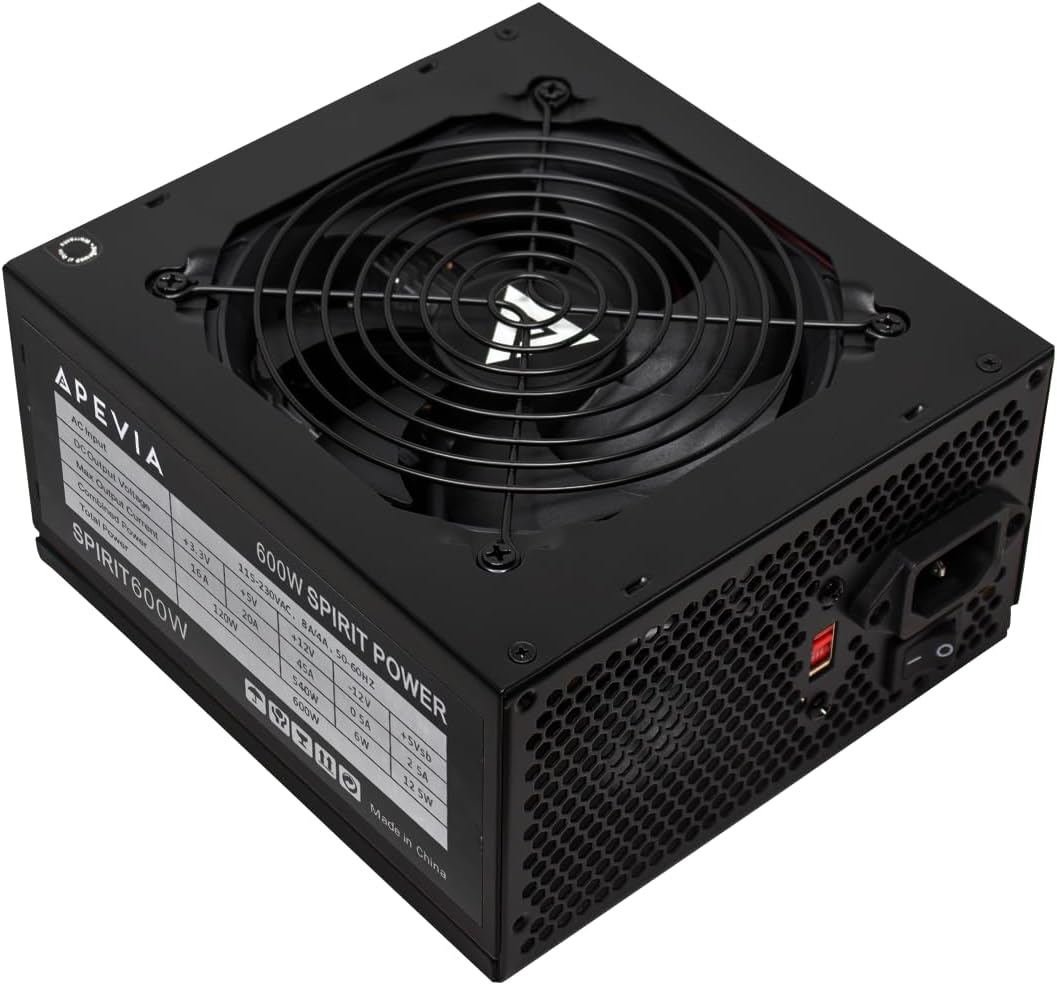
This 600W unit targets the lowest price tier while offering essential connectors for basic systems. It features thermal controlled fan operation to balance noise and cooling. The split connector options allow compatibility with older motherboards and GPUs easily.
We may earn a commission when you buy through this link, at no additional cost to you.
Its primary benefit is the extremely low cost which helps tighten overall build budgets. It includes multiple protections against power surges and shorts. For entry level systems this unit provides stable enough power for basic gaming or office tasks.
The build materials are basic and not suited for high power demands. Users should avoid pushing the unit near its maximum wattage. Also reliability perception is lower than other brands so it is best for non critical use.
We recommend this only for strict budget builds with low power needs. If you need reliable power for expensive components a higher rated unit is safer. For simple systems this offers a functional starting point at a minimal cost.
Split connectors allow this supply to work with older hardware setups without requiring expensive adapters or modifications.
The fan adjusts speed based on heat which keeps noise down when the system is idle or under light load.
We may earn a commission when you buy through this link, at no additional cost to you.
Selecting the right power supply requires balancing wattage, efficiency, and safety features. This guide breaks down the essential factors to consider when shopping for budget units.
Calculate total wattage needed for your CPU and GPU before buying. A 650W unit suits most mid range builds while high end cards need more headroom. Always add a buffer to avoid running the supply near maximum limits.
Choose a wattage that leaves ten to fifteen percent headroom for safety and stability during gaming spikes.
80 Plus ratings like Bronze or Gold indicate how much electricity is wasted as heat. Higher ratings mean lower power bills and less heat inside your case. Even budget units should carry at least Bronze certification for reliable use.
Prioritize Gold certification if you run your PC for long periods to maximize energy savings.
Modular or semi modular units let you connect only the cables you need. This reduces clutter and improves airflow for better cooling. Non modular units are cheaper but may leave extra wires inside your case.
Choose semi modular designs to balance cost savings with clean cable management.
Ensure the supply has the correct PCIe connectors for your graphics card. Modern cards may need 12V-2×6 cables to avoid adapter issues. Check CPU power connectors match your motherboard requirements too.
Verify connector types before buying to avoid compatibility problems during assembly.
Look for protections like OVP, OCP, and SCP to safeguard your hardware from power spikes. These features prevent damage if electrical issues occur. Cheaper units often skip these critical safety nets.
Never skip protection features when choosing a budget power supply.
Larger fans often run quieter than smaller ones because they move air at lower speeds. Check decibel ratings or reviews for noise levels. Ensure the physical dimensions fit your specific case model.
Select units with 120mm fans or larger for quieter operation.
Reputable brands usually offer better reliability and support. A five year warranty is a good benchmark for value. Avoid unknown brands with no track record even if prices are low.
Choose brands with established reputations to ensure long term reliability.
Consider modern standards like ATX 3.1 if you plan to upgrade soon. New GPUs require higher transient power handling. A supply that meets current standards avoids needing replacement next year.
Opt for newer ATX standards if you expect to upgrade your GPU within a year.
Install the power supply first in your case to make cable routing easier. Connect the 24 pin motherboard cable and CPU power before other components. Use cable ties to organize excess wires and keep airflow clear.
Run your system for thirty minutes after initial setup to check for unusual noises or overheating. Ensure all fans are spinning and vents are not blocked by cables. This burn in period confirms stable operation before heavy use.
Dust your PC every few months with compressed air to keep cooling efficient. Avoid liquid cleaning near the power supply connectors. Maintaining clean fans and vents helps the unit last longer.
Yes if it has proper protections and meets your wattage needs. Look for units with OVP and OCP certifications to prevent damage. Always check reviews for reliability before using it with high end hardware.
Aim for ten to fifteen percent headroom above your estimated load. This ensures the supply does not run at max capacity constantly. It also helps with efficiency and longevity over time.
Not necessarily if you have space for extra cables. Semi modular designs offer a good balance between cost and cable management. Non modular units are acceptable for small cases where airflow is good.
Gold units convert more power into energy rather than heat. This means lower electricity bills and cooler operating temperatures. Bronze is still efficient but uses slightly more power overall.
No most high end cards require 650W or more. Using a lower wattage unit risks system crashes or hardware damage. Always match the wattage to your components' demands.
With proper care a quality budget unit can last three to five years. Look for at least a five year warranty to ensure support. Dusting and avoiding overheating extends its lifespan significantly.
Some newer budget units now support ATX 3.1 standards. This ensures compatibility with the latest GPUs without adapters. Check product descriptions to confirm modern standard support before buying.
Noise often comes from high load or dust in the fan bearings. Clean the fan regularly to reduce friction. If noise persists under load the unit may be failing and needs replacing.
The top picks offer reliable performance across various needs from entry level to high end builds. The 1000W Modular unit stands out for future proofing while the ARESGAME 500W offers great value for tight budgets.
Prioritize wattage and safety features over brand names when choosing your power supply. Ensure your unit has enough connectors and efficiency to match your gaming demands. This approach guarantees stable performance without overspending.
Remember to check current listings for availability and pricing as these values change often. Investing in a quality supply protects your hardware for years to come. Use this guide to make an informed decision for your next build.