
Razer Laptop Cooling Pad Adaptive Smart Intelligent Fan Control
4.4Editor score
Smart adaptive fan control
Airtight pressure chamber design
Works with most laptops
Keeping your MSI gaming laptop cool is essential for maintaining peak performance during intense gaming sessions. A reliable cooling fan helps prevent overheating and extends the lifespan of your device while ensuring stable frame rates.
We evaluated ten top-rated cooling solutions based on airflow efficiency noise levels build quality and compatibility with MSI models. Each product was assessed for its ability to handle thermal loads across different usage scenarios and laptop sizes.
Each pick highlights unique strengths and considerations to help you find the right match for your setup. Please note that availability and details may change so always verify specifications before making your final decision today.
4.4Editor score

5.0Editor score

4.4Editor score
As an Amazon Associate we earn from qualifying purchases.
The following side-by-side comparison highlights key specifications and unique features across all ten products to help you quickly identify the most suitable cooling solution for your specific MSI laptop model and usage needs.
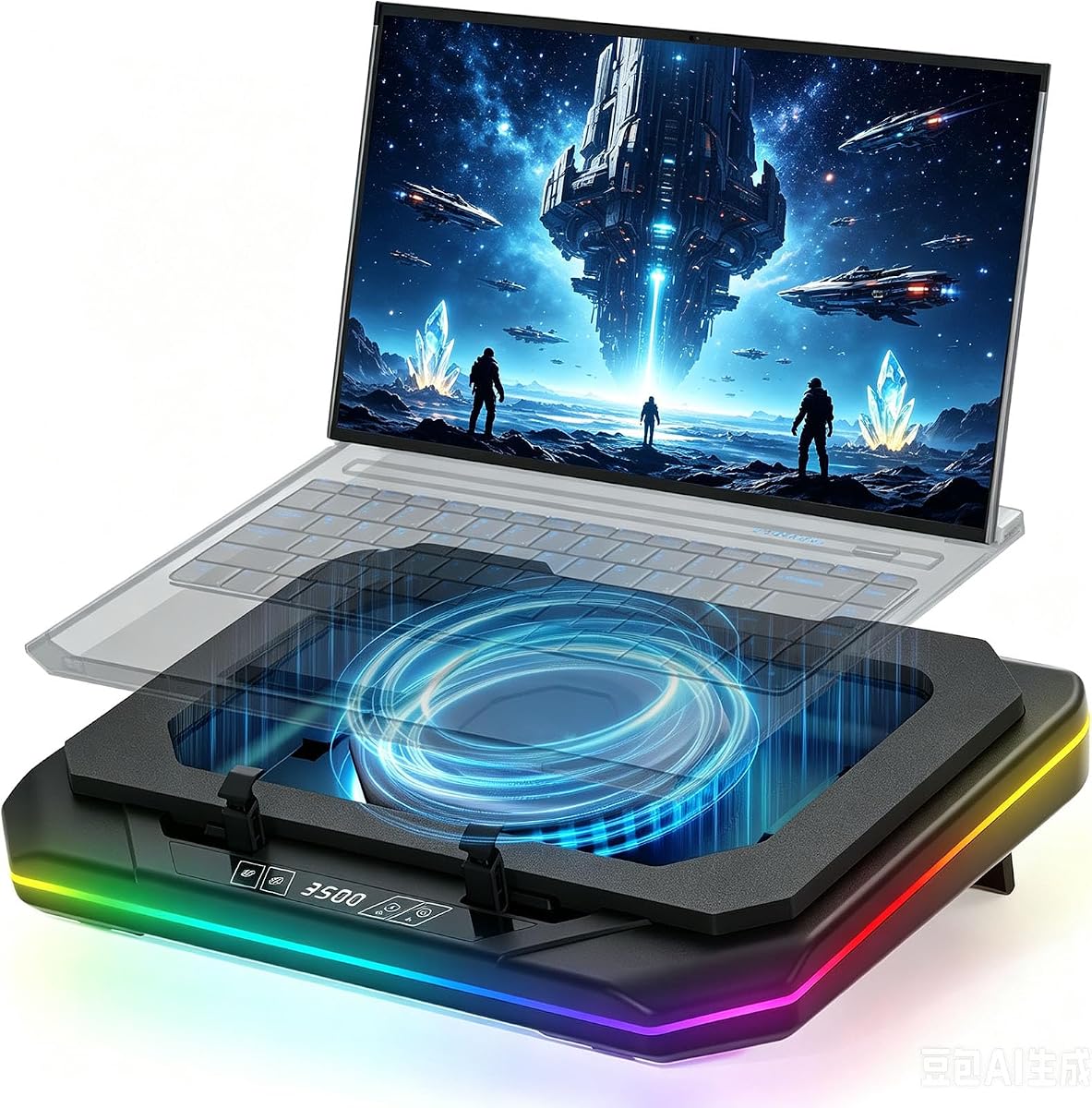


This cooling pad stands out for its intelligent adaptive cooling that adjusts fan speeds automatically based on system load. It offers a premium experience with smart controls and strong performance for demanding gaming sessions on MSI laptops.
We may earn a commission when you buy through this link, at no additional cost to you.
The airtight pressure chamber with foam seals ensures no cool air leakage while the 140mm brushless fan spins up to 3000 RPM for significant temperature reduction. Users can calibrate fan curves via Razer Synapse for noise or temperature control.
While the price is higher than basic models the build quality and smart features justify the investment for serious gamers. The magnetic frames ensure secure fit for various laptop sizes and the USB hub adds practical connectivity.
Buyers seeking top-tier cooling with advanced controls will appreciate this solution. Its smart capabilities make it ideal for those who want effortless thermal management without manual adjustments during gameplay or creative work.
The automatic fan speed adjustment ensures optimal cooling without user intervention keeping your laptop running smoothly under varying workloads.
Additional USB ports and remappable buttons enhance convenience allowing you to connect peripherals and manage settings on the fly.
We may earn a commission when you buy through this link, at no additional cost to you.
Designed specifically for MSI gaming laptops this cooling pad delivers rapid heat dissipation with a powerful turbofan that can reduce CPU and GPU temperatures significantly in just seconds. It combines performance with sleek aesthetics.
We may earn a commission when you buy through this link, at no additional cost to you.
The sealed wind pressure system pushes air efficiently into your laptop while retractable side panels prevent slipping. Multiple patented designs ensure compatibility across various sizes from 14 to 18 inches with foldable footrests for added stability.
Noise levels can reach 60 dB at highest speeds so quiet environments may require lower settings. The RGB lighting modes add visual appeal though some users might prefer a more minimalist look for office use.
Gamers prioritizing raw cooling power and MSI compatibility should choose this pad. Its robust performance and safety features make it a reliable choice for maintaining system health during extended gaming marathons.
Specific design elements ensure optimal airflow alignment with MSI laptop intake vents for maximum thermal efficiency.
Adjustable RGB lighting modes let you personalize the setup to match your gaming rig aesthetic preferences.
We may earn a commission when you buy through this link, at no additional cost to you.
This cooling pad offers excellent value with ultra-portable design and ultra-quiet fans perfect for users on a budget. It provides reliable cooling and ergonomic comfort without breaking the bank for MSI laptop owners.
We may earn a commission when you buy through this link, at no additional cost to you.
The slim profile makes it easy to carry while the metal mesh surface offers stability for your device. Two adjustable height settings help improve posture during long work or gaming sessions with minimal bulk.
While it lacks advanced features like RGB lighting or smart controls it delivers consistent performance for everyday use. The extra USB port is a practical addition though Type C devices may require adapters.
Buyers seeking an affordable and portable cooling option will find this pad meets their needs. Its quiet operation and lightweight build make it ideal for students or professionals who move frequently.
Lightweight construction ensures you can take this cooler anywhere without adding significant weight to your bag.
Adjustable height settings help reduce neck strain by positioning the laptop screen at a more comfortable viewing angle.
We may earn a commission when you buy through this link, at no additional cost to you.
Similar to the MSI Raider model this cooling pad targets Vector laptops with powerful turbofans and rapid heat dissipation capabilities. It ensures your system stays cool during intense gaming with robust safety features.
We may earn a commission when you buy through this link, at no additional cost to you.
The retractable side panels prevent slipping while the dust filtration mesh reduces cleaning needs. USB hub ports let you connect external devices conveniently making it a central workstation for your peripherals.
Noise can be significant at maximum speed so users sensitive to sound may need to adjust settings. The high-power adapter ensures strong cooling but limits portability when traveling without access to power.
This pad is ideal for MSI Vector owners needing serious thermal management. Its combination of cooling power and connectivity features makes it a strong choice for desktop-style gaming setups.
Super turbofan speeds deliver consistent cooling even under heavy loads like rendering or AAA gaming.
Built-in USB ports reduce cable clutter by allowing direct connection of keyboards and mice to the pad.
We may earn a commission when you buy through this link, at no additional cost to you.
The Kootek cooling pad features five quiet fans and six adjustable height settings providing versatile cooling for laptops between 12 and 17 inches. It balances performance with ergonomic comfort for extended use.
We may earn a commission when you buy through this link, at no additional cost to you.
Switches allow control over fan configurations while blue LEDs indicate active zones. The dual USB hub offers extra connectivity and stoppers keep the laptop secure during intense gaming or work sessions.
Managing multiple switches can be less intuitive than single control systems and bright LEDs may disturb in dark rooms. Despite this the build quality and cooling performance remain competitive for the price.
This pad suits users needing adjustable height and multi-fan coverage without breaking budget limits. Its secure design and USB hub make it practical for both home and office workstations.
Five independently controlled fans allow targeted airflow distribution across different areas of your laptop chassis.
Six height options ensure you can find the perfect viewing angle to reduce strain during long hours.
We may earn a commission when you buy through this link, at no additional cost to you.
This cooling pad stands out with nine super cooling fans and ten RGB light modes for a visually striking setup. It supports larger laptops up to 19.3 inches with eight height adjustment options for comfort.
We may earn a commission when you buy through this link, at no additional cost to you.
An LCD display shows real-time fan speed and touch buttons simplify control over lights and cooling. Capacitor components help reduce working noise making it quiet enough even on max settings.
Managing nine fans can feel complex and RGB effects might distract some users. The large footprint may not fit smaller desks but offers maximum coverage for bigger gaming rigs.
Buyers wanting extensive coverage and visual customization will appreciate this pad. Its combination of fan count and lighting options makes it a standout for immersive gaming environments.
Ten RGB light modes and touch controls let you tailor the lighting to match your gaming setup vibe.
Designed for 15 to 19 inch laptops ensuring stable cooling for larger and heavier gaming machines.
We may earn a commission when you buy through this link, at no additional cost to you.
The llano V12 Ultra offers intelligent AI temperature control via Myth.cool software for precise thermal management. Its 5.5 turbo fan delivers efficient cooling while three adjustable heights support ergonomic comfort during use.
We may earn a commission when you buy through this link, at no additional cost to you.
The high-power 36W adapter ensures full fan speed without draining laptop power and removable dust filters simplify maintenance. USB 3.0 hub connectivity supports fast data transfer for external drives or peripherals.
Software reliance might be a barrier for some and the premium price reflects advanced features. Noise remains low though but setup requires downloading updates for seamless control integration.
Tech-savvy users valuing automated cooling will find this pad ideal. Its software integration and strong build quality make it a reliable choice for demanding workloads.
Myth.cool software adjusts fan speeds automatically based on system workload reducing manual intervention.
Five USB 3.0 ports provide fast data transfer for connecting multiple peripherals efficiently.
We may earn a commission when you buy through this link, at no additional cost to you.
The llano V12 Gaming offers a 5.5 turbo fan and 44-degree temperature reduction ensuring efficient cooling for heavy tasks. RGB light modes and a scroll wheel provide intuitive control over lighting and fan speed.
We may earn a commission when you buy through this link, at no additional cost to you.
Three USB 2.0 hub ports allow connection of peripherals while dust filters protect internal components from debris. The reinforced chassis design supports heavy-duty laptops between 15.6 and 19 inches.
USB 2.0 speeds may limit file transfer rates and scroll wheel adjustments require some practice. Still the cooling performance and visual appeal remain strong for gaming setups.
Gamers prioritizing temperature reduction and visual style should consider this model. Its robust build and RGB features make it a practical addition to any gaming desk.
Sealed turbo fan design ensures maximum airflow pressure for significant temperature drops under load.
High-density dust filters extend the lifespan of your laptop by preventing debris buildup inside vents.
We may earn a commission when you buy through this link, at no additional cost to you.
This cooling pad features a patented air guide design and quiet turbo fan for efficient cooling up to 19 inches. Sealed airflow ensures maximum fan with multiple adjustable angles supporting ergonomic comfort during use.
We may earn a commission when you buy through this link, at no additional cost to you.
RGB modes with memory allow easy control via touch panel and washable dust filters keep maintenance simple. USB-C powered design supports mobility though full turbo power may need a wall charger.
Adapter not included means extra cost for full performance and RPM range is lower than industrial fans. The sleek lightweight design remains ideal for portable setups or quiet environments.
Users valuing low noise and clean design will appreciate this pad. Its sealed airflow and USB-C power make it a modern solution for portable laptop cooling needs.
Patented fan design allows effective cooling at low speeds keeping noise levels minimal.
Slim lightweight build makes it easy to carry between locations without adding bulk.
We may earn a commission when you buy through this link, at no additional cost to you.
The llano V12 Cooler delivers 44-degree temperature reduction with a 5.5 turbo external fan suitable for gaming laptops. Real-time LED display shows fan speed and touch buttons simplify adjustments during use.
We may earn a commission when you buy through this link, at no additional cost to you.
Double non-slip baffles ensure stability and an extra dust filter is included for extended protection. Height adjustment reduces neck strain during gaming sessions with sturdy design supporting larger machines.
Height adjustment is limited to few positions and touch buttons may be overly sensitive. The cooling performance remains excellent though making it a reliable choice for demanding tasks.
Gamers seeking solid cooling with visual feedback will find this model effective. Its sturdy build and included extra filter make it a practical choice for long-term laptop maintenance.
Real-time LED display lets you monitor fan speed without needing external software tools.
Extra dust filters ensure long-term protection keeping internal components free of debris.
We may earn a commission when you buy through this link, at no additional cost to you.
Selecting the right cooling fan requires understanding your specific laptop model and usage patterns. This guide outlines key factors to help you find a solution that fits your needs.
Larger fans typically move more air at lower speeds while high RPM fans provide rapid cooling. Consider the balance between cooling power and noise levels when selecting a pad.
Opt for a fan speed and size that matches your laptop's ventilation system for optimal performance.
Ensure the cooling pad supports your MSI laptop's dimensions from 15 to 18 inches. Retractable panels or adjustable frames can accommodate different models comfortably.
Choose a model with adjustable or compatible frames to secure your device effectively.
Noise ratings vary from whisper-quiet to industrial levels especially at maximum speeds. Consider your environment and sensitivity to sound before selecting a high-performance model.
Select a pad with low noise settings if you work in quiet spaces or share a room.
USB hubs and ports allow connection of peripherals reducing cable clutter. Ensure the hub supports your devices speed requirements for efficient data transfer.
Look for models with multiple USB ports and compatible connectors for your peripherals.
Sturdy chassis and dust filtration extend product lifespan and maintain efficiency. Check for robust materials and replaceable filters for long-term reliability.
Prioritize models with dust filters and durable construction to protect your investment.
Adjustable height settings help improve posture and reduce strain during extended use. Multiple tilt angles support comfortable viewing positions for gaming or work.
Choose a cooling pad with adjustable angles to maintain healthy posture while using your laptop.
RGB lighting and display panels enhance aesthetics but may distract some users. Decide if visual customization aligns with your preference for simplicity.
Assess whether RGB modes are essential or if simple controls suit your workflow better.
Some models require dedicated power adapters while others run via USB. Consider portability needs and available power sources before buying.
Check power adapter availability and USB power limits to ensure consistent cooling performance.
Place the cooling pad on a flat stable surface and align your MSI laptop with the intake vents. Secure the device using any included stoppers or side panels to prevent slipping during use.
Power the cooling pad using USB or adapter and adjust fan speeds according to your workload. Use ergonomic angles to reduce strain and monitor temperatures regularly for optimal performance.
Clean dust filters and vents regularly to maintain airflow efficiency. Replace worn parts or filters as needed to ensure consistent cooling and extend product lifespan.
Some high-performance cooling pads require dedicated wall adapters to run fans at full speed. Others can operate via USB but may not reach maximum cooling potential without extra power. Check the product specifications before purchasing.
Most cooling pads support a wide range of laptops from 15 to 19 inches. Always verify your MSI model dimensions and vent placement to ensure proper alignment with the cooling fans.
Noise levels vary from whisper-quiet to 60 dB depending on fan speed. Higher speeds provide better cooling but increase noise so choose a model matching your environment preferences.
Quality cooling pads can lower CPU and GPU temperatures by up to 40 degrees in minutes. Results depend on your laptop ventilation and cooling pad placement for optimal airflow.
Clean dust filters and vents at least once a month to maintain efficiency. Regular cleaning prevents debris buildup and ensures consistent cooling performance for your laptop.
Yes reducing heat stress helps prevent overheating and component wear over time. A reliable cooling pad supports hardware health and consistent performance during long gaming or work sessions.
Not all models include USB hubs though many offer multiple ports for connectivity. Verify the hub count and USB version to ensure compatibility with your peripherals.
RGB lights provide visual customization and ambiance for gaming setups. They do not affect cooling performance but can enhance your desk aesthetic if desired.
Our top three picks highlight the best cooling solutions balancing performance compatibility and value for MSI users. Each model offers unique strengths suited for different gaming needs and budget preferences.
Prioritize cooling performance noise levels and ergonomic comfort when making your final choice. Consider compatibility with your specific MSI model to ensure seamless integration and effective thermal management.
Always verify current specifications and availability before purchasing to ensure the best fit for your setup. Regular maintenance and proper use will maximize cooling efficiency and extend device lifespan.