
Anker Nano Power Strip
4.8Editor score
Desk clamp for secure mounting
70W USB-C laptop charging
Dual-zone 10-port layout
Explore our comprehensive guide to the best desk mounted outlet towers, comparing features, safety, and charging speed to find your ideal power solution.
Desk mounted outlet towers are essential for modern workspaces needing multiple charging points. They organize cables, save space, and provide safe power distribution for all your electronics efficiently.
We evaluated ten top models based on outlet count, USB capabilities, build quality, and safety features. Our comparison highlights strengths for offices, dorms, and home setups to help you decide.
Each pick details key specs and user benefits found in real usage scenarios. Note that availability and pricing can shift quickly, so check current listings before making your final purchase decision today.
4.8Editor score

4.5Editor score

5.0Editor score
This side-by-side comparison highlights the key specifications of each model to help you identify the best fit for your power and space needs without hassle.




The TenTrend Power Strip Tower ranks as our top pick for its exceptional balance of power and safety. With a 4.5 rating, it delivers 230W across 14 ports, meeting most daily charging needs efficiently.
We may earn a commission when you buy through this link, at no additional cost to you.
Its standout feature is the dual orange USB-C ports capable of 65W, ideal for laptops alongside phones. The 6 AC outlets support heavy-duty tools while the flat plug prevents wall outlet blockage.
While the cord is standard length, the space-saving design is a major plus. Users appreciate the ability to plug many devices without clutter, making it perfect for dense desk setups.
Buy this if you need reliable multi-device charging with robust safety. It is a practical choice for students or professionals who want organized power without sacrificing performance.
The tower supports fast charging for laptops and phones simultaneously using its dedicated USB-C ports.
Its slim profile and built-in safety components protect your gear while minimizing desk footprint.
We may earn a commission when you buy through this link, at no additional cost to you.
The Uncaged Ergonomics Retractable Tower offers a premium user experience with its unique auto-rewinding cord. It holds a perfect 5.0 rating for its innovative design that reduces clutter significantly.
We may earn a commission when you buy through this link, at no additional cost to you.
Key strengths include mountable feet allowing under-desk installation to free up desk space. The 320 joule surge protection protects sensitive electronics from spikes, ensuring long-term reliability.
Although it comes at a higher cost, the convenience of no-coiling cords is worth it. Users report it transforms messy desks into clean workspaces effortlessly.
Choose this for premium organization and durability. It suits professionals who value neatness and want a versatile power station that can be mounted or placed freely.
The retractable cord system keeps your floor clean by auto-retracting excess length when not in use.
With mountable feet, you can secure it to workbenches or walls to reclaim valuable desk surface.
We may earn a commission when you buy through this link, at no additional cost to you.
The SMALLRT Power Strip Tower provides exceptional value with 12 AC outlets and 4 USB ports. It holds a strong 4.7 rating for its durability and practicality in various settings.
We may earn a commission when you buy through this link, at no additional cost to you.
Its long 6.5 foot cord allows flexible placement far from the wall. The 4 separated switches let you control power zones, reducing energy waste when devices are not needed.
While the USB charging is standard, the sheer number of ports makes it ideal for heavy usage. Users appreciate the build quality and safety features at this price point.
Buy this if you need maximum outlets for less. It is perfect for dorms or offices where budget matters but capacity cannot be compromised.
The 4 separated switches let you power off specific sections to save electricity when devices are idle.
A 6.5 foot cord ensures you can place the tower wherever needed without moving furniture.
We may earn a commission when you buy through this link, at no additional cost to you.
The Anker Nano Power Strip stands out with its desk clamp design that saves valuable surface space. It rates 4.8 for its ability to keep cables out of the way.
We may earn a commission when you buy through this link, at no additional cost to you.
Key benefits include 70W USB-C charging for laptops and dual zones to organize devices by frequency of use. The surge protection is robust, ensuring safety against voltage spikes.
It may not fit curved desks, but for standard edges, it is ideal. Users find the stability and reach great for accessing ports while typing.
Choose this for ergonomic power access. It suits professionals who need quick access to USB-C power without cluttering their desk surface.
The adjustable clamp holds the strip firmly on desk edges to free up flat work areas.
Up to 70W USB-C power supports laptops and tablets for efficient on-the-go charging needs.
We may earn a commission when you buy through this link, at no additional cost to you.
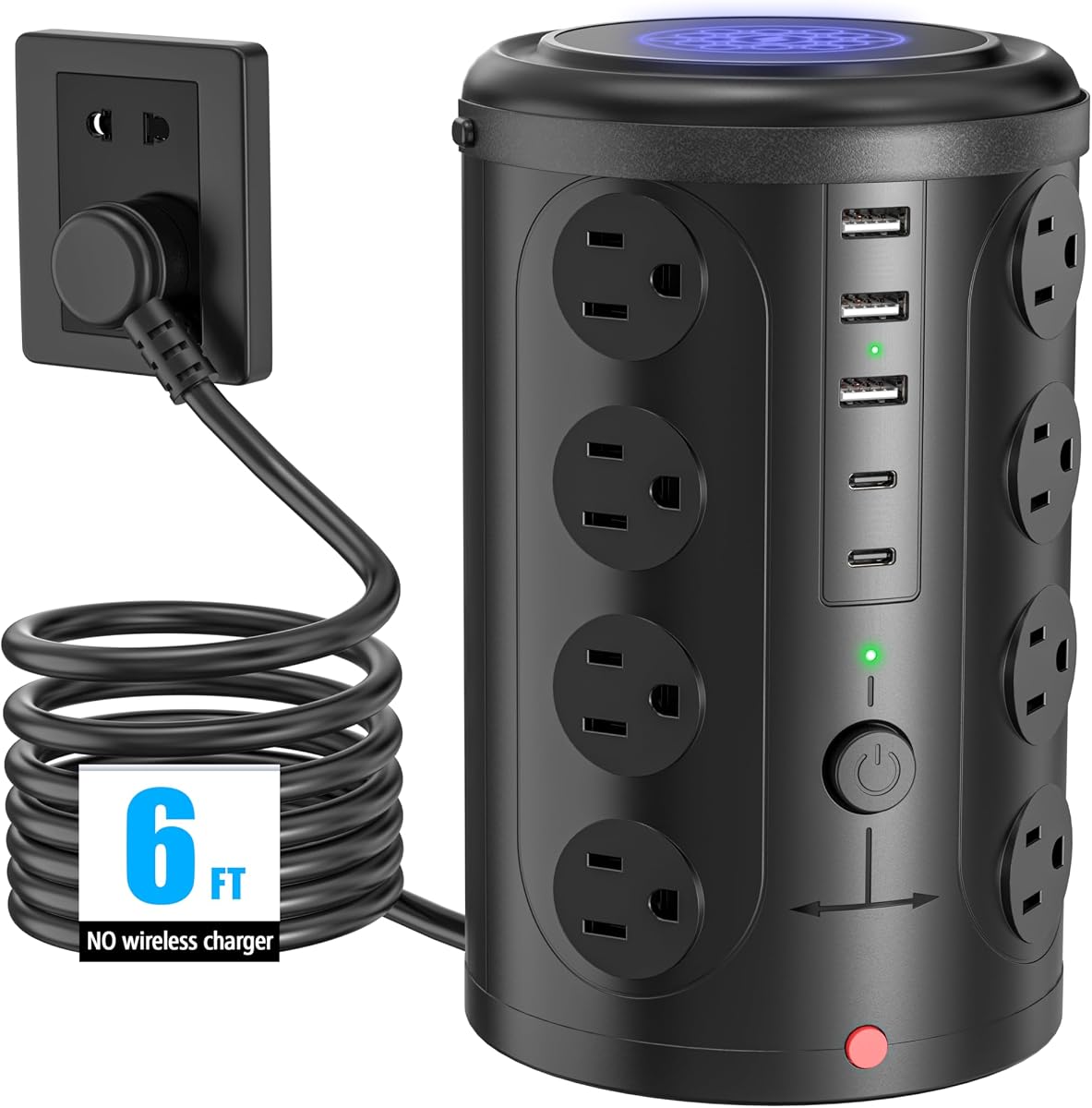
This SMALLRT Power Strip Tower offers high capacity with 16 total ports to power up to 16 devices at once. It rates 4.8 for its robust build and smart safety features.
We may earn a commission when you buy through this link, at no additional cost to you.
Key strengths include a pure copper cord and auto-sensing USB ports that optimize charging speeds. The base features an anti-slip mat, ensuring it stays in place during daily use.
The shell is fire-resistant for peace of mind. While it is sturdy, the design fits well in corners or on shelves for centralized power access.
Buy this for large setups needing many outlets. It suits busy offices or shared spaces where multiple users need reliable power access.
Smart USB ports detect connected devices to deliver optimal charging speeds automatically.
Fire-resistance shell and overload protection keep your expensive electronics safe from electrical hazards.
We may earn a commission when you buy through this link, at no additional cost to you.
The 16 Wide‑Spaced Outlets Tower is ideal for heavy users needing maximum plug space. It holds a 4.6 rating for its generous port layout and high wattage capability.
We may earn a commission when you buy through this link, at no additional cost to you.
Key benefits include 16 wide-spaced AC outlets that prevent blocking and support power-hungry tools. It also delivers 17W via USB ports for phones and peripherals.
Its compact vertical structure keeps desks organized even with many cables. Users find the wide spacing essential for large power adapters.
Buy this if you need sheer volume of outlets. It suits power users with many devices that require frequent plugging and unplugging.
16 wide-spaced AC outlets allow bulky adapters to plug in without blocking adjacent sockets.
Supports up to 3600W for heavy-duty equipment ensuring safe power delivery for all tools.
We may earn a commission when you buy through this link, at no additional cost to you.
The TESSAN Tower Power Strip features a slim flat plug ideal for tight wall spaces. It rates 4.8 for its efficient layout and strong surge protection features.
We may earn a commission when you buy through this link, at no additional cost to you.
Key strengths include a 45-degree plug angle that leaves room below the socket. The 1050J protection rating ensures safety against electrical spikes during storms.
It keeps desks tidy with rubber feet preventing slips. Users appreciate the flat head design for hiding cords behind furniture.
Buy this for clean and discreet installation. It suits home offices where aesthetics and space efficiency are priorities.
An ultra-thin flat plug sits flush against the wall avoiding obstruction of adjacent outlets.
The 45 degree right angle allows a second plug to fit below the strip easily.
We may earn a commission when you buy through this link, at no additional cost to you.
The VILONG Dual Layer Power Strip offers a versatile mounting solution for both desktop and under-desk use. It rates 4.4 for its practical dual-layer design.
We may earn a commission when you buy through this link, at no additional cost to you.
Key features include a 20W USB-C port and fire-resistant build for safety. The dual switches let you manage power zones without unplugging devices.
Its clamp fits desks up to 1.6 inches thick. Users find it great for keeping cables off the desktop surface entirely.
Buy this for under-desk routing. It suits tech workers wanting to hide power strips for a cleaner aesthetic.
The dual-layer structure supports charging devices from above or below the desk surface flexibly.
Secure clamping allows quick installation to any standard edge without tools or drilling needed.
We may earn a commission when you buy through this link, at no additional cost to you.
The 6FT Power Strip Tower is built for safety with a robust 1800J surge protector. It rates 4.7 for reliability and effective outlet spacing.
We may earn a commission when you buy through this link, at no additional cost to you.
Key strengths include 12 wide-spaced AC outlets and a flat plug for wall fit. The 6-foot cord ensures flexibility across larger rooms.
The wide spacing is perfect for large adapters. Users report it keeps setups organized without blocking neighboring sockets.
Buy this for high protection needs. It suits home offices where safety and plug spacing matter most.
The 1800J rating protects expensive electronics from major power surges effectively.
12 wide-spaced outlets allow large power bricks to plug in without interference.
We may earn a commission when you buy through this link, at no additional cost to you.
The Power Strips with Surge Protection offers a sleek slim profile at an attractive price point. It rates 4.8 for its comprehensive protection and smart charging features.
We may earn a commission when you buy through this link, at no additional cost to you.
Key benefits include 12 AC outlets and 4 USB ports. The braided fabric cord adds durability and a modern look to any room.
Its slim flat plug fits easily behind furniture. Users appreciate the 1080 Joule protection rating for added peace of mind.
Buy this for style and function. It suits students wanting a durable and aesthetic power solution for dorm rooms.
The ultra-slim 0.35 inch flat plug allows it to fit in tight wall spots.
Braided fabric on the cord ensures flexibility and resistance to wear over time.
We may earn a commission when you buy through this link, at no additional cost to you.
Choosing the right tower requires evaluating safety, capacity, and design. This section breaks down key factors to consider for your specific workspace needs.
Evaluate how many AC outlets and USB ports you need daily. Some towers offer 12 to 21 ports, which is vital for multi-device setups.
Choose a model with enough outlets to avoid daisy-chaining strips.
Look for a high joule rating to ensure safety against power spikes. Models range from 700J to 1800J; higher ratings better protect expensive electronics.
Always prioritize a tower with built-in circuit breakers for added safety.
Check USB-C wattage to support laptop charging. Some towers offer 20W or 65W+ which are crucial for powering devices quickly without separate adapters.
Ensure ports support smart charging to optimize speed for different gadgets.
Cord length determines placement flexibility. Standard lengths are 5 to 6.5 feet. Flat plugs are easier to manage behind furniture and save wall space.
Consider retractable cords if you need to manage slack frequently.
Decide between standing towers and clamp mounts. Desk clamps free up surface space, while freestanding towers offer versatility for floors or shelves.
Ensure clamp models fit your desk thickness before buying.
Fire-resistant shells and pure copper wires indicate durability. Look for ratings like 1250W or 1625W to confirm it can handle heavy loads.
Check for rubber feet to prevent sliding on smooth desks.
Individual outlet switches allow you to turn off unused devices easily. This helps save energy and manage power consumption effectively.
Towers with 4 separate switches offer granular control over zones.
Vertical designs minimize desk footprint compared to horizontal strips. A compact tower keeps cables organized and reduces visual clutter significantly.
Select slim profiles if your workspace is tight or narrow.
Install your tower on a flat stable surface. For clamp models, secure the mount to the desk edge ensuring it does not wobble during use.
Plug the tower into a grounded wall outlet. Do not overload the unit beyond its wattage limit. Distribute devices evenly across AC outlets to prevent overheating.
Regularly inspect cables for wear and tear. Keep the tower clean and dust-free to maintain safety. Unplug during storms to protect connected electronics from surges.
The main benefit is organized power distribution. It replaces multiple wall adapters and strips, reducing clutter on your desk while offering safer power access.
Check the dimensions and width. For clamp models, verify your desk thickness matches the clamp range. For standing towers, ensure the base fits your shelf space.
Yes if the USB-C port supports high wattage like 65W. Standard 20W ports charge phones and tablets but may be too slow for laptops.
Yes most include safety features like overload and short-circuit protection. However, unplugging unused devices at night saves energy and reduces heat risks.
Many models offer separated switches for zones. This allows you to turn off parts of the tower without unplugging devices from the wall.
Yes clamp models are designed for under-desk use. Standalone towers can be mounted with brackets if you need hidden power access.
Surge protection guards against voltage spikes. Overload protection shuts off power if total wattage exceeds limits to prevent overheating and fire risks.
Most towers support 125V standard. Check the input rating on the label. Some international models may support 220V or wider voltage ranges.
We recommend the TenTrend for its balanced power and the Uncaged Ergonomics for premium cable management. Both offer top performance for different needs.
Prioritize safety features like surge protection and high wattage USB ports. These ensure your devices remain safe and charged efficiently.
Always check current availability and prices as they change frequently. Verify all specifications match your setup before finalizing your purchase today.