
Digital Alarm Clock with Date and Day of Week for Dementia Seniors
4.7Editor score
Voice Announcement Time Function
7-inch Large Digital Screen
Automatic Dimming Option
This guide compares the top 10 digital clocks with date and day of week for seniors and home use, focusing on display clarity, alarms, and ease of use.
Finding the right timepiece can be challenging when clarity is key. A digital clock with date and day of week offers essential information at a glance. These devices help users stay oriented and organized throughout their daily routines effortlessly.
We evaluated ten top-rated models based on display size, readability, and functional features. Each product was selected for its ability to support seniors and busy households. Our analysis highlights critical aspects like auto-dimming, alarm customization, and language support.
Each pick showcases unique strengths tailored to different needs and preferences. From voice announcements to large screens, there is a solution for everyone. Please note that prices and availability change frequently, so check current listings before buying.
4.7Editor score

4.6Editor score

4.4Editor score
This side-by-side comparison highlights the core specifications and unique features of each selected model. Use this table to quickly identify which clock matches your specific needs for visibility and functionality.


The SSYA Dementia Clock stands out with its massive 11.5-inch display that spells out full day names and dates clearly. It earned a strong 4.6 rating for helping seniors stay oriented without confusion. The design prioritizes readability above all else.
We may earn a commission when you buy through this link, at no additional cost to you.
Its full-day name display eliminates abbreviations like Mon or Tue which can be confusing. Users can see MORNING AFTERNOON or EVENING with sun and moon icons to guide them. This visual context is crucial for those with memory loss or dementia.
While the display is excellent the unit requires a power cord and cannot run on batteries alone. The large footprint also means it might not fit on smaller bedside tables. These trade-offs are acceptable given the clarity it provides.
This clock is ideal for seniors who need clear visual cues about time and date. It serves as a reliable tool for medication reminders and daily schedules. If clarity is your top priority this model offers unmatched visibility.
The sun and moon icons help users understand if it is morning or night at a glance.
Support for 8 languages makes it accessible for households with different native languages.
We may earn a commission when you buy through this link, at no additional cost to you.
This Mitoart digital clock offers exceptional value with its 7-inch screen and voice announcement capability. Rated 4.7 it is designed specifically for those with weak vision or memory challenges. The voice function allows users to hear the time clearly.
We may earn a commission when you buy through this link, at no additional cost to you.
Its large bold letters display the week month and date without complex abbreviations. The auto dimming feature adjusts brightness at 7 am and 7 pm to protect eyes. This reduces glare at night while ensuring visibility during the day.
The clock lacks a battery backup so power outages may reset settings temporarily. Also the screen is smaller than premium models but still large enough for most needs. These limitations are minor given the affordable price point.
Buyers looking for a cost-effective solution should consider this model highly. It provides essential features like voice time and reminders without a high cost. It is a practical gift for elderly family members who need support.
Pressing the OK button speaks the time aloud helping those with poor vision.
Automatic brightness adjustment happens at set times so you do not need to adjust manually.
We may earn a commission when you buy through this link, at no additional cost to you.
This Alzheimer's Dementia Clock features a 7-inch HD screen with 20 alarms and custom reminders. It includes a photo playback function and 12 themes to suit personal tastes. The visual icons for time periods are a standout premium feature.
We may earn a commission when you buy through this link, at no additional cost to you.
The day is divided into six periods like MORNING and AFTERNOON with sun moon icons. Users can set 20 alarms and 20 reminders for medication or water intake. This high level of customization helps manage complex daily routines effectively.
Some users find the setup process complex compared to simpler models. It also relies on a power adapter which limits placement options. However the rich feature set justifies the premium price for those needing detailed alerts.
Choose this clock if you need extensive reminder capabilities and visual customization. The photo frame feature adds a personal touch to the device. It is perfect for families who want to combine functionality with sentimental value.
The ability to set 20 alarms and reminders ensures no important task is missed.
Choose from 12 themes to match home decor or color preferences easily.
We may earn a commission when you buy through this link, at no additional cost to you.
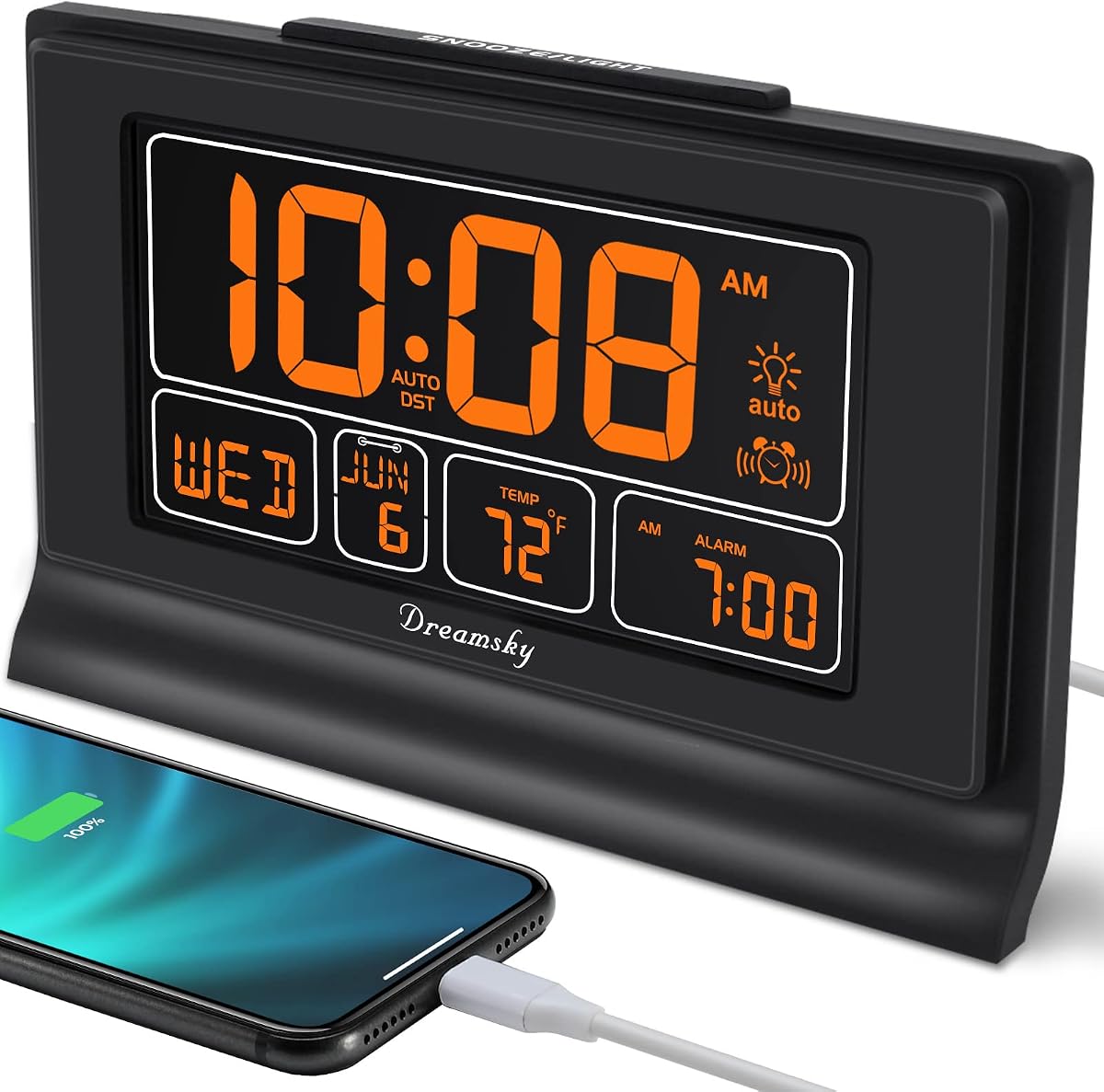
The DreamSky clock offers a 7.6-inch screen that clearly shows time date and temperature. It includes a battery backup to prevent resets during power cuts. The USB port allows convenient charging of devices next to the clock.
We may earn a commission when you buy through this link, at no additional cost to you.
Its backlight has four levels of brightness to suit day or night needs. The auto dimmer dims at 9 pm and brightens at 7 am automatically. This feature saves manual adjustments and ensures comfort while sleeping or reading.
The alarm volume has four levels but may be too loud for sensitive sleepers. Some users find setting the initial time requires patience. These issues are minor given the reliable battery backup and extra USB convenience.
This clock is great for bedrooms where temperature monitoring is also useful. The battery backup ensures you never lose time during storms. It balances utility with ease of use for general household needs.
View indoor temperature at a glance without needing a separate thermometer.
Settings are saved on power loss so you do not need to reset after outages.
We may earn a commission when you buy through this link, at no additional cost to you.
The Nimukol dementia clock features a 7-inch display with voice time support for clarity. It helps elderly people with memory loss or dementia manage daily tasks better. The voice timing function is a key aid for weak vision.
We may earn a commission when you buy through this link, at no additional cost to you.
It displays the week month and date in large bold letters without abbreviations. The auto dimming adjusts brightness at 7 am and pm to protect eyes. The interface is simple so even seniors can operate it easily.
The unit does not have a battery backup so power loss resets settings. Customization options are limited compared to premium models. However for essential reminders and voice features it delivers solid performance.
Pick this clock for straightforward alerts and voice time help. It is ideal for those who need basic reminders for medication or appointments. The simple setup makes it user-friendly for less tech-savvy users.
The voice function speaks the time to help those with vision difficulties.
One click setup ensures the clock is ready to use without confusion.
We may earn a commission when you buy through this link, at no additional cost to you.
The American Lifetime dementia clock is crafted with quality materials for daily use. It features a large display that spells out time and date in clear letters. The auto-dimming feature adjusts to ambient light automatically for comfort.
We may earn a commission when you buy through this link, at no additional cost to you.
Custom alarms allow up to five daily reminders for meds or appointments. The device supports multiple languages for diverse households. U.S. based customer support adds peace of mind for buyers seeking assistance.
The clock relies on a power adapter and lacks a battery backup option. The display modes are fewer than some larger models. These factors do not diminish its reliability as a home timekeeping tool.
Choose this clock for dependable performance and local support. The customizable alarms help manage daily routines effectively. It is a practical choice for those who value straightforward design.
Set up to five daily alarms to track important tasks reliably.
Access U.S. based customer support for help with setup or issues.
We may earn a commission when you buy through this link, at no additional cost to you.
The DIWAKREM clock uses an IPS display with a 175 viewing angle for visibility. It shows time date and calendar info with cartoon pictures for reminders. The time memory function keeps time after restarts so setup is easier.
We may earn a commission when you buy through this link, at no additional cost to you.
You can set 12 alarms and reminders for tasks like gardening or meds. The screen dims automatically or manually to protect eyes. Eight languages are supported for broader accessibility across different households.
The device is not battery operated and needs a power source. Initial setup may require some effort to configure alarms correctly. These limitations are manageable given the rich visual reminders and alarms.
This model is excellent for those who benefit from visual cues. The cartoon pictures make reminders engaging for seniors. It balances functional alerts with a friendly design approach.
Cartoon pictures appear to signal reminders for daily tasks.
The IPS screen ensures clear visibility from almost any angle.
We may earn a commission when you buy through this link, at no additional cost to you.
The KOSUMOSU clock offers a modern look with a sleek mirror style. It displays date day of week and temperature along with dual alarms. The 6.7-inch LED display is bright and easy to read.
We may earn a commission when you buy through this link, at no additional cost to you.
Auto/manual dimming lets users choose brightness levels easily. The snooze function has a fixed five minute duration for convenience. Separate alarms can be set for workdays weekends and every day.
A button battery only preserves settings during outages and is not for power. The snooze duration is not customizable which some may find limiting. However the dual alarms and temperature add practical value.
Select this clock for style and modern features. It suits bedrooms where temperature and multiple alarms are useful. The design blends well with contemporary decor settings.
Set two alarm times to manage different schedules in one device.
View indoor temperature alongside time for weather awareness.
We may earn a commission when you buy through this link, at no additional cost to you.
The Peakeep clock features an oversized digital screen for excellent visibility. It displays time date and day of week in one place. The USB charger port allows charging phones next to the clock.
We may earn a commission when you buy through this link, at no additional cost to you.
You can choose from five volume levels for the alarm to suit hearing needs. The dimmable display helps avoid eye strain at night. Automatic DST adjustment keeps the clock accurate through the seasons.
There is no battery backup so power loss resets the time. The features are basic compared to models with voice or reminders. This simplicity works well for general household timekeeping purposes.
This clock is ideal for straightforward time and date needs. The USB port adds convenience for bedside charging. It is a practical option for those seeking essential functions.
Five volume settings ensure the alarm is heard without being too loud.
Charge your phone while sleeping to start the day with a full battery.
We may earn a commission when you buy through this link, at no additional cost to you.
The DreamSky alarm clock sets itself to the right time when plugged in. It includes a battery backup to preserve settings during power outages. The ascending beeping alarm wakes you up naturally without harsh sound.
We may earn a commission when you buy through this link, at no additional cost to you.
You can select from seven USA time zones easily. A USB port allows charging devices at night. The snooze button resets the alarm after eight minutes of extra rest.
The 5-inch screen is smaller than larger digital clocks available. Some may prefer more customization options for alarms. However the auto-set feature makes setup quick and straightforward.
Choose this clock for hassle-free time management. The battery backup and auto-set are convenient for busy households. It is a reliable companion for daily wake-up needs.
Plug in the clock to set the right time immediately.
The alarm sound increases gradually to wake you naturally.
We may earn a commission when you buy through this link, at no additional cost to you.
Choosing the right digital clock requires evaluating several features to match your household needs. This guide outlines the key factors to consider before buying.
A large display ensures you can read time and dates from across the room. Look for screens with high contrast and bold fonts that avoid abbreviations. Clear visual cues help everyone understand the time without guessing.
Prioritize models with at least a 7-inch screen for best visibility.
Models that spell out full day names and dates are easier to interpret. Avoid clocks that use short codes like Mon or Tue. Full names reduce confusion especially for seniors or those with memory challenges.
Select clocks that show MORNING or AFTERNOON with icons for clarity.
Consider how many alarms and reminders you need daily. Some clocks offer up to 20 alarms for medication or events. More reminders allow better management of complex daily routines and schedules.
Ensure the clock supports customizable reminders for daily tasks.
Voice announcement functions are helpful for those with weak vision. A button that speaks the time aloud provides an audio check. Some models also offer volume control to suit hearing preferences.
Look for 9 language support if household members speak different languages.
Auto-dimming adjusts screen brightness based on ambient light. This feature prevents eye strain at night and ensures readability during day. Manual dimming allows you to choose brightness levels freely.
Choose clocks with 4 to 10 dimming levels for flexibility.
Most models require a power adapter for continuous operation. A battery backup ensures settings are saved during power outages. This feature avoids resetting time after storms or disruptions.
Verify whether batteries are included or must be purchased separately.
Automatic DST adjustment keeps your clock accurate across seasons. Some clocks offer multiple time zone settings for travel or remote areas. Manual DST buttons are an alternative for easy correction.
Ensure the clock supports automatic adjustments to save time.
Consider the physical size and shape for your intended location. A clock that fits your bedside or wall requires less clutter. Sleek designs blend well with home decor while remaining functional.
Measure your space before buying to ensure proper fit.
Start by plugging the clock into a power outlet and connecting the adapter. Use the menu keys to set time and date manually or via auto-set. Follow the manual to configure your first alarm or reminder.
Adjust the brightness settings to match your room lighting preferences. Use the auto-dimming option for automatic adjustments at night. Press the OK or voice button to hear time announcements if available.
Clean the screen with a soft dry cloth to avoid scratches. Keep the unit away from moisture and direct sunlight. Check battery levels periodically if your model includes backup batteries.
Most digital clocks require a power adapter for continuous operation. Some models include battery backups to save settings during outages. Always check the product description for power requirements.
Yes many models allow multiple alarms ranging from 5 to 20. You can set reminders for medications appointments or other events. Customization options vary by brand so review features carefully.
Several options include voice announcement functions for weak vision. Press a button to hear the time spoken aloud in your language. This feature adds accessibility for those with visual impairments.
Use the menu or settings button to switch between 12 and 24 hour formats. Some models let you choose date formats like DAY-MONTH-YEAR. Follow the manual for exact steps for your clock.
Auto-dimming adjusts brightness to match ambient light in the room. This protects eyes from glare at night and ensures readability during day. It reduces the need for manual adjustments regularly.
Some models include an indoor temperature display for added utility. This feature allows you to monitor room conditions without extra tools. Check specs to confirm if temperature is included in your chosen clock.
Yes many clocks are designed specifically with seniors in mind. Large screens and voice announcements help those with memory loss or vision issues. They serve as helpful tools for daily routines and reminders.
These ten models offer a range of features from basic displays to advanced reminders. The SSYA clock leads for its ultra-large screen and clarity. Budget buyers may prefer the Mitoart model with voice support.
Prioritize display size and alarm capacity based on your daily needs. Voice features and auto-dimming enhance accessibility and comfort significantly. Choose a clock that fits your space and setup ability.
Prices and availability change frequently so check current listings before buying. Verify power requirements and battery backup options match your needs. The right clock can simplify your daily life and routines.