
8mm & Super 8 Film to Digital Converter
3.7Editor score
32GB SD card included
2.4 inch display screen
No computer required for operation
Preserving family history often means digitizing old film reels. A quality digital converter transforms analog footage into modern formats for easy sharing and long term storage without specialized equipment.
We compared ten top rated converters based on ease of use, output quality, screen size, and compatibility with various reel sizes. Our analysis highlights features that matter most for home archivists.
Each selection includes detailed pros and cons to help you decide. Note that product availability and pricing change frequently, so verify current offers before purchasing your chosen device today.
3.7Editor score

4.1Editor score

As an Amazon Associate we earn from qualifying purchases.
The following table provides a side by side overview of all ten converters evaluated in this guide. Compare key specifications to find the model that best fits your digitization needs.



This KODAK digitizer stands out as the top choice for preserving home films with its robust feature set. It converts 8mm and Super 8 reels into 1080p MP4 files using an 8MP sensor for clear results.
We may earn a commission when you buy through this link, at no additional cost to you.
The standout feature is the 5 inch LCD touchscreen which allows users to zoom, align frames, and adjust settings like exposure and sharpness directly on the device. This eliminates the need for external monitors or editing software.
While the lack of audio capture is a limitation for sound films, the visual fidelity remains strong. The included kit provides all necessary adapters and cables to get started immediately without extra purchases.
Ideal for families wanting a standalone solution, this converter simplifies the archival process significantly. We recommend it for anyone prioritizing ease of use and screen size over audio preservation features.
The large 5 inch display provides a clear view of the film as it converts, making it easy to correct framing issues in real time.
Compatible with reels from 3 to 9 inches, this device handles various collection sizes without requiring multiple tools.
We may earn a commission when you buy through this link, at no additional cost to you.
This converter offers a cost effective entry point for digitizing old films. It captures frame by frame at 20 fps to create smooth MP4 videos compatible with most modern devices and operating systems.
We may earn a commission when you buy through this link, at no additional cost to you.
The inclusion of a 32GB SD card is a major value add, allowing immediate storage without additional costs. Users can review footage on the built in 2.4 inch screen or connect to a TV for larger viewing.
While the screen is smaller than premium models, it serves the purpose of quick checks effectively. The main limitation is the absence of audio, which is common in this price tier.
Best for casual users with limited budgets, this device delivers solid visual conversion. It is a practical choice for those who want to preserve memories without spending heavily on advanced features.
With the SD card already included, you can start converting films immediately upon unboxing without visiting a store for extra accessories.
MP4 files work seamlessly across Windows, Mac, and Linux, ensuring your digitized footage is accessible on any computer.
We may earn a commission when you buy through this link, at no additional cost to you.
This premium scanner is designed for those seeking high fidelity digitization. It brings old 8mm and Super 8 films into the modern era with clear MP4 files suitable for long term archiving.
We may earn a commission when you buy through this link, at no additional cost to you.
The built in 2.4 inch LCD allows for immediate review of converted content. Users can watch videos directly on the device or use the included TV cable to share memories on a larger screen.
Though it supports reels up to 5 inches which is smaller than some competitors, it excels in simplicity and output quality. The lack of computer requirement makes it accessible for non tech savvy users.
We recommend this model for users prioritizing image clarity and ease of use over massive reel capacity. It is an elegant solution for preserving cherished home movies with minimal effort.
The advanced sensor technology ensures that details in your old films are captured with high clarity and color accuracy.
Connect directly to a TV or monitor to view scanned videos instantly with family and friends without needing additional software.
We may earn a commission when you buy through this link, at no additional cost to you.
The Magnasonic scanner focuses on ease of use with a vibrant screen that makes reviewing clips enjoyable. It automatically converts 3, 5, and 7 inch reels into digital MP4 files with minimal manual intervention.
We may earn a commission when you buy through this link, at no additional cost to you.
Users can adjust brightness, sharpness, and framing directly on the device to improve image quality. This flexibility helps compensate for aging film conditions without requiring external editing tools.
While it requires purchasing an SD card separately, the process remains straightforward. The included RCA cable ensures you can connect to older TVs for a nostalgic viewing experience.
This device is ideal for beginners who want a no fuss experience. Its vibrant screen and simple controls make it a reliable choice for preserving family history.
Fine tune brightness and sharpness directly on the scanner to ensure your converted video looks its best before saving.
Operate entirely without a computer, making it perfect for users who prefer a dedicated hardware solution.
We may earn a commission when you buy through this link, at no additional cost to you.
This scanner boasts a 5 Megapixel sensor that captures exceptional clarity and color accuracy for HD conversion. It offers a full color LCD screen with touch buttons for intuitive operation.
We may earn a commission when you buy through this link, at no additional cost to you.
The package includes a 32GB SD card and all necessary cables like USB and RCA for TV playback. This completeness makes it a convenient option for immediate use.
With a 1 year warranty and technical support, users gain peace of mind. The ability to handle 9 inch reels means you can digitize larger collections without extra equipment.
It is a well rounded device for families looking for a complete kit. While audio is not supported, the visual quality and included accessories make it a strong contender.
The inclusion of an SD card, power adapter, and TV cable ensures you have everything needed to start digitizing right away.
A 1 year warranty and 24 hour support provide assurance for your investment in preserving your home movies.
We may earn a commission when you buy through this link, at no additional cost to you.
The MovieMaker Pro offers a fully automated digitization process that handles conversion without complex steps. It supports 3, 5, and 9 inch reels with 1080p resolution and a 20 fps frame rate.
We may earn a commission when you buy through this link, at no additional cost to you.
Like other models, it includes an SD card and has a built in screen for viewing. Files can also be transferred to computers or TVs for broader sharing capabilities.
While user ratings are lower, the functional capabilities remain robust for basic needs. The automation reduces the risk of user error during the transfer process.
We suggest this for users who want a plug and play experience. Its comprehensive reel support makes it suitable for varied film collections without extra adapters.
The device handles the conversion process automatically, allowing you to focus on loading the film and waiting for results.
Compatible with Windows, Mac, and Linux systems ensuring your files are accessible regardless of your operating system.
We may earn a commission when you buy through this link, at no additional cost to you.
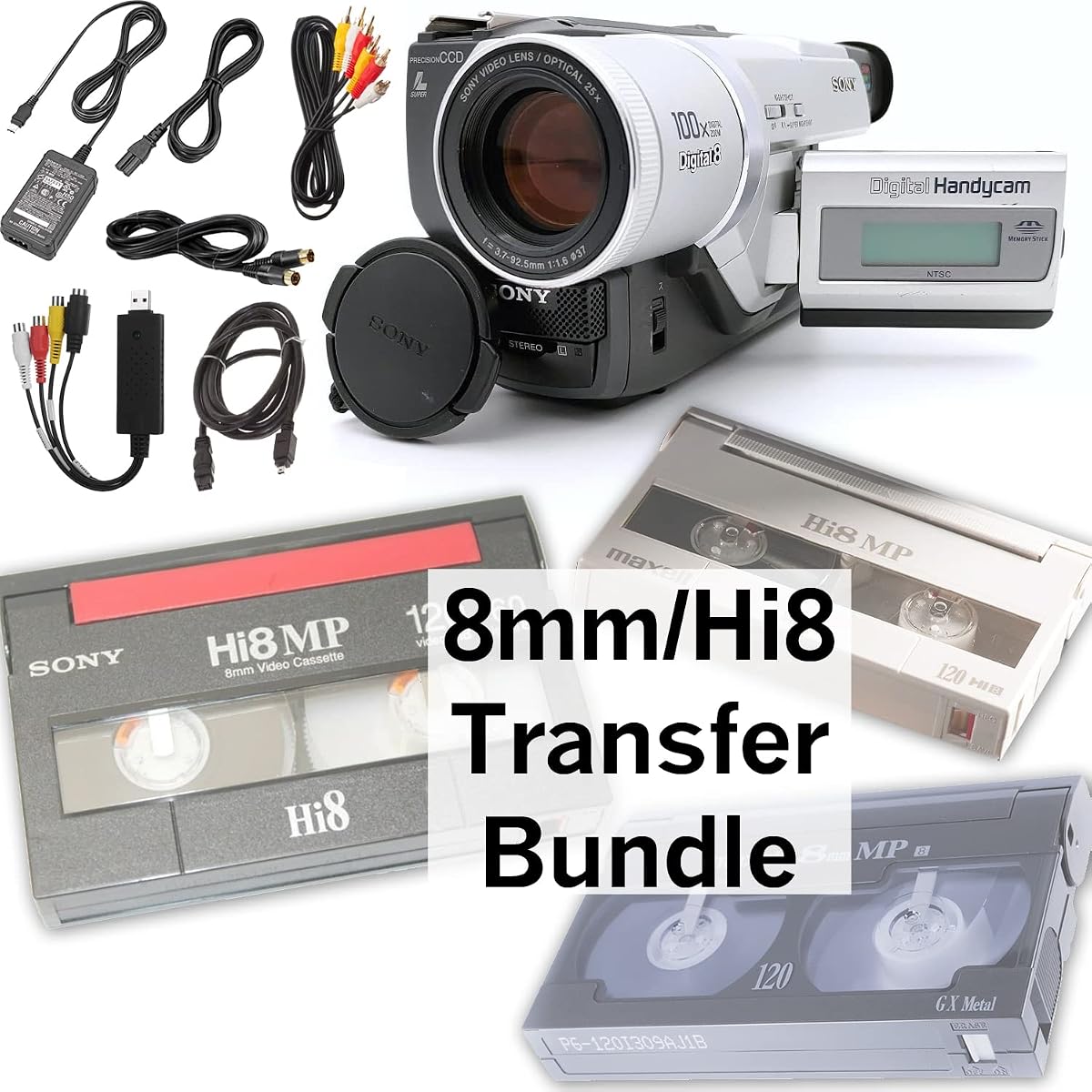
This bundle is distinct as it targets 8mm, Hi8, and Digital8 tapes rather than reel films. It includes a camcorder for playback and a USB capture device to transfer footage to a computer.
We may earn a commission when you buy through this link, at no additional cost to you.
Users can save files digitally or burn them to DVDs for physical copies. The AV cables allow for direct TV playback which adds versatility to the viewing options.
Since it focuses on tapes, it is a specialized tool compared to reel converters. The guarantee ensures working functionality which is reassuring for vintage electronics.
It is the best choice for those with tape collections. If you have mixed media, you might need a reel converter as well.
Includes a camcorder to ensure your tapes can be played back even if you no longer own a working tape deck.
Transfer files to a computer for digital storage or burn them to DVD to keep a physical copy of your memories.
We may earn a commission when you buy through this link, at no additional cost to you.
Similar to the previous bundle, this version includes a blank tape which can be useful for transferring content without erasing originals. It supports Hi8, Digital8, and standard 8mm tapes effectively.
We may earn a commission when you buy through this link, at no additional cost to you.
The bundle provides all necessary cables for transfer and viewing. The included USB capture device simplifies the connection to modern computers for digital archiving.
As it targets tapes, it complements reel scanners well. The blank tape feature is a thoughtful addition that saves a trip to the store for supplies.
We recommend this specifically for tape users. It ensures you have the means to play and record without needing additional gear beyond what is in the box.
The included blank tape allows you to transfer content from old tapes to a fresh copy before digitizing to protect the original.
AV cables included mean you can hook up directly to a TV or monitor for immediate playback without extra accessories.
We may earn a commission when you buy through this link, at no additional cost to you.
This scanner stands out by offering JPEG image conversion alongside MP4 video. It brings 8mm and Super 8 films into the present for easy digital sharing and archiving.
We may earn a commission when you buy through this link, at no additional cost to you.
The 2.4 inch LCD screen makes it simple to check your results. You can send footage directly to an SD card without needing drivers or a computer connection.
The ability to create JPEG images is unique for frame by frame viewing. This can be useful if you want static shots from your videos for prints or slideshows.
Ideal for those wanting still images as well as video, this device offers versatility. It is a strong option for detailed preservation of specific frames.
Convert film to JPEG images for easy viewing and printing without needing video software to extract frames.
Send footage directly to an SD card without installing any drivers, ensuring quick access to your files.
We may earn a commission when you buy through this link, at no additional cost to you.
This device comes with a comprehensive set of accessories including USB, power, and TV cables. It promises fast and stable digitization of your old films for lifetime viewing.
We may earn a commission when you buy through this link, at no additional cost to you.
The built in display allows you to check content immediately on the device. Connect to a monitor with the RCA cable for larger viewing at home or office.
While it focuses on reels up to 5 inches, the included accessories mean you do not need to buy extra parts. This completeness simplifies the setup process significantly.
We recommend this for users who want a complete package ready out of the box. It balances portability with functionality for effective home archiving.
Includes USB, power adapter, and RCA TV cable so you can connect to various devices immediately.
Designed for fast and stable digitization ensuring consistent quality across your converted film reels.
We may earn a commission when you buy through this link, at no additional cost to you.
Choosing the right converter requires understanding key features like screen size, reel compatibility, and output formats to suit your needs.
A larger screen makes it easier to frame your film and check for errors during conversion. Look for at least a 2.4 inch LCD for comfortable viewing without a monitor.
Prioritize devices with larger screens if you want to review footage on the go without connecting to another device.
Converters vary in the maximum reel size they support, typically from 3 to 9 inches. Ensure the device matches your collection size to avoid needing adapters.
Check the max reel diameter in specs to ensure your collection fits without additional gear purchases.
Most devices output MP4 video which is universally compatible with modern players. Some may also offer JPEG still frames for prints or slideshows.
Select MP4 output for video preservation as it works on most computers and phones easily.
Many basic converters do not support audio capture for sound films. Verify audio support if preserving sound is a priority for your project.
Be aware that audio is often excluded in budget models so check before buying if sound matters.
Some kits include SD cards, cables, and adapters while others require separate purchases. A complete set saves time and ensures you can start immediately.
Look for packages with SD cards and cables to avoid hidden costs after purchase.
Most standalone units do not need a computer to operate. However transferring files may require USB connections to PCs or laptops for editing.
Choose standalone units if you want to avoid using a computer for the digitization process itself.
Touchscreens provide an intuitive interface for adjusting settings like exposure and framing. Manual buttons are simpler but may be less precise for adjustments.
Select touch controls if you want easier access to settings on the device screen.
Check for warranty coverage and technical support availability. Reliable support ensures you can get help if the device malfunctions or you face issues.
Choose brands offering at least a 1 year warranty for peace of mind regarding your purchase.
Start by loading your film reel onto the universal supply reel using the provided adapters. Ensure the film is threaded correctly through the guides to prevent jams.
Insert a formatted SD card into the slot and power on the device. Select the film type on the screen and press record to begin the frame by frame conversion process.
After completion, transfer files via USB to your computer for editing or play directly on the device screen. Store the unit in a dry place to keep sensors clean for future use.
Most models do not capture audio and only output video files. You would need to add audio later if sound is a priority.
No, standalone converters work without a computer. However you may need one to transfer files for editing or viewing on larger screens.
1080p is the standard high definition resolution offered by most converters. It provides clear visuals suitable for modern displays and sharing.
Yes, many models support up to 9 inch reels. Always check the specific specs to confirm the maximum size supported by the device.
The card may come pre formatted but ensure it is in FAT32 format for compatibility if you use your own card.
Use the included USB cable to connect the converter to your PC. The files will appear as a drive so you can copy them over.
Yes, most devices include RCA or HDMI cables for TV connection. You can view footage on a larger screen for sharing with family.
Yes, they are designed for simple operation with minimal setup. Follow the on screen prompts to convert your films without technical knowledge.
The KODAK REELS and budget options offer excellent paths for digitizing home films. They balance ease of use with quality results for archiving memories.
Prioritize reel compatibility and screen size to ensure a smooth experience. Consider if audio is needed before choosing a basic model.
Prices and availability change frequently so check current offers before purchasing. Use this guide to find the converter that matches your needs best.