
NZXT H9 Flow RGB+ – Dual-Chamber ATX PC Case – Black
4.7Editor score
Dual-chamber separated design
Ten-fan cooling capacity
Panoramic wraparound glass view
Explore our expert comparison of the top dual system PC cases for October 2026. We review features, airflow, and design to help you choose the right chassis.
Dual system PC cases offer unique flexibility for enthusiasts who need to run two separate computers in one chassis. These specialized enclosures support multiple motherboards and power supplies while maintaining efficient cooling and clean cable management for complex builds.
We evaluated ten leading models based on airflow performance, modularity, and support for high-end components. Our analysis focuses on thermal efficiency, build quality, and the ability to house distinct systems without compromising on aesthetics or functionality.
Each pick highlights specific strengths like dual chamber designs or custom liquid cooling support. Prices and availability change frequently so check current listings before purchasing to ensure you get the best deal on your ideal workstation solution today.
4.7Editor score
4.8Editor score

5.0Editor score
This side-by-side comparison highlights the key specifications and unique features of each dual system PC case model to help you decide which chassis fits your specific multi-build needs and budget requirements.


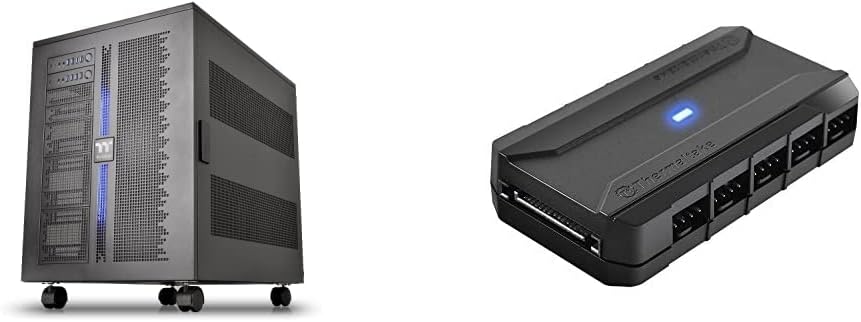
The Thermaltake Core W200 stands out as the premier choice for users needing two separate systems in one chassis. Its unique back-to-back configuration allows for complete isolation while maintaining shared cable management and cooling resources.
We may earn a commission when you buy through this link, at no additional cost to you.
This case features a fully modular design that lets you dismantle the chassis completely for easier cleaning or reconfiguration. The included Commander FP hub manages up to ten PWM fans ensuring optimal thermal performance for demanding workloads.
Trade-offs include the massive physical size which limits desk placement options. The complexity of managing two power supplies and motherboards also requires careful planning during the build process.
Enthusiasts needing maximum flexibility should choose this bundle for its robust build quality and extensive cooling options. It remains the top recommendation for dual system builds requiring heavy customization.
The Core W200 supports two motherboards power supplies and VGA cards in a back-to-back setup.
Includes a hub that powers up to ten PWM fans simultaneously expanding cooling capability significantly.
We may earn a commission when you buy through this link, at no additional cost to you.
The Cooler Master HAF II 500 focuses on high airflow through oversized fans including two 220mm intake units. This design maximizes cooling efficiency for single system builds requiring maximum thermal performance.
We may earn a commission when you buy through this link, at no additional cost to you.
Its low resistance ventilation ensures air moves quickly through the chassis. The MasterRail system provides flexible mounting options for fans and radiators supporting diverse cooling configurations.
While excellent for single GPUs its dual system capabilities are minimal compared to specialized cases. The GPU holder supports dual cards but lacks separate system isolation features.
Builders prioritizing raw airflow and GPU cooling should consider this case. It delivers strong performance for standard ATX builds with powerful graphics hardware.
Features two 220mm front intake fans and one 180mm rear exhaust for maximum airflow.
Optimizes routing space and creates room for oversized rear exhaust cooling.
We may earn a commission when you buy through this link, at no additional cost to you.
The NZXT H9 Flow RGB+ offers excellent value with its dual-chamber design separating components from power and storage. This layout improves thermal performance while enabling cleaner cable routing.
We may earn a commission when you buy through this link, at no additional cost to you.
Its perforated panels and angled fans ensure efficient cooling for high-performance builds. The ten-fan capacity supports extensive custom liquid cooling configurations including 420mm radiators.
Trade-offs include limited dual-system independence as it uses one motherboard. The bundled RGB fans are good but may not match premium options for color consistency.
Budget-conscious users seeking superior airflow and modern aesthetics should choose this model. It balances thermal efficiency and visual appeal effectively.
Separates main components from the PSU and drives for improved thermal performance and cable management.
Compatible with rear-connecting motherboards for a cable-free look.
We may earn a commission when you buy through this link, at no additional cost to you.
The Antec Flux Pro emphasizes premium textures combining metal glass and wood for a unique build experience. It supports extensive fan layouts including 420mm plus 360mm radiators for high-end cooling.
We may earn a commission when you buy through this link, at no additional cost to you.
Its multi-directional vent design maximizes airflow with six pre-installed PWM fans. The iShift PSU mount offers flexibility for cable routing and component clearance.
Lacking true dual-system independence this model suits single high-end builds. The dual temperature display provides useful monitoring without extra software.
Users wanting aesthetic appeal and thermal capacity should choose this case. It excels for single system builds needing extensive cooling.
Supports up to 12 fans simultaneously with flexible removable cooling brackets.
90-degree mount and CPU/GPU dual temperature display enhance build flexibility.
We may earn a commission when you buy through this link, at no additional cost to you.
The ASUS TUF GT502 divides internals into main and rear chambers for cleaner builds. It supports independent cooling zones for CPU and GPU improving thermal efficiency.
We may earn a commission when you buy through this link, at no additional cost to you.
Its versatile GPU mounting options include a vertical stand and a support bracket to prevent sagging. Tool-free panels allow quick access for upgrades.
While designed for single systems its dual-chamber layout offers partial isolation. The high-speed connectivity includes USB-C and RGB buttons for convenience.
Gamers and creators needing reliable airflow and solid build quality should choose this case. It balances durability and aesthetic appeal well.
Internals are divided into two chambers allowing independent cooling zones for CPU and GPU.
Supports vertical mounting or standard slot with a bundled support bracket.
We may earn a commission when you buy through this link, at no additional cost to you.
The ASUS ROG Strix Helios II targets showcase builds with its diamond-grille design and dual tempered glass. It supports EATX motherboards and graphics cards up to 450mm for maximum performance.
We may earn a commission when you buy through this link, at no additional cost to you.
Its pre-installed performance fans deliver ultimate airflow while the multifunction cover keeps cables tidy. The advanced I/O includes USB-C and PWM control for convenience.
Trade-offs include the single system focus and premium pricing. The dual glass adds weight and requires careful handling during installation.
Users seeking top-tier aesthetics and thermal performance should choose this premium case. It remains a standout for high-end enthusiast builds.
The Helios II is made for showcase builds with aluminum front panel featuring diamond-grille design.
Features two USB 20Gbps Type-C ports four USB-A 3.0 ports and ARGB-lighting control.
We may earn a commission when you buy through this link, at no additional cost to you.
The HAVN HS 420 uses a hybrid dual-chamber design to direct cool air centrally onto the GPU. It supports eleven 140mm fans and three 420mm radiators for extreme cooling capacity.
We may earn a commission when you buy through this link, at no additional cost to you.
Its heat-formed glass panel minimizes distortion while the SimpliCable system routes cables cleanly. Custom VESA mounts allow portable display integration.
While offering excellent thermal performance it lacks dual motherboard support. The glass design prioritizes aesthetics over strict dual-system functionality.
Users prioritizing GPU cooling and visual quality should choose this model. It delivers exceptional airflow and design integration.
Dual-chamber design with balanced airflow directs cool air from the bottom onto the GPU.
Uniquely user-friendly SimpliCable routing system and fan hub for pristine appearance.
We may earn a commission when you buy through this link, at no additional cost to you.
The NZXT H6 RGB+ features a dedicated secondary chamber isolating power and cables for cleaner builds. Its seamless curved glass provides a distortion-free view of components.
We may earn a commission when you buy through this link, at no additional cost to you.
High-airflow mesh across top and front ensures optimal cooling. The adjustable anti-sag bracket supports heavy GPUs without additional brackets.
Trade-offs include no bundled fans and limited expandability. The compact size suits smaller setups but restricts radiator options.
Users wanting a clean aesthetic in smaller spaces should choose this case. It delivers reliable cooling with modern design.
A dedicated secondary chamber isolates power and cables from your main build.
Single-piece tempered glass bent to a tight radius for minimal distortion.
We may earn a commission when you buy through this link, at no additional cost to you.
The Thermaltake Capo X enables parallel operation of two independent mATX systems in one chassis. This cross-platform architecture maximizes desk space efficiency for complex workloads.
We may earn a commission when you buy through this link, at no additional cost to you.
Its configurable cooling supports thirteen 120mm fans and large radiators while hidden connector support maintains a clean aesthetic. The detachable GPU braces provide stable support.
Trade-offs include higher cost and complex assembly requirements. Hidden connector motherboards are required for full cable concealment.
Users needing maximum parallel processing power should choose this case. It remains the top choice for multi-system productivity.
Delivering the ability for parallel operation from a single chassis the CAPO X can house two independent mATX systems.
Extra cutouts allow support for mATX hidden connector motherboards to hide cables.
We may earn a commission when you buy through this link, at no additional cost to you.
The Thermaltake View 380 TG offers a pillarless front and side glass design for a clear view. It supports hidden-connector motherboards for cable-free aesthetics and includes four ARGB fans.
We may earn a commission when you buy through this link, at no additional cost to you.
Its dual chamber layout separates components for cleaner routing. The included fans simplify initial setup and lighting customization.
Trade-offs include limited dual-system support and single motherboard focus. The glass design requires careful handling to avoid damage.
Users prioritizing visual appeal and hidden-connector compatibility should choose this model. It delivers strong aesthetics and cooling.
Dual chamber case with pillarless front and side tempered glass panel.
Compatible with hidden-connector motherboards for clean cable management.
We may earn a commission when you buy through this link, at no additional cost to you.
Selecting the right dual system PC case requires understanding your specific needs for component isolation cooling and aesthetics.
Consider whether you need full dual motherboard support or just dual chambers for component separation. True dual-system cases allow parallel operation while chamber cases offer better airflow for single setups.
Verify motherboard form factor support to ensure compatibility with your planned hardware.
Look for cases supporting multiple fans and large radiators to maintain optimal temperatures for both systems. Pre-installed PWM fans simplify setup and improve thermal performance.
Check for dual-channel or multi-path airflow designs that prevent heat overlap between components.
Dual systems generate more cables so robust management tools like tie-down points and hidden routing are essential. Modular chassis designs allow easier access for routing complex connections.
Prioritize cases with ample rear space for organizing power and data cables.
Ensure the case supports multiple graphics cards with adequate clearance and dedicated braces. Dual-system builds often require specialized GPU support to prevent sagging.
Check radiator and PSU compatibility to match your cooling and power requirements.
Select cases with sturdy frames and high-quality glass panels for durability and aesthetics. Metal mesh designs often provide better airflow than solid panels.
Consider modular designs that allow easy disassembly for cleaning or upgrades.
Hidden connector motherboards reduce cable clutter significantly so verify chassis support for these technologies. This feature maintains a clean aesthetic without compromising functionality.
Ensure cutouts are large enough for hidden cable routing.
Dual systems may need independent I/O ports so check for multiple USB ports and audio jacks. Front panel connectivity options improve access for peripherals.
Consider additional USB-C ports for modern device support.
Choose glass or mesh panels based on your preference for visibility versus airflow. RGB hubs simplify lighting synchronization across fans and components.
Match case design to your workspace decor for cohesive visual appeal.
Assemble each system separately before installing them in the chassis to ensure all connections function correctly. Verify motherboard and PSU compatibility before final assembly.
Use cable management tools to separate power and data wires for both systems. This reduces heat overlap and simplifies future troubleshooting.
Regularly clean dust filters and fans to maintain optimal airflow. Monitor component temperatures using software tools to prevent overheating issues.
A dual system PC case supports two independent motherboards and power supplies in one chassis. This configuration allows parallel operation for multitasking or dedicated tasks without separate physical enclosures.
Some cases support standard ATX but many use mATX or E-ATX compatibility for space efficiency. Check the specifications before purchasing to ensure motherboard compatibility.
Dual-chamber cases separate power supplies from main components reducing heat overlap. This improves thermal performance and makes cable routing cleaner for single or multi-component builds.
Most high-end models support multiple radiators including 420mm units. Verify radiator clearance and fan mounting options before selecting a liquid cooling solution.
Use separate cable channels and dedicated tie-down points for each system. Modular chassis allow easier access for routing power and data connections cleanly.
Many modern cases include cutouts for hidden-connector motherboards reducing visible cables. Confirm compatibility with your motherboard model before purchase.
These cases require significant depth and width to accommodate multiple components. Measure your workspace carefully to ensure adequate clearance for the chassis.
Some models come with pre-installed PWM fans while others require separate purchases. Check product details to determine included cooling components before ordering.
Our top picks include the Thermaltake Core W200 for versatility and the NZXT H9 Flow RGB+ for budget-friendly thermal performance. The Thermaltake Capo X remains the best option for true parallel operation.
Prioritize airflow capacity and motherboard compatibility when selecting a chassis for multi-system builds. Modularity ensures easier maintenance and future upgrades.
Prices and availability change frequently so verify current listings before purchasing. Consider your specific thermal and component needs to choose the most suitable option.