
MEGATEK Region-Free DVD Player
4.4Editor score
1080p HDMI Upscaling
Multi-Region DVD Playback
USB Port for Media
This guide compares the top DVD players for projectors, evaluating HDMI output, upscaling, and region support to help you choose the right model.
Finding the right DVD player for projectors can transform your home theater experience into a cinematic adventure. You need a device that connects seamlessly via HDMI, offers strong upscaling for standard discs, and handles various media formats without fuss.
We evaluated ten highly rated models based on connectivity, video quality, region compatibility, and ease of use. Each option was assessed for its ability to deliver clear images and reliable performance when paired with modern projection systems.
Every pick highlights unique strengths, from budget-friendly mini players to premium Blu-ray capable units. Please note that product availability and pricing can change frequently, so verify details before making your final purchase decision today.
4.4Editor score

4.3Editor score

4.4Editor score
Below is a side-by-side comparison of the top ten DVD players suitable for projector setups. This table helps you quickly identify key specifications like resolution support, connectivity options, and disc compatibility across all models.


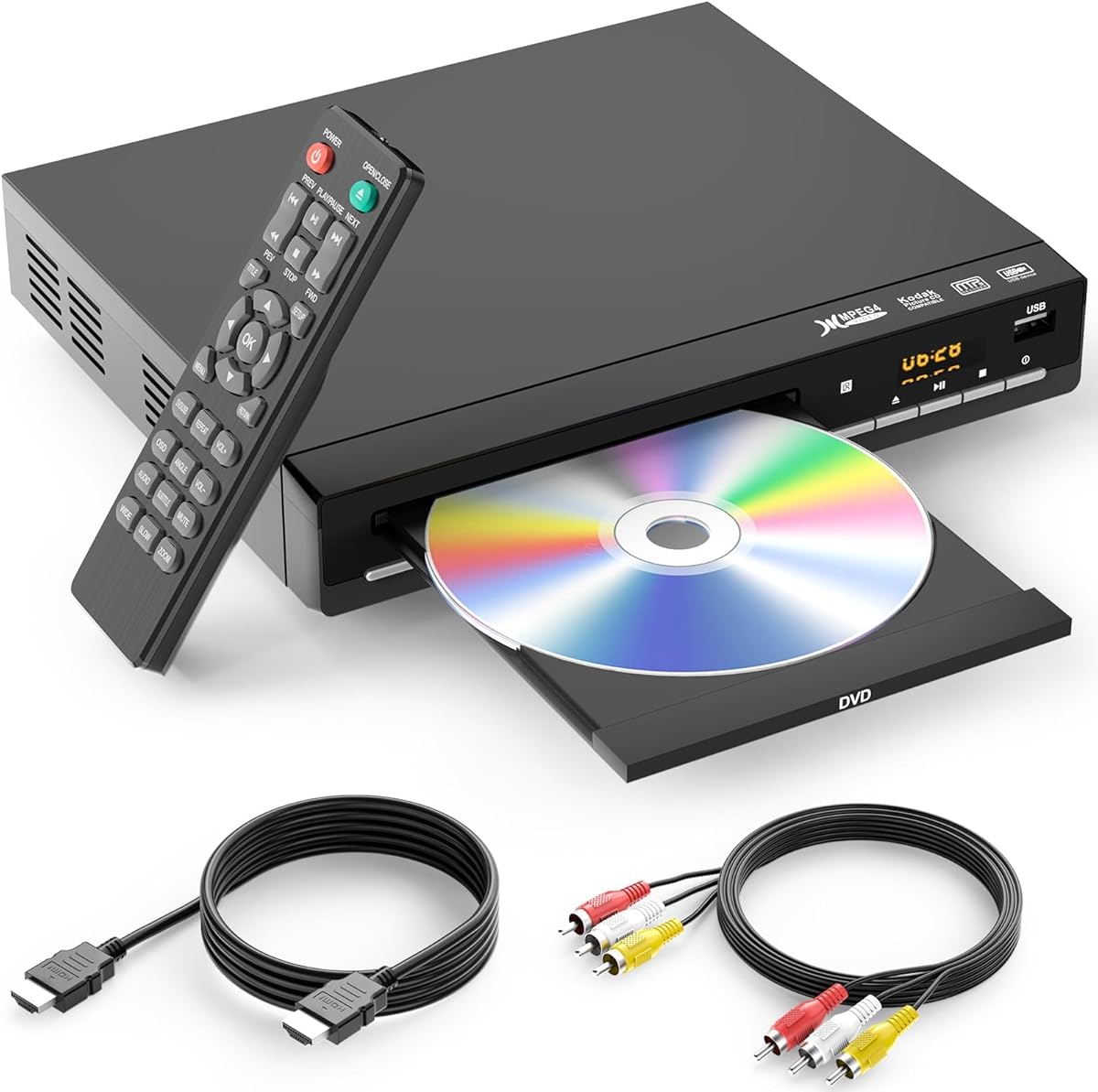


The MEGATEK Region-Free DVD Player stands out as the top choice for projector setups due to its reliable HDMI output and versatile media support. With a 4.4 rating from users, it consistently delivers clear 1080p upscaled images from standard discs.
We may earn a commission when you buy through this link, at no additional cost to you.
Its ability to play DVDs from all regions makes it ideal for collectors with imported media. The included HDMI cable ensures a straightforward connection to any projector, while the USB port allows direct playback of MP3 and JPEG files.
The metal housing provides better cooling and quieter operation compared to plastic models. However, it cannot play Blu-ray discs, which limits future-proofing for some users who might want higher resolution sources later.
If you need a dependable, easy-to-use player for your projector that handles standard DVDs and common digital files, this model is the best overall recommendation available today.
Standard DVDs are 480p, but projectors often display at 720p or 1080p. This player boosts the image quality so details look sharper on large screens.
You can play discs from any country without worrying about region codes blocking your movies, expanding your library significantly.
We may earn a commission when you buy through this link, at no additional cost to you.
The DESOBRY Mini DVD Player is perfect for tight spaces or portable projector setups. Despite its small size, it maintains strong performance with 1080P upscaling and region-free compatibility for global disc usage.
We may earn a commission when you buy through this link, at no additional cost to you.
Its drive core is upgraded for fast reading and handles scratched discs well with error correction. The breakpoint memory feature is useful for pausing and resuming movies without losing your place.
The main limitation is the USB storage limit of 32GB and no MP4 file support, which might restrict digital media use. However, for pure DVD playback, it remains highly effective.
For those seeking a cost-effective and space-saving solution for a projector setup, this mini player offers excellent value without compromising on essential video features.
Weighing only 1.1lbs, it is easy to pack for travel or move between rooms where you use a projector.
Older discs often have scratches, but the built-in error correction helps maintain smooth playback without skipping.
We may earn a commission when you buy through this link, at no additional cost to you.
The Sony BDP-S1700U offers a premium experience by playing both standard DVDs and Blu-ray discs. This versatility ensures you can enjoy high-definition content on your projector if you have a growing Blu-ray collection.
We may earn a commission when you buy through this link, at no additional cost to you.
Its super quick start mode boots up in less than a second, which is convenient when you want to start watching immediately. The user-friendly interface simplifies navigation and settings adjustments.
While it comes at a higher price point, the build quality and performance justify the cost for serious home theater enthusiasts. Note that Blu-ray discs are region A locked, so check your imports.
If you want a high-end player that supports the best possible disc quality for your projector, this Sony model delivers excellent video and audio performance.
Blu-ray discs provide much higher resolution than DVDs, making movies look significantly sharper on large projector screens.
Waiting for a player to load is frustrating, but this model loads almost instantly, saving you time and effort.
We may earn a commission when you buy through this link, at no additional cost to you.
The MAJORITY DVD Player 2026 model provides a straightforward solution for projector users who need basic functionality. It connects easily via HDMI and comes with both HDMI and RCA cables for flexibility.
We may earn a commission when you buy through this link, at no additional cost to you.
Users appreciate the quiet operation and fast loading speeds, which make watching movies more enjoyable. The region-free feature ensures you can play imported discs without issues.
While it does not reach the highest ratings of premium models, it offers solid performance for the price. The remote includes standard functions like zoom and slow motion.
If you want a reliable, ready-to-use player without extra complications, this model is a practical choice for most projector setups.
Everything needed to start watching is in the box, including HDMI and RCA cables, saving you extra trips to the store.
You can play video files from USB drives directly, expanding what you can watch beyond physical discs.
We may earn a commission when you buy through this link, at no additional cost to you.
This DVD player supports 1080P technology and can play a wide range of formats including CD, DVD, VCD, and JPEG. The imported movement ensures fast disc loading and reliable performance.
We may earn a commission when you buy through this link, at no additional cost to you.
Its USB port supports drives up to 128GB, which is generous compared to other budget models. The anti-shock function helps prevent interruptions during playback.
The main limitation is that it cannot play Blu-ray discs, so it is best for standard DVD collections. However, the multimedia support is excellent for the price.
If you need a versatile player that handles various media types and offers good USB support, this is a strong option to consider.
The 1080P technology ensures that images look crisp and clear when projected onto a large screen.
Playing files from a flash drive is easier than buying discs, and the large capacity limit helps store more content.
We may earn a commission when you buy through this link, at no additional cost to you.
The Sony DVPSR510H is known for its slim design and reliable performance. It features 1080P upscaling which is essential for making DVD content look good on projectors.
We may earn a commission when you buy through this link, at no additional cost to you.
Energy Star certification means it uses less power, which is a nice bonus for eco-conscious users. The multi-disc resume function allows you to remember playback positions.
While it is an older model compared to newer releases, the quality remains consistent. It does not support Blu-ray, but it works well for standard DVDs.
If you prefer a trusted brand with a compact footprint for your entertainment center, this Sony player is a solid and efficient choice.
Its compact profile means it fits easily on shelves or under cabinets without taking up much space.
Less power consumption reduces electricity costs and helps keep your setup running cooler.
We may earn a commission when you buy through this link, at no additional cost to you.
This mini DVD player is extremely portable, weighing only 0.62 lbs, making it ideal for travel setups with a portable projector. It includes a headphone jack for private listening.
We may earn a commission when you buy through this link, at no additional cost to you.
The built-in CD to USB copy feature is unique and useful for digitizing your music collection without a computer. Region free support allows for global disc usage.
USB video support is limited to MPEG encoding, so MP4 files will not play directly from the drive. However, for DVDs and CDs it performs well.
If you need a highly portable player for your setup, this model offers convenient features like headphone output and easy disc copying.
Plug in headphones to watch movies without disturbing others in the room, which is great for private viewing.
Its tiny size and low weight make it easy to throw in a bag when moving between locations.
We may earn a commission when you buy through this link, at no additional cost to you.
The Sony UBP-X700U supports 4K Ultra HD Blu-ray discs, offering the highest possible picture quality for compatible projectors. It also upscales standard DVDs to near 4K quality.
We may earn a commission when you buy through this link, at no additional cost to you.
Dual HDMI outputs allow for separating audio and video, which is useful for complex home theater systems. The upscaling technology is top-notch for older discs.
It is a premium unit with a corresponding price, and Blu-ray regions are locked. But for maximum video fidelity, it outperforms standard DVD players.
If you are building a high-end system and want the best image quality possible, this player is an outstanding investment for your projector.
Even standard DVDs look better because the player enhances the image to match high-resolution projector screens.
Separate video and audio signals to avoid interference and improve sound quality with external receivers.
We may earn a commission when you buy through this link, at no additional cost to you.
This player features Precision Drive 3 System and Progressive Technology for better handling of warped discs and improved picture sharpness. It also supports SACD for high-quality audio.
We may earn a commission when you buy through this link, at no additional cost to you.
The 1080i upscaling is robust, making it a good choice for audio and video enthusiasts. It handles MP3 playback for music files on discs.
Since it is an older model, it may be harder to find new. However, its technology remains highly respected for its era.
If you value audio quality and precise image processing, this Sony player is a specialized choice that delivers high fidelity.
If you have Super Audio CD discs, this player can play them in high quality for music listening.
The lens moves instead of the whole block to correct errors faster, keeping playback smoother.
We may earn a commission when you buy through this link, at no additional cost to you.
The Toshiba HD-A35 plays HD DVD discs which are now obsolete but were once a high-definition format. It supports Deep Color and HDMI CEC for integration with TVs and projectors.
We may earn a commission when you buy through this link, at no additional cost to you.
If you still have HD DVD discs, this player is one of the few options left to play them. The 1080p resolution is decent for standard DVD content.
However, for general use today, newer players are more versatile. It serves a niche purpose for collectors of older high-definition media.
If you are looking to play old HD DVD discs specifically, this player is unique, but for general projector use, newer models are more practical.
HD DVD was a competitor to Blu-ray, and this player allows you to watch those older high-definition titles.
Deep color support allows for richer and more vibrant colors when playing compatible content.
We may earn a commission when you buy through this link, at no additional cost to you.
Selecting the right DVD player for your projector involves checking key features that ensure compatibility and performance. This section outlines the most important factors to consider.
Ensure the player has an HDMI port for the best video and audio quality. This is essential for modern projectors to deliver high-resolution images without extra adapters.
Always verify that an HDMI cable is included or that you have one ready for setup.
Look for players with 1080p upscaling so standard DVDs look sharp on large projector screens. This feature boosts low-resolution content to match your display capabilities.
Players with better upscaling technology provide clearer details and smoother motion during playback.
If you collect imported discs, choose a region-free model to play DVDs from any country without restrictions. Standard players often lock out foreign media.
Region-free players give you access to a wider global library of movies and TV shows.
USB ports allow playback of digital files like MP3s and JPEG images from drives. Check the maximum supported size and file formats for your needs.
A USB port adds flexibility to watch stored content without burning it to physical discs.
Decide if you need Blu-ray support for higher resolution movies. Standard DVD players are cheaper and sufficient for most collections.
Blu-ray players offer sharper pictures but come with a higher price tag and region locks.
Consider how much space the player will take up in your media center or travel setup. Mini players save space and are easier to transport.
A compact design fits better in tight spots without sacrificing necessary performance features.
Look for features like error correction and anti-shock technology to ensure smooth playback. Quiet operation is important for immersive viewing experiences.
Better internal mechanisms reduce noise and help the player handle scratched discs better.
A full-function remote allows you to control playback like zoom, pause, and playback speed easily. Look for remotes with clear buttons and good range.
Quality remotes make navigation simpler and improve the overall user experience.
Connect the DVD player to your projector using an HDMI cable for the best signal quality. Power on the player first then the projector to establish the connection correctly.
Insert a disc gently into the tray and use the remote to start playback. Adjust the projector focus and keystone settings if needed for a sharp image.
Keep the player clean by dusting it regularly and avoid placing it near direct heat sources. If discs skip, clean them or use the error correction features provided by the player.
Most modern DVD players have HDMI outputs that connect directly to projectors. Older models with only analog outputs may need adapters to work with digital projector inputs.
Standard DVDs have low resolution, so ensure your player has upscaling to boost the image. Check your projector focus and input settings for clarity issues.
An HDMI cable is standard for best quality and is included with many players. You might need a separate power cable and remote batteries to get started.
Only region-free players can play DVDs from all countries without restrictions. Check the product specs to confirm if it supports multi-region playback.
Most players support MP3 audio and JPEG images. Video support varies, so check if it accepts MP4 or requires MPEG encoding for playback.
If you want sharper images than standard DVD offers, a Blu-ray player is worth the investment. It provides true high-definition content that matches 1080p projectors.
We reviewed ten DVD players ranging from budget-friendly options to high-end premium units. Each offers different strengths in upscaling, connectivity, and format support for projector use.
When choosing, prioritize HDMI output and upscaling to ensure your DVD collection looks sharp. Region-free capability adds value if you have imported media or travel frequently.
Always check current prices and availability before buying as deals can change quickly. Selecting the right player enhances your projector setup significantly for a better viewing experience.