
MAJORITY DVD
4.1Editor score
Region free playback support
1080P HDMI upscaling
Includes HDMI and RCA cables
This guide compares the top DVD players with HDMI outputs for TVs, evaluating upscaling, region compatibility, and connectivity to help you choose the right
Finding a reliable DVD player with HDMI for TV ensures your classic collection looks sharp on modern screens. These devices bridge the gap between older discs and high definition displays with upscaling tech.
We evaluated ten top models based on build quality, playback speed, and feature sets. Each product offers distinct advantages for different home setups and viewing preferences today.
Each pick highlights key strengths and limitations to guide your decision. Note that stock levels and availability can change rapidly, so verify details before purchasing online.
4.1Editor score

4.4Editor score

4.4Editor score
The following table provides a side-by-side comparison of the ten selected DVD players. Each entry lists key specifications to help you quickly identify the model that best fits your setup.





The MEGATEK Region-Free DVD Player stands out as a top choice for home theater setups. It offers robust upscaling and universal disc compatibility that appeals to collectors and casual viewers alike.
We may earn a commission when you buy through this link, at no additional cost to you.
This device excels at transforming standard definition content into clear Full HD images. Its metal chassis ensures reliable performance and better cooling during extended playback sessions.
While it does not play Blu-rays, its focus on DVD quality is evident. Users should note the lack of Wi-Fi, but wired connections remain stable and effective.
If you need a dependable player for older discs with modern visuals, this model is an excellent recommendation for your living room setup.
Supports discs from all regions plus MP3 and JPEG files for versatile media access.
Includes HDMI, RCA, and coaxial outputs to fit various TV and audio systems.
We may earn a commission when you buy through this link, at no additional cost to you.
Sony continues to deliver quality hardware with the DVPSR510H. This model focuses on clean performance and minimal design to fit easily into any entertainment center.
We may earn a commission when you buy through this link, at no additional cost to you.
Its slim profile makes it ideal for tight spaces. The upscaling works well for standard discs, and the energy efficiency keeps power costs low during use.
However, the region lock restricts international discs, which may limit global users. If you primarily watch domestic releases, this limitation is manageable.
For those seeking a compact, efficient player with brand reliability, this Sony unit is a solid option for modern TVs.
The ultra-slim body fits neatly on shelves without dominating your media cabinet.
Offers multi-disc resume and fast start modes for convenient viewing sessions.
We may earn a commission when you buy through this link, at no additional cost to you.
This Sony model offers the added versatility of Blu-ray playback alongside standard DVD support. It serves users who want access to both formats without needing two separate devices.
We may earn a commission when you buy through this link, at no additional cost to you.
The quick start mode ensures you can launch discs rapidly. The interface is designed for simplicity, making it easy for guests to navigate without confusion.
The higher cost reflects the Blu-ray capability, which is a trade-off for those strictly needing DVD playback. Ensure your region matches the device before buying.
If you need a hybrid player for Blu-ray and DVD with smooth performance, this model is a strong contender.
Handles both Blu-ray and DVD discs to future-proof your collection needs.
Simple interface and quick start features reduce wait times between movies.
We may earn a commission when you buy through this link, at no additional cost to you.
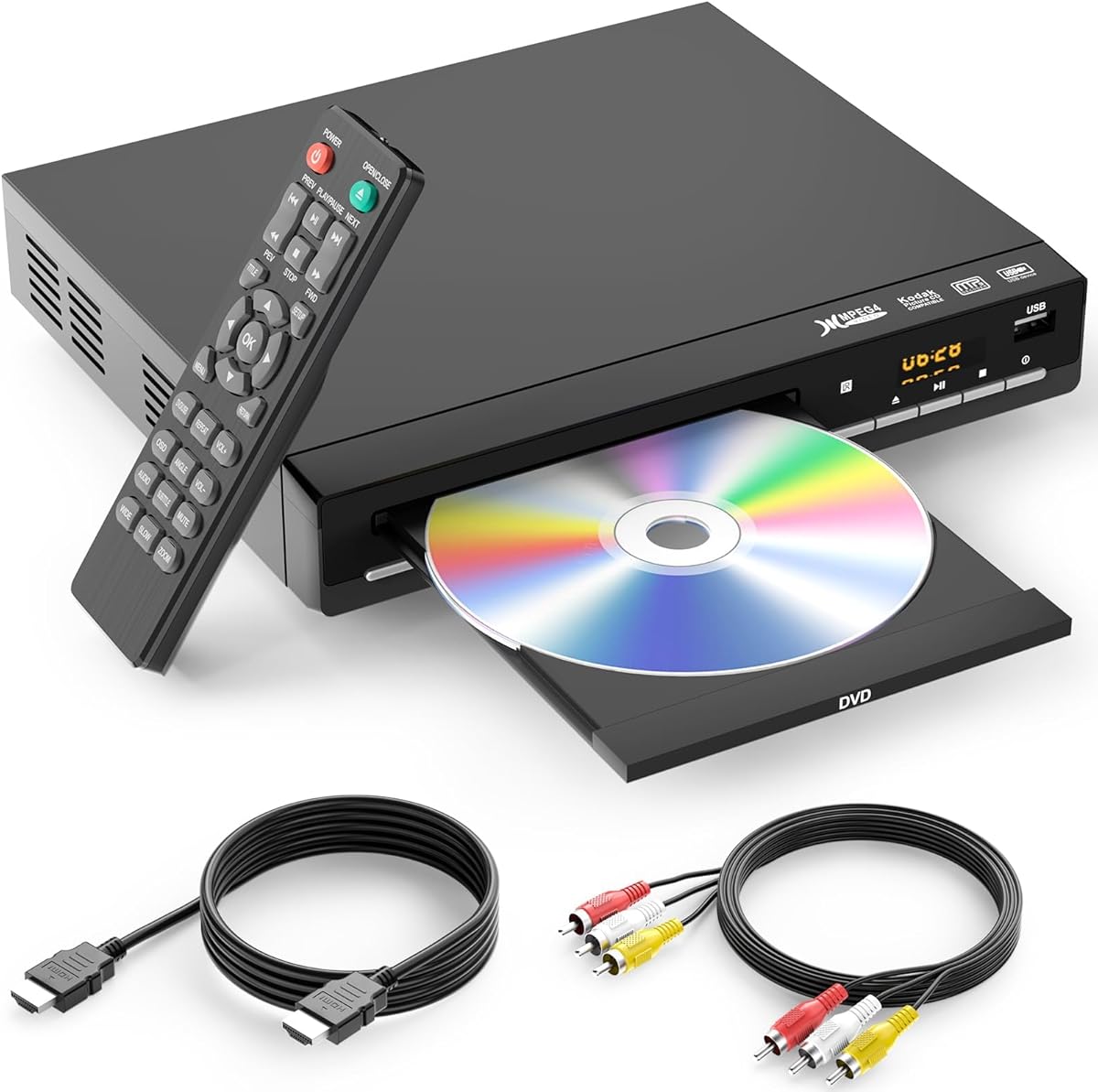
The MAJORITY DVD Player offers an accessible entry point into HDMI DVD playback. It delivers region-free compatibility and essential upscaling features at a very competitive price.
We may earn a commission when you buy through this link, at no additional cost to you.
It includes necessary cables in the box, simplifying setup immediately. The quiet operation ensures that movie audio remains the focus without distraction from the player.
The build quality is functional rather than premium, but it performs reliably for casual use. Users should expect basic audio compared to higher-end models.
For budget-conscious buyers needing universal disc support, this unit provides excellent value for money.
Priced competitively with all essential cables included for instant setup.
Designed to run quietly so the device does not interfere with audio.
We may earn a commission when you buy through this link, at no additional cost to you.
Philips provides a user-friendly option with broad region support and helpful features like Screen Fit. This model is designed to be accessible for users of all ages.
We may earn a commission when you buy through this link, at no additional cost to you.
The Screen Fit button automatically adjusts the image to fill the display. This prevents black bars and ensures maximum use of your TV screen for any disc.
USB playback adds convenience for viewing photos or listening to music. However, audio output is standard, which may suit home stereo systems better than high-end setups.
This player is a good match for those wanting simplicity and universal format compatibility without complex settings.
Automatically adjusts aspect ratio to fill the full TV screen without borders.
USB port allows direct playback of files without needing extra storage devices.
We may earn a commission when you buy through this link, at no additional cost to you.
This generic model emphasizes reliability and universal compatibility for international media collections. It uses an imported movement core to ensure smooth disc handling.
We may earn a commission when you buy through this link, at no additional cost to you.
The 1080P upscaling brings standard content closer to HD quality. Support for JPEG files means you can view photo albums directly from the player without external devices.
While it lacks advanced streaming features, it focuses on core playback needs. Users should verify USB compatibility as formats can vary between drives.
For international disc collectors, this device offers a straightforward and effective solution for playback.
Uses a high quality motor for fast reading and error correction on discs.
Allows direct viewing of photo files stored on USB drives or discs.
We may earn a commission when you buy through this link, at no additional cost to you.
ELECTCOM PRO offers a compact player built for longevity with a strong warranty. It is designed to handle international discs effortlessly without manual configuration.
We may earn a commission when you buy through this link, at no additional cost to you.
Auto format detection means it switches between PAL and NTSC automatically. This makes it perfect for mixed media libraries where discs come from various countries.
The compact size allows it to fit anywhere, though some users might need to purchase YUV cables separately. It remains a solid option for portable or small spaces.
If you want a small, reliable player that handles global discs well, this model is worth considering.
Automatically switches video standards to play international discs correctly.
Comes with a three year warranty and lifetime technical support.
We may earn a commission when you buy through this link, at no additional cost to you.
The DESOBRY Mini DVD Player is an ultra-portable solution for small spaces. It packs essential features into a tiny chassis that fits on any shelf.
We may earn a commission when you buy through this link, at no additional cost to you.
Breakpoint memory allows you to resume playback exactly where you left off. This is particularly useful for long movies that require pauses during viewing sessions.
Its support for TF cards adds flexibility for media access without using a computer. Users should be mindful of its plastic housing, which is durable but lightweight.
For RVs or small apartments, this mini player offers convenience and quality in a minimal package.
Remembers your last position so you can resume movies instantly.
Supports memory cards for quick access to media files on the go.
We may earn a commission when you buy through this link, at no additional cost to you.
The Panasonic DVD-S700 is a premium choice for those prioritizing audio and video fidelity. It delivers crisp upscaling and Dolby Digital sound for a rich home cinema experience.
We may earn a commission when you buy through this link, at no additional cost to you.
USB connections allow for additional media playback options. The audio signal-to-noise ratio ensures clean sound without background noise even at high volumes.
While it lacks smart features, its focus on pure playback quality is unmatched in this list. The price reflects the high-end components used internally.
For audiophiles and home theater enthusiasts, this player offers the best sound and picture quality available.
Built-in decoder delivers immersive surround sound for compatible discs.
Supports media files from USB drives to expand your digital collection.
We may earn a commission when you buy through this link, at no additional cost to you.
This model offers a budget-friendly option with essential features for universal playback. It supports a wide range of formats and includes a remote with a long operating range.
We may earn a commission when you buy through this link, at no additional cost to you.
The ability to copy CDs to USB drives helps preserve audio albums digitally. This is a rare feature at this price point and adds significant utility.
While basic, it covers all essential needs for DVD playback on modern TVs. Ensure your media matches supported formats to avoid compatibility issues.
For users seeking an affordable player with unique utilities like CD copying, this is a practical choice.
Allows you to transfer audio discs to USB drives for digital storage.
Supports control signals up to ten meters for easy operation.
We may earn a commission when you buy through this link, at no additional cost to you.
Selecting the right player involves considering key factors like connectivity, region support, and upscaling quality. This guide breaks down the most important features to look for before you buy.
HDMI is the standard connection for modern TVs, providing both high-quality video and digital audio in one cable. Ensure the player supports HDMI 1.4 or higher to take advantage of Full HD upscaling without bottlenecks.
Check the cables included; some models come with the necessary cables while others require you to buy them separately.
Most commercial DVDs are locked to specific regions. If you collect international discs or imported media, look for a region-free model that plays content from all over the world without errors.
Standard players may reject discs that do not match your local region code, so universal playback is essential for collectors.
Upscaling transforms standard definition content into higher resolution outputs. Good upscaling sharpens edges and reduces noise, making older DVDs look much better on large modern screens.
Look for models that promise 1080p upscaling to maximize the potential of your HDTV display.
Audio options vary from basic stereo to digital coaxial or optical outputs. If you have a surround sound system, digital outputs will provide a more immersive and clearer audio experience.
Standard RCA audio is sufficient for basic setups but may lack depth for high-fidelity sound.
Modern players often include USB ports for playing photos, music, and videos directly. Verify supported file formats like MP3 and JPEG to ensure your media files will work properly.
This feature adds significant value, turning the player into a mini media center for photos.
Metal housings often offer better durability and heat dissipation than plastic ones. Consider the physical dimensions to ensure the player fits your shelf or cabinet space comfortably.
A compact unit is ideal for small rooms or RVs where space is at a premium.
A full-function remote is crucial for smooth navigation and playback control. Look for extras like resume playback, fast forward, and zoom for better user control.
Ensure the remote has a decent range so you can operate it from the couch without issue.
Reliable support ensures you can fix issues if the hardware fails. A warranty period of at least one year is standard, but some brands offer extended protection for peace of mind.
Check customer service availability to ensure help is accessible when needed.
To begin, connect the HDMI cable from the player's output to your TV's HDMI input. Then connect the player to a power outlet and press the power button to turn it on.
Turn on your TV and switch the source to the correct HDMI input. Insert a disc into the tray, and playback should start automatically or after pressing play on the remote.
Keep the player in a well-ventilated area to prevent overheating. Clean the lens occasionally using a soft cloth and keep discs free of dust for smooth playback.
Most models include RCA outputs alongside HDMI, allowing connection to older TVs. You may need to switch inputs on your TV to match the connector type.
These players are designed for standard DVD and CD formats. Only models specifically listed as Blu-ray compatible will play that media.
Most standard players do not support streaming apps. You will need to use external devices like sticks for online streaming services.
The region code is usually printed on the disc label or case. You can also check the product description to confirm it is region free.
Yes, most models support audio files like MP3 via USB. Check the supported formats to ensure your files are compatible with the device.
Blurry images can result from upscaling settings or incorrect connections. Ensure you are using an HDMI cable and that the upscaling feature is active.
Most remotes work up to ten meters but require line of sight. Check the specific specs if you need a wider control range for your room.
These players typically rely on wired connections only. There is no need to configure Wi-Fi for standard disc playback.
Choosing the best DVD player with HDMI for TV depends on your specific needs for region support and audio quality. Our top picks offer a balance of performance and reliability for most users.
Prioritize upscaling capabilities and build quality if you want the best picture. Budget models offer great value but may lack premium features like digital audio.
Remember to check current availability and features before purchasing to ensure the model meets your setup requirements.