
ACEMAX 4K@60Hz Offline
3.5Editor score
2-in-1 HDD enclosure
Auto play and loop
Metal housing design
Compare the top external hard drive media players for 4K playback, digital signage, and local storage support to find the perfect device for your needs.
Finding the right external hard drive media player can transform your home entertainment or business display setup significantly. These devices allow you to play high-resolution videos, music, and photos directly from USB drives without needing internet access.
We evaluated ten top-rated models based on format support, resolution capabilities, and ease of use. Each product was reviewed for its ability to handle large external storage drives and deliver smooth playback performance across different screen types.
Every pick highlights specific strengths for various use cases like home theaters or commercial signage. Please note that prices and availability may change over time so always check current listings before making your final purchasing decision today.
3.5Editor score
4.3Editor score

4.7Editor score
This side-by-side comparison highlights the key specifications and capabilities of each model to help you choose the best fit for your storage and playback requirements.


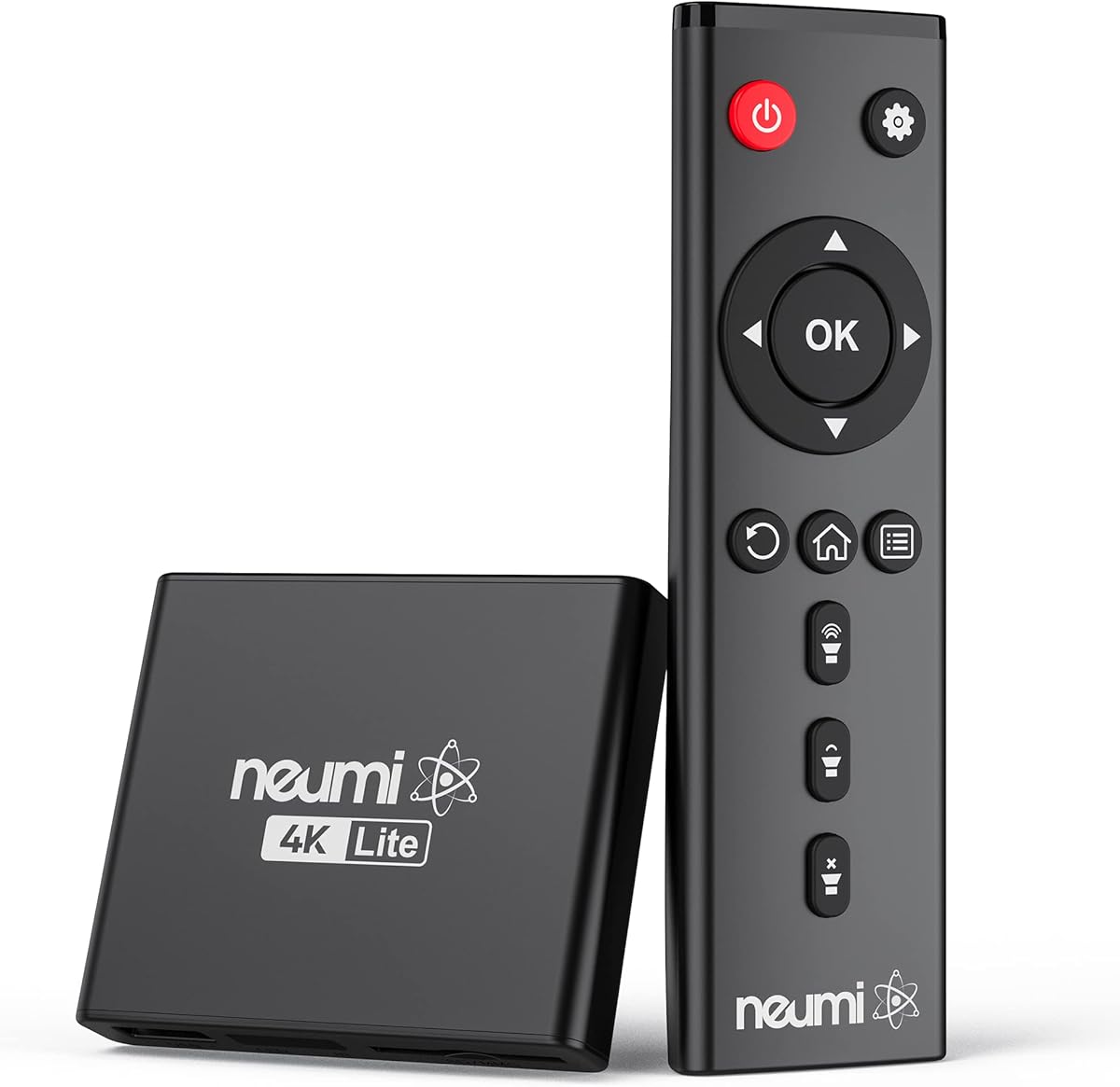
The NEUMI Atom 4K Lite stands out as a top contender in the external hard drive media player category with its impressive combination of simplicity and advanced features. Rated highly by users for its ease of use and robust performance, this device handles high-resolution content with ease while remaining accessible to non-technical users.
We may earn a commission when you buy through this link, at no additional cost to you.
Its standout feature is the trigger sensor input which allows you to create interactive displays by playing different videos based on motion or button presses. This makes it ideal for art galleries or retail environments where dynamic content is key. Additionally it supports up to 4K video playback ensuring sharp visuals on modern screens.
While the device is powerful it does have some limitations such as the need to purchase sensors separately and a cap at 30 frames per second for 4K content. These trade-offs are acceptable given the price point and the unique interactivity it offers compared to standard players.
For anyone seeking a balance between home entertainment and professional digital signage capabilities this player is a strong recommendation. It delivers reliable performance and intuitive controls that make managing large external hard drives straightforward for any user.
The trigger sensor input allows you to build interactive displays by playing specific videos when motion is detected or a button is pressed.
Smaller than a deck of cards this player offers simple operation with no complicated settings required for everyday use.
We may earn a commission when you buy through this link, at no additional cost to you.
The ACEMAX 4K@60Hz Offline media player offers an exceptional value proposition by combining a media player with a hard drive enclosure in a single unit. While it holds a lower user rating compared to premium options it provides essential features for those needing a cost-effective solution for playback and storage.
We may earn a commission when you buy through this link, at no additional cost to you.
Its 2-in-1 design allows you to install a 2.5-inch SATA drive directly into the metal housing which helps dissipate heat during extended use. This is particularly useful for digital signage applications where the device might run continuously without interruption or user interaction.
Users may encounter some challenges with formatting drives to ensure compatibility which requires checking specific file system requirements before use. However the inclusion of a remote control and support for auto-play features makes daily operation straightforward once set up properly.
This model is best suited for users who prioritize budget and dual functionality over high-end polish. It serves well for basic commercial displays or home setups where reliable playback from local storage is the primary goal.
This unit functions as both a media player and a hard drive enclosure allowing direct installation of 2.5-inch SATA drives.
The metal housing helps dissipate heat effectively during long playback sessions ensuring stable performance for signage applications.
We may earn a commission when you buy through this link, at no additional cost to you.
The WD 2TB Elements Portable External Hard Drive is a premium storage solution that pairs perfectly with any media player for seamless content access. With a 4.7 rating it is trusted by users for its reliability and speed making it an essential companion for those who need substantial storage for media files.
We may earn a commission when you buy through this link, at no additional cost to you.
Its SuperSpeed USB 3.2 Gen 1 interface ensures that large video files transfer quickly from your computer to the drive without unnecessary delays. The plug and play readiness means you can use it immediately on both Windows and Mac systems without needing to install extra software drivers.
While it is not a media player itself it is designed to work effortlessly with external players that support USB hard drives up to several terabytes. This makes it a critical part of the external hard drive media player ecosystem for storing high-resolution content.
Investing in this drive ensures your media library is stored safely on a reputable brand known for durability. It is an ideal choice for anyone looking to expand their storage capacity while maintaining high performance and compatibility.
USB 3.2 Gen 1 technology provides fast data transfer rates ensuring your large media libraries are accessible and ready to play.
This drive works seamlessly with both Windows and Mac computers offering plug and play convenience without driver installation.
We may earn a commission when you buy through this link, at no additional cost to you.
The Micca 4K Ultra-HD media player is designed to enhance any TV into a smart entertainment hub with robust support for local media playback. It is particularly strong in digital signage scenarios where reliable looping and auto-play features are essential for displaying menus or welcome videos.
We may earn a commission when you buy through this link, at no additional cost to you.
It supports up to 4K resolution output via HDMI ensuring crisp visuals for any content displayed on modern screens. The device is compact and affordable making it easy to deploy across multiple locations without breaking the budget or taking up significant space.
While it excels in visual performance the audio output options are somewhat basic requiring external speakers for optimal sound quality in noisy environments. However the ability to resume from the last stopping point adds convenience for users who pause content frequently.
This player is a strong choice for users who need a straightforward and reliable device for both home and commercial use. Its ability to handle multiple file systems and large external drives ensures it remains versatile for diverse media needs.
Features like automatic playback and configurable video rotation make it ideal for displays and art installations.
Anyone can use it without complicated setup making it accessible for users of all technical skill levels.
We may earn a commission when you buy through this link, at no additional cost to you.
The HDMI Media Player Black Mini is a perfect travel partner for those who need to play media on the go without carrying heavy equipment. Its aluminum alloy body ensures it is durable enough to withstand being carried in a bag while still looking sleek and professional.
We may earn a commission when you buy through this link, at no additional cost to you.
While it supports up to 1080p resolution it handles a wide variety of video formats smoothly allowing for flexible playback options. This makes it a practical choice for older TVs or situations where 4K is not necessary but reliability is key.
Users should note that this model does not support 4K resolution so it may not be suitable for cutting-edge displays. However for standard high-definition needs it performs well with intuitive controls and comprehensive file support.
Ideal for office work or home entertainment this player offers multifunctional capabilities in a tiny package. It is a solid option for anyone needing a reliable secondary device for simple media playback tasks.
The aluminum alloy material ensures the device is not easy to damage during carrying making it great for travel.
Supports most video audio and image formats on the market including random and loop playback modes for flexibility.
We may earn a commission when you buy through this link, at no additional cost to you.
This 4K@30hz Media Player is designed to deliver high-quality audio and video playback making it suitable for home entertainment systems. Its support for 7.1 surround sound and optical output allows users to connect external speakers for a truly immersive viewing experience.
We may earn a commission when you buy through this link, at no additional cost to you.
The device features H.265 decoding which helps files load faster and use less bandwidth for efficient playback. It also supports reading PPT documents allowing it to serve as a simple presentation tool in addition to playing standard media files.
Users might find the dual USB ports a bit limiting since only one can be read at a time. However the ability to connect a USB mouse makes navigation easier and adds flexibility for those who prefer direct input over remote control.
For those who prioritize audio quality and multimedia versatility this player offers a robust set of features. It is a great choice for users who need more than just basic video playback capabilities.
Supports up to 7.1 surround sound via HDMI and optical output ensuring crisp and detailed audio reproduction.
You can connect a USB mouse or keyboard to operate the player making navigation of menus and slideshows easier.
We may earn a commission when you buy through this link, at no additional cost to you.
This HDMI Media Player is tailored for advertising and multimedia playback with support for direct decoding of Blu ray files. It delivers sharp 4K visuals and includes various output options like VGA and AV ensuring compatibility with a wide range of displays.
We may earn a commission when you buy through this link, at no additional cost to you.
The powerful decoding chip handles international standard formats efficiently allowing for smooth playback of high-bitrate content. Users can also connect a HUB via USB to expand connectivity which is useful for adding keyboards or providing additional power.
While the device does not include built-in storage it supports large external hard drives and SD cards for flexible media management. The AV cable is included to help with older TVs making it a versatile choice for mixed setups.
Ideal for advertising or home use this player balances performance with affordability. It is a practical solution for anyone needing reliable and high-quality media playback capabilities.
Supports HDMI VGA and AV outputs ensuring it works with modern and older display devices seamlessly.
The H.265 decoding chip improves playback efficiency and speed allowing you to enjoy high-quality video without buffering.
We may earn a commission when you buy through this link, at no additional cost to you.
The 4K@60Hz HDD Enclosure player offers a perfect user rating by combining playback and storage in one compact device. It supports Mac formatted drives and includes a Type-C cable making it easy to transfer data to laptops or play directly from the drive.
We may earn a commission when you buy through this link, at no additional cost to you.
It is designed to loop content continuously and resume from where you left off which is perfect for signage or home theater use. The metal housing ensures heat is managed well during long playback sessions preventing overheating issues.
While the drive itself is not included the ability to play directly from an internal SATA drive saves on external cabling and clutter. This design makes it a clean and efficient solution for fixed installations.
This unit is highly recommended for anyone needing a reliable 2-in-1 solution for their media storage and playback needs. Its simplicity and performance make it a standout choice in its category.
Works as a player and enclosure in one unit allowing you to play directly from internal hard drives or external USB.
Includes a Type-C cable for easy data transfer to laptops and additional storage flexibility for modern devices.
We may earn a commission when you buy through this link, at no additional cost to you.
This Ultra HD 4K@60Hz player is a solid choice for those who want peace of mind with a one-year warranty included. It supports smooth 4K playback and includes auto-play and resume features that make it easy to set up for unattended use.
We may earn a commission when you buy through this link, at no additional cost to you.
The integrated HDD enclosure allows you to connect a 2.5-inch SATA drive internally which reduces cable clutter and simplifies the setup process. Its Type-C connection ensures modern compatibility and efficient data transfer speeds.
Users should be aware that batteries are not included in the package which means you will need to purchase AA batteries separately for the remote. Despite this minor inconvenience the device performs well for both home and commercial use.
With its focus on smooth playback and warranty support this player is a reliable option for anyone needing a stable media solution. It is particularly useful for businesses looking to minimize risk while deploying displays.
The manufacturer offers a one-year warranty ensuring you have support if any technical issues arise during normal use.
Integrated HDD enclosure allows for internal 2.5-inch SATA drives reducing clutter and simplifying your setup.
We may earn a commission when you buy through this link, at no additional cost to you.
This 4K Ultra HD Media Player is an affordable and simple solution for basic digital signage and home entertainment needs. It features a built-in HDD enclosure and supports a wide range of video formats making it easy to plug in and start playing media.
We may earn a commission when you buy through this link, at no additional cost to you.
The configurable video rotation allows you to install displays vertically or horizontally without needing extra software or hardware. This flexibility makes it ideal for unique installation spots where space or design constraints exist.
While it has a lower user rating it remains a functional option for those who need straightforward playback without complex settings. The analog AV output ensures it can also connect to older TVs or speakers if needed.
For users who want a no-fuss device that handles common media files well this player is a practical choice. It provides reliable performance for the price and is easy to equip across multiple locations.
Configurable video rotation of 90 180 or 270 degrees allows for flexible installation in any orientation.
Requires no complicated setup making it easy to use for anyone who needs a simple media hub.
We may earn a commission when you buy through this link, at no additional cost to you.
Choosing the right player involves considering compatibility resolution and features that match your specific needs.
Look for players that support at least 1080p or 4K depending on your TV capabilities. Higher resolution support ensures you can view high-quality content without losing detail or clarity on modern screens.
Prioritize models that advertise 4K compatibility if you plan to use them with Ultra HD displays for the best visual experience.
Check that the player supports external hard drives up to your required capacity such as 2TB or 8TB. Also ensure it handles necessary file systems like NTFS or exFAT for your existing drives.
Always verify the maximum supported drive size before purchasing to avoid limitations with large media libraries.
Ensure the device supports common video formats like MP4 MKV and AVI as well as audio and image types. Broad format support reduces the need to convert files before playback saving you time and effort.
Choose a player with extensive codec support to handle various file types you might already have in your collection.
Confirm the player has HDMI outputs for modern TVs and AV outputs if you need to connect to older displays. Some models also offer optical audio outputs for better sound integration with home theater systems.
Select a unit with versatile outputs to ensure compatibility with all your display and audio equipment.
Look for features like auto-play resume and loop which are essential for signage or automated content display. These functions allow the device to run unattended and maintain consistent performance over time.
Prioritize models with robust playback modes if you plan to use the player for continuous or interactive displays.
Consider devices with metal housings or durable aluminum alloy bodies for better heat dissipation and longevity. Good build quality ensures the player stays cool during extended use and withstands regular handling.
Opt for sturdy construction to avoid overheating issues and ensure reliable performance over many hours of operation.
Choose a player with an intuitive interface and easy remote control for straightforward navigation. Simple setup reduces the learning curve and makes daily operation hassle-free for all users.
Select devices with clear menus and responsive remotes to ensure a smooth and user-friendly experience.
Evaluate the cost against the features offered to ensure you get the best value for your budget. Higher-priced models often come with better build quality or more advanced features like higher resolution support.
Balance your needs with your budget to find a player that offers the best combination of price and performance.
Connect the player to your TV using an HDMI or AV cable and plug it into a power source. Insert your media drive into the USB port or internal enclosure if supported by the device.
Use the included remote control to navigate through folders and select files for playback. Adjust settings like loop or auto-play in the menu to customize your viewing experience.
Keep the device in a well-ventilated area to prevent overheating and clean it with a soft cloth regularly. Avoid exposing it to moisture or extreme temperatures to maintain its performance and longevity.
Many models in this list support 4K resolution at 30Hz or 60Hz depending on the specific device. Check the product details to confirm the maximum resolution it supports for your needs.
Most players support external drives up to several terabytes but file system compatibility like NTFS or exFAT is key. Ensure your drive is formatted correctly to avoid connection issues with the media player.
No most of these players are designed for offline playback directly from local storage drives. They do not require Wi-Fi or streaming subscriptions to function properly.
Most models come with an infrared remote control but check the product description to be sure. Some players may require separate purchases for additional accessories like sensors.
Common supported systems include FAT32 exFAT and NTFS but check individual specifications for compatibility. Proper formatting ensures your drive is recognized and readable by the player.
Yes several models include features like auto-play loop and resume that are ideal for signage. They are designed to run continuously and display content reliably for commercial use.
The top picks highlight devices that offer excellent value and performance for different needs ranging from budget to premium. Each option has been selected based on its ability to handle local storage and deliver reliable playback.
When choosing prioritize features that match your specific use case such as resolution support or storage capacity. Consider how much you will use the player daily to find the most suitable model for your setup.
Always verify current pricing and availability as these details can change over time. Regular checking ensures you get the best deal on the right device for your media needs.