
Replacement TV Remote Control for All Fire Series
4.3Editor score
Voice control support
Works with 3rd Gen
Easy pairing process
Affordable pricing tier
Find the perfect Fire Stick Replacement Remote for your setup. This guide compares top voice remotes with Alexa support and smart TV compatibility options.
When your original remote fails or gets lost, finding a reliable Fire Stick Replacement Remote becomes essential. Modern remotes offer voice control and intuitive navigation to enhance your streaming experience significantly.
We evaluated ten top-rated options based on compatibility, build quality, and feature sets. Our list includes official Amazon models and trusted third-party alternatives that deliver consistent performance without compromising functionality.
Each pick highlights key strengths and limitations to help you decide quickly. Note that prices fluctuate regularly, so check current listings before making your final purchase decision today.
4.3Editor score
4.5Editor score

4.5Editor score
This side-by-side comparison highlights the core specs and capabilities of each remote model to help you find the right match for your Fire TV ecosystem needs.
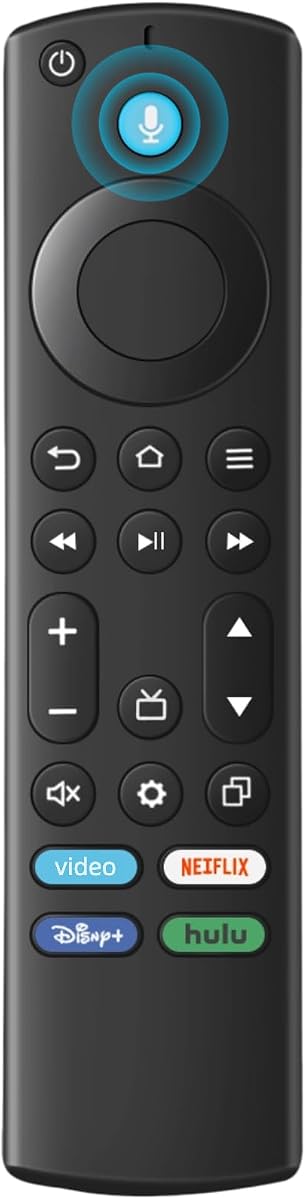


This replacement voice remote offers a cost-effective way to regain control over your Fire Stick or Fire Cube. With a rating of 4.2 stars, it delivers reliable performance for users needing a quick backup solution.
We may earn a commission when you buy through this link, at no additional cost to you.
The remote supports voice commands which allow you to search for content without typing. It pairs well with devices like the Fire Stick 4K Max and Fire Cube 3rd Gen, making it versatile for modern setups.
Users should note that pairing instructions differ between streaming devices and smart TVs. Additionally, batteries are not included, so you will need to source two AAA batteries separately before use.
If you need a straightforward, affordable remote that works across multiple Fire TV generations, this is a solid choice. It restores functionality without breaking the bank.
This remote works with Fire Stick 4K, Fire Cube, and compatible smart TVs like Omni and Insignia for broad utility.
Find movies and shows faster by using voice commands instead of navigating menus manually with the on-screen keyboard.
We may earn a commission when you buy through this link, at no additional cost to you.
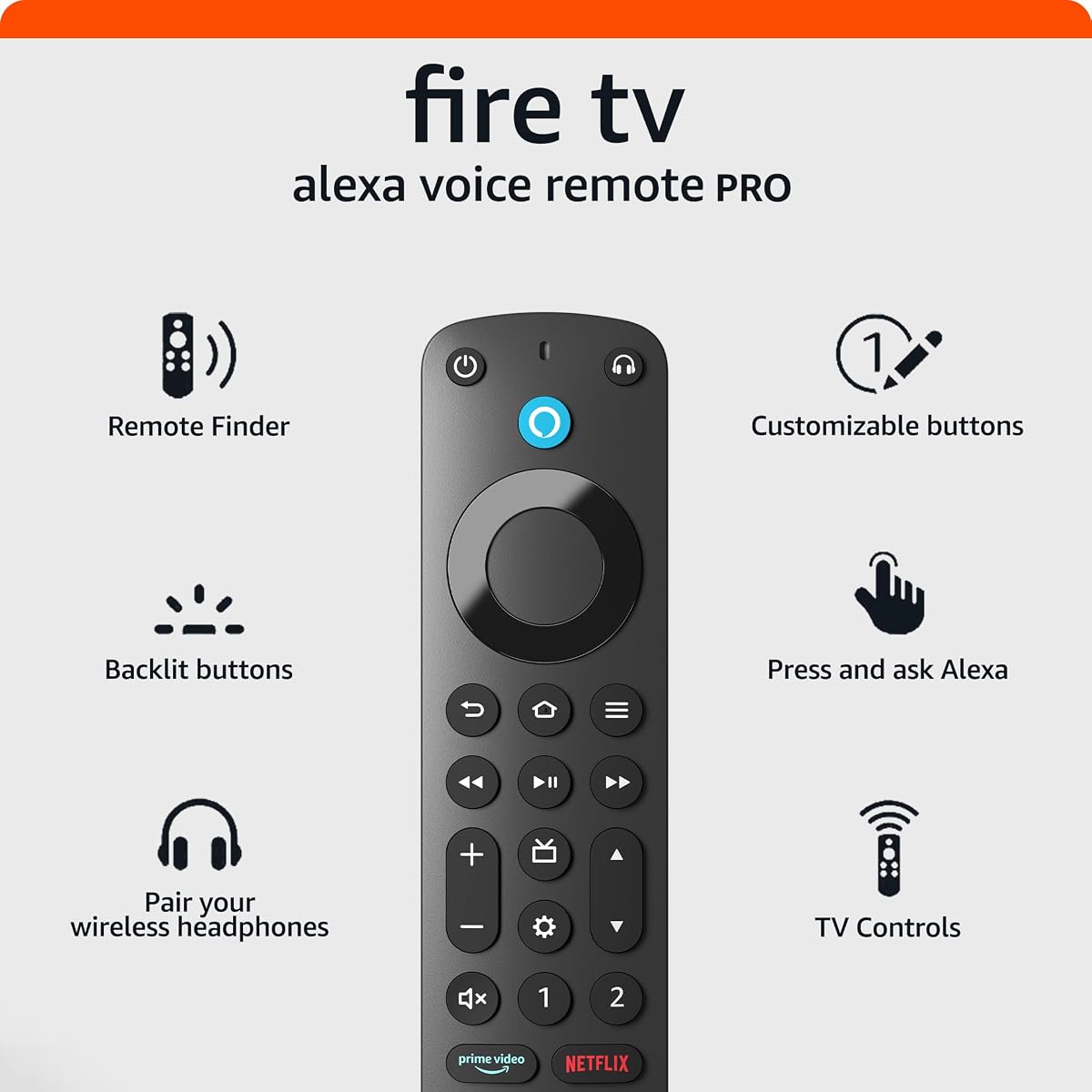
The Amazon Fire TV Alexa Voice Remote Pro stands out with premium features designed for convenience. Rated 4.5 stars, it includes backlit buttons and a remote finder function that solves common usage problems.
We may earn a commission when you buy through this link, at no additional cost to you.
In dark environments, the motion-activated backlight illuminates buttons so you can navigate easily. You can also set customizable buttons to launch apps quickly, saving time on repetitive tasks.
The dedicated headphone button simplifies pairing wireless audio devices, offering a faster path to private listening. However, it is not compatible with older Fire TV generations released before 2018.
For users wanting the best user experience with smart home control and premium touches, this remote is worth the investment. It elevates daily streaming with practical innovations.
Press and ask Alexa to manage compatible smart home devices directly from the remote without needing separate apps.
A dedicated headphone button provides quick access to the on-screen Bluetooth menu for faster wireless audio setup.
We may earn a commission when you buy through this link, at no additional cost to you.
This replacement remote offers strong value with a 4.5 star rating and broad compatibility. It supports voice control and includes multiple shortcut buttons for instant access to your favorite content.
We may earn a commission when you buy through this link, at no additional cost to you.
The remote features 4 preset app buttons and 2 customizable buttons that can be programmed to launch specific services. This flexibility helps streamline navigation without deep menu diving.
Voice activation requires following the manual instructions to pair correctly. Users should ensure their device model matches the supported list to avoid compatibility issues with non-Fire brands.
If you want a third-party remote that balances price and functionality well, this model is a top contender. It delivers essential features without unnecessary complexity.
Program your custom buttons to launch favorite apps instantly by holding the number buttons during setup.
Control your content with voice commands for hands-free searching and launching of applications.
We may earn a commission when you buy through this link, at no additional cost to you.
Rated 4.3 stars, this remote is designed for durability with over 20,000 clicks tested on its buttons. It provides reliable operation for daily use across compatible Fire Stick models.
We may earn a commission when you buy through this link, at no additional cost to you.
With a range of 12 meters, you can control your device from various seating positions comfortably. The inclusion of 4 shortcut buttons ensures quick access to your primary streaming apps.
Voice control is enabled but requires pairing via the instructions provided. Users must note that this model does not work with older generations like Fire TV Stick 1st Gen.
For those seeking a sturdy replacement remote backed by customer support, this option meets expectations well. It delivers performance that matches the original remote closely.
Enjoy freedom to move around the room while maintaining a stable connection up to 12 meters away.
The product comes with a 60-day satisfaction guarantee and quick customer service responses for issues.
We may earn a commission when you buy through this link, at no additional cost to you.
This replacement remote simplifies setup with an automatic sync feature that pairs easily when inserted into your device. It holds a 4.2 star rating for consistent performance across supported models.
We may earn a commission when you buy through this link, at no additional cost to you.
The remote works seamlessly with smart TVs like Insignia and Toshiba, offering unified control. Pre-programmed shortcuts give you instant access to popular streaming apps without extra navigation steps.
Voice control features allow you to launch apps and adjust volume hands-free. Keep in mind that it does not work with soundbars or older Fire Stick generations from 2017 or earlier.
If you want a remote that pairs quickly and works across multiple smart TV brands, this is a great fit. It provides essential features with minimal configuration effort.
Control both your Fire Stick and compatible smart TV power and volume from one single device.
Access your favorite channels with one tap using the included pre-programmed shortcut buttons.
We may earn a commission when you buy through this link, at no additional cost to you.
Priced aggressively, this remote offers essential functions without premium costs. With a 4.3 star rating, it serves as an excellent budget option for users needing a functional replacement.
We may earn a commission when you buy through this link, at no additional cost to you.
It supports voice commands that help you find content and control smart home devices efficiently. The LED indicator helps confirm when the remote is successfully paired with your Fire TV.
Pairing involves holding the Home button for 10-15 seconds while the device is powered. Users should check model compatibility carefully to ensure it fits their specific Fire TV version.
If you need a cheap and reliable remote that covers most 3rd Gen devices, this selection is hard to beat. It balances cost and function effectively for most buyers.
Save money on a remote that performs essential tasks without expensive features you might not use.
Use voice control to manage compatible smart home devices directly from your living room setup.
We may earn a commission when you buy through this link, at no additional cost to you.
As an official Amazon product, this remote delivers consistent quality and full feature support. Rated 4.5 stars, it includes everything needed to start using it right out of the box.
We may earn a commission when you buy through this link, at no additional cost to you.
The remote features a guide button that displays live TV listings and program schedules conveniently. Dedicated power and volume buttons make it easy to control your TV and soundbar directly.
It comes with 2 AAA batteries included so you avoid extra trips to the store. Compatibility extends to Fire Stick 4K Max and Fire Cube 2nd Gen but excludes very older models.
If you want a guaranteed fit with official support and included batteries, this remote is the safest choice. It offers a complete and polished streaming experience for users.
No need to buy extra batteries as two AAA batteries are included with the purchase.
Use the guide button to see all your live TV apps and program listings in one spot.
We may earn a commission when you buy through this link, at no additional cost to you.
This remote supports a wide range of Fire Smart TV Stick and Cube models with a 4.4 star rating. Voice control makes navigating content faster and more efficient for daily users.
We may earn a commission when you buy through this link, at no additional cost to you.
The LED indicator provides clear visual feedback during the pairing process. Simply hold the Home key for about 10 seconds and wait for the light to confirm connection.
Manual matching is required, so following the instructions closely is key to success. If issues arise, checking battery levels or reinserting them often resolves connection failures.
For users who want a capable third-party remote that covers many Fire devices, this is a strong option. It balances price and features well with helpful support.
An LED light flashes to show pairing status so you know when the remote is ready.
Use simple voice phrases to control volume and switch channels without pressing multiple buttons.
We may earn a commission when you buy through this link, at no additional cost to you.
Rated 4.3 stars, this remote works with Fire devices and third-party TVs like Insignia and Pioneer. It brings voice control to your entertainment setup for easier navigation and search.
We may earn a commission when you buy through this link, at no additional cost to you.
Preset app buttons give quick access to favorite content while the LED flash confirms pairing. The guide helps you jump scenes quickly using standard playback controls available.
Make sure to remove old batteries from any previous remote before pairing the new one to avoid conflicts. This step ensures the new remote connects properly without interference.
If you have a compatible smart TV and want a unified remote experience, this is a solid pick. It offers good value with helpful features for everyday use.
Control compatible smart TVs from brands like Insignia and Pioneer alongside your Fire Stick.
Use standard playback controls to skip to favorite scenes in your favorite shows quickly.
We may earn a commission when you buy through this link, at no additional cost to you.
This remote offers 4.4 stars for performance with strong voice control features. It supports Fire Stick models and QLED TVs from brands like Omni and Toshiba for flexible use.
We may earn a commission when you buy through this link, at no additional cost to you.
Voice commands make searching for content easy while 4 shortcut buttons let you launch apps instantly. The support team provides help for pairing issues or setup questions.
Pairing requires holding the Home button for about 10 seconds until the LED blinks. Ensure you have 2 AAA batteries ready as they are not provided in the package.
For users wanting a feature-rich remote with good support and brand compatibility, this is a great choice. It delivers the essential tools for a seamless streaming experience.
Use four dedicated buttons to open your top streaming apps instantly with a single click.
Reach out to the dedicated support team for help with setup or any pairing issues quickly.
We may earn a commission when you buy through this link, at no additional cost to you.
Choosing the right replacement remote requires considering compatibility, features, and price. Here are key factors to help you make an informed decision.
The most critical factor is ensuring the remote works with your specific Fire Stick model or Fire TV Smart TV. Check the generation of your device (e.g., 3rd Gen, 4K Max) against the product list to avoid purchasing an incompatible unit. Some remotes do not support older 1st or 2nd Gen devices.
Always verify the supported list before buying to ensure seamless integration with your streaming ecosystem.
Voice remote capabilities allow you to search for content and control smart home devices using spoken commands. This feature is especially useful for quick navigation and finding specific movies without typing. Most modern remotes include a built-in microphone for this function.
Select a remote with active voice control if you prefer hands-free operation and efficient content discovery.
Consider the button layout and if the remote offers customizable shortcuts. Remotes with preset app buttons let you launch Netflix or Prime Video with one press. Some models allow you to program these buttons for specific commands.
A well-designed layout with shortcut buttons can significantly speed up your daily viewing routine and improve usability.
Most remotes require standard AAA batteries which are often sold separately. Verify if the package includes batteries to save time and extra cost. Some premium remotes may use rechargeable batteries instead.
Ensure you have fresh batteries available upon arrival to avoid setup delays when you receive the product.
The ease of pairing affects how quickly you can use the remote. Official remotes usually pair automatically while third-party options may require holding the Home button for a specific time. Review the instructions to understand the steps involved.
Choose a remote with a straightforward pairing process to minimize frustration during initial setup.
A durable remote should withstand daily use without button failure or battery cover issues. Look for remotes with tested button lifespans and reliable materials. Higher rated products often indicate better build quality and longevity.
Investing in a durable remote can save you money and hassle by reducing the need for frequent replacements.
If you use a Fire TV Smart TV, choose a remote that controls power and volume directly. Integrated TV buttons eliminate the need for multiple remotes for different devices. This feature is common in official and high-quality third-party models.
Opt for a remote with integrated TV controls to simplify your home entertainment setup and reduce clutter.
Compare the price of the remote against its features to determine value. Third-party remotes are often cheaper but may lack premium features like backlit buttons. Official remotes cost more but offer full support and reliability.
Decide your budget and prioritize features that matter most to your usage habits to find the best value.
Begin by installing fresh batteries into the remote ensuring correct polarity as indicated in the battery compartment. If the remote does not pair immediately, check that the batteries are properly seated and have adequate charge.
To pair the remote with your Fire device remove the old remote batteries first to prevent connection conflicts. Hold the Home button for 10 to 15 seconds until the LED flashes indicating pairing mode has started.
Keep the remote clean by wiping it with a soft dry cloth to remove dust and oils. Avoid exposing it to excessive heat or moisture which can damage the internal electronics and reduce lifespan.
Not all replacement remotes work with every Fire TV model. You must check the device generation listed in the product description. Many third-party remotes support 3rd Gen and newer devices but exclude older 1st or 2nd Gen models.
To pair the remote remove the batteries of any existing remote. Press and hold the Home button for 10 to 15 seconds until the LED indicator flashes rapidly. Wait for the remote to connect automatically within 30 to 60 seconds.
Yes many Fire Stick Replacement Remotes are compatible with smart TVs like Insignia Toshiba and Omni. These remotes include TV power and volume buttons for unified control. Ensure the TV supports Fire TV or is listed as compatible.
Most Fire Stick Replacement Remotes use two AAA batteries. These are typically not included in the package so you will need to buy them separately. Some models may have different power requirements so check the specs.
If pairing fails check the battery level and ensure old remotes are disconnected. Sometimes removing and reinserting batteries helps reset the connection. If problems persist contact customer support for troubleshooting guidance.
Premium remotes offer features like backlit buttons and remote finder that improve convenience. If you want these extra tools they are worth the investment. For basic control a budget option may suffice depending on your needs.
We have reviewed ten top Fire Stick Replacement Remotes ranging from affordable third-party options to official premium models. Each offers unique features like voice control and compatibility with Fire TV smart TVs.
When choosing prioritize compatibility with your specific device generation and the features you need most. A remote with voice control and shortcut buttons can significantly enhance your daily streaming experience.
Remember that prices and availability may change over time. Always check the current listings and reviews before making your final purchase to ensure you get the best deal available.