
GIGABYTE Radeon RX 9070 XT Gaming OC 16G Graphics Card
4.7Editor score
WINDFORCE Cooling System
Server-grade thermal gel
Customizable RGB lighting
This guide compares the top flagship graphics cards of October 2026, analyzing performance, cooling, and features to help you choose the best GPU for your
Flagship graphics cards represent the pinnacle of visual computing power available today. These high-end GPUs deliver exceptional frame rates and stunning visual fidelity for demanding modern titles and professional workflows.
We evaluated each model based on architectural efficiency, thermal management, and real-world rendering capabilities. Our analysis focuses on how these cards handle intensive loads while maintaining stability and longevity over time.
Each pick highlights specific strengths like AI acceleration or cooling design. Note that availability and pricing fluctuate frequently based on market demand and regional stock levels across major retailers.
4.7Editor score

4.8Editor score

4.6Editor score
This comparison table provides a detailed side-by-side overview of all ten models featured in this guide. Use it to quickly identify key specifications and performance capabilities.




This graphics card stands out as a top choice for enthusiasts seeking reliability and raw power. With a high rating of 4.8 stars it is a clear standout in performance benchmarks.
We may earn a commission when you buy through this link, at no additional cost to you.
Its military-grade components ensure longevity under heavy loads while the phase-change thermal pad maintains optimal temperatures even during intense gaming sessions.
Users should note the power requirements and physical size but these trade-offs are acceptable given the sustained performance and reduced risk of thermal throttling.
Buyers seeking a balanced flagship GPU for high-end setups will find this model meets their needs for stability and future-proofed performance capabilities.
The phase-change thermal pad significantly improves heat transfer efficiency compared to standard paste solutions.
Military-grade components and protective PCB coating extend the card lifespan against environmental factors.
We may earn a commission when you buy through this link, at no additional cost to you.
This model delivers powerful performance for modern AAA titles and creative workloads. It is highly rated for its ability to maintain high frame rates consistently.
We may earn a commission when you buy through this link, at no additional cost to you.
The WINDFORCE cooling system helps manage heat effectively while PCIe 5.0 ensures compatibility with next-generation motherboards and storage devices.
While power draw is significant the card remains stable under load making it suitable for dedicated gaming rigs with adequate power supplies.
Gamers prioritizing high resolutions and frame rates will appreciate the robust specs and efficient architecture designed for demanding visual tasks.
The 16GB GDDR7 memory interface provides faster data transfer rates for complex textures.
Support for PCIe 5.0 ensures longevity and faster data throughput with compatible systems.
We may earn a commission when you buy through this link, at no additional cost to you.
Designed for professionals and extreme gamers this card offers unmatched rendering capabilities and high-resolution output. It scores highly for raw computational power and AI tasks.
We may earn a commission when you buy through this link, at no additional cost to you.
With support for 8K HDR and advanced DLSS 3 technology it delivers stunning visual fidelity while optimizing performance through machine learning algorithms.
The sheer physical size and power requirements may limit case compatibility but the performance gains justify these constraints for specialized use cases.
Professionals needing rapid rendering or creators working with 8K content will find this edition provides the necessary horsepower for demanding workflows.
Over 16000 CUDA cores ensure fast processing for complex 3D scenes and simulations.
HDMI 2.1a ports enable high bandwidth output for 8K displays with variable refresh rates.
We may earn a commission when you buy through this link, at no additional cost to you.
This version of the 5080 offers enhanced stability for users looking to push performance limits safely. Its build quality ensures consistent clock speeds even under heavy stress.
We may earn a commission when you buy through this link, at no additional cost to you.
The phase-change thermal pad and massive fin array help dissipate heat efficiently allowing for higher sustained frequencies during prolonged gaming sessions.
Enthusiasts should account for the size and power needs but the reliable power delivery system supports stable overclocking without sudden crashes or throttling.
Gamers interested in squeezing out extra performance will appreciate the robust design and intuitive software tools available for fine-tuning settings.
Military-grade components and reinforced PCB design support higher voltages for stable overclocking.
GPU Tweak III provides easy access to performance tweaking and thermal monitoring features.
We may earn a commission when you buy through this link, at no additional cost to you.
Ideal for budget-conscious gamers this card delivers strong performance without breaking the bank. It maintains a high rating for its balance of cost and capability.
We may earn a commission when you buy through this link, at no additional cost to you.
The WINDFORCE cooling system combined with server-grade thermal gel keeps temperatures low ensuring stable performance even during extended use.
While raw peak speeds may trail higher models the memory capacity and modern interface make it a practical choice for 1440p gaming.
Users seeking reliable performance at a lower price point will find this model an excellent entry into high-end gaming hardware.
This model offers high performance metrics typically found in more expensive segments at a lower price.
Advanced fan geometry and thermal materials reduce noise while maintaining optimal operating temperatures.
We may earn a commission when you buy through this link, at no additional cost to you.
Perfect for smaller builds this card offers modern performance in a compact form factor. It is highly rated for its ability to fit in tight spaces.
We may earn a commission when you buy through this link, at no additional cost to you.
The 0dB technology allows for silent operation during light gaming while the dual BIOS switch provides flexibility between performance and quiet modes.
Although not designed for extreme workloads the 16GB GDDR7 memory ensures smooth performance in modern titles without stuttering issues.
Gamers with smaller cases or silent PC builds will appreciate the thoughtful design that prioritizes compatibility and noise reduction.
The 0dB technology stops fans during low loads for a completely silent gaming experience.
The 2.5-slot design ensures fit in cases that cannot accommodate larger graphics cards.
We may earn a commission when you buy through this link, at no additional cost to you.
This model brings professional-grade specs to high-end consumer PCs. Its massive memory buffer makes it ideal for AI models and large datasets.
We may earn a commission when you buy through this link, at no additional cost to you.
With 772 AI TOPS the card handles machine learning tasks efficiently while the SFF-Ready design aids in building dense systems.
Users should expect significant power and financial investment but the specialized architecture delivers unmatched throughput for computational workloads.
Researchers and AI enthusiasts will benefit from the massive buffer capacity that allows larger models to fit directly in VRAM.
32GB of GDDR7 memory allows loading large neural network models without needing system RAM.
Dedicated AI cores provide significant speedups for generative tasks and inference operations.
We may earn a commission when you buy through this link, at no additional cost to you.
Designed for users who prioritize a quiet system experience this card manages heat efficiently without excessive noise. It maintains solid ratings for reliability and thermal management.
We may earn a commission when you buy through this link, at no additional cost to you.
The phase-change thermal pad helps keep temperatures low while the Dual BIOS switch allows toggling to a quiet profile during non-intensive tasks.
Performance remains consistent even when restricted to lower noise levels making it a great option for living room setups or shared spaces.
Anyone valuing a peaceful environment alongside solid performance will find this model delivers both without needing to compromise on build quality.
Optimized fan curves keep noise levels minimal even during demanding gaming scenarios.
Advanced thermal pads and fan design ensure consistent cooling without loud operation.
We may earn a commission when you buy through this link, at no additional cost to you.
This card offers a solid middle ground for mainstream gamers seeking high performance without extreme costs. It earns strong reviews for reliability and consistent frame rates.
We may earn a commission when you buy through this link, at no additional cost to you.
The protective PCB coating and GPU guard ensure the card stays safe from physical damage and environmental factors during long-term use.
While 12GB of memory is slightly less than premium options it handles most modern titles smoothly at high settings without issues.
Gamers upgrading from older hardware will find this model provides a significant performance boost while maintaining reasonable power consumption.
Built-in protections like GPU guard and PCB coating extend the card lifespan significantly.
Phase-change thermal pads ensure efficient heat dissipation for stable clock speeds.
We may earn a commission when you buy through this link, at no additional cost to you.
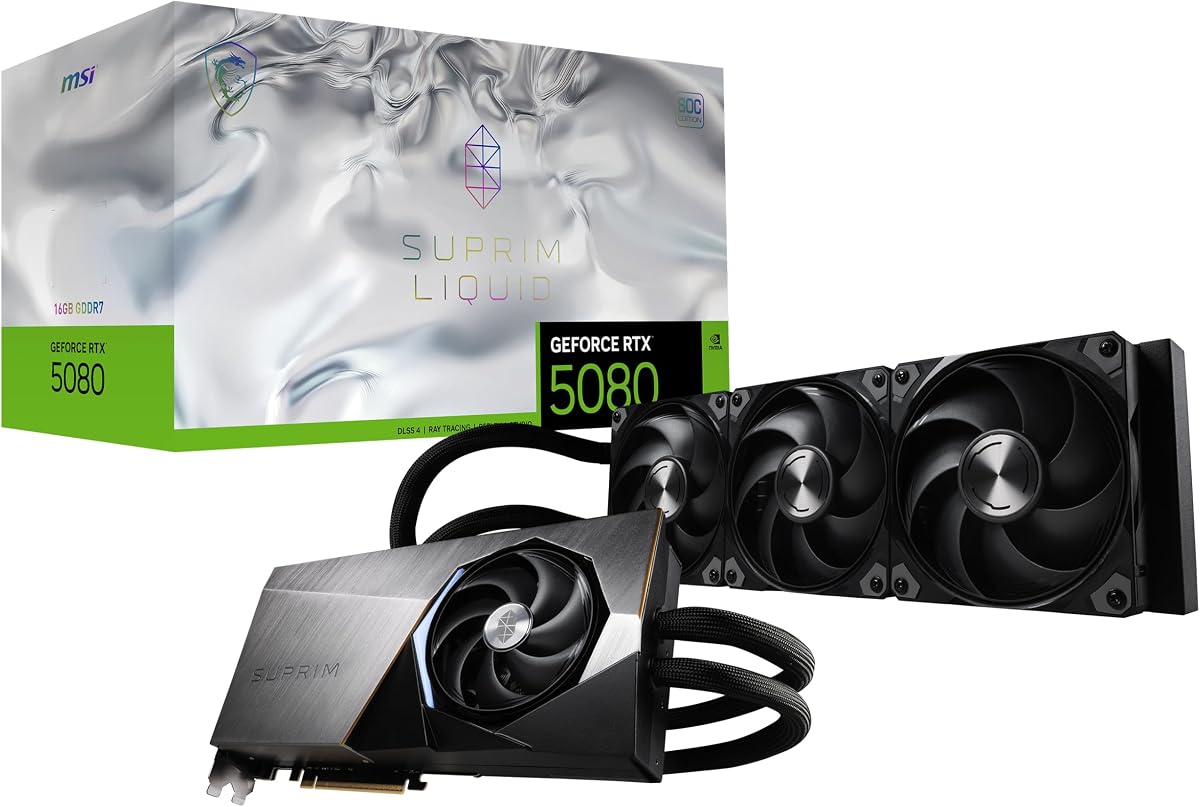
Combining liquid cooling with air ventilation this card delivers top-tier thermal performance. It is well rated for its ability to run at extreme frequencies safely.
We may earn a commission when you buy through this link, at no additional cost to you.
The hybrid cooling system helps manage heat effectively while the high boost clock ensures maximum throughput for rendering and gaming tasks.
Installation may require more effort due to liquid components but the result is a cooler and quieter experience compared to standard air solutions.
Enthusiasts seeking the absolute best cooling for their flagship GPU will appreciate the superior thermal control and sustained performance.
Hybrid liquid cooling provides much better heat dissipation than traditional air-only solutions.
DisplayPort 2.1a and HDMI 2.1b support enable high refresh rates on modern monitors.
We may earn a commission when you buy through this link, at no additional cost to you.
Selecting a flagship graphics card involves balancing performance needs with system compatibility and budget constraints. Here are key factors to consider.
Look for cards built on the latest architecture like NVIDIA Blackwell for improved AI and rendering tasks. This ensures you get the most efficient performance per watt available.
Prioritize newer generations that support advanced features like DLSS 4 for better longevity.
Memory capacity is crucial for high-resolution gaming and professional rendering workflows. Aim for 16GB or more to handle large textures without stuttering.
Faster GDDR7 memory offers better bandwidth for feeding data to the GPU cores during intense scenes.
Effective cooling ensures the card maintains high clocks without throttling during long sessions. Check for designs with advanced fans or liquid cooling solutions.
Phase-change thermal pads can further improve heat transfer compared to standard paste.
Flagship cards often demand powerful power supplies to run stably. Ensure your unit meets the recommended wattage and connector requirements like 12VHPWR.
Underpowered systems may crash or throttle limiting performance gains.
Modern cards can be large and thick requiring clearance in your case. Measure your available space before purchasing to avoid fit issues.
Consider slim designs if building in compact chassis with limited airflow.
Ports like DisplayPort 2.1a and HDMI 2.1b enable high refresh rates and resolutions on modern monitors. Verify compatibility with your display before buying.
More versatile ports allow connecting multiple screens without adapters.
Cards with military-grade components and protective coatings last longer under demanding use. These features reduce risk of failure from dust or moisture.
Robust builds justify higher costs through longer usable lifespan.
Tools like GPU Tweak III allow easy performance tuning and monitoring of thermal metrics. These utilities simplify optimization for non-technical users.
Good software support enhances the overall user experience with hardware.
Always install the latest drivers from the manufacturer to ensure stability and performance optimizations are applied to your system.
Keep your PC case well-ventilated to allow cool air to reach the card effectively reducing overall operating temperatures.
Regularly clean dust from fans and heatsinks to prevent airflow blockage that can lead to thermal throttling over time.
The most important feature is typically architectural efficiency and memory capacity which determine raw performance for gaming and productivity. Ensure the card supports modern standards like DLSS and has enough VRAM for high-resolution textures.
Yes most flagship models need powerful power supplies ranging from 850W to over 1000W depending on the specific model. Also check for necessary 12VHPWR connectors which are required by many newer cards.
With proper care and adequate cooling flagship graphics cards can last five years or more before becoming obsolete. Dust cleaning and maintaining cool room temperatures significantly extend their operational lifespan.
Liquid cooled cards often offer lower temperatures and quieter operation under heavy loads compared to air cooled options. However they require more complex installation and may have higher failure risk due to pumps.
Yes flagship cards are ideal for creative workflows including 3D rendering video editing and AI tasks due to their massive CUDA core counts and memory bandwidth. Professional applications leverage these specs effectively for speed.
Most flagship graphics cards support multiple monitors simultaneously via multiple DisplayPort or HDMI outputs. This allows for extended desktops or multi-screen setups ideal for productivity and gaming.
The top picks like the ASUS TUF RTX 5070 Ti and GIGABYTE RX 9070 XT offer excellent balance between performance and value for most users.
Prioritize factors like cooling design and memory capacity based on your specific use case to ensure the card meets your demands effectively.
Always check current availability and pricing at your preferred retailer before purchasing as stock levels and offers change frequently.