
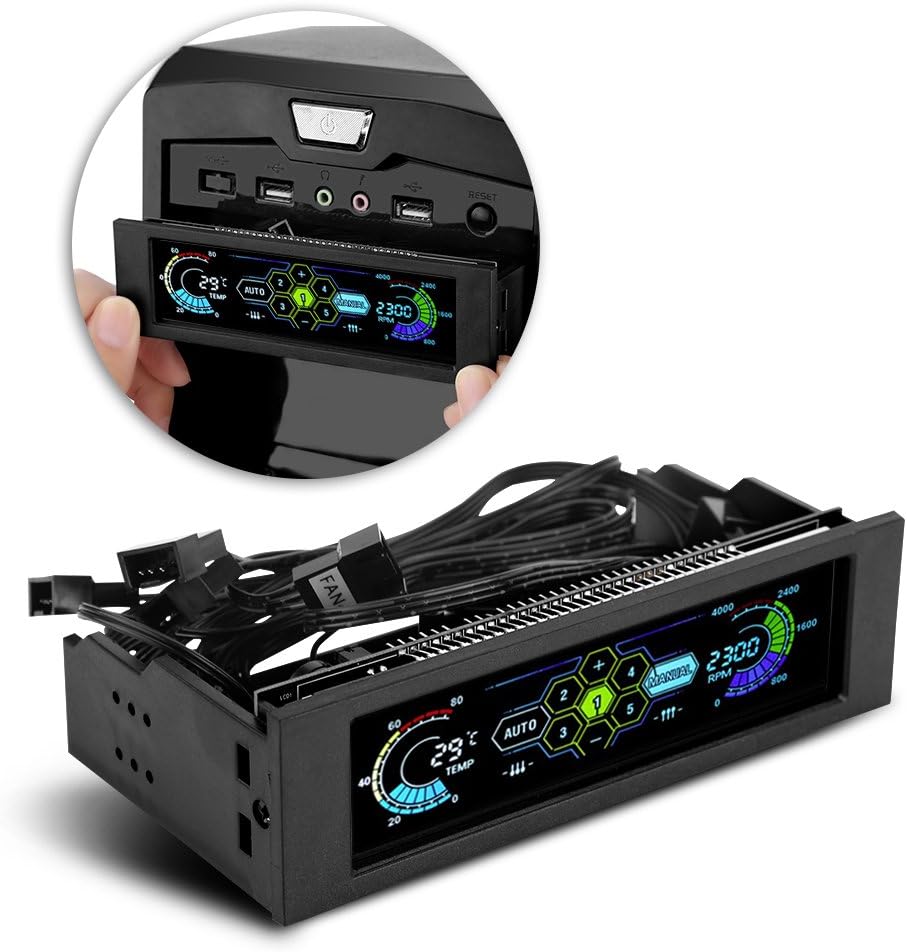
SaiDian 5.25 inch Fan Speed Controller
3.9Editor score
Affordable price point
LCD temperature display
Fan jam alarm system
This guide compares the top 10 Front Panel Fan Controller models to help you choose the best cooling solution for your PC build with expert insights.
Managing heat inside your computer case is crucial for performance and longevity. A Front Panel Fan Controller allows you to adjust fan speeds manually or automatically based on temperature readings. This ensures your system stays cool without unnecessary noise during light tasks.
We have reviewed ten distinct models ranging from budget-friendly options to premium RGB-enabled units. Each product was evaluated on build quality, ease of installation, control features, and reliability. Our goal is to help you find the perfect match for your specific cooling needs.
Each pick in this list highlights key strengths and potential trade-offs you should consider. We include detailed specifications, pros and cons, and usage tips for every item. Please note that prices and availability can change rapidly online so check current listings before buying.
3.9Editor score

5.0Editor score

4.2Editor score
The following table provides a side-by-side comparison of all ten models we reviewed. You can quickly see key specifications and features to identify which unit fits your requirements best.


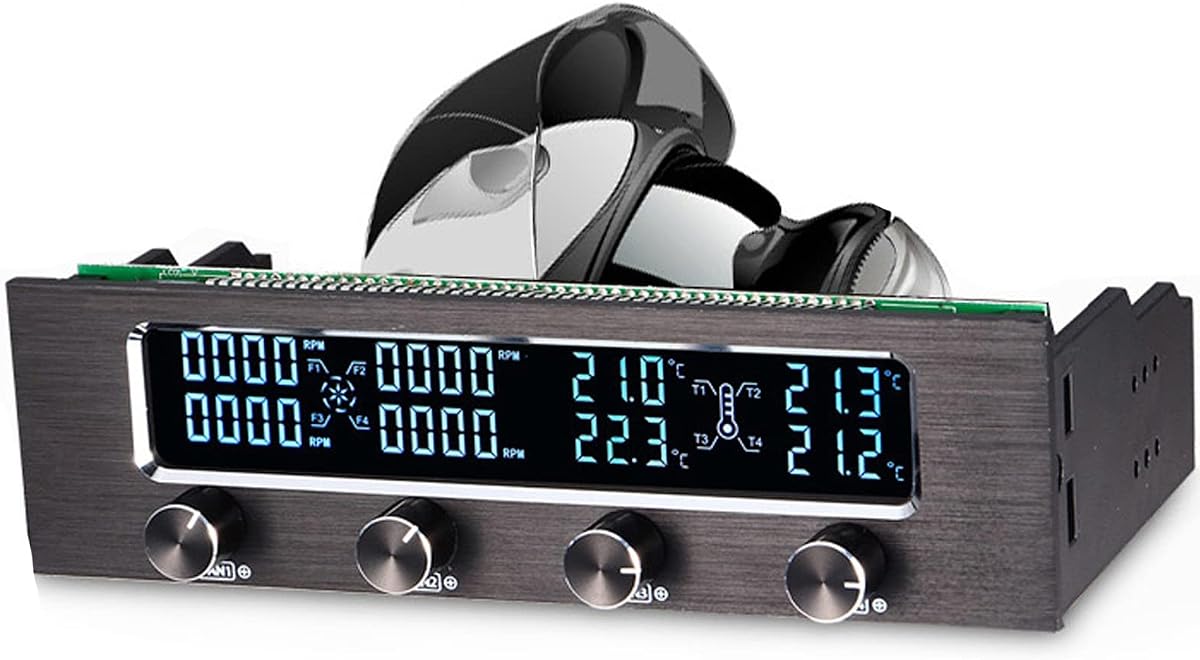
The STW-6041 stands out as a highly reliable unit with a perfect rating. Its robust aluminum alloy panel ensures durability while the LCD display provides clear real-time data on fan speeds and temperatures. This model is ideal for users seeking a balance of functionality and aesthetic appeal.
We may earn a commission when you buy through this link, at no additional cost to you.
Key strengths include the wide LCD screen that shows four sets of fan speeds and temperatures simultaneously. The over temperature warning system is particularly useful as it flashes and sounds an alarm when temperatures exceed sixty degrees. This safety feature helps prevent hardware damage from overheating effectively.
While the unit requires a 5.25 inch optical drive bay for installation which might not be available in all cases the benefits outweigh this limitation for many builders. The PWM circuit adjusts fan speed to reduce high frequency noise which contributes to a quieter computing environment overall.
This controller is best suited for enthusiasts who want precise manual control alongside automated safety features. The high specification capacitors ensure the unit can withstand high temperatures and maintain reliable function over a long service life without suffering from electrical leakage or damage.
The aluminum alloy panel undergoes multiple matt treatments to resist wear and fit any chassis style.
Integrated sensors detect high temperatures and fan failures to trigger immediate alerts and prevent damage.
We may earn a commission when you buy through this link, at no additional cost to you.
This premium controller offers extensive customization through its RGB LCD screen and six voltage control knobs. It supports up to six fans independently allowing for precise airflow management in complex builds. The inclusion of temperature sensors ensures you can monitor heat sources directly on the panel.
We may earn a commission when you buy through this link, at no additional cost to you.
The ability to connect Lumi LED strips adds a visual flair that enhances the overall look of your setup. Users appreciate the warning alarm system which protects against short circuits and other electrical issues. This level of protection is vital for expensive hardware components inside your PC.
Despite the higher cost compared to basic models the features justify the investment for serious enthusiasts. The single bay installation saves space while providing maximum control options. However you should ensure your case has an available 5.25 inch drive bay before purchasing.
Ideal for users building high end gaming rigs or workstations this controller delivers both performance and style. The one year warranty provides peace of mind regarding durability. It remains a top choice for those who prioritize aesthetic integration with robust functionality.
The RGB LCD and LED strip support allow for unique lighting schemes that match your system theme.
Six temperature sensors provide detailed insight into internal heat levels across different zones.
We may earn a commission when you buy through this link, at no additional cost to you.
Offering an accessible entry point into fan control this unit provides essential features at a low cost. The large screen displays temperature fan speed and hard disk status keeping you informed at a glance. A fan jam alarm ensures you are notified if cooling fails unexpectedly.
We may earn a commission when you buy through this link, at no additional cost to you.
Users can manually set the alarm temperature range to prevent hardware damage effectively. The controller allows for both manual and automatic speed adjustments giving flexibility based on user preference. However it controls only three groups of fans which may limit options for larger setups.
The price point makes it attractive for budget builds but user reviews suggest mixed experiences. Some users report functionality issues that may require troubleshooting or replacement. It is important to weigh the cost savings against potential reliability concerns before buying.
Best for users who need basic temperature monitoring without advanced features this controller serves a niche market. The date time display is a unique addition that adds utility beyond cooling. Always check current customer feedback to ensure you get a functional unit.
This model provides core cooling management features at a price that fits tight budgets.
Immediate alarms for fan failures help prevent overheating even in simple configurations.
We may earn a commission when you buy through this link, at no additional cost to you.
This controller supports up to five fans which is more than many basic units in its class. The big LCD screen displays temperature fan speed alarm temperature and hard disk state for comprehensive monitoring. Auto manual mode switching allows users to choose between automatic regulation or manual adjustments.
We may earn a commission when you buy through this link, at no additional cost to you.
The alarm temperature range can be manually set between forty and ninety degrees to match your system needs. This flexibility is useful for custom tuning based on ambient conditions or workload demands. However some users find the initial setup and calibration slightly complex compared to plug and play models.
When a fan breaks down the system alerts you immediately ensuring you never lose cooling protection. This feature is crucial for maintaining system health over time. The ability to monitor hard disk state adds an extra layer of insight into your PC's overall health.
Ideal for users with multiple fans needing independent control this unit balances features and cost. The four seven rating reflects general satisfaction with performance. Always ensure your case supports the required connections before installation to avoid compatibility issues.
Support for five fans provides ample control for larger or more complex cooling configurations.
Switching between auto and manual modes lets you adapt cooling strategies to different situations.
We may earn a commission when you buy through this link, at no additional cost to you.
The Ejoyous controller offers independent control for up to four case fans with a wide LCD display. Four temperature sensors monitor different areas inside the PC case providing detailed thermal data. The automatic or manual regulation supports demand oriented cooling to optimize efficiency and comfort.
We may earn a commission when you buy through this link, at no additional cost to you.
A double safety function alerts you if temperatures exceed sixty degrees or if a fan stands still. This reliable operation support is vital for maintaining hardware health during heavy loads. The aluminum alloy panel with matte finishes gives the unit a robust and durable appearance.
PWM circuitry allows for precise fan control reducing annoying high frequency noises significantly. By adjusting performance as needed the system operates more comfortably and efficiently. While no rating is currently available the features suggest a well designed product for general use.
Best for users seeking a balance of aesthetics and functionality this model fits standard 5.25 inch bays. The robust execution suggests a long lifespan and reliable function within the PC case. Always verify the latest reviews and feedback before purchasing to ensure current quality standards.
Four channels allow you to tune individual fans for optimal airflow and noise reduction.
Integrated sensors detect anomalies to protect your hardware from thermal damage or failure.
We may earn a commission when you buy through this link, at no additional cost to you.
This unit optimizes airflow with ten ports for individual PWM control reducing cable chaos significantly. It supplies up to two amps per port ensuring fans receive consistent power levels. Windows and Linux support enables compatibility with a wide range of fan control and monitoring software.
We may earn a commission when you buy through this link, at no additional cost to you.
Centralized cable management through this controller ensures a cleaner build by eliminating Y splitter cables. This is particularly beneficial for cases with limited routing options or tight spaces. The magnetic or adhesive mounting options provide flexibility for placement within the chassis.
Unlike motherboards that may vary in output levels this controller offers uniform performance across all ports. Native driver support allows you to use existing tools to manage your fans without new software. However the lack of a built-in display means you rely on software for real-time data.
Ideal for builders prioritizing cable management and software integration this controller is a strong choice. The zero cable chaos feature simplifies both installation and future upgrades. Consider your need for on-board displays when deciding if this hub meets your specific requirements.
Support for common OS platforms allows you to use familiar tools for managing fan speeds.
Centralized wiring reduces clutter and improves airflow by minimizing obstruction inside the case.
We may earn a commission when you buy through this link, at no additional cost to you.
The Noctua NA-FC1 is a compact controller designed for 4-pin PWM fans offering high flexibility. It works as a manual speed reducer or in tandem with automatic motherboard control. This dual functionality helps achieve truly quiet operation even with high-speed industrial fans.
We may earn a commission when you buy through this link, at no additional cost to you.
The no stop mode prevents fans from falling below 300 RPM to avoid BIOS fan errors. This is crucial for systems that require constant airflow to maintain stability. It includes a 3-way splitter cable allowing you to control up to three fans simultaneously with one unit.
While it lacks automated temperature controls users appreciate the simplicity and reliability of manual adjustment. The six-year manufacturer warranty highlights confidence in the product's longevity and build quality. It is a great choice for those who prefer direct control over software automation.
Best for small form factor builds or simple setups this unit fits easily inside cases. Its ability to handle industrial fans expands its utility beyond standard consumer hardware. If you value quiet operation and reliability this controller is an excellent addition to your build.
Designed to work with high-speed industrial fans it handles demanding cooling tasks effortlessly.
No stop mode ensures BIOS stability by maintaining minimum fan speeds under all conditions.
We may earn a commission when you buy through this link, at no additional cost to you.
This unit works with any PD USB-C charger and comes with a complete DIY kit. It features a digital display that switches between real-time temperature and fan speed for precise control. Dual control modes allow automatic temperature-based adjustments or manual PWM duty cycle changes.
We may earn a commission when you buy through this link, at no additional cost to you.
The digital display supports temperature ranges from negative thirteen to two hundred forty eight degrees. Adjustable start and full-speed temperatures with hysteresis provide fine-tuned thermal management. Built-in over-voltage and over-current protection ensure safe and stable long-term use.
It offers power-off memory for all settings so you do not lose your configuration after a reboot. The compact size allows for easy integration into various projects beyond standard PC cases. This versatility makes it popular for NAS server cabinets and custom cooling projects.
Ideal for DIY enthusiasts this controller provides extensive features for a low price point. The five star rating indicates high satisfaction among users. Always verify that you have the necessary USB-C charger and cables to power the unit properly.
Compatible with USB-C power sources for flexible installation in non-traditional setups.
Adjustable start and stop temperatures allow for custom cooling curves tailored to your needs.
We may earn a commission when you buy through this link, at no additional cost to you.
This unit features a wide LCD screen displaying four sets of fan speeds and temperatures. The safety system includes high temperature alarms and fan anti-seize features to protect hardware. PWM circuit adjust helps reduce high frequency noise for a quieter system environment.
We may earn a commission when you buy through this link, at no additional cost to you.
The alloy panel undergoes multiple matt treatments to suit any chassis style. While it shares many features with top models user reviews indicate significant performance inconsistencies. Some users report issues with the display or alarm functionality that impact overall satisfaction.
It is suitable for any chassis which provides installation flexibility for standard cases. However the low rating suggests quality control may vary between production batches. Potential buyers should check recent feedback carefully before making a decision to avoid disappointment.
Best for budget builds where aesthetics matter this controller offers visual utility. The date time display is a nice addition that adds value. Always weigh the risks of lower rated products against the potential savings carefully.
The treated alloy panel fits various case styles without clashing with existing components.
PWM technology helps lower operational noise making it suitable for quiet PC builds.
We may earn a commission when you buy through this link, at no additional cost to you.
This controller manages up to five groups of fans which is beneficial for larger systems. The big LCD screen displays temperature fan speed alarm temperature and hard disk state constantly. Users can manually set alarm temperature ranges from forty to ninety degrees for custom protection.
We may earn a commission when you buy through this link, at no additional cost to you.
Auto and manual mode switching provides flexibility in how you manage cooling. When a fan breaks down the system alerts you immediately to prevent overheating damage. However similar to the four fan model user ratings suggest mixed reliability experiences.
The drive bay installation fits standard cases without requiring major modifications. It offers solid feature count for the price but quality control may be inconsistent. Always review the latest user feedback to see if current batches have improved over previous versions.
Best for users needing more channels without paying premium prices this model offers value. The hard disk state display adds utility for comprehensive system monitoring. Proceed with caution if reliability is your top priority given the lower rating.
Managing five fan groups allows for complex cooling layouts in larger PC chassis.
Displays hard disk state alongside temperature for a broader view of system health.
We may earn a commission when you buy through this link, at no additional cost to you.
Selecting the right controller involves understanding your needs for channel count features and installation space. This guide outlines key factors to help you make an informed decision.
The number of channels determines how many fans you can control independently. If you have a simple setup with two or three fans a four channel unit might suffice. However larger builds often require five or six channels to manage airflow effectively across different zones.
Choose a model that supports enough fans for current needs and future upgrades. Ensure the controller allows independent voltage control for precise speed adjustments.
Controllers offer LCD displays digital readouts or no display at all. An LCD screen provides quick access to temperatures and RPMs without opening software. Some units allow customization of the display for aesthetics which enhances the overall look.
If you prefer software management a controller without a display might save money. Ensure the interface is intuitive so you can adjust settings easily during operation.
Most front panel units require a 5.25 inch optical drive bay. Check your case specs to ensure this space is available as some modern cases omit it entirely. Magnetic or adhesive options offer alternatives if you cannot fit a traditional bay mount.
Verify that the power supply cables included match your fan connectors. Adapters may be needed for older three-pin fans to work with modern four-pin systems.
Decide between manual auto or hybrid control modes. Manual control gives you direct command over speeds while automatic uses temperature probes to adjust dynamically. Hybrid modes offer the best of both worlds allowing you to override settings when necessary.
Automatic modes are better for maintaining consistent cooling without constant user intervention. Manual modes are ideal for tuning specific noise performance trade-offs during gaming or rendering.
Look for alarms that trigger when temperatures exceed safe limits or when fans stop. Over-voltage and short circuit protection prevent electrical damage to expensive components. These features are crucial for long-term reliability and hardware safety.
Prioritize models with fan anti-seize detection to avoid overheating risks. A safety system adds a layer of protection that simple pass-through hubs lack.
Aluminum alloy panels are common and offer durability and heat resistance. High-quality capacitors ensure the unit can withstand heat and voltage spikes without failure. Inspect finish quality to ensure the controller matches your case aesthetics.
A robust build extends the lifespan of the controller in a hot PC environment. Avoid models with plastic panels if durability is a primary concern.
Prices range significantly from budget units to premium RGB models. Determine how many features you truly need versus what is marketing fluff. A budget unit might lack some safety features but still manage cooling adequately.
Consider the total cost including any required adapters or extension cables. Invest in a unit that offers long-term reliability to avoid replacement costs later.
Ensure the controller supports your operating system if it uses software. Windows and Linux support is critical for monitoring applications. Check if firmware updates are available to maintain compatibility with newer hardware.
Read customer reviews to gauge real-world reliability. Strong manufacturer support can help if you encounter installation or technical issues.
Install the controller into a 5.25 inch drive bay and connect the main power cable to a 12V Molex or SATA connector from your PSU. Attach fan wires to the designated ports and route them neatly to avoid blocking airflow inside your case.
Turn on your PC and allow the controller to initialize. Check the LCD or display for error messages and set your desired alarm temperatures or manual speeds. If your unit uses software download and install drivers to enable full functionality.
Periodically clean dust from the panel and cables to ensure proper ventilation and connectivity. Check that all fans spin smoothly without unusual noise. Reset settings if you encounter glitches or update firmware to maintain optimal performance.
Yes most modern controllers support three pin fans via adapters. They will operate at full speed unless you manually adjust voltage or use PWM conversion adapters. Check product specs to confirm compatibility with your specific fan type.
Controllers typically draw power from your PSU via Molex or SATA cables. Some advanced units may require USB connections for software integration. Always verify the included power cables match your available connectors.
Connect the included temperature probe to a heat source like the CPU or GPU. Set your desired alarm thresholds in the controller settings or software. Ensure the fan response range is configured to adjust speeds based on detected changes.
If the display stops working the controller may still manage fans if configured before failure. Use software controls if available to maintain cooling. Contact support for warranty service if hardware defects are suspected.
PWM controllers generally reduce high frequency noise by modulating fan speeds smoothly. Ensure all connections are secure to avoid buzzing sounds. Adjust speed curves to avoid sudden spikes that cause audible changes.
Most units support between four and ten fans depending on the model. Check the total current capacity to avoid overloading the unit. Distribute high RPM fans across ports to stay within safe limits.
We reviewed ten models ranging from budget options to premium RGB units. The STW-6041 offers excellent value with a clear display while the Thermaltake Commander F6 leads in customization.
Prioritize safety features and build quality when selecting your unit. Ensure the channel count meets your needs and the installation fits your case structure.
Prices and availability change often so check current listings before buying. Verify compatibility and read the latest reviews to confirm current product quality standards.