
GRAUGEAR 20Gbps Type E Key A Front Panel USB C Header Extension Cable
4.6Editor score
20Gbps high-speed data transfer
Compatible with Type E Key A headers
Includes sturdy metal PCIe bracket
Front Panel USB C Headers allow users to add modern connectivity to older desktop cases. These adapters convert internal motherboard headers into accessible external ports for fast data transfer and device charging.
We compared ten top-rated models based on speed support, compatibility with various headers, build quality, and user feedback. Our analysis focuses on reliability, ease of installation, and overall value for different PC setups.
Each pick highlights specific strengths like 20Gbps speeds or hub functionality. Prices and availability change frequently so check the linked product pages for current details before making your final purchasing decision today.
4.6Editor score

4.6Editor score

4.6Editor score
As an Amazon Associate we earn from qualifying purchases.
This side-by-side comparison evaluates all ten selected models based on their speed capabilities, port configurations, and compatibility requirements to help you find the best match for your specific hardware setup.


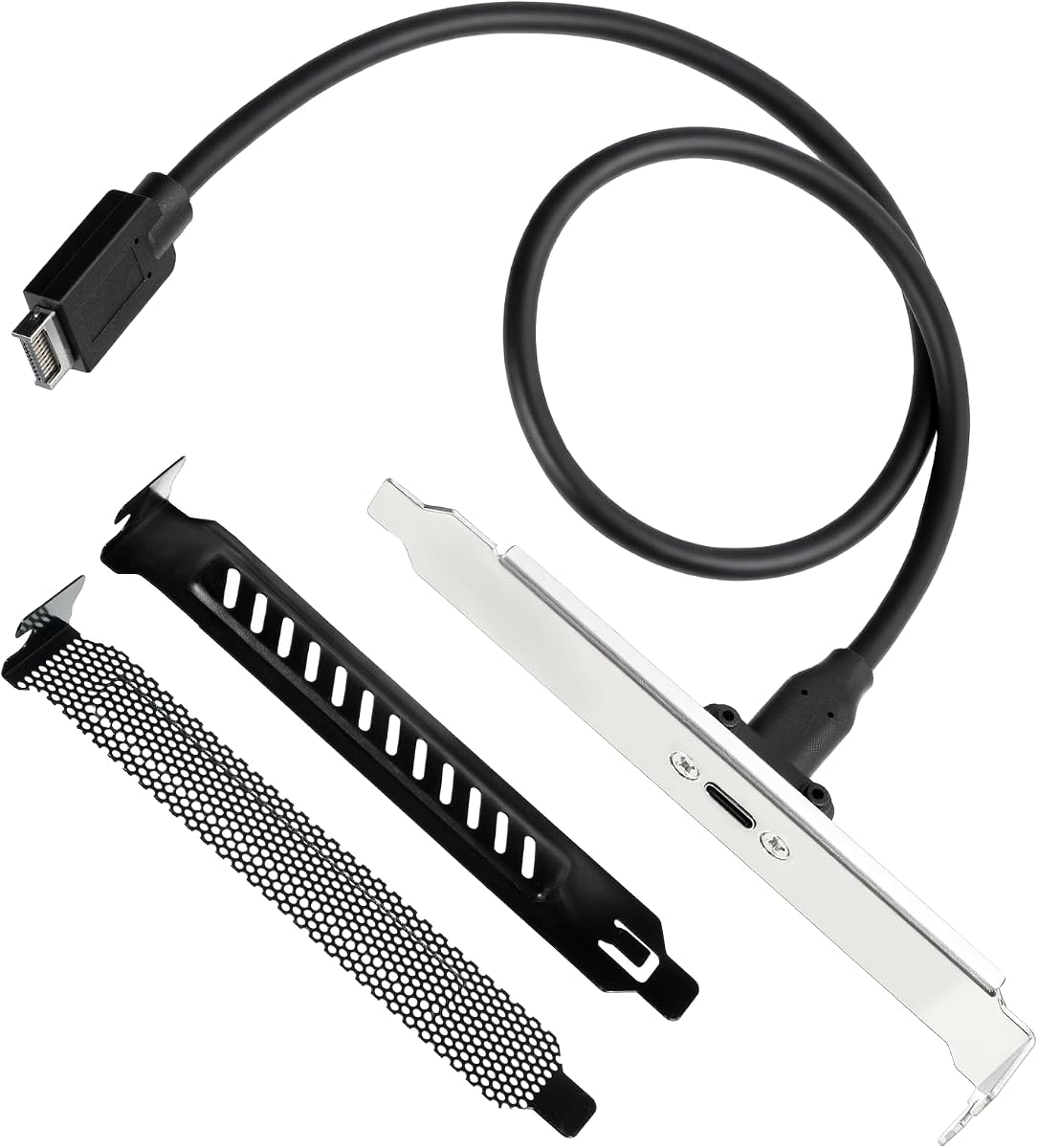


This GRAUGEAR adapter offers excellent performance for users needing fast external access to USB-C devices. With a 4.6 rating, it delivers 20Gbps speeds when paired with the right motherboard header. The sturdy metal bracket ensures it fits securely in standard back panels.
We may earn a commission when you buy through this link, at no additional cost to you.
Its high-speed wire construction supports USB 3.2 Gen 2×2 standards effectively. The double-shielded EMI/EFI wires prevent noise interference during data transfers. Users appreciate the compatibility with phones, tablets, and drives through the panel-mounted female connector.
While it requires a specific Type-E header, the installation is straightforward with clear labeling. Some older motherboards may need an adapter card for conversion which adds complexity. The cable is not extendable which limits routing flexibility in tight cases.
This model is ideal for builders upgrading older cases with modern connectivity without expensive hubs. It balances speed and cost effectively for those who already have the required motherboard header. Check your system specs before purchasing for full compatibility.
The 20Gbps capability ensures quick file transfers for external SSDs and high-bandwidth peripherals.
Double shielding protects data integrity by reducing electromagnetic interference during operations.
We may earn a commission when you buy through this link, at no additional cost to you.
This adapter provides a reliable way to bring USB-C connectivity to the front of your PC case. Rated 4.6 stars it supports 20Gbps data transfer speeds compatible with USB 3.2 Gen 2×2 devices. The panel mounted connector allows easy access for phones and drives.
We may earn a commission when you buy through this link, at no additional cost to you.
The construction features extremely high-speed wires that maintain signal integrity over the cable length. A sturdy metal bracket secures the rear connection point preventing loose connections during use. This ensures longevity and consistent performance in various environments.
Installation is simple with no driver requirements for modern operating systems. Users should confirm their motherboard has the required 20-pin Type-E Key-A header before purchasing. Without it additional adapters are needed which adds cost and complexity to the setup.
This cable is best for users who need a direct extension without a full hub setup. It offers a cost-effective upgrade path for existing desktop systems. Verify your system capabilities to ensure optimal speed and functionality.
Supports up to 20Gbps transfer speeds for efficient handling of large files.
The included PCI bracket ensures the adapter stays firmly in place during use.
We may earn a commission when you buy through this link, at no additional cost to you.
This adapter stands out by offering both USB-C and standard USB Type-A front panel ports. With a 4.6 rating it supports 20Gbps speeds for USB-C devices while providing legacy support for other peripherals. This dual connectivity adds versatility to desktop setups.
We may earn a commission when you buy through this link, at no additional cost to you.
The cable uses high-speed wires compatible with USB 3.2 Gen 2×2 standards. The sturdy metal construction and double-shielded wires ensure reliable data transmission with minimal interference. Users can connect phones tablets and flash drives easily.
Installation requires both a 20-pin Type-E and a 19-pin USB 3.0 header on the motherboard. Older systems may need adapters to enable these connections which adds steps to the process. Ensure both headers are available before purchase for best results.
This adapter is perfect for users wanting both modern and legacy USB access in one solution. It balances high-speed performance with broad compatibility effectively. Check your motherboard specs carefully to confirm header availability.
Offers both Type-C and Type-A ports for diverse device connectivity needs.
Double shielding protects against internal and external interference during data transfers.
We may earn a commission when you buy through this link, at no additional cost to you.
This hub converts a standard 3.5 inch drive bay into four high-speed USB ports. Rated 4.2 stars it offers two USB-C and two USB-A ports for flexible device connectivity. It transforms unused space into practical access points for peripherals.
We may earn a commission when you buy through this link, at no additional cost to you.
Both port types support USB 3.2 Gen 2 speeds up to 10Gbps. The sturdy metal construction ensures durability and long service life. Multiple safety protections like over-current and over-voltage safeguards keep connected devices safe from power spikes.
Installation requires a 20-pin Type-E header and a 15-pin SATA power connector. Older motherboards may need conversion adapters to provide these inputs. The included six screws ensure secure mounting within the computer case.
This hub is ideal for users needing multiple front USB ports without a full expansion card. It provides substantial scalability for desktop computers effectively. Ensure power and header availability before purchasing for full functionality.
Provides four ports for connecting multiple devices simultaneously without adapters.
Over-current and short-circuit protection safeguards connected peripherals during operation.
We may earn a commission when you buy through this link, at no additional cost to you.
This expansion card adds front USB-C and USB 3.0 ports via a PCIe x1 slot. Rated 4.5 stars it supports 5Gbps transfer speeds for efficient data handling. It is a great option for cases lacking internal motherboard headers.
We may earn a commission when you buy through this link, at no additional cost to you.
The card uses explosion-proof capacitors and voltage-regulating components for stable power. Users report compatibility with most modern Windows systems and various desktop brands. Installation is straightforward with clear steps provided in the documentation.
The main limitation is the 5Gbps speed which is standard for USB 3.0 Gen 1. It requires an empty PCIe x1 slot which may be occupied in compact systems. Power is drawn from the slot so no extra cables are needed.
This card is best for users needing to add front ports on motherboards without built-in headers. It offers a direct hardware solution without external hubs. Check slot availability and speed requirements before buying.
Uses an empty PCIe x1 slot to add USB front panel ports directly.
Built-in capacitors ensure consistent power delivery for connected devices.
We may earn a commission when you buy through this link, at no additional cost to you.
This hub combines a high-speed USB-C port with two standard USB-A ports in one unit. Rated 4.6 stars it supports 20Gbps speeds ideal for fast external storage. It turns a 3.5 inch floppy bay into a modern connectivity center.
We may earn a commission when you buy through this link, at no additional cost to you.
The USB-C port supports USB 3.2 Gen 2×2 standards for maximum data rates. Safety features include over-current and short-circuit protection for secure operation. The sturdy build with included screws ensures stable installation in most cases.
Installation needs both a 20-pin Type-E header and a 19-pin USB 3.0 header. This dual requirement can be tricky on older motherboards without proper slots. Users may need adapters if headers are missing from their system.
This hub is an excellent choice for users needing mixed USB types with high speed. It offers a compact solution for maximizing case utility effectively. Verify your motherboard headers to ensure compatibility.
Delivers 20Gbps transfer rates for quick file handling with modern devices.
Included screws and sturdy design keep the hub stable within the case.
We may earn a commission when you buy through this link, at no additional cost to you.
This cable allows older motherboards to support a USB-C port on the front panel. With a 4.8 rating it converts a 9pin USB 2.0 header into a Type-C connector. It is a cost-effective way to modernize legacy systems.
We may earn a commission when you buy through this link, at no additional cost to you.
The cable supports maximum USB 2.0 speeds of 480Mbps. It is designed for basic data transfer to phones and drives without video output capabilities. Installation is straightforward with plug and play functionality requiring no drivers.
The short 17cm length keeps cable management clean but limits routing options. It does not support USB 3.0 speeds which may be a limitation for faster devices. This makes it best for low-speed peripherals only.
This adapter is ideal for users who just need basic USB-C access on older hardware. It brings modern connectivity to older systems affordably. Manage expectations regarding transfer speeds for best satisfaction.
Enables USB-C connectivity on older motherboards with USB 2.0 headers.
Provides essential 480Mbps speeds for low-bandwidth devices.
We may earn a commission when you buy through this link, at no additional cost to you.
This adapter offers a complete solution with a cable and two PCI slot covers. Rated 3.8 stars it supports 20Gbps data transfer speeds for large file handling. The panel-mounted USB-C connector works with modern devices easily.
We may earn a commission when you buy through this link, at no additional cost to you.
The cable uses metal and PVC materials for stability and flexibility. Clear labeling ensures correct orientation during installation to prevent connection errors. The included silver finish brackets complement most computer builds for a professional look.
The 50cm cable length provides sufficient slack for routing within cases. However some users report compatibility issues which lower the overall rating. Ensure your motherboard has the correct Type-E header before purchasing.
This kit is best for users wanting a complete setup with extra covers for aesthetics. It balances speed and convenience for desktop upgrades. Verify motherboard compatibility for reliable performance.
Includes both the adapter cable and PCI slot covers for a full install.
Metal and PVC materials ensure stable transmission and bending resistance.
We may earn a commission when you buy through this link, at no additional cost to you.
This extension cable converts a mainboard USB3.0 interface to a TYPE-E USB 3.1 interface. Rated 4.3 stars it supports data speeds up to 10Gbps for efficient file transfers. The TPE flat cable offers flexibility for tight routing.
We may earn a commission when you buy through this link, at no additional cost to you.
The cable uses 16-pin wiring with silver-plated materials to reduce impedance. Double shielding ensures stable signal transmission during operation. Users appreciate the plug and play nature with no driver requirements needed.
The ultra-thin flat cable can be bent thousands of times without damage. Panel screw spacing is 20mm which fits most chassis standards. Ensure the motherboard has a Type-E port for normal functionality.
This adapter is best for users needing a flexible and thin cable solution for tight spaces. It provides a balance of speed and manageability. Verify header compatibility for correct installation.
Ultra-thin flat design allows tight bends without damaging internal wires.
Silver-plated materials reduce conductor impedance for faster data speeds.
We may earn a commission when you buy through this link, at no additional cost to you.
This adapter offers an exceptional rating with support for multiple USB types. Rated 5.0 stars it provides both Type-C and Type-A ports for versatile connectivity. It supports high 20Gbps speeds ideal for demanding data needs.
We may earn a commission when you buy through this link, at no additional cost to you.
The double-shielded EMI/EFI wires ensure stable and noise-free transmission. Sturdy metal construction ensures a long service life and durability. Users can connect a wide range of devices including phones tablets and external storage.
Installation requires both Type-E and USB 3.0 headers on the motherboard. This dual requirement means older systems may need conversion cards to use fully. The PCIe bracket helps secure the connection at the back of the case.
This adapter is the top choice for users needing comprehensive port flexibility and speed. It stands out for its high user satisfaction and robust design. Check motherboard header availability before purchasing.
Achieves a perfect 5.0 user rating for reliability and performance.
Durable metal ensures long service life for extended daily use.
We may earn a commission when you buy through this link, at no additional cost to you.
Selecting the right header requires understanding your motherboard compatibility and speed needs. Consider these key factors to find a model that matches your specific system and performance goals.
Check your motherboard for the specific Type-E 20-pin header. Some models require both Type-E and USB 3.0 headers. Without the correct headers you may need additional adapters which increase cost.
Always verify your motherboard's header types before purchasing to avoid incompatibility.
Look for adapters supporting USB 3.2 Gen 2×2 for up to 20Gbps speeds. Standard USB 3.0 headers may limit you to 5Gbps rates. Ensure your external devices can utilize the advertised speeds.
Match the adapter speed to your peripheral needs for optimal performance.
Measure your case's interior to ensure the cable reaches from the motherboard to the front. Typical lengths range from 17cm to 23 inches for standard cases. Short cables may not reach in larger or specific case designs.
Choose a length that fits your case layout to manage cables effectively.
Select models with metal brackets and double-shielded wires for durability. Shielding reduces electromagnetic interference that can corrupt data transfers. Metal parts ensure a stable mount within the case back panel.
Prioritize durable materials to ensure a long service life.
Decide between adapters offering only USB-C or those with USB-A ports. Some hubs provide multiple ports which is useful for connecting several devices. A single cable extension works best if you only need one port.
Choose a port configuration that matches your daily connectivity needs.
Some hub models require a SATA power connector in addition to motherboard headers. Simple cables do not need external power as they draw from the header. Confirm power needs based on the product type.
Ensure your power supply has available connectors if needed.
Most adapters support plug and play without drivers but may need screws for mounting. Complex setups involving hubs may require multiple cable connections. Read instructions to estimate your installation time.
Factor in the time and tools required for physical installation.
Prices vary widely based on speed support and extra features like shields. Higher speed models generally cost more than standard USB 3.0 adapters. Balance your budget with the features you truly need.
Compare features against price to find the best value.
First ensure your computer is powered off and unplugged from the wall outlet before opening the case. This prevents static electricity from damaging sensitive internal components like the motherboard or cables. Work on a clean non-conductive surface.
Connect the adapter cables to the correct headers on the motherboard. Match the 20-pin Type-E connector or 19-pin USB 3.0 connector carefully ensuring orientation is correct. Secure the rear bracket to the case with screws or tabs.
Regularly check connections for dust or loose wires to maintain optimal performance. Avoid bending the cables sharply near the connection points to prevent internal wire damage. Keep the front ports clean and dry to avoid short circuits.
Most modern adapters do not require drivers as they use plug and play protocols. Windows 10 and above typically support them automatically. Older systems like Windows XP may need specific drivers to function correctly.
Type-E headers support 20-pin connections often required for USB 3.2 Gen 2 speeds. USB 3.0 headers usually have 19 pins and support lower speeds. Knowing your motherboard's header type is key to choosing the right adapter.
Hub models typically require a 3.5 inch space to fit. Simple cables may be mounted using spare bracket slots in other locations. Check your case's available expansion slots for mounting options.
These data-only adapters do not support video or audio output. They are designed for transferring files and connecting peripherals like drives. For video functionality look for DisplayPort or HDMI specific adapters.
Consult your motherboard manual or look at the manufacturer's website specs. Check the front of the board near the USB ports for 20-pin or 19-pin headers. Visual inspection of the board usually reveals these connectors.
Yes these adapters are safe for continuous use once installed correctly. They include safety protections like over-voltage and short-circuit safeguards. Ensure the connections are tight to prevent accidental disconnections.
The top picks offer a range of options from simple cables to full hubs for versatile connectivity. Our best budget choice delivers excellent speed value while the editor's pick provides a balanced hub solution.
Prioritize your motherboard header compatibility and speed needs before making a selection. Ensure the physical fit matches your case to avoid installation issues.
Remember that prices and availability change frequently so verify the linked pages for current stock. This guide helps you make an informed choice to enhance your desktop connectivity.