
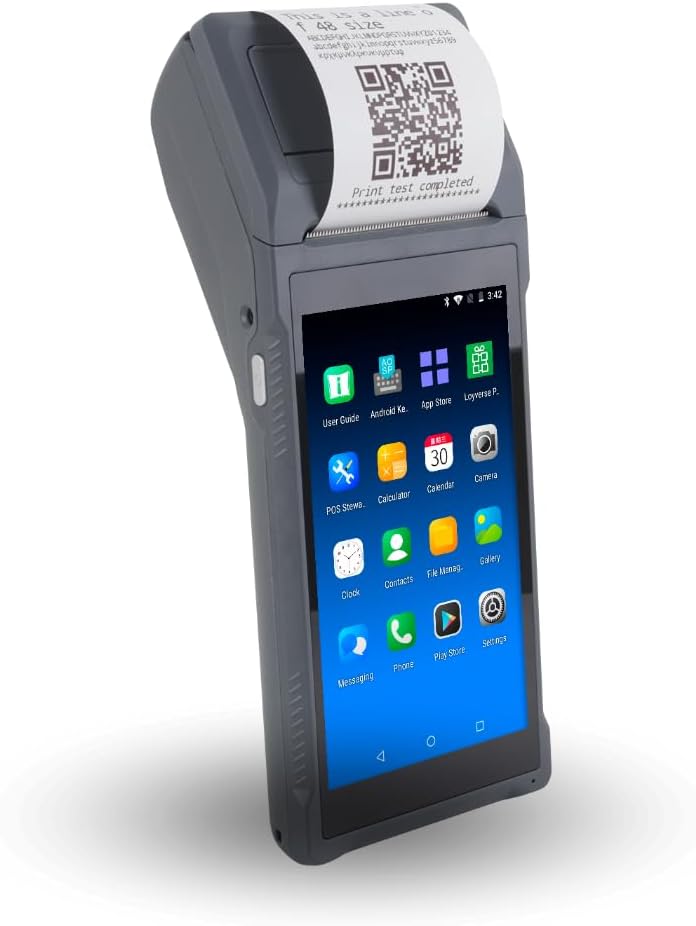
Bisofice POS Receipt Printer
4.0Editor score
Android 8.1 OS
Built-in thermal printer
5000mAh battery
Handheld point of sale systems have revolutionized how businesses process transactions on the go. These portable devices combine payment processing, inventory management, and receipt printing into a single unit. Choosing the right one depends on your specific industry needs and mobility requirements.
We evaluated ten leading models based on connectivity options, battery life, and software compatibility. Our analysis covers devices ranging from simple card readers to full Android terminals with thermal printers. This list helps you compare key specifications to find the best fit for your operations.
Each pick below highlights unique strengths like offline capabilities, barcode scanning, or rugged design. Keep in mind that pricing and availability can fluctuate over time. Always check the latest details before making your final purchase decision for your business needs.
4.0Editor score

4.7Editor score

5.0Editor score
As an Amazon Associate we earn from qualifying purchases.
This side-by-side comparison highlights the key specifications of each model to help you make an informed decision. Look closely at operating systems, connectivity options, and physical dimensions to determine which device aligns best with your daily workflow and business requirements.




The Square Handheld stands out as a top choice for businesses needing mobility and simplicity. With a high user rating, it proves reliable for restaurants and retail shops. Its slim design ensures it fits easily in pockets while maintaining robust functionality for daily sales.
We may earn a commission when you buy through this link, at no additional cost to you.
This device accepts all major credit and debit cards with a simple rate structure. The offline payment capability means you can continue selling even if internet connectivity drops. A long-lasting battery powers through full shifts without constant recharging interruptions.
While the device is durable against water splashes and dust, accidental drops might require an optional protective case. Without it, the slim profile could be vulnerable to damage in rugged environments. This trade-off is acceptable for users prioritizing portability over heavy-duty ruggedness.
Anyone needing a quick setup for tableside orders or mobile sales will find this ideal. It removes the need for complex hardware setups. We recommend this for small businesses wanting flexibility and ease of use without long-term commitments.
The slim, lightweight design allows staff to carry it comfortably while moving around the store or restaurant floor.
Offline payment features ensure transactions continue smoothly even when network signals are weak or unavailable temporarily.
We may earn a commission when you buy through this link, at no additional cost to you.
The H10 terminal offers cutting-edge performance with Android 14 and an Octa-Core processor. It features a clear touchscreen display and integrated thermal printer for receipts. This makes it a strong candidate for businesses needing a modern all-in-one mobile solution.
We may earn a commission when you buy through this link, at no additional cost to you.
Its battery life supports up to 14 hours of runtime, ideal for long shifts in retail or food trucks. Connectivity options include dual-band Wi-Fi, 4G LTE, and Bluetooth. The SDK availability allows developers to build custom software integrations easily.
While powerful, the device weighs 345 grams which might feel heavy for some users over time. The camera acts as a barcode scanner but lacks dedicated scanning hardware for high-speed operations. These factors are manageable for standard daily usage needs.
Developers and tech-savvy business owners will appreciate the flexibility this terminal offers. It supports many business applications and payment types. We suggest it for those wanting future-proof software and hardware capabilities.
Support for 4G LTE and dual-band Wi-Fi ensures stable connections in various environments.
Available SDK allows custom software integration for tailored business workflows and inventory management.
We may earn a commission when you buy through this link, at no additional cost to you.
The Bisofice POS Receipt Printer offers a budget-friendly option for small businesses needing mobile printing. It runs on Android 8.1 and includes a thermal printer for immediate receipts. This device suits cafes and boutiques wanting basic functionality without high costs.
We may earn a commission when you buy through this link, at no additional cost to you.
Wireless connectivity via 3G and WiFi allows flexible placement around the venue. The compact size makes it easy to carry while serving customers. A 5000mAh battery supports enduring working hours for daily operations.
The older Android OS might limit compatibility with some modern apps. Connectivity options are standard but lack 4G LTE speeds found in premium models. These limitations are acceptable for buyers prioritizing low upfront investment.
Small business owners looking for an entry-level mobile POS will find this useful. It handles basic sales and inventory tasks efficiently. We recommend it for startups or seasonal events needing a reliable low-cost tool.
Low operating costs with ink-free thermal printing and affordable hardware pricing for tight budgets.
Compact wireless design ensures staff can move freely while processing transactions anywhere.
We may earn a commission when you buy through this link, at no additional cost to you.
This 4G Handheld PDA POS combines Android 13 with reliable network connectivity. It features a 5MP camera for barcode scanning and a built-in printer. This model fits logistics and warehouse environments needing constant connection.
We may earn a commission when you buy through this link, at no additional cost to you.
The full network compatibility ensures uninterrupted workflow across various locations. The HD+ screen provides clear visuals for daily tasks. It comes with a roll of printing paper ready for immediate use upon delivery.
The 2GB RAM might slow down with heavy multitasking. The battery capacity is moderate compared to larger terminals. These trade-offs are fine for standard operational loads without complex apps.
Businesses needing consistent connectivity outside fixed locations will benefit here. It offers a balance of performance and portability. We suggest it for mobile teams requiring reliable data access.
Supports 4G LTE and WiFi ensuring stable connections even in remote or mobile settings.
Built-in thermal printer allows immediate receipt generation without external accessories.
We may earn a commission when you buy through this link, at no additional cost to you.
The Square Terminal integrates sales, payment acceptance, and receipt printing in one device. It works well at counters or anywhere in the store. This model simplifies the checkout experience for staff and customers alike.
We may earn a commission when you buy through this link, at no additional cost to you.
Fast chip card processing takes only two seconds reducing wait times. The built-in battery lasts all day allowing cordless use. Funds are available as soon as the next business day improving cash flow.
While versatile, it is less portable than true handheld models. It still requires some counter space for optimal use. This is acceptable for businesses needing a dedicated checkout station with mobility.
Retail stores wanting a streamlined checkout solution will find this effective. It balances ease of use with reliable performance. We recommend it for shops needing quick setup and consistent results.
Combines ring up, payment, and receipt printing to reduce hardware clutter and steps.
Chip card processing in seconds keeps lines moving quickly during peak hours.
We may earn a commission when you buy through this link, at no additional cost to you.
The Q2i Mobile POS Terminal runs on Android 11 with access to Google Play Store. It combines a touchscreen with an integrated thermal printer for receipts. This device supports various POS applications including Square and Loyverse.
We may earn a commission when you buy through this link, at no additional cost to you.
The built-in camera scanner reads standard 1D barcodes efficiently. A 5000mAh battery supports day long use. The package includes essential accessories like paper rolls and a start guide.
The scanner cannot read QR codes limiting some modern use cases. Ratings suggest potential variability in performance quality. These are manageable constraints for basic retail scanning needs.
Small businesses needing a simple Android terminal at a reasonable cost should consider this. It handles standard retail operations well. We suggest it for stores needing immediate setup and basic functions.
Google Play Store access allows installation of diverse POS and inventory applications.
Complete kit with cables and paper rolls ensures quick deployment upon arrival.
We may earn a commission when you buy through this link, at no additional cost to you.
The P1 terminal is built for fixed checkout locations with high reliability. It features an HD touchscreen and built-in printer for efficiency. With a perfect user rating, it stands out for stability and support.
We may earn a commission when you buy through this link, at no additional cost to you.
Hybrid connectivity ensures stable rapid transaction processing. It accepts all payment types including mobile wallets. The secure merchant onboarding process builds trust for new businesses.
It is designed specifically for counters rather than mobile roaming. Network setup requires attention to cabling or Wi-Fi zones. This fits stores prioritizing speed over mobility.
Retailers and salons needing a dependable counter unit will find this excellent. The support quality is a major benefit. We recommend it for established businesses wanting consistent uptime.
Dual Ethernet and WiFi prevent connection drops during busy checkout periods.
Vibrant touchscreen paired with physical keypad offers an intuitive user experience.
We may earn a commission when you buy through this link, at no additional cost to you.
The Alacrity Handheld POS PDA delivers premium performance with Android 14 and a large display. It features a powerful processor and massive battery for uninterrupted work. This model suits high-demand environments like logistics or retail.
We may earn a commission when you buy through this link, at no additional cost to you.
The 80mm printer supports flexible widths for various labels. Connectivity options include dual-band Wi-Fi and SIM support. The scan module handles both 1D and 2D codes efficiently.
The bulk from the large screen might be a drawback for tight pockets. The cost reflects the high-end specs. These are acceptable for businesses needing top-tier functionality.
Operations requiring heavy scanning and extended battery life will benefit most. The speed and reliability make it a strong investment. We suggest it for professional teams needing robust mobile tools.
6400mAh battery ensures extended working hours without frequent recharging interruptions.
Adjustable 80mm print width creates commercial possibilities for labels and receipts.
We may earn a commission when you buy through this link, at no additional cost to you.
This terminal focuses on scanning and ticket printing for high-volume operations. It features a 10-core CPU and large screen for clear data display. Ideal for managing queues and takeaway orders efficiently.
We may earn a commission when you buy through this link, at no additional cost to you.
The professional scan engine reads codes even with damage. Thermal prints are fast at 80mm/s. Connectivity includes 4G and Bluetooth for mobile use.
It does not process encrypted card transactions directly. An external card reader is needed for payment acceptance. This design suits staff focusing on order and queue management.
Food and beverage businesses needing efficient order handling will find this useful. The print speed enhances throughput during rushes. We recommend it for busy service environments.
80mm/s print speed with zigzag cutter ensures fast ticket generation and workflow efficiency.
Professional scan engine reads damaged or scratched codes for accurate data capture.
We may earn a commission when you buy through this link, at no additional cost to you.
The Clover GO pairs with mobile devices for simple payment acceptance. It offers end-to-end security and flexible receipt options. With a perfect rating, it appeals to those seeking ease of use.
We may earn a commission when you buy through this link, at no additional cost to you.
Paperless receipts via email or text reduce waste and costs. Employee permissions allow easy management of access. It supports custom tips and tax rates for flexibility.
It requires processing through SwyftPAY limiting provider choice. The dock is sold separately adding to setup cost. These constraints are manageable for businesses comfortable with the ecosystem.
Small businesses needing a pocket-sized reader will find it practical. The security and flexibility are strong points. We suggest it for mobile teams needing reliable payments.
Paperless email or text receipts reduce costs and cater to customer preferences easily.
End-to-end encryption protects customer and merchant data throughout every transaction process.
We may earn a commission when you buy through this link, at no additional cost to you.
Selecting the right handheld POS involves analyzing your operational needs against device capabilities. This guide breaks down the critical factors to consider before purchasing a mobile terminal.
The operating system dictates which applications your device can run. Android offers wide compatibility with business apps, whereas closed systems may limit customization. Ensure the device supports the POS software you already use or plan to adopt.
Look for up-to-date OS versions like Android 13 or 14 for security patches and performance.
Reliable connectivity is crucial for processing payments without interruption. Devices with 4G LTE allow work outside Wi-Fi zones. Dual-band Wi-Fi ensures stability in crowded environments.
Prioritize models with 4G or cellular support if you often operate away from fixed networks.
Battery capacity determines how long you can work without recharging. High capacity batteries like 6000mAh support long shifts. Fast charging capabilities minimize downtime between uses.
Choose a battery life that matches your typical work duration to avoid interruptions.
Built-in thermal printers save space and streamline receipt handling. Check paper width compatibility such as 58mm versus 80mm for labels. Ink-free printing reduces ongoing operational costs significantly.
Opt for a thermal printer if you need to issue physical receipts on the go.
Integrated cameras or dedicated scanners speed up inventory and sales processes. Some models read 1D codes while others support 2D QR codes. Verify scanning capabilities match your inventory management needs.
Ensure the scanner handles both 1D and 2D codes if you sell varied products.
Physical durability matters for devices used in rugged environments. Water resistance and drop protection extend device life. Ergonomic designs reduce strain during frequent use.
Look for water and dust resistance if your staff works outdoors or in messy areas.
Some devices are all-in-one while others pair with external card readers. Verify which payment processors are compatible with your hardware. Secure transaction processing is non-negotiable for compliance.
Check if the device supports encrypted transactions natively or requires pairing.
Consider not just hardware cost but also ongoing expenses. Some models include charging kits and paper rolls while others charge extra. Factor in maintenance and potential software subscription fees.
Calculate total ownership costs to avoid hidden expenses later in your business operations.
To maximize performance, charge your device fully before the first shift. Ensure the battery reaches full capacity so it lasts through peak hours. Check that all ports and buttons are clean and functional before starting operations.
Keep the device updated with the latest software patches for security. Sync your inventory data regularly to ensure accuracy. Clean the screen and printer roller with a dry cloth to prevent smudges and jams.
Store the device in a protective case when not in use to prevent accidental drops. Avoid exposing it to extreme temperatures or moisture. Follow manufacturer guidelines for replacing printer paper to ensure smooth output.
Some models like the Square Handheld allow offline payments, but functionality varies. Always check if offline modes support syncing transactions later. This feature is critical for remote or low-connectivity areas.
Most handheld printers focus on 58mm receipts but some support wider 80mm labels. Check the device specs for label printing capabilities. Not all models support die-cut label media for inventory.
Battery life ranges from 10 to 14 hours depending on usage intensity. Higher capacity batteries like 6400mAh last longer during heavy scanning. Always carry a charging cable for backup power needs.
Yes, reputable devices use end-to-end encryption to protect card data. Ensure you choose models with compliance certifications for your region. Avoid using unsecured public Wi-Fi networks for transactions.
Many modern handheld terminals include built-in NFC and card readers. However, basic models like Clover GO require pairing with external devices. Review the specs to see what payment hardware is included.
Most devices run Android versions from 8.1 up to 14. iOS compatibility depends on specific app support. Ensure your chosen app supports the OS version of the device you buy.
Connectivity options like Wi-Fi and Bluetooth allow syncing with cloud software. Some devices offer SDKs for custom API integrations. Use standard POS apps that support your inventory database.
We highlighted the Square Handheld, H10, and Alacrity PDA as top choices for different needs. Each model offers unique strengths ranging from budget-friendly options to high-performance terminals. Selecting the right one depends on your specific operational workflow.
Prioritize battery life and connectivity if you move often between locations. Ensure the device supports necessary software to avoid compatibility issues later. Always verify the durability features match your work environment conditions.
Prices and availability may change so check current listings before ordering. Review the latest user feedback for any recent updates. Investing in the right handheld POS can streamline your daily business operations effectively.