
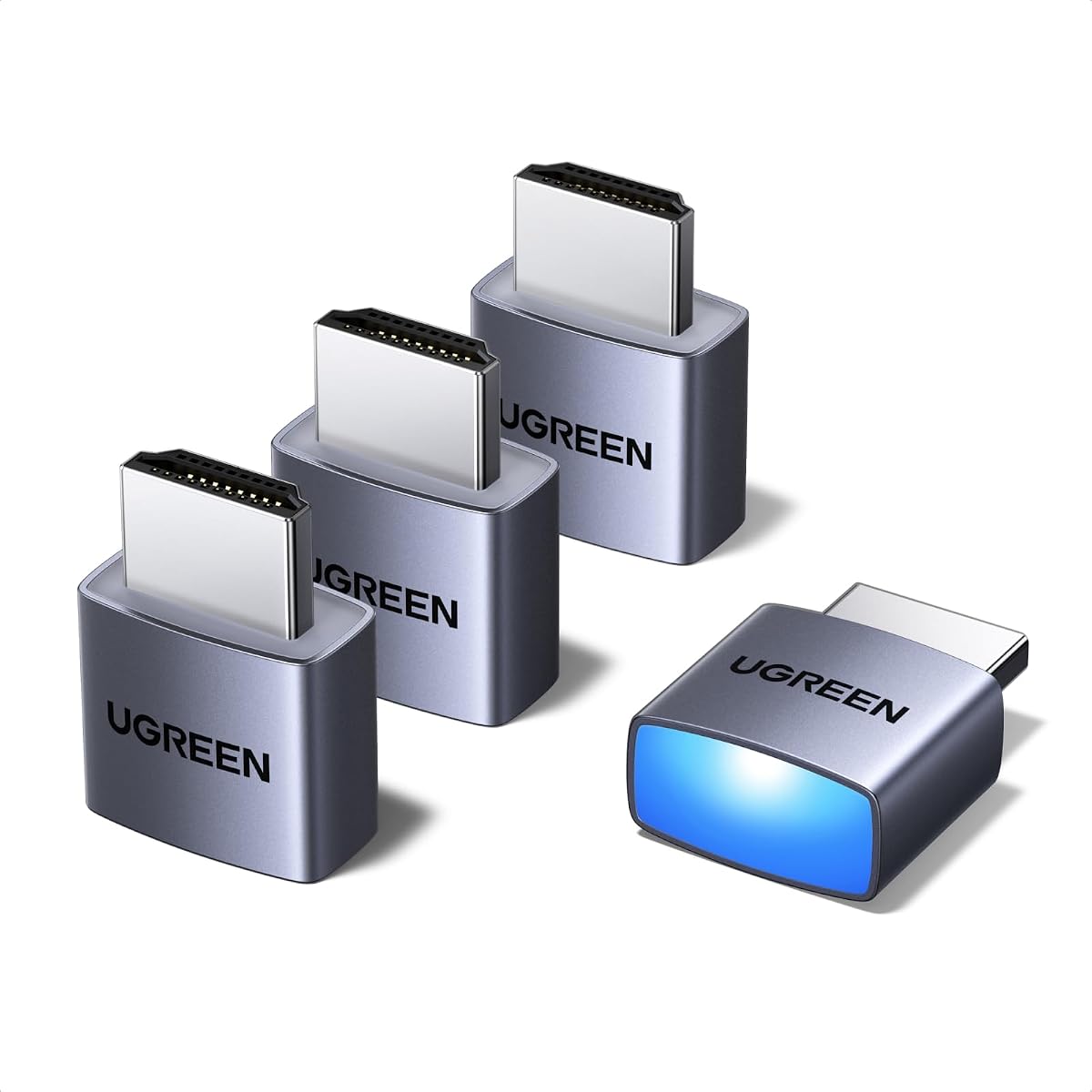
4 Pack HDMI Dummy Plug 4K HDR, Virtual Monitor EDID Emulator 4K@60Hz 2K@60Hz 1080P@120Hz
4.8Editor score
High resolution support
Universal compatibility
No driver required
This guide compares the top HDMI Dummy Plug models for headless setups, remote desktop, mining, and streaming to help you choose the right EDID emulator for
Finding the right HDMI Dummy Plug is essential for maintaining headless PC performance. These small adapters trick your graphics card into detecting a monitor, ensuring stable GPU operation without physical screens for remote tasks.
We evaluated ten top-rated models based on resolution support, build quality, and compatibility across Windows, Mac, and Linux systems. Our analysis focuses on real-world performance for mining, streaming, and server management scenarios.
Each pick highlights specific strengths like 4K support, aluminum housing, or multi-pack value. Note that prices and availability change frequently, so verify current details before purchasing your next virtual display adapter.
4.8Editor score
4.6Editor score

Compare specifications side-by-side to find the perfect fit for your headless server, mining rig, or remote desktop setup. This table highlights key capabilities across all top models.


The UGREEN HDMI Dummy Plug offers reliable 4K@60Hz performance with a sturdy aluminum shell. It is ideal for users seeking stability in remote desktop and mining environments.
We may earn a commission when you buy through this link, at no additional cost to you.
Its high-resolution support ensures your GPU remains active for demanding tasks. The status LED helps you quickly confirm connection integrity without extra software checks.
While slightly more expensive, the build quality justifies the cost for professional use. It avoids compatibility issues common with cheaper plastic alternatives in long-term deployments.
Choose this if you need a robust solution for headless servers. It delivers consistent results across Windows, Mac, and Linux systems without configuration hassles.
Supports up to 4K@60Hz and 1080P@120Hz for versatile usage.
Aluminum shell enhances heat dissipation during intensive computing tasks.
We may earn a commission when you buy through this link, at no additional cost to you.
This 4-pack provides exceptional value with broad GPU support across major operating systems. Its aluminum armor ensures durability for 24/7 server operations without overheating.
We may earn a commission when you buy through this link, at no additional cost to you.
It excels in headless PC deployments where stability matters most. The plug-and-play design means you can set up multiple rigs in minutes without complex driver installs.
The only minor trade-off is the basic LED compared to premium models. However, its performance at this price point makes it a top pick for bulk installations.
Opt for this if you need multiple units for a home lab. It balances cost, performance, and reliability effectively for most remote desktop applications.
Works seamlessly with NVIDIA, AMD, and Intel GPUs on Windows, Mac, and Linux.
Heat-dissipating aluminum casing prevents overheating during long compute sessions.
We may earn a commission when you buy through this link, at no additional cost to you.
The DTech model specifically addresses the common Apple OSX headless display issue. This makes it a great choice for Mac Mini servers needing reliable GPU activation.
We may earn a commission when you buy through this link, at no additional cost to you.
Gold plating ensures stable signal transmission over time, reducing connection drops. Its compact form factor fits easily into tight server rack spaces without obstruction.
While not as feature-rich as premium models, it handles standard remote tasks well. Users appreciate its plug-and-play nature for quick deployment in SOHO environments.
Select this if you are running headless Mac Mini systems. It provides a straightforward fix for display detection without requiring external software.
Specifically solves display issues on OSX for seamless headless operation.
Emulates up to 4K resolution for accurate GPU performance testing.
We may earn a commission when you buy through this link, at no additional cost to you.
This ultra-compact plug focuses on simplicity for basic remote desktop tasks. It mimics a standard LCD monitor signal to keep your GPU active without complications.
We may earn a commission when you buy through this link, at no additional cost to you.
It works with virtually any HDMI output device, making it highly versatile. The low-profile design ensures it does not protrude significantly from your port.
While limited to 1080P, it serves well for general virtual desktop usage. It avoids the overhead of higher-end features you might not need for basic monitoring.
Buy this if you need a no-fuss solution for remote control. It delivers exactly what is needed for standard headless operation without extra cost.
Designed to work with any graphics card having an HDMI output port.
Requires no external power, consuming minimal energy while active.
We may earn a commission when you buy through this link, at no additional cost to you.
This mid-range model balances 4K performance with reasonable pricing. It offers a two-year warranty which adds peace of mind for long-term deployments.
We may earn a commission when you buy through this link, at no additional cost to you.
Hot swap support allows you to plug and unplug without rebooting systems. This feature is useful for maintenance tasks where downtime must be minimized.
The gold-plated connector ensures stable signal quality, reducing interference risks. It is suitable for users needing more than just 1080P capabilities.
Choose this for general headless PC use where value matters. It provides a stable virtual display for mining or remote sessions effectively.
Backed by a two-year unconditional warranty for reliable after-sales support.
Allows safe plugging and unplugging while the system is running.
We may earn a commission when you buy through this link, at no additional cost to you.
This 5-pack targets high-performance setups needing faster refresh rates. It supports up to 1080P@240Hz which is useful for gaming or VR simulations.
We may earn a commission when you buy through this link, at no additional cost to you.
Full board copper pouring enhances signal stability against electromagnetic interference. The aluminum shell provides durability and better heat dissipation during extended use.
While the default resolution is 1080P, you can configure it for higher speeds. This flexibility makes it a strong candidate for dynamic server environments.
Opt for this if you need high refresh rates for gaming rigs. It delivers solid performance across multiple ports with good physical protection.
Supports 1080P up to 240Hz for smooth frame processing in VR.
Full copper pouring reduces interference for consistent virtual display output.
We may earn a commission when you buy through this link, at no additional cost to you.
This plug is built for modern GPUs supporting HDMI 2.1 interfaces. It enables 4K@120Hz which is essential for high-fidelity VR streaming and future-proofing.
We may earn a commission when you buy through this link, at no additional cost to you.
Note that while Win10 supports 120Hz, Win11 might default to 60Hz. Ensure your system allows resolution changes via Display Menu for full utility.
Its negligible heat emission ensures it runs quietly in confined server spaces. The gold-plated interface guarantees a secure connection over long periods.
Choose this if you have HDMI 2.1 hardware. It unlocks higher bandwidth potential for advanced remote gaming or professional visualization tasks.
Handles HDMI 2.1 signals for 4K@120Hz performance on supported hardware.
Ideal for headless gaming PCs accessed via Moonlight or Steam Link.
We may earn a commission when you buy through this link, at no additional cost to you.
An 8-pack bulk option perfect for large-scale server farms or crypto mining farms. It defaults to 1440P which is a sweet spot for many virtual setups.
We may earn a commission when you buy through this link, at no additional cost to you.
Each unit features enhanced electromagnetic shielding to prevent interference. The HDR simulation supports accurate brightness for video preview workflows.
The aluminum casing ensures durability for continuous operation. This bulk pack saves significant effort when outfitting multiple workstations simultaneously.
Select this for large deployments needing consistent display emulation. It offers volume pricing benefits with standard high-resolution capabilities.
Eight units provide extensive coverage for large server or mining clusters.
Simulates HDR brightness for more realistic video preview and mirroring.
We may earn a commission when you buy through this link, at no additional cost to you.
This model defaults to 2160P providing near 4K resolution instantly. It is excellent for tasks requiring higher pixel density like detailed remote editing.
We may earn a commission when you buy through this link, at no additional cost to you.
Gold-plated connectors protect against corrosion while ensuring conductivity. Full board copper pouring reduces signal noise for consistent performance over time.
While the rating is not available, specs suggest strong reliability. It fits well in headless setups needing precise visual fidelity without external screens.
Choose this for professional remote work requiring high resolution. It simplifies virtual display setup with built-in high pixel defaults.
Defaults to 2160P for detailed work without manual resolution changes.
Thick aluminum shell resists wear and ensures long operational life.
We may earn a commission when you buy through this link, at no additional cost to you.
The top-tier option offering 8K 30Hz capabilities for next-gen setups. It requires HDMI 2.1 interfaces but delivers unmatched resolution for specialized tasks.
We may earn a commission when you buy through this link, at no additional cost to you.
Premium construction includes gold plating and aluminum shells. This ensures longevity and signal integrity even under heavy professional workloads or mining.
Note that system updates may affect specific refresh rates. However, for users needing maximum resolution, it sets the highest standard available.
Buy this if you need future-proofing with 8K potential. It justifies the cost with top-end performance for advanced virtual display needs.
Supports 8K 30Hz for ultimate resolution in high-end visualization.
Leverages HDMI 2.1 for high bandwidth data transfer.
We may earn a commission when you buy through this link, at no additional cost to you.
Selecting the right HDMI Dummy Plug depends on your specific resolution needs and hardware compatibility. This section outlines key factors to consider before purchasing.
Check if the plug supports 4K@60Hz or higher. Some basic models only do 1080P, which may not be enough for GPU-intensive tasks like rendering or VR.
Prioritize models with 4K HDR support for better color accuracy.
Ensure the adapter works with your OS (Windows, Mac, Linux). Some models have specific patches for macOS headless display issues.
Most modern units are universally compatible across major platforms.
Look for aluminum shells instead of plastic. Metal casing dissipates heat better, reducing the risk of overheating during long mining or rendering sessions.
Gold-plated connectors resist corrosion and improve signal stability.
A status LED helps you confirm the connection is active at a glance. This saves time when troubleshooting remote connections.
Not all models have this feature, but it is a useful practical addition.
Bulk packs like 3 or 5 units are cost-effective for farms. Single units suffice for personal headless desktops.
Assess how many virtual monitors you need before buying.
For gaming or VR streaming, check if the plug supports high refresh rates like 120Hz or 144Hz. This ensures smooth motion in virtual environments.
Standard 60Hz is enough for remote desktop management.
Most dummy plugs draw power directly from the HDMI port, meaning no external cables are needed. This keeps your setup clean.
Always verify no external power supply is required for your specific model.
A two-year warranty indicates manufacturer confidence. It offers protection against defects in critical hardware.
Check customer service responsiveness for technical queries.
First, power down your computer completely before inserting the dummy plug into the HDMI port. This ensures the system detects the new display on boot.
Next, turn on your PC and wait for the OS to load. The dummy plug will appear as an active monitor in display settings.
Finally, configure the display resolution and refresh rate as needed. Avoid removing the plug while the GPU is under heavy load to prevent signal interruption.
Yes, many HDMI Dummy Plugs are designed to solve Mac Mini headless display issues. Look for models specifically mentioning OSX compatibility in their product description.
No, most HDMI Dummy Plugs work plug-and-play without additional drivers. The operating system recognizes them immediately as standard monitors.
Absolutely. These plugs keep the GPU active for rendering and mining tasks even without a physical screen connected. This ensures stable operation in server farms.
Many models support up to 4K@60Hz. Ensure you check the specific product specs to confirm 4K support if you need high-resolution virtual screens.
Yes, it is compatible with VR headsets and game streaming. It provides the active display signal required for platforms like Steam Link or Moonlight to function.
High-quality aluminum adapters can last for years under continuous use. Their passive design means no moving parts to wear out, ensuring reliability.
If your port is used by another device, ensure your graphics card has an extra HDMI output. Alternatively, check for multi-monitor support in your settings.
The top picks include the UGREEN 4 Pack for reliability and the 4K 120Hz model for high bandwidth needs. Both ensure stable headless operations effectively.
Prioritize models with aluminum shells and correct resolution support for your specific tasks. This guarantees longevity and prevents performance bottlenecks in virtual setups.
Remember to check current prices and availability before finalizing your purchase. Hardware options evolve quickly, so verify the latest specs for your setup.