
Epson EcoTank ET-2803
4.2Editor score
Cartridge free printing
Up to 2 years ink
Wireless mobile printing
Ink tank printers have revolutionized home and office printing by offering massive ink capacity and lower costs per page. These devices eliminate the need for frequent cartridge replacements, making them ideal for high-volume users who need reliability without breaking the bank.
We have carefully evaluated ten leading models from major brands like Canon, Epson, and HP. Our analysis focuses on print quality, connectivity options, ink efficiency, and overall value. Each product was selected based on user feedback and technical specifications to ensure you make an informed decision.
Every pick in this list highlights specific strengths such as speed, design, or cost savings. Please note that product availability and pricing can change frequently. We recommend checking the latest details directly on the retailer site before making your final purchase decision.
4.2Editor score

4.1Editor score

4.2Editor score
As an Amazon Associate we earn from qualifying purchases.
This side-by-side comparison helps you quickly identify the right Ink Tank Printer for your specific needs based on key specifications and capabilities.





The Canon MegaTank G3270 is a robust all-in-one wireless color printer designed for users who need reliable performance without constant maintenance. It holds a solid rating of 4.1 stars from users who appreciate its efficiency and ease of use in a home office setting.
We may earn a commission when you buy through this link, at no additional cost to you.
One of its strongest features is the massive ink capacity which allows you to print up to 6000 black and white or 7700 color pages using a single set of inks. This translates to significant savings over time as you avoid buying expensive traditional cartridges frequently.
While it lacks automatic duplexing and has a small display, these trade-offs are acceptable for the price point and ink savings it offers. The setup is straightforward and the wireless features make it easy to print from various devices around your home.
This printer is ideal for small businesses or households with moderate printing needs that want to minimize ongoing ink costs. We recommend it for anyone looking for a balance between upfront cost and long-term value in the ink tank category.
You get up to two years of ink included in the box which drastically reduces the frequency of refills and ensures you are rarely out of supplies.
By eliminating traditional cartridges this system can save you up to a thousand dollars on ink over the life of the printer compared to standard models.
We may earn a commission when you buy through this link, at no additional cost to you.
The Epson EcoTank ET-2803 stands out as an incredibly budget-friendly option that still delivers on the core promise of cartridge-free printing. With a high rating of 4.2 stars it is a popular choice for students and families needing a reliable workhorse without a high upfront cost.
We may earn a commission when you buy through this link, at no additional cost to you.
Its innovative design uses refillable tanks that come with enough ink to last up to two years. The Micro Piezo Heat-Free technology ensures sharp text and vibrant photos while keeping energy consumption low and the printhead durable over time.
Although it does not print double-sided automatically and photo speeds can be modest the overall value proposition is hard to beat. The hands-free voice activated printing feature adds a modern convenience that makes using it with smart devices seamless and intuitive.
We suggest this model for users on a tight budget who still want the long-term savings of an ink tank system. It is perfect for general document printing and casual photo needs where speed is not the primary concern.
The exclusive EcoFit ink bottles are designed to make filling easy and worry-free with keyed no prevent mixing up colors during the refill process.
By using this printer you help reduce cartridge waste ending up in landfills which makes it a more sustainable choice for environmentally conscious consumers.
We may earn a commission when you buy through this link, at no additional cost to you.
The HP Smart Tank 5003 is a versatile wireless all-in-one printer that promises to be the last printer you will ever need. It carries a rating of 4.1 stars and is recognized for its high volume capabilities and smart features that simplify the printing workflow.
We may earn a commission when you buy through this link, at no additional cost to you.
This model includes enough ink to last up to three years and allows you to print up to 6000 color or black pages right out of the box. The mess-free refill system is a standout feature that ensures you can replenish ink without spills or stress.
While it comes at a slightly higher price point the inclusion of AI-capable features and borderless printing makes it a powerful tool for creative projects and daily tasks. The sharp text and rich colors ensure professional-quality results every time you hit print.
We recommend this printer for home offices that need a balance of performance and convenience. It is especially suitable for users who want to leverage AI tools for document management and need reliable high-volume output without interruption.
With up to three years of ink included you will experience minimal downtime and significantly lower costs per page compared to cartridge-based printers.
The AI capable technology helps optimize your print jobs automatically ensuring you get the best quality with the least amount of effort required.
We may earn a commission when you buy through this link, at no additional cost to you.
The Epson EcoTank ET-2903 is a powerful upgrade for those who need faster printing speeds without compromising on quality. It has earned a 4.2-star rating for its productivity features and ability to deliver sharp documents and stunning photos quickly and efficiently.
We may earn a commission when you buy through this link, at no additional cost to you.
With speeds up to 11 pages per minute and zero warmup time this printer is ready to work instantly. The large color display makes navigation easy and allows you to control settings directly on the device without needing a computer connection.
While the paper tray is limited to 100 sheets the high-resolution print engine ensures exceptional image quality on a wide range of media. The Heat-Free technology keeps the printhead durable and reliable for long-term use in busy environments.
This model is best suited for users who prioritize speed and ease of use in their workflow. If you frequently print multi-page documents or require high-quality photos this printer provides the performance you need to get tasks done faster.
The 11 PPM speed and zero warmup time mean you can move through your print queue quickly without waiting for the machine to heat up.
A 1.44 color display gives you a clear view of your settings and status making it easy to manage print jobs directly on the printer.
We may earn a commission when you buy through this link, at no additional cost to you.
The Canon Megatank G3290 is a strong contender for users who need automatic duplex printing in an ink tank system. Its solid 4.2-star rating reflects satisfaction with its reliability and the convenience of being able to print on both sides of the paper automatically.
We may earn a commission when you buy through this link, at no additional cost to you.
Equipped with a larger 2.7 LCD touchscreen this model offers a more user-friendly interface for navigating settings and print jobs. The massive ink capacity ensures you can print up to 6000 black and white pages without needing to replace inks frequently.
While it takes up more space than smaller models the functionality it provides is worth the trade-off for most office environments. The wireless connectivity allows for seamless printing from laptops and mobile devices ensuring everyone stays connected.
We recommend this printer for small businesses or home offices that print multi-page documents regularly. The auto duplex feature saves paper and reduces waste making it a practical choice for eco-conscious users who still need efficiency.
Automatic two-sided printing helps you save paper and money while reducing the environmental impact of your daily printing activities.
The large color touchscreen simplifies the printing process allowing you to check status and change settings with just a few taps.
We may earn a commission when you buy through this link, at no additional cost to you.
The Epson EcoTank ET-4800 is designed to impress with its stunning photographic print quality. While it has a slightly lower rating of 3.8 stars it remains a capable device for home users who prioritize visual output and ease of maintenance.
We may earn a commission when you buy through this link, at no additional cost to you.
Its High-capacity ink tanks mean you never have to deal with tiny expensive ink cartridges again. The Micro Piezo Heat-Free technology ensures sharp text and vibrant colors on virtually any paper type you choose to use for your projects.
Although some users report slower speeds the convenience of the refillable tanks and the environmental benefit of zero cartridge waste are compelling features. The built-in scanner and copier add value by consolidating multiple functions into one compact device.
This printer is best for families who print photos frequently and want to reduce plastic waste. It offers a reliable and efficient solution for everyday needs while providing the freedom to print in any color you need.
With unique Micro Piezo technology you can achieve impressive color photos and graphics that look professional and vibrant on standard paper.
By using this printer you help reduce the amount of plastic cartridge waste ending up in landfills making it a greener choice for your home.
We may earn a commission when you buy through this link, at no additional cost to you.
The Epson EcoTank ET-2980 is a reliable color printer that emphasizes longevity and ease of use. With a 4.0-star rating it is a solid choice for home users who want to avoid frequent ink replacements and enjoy a hassle-free printing experience.
We may earn a commission when you buy through this link, at no additional cost to you.
This model includes enough ink to last up to three years and allows you to print up to 6600 black pages without worry. The supersized ink tanks and unique EcoFit bottles make refilling simple without the risk of mixing up colors.
While the bottles are large they are designed to reduce the frequency of replacements which saves time and effort in the long run. The wireless features let you print and scan directly from your smartphone ensuring you stay productive on the go.
We suggest this model for those who value simplicity and cost efficiency. It is a great fit for households with steady printing needs who want a device that works reliably without requiring constant attention or maintenance.
With up to three years of ink included you will enjoy worry-free printing and fewer frustrating moments of running out of supplies.
Enhanced mobile printing via the Epson Smart Panel app lets you manage tasks from anywhere without needing to sit at a computer.
We may earn a commission when you buy through this link, at no additional cost to you.
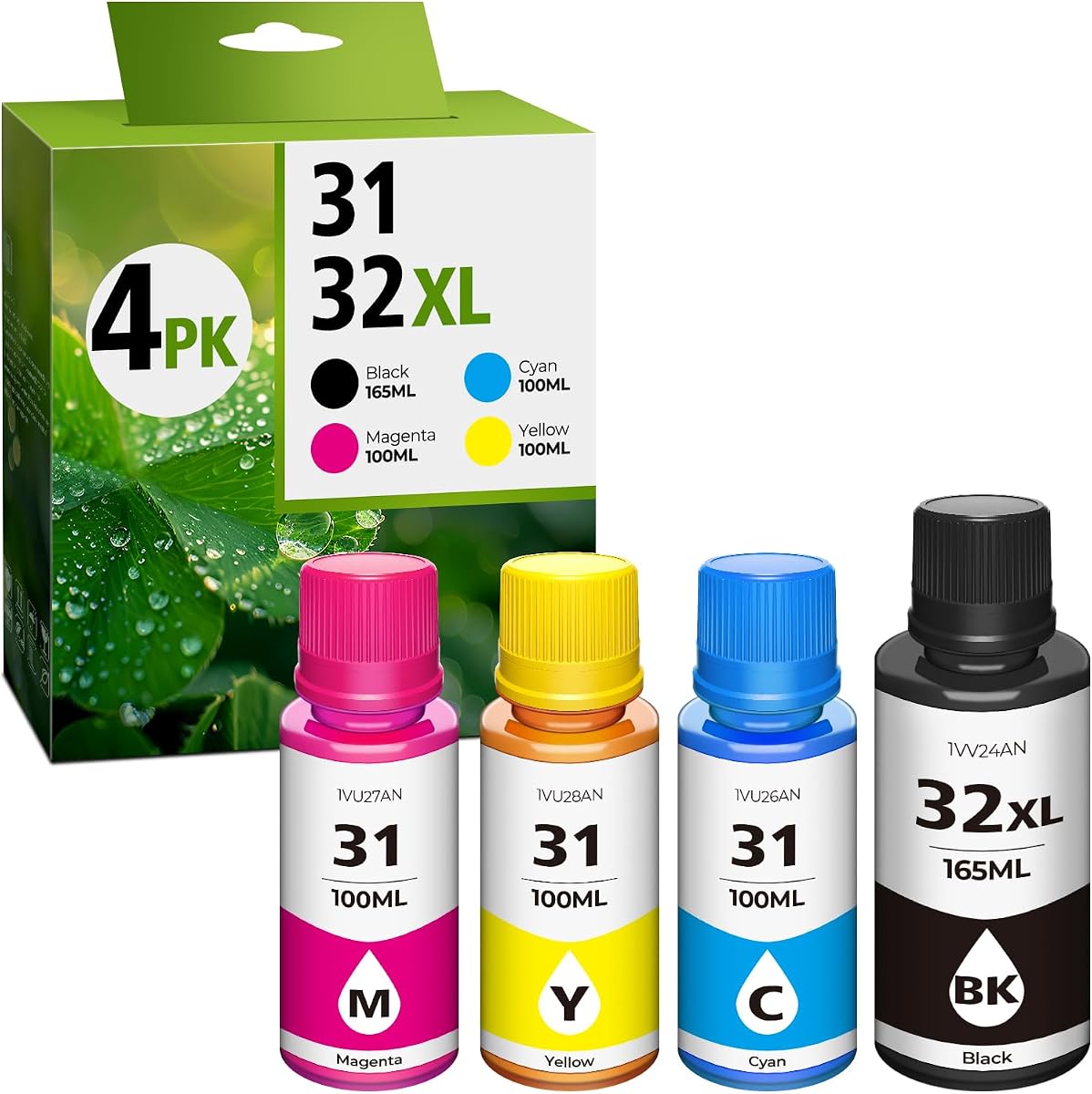
The 31 Ink 32XL Black Ink Bottle Set offers a cost-effective solution for refilling compatible Smart Tank printers. With a high rating of 4.4 stars it is well-regarded for its ease of use and significant savings compared to manufacturer brands.
We may earn a commission when you buy through this link, at no additional cost to you.
Each set includes four bottles with a high capacity design that reduces the frequency of refills. The seamless refill process ensures minimal effort and no leakage making it convenient for users who want to maintain their printers without hassle.
While these are dye inks rather than pigment black inks for the high volume of pages they produce at a competitive price point. They work well for general office documents and are perfect for environments where crisp and sharp text is the main priority.
We recommend this set for users looking to stretch their ink budget further. If your printer is compatible and you do not need pigment black for specific archival tasks these bottles provide excellent value and reliability.
These higher capacity bottles are designed to reduce the frequency of ink replacement providing exceptional value for your daily printing needs.
The bottles are designed for easy refilling ensuring you can replenish your tanks quickly without spills or complex procedures.
We may earn a commission when you buy through this link, at no additional cost to you.
The HP Smart Tank 5003 variant offers a reliable experience for users who need consistent performance without complex maintenance. Although it has a slightly lower rating of 3.8 stars it still delivers on the promise of easy and reliable printing for daily tasks.
We may earn a commission when you buy through this link, at no additional cost to you.
With up to three years of ink included you can get up to 6000 color or black pages right out of the box. The mess-free refill system ensures that you can replenish ink with ease without squeezing or spilling anywhere.
While setup might require some app interaction the borderless prints and AI capabilities add flexibility to your workflow. This model is a solid choice for those who want to avoid cartridge hassles and enjoy a seamless printing experience at home.
We suggest this printer for households that need a dependable workhorse. It is a good fit for users who prioritize ease of use and cost savings over high-speed enterprise performance for their home office needs.
Replenishing ink is simple with the easy-access system that lets bottles drain naturally without the need for squeezing or shaking.
The printer is designed to be the last one you need with a focus on long-term reliability and consistent print quality.
We may earn a commission when you buy through this link, at no additional cost to you.
The Epson EcoTank ET-2988 Renewed offers a cost-effective way to access a powerful ink tank printer. With a 3.9-star rating it is a practical option for budget-conscious buyers who still want high-speed printing and automatic duplex capabilities.
We may earn a commission when you buy through this link, at no additional cost to you.
This model comes with enough ink to print up to 6600 black pages and features fast speeds of 15 pages per minute. The auto duplex printing helps save paper while the 1.44 color screen makes navigation intuitive and quick.
As a renewed unit it may have minor cosmetic imperfections but it functions like new to save you money. The high yield ink system ensures you get plenty of pages without needing to buy replacements often making it a great value for heavy users.
We recommend this printer for those looking for speed and efficiency at a lower price point. It is an excellent choice for users who are comfortable with renewed electronics and want a reliable device for daily high-volume printing.
With 15 PPM speeds and zero warmup time you can process large jobs quickly without waiting for the printer to get ready.
Buying a renewed model gives you access to premium features like auto duplex and high speed at a more accessible price than new units.
We may earn a commission when you buy through this link, at no additional cost to you.
Selecting the right ink tank printer requires understanding your specific needs and what features matter most to your workflow.
The primary advantage of ink tank printers is their massive ink capacity which can last for years. Look for models that advertise high page yields such as thousands of pages per set to ensure you get the most value.
Higher yield means less frequent refills and lower costs over time. Always check how many black and color pages are included with the initial bottles to compare long-term savings accurately.
Speed is essential if you print large documents frequently. Check the pages per minute ratings for both black and color to ensure the printer keeps up with your daily workflow without delays.
High resolution is critical for photos and graphics. Look for models with detailed dpi ratings to ensure text is sharp and images are vibrant for your specific use cases.
Modern printers must support wireless connections to be truly convenient. Ensure the model supports Wi-Fi direct and standard protocols like AirPrint or Mopria for easy mobile printing from any device.
Voice-activated printing is a nice feature for tech savvy users who want hands-free operation. Check if the manufacturer provides a dedicated app for easy setup and remote management of print jobs.
A larger paper tray reduces the need to constantly refill sheets during busy periods. Look for models with at least 100 sheets of capacity to keep your workflow smooth and uninterrupted.
Automatic duplex printing is a must for saving paper and reducing costs. If you print many multi-page documents ensure the printer has this feature built-in to save effort and resources.
Refilling ink should be a mess-free experience. Check that the bottles are keyed or designed to prevent spills and mixing of colors which can cause clogs and print quality issues.
Easy access to ink tanks is important for maintenance. A design that allows you to see ink levels easily helps you plan refills before running out completely and stops work.
A larger color screen makes navigating settings and checking status much easier. Look for touchscreens that offer clear menus so you can manage print jobs without relying on a computer.
Simple interfaces reduce the learning curve for new users. Ensure the controls are intuitive so you can start printing quickly without frustration or complex setup steps.
A strong warranty provides peace of mind for expensive electronic devices. Check the length of the manufacturer warranty and what parts or labor are covered to protect your investment.
Good customer support is vital if you encounter technical issues. Look for brands with dedicated help centers and responsive service teams to resolve problems efficiently when they arise.
Ink tank printers reduce waste significantly by eliminating disposable cartridges. Choosing one helps reduce the amount of plastic ending up in landfills and supports sustainable printing habits.
Look for Energy Star certified models to ensure they meet efficiency standards. This helps lower power consumption and reduces your overall environmental footprint for home office tasks.
When setting up your printer use the manufacturer app to connect to Wi-Fi and run initial calibration. This ensures print heads are aligned correctly and ink flows smoothly before you start regular printing tasks.
Refill ink only when the level indicator shows low. Keep bottles upright during filling and avoid touching the nozzle to prevent contamination. Use genuine or high-quality compatible ink to protect the printhead from damage.
Print a test page every few weeks if not used daily to prevent clogs. Clean the printer exterior with a soft cloth and keep it in a dry cool place to avoid dust accumulation and mechanical issues.
Most ink tank printers include enough ink to last up to two years with normal home use. High volume models can last even longer. It depends on your printing frequency.
While possible using non-genuine ink may void the warranty and affect print quality. Most manufacturers recommend genuine ink for optimal performance.
Yes many ink tank printers are optimized for color photos. They can produce vibrant images on photo paper though dedicated photo printers may offer better results for professional needs.
Ink tank printers offer the lowest cost per page often pennies per print. This is significantly cheaper than traditional cartridge-based printers for high volume users.
Yes all modern ink tank printers support mobile printing via apps and protocols like AirPrint. You can print directly from smartphones without needing a computer.
Use the built-in cleaning utility from the printer menu or computer software. If that fails a manual cleaning with lint-free cloths may be needed to remove stubborn clogs.
We have reviewed ten top Ink Tank Printers that offer reliable performance and cost efficiency for various needs. The Canon MegaTank G3270 and Epson EcoTank models stand out for their high yields and user-friendly designs.
Prioritize features like print speed and duplex capabilities based on your volume. If you print mostly documents look for models with high black page yields. For photos choose models with advanced print quality features.
Remember to check the current availability and prices before buying. We hope this guide helps you find the perfect device to streamline your printing workflow and save money on supplies.