
Weilisi 10.2 Desk Ring Light with Stand
4.5Editor score
Affordable desk ring light with clamp
360 degree rotating head design
Multiple brightness and color options
Streaming requires professional lighting to look polished on camera. A good key light provides even illumination that flatters your features and eliminates harsh shadows for a clear video feed.
We compared ten top models based on brightness color range mounting options and control features. Each product offers unique benefits for different budgets and desk configurations.
Every pick includes detailed specs pros cons and practical advice. Prices and availability may change so check current listings before making your final decision.
4.5Editor score

4.5Editor score
4.7Editor score
As an Amazon Associate we earn from qualifying purchases.
This side-by-side comparison highlights key specifications across all ten products so you can quickly identify the best fit for your streaming needs and workspace.



The Elgato Key Light stands out as a top choice for streamers seeking professional quality. With a 4.5 star rating it delivers powerful illumination and smart control features.
We may earn a commission when you buy through this link, at no additional cost to you.
Its 2800 lumens output ensures your space is well lit while the 160 OSRAM LEDs produce minimal heat. The Wi-Fi enabled app lets you fine-tune settings without reaching for the panel.
While the price is higher than entry-level options the performance justifies the investment. The opal glass face prevents glare ensuring a polished look on camera even during long sessions.
If you value ease of use and premium build quality this light is an excellent choice for any serious streaming setup looking to elevate visual quality.
Adjust brightness and color temperature via the desktop app for seamless workflow integration during live broadcasts or recording sessions.
The high lumen count and color range provide consistent lighting that flatters skin tones and reduces shadows across various environments.
We may earn a commission when you buy through this link, at no additional cost to you.
The Logitech Litra Glow offers excellent value for streamers on a budget. Its TrueSoft technology delivers balanced full-spectrum light that looks natural on camera.
We may earn a commission when you buy through this link, at no additional cost to you.
The frameless diffuser radiates soft wide light that eliminates harsh shadows. With adjustable brightness and color temperature you can quickly achieve the look you want using the G HUB app.
While it lacks the raw power of higher-end options it is perfect for compact desk setups. The USB powered design ensures you can keep your workspace tidy without extra cables.
This light is ideal for beginners or those needing reliable lighting for webcams and video calls without breaking the bank or requiring complex installation.
The plug and play USB design means you can start streaming with professional lighting in minutes without additional hardware or drivers.
TrueSoft technology ensures your skin tones appear radiant and accurate which is essential for maintaining viewer engagement and credibility.
We may earn a commission when you buy through this link, at no additional cost to you.
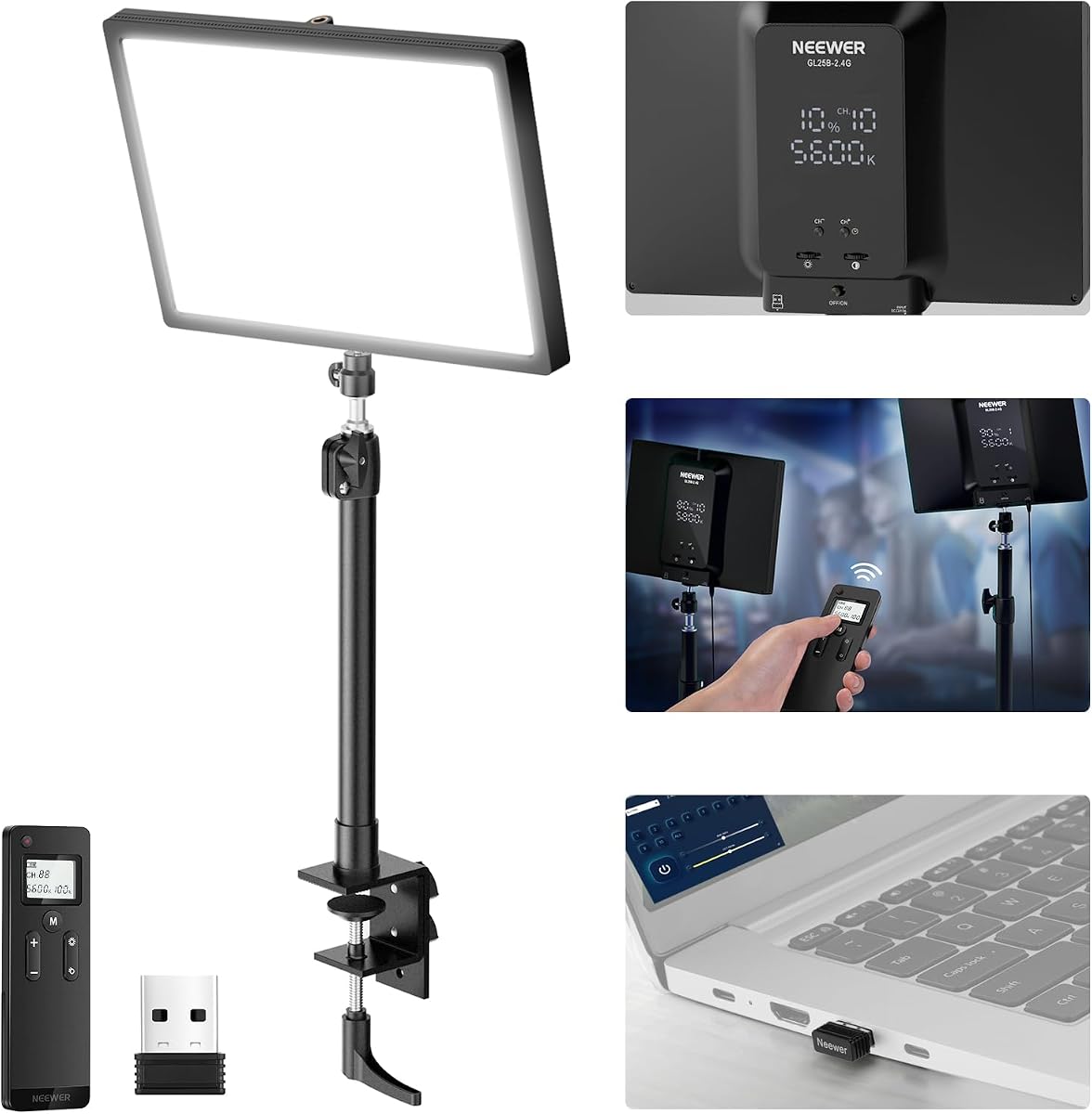
The NEEWER GL25B impresses with its high CRI of 98 plus and bright 2300lux output. It delivers soft diffused lighting that is gentle on the eyes during long streams.
We may earn a commission when you buy through this link, at no additional cost to you.
The fanless cooling system ensures zero noise which is critical for audio recording. Control is flexible via the 2.4G remote or the Neewer Control Center app on your computer.
While it takes up more space than smaller lights the large panel provides excellent coverage. The edge-emitting technology prevents harsh shadows ensuring your face looks smooth and professional.
This model is perfect for creators who prioritize silent operation and color accuracy. It brings studio-grade performance to your desk without the hassle of bulky traditional lighting rigs.
The innovative fanless design eliminates cooling noise ensuring your microphone captures only your voice without distracting hums or whirs.
With stepless brightness and a wide color temperature range you can match any room lighting to create a consistent professional visual style.
We may earn a commission when you buy through this link, at no additional cost to you.
The Elgato Key Light Air MK.2 offers a slim 15 inch profile with 2100 lumens. It supports USB-C and MagSafe power making it versatile for mobile or fixed setups.
We may earn a commission when you buy through this link, at no additional cost to you.
Its edge-lit design reduces glare and fits well in tight spaces. Touch controls and full USB or Wi-Fi app access give you quick adjustments during live streams or recording.
While it has a lower lumen count than the Pro version it still provides high-quality illumination. The Stream Deck support adds automation potential for seamless workflow control.
If you need portability and flexibility this light is a strong contender. Its premium build and power options make it suitable for creators who travel or use diverse recording environments.
Power your light via laptop USB-C PD adapter or MagSafe battery bank ensuring you can shoot anytime without hunting for wall outlets.
Automate your lighting with a single keypress on compatible Stream Deck devices for fast adjustments during complex multi-camera setups.
We may earn a commission when you buy through this link, at no additional cost to you.
The Weilisi 10.2 Desk Ring Light is a practical and affordable option for streamers needing basic lighting. It features a full-screen design that provides uniform diffused light.
We may earn a commission when you buy through this link, at no additional cost to you.
The telescoping stand and 360 degree rotation allow flexible positioning. A sturdy metal C-clamp secures it to desks up to 2.34 inches thick saving valuable surface space.
With 10 brightness levels and three color temperatures it adapts to various moods. While not as powerful as premium panels it is excellent for budget-conscious creators starting out.
This light is ideal for webcams video calls and short video recordings. Its ease of use and low cost make it a smart first step into professional lighting setups.
The C-clamp mount keeps your desk clear by attaching securely to the edge allowing more room for equipment or personal items.
The full-screen ring design ensures even light distribution that reduces shadows and highlights your features for a natural video look.
We may earn a commission when you buy through this link, at no additional cost to you.
This NiceVeedi kit includes two 10 inch panels with high CRI for precise color rendering. The 73 inch stands offer height flexibility for varied shooting angles.
We may earn a commission when you buy through this link, at no additional cost to you.
Each panel has 356 LED beads for stable output. You can adjust brightness from 10 to 100 percent using the remote. The USB port supports charging via wall adapter or power bank.
The kit is great for multi-angle setups or fill lighting. However the stands require careful setup to ensure stability. The storage bag helps keep everything organized for transport.
If you need two lights for a balanced setup this kit offers value. It suits streamers who want flexibility in placement without investing in separate high-end units.
Having two panels lets you create a key and fill configuration for professional depth and shadow control in your video frames.
USB-C support means you can power the lights from a laptop or battery bank enabling mobile recording sessions without wall access.
We may earn a commission when you buy through this link, at no additional cost to you.
This 2-pack features gooseneck tubes that allow precise light positioning without a bulky stand. The LCD screen shows brightness color temperature and power status clearly.
We may earn a commission when you buy through this link, at no additional cost to you.
Each unit has 118 edge-mounted LEDs providing soft flicker-free light. The C-clamp mount saves space and the memory function retains your last settings when powered off.
The gooseneck flexibility is great for small desks but may bend over time under heavy use. Brightness is moderate but sufficient for most streaming needs and video calls.
This kit is perfect for creators needing versatile angles in tight spaces. Its high rating reflects user satisfaction with the flexibility and ease of use in daily workflows.
The gooseneck tubes let you bend and hold light at exact angles ensuring targeted illumination without moving bulky stands or fixtures.
The built-in memory saves your preferred settings so you can start streaming instantly without readjusting brightness or color every time.
We may earn a commission when you buy through this link, at no additional cost to you.
The Godox ES45 features a soft edge-lit OLED panel that reduces glare and eye fatigue during long sessions. Its magnetic auto-charging remote stays attached when not in use.
We may earn a commission when you buy through this link, at no additional cost to you.
Wireless 2.4G control lets you adjust brightness and color without reaching behind the light. The app enables group control for multiple units creating a scalable studio setup.
The color range from 2800K to 6500K suits various environments. While pricier than average it offers premium features like magnetic remote and OLED diffusers for a polished look.
This light is ideal for streamers valuing ergonomics and aesthetics. The combination of wireless control and expandability makes it a future-proof choice for growing setups.
The remote attaches magnetically to the back recharging automatically ensuring you never lose it or deal with battery replacements.
Using channels and groups you can synchronize multiple ES45 lights to match your setup as your studio grows over time.
We may earn a commission when you buy through this link, at no additional cost to you.
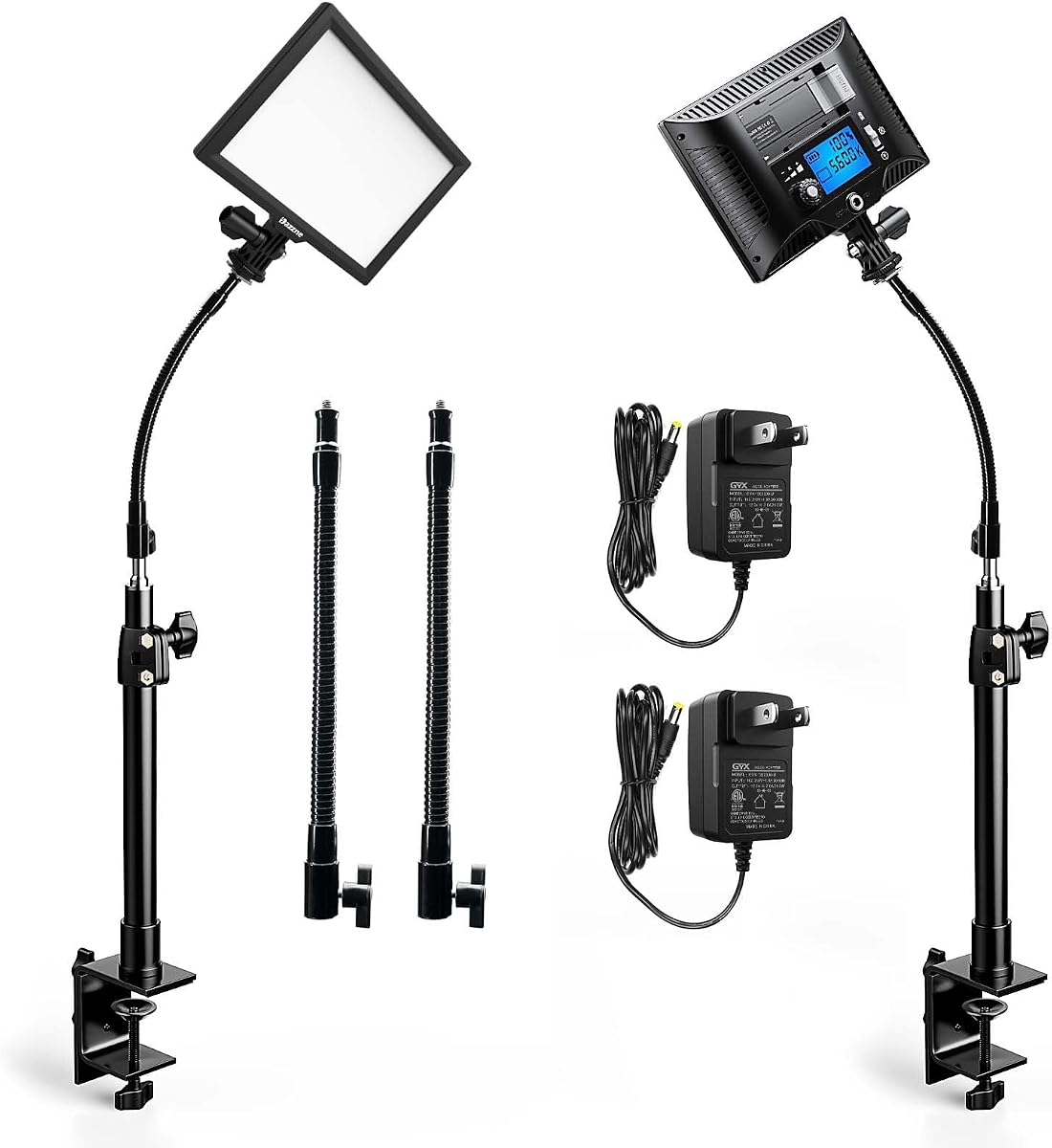
The Dazzne 2Pack offers two panel lights with gooseneck tubes for flexible angles. Each has an LCD screen to show settings clearly and memory to retain preferences.
We may earn a commission when you buy through this link, at no additional cost to you.
With 118 LEDs per panel the output is soft and flicker-free. The clamp mount works on desks from 0.3 to 3.3 inches thick fitting most home office setups.
Color temperature ranges from 3200K to 5600K which covers most streaming needs. While not ultra-bright it provides steady light for podcasts and casual streaming effectively.
This kit is best for users wanting dual lights without high cost. The flexible tubes and memory function simplify daily use making it a practical choice for streamers.
The high-definition display shows current settings clearly so you can verify brightness and color before going live without guessing.
Adjust the light angle precisely using the gooseneck tubes to direct illumination exactly where your subject needs it most.
We may earn a commission when you buy through this link, at no additional cost to you.
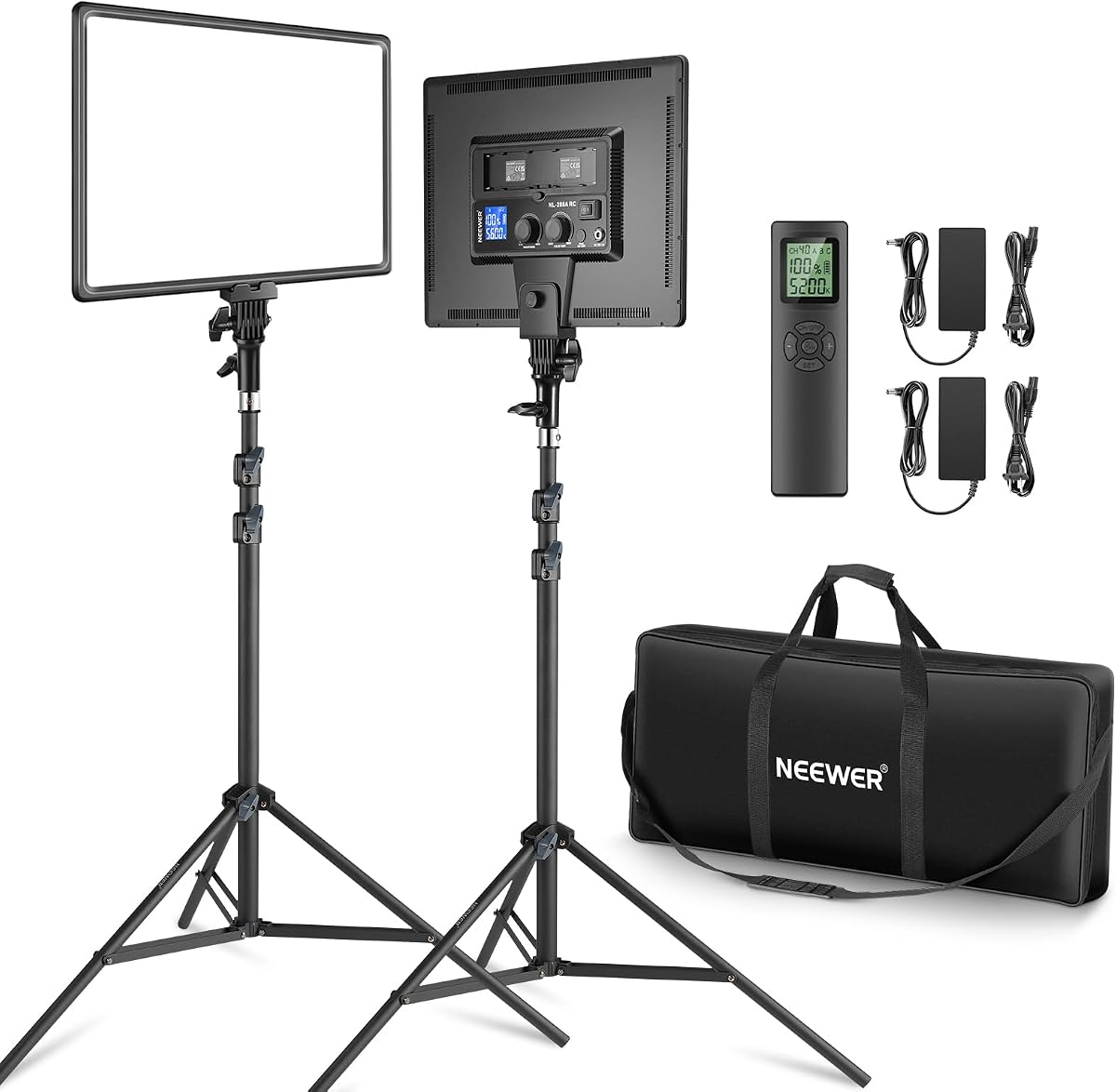
This Neewer kit includes two 18 inch panels with 45W output each. The 4800Lux brightness at 0.5m makes it ideal for large rooms or professional setups.
We may earn a commission when you buy through this link, at no additional cost to you.
CRI of 97 plus ensures true-to-life color rendering. Dual power options let you run on AC or NP-F batteries for portability. The remote supports 40 channels and 4 groups.
While the panels are heavier and larger than desk clamps the power and versatility are unmatched. The carrying bag helps manage transport and storage effectively.
For creators needing serious illumination this kit excels. The combination of high lumen output battery power and multi-channel control makes it a professional solution for live streaming.
At 4800Lux the panels deliver intense light that can fill larger spaces and overcome ambient room lighting for consistent quality.
Support for Sony NP-F batteries lets you take the lights anywhere without needing constant access to an electrical outlet.
We may earn a commission when you buy through this link, at no additional cost to you.
Selecting the right key light depends on several factors that affect your video quality and setup ease.
Brightness measured in lumens or lux determines how well your space is lit. Higher output is essential for larger rooms or when you need to overpower ambient light. Look for at least 1500 lumens for standard setups and more for professional use.
Prioritize lights with high lumen ratings if you plan to stream in varied lighting conditions.
A wide color temperature range from around 2800K to 7000K lets you match your environment and create different moods. Adjusting from warm to cool helps you flatter skin tones and maintain consistency.
Ensure your light supports bi-color adjustment for flexibility across day and night streaming sessions.
Color Rendering Index (CRI) measures how accurately colors appear under the light. A CRI of 90 or higher is recommended for streaming to ensure natural skin tones and true colors.
Choose lights with CRI above 95 for the best visual fidelity on camera.
Consider how you want to adjust your light. Options include physical buttons touch panels remotes or app control. Wi-Fi or 2.4G wireless connectivity allows remote changes without interrupting your stream.
Look for models with app support if you want precise adjustments and preset saving.
Desk clamps save space while tripods offer flexibility for floor or angled placement. Measure your available area and choose a mount that fits your desk thickness and height needs.
Select a mounting style that matches your desk layout to keep your workspace clean.
Lights powered via USB offer convenience and reduce cable clutter but may have lower output. AC powered models provide maximum brightness and dual options with battery support add portability.
Choose power options that align with where you stream most often.
Fans can introduce noise during recording so fanless models are preferred. Heat dissipation affects comfort and safety so look for efficient designs that stay cool.
Prioritize silent cooling systems for uninterrupted audio recording.
Balance price with features needed. Entry-level lights suit beginners while premium models offer durability and advanced controls. Consider long-term needs to avoid frequent upgrades.
Invest in a light that meets current and future streaming requirements.
Position your key light at a 45-degree angle above your eye level to reduce shadows and flatter facial features. Ensure it is bright enough to eliminate dark areas behind your face.
Clean the diffuser panel regularly with a soft dry cloth to maintain light output. Avoid harsh chemicals or water that could damage the surface or internal components.
Adjust color temperature and brightness to match your room lighting before going live. Use presets if available for quick setup during daily streaming routines.
Place the key light at a 45-degree angle to your right or left slightly above eye level. This reduces shadows and ensures even illumination across your face. Avoid placing it directly in front or too low to prevent unflattering shadows.
A fill light softens shadows created by the key light for a more balanced look. It is not always necessary but helps achieve a polished professional appearance especially in darker environments.
Color temperature changes the warmth or coolness of your light. Warmer tones look cozy while cooler tones look crisp. Matching your environment ensures consistency and helps skin tones appear natural.
Yes many key lights have clamp mounts or USB stands that attach directly to desks or monitors. Ensure the mount is stable and secure to prevent tipping during use.
Wi-Fi control allows remote adjustments via apps which is convenient during live streams. Physical controls or remotes also work well so choose based on your preference for accessibility.
A CRI of 90 or higher is ideal to ensure accurate color reproduction and natural skin tones. Lights with CRI above 95 are recommended for professional-looking results.
Use a soft microfiber cloth to gently wipe away dust. Avoid liquids or chemicals that could damage the panel or internal components. Ensure the light is off and cool before cleaning.
We highlighted ten top models ranging from budget-friendly options to premium kits. Each offers distinct strengths for different needs and desk setups.
Prioritize brightness color accuracy and control features when deciding. Consider your space constraints and power requirements to find the best fit.
Check current availability and pricing before purchasing as offers may change. Choose a light that supports your growth and delivers consistent quality.