
Adesso Easy Touch
4.2Editor score
IP67 Waterproof Rating
Large Durable Keys
Spill Resistant Design
Finding the right keyboard for your point of sale system is crucial for efficient daily operations. A good POS keyboard needs to handle high volumes of input while remaining durable enough for busy environments. It should offer a comfortable typing experience to reduce strain during long shifts and support the specific layout requirements of your software.
We compared ten different keyboards designed or suitable for POS environments. Our analysis looked at key features like spill resistance, integrated touchpads, and specialized keys for quick access. We evaluated each model based on build quality, connectivity options, and user feedback to determine which ones offer the best value and performance for businesses.
Each pick in this list highlights specific strengths that cater to different operational needs. Whether you need a compact solution for a small counter or a rugged unit for a industrial kitchen, there is an option here. Please note that prices can change frequently so always check the current listing before making your final decision.
4.2Editor score

4.2Editor score
As an Amazon Associate we earn from qualifying purchases.
This table provides a side-by-side comparison of all ten keyboards reviewed in this guide. Each row lists the key specifications and features that define the product. Use this to quickly identify which model matches your specific connectivity and layout needs.


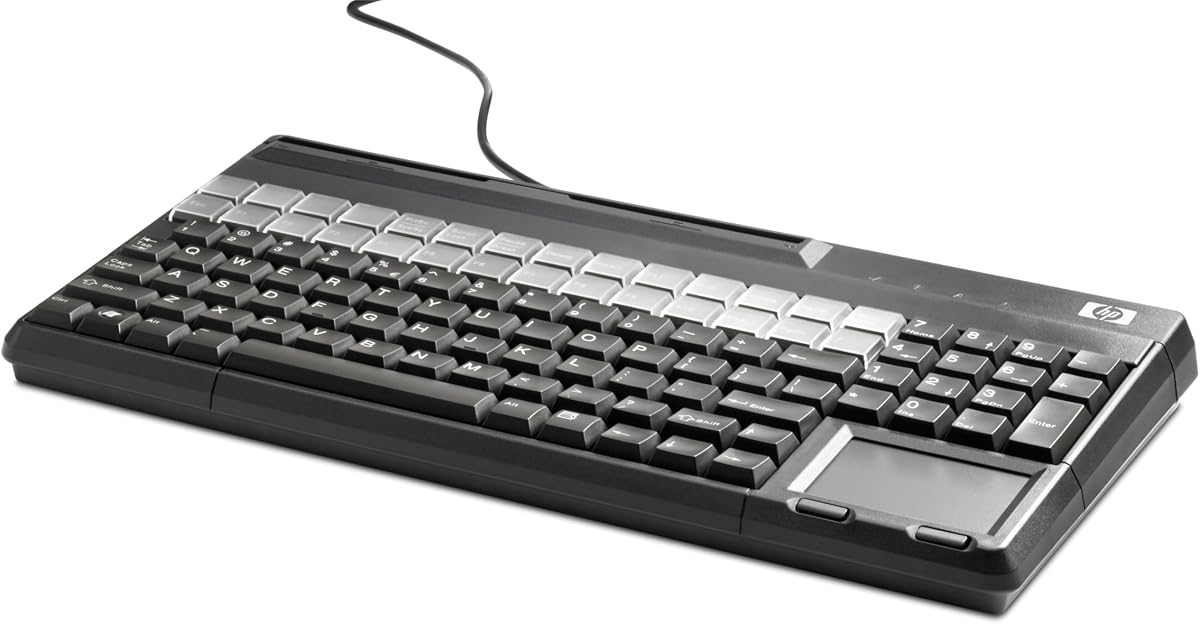
This HP POS keyboard is designed specifically for retail environments where speed and accuracy are paramount. It features a standard QWERTY layout combined with a magnetic stripe reader for seamless payment processing. The presence of 28 relegendable keys allows for customization to fit your specific software needs making it highly versatile.
We may earn a commission when you buy through this link, at no additional cost to you.
The keyboard includes a touchpad which eliminates the need for a separate mouse in tight counter spaces. This integration helps keep the workspace clean and organized. The USB interface ensures a reliable connection that is easy to set up without requiring additional drivers or complex configuration steps.
While the price is higher than standard office keyboards the specialized features justify the investment for businesses. The magnetic stripe reader is particularly useful for point of sale applications needing to process cards quickly. However users should be aware that the key layout is not standard which may require a brief adaptation period.
We recommend this keyboard for retail stores and checkout counters that need an all-in-one solution. It is ideal for businesses that want to reduce clutter on their counters while maintaining high functionality. The build quality suggests it can withstand the daily wear and tear of a busy retail environment.
The built-in reader allows staff to swipe cards without reaching for external hardware speeding up transactions.
You can customize key labels to match your software commands improving workflow efficiency.
We may earn a commission when you buy through this link, at no additional cost to you.
The Cherry G86-62401 offers a compact design that fits well in space-constrained POS setups. It includes an integrated touchpad which is essential for systems that do not use a mouse. The keyboard is also spill resistant making it suitable for environments where liquids might be present like cafes or kitchens.
We may earn a commission when you buy through this link, at no additional cost to you.
With a standard QWERTY layout and USB connectivity this keyboard is easy to integrate into existing systems. The build quality reflects Cherry's reputation for durable input devices. It provides a reliable typing experience that is comfortable for extended periods of use during busy shifts.
The touchpad functionality is convenient but may not offer the precision of a dedicated mouse. For tasks requiring heavy navigation this might be a limitation. However for basic POS entry tasks it works sufficiently well to keep operations moving without interruption.
This model is best suited for small businesses or kiosks where space is at a premium. It offers a good balance between functionality and footprint. If you need a simple reliable keyboard that can handle minor spills this is a solid choice.
The compact layout reduces desk clutter allowing more room for other POS peripherals.
Protects internal components from minor spills which are common in food service environments.
We may earn a commission when you buy through this link, at no additional cost to you.
The Logitech K120 is a standard full-size keyboard that works well for general purpose POS tasks. It features a spill-proof design which protects against accidental liquid damage. The plug-and-play USB connection means you can start using it immediately without installing any software.
We may earn a commission when you buy through this link, at no additional cost to you.
Its deep-profile keys provide a comfortable typing experience that reduces fatigue during long shifts. The keyboard is built to last with sturdy tilt legs that adjust to a comfortable typing angle. It is compatible with all common Windows versions making it versatile for various POS systems.
While it lacks specialized POS features like card readers or touchpads it is highly reliable. The affordable price makes it an excellent option for businesses on a tight budget. It is best used in environments where a mouse is available separately and high-end features are not required.
This keyboard is ideal for office-based POS setups or back-end administration stations. It offers the durability and comfort of higher-end models at a fraction of the cost. If you need a straightforward reliable input device this is a top contender.
Designed to prevent liquids from damaging the electronics ensuring longevity in busy areas.
No drivers required for instant setup saving time during installation or replacement.
We may earn a commission when you buy through this link, at no additional cost to you.
This Cherry Lpos keyboard offers an extensive array of 169 keys designed for complex POS operations. It includes 42 relegendable keys that can be customized to match specific software functions. The integrated magnetic stripe reader is included for handling payments efficiently at the point of sale.
We may earn a commission when you buy through this link, at no additional cost to you.
The keyboard connects via USB which provides a stable and fast data transfer rate. Its layout is designed to reduce the need for multiple peripheral devices by centralizing input and payment processing. This can streamline the workflow for cashiers handling high volumes of transactions.
Due to its size and number of keys this model requires significant desk space. It may not be suitable for small kiosks or compact counters. However for full retail terminals where speed is critical the added functionality can be a major advantage.
We recommend this for large retail stores or inventory management stations. The ability to customize keys means it can adapt to changing business needs over time. If you need a robust solution with maximum input capability this is a strong candidate.
169 keys provide shortcuts for complex tasks reducing the need for mouse navigation.
Integrated reader allows for quick card swipes without external hardware.
We may earn a commission when you buy through this link, at no additional cost to you.
The Perixx PERIBOARD-513III combines a full-size keyboard with an integrated touchpad in a single unit. This design saves desk space which is valuable in POS environments. The keys use a quiet scissor-switch mechanism that reduces noise while maintaining a stable typing feel.
We may earn a commission when you buy through this link, at no additional cost to you.
It features a dedicated numeric keypad for efficient data entry and multimedia hotkeys for quick access to system controls. The long USB cable allows for flexible placement of the unit relative to the computer. This flexibility makes it easier to route cables neatly around a counter.
The touchpad includes physical click buttons which improves navigation accuracy compared to touch-only pads. While it is a wired unit the long cable ensures it can reach devices across a desk. This makes it a versatile choice for both fixed and semi-mobile setups.
We suggest this for businesses that want to minimize hardware clutter without sacrificing functionality. It is an excellent choice for modern POS setups where space efficiency is key. The durability and comfort make it suitable for high-use environments as well.
Reduces noise in quiet environments while providing a laptop-like comfortable typing experience.
Eliminates the need for a mouse simplifying the counter setup significantly.
We may earn a commission when you buy through this link, at no additional cost to you.
This keyboard stands out for its IP67 waterproof rating which means it can withstand submersion in water. It is designed for industrial or workshop environments where liquids and dust are common hazards. The large keys are easy to read and durable enough for rough use.
We may earn a commission when you buy through this link, at no additional cost to you.
Construction is robust to ensure long-lasting performance in harsh conditions. The design allows for easy cleaning which is critical for maintaining hygiene in food service or medical settings. It connects via USB and is compatible with all standard Windows operating systems.
While it lacks the extra features of specialized POS keyboards its reliability is unmatched in wet environments. The large contrast keys improve readability for all users regardless of lighting conditions. This makes it a safe choice for areas where accidents involving liquids are more likely.
We recommend this for kitchens, laboratories, or outdoor POS stations. If protection against moisture is your primary concern this is the best option available. It ensures that your input device remains functional even when exposed to significant splashes or spills.
Guarantees protection against dust and water allowing use in wet or dirty areas.
High contrast and size improve visibility and reduce errors during typing.
We may earn a commission when you buy through this link, at no additional cost to you.
This keyboard offers extensive customization with 127 programmable keys and 42 relegendable keys. It includes an integrated touchpad to save space on your counter. The USB interface ensures connectivity with standard systems without requiring additional adapters.
We may earn a commission when you buy through this link, at no additional cost to you.
The ability to program keys means you can create macros or shortcuts for frequent actions. This can significantly speed up complex transactions in retail or hospitality settings. The physical key labels can be swapped to match your software layout perfectly.
Users have reported mixed experiences regarding reliability which should be taken into consideration. The configuration process may require time to set up correctly for your specific needs. However the flexibility it offers is unmatched for businesses with unique workflow requirements.
We suggest this for businesses that have highly customized POS software. If you can manage the setup process the productivity gains can be worth the effort. It is best suited for environments where standard keyboard layouts limit efficiency.
Allows creation of macros to automate complex tasks with a single press.
Physical labels can be changed to match any software requirement.
We may earn a commission when you buy through this link, at no additional cost to you.
The Cherry KC 1000 is designed specifically for secure transactions requiring smartcard integration. It includes a built-in smartcard reader that supports various protocols for secure data exchange. The dedicated PIN entry pad enhances security for financial or access control applications.
We may earn a commission when you buy through this link, at no additional cost to you.
This keyboard is approved by FIPS 201 and EMV 2000 Level 1 ensuring high security standards. It is compatible with Windows macOS and Linux systems providing wide operating system support. The thin design keeps the profile low so it does not obstruct the view of the screen.
While it is not a standard typing keyboard it is ideal for kiosks or admin stations. The security features make it suitable for applications handling sensitive personal information. It supports reading and writing on ISO 7816 compliant smartcards efficiently.
We recommend this for businesses requiring high security card handling. It is perfect for loyalty programs or secure access management. If you need secure input without external card readers this provides an integrated solution.
Dedicated keypad ensures safe input of sensitive codes without external hardware.
Reads and writes to smartcards directly for loyalty or secure access.
We may earn a commission when you buy through this link, at no additional cost to you.
This keyboard is built for industrial applications where durability is critical. It features MX Black mechanical switches that can withstand over 100 million actuations. The compact design saves space on the counter while still providing a number pad for data entry.
We may earn a commission when you buy through this link, at no additional cost to you.
It offers both USB and PS/2 connectivity giving you flexibility with older systems. The gold crosspoint contacts ensure reliable switching performance over a long lifespan. This makes it a dependable choice for environments where equipment is used continuously.
The mechanical switches provide a tactile feedback that many users prefer for typing accuracy. However they can be noisier than membrane switches which might disturb quiet settings. The space-saving dimensions allow it to fit in tight 19 inch rack applications easily.
We suggest this for warehouses or factory floors where equipment takes a beating. It is a solid choice for heavy-duty use where reliability is the priority. If you need a keyboard that lasts for years this is an excellent option.
MX Black switches provide long life and tactile feedback for accurate typing.
Supports both USB and PS/2 to work with legacy industrial hardware.
We may earn a commission when you buy through this link, at no additional cost to you.
The Logitech K270 offers wireless freedom with a strong and reliable 2.4 GHz connection. It provides a full-size layout including a number pad and multimedia hotkeys for convenience. The battery life lasts up to 24 months which reduces maintenance needs significantly.
We may earn a commission when you buy through this link, at no additional cost to you.
Its spill-proof design protects against accidental liquid damage which is common in busy environments. The plug-and-play setup allows you to start using it immediately after inserting the USB receiver. This makes it easy to replace existing wired units without downtime.
Wireless connectivity allows staff to move around more freely while entering data. However you must ensure the USB receiver is always plugged in and the connection remains stable. Battery life is impressive but eventual replacement is inevitable for long-term use.
We recommend this for POS stations that benefit from cable-free operation. It is ideal for tables or setups where desk space is limited by wires. If you prioritize convenience and flexibility this is a reliable wireless solution.
Removes cables from the workspace for a cleaner and more flexible setup.
Up to 24 months of battery life reduces the frequency of battery changes.
We may earn a commission when you buy through this link, at no additional cost to you.
Selecting the right keyboard for your POS system involves several critical factors. You must consider how the hardware will fit into your workflow and environment.
Standard keyboards typically have 106 keys but POS systems may require more. Look for models with relegendable or programmable keys if your software needs custom shortcuts. A full-size layout with a number pad is essential for quick data entry.
Most modern POS systems use USB interfaces which provide plug-and-play setup. Some older systems may require PS/2 connections so check compatibility before buying. Wireless options offer flexibility but require battery maintenance and signal checks.
POS keyboards are used frequently and must withstand heavy daily use. Look for robust construction materials and durable switches that offer longevity. Industrial models often feature reinforced cases to protect against drops and impacts.
Food service environments often have liquids near the counter. A spill-resistant design protects internal components from accidental drinks or cleaning fluids. Some models are fully waterproof which is ideal for kitchens or labs.
Some keyboards include integrated magnetic stripe readers or touchpads. These features can reduce counter clutter by combining multiple devices into one. Check if your POS software supports these integrated features for seamless operation.
Since staff type for hours the keyboard should be comfortable. Keys should have good travel distance and tactile feedback to reduce fatigue. Tilt legs can adjust the typing angle for better ergonomics.
Ensure the keyboard works with your specific POS operating system. Most work with Windows but some may have issues with Linux or specialized software. Drivers or configuration software might be required for advanced features.
Price varies depending on features and durability. Higher-end models offer longer warranties which can save money on replacements. Consider the total cost of ownership including batteries and potential repairs when comparing options.
Start by connecting the keyboard to the USB or PS/2 port on your POS terminal. Ensure the connection is secure and the system recognizes the input device immediately. If your keyboard has a receiver check that it is plugged into an available USB slot for wireless models.
Clean the keyboard regularly by turning it upside down to remove debris. Use a soft brush or compressed air to clear dust from between the keys. For spill-resistant models use a damp cloth to wipe the surface but avoid spraying liquids directly.
If using a waterproof keyboard check the seals periodically to maintain protection. For models with relegendable keys replace the labels when they wear out. Rotate keys if possible to distribute wear evenly across the surface.
A POS keyboard should be durable spill-resistant and efficient for data entry. Features like programmable keys or card readers add value depending on your business needs. It must also be compatible with your POS software and operating system to avoid technical issues.
Yes you can use a standard keyboard for POS but it may lack specialized features. Standard keyboards often lack programmable keys or card readers. If your workflow is simple a standard keyboard may work fine but specialized models offer better efficiency.
Most POS keyboards use plug-and-play USB connections that require no drivers. However some models with specialized features like card readers may need specific software. Always check the documentation to ensure compatibility with your system.
A relegendable key allows you to change the label on the keycap. This is useful for customizing keys to match your software functions. It improves workflow by reducing the need to memorize complex commands.
Wireless keyboards reduce cable clutter but rely on batteries and signal strength. They are good for mobile setups but wired keyboards are more reliable for fixed terminals. Choose based on whether flexibility or reliability is more important to you.
You can wipe the surface with a damp cloth and mild detergent. For IP67 rated models you can even rinse them under water. Always ensure the keyboard is dry before reconnecting it to your POS system.
We reviewed ten keyboards ranging from standard office models to industrial POS units. The HP POS Keyboard offers an excellent all-in-one solution with a magnetic reader. For budget-conscious buyers the Adesso Easy Touch provides unmatched durability for low cost.
Prioritize features based on your specific environment and workflow needs. If space is limited consider models with integrated touchpads to save desk space. Durability and spill resistance are critical for environments where accidents occur frequently.
Prices and availability can change so always verify current listings before purchasing. Use the comparison table to find the best match for your POS system. Investing in the right keyboard improves efficiency and reduces downtime for your business.