
Lenovo V15 Laptop
4.4Editor score
AMD Ryzen 5 Processor
16GB RAM Standard
Affordable Price Point
Finding a laptop that handles both Windows and Linux seamlessly is crucial for developers and power users. You need hardware that supports open-source drivers while maintaining enterprise-grade performance for daily tasks.
We evaluated ten distinct models based on processor architecture, RAM capacity, storage speed, and port availability. Our analysis focuses on systems known for smooth multi-platform operation and reliable long-term support.
Each entry below highlights specific strengths for dual-boot workflows. Note that availability and pricing fluctuate frequently, so verify current stock before purchasing your next workstation machine.
4.4Editor score

5.0Editor score

4.3Editor score
As an Amazon Associate we earn from qualifying purchases.
The following table presents a side-by-side technical breakdown of all ten selected laptops. Compare specifications like processor generation, memory type, and storage capacity to find the precise match for your dual-boot requirements.


This Thinkbook stands out for its native Linux Mint installation, saving setup time for dual-boot users. It offers a robust industrial design with a lightweight chassis perfect for mobile developers.
We may earn a commission when you buy through this link, at no additional cost to you.
The i7-8565U processor delivers consistent performance for coding and virtualization tasks. Combined with 16GB of RAM, it handles multiple containers and terminals without slowdowns.
While the CPU is older, the thermal design keeps it cool during extended compilation runs. The lack of modern Thunderbolt ports may limit high-speed external docking options.
It is the ideal choice for professionals who need a reliable, Linux-first machine that still boots Windows efficiently when necessary for corporate compliance.
Pre-installed Linux Mint ensures immediate usability without driver hunting or firmware conflicts common on generic hardware.
At under three pounds and only 16mm thin, this laptop slips easily into a backpack for travel or daily commuting.
We may earn a commission when you buy through this link, at no additional cost to you.
This model offers exceptional value with a powerful hexa-core processor and ample RAM for dual-boot environments. It is well-suited for students or budget-conscious developers needing reliable performance.
We may earn a commission when you buy through this link, at no additional cost to you.
The Ryzen 5 5500U handles multitasking efficiently, allowing you to run Linux and Windows side-by-side via virtual machines. The 512GB SSD provides plenty of room for large codebases.
The chassis is primarily plastic which reduces cost but feels less premium than metal alternatives. The webcam is basic and may not suit high-quality video conferencing needs.
Choose this if you need maximum raw power and storage for the lowest possible cost while maintaining good Linux hardware compatibility.
Delivering high-end specs at a mid-range price point makes this an accessible entry into serious dual-boot workflows.
Includes legacy Ethernet and a full numeric keypad which are often missing on ultrabooks but vital for enterprise tasks.
We may earn a commission when you buy through this link, at no additional cost to you.
This laptop pushes the boundaries of performance with the latest Core Ultra 9 processor. It is designed for heavy workloads like AI training or video rendering on Linux.
We may earn a commission when you buy through this link, at no additional cost to you.
The massive 99.9Wh battery ensures you can work unplugged for a full day without sacrificing speed. The cooling system allows sustained 55W output even without a power adapter.
While it comes at a premium price, the build quality and speed justify the cost for power users. It may be heavier than standard ultrabooks due to the robust cooling system.
Select this for demanding professional environments where maximum compute power and battery independence are required for complex dual-boot development tasks.
The Core Ultra 9 delivers desktop-class speeds in a portable form factor suitable for high-end Linux development work.
Up to 24 hours of battery life ensures continuous productivity without needing constant access to power outlets.
We may earn a commission when you buy through this link, at no additional cost to you.
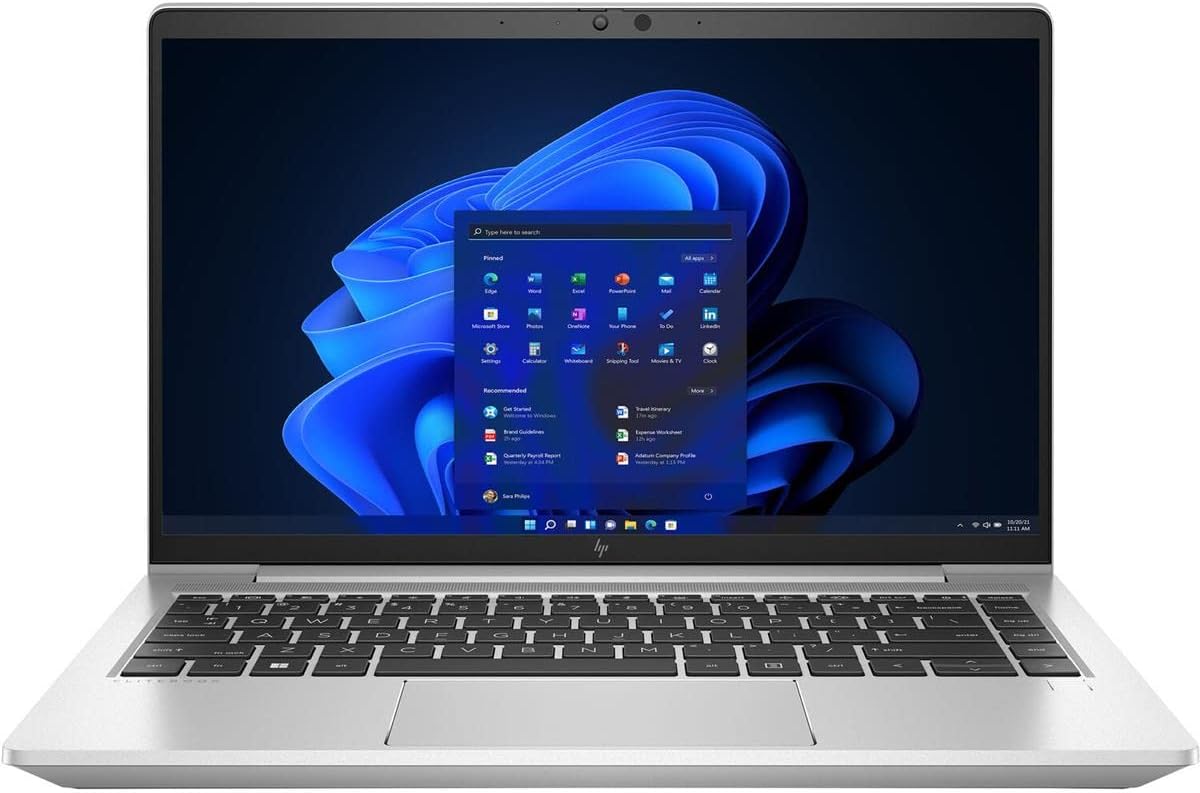
This EliteBook is built for enterprise environments where stability and security are paramount. It handles dual-boot setups well with professional-grade hardware features.
We may earn a commission when you buy through this link, at no additional cost to you.
The octa-core Ryzen 7 PRO provides significant multi-threading power for running virtualized Linux environments. The 16GB of memory ensures smooth operation across multiple applications.
While robust, the design is somewhat conservative and heavier than modern consumer laptops. The SSD capacity is decent but might need expansion for large datasets.
Ideal for IT professionals and enterprise users who need a secure, durable machine that supports both Windows and Linux effectively.
Built with security chips and management features suited for corporate deployment and strict compliance requirements.
The eight core processor handles demanding multitasking and virtualization workloads without thermal throttling issues.
We may earn a commission when you buy through this link, at no additional cost to you.
This unit brings DDR5 memory to a budget-friendly form factor. It is a strong contender for users needing faster memory speeds for compilation tasks.
We may earn a commission when you buy through this link, at no additional cost to you.
The Ryzen 5 7520U is efficient and supports modern instruction sets beneficial for Linux environments. DDR5 RAM significantly improves data throughput for heavy applications.
Integrated graphics may limit GPU-specific development work but suffice for general coding. The display has a lower contrast ratio which might strain eyes during long sessions.
Recommended for users wanting the latest memory technology without paying for high-end consumer branding or gaming features.
DDR5 technology provides faster data access speeds compared to previous DDR4 generations used in older laptops.
Testing against MIL-STD-810H standards ensures the device can withstand daily wear and tear in harsh environments.
We may earn a commission when you buy through this link, at no additional cost to you.
The L14 offers the legendary ThinkPad typing experience at a lower cost due to renewed status. It is perfect for keyboard-centric developers needing reliable input.
We may earn a commission when you buy through this link, at no additional cost to you.
The Ryzen PRO processor ensures security features are available for enterprise Linux deployments. USB-C 3.2 Gen2 allows fast data transfers for external drives.
Buying renewed means accepting potential cosmetic wear and relying on seller warranties. The 256GB SSD may require external storage for large project files.
Choose this if you want classic ThinkPad ergonomics and features without the premium price of a new business laptop.
The TrackPoint and deep key travel provide unmatched comfort for long coding and typing sessions.
Supports the latest Wi-Fi 6E for reduced latency and higher throughput in busy wireless environments.
We may earn a commission when you buy through this link, at no additional cost to you.
This laptop combines a modern 13th gen Intel processor with a pre-installed Linux Mint OS. It is an excellent choice for immediate productivity without setup hassles.
We may earn a commission when you buy through this link, at no additional cost to you.
The i5-1335U provides a mix of performance and efficiency cores suitable for various workloads. Fast charging ensures you can power up quickly between meetings or classes.
Storage is limited to 256GB which might fill up quickly with system images. Intel integrated graphics may not handle GPU-accelerated Linux tasks well.
Best for users who want a fresh, modern Linux experience out of the box without spending time on configuration.
Arrives with Linux Mint already configured so you can start working on projects immediately upon unpacking.
The latest generation Intel Core i5 offers improved efficiency and performance over older budget models.
We may earn a commission when you buy through this link, at no additional cost to you.
The Latitude 5420 is a workhorse designed for corporate environments. It handles dual-boot setups reliably with standard business features.
We may earn a commission when you buy through this link, at no additional cost to you.
With 16GB of RAM, you can switch between Windows and Linux virtual machines with ease. The chassis is built to withstand daily travel and rough handling.
As a renewed unit, you must check the condition carefully before purchase. The older CPU generation is still capable but lacks the efficiency of newer chips.
Consider this for corporate users needing a dependable, portable machine that supports both operating systems reliably.
Built to strict business standards for reliability and ease of maintenance in office environments.
Includes essential ports like HDMI and USB-A so you don't need to carry dongles for presentations.
We may earn a commission when you buy through this link, at no additional cost to you.
This device focuses on portability and basic tasks. It can run lightweight Linux distros but struggles with heavy development workflows.
We may earn a commission when you buy through this link, at no additional cost to you.
The 4GB RAM limits running multiple applications simultaneously. It is better suited for browsing and text editing than compiling code.
The 64GB eMMC storage is very slow compared to SSDs. You will rely heavily on the included 1TB cloud storage for files.
Only choose this for very light dual-boot needs like writing or basic web development on a tight budget.
Weighing just 2.87 lbs and under an inch thick, this laptop is easy to carry everywhere you go.
Battery life lasting up to 10 hours ensures you can work throughout the day without charging.
We may earn a commission when you buy through this link, at no additional cost to you.
This model offers a rare combination of DDR5 memory at a competitive price point. It provides smooth performance for general dual-boot tasks.
We may earn a commission when you buy through this link, at no additional cost to you.
The 120Hz display offers fluid visuals during navigation. DDR5 RAM ensures the system remains responsive even with multiple apps running.
The chassis feels somewhat plastic and the weight makes it less portable. The SSD is modest in size but sufficient for OS and apps.
Select this if you prioritize memory speed and display refresh rate over premium build materials for daily use.
DDR5 memory provides significantly higher bandwidth and efficiency compared to standard DDR4 laptops.
A 120Hz refresh rate makes scrolling and animations feel smoother and more responsive during daily use.
We may earn a commission when you buy through this link, at no additional cost to you.
Selecting the right laptop for dual boot requires balancing hardware compatibility, performance, and portability. Here are the critical factors to consider before purchasing.
The CPU architecture determines how well Linux drivers will function. Intel Core and AMD Ryzen processors generally have excellent open-source support in modern kernels.
Prioritize processors from recent generations to ensure firmware support and long-term security updates for both operating systems.
Running two operating systems or VMs requires substantial memory. At least 16GB of RAM is recommended for smooth multitasking between Windows and Linux.
Look for models with upgradeable memory slots to future-proof your investment as software requirements grow over time.
Solid State Drives (SSD) are essential for fast boot times and efficient file access. Avoid eMMC storage for serious development work.
Choose NVMe SSDs over SATA drives for faster data transfer speeds which benefit compilation and database operations.
High resolution screens improve code readability and productivity. Aim for at least 1920×1080 FHD resolution for a comfortable workspace.
IPS panels offer better viewing angles and color accuracy compared to TN panels which may cause eye strain.
Dual-boot users often connect external monitors or hardware. Ensure the laptop has enough USB-A, USB-C, and HDMI ports.
Check for Ethernet ports if you require stable wired network connections for server administration tasks.
Business laptops like ThinkPads and Latitudes offer durable chassis suitable for daily travel. Look for MIL-STD certifications for ruggedness.
Premium materials like aluminum provide better heat dissipation than plastic during heavy processing tasks.
Long battery life is crucial for mobile developers. Look for ratings above 8 hours of actual usage time.
Faster charging technologies can minimize downtime when you need to quickly power up for a meeting.
A good keyboard is vital for coding. Look for key travel depth of 1.5mm or more for comfortable typing.
Backlit keyboards help when working in low-light environments or on planes.
Start by backing up your data before installing a second operating system. Use tools like GParted to partition your drive safely for Windows and Linux.
Keep your Linux kernel updated regularly to ensure hardware compatibility and security patches. Use package managers like apt or dnf to streamline updates.
Clean your laptop vents regularly to prevent overheating. Avoid using the device on soft surfaces like beds which block airflow.
Most modern laptops support dual boot but you must check BIOS/UEFI settings for Secure Boot. Disable Secure Boot or configure it to allow Linux bootloaders like GRUB.
Ubuntu and Linux Mint are excellent choices for dual boot because they have broad hardware support and user-friendly installers that work well alongside Windows.
While not strictly necessary, a separate physical SSD improves performance and safety. It isolates operating systems and prevents accidental file deletion.
Dual boot itself does not slow down the system since only one OS runs at a time. However, partitioning your drive might reduce available space for each OS.
Restart your computer and hold Shift or F12 to access the boot menu. Select your desired operating system from the list presented by GRUB.
Yes, Linux relies on open-source drivers. Intel and AMD hardware generally has excellent support, but proprietary Nvidia GPUs may require additional setup.
The Lenovo Thinkbook 13s and GEEKOM GeekBook M16 lead our list for their balance of native Linux support and high performance. Both serve distinct needs for different developers.
When choosing, prioritize RAM and storage speed over raw clock speed. Dual boot workflows often require multiple virtual machines which demand memory more than CPU cycles.
Verify current prices and availability before purchasing as models update frequently. Always confirm return policies to ensure the hardware supports your specific Linux distribution.