
Epson Expression Photo HD XP-15000
3.9Editor score
Compact Wide Format Design
Individual Ink Cartridges
Auto Duplex Printing
Finding the right large format printer for your Mac ecosystem requires careful consideration of connectivity, driver support, and color accuracy. Professionals need reliable devices that handle everything from marketing materials to engineering drawings without compatibility headaches or slow performance.
We compared ten leading models based on their Mac integration, print resolution, paper handling capabilities, and overall value. Our analysis focuses on wireless features, ink efficiency, and the ability to handle wide media sizes ranging from standard sheets to professional roll feeds.
Each pick highlights specific strengths like photo quality, business productivity, or technical drawing precision. While prices fluctuate frequently, these selections represent the current best options for Mac users seeking versatile wide-format printing solutions for home offices and creative studios.
3.9Editor score

4.0Editor score

4.1Editor score
As an Amazon Associate we earn from qualifying purchases.
This side-by-side comparison details the core specifications and capabilities of each selected printer. Use this table to quickly identify which model offers the specific features you need for your Mac workflow and media requirements.


The Epson EcoTank Photo ET-8550 stands out as a top choice for Mac users focused on high-quality creative projects. Its impressive 4.0 rating reflects strong performance in delivering vibrant, accurate colors across various media types.
We may earn a commission when you buy through this link, at no additional cost to you.
This model uses a six-color Claria ink system that produces professional-grade photos with sharp text and rich blacks. The cartridge-free design ensures you can print thousands of pages with the included bottles, significantly reducing long-term operating costs.
While it excels at photo printing, the device can be slower on standard text documents compared to laser alternatives. Its physical size also requires ample desk space, which might challenge smaller home office setups.
Photographers and designers will appreciate the borderless printing capability and robust Mac compatibility. For anyone seeking high volume creative output without constant ink replacements, this remains the ideal recommendation.
The tank system allows printing up to 6,200 color pages on one set of bottles, eliminating frequent cartridge changes.
Built-in Wi-Fi and AirPrint support ensure effortless wireless printing directly from any macOS device or mobile app.
We may earn a commission when you buy through this link, at no additional cost to you.
The Epson Expression Photo HD XP-15000 offers an entry-level path to wide-format printing without sacrificing photo quality. With a solid 3.9 rating, it is ideal for users needing occasional borderless prints up to 13 by 19 inches.
We may earn a commission when you buy through this link, at no additional cost to you.
Its compact design fits easily on crowded desks while maintaining professional output via six individual ink cartridges. This allows precise color management for photos and creative documents directly from your Mac.
Some trade-offs include limited paper capacity and lack of auto-duplex for wide formats. However, the affordability and simplicity make it a practical choice for occasional home printing needs.
Home users and hobbyists looking for reliable wide-format capability on a budget should consider this model. It balances essential features with a low initial investment effectively.
Thirty percent smaller than its predecessor, this unit saves valuable desk space while delivering professional wide-format results.
Six separate cartridges mean you only replace the specific color that runs out, optimizing your ink budget efficiently.
We may earn a commission when you buy through this link, at no additional cost to you.
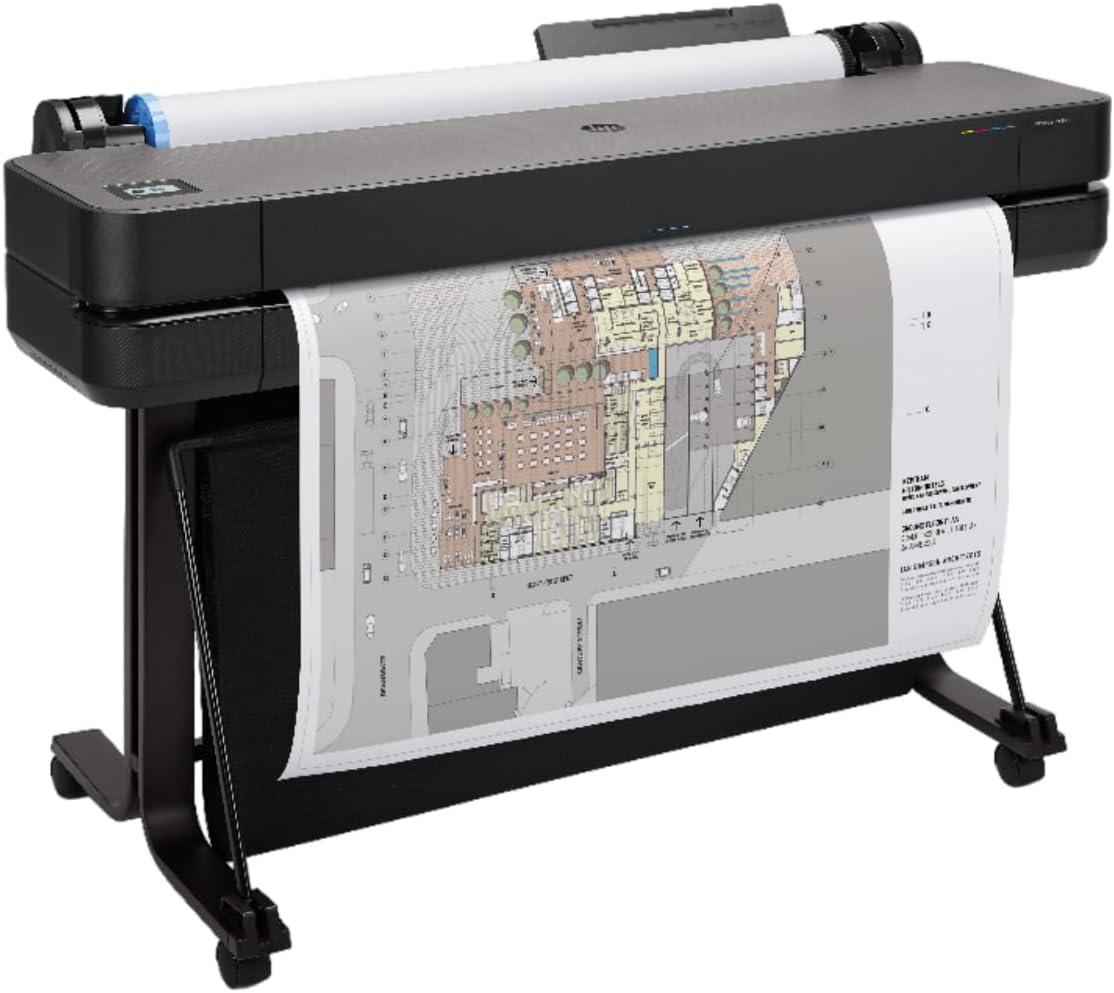
The HP DesignJet T650 targets professional architects and engineers requiring precise technical drawings and large-format posters. Its 4.1 rating highlights reliable performance for complex projects demanding exact line quality and color accuracy.
We may earn a commission when you buy through this link, at no additional cost to you.
Supporting up to 36-inch wide media, this plotter integrates seamlessly with CAD software via HP Click and robust connectivity options. The included onsite warranty provides peace of mind for business-critical operations.
The high price point and large footprint limit this unit to dedicated studios or offices. However, the speed and precision justify the cost for professionals who cannot afford printing errors.
Businesses prioritizing reliability and speed for technical graphics will find this model indispensable. It delivers consistent results that meet rigorous industry standards effortlessly.
Designed for accurate line drawings and renders, it ensures crisp text and detailed technical specifications every time.
HP Click software integrates directly with your workflow, enabling easy PDF error checking and auto-nesting to save waste.
We may earn a commission when you buy through this link, at no additional cost to you.
The Epson Workforce Pro WF-7840 is built for busy offices needing reliable wide-format printing for documents and marketing materials. Its 3.9 rating reflects consistent performance in a professional environment.
We may earn a commission when you buy through this link, at no additional cost to you.
Featuring PrecisionCore technology, this printer delivers fast results while maintaining a 500-sheet capacity to minimize refills. The all-in-one functions including fax and scan enhance overall office productivity.
While excellent for documents, it may lack the color vibrancy needed for high-end creative work. Its size is also better suited for dedicated office floors rather than small desks.
Office managers handling high-volume print tasks will benefit from this durable machine. It offers a balanced mix of speed, capacity, and network security for daily business operations.
The large input tray and automatic duplexing reduce manual intervention, allowing staff to focus on core tasks instead.
Built-in wireless and security features ensure safe and convenient printing from any Mac connected to the office network.
We may earn a commission when you buy through this link, at no additional cost to you.
The HP OfficeJet Pro 9730 brings advanced color accuracy to wide-format printing with its unique P3 color gamut support. Its 3.8 rating indicates strong performance for businesses needing visually striking output.
We may earn a commission when you buy through this link, at no additional cost to you.
HP AI optimizes web and email printing to reduce waste, ensuring pages look professional directly from a Mac browser. The touchscreen interface simplifies navigation for complex jobs.
Users must consider the Instant Ink subscription model which may increase long-term costs. Additionally, the device requires significant counter space due to its robust build.
Designers and marketing teams will value the screen-accurate color reproduction. This model is a solid choice for businesses prioritizing visual quality and workflow efficiency.
P3 color gamut support ensures vibrant and accurate prints that match digital screens, reducing proofing errors.
HP AI automatically adjusts formatting for emails and web pages to prevent awkward layouts and wasted paper.
We may earn a commission when you buy through this link, at no additional cost to you.
The Canon imagePROGRAF TC-21M offers a straightforward approach to wide-format printing with excellent direct USB capabilities. With a high 4.4 rating, it appeals to users seeking simplicity and reliability.
We may earn a commission when you buy through this link, at no additional cost to you.
Its unique enlarge copy feature allows quick scaling of smaller documents directly from the flatbed scanner. This is particularly useful for creating posters or plans without complex computer editing.
Connectivity is more basic compared to competitors, often requiring physical connections for full functionality. However, the ease of use remains a significant advantage for casual users.
Those needing quick enlargements and large prints without software dependency will find this useful. It provides a practical solution for small business signage and plans.
Make enlargements of smaller originals directly from the flatbed scanner in simple steps without PC software.
Easily print to or scan from the cloud directly from the printer for flexible document management.
We may earn a commission when you buy through this link, at no additional cost to you.
The Epson EcoTank ET-15000 delivers high-speed wide-format printing with the convenience of an ink tank system. Its 4.2 rating confirms strong reliability and quality for regular business or creative use.
We may earn a commission when you buy through this link, at no additional cost to you.
With a duty cycle of 33,000 pages, it handles heavy workloads efficiently without frequent maintenance interruptions. The high resolution ensures readable text and clear graphics for professional documents.
The upfront investment is higher than standard cartridge models, but the savings on ink make it worthwhile for frequent users. It requires ample desk space for the unit and ink bottles.
Small businesses needing rapid document turnaround will appreciate its speed and efficiency. It is a strong contender for those wanting professional wide formats with low operating costs.
Print up to 17 pages per minute in black, ensuring quick delivery of wide-format documents when time matters.
High 4800×2400 DPI resolution provides excellent readability for detailed text and complex graphics on large media.
We may earn a commission when you buy through this link, at no additional cost to you.
The Brother INKvestment 6960 focuses on speed and reliability for small businesses needing quick wide-format outputs. Its 4.2 rating highlights consistent performance for daily administrative and graphic tasks.
We may earn a commission when you buy through this link, at no additional cost to you.
With print speeds up to 31 pages per minute, it handles high-volume needs efficiently. The generous page yield ensures fewer interruptions for cartridge changes during busy workdays.
While excellent for speed, color accuracy may not match dedicated photo printers. It lacks roll media support, limiting it to sheet-fed wide formats up to 11 by 17 inches.
Busy office environments needing fast reliable printing for reports and flyers will find this appealing. It balances speed and cost effectively for small business productivity.
Engineered for speed with MAXIDRIVE technology to handle heavy workloads without slowing down office workflows.
Wi-Fi Direct allows wireless printing without a network connection, offering convenience for temporary setups or guests.
We may earn a commission when you buy through this link, at no additional cost to you.
The HP DesignJet T210 is tailored for technical professionals needing precise line drawings and posters. With a strong 4.4 rating, it excels in accurate output quality for engineering tasks.
We may earn a commission when you buy through this link, at no additional cost to you.
It supports up to 24-inch wide rolls and includes HP Click software for seamless file management. The automatic horizontal cutter adds convenience for handling large projects efficiently.
The control interface is relatively simple which might require some setup time initially. However, the accuracy and cost-saving maintenance features make it a robust choice for technical offices.
Engineers and designers needing reliable CAD plotting on a budget will find this ideal. It ensures professional results for technical documents with minimal operational cost.
Ideal for technical line drawings and renders requiring precise, accurate line-quality and crisp text every time.
Predefine print settings and easily print files by simply dragging and dropping them into the HP Click Driver.
We may earn a commission when you buy through this link, at no additional cost to you.
The HP DesignJet T630 delivers high-end performance for large architectural and engineering plans with 36-inch wide capability. Its 4.0 rating reflects solid reliability for demanding business environments.
We may earn a commission when you buy through this link, at no additional cost to you.
It features automatic sheet and roll switching to streamline workflow without manual media changes. The included media bin keeps the work area organized while processing large volumes.
Complex setup and higher consumable costs can be barriers for smaller users. However, for dedicated large format needs, its speed and precision are unmatched in this class.
Architects and construction professionals needing wide precision prints will benefit most. It provides professional-grade outputs that meet rigorous industry specifications effectively.
Print multi-size projects automatically without needing to manually switch the media source for greater flexibility.
Popular among architects and engineers for delivering precise, accurate line-quality and crisp text for maps.
We may earn a commission when you buy through this link, at no additional cost to you.
Selecting the right wide-format printer requires evaluating several key factors to ensure seamless integration with your Mac system and workflow needs.
Ensure the printer supports macOS natively via AirPrint or provides dedicated drivers. Most modern models offer robust wireless connections that work effortlessly with Apple devices.
Always check compatibility lists before purchasing to avoid connectivity issues with your specific Mac model.
Decide if you need standard 11×17 or larger 24-inch capabilities based on your typical projects. This decision impacts both the physical size and cost of the device.
Choose a printer that accommodates your maximum media needs to avoid needing future upgrades.
Evaluate the cost per page and whether the printer uses cartridges or bulk ink tanks. Tank systems generally offer significant savings for high-volume users.
Opt for systems with high-yield options to reduce the frequency of replacements and downtime.
Look for models with robust Wi-Fi and Ethernet ports to support multiple Mac users in a shared environment. Direct USB support is also useful for quick standalone printing.
Reliable wireless networks ensure you can print from anywhere in your workspace without cables.
Consider your need for color accuracy and detail, especially for photos versus technical drawings. Higher DPI ratings generally produce sharper text and smoother gradients.
Choose a device with appropriate color gamut support like P3 if accurate screen matching is critical.
Check for auto sheet feeders, roll support, and duplex capabilities based on your workflow. These features reduce manual paper handling and increase overall productivity.
Robust paper trays prevent jams and allow you to store more paper types at once.
Software like HP Click or Epson Smart Panel enhances workflow by enabling file editing and optimization. Good software ensures easier file management directly from your Mac.
Prioritize manufacturers offering comprehensive apps for mobile and desktop control to maximize your investment.
Measure your available desk or office space before buying as wide-format printers can be large and heavy. Ensure you have room for both the unit and necessary paper rolls.
A compact footprint is essential for smaller studios while larger units are better for dedicated print rooms.
Start by downloading the correct drivers from the manufacturer's website to ensure smooth connection with your macOS. Follow the setup wizard to connect via Wi-Fi or Ethernet and test a sample print job.
Regularly clean the printheads using the built-in maintenance tools to prevent clogs and ensure consistent ink flow. Keeping the printer covered when not in use also protects it from dust buildup.
Store paper rolls in a cool dry place away from direct sunlight to maintain quality. Always use genuine ink supplies to preserve the printer's warranty and optimal performance.
Most modern large format printers are fully compatible with macOS, offering support for AirPrint and dedicated drivers. This ensures you can print wirelessly from your Mac without complex setup steps.
Wide format typically refers to prints up to 13 or 24 inches while large format generally starts at 24 inches and goes up to 60 or more. This distinction affects the media rolls and price of the device.
The Epson EcoTank Photo ET-8550 offers excellent value due to its low ink costs and high photo quality. Its compatibility with Mac makes it a top choice for creative professionals on a budget.
Many models in this list support roll media for continuous wide prints like blueprints or banners. Check the specific specs for roll width limitations before purchasing.
Using bulk ink tank systems like EcoTank or INKvestment significantly reduces cost per page compared to standard cartridges. Subscriptions like Instant Ink can also help automate refills at lower rates.
Most models include robust dual-band Wi-Fi for stable connections across your office. Ethernet ports are also available on many units for guaranteed speed and reliability.
Our top picks include the Epson EcoTank Photo ET-8550 for creative work, the Epson XP-15000 for budget needs, and the HP DesignJet T650 for professional engineering.
Prioritize ink efficiency and Mac compatibility when selecting your printer to ensure long-term satisfaction and minimal setup hurdles. Choose a model that fits your daily workflow demands accurately.
Always check current prices and availability as these fluctuate frequently due to market conditions. Verify the latest Mac software support before finalizing your purchase to guarantee a smooth experience.